# Yummy Steak
Sprinkle steak with stardust for a filling meal.
## Content
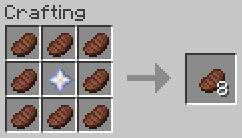
– Craft _Filling Steak_ with 8 _Steak_ and 1 _Nether Star_ (center), which applies the saturation effect for an hour when eaten.
– Adds level 30 enchantment _Yummy_ to never run out of steak (can only be applied on the _Filling Steak_).
## Technical Concept
Besides the gameplay functionality the goal was to provide these custom features without using the global tick function to check for changes in the player’s inventory.
– saturation effect is applied via [`consumable` data component](https://minecraft.wiki/w/Data_component_format#consumable) (added in MC 1.21.2)
– not consuming the item is handled via the [`use_remainder` data component](https://minecraft.wiki/w/Data_component_format#use_remainder) (added in MC 1.21.2)
– as use_remainder would need a recursive definition to be infinitly reuseable, a dummy-item is used, which then is swapped out for the actual food item
– instead of constantly checking whether a dummy item exists and is in need of replacement, the [enchantment effect component `minecraft:tick`](https://minecraft.wiki/w/Enchantment_definition#Components_with_entity_effects) with the [entity effect `run_function`](https://minecraft.wiki/w/Enchantment_definition#run_function) (added in MC 1.21) is used to change the dummy item (only executed for one tick, when the item is first held, so more resource efficient).
**[Fabric API][fapi], [QSL][qsl], or [Sinytra Connector][connector] + [Forgified Fabric API][ffapi] is required.** [EMI][emi] is strongly recommended.
Yttr is an expansive mod for Fabric & Quilt, sort of existing as a love letter to 1.4-1.6 modded. It contains fresh takes on a lot of common features, interesting worldgen, custom music, and all-new mechanics.
Starting as a loose collection of useful tidbits, Yttr has grown into a more cohesive mixture between a content mod and a vanilla overhaul. Presented as three “content branches”, extending those provided by vanilla; Void for the Overworld, Scorched for the Nether, and Continuity for the End.
The first “progression gate” in Yttr is using the multi-mode Yttric Rifle to blast an obsidian/diamond spike into the bedrock, smashing it open, revealing a geyser of liquid Void — created years (or versions) ago due to an alchemical disaster, also resulting in the creation of the familiar Wasteland biome. After thorough preparation, you might even be able to dive through the Void to fast-travel to places you (or your friends (or rivals)) have smashed open geysers elsewhere. If you’re not sufficiently prepared, well, even your items are not protected from the Void’s universal dissolution…
Scorched acts as a complete revamp of the top of the Nether, turning it into an ominous soot-covered biome, and making it simple to access (because let’s be honest, getting on top of the Nether is not difficult). Your farms won’t break, as nothing can spawn in the Scorched Summit on its natural blocks.
Roots of Continuity can be found underneath floating End islands, and smashing them with a pickaxe yields a Drop of Continuity and drops the island into the abyss — however, you may want to watch your back…
Also offered are “abominations”, providing a solution to autocrafting and item sorting that isn’t just a block with a funny texture. (Okay, it’s a block with a funny model.) Put a Skeleton on a table, surgically combine Silverfish and Creepers and house them in a Bee Nest, or splice together an Enderman and Zombie and magically bind them to a hopper — because of course you will just to make your logistics easier, ~~you monster~~.
Yttr treats crafting more as a mechanic than an interface, tightly integrating with the world around it. From automatically crushing and bottling gaseous Shroomlight, to stuffing a skeleton in a snare and feverishly strapping it to a table, Yttr tries to avoid recipes that can be solved by a digital storage system. Every recipe type also comes with detailed [EMI][emi] integration.
Also included are a plethora of useful “Vanilla+” pieces — the Dopper, a dual-output round-robin hopper; the Flopper, a sideways hopper; the Chute, allowing you to send items downward or center items shot from a Dropper; the Yttrium Button, a one-tick button; half-tick delayed note blocks, and even a few more things still.
There’s even more to the mod than mentioned here — solvent-weldable plastic Bloques®, fancy lamps, permanent Neodymium magnets, a centrifuge, Delicaceness of Deep-Sea Squeeze Trees, multiple new enchantments and curses, a new form of circuitry derived from InfraRedstone (not yet finished), …
Check out the [wiki][wiki] for a thorough explanation of ~~everything~~ some things — it has not yet been updated for the latest version, and is stuck on v0.4.3. We’re working on getting it updated. You can come chat on [Discord][discord] or [Matrix][matrix] about it, too.
# Your_Time
[](https://modrinth.com/mod/your_time)
[](https://modrinth.com/mod/fabric-api)
[](https://modrinth.com/mod/Nixienaut)
[](https://github.com/rotgruengelb/Your_Time/issues/new?assignees=rotgruengelb&labels=version-port&projects=&template=version_port_request.yml&title=%5BVERSION%5D+____+Version+Port+Request)
This mod adds a Timer displaying your in-game/session time in the in-game HUD. Look at the Gallery if you want to know how it looks in-game.
## How to Configure
Use Mod Menu to access the Configuration Screen of the Mod.
### Formatting the Timer Text
There is a Guide on the syntax for the formatting settings:
“`
%s% Seconds (to next minute)
%m% Minutes (to next hour)
%h% Hours (to next day)
%d% Days
%tS% Total Seconds
%tM% Total Minutes
%tH% Total Hours
– Insert “n” for a line break.
– Put “%%” to insert a normal “%”.
“`
& You should install [Mod Menu](https://modrinth.com/mod/modmenu) to get access to the config Screen.
—
### Recommended Mods
– [Jump_Connect](https://modrinth.com/mod/jump_connect): Quickly join a configurable server by holding Alt/Ctrl/Shift Key whilst clicking on the Multiplayer Button in the Main Menu.
This mod is part of The Vanilla Experience modpack and Serilum’s Quality of Life Bundle mod. Your Items Are Safe is a mod which can function as an alternative to the existing gravestone mods, by using only vanilla blocks. When a player dies, it will keep their items from despawning. It does this by creating an armor stand with equiped gear and a chest with the items from the inventory. A sign will be placed on the chest with the player’s name. If the inventory does not fit into one chest, another one above it is generated. The armor stand stands above the chest. All features can be turned on/off via the config. If a player dies in the void, the chest will be placed above the death coordinates.
To keep it balanced the chests and armor stand can only be created if the player has enough wood in its inventory. A chest requires either 2 logs, 8 planks or an actual chest. The armor stand requires 1 log or 3 planks. The mod searches for logs first, then planks, then chests. If it can’t find the raw material needed, the chest and armor stand is not generated. If you’d like to always generate them, even without raw materials, this can be set in the config file as well.
The mod also contains the functionality to generate a player head and put it on the armor stand. This makes it easier to identify which player has died where. If the player had a helmet equiped, it is placed inside the chest. Enabled by default. But again, this can be disabled in the config.
Configurable:( how do I configure? ) mustHaveItemsInInventoryForCreation (default = true): When enabled and a player dies without any items in their inventory, no chest or armor stand is generated. addPlayerHeadToArmorStand (default = true): If a player head should be added to the armor stand. If a helmet is worn, this will be placed into the chest. createArmorStand (default = true): Whether an armor stand should be created on death. If disabled, the player’s gear will be placed inside the chest. createSignWithPlayerName (default = true): Whether a sign should be placed on the chest with the name of the player who died there.
needChestMaterials (default = true): Whether materials are needed for the chest which spawns on death. This can be the actual chest or the costs in raw materials. needArmorStandMaterials (default = true): Whether materials are needed for the armor stand to spawn on death. This can be the actual armor stand or the costs in raw materials. needSignMaterials (default = false): Whether materials are needed for the creation of the sign when ‘createSignWithPlayerName’ is enabled. ignoreStoneMaterialNeed (default = true): Only relevant if ‘needChestAndArmorStandMaterials’ is enabled. An armor stand needs 1 stone slab to be created, but I think it’s alright to ignore that requirement. If enabled, no stone is needed in the inventory on death.
createChestAboveVoid (default = true): If a chest should be placed right above the minimum build height when a player dies in the void. createVoidPlatform (default = true): If a 3×3 platform should be created below the chest above the void. ‘createChestAboveVoid’ must be enabled.
sendMessageOnCreationFailure (default = true): If a message should be sent if the chest or armor stand can’t be created due to missing materials. sendMessageOnCreationSuccess (default = true): If a message should be sent on successful creation of the chest(s) and armor stand. sendDeathCoordinatesInChat (default = true): If the player’s death coordinates should be sent in the chat below the ‘sendMessageOnCreationFailure’/’sendMessageOnCreationSuccess’ message.
creationFailureMessage (default = “Your items are not safe due to having insufficient materials. Missing: %plankamount% planks.”): The message sent on creation failure with ‘sendMessageOnCreationFailure’ enabled. Possible replacement values: %plankamount%, %stoneamount%. creationSuccessMessage (default = “Your items are safe at your death location.”): The message sent on creation success with ‘sendMessageOnCreationSuccess’ enabled.
Some examples: An armor stand and chest generated after death:
Two chests generated after death, because the inventory didn’t fit in a single one:
One chest and an armor stand created after death:
Show Spoiler
The previous death results in the following:
Show Spoiler
Here the player has no wood in its inventory. The chest/armor stand is not generated:
Show Spoiler
The player does have some planks in its inventory, but not enough. This is shown in the chat via a message:
Show Spoiler
The inventory is completely full, so 2 chests are needed to store everything. Luckily the player has more than 19 planks:
Show Spoiler
When a player dies in the void, the chest is placed on the initial position above it with a cobblestone platform.
Death coordinates are sent in the chat. Can be disabled in the config.
——————
You may freely use this mod in any modpack, as long as the download remains hosted within the Modrinth ecosystem.
Serilum.com contains an overview and more information on all mods available.
Comments are disabled as I’m unable to keep track of all the separate pages on each mod. For issues, ideas, suggestions or anything else there is the Github repo. Thanks!
You Need Bait!

Dive into a deeper fishing experience with this mod, featuring fully custom 3D models and unique animations for every new fish you catch. Gear up with a specialized fishing rod that supports powerful modifiers to boost your haul, and expand your toolkit with multiple bait types, a required hook, a handy tacklebox, a minnow trap, and more to discover.
* **Expanded Aquatic Life:** Discover a variety of new fish species, each with unique 3D models, textures, and animations. Encounter Walleye, Largemouth Bass, Muskellunge, Northern Pike, Black Crappie, White Crappie, Catfish, and Pumpkinseed Sunfish in their natural habitats.
* **Custom Fishing Rod:** Craft and wield the “Fancy Fishing Rod,” a custom 3D model with dedicated slots for bait, hooks, and powerful modifiers. This rod is obtainable through a progressive trading system with the Master Fisherman Villager.
* **Modifiers:** Enhance your fishing with modifiers like Glow Berries (experience bonus) or an Iron Hoe (chance to convert junk items to seeds or Onion Bulbs).
* **Diverse Bait System:** No more fishing empty-handed! This mod introduces a variety of bait types, including Worms, Caterpillars, Minnows, Sucker Minnows, Leeches, and Nightcrawlers. At least one type of bait is required in your inventory to fish, with a 10% chance of consumption per catch.
* **Essential Fishing Tools:**
* **Tacklebox:** A handy storage solution for your fishing gear, featuring a new 3D model and inventory screen. The basic version offers 4 slots and can only hold “fishing” items.
* **Minnow Trap:** Place these traps in rivers or swamps to slowly gather minnows or leeches over time.
* **Fish Cleaning Station:** Clean your catches with a Filet Knife for delicious food items and a 10% chance of bonus loot.
* **New Items & Food:** Explore a range of new items like Azuromite Ingots and Blocks, Mutilated Flesh, and a variety of food items such as Less Suspicious Stew, Raw Fish Fillets, Salted Beef, Beef Jerky, and more.
* **Dynamic Fish Weights:** Each custom fish species now has a unique weight range, configurable to be displayed in pounds (lb) or kilograms (kg). Adjust the “fish weight bias” to control the rarity of catching record-sized fish.
* **Configurable Gameplay:** Customize your fishing experience with a new configuration file (`config/youneedbait.toml`) allowing you to adjust settings like bait requirement, bait usage percentage, fish weight units, and weight bias.
* **Enhanced Villager Trading:** The Master Fisherman Villager now offers an expanded and progressive trade system, making the Fancy Fishing Rod and other valuable fishing items more accessible.
* **World Generation:** Discover abandoned houses randomly spawning in some biomes, occasionally featuring a parrot. Salt Blocks also generate naturally during world creation.
* **Achievements & Tooltips:** Track your progress with custom advancements and benefit from informative tooltips for new items.
* **Compatibility:** Verified compatibility with JEI (Just Enough Items).
**Future Updates:** Many future updates are planned to further diversify fishing features and expand the mod’s content.
never again loose your precious axolotl for you can now put it on your head by right-clicking on it
(https://youtu.be/tlMBNEAuZB8)
You Thief!
This is originally for modpack [AnimateCraft: Lankeren](https://modrinth.com/modpack/animatecraft-lankeren). If you like this content, I’m sure you’ll like that modpack, too. Welcome to check it out!
—
I always wanted villagers to act more like…human. So I made this, eventually. (At the beginning it was called Steal & Strike, some folks may remember.)
Now when you open the chests in the village, and the villagers nearby see or hear you,
they will get angry and raise the trade price extremely.
The iron golems will attack you too.
You will also get a bad luck debuff for a day. What a shame to be a thief! (Don’t even try to get rid of it with milk)
Now think twice about the consequences before you steal!
-Location will be detected, you will only offend villagers and iron golems when opening chests in the village. Placing/opening/breaking your own chest will not offend villagers.
-Compatibility with multiplayer game. You should be announced when your friends play dirty.
-Compatibility with villages from datapack Towns & towers
-Occasionally some merciful witness wouldn’t blame you, but don’t take chances.
Future Features:
·More properties of village detected: hay bales, melons, beds, work stations, etc. (Suggestions and ideas are welcome)
SUPER CREDITS to peA_sh0ter and Ajana!!!
Thanks for you guys’ patience, encouragement, support and help! I might never have been able to create this data pack without you.
Brainstorming and sharing the joy with friends are the best part of pack making.
This mod is not compatible with Lootr.
The cover is made with resource pack [Fresh Animation](https://modrinth.com/resourcepack/fresh-animations) by FreshLX
## 版权声明|License
– **作者保留该作品的所有权利。禁止在其他社交平台(包括群聊、网盘等)重新上传或商用,否则后果自负。** This content is All Rights Reserved, meaning that you cannot redistribute/modify & distribute this content, or use it in commercial ways.
– **欢迎您将其收录到整合包中或用其制作视频,请在简介处附上此发布页面的链接和[我的bilibili主页](https://space.bilibili.com/190900020),也欢迎在简介艾特我,我很想看你们的视频!**
If you make a video about this content or put this content in your modpack, please give credit and link to this page, and I would love to know! Thank you.
You Shall Not Spawn!
Disable unwanted mobs from spawning using JSON configuration.
Supports Forge, Fabric, and Quilt
⭐ Features ⭐
Disable Entity Spawning
Add the ID of the entity you want to remove in config/ysns/disabled_entities.json5 to completely remove entities from spawning.
Control Entity Spawning
Whether per dimension or globally (by using "!.*"), you can control the spawn rate of an entity in the config/ysns/per_dimension_entities.json5 config.
Regex Support
Need to disable multiple entities from 1 mod? Or is there a pattern in them? Then no need to repeat yourself!
With regular expressions, you can disable multiple entities in a single entry, disable all entities from a mod, and a lot more! Simply start the entry with "!" and then write your regular expression.
Commented Config File
The config files have comments explaining and giving examples of what you need to add to make the mod work! If you need extra help, feel free to hop in my Discord in the #elocins-projects channel.
FAQ
Can I use this in my modpack?
Of course! It was designed for modpack creators to remove undesired entities that may unbalance the game or create issues.
Can I still make the entities spawn?
In the case of using the disabled_entities config, no. Once a mob is added to the blacklist, there is no way to spawn it by any method. Both natural or through eggs/commands. This mod is meant to completely remove undesired entities.
In the case of the per_dimension config, it works via chance, so at 0.0 they won’t spawn at all. But at 0.5 it’ll have a 50% chance of spawning.
Client or server?
Everything happens on the server’s side. Though it is recommended to leave the mod and config for clients too, for the case they want to play a single-player world. You should always leave this mod in the server pack alongside its config.
What if I add an entity to the blacklist that was already spawned?
Spawned entities will still exist, so it’s up to you if you want to kill them or not. For this reason, it’s recommended to configure the mod before creating a world.
What if I misspell an entity’s ID in the config file?
Nothing will happen. Adding invalid IDs won’t cause issues, but obviously, the entity won’t be blacklisted as it technically doesn’t exist. The same thing would happen if the mod isn’t present, but it will be if it’s added later and the ID is valid.
You Received a Crit from the Arrow│你受到了箭矢的暴擊
# Function│功能
Arrows fired by AI mobs with bows or crossbows will now be crit arrows.│現在AI生物透過弓或弩所射出的箭矢都會是暴擊箭矢。
You Died
## You Died
This mod adds a Dark Souls inspired death screen.

#### Bugs/Ideas/Requests?
Post bugs/ideas/requests on my Github issue tracker.
#### Modpacks?
You are free to use this mod in modpacks.


