Wither Fortress│凋零堡壘
**⚠️ This data pack requires the server-side mod Bedrock Crafter.│該資料包需要伺服器端模組Bedrock Crafter。 ⚠️**
# Function│功能
– In the Nether, Wither Fortresses made of bedrock will generate, which include a main castle, roads, chest towers, and summoning towers.|在下界會生成由基岩組成的凋零堡壘,其中包含主堡、道路、寶箱塔、召喚塔。
– Main Castle: The area where the Wither roams when idle, with four gates leading outwards.│主堡:凋零怪閒置狀態下活動的區域,有四個門向外延伸道路。
– Roads: There are three types — straight roads, curved roads, and forked roads. Treasure chest towers always appear at the end of the road.│道路:有直線、彎道、岔路三種,末端總會生成寶箱塔。
– Streetlights: There is a 5% chance that a streetlight will generate above each bedrock wall on the road, with a bedrock lamp at the top for illumination.│路燈:道路的每個基岩牆上方有5%概率生成,頂端有基岩燈做為照明。
– Chest Tower: A tower with stairs leading to the top, where a treasure chest containing rich loot awaits.│寶箱塔:一座塔,有樓梯可以爬到塔頂,塔頂有一個寶箱,有豐厚的戰利品。
– Summoning Tower: Specialized from Chest Towers, each Wither Fortress will always generate 3 Summoning Towers. The original chest slots of the Chest Towers have been replaced with two-block-high bedrock pillars, each topped with a Wither Skeleton Skull Frame, placing a Wither Skull on it will activate it.│召喚塔:由寶箱塔特化而成,一座凋零堡壘固定生成3座召喚塔。原本寶箱塔的寶箱位置被替換為兩格高的基岩柱子,上方有凋零骷髏頭顱框架,放上凋零骷髏頭顱時會啟動它。
– If no Wither resides in this Wither Fortress, and all three Wither Skeleton Skull Frames of the Summoning Towers are activated, the Wither Skeleton Skulls on the Wither Skeleton Skull Frames will shatter and summon new Wither.當不存在定居於此凋零堡壘的凋零怪時,若3座召喚塔的凋零骷髏頭顱框架皆被啟動,那麼凋零骷髏頭顱框架上的凋零骷髏頭顱會碎裂,並召喚出新的凋零怪。
– Wither monsters cannot be summoned through multi-block structures.│無法透過多方塊結構召喚凋零怪。
– If a Wither is outside the Wither Fortress while idle, it will be teleported back to the main castle.│凋零怪在閒置狀態時若位在凋零堡壘外,會傳送回主堡。
## Adjustments and compatibility with Bedrock Crafter│針對Bedrock Crafter的調整與兼容
– If you want to obtain bedrock only from the reward chests in Wither Bastion and do not want to be able to craft bedrock, you can installthe additional file **bedrock_crafter_recipes_tweak**.│如果你希望獲取基岩的方式僅限於凋零堡壘的獎勵箱,而不希望可以合成出基岩,那麼你可以安裝附加檔案**bedrock_crafter_recipes_tweak**。
– If you want Bedrock Crafter to be compatible with 6 Stairs, you can install the additional file **bedrock_crafter_6_stairs**.│如果你希望Bedrock Crafter可以兼容6 Stairs,你可以安裝附加檔案**bedrock_crafter_6_stairs**。
## Additional Information│附加資訊
Loot│戰利品
**Note: The following loot table will be drawn 5-10 times.│備註:以下戰利品表會抽取5-10次**
|Item│物品|Stack Count│堆疊數|Weight│權重|Probability│機率|
|-|-|-|-|
|Enchanted Golden Apple│附魔金蘋果|1|²/₅₂|10%|
|Bedrock│基岩|1|²/₅₂|5%|
|Nether Star│下界之星|1-2|⁴/₅₂|10%|
|Beacon│烽火台|1|⁴/₅₂|10%|
|Enchanted Book[[Loot1]](# “Soul Speed with Level I-III”)│附魔書[[戰利品1]](# “I-III級的靈魂疾走”)|1|²/₅₂|10%|
|Wither Skeleton Skull│凋零骷髏頭顱|1-2|⁶/₅₂|15%|
|Soul Torch│靈魂火把|1-3|⁴/₅₂|5%|
|Soul Lantern│靈魂燈籠|1-2|⁴/₅₂|5%|
|Soul Campfire│靈魂營火|1-2|⁴/₅₂|5%|
|Soul Soil│靈魂土|1-3|⁴/₅₂|5%|
|Wither Rose│凋零玫瑰|1-3|⁸/₅₂|10%|
|Dried Ghast│乾癟幽靈|1|⁸/₅₂|10%|
Wither Fix
When the Datapack notices a Wither being trapped in Bedrock, it teleports the Wither to the nearest player
Wither Cage Fix
—
### Fixes vanilla bug where withers forget their targets. Can also prevent blue skulls.
Works server-side and in single player.
This mod fixes a bug in vanilla minecraft that causes Wither bosses to forget which mob they were targeting when they
unload (due to quitting, going through a portal, etc.).
Additionally, it adds a new gamerule: `wither_cage_fix:allowBlueWitherSkulls` (default = false).
If this is set to false, Withers will never shoot blue skulls
(whenever they would have, they’ll shoot normal skulls instead).
The bug fix allows for much simpler Wither cages because there’s no need to control line-of-sight when entering/leaving
the area.
The gamerule is added as an option because blue Wither skulls have basically no purpose other than to make Wither cages
more difficult to create.
Why would anyone want a caged Wither?
– They provide a fully-automatable, late-game ([subjectively] balanced) way of breaking blocks.
– The above is a nice alternative to TNT duping for those who don’t want to use it (also check out
Carpet TIS Addition
which includes an optional patch for TNT duping).
– It’s cool.
—
Translating

If you’d like to help translate Wither Cage Fix, you can do so on
Crowdin.
—
This mod is only for Fabric (works on Quilt, too!) and I won’t be porting it to Forge. The license is MIT, however,
so anyone else is free to port it.
I’d appreciate links back to this page if you port or otherwise modify this project, but links aren’t required.
Wither Boss Fight Remastered
## Wither Remastered
The Minecraft Wither boss battle has been totally revamped to make it way exciting. This datapack turns the Wither into a Hard Boss with a bunch of combat phases, powerful attacks and cool visuals.
This datapack adds a variety of combat phases, powerful attacks and dramatic visuals to make battling the Wither impressive. You will have a time defeating this Wither. The Wither has **3 combat phases**, which kick in as its health drops. Each phase brings attacks, increased aggression. The Withers combat starts off tough. Gets even tougher.
## 🆕 What’s New in v1.2
– **Black Hole Collapse** – New ultimate ability that pulls players in and explodes
– **Combo Attacks** – Wither chains abilities for deadly combos
– **Smart AI** – Abilities react to player distance and movement
– **Near-Death Rage** – Triggers below 10% HP with speed and aggression boost
– **Better Visuals** – New aura, energy rings, phase changes, and effects
– **Sound Design** – Added charge-up, thunder, and impact sounds
## Features
### 3 Combat Phases
**Phase 1: 100%-50% HP**
The Wither starts by spawning skeleton minions to test your fighting skills.
**Phase 2: 50%-25% HP**
The Wither gets more aggressive moving faster. Lightning storms and debuff auras appear.
**Phase 3: Less than 25% HP**
The Wither goes into rage mode, unleashing attacks pulling players towards it and pulse waves.
### Wither Abilities
* **Wither Skeletons**: The Wither summons minions to fight alongside it.
* **Lightning Storm**: The Wither strikes players with bolts of lightning.
* **Debuff Aura**: The Wither slows down players movements.
* **Pull Vortex**: The Wither physically pulls players back to it.
* **Pulse Wave**: The Wither knocks players back with a wave.
* **Rage Burst**. The Wither unleashes an explosion effect with blindness.
### Visual Effects
* The Wither has a aura with particles.
* The Wither changes visually with each phase.
* The Wither has rotating energy rings surrounding it.
* The Wither has death effects when it dies.
### Rewards
The Wither drops a special **Wither Trophy**
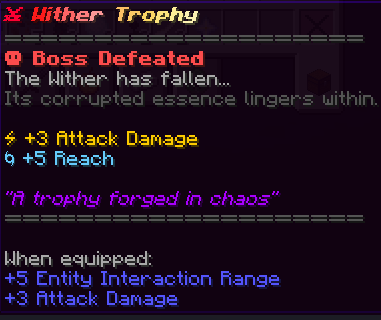
* +3 Attack Damage
* +5 Reach
## Installation
1. Download the datapack.
2. Move it to your worlds `datapacks` folder.
3. Type `/reload` in-game.
4. Summon the Wither.
## Compatibility
* This datapack works in singleplayer and multiplayer.
* It also works with other datapacks.
* It works with Minecraft 1.21.x
## Use Remastered Wither resourcepack for better experience.
## FAQ
**Q: How hard is this?**
A: It’s much harder than the vanilla Wither.
**Q: Can I make it harder/easier?**
A: For now the difficulty is fixed. Its meant to be tough but fair.
**Q: Is it compatible, with servers?**
A: Yes you can install it like any datapack.
**Q: Will it mess with my world?**
A: No it only affects the Wither. Your world is safe.
Withdrawer
Withdrawer is a way for players to withdraw their money, exp, hp or others onto physical items, so they can redeem them, trade them, sell them or store them as they wish.
## Features
* Withdraw your money, exp or hp onto items!
* Use the API to implement a new item that fits your needs!
* Bulk-Redeeming while pressing down the Shift Key.
* Messages and Sounds are all configurable, such as plugin prefix.
* The items are all configurable.

Witch’s Blights
—
Witch’s Blights is a reinterpretation on the several werewolves and vampire mods that are currently out there. The idea is for the afflictions to feel more like a curse and a consequence to one’s actions and taking inspiration from older folklore. You won’t be burning in the day as a vampire, the full moon doesn’t have any sway as a werewolf. Upon slaying those who practice the craft of witches may need to be weary for they may put a curse on you.
This isn’t a mod where you’d want to become a werewolf or a vampire, but rather fear them and their curse but at the same time, make the experience more immersive and not as gameplay intrusive.
What to look out for:
– When killing a witch, they’ll have a chance to throw a potion which’ll give you a potion effect. These effects will either change you into a werewolf or a vampire.
– Afflicted with either curse will have you turning and losing control whenever you stay near what your curse considers it’s prey. For vampires, this is just humanoid creatures, werewolves, however, consider both humanoids and animals their prey. How long it takes to turn, how long you stay turned for and other features related to that are configurable.
– Each time you allow the curse to indulge in it’s hunger, it resets the potion effect. Should you not allow the curse to indulge at it’s fancy, you will be cured when the timer runs out.
—


Witches Drop Blaze Powder
This pack tweaks what witches drop when killed in two ways:
1. It adds blaze powder as a possible drop.
2. It increases the number of glass bottles that may be dropped.
**Note:** If you are using this pack with Vanilla Tweaks’ More Mob Heads, make sure Witches Drop Blaze Powder is loaded _after_ More Mob Heads. Witches Drop Blaze Powder should be at the bottom of the list if you run the `/datapack list` command.
## License
This pack is available under a Creative Commons 4.0 Attribution-Noncommercial-ShareAlike (CC BY-NC-SA) license. You have permission to modify and share this pack under the following conditions:
1. You don’t use it to make money.
2. You give credit (by keeping credits.txt and not modifying the attribution advancements). If you publish the pack online or in a modpack, include a link back to the original Modrinth page.
3. You distribute your modified pack under the same CC-BY-NC-SA license.
What it should be

—
## About
A configurative Minecraft mod which focus on changing some vanilla features and gameplay to what it should be. (From Mod dev’s perspective atleast…) Without adding any blocks, entities or items.
—
## Features
**
— Compass bar —
**

Holding Compass informs direction of player facing and player’s current coordinates without F3
(include Recovery Compass)
Compass bar can read map in hands and show map’s marker icon on the bar as well. but off by default due to keeping map reading gameplay.
“`
Gamerule : showCompassGUI (On by default)
Gamerule : showTreasureInCompassGUI (Off by default)
“`
“`
Mod config contains precisive coordinates setting.
“`
**
— Clock bar —
**

Holding Clock informs in-game time and days
“`
Gamerule : showClockGUI (On by default)
“`
“`
Mod config contains time format setting.
“`
…
(compatable with Trinkets)
—
**
— Renameable Nametag —
**

Sneak right-click on Nametag to rename it without anvil. But still need enchantment cost to make anvil renaming method not completely pointless. It just you could rename it anywhere.
Enchantment cost can be adjust or disable by gamerule (renameNameTagCost)
—
— More details Tooltips —

“`
Can be toggle by mod config.
“`
—
— Bonemealable Crops —
– Bonemealable Sugar Cane
“`
Gamerule : bonemealableSugarCane (On by default)
Gamerule : sugarCaneGrowHeight (Adjust sugar cane grow height, 3 by default)
“`
– Bonemealable Netherwarts
“`
Gamerule : bonemealableNetherwart (Off by default)
“`
– Bonemealable Lily Pad
“`
Gamerule : bonemealableLilyPad (Off by default)
“`
—
— Mob Changes —
– Adjusted Baby zombie hitbox to be larger and decrease max health from 20 to 14
– Gamerule : easierBabyZombie (On by default)

– Creeper Explosion Destroy block gamerules
“`
Gamerule : creeperExplosionDestroyBlock (Off to stop Creeper explosion to destroy blocks, On by default)
“`
– Turtle Barnacle

Turtle will get barnacle on their back after swim in water for 15-22 minutes, then player can use brush on them to clean it off. Turtle Scute drops when brushing.
Honeycomb can be use on turtle to stop getting barnacles.
“`
Gamerule : turtleHasBarnacle (Toggle turtle barnacle, ON by default)
Gamerule : turtleBarnacleMinTime (Minimum time to turtle to get barnacle while swimming, 18000 ticks (15 minutes) by default)
Gamerule : turtleBarnacleMaxTime (Maximum time to turtle to get barnacle while swimming, 26400 ticks (22 minutes) by default)
“`
– Armor Stand has arms

Placing Armor Stand will come with arms now.
“`
Gamerule : spawnArmorStandWithArm (On by default)
“`
– Shearable Item Frame

Use shear on item-attached item frame to make item frame invisible
“`
Gamerule : shearAbleItemFrame (On by default)
“`
—
— Recipe & Minor Chages —
Lodestone

Composing
Rotten Flesh & Poisonous Potato can be composed.
Cauldron Interaction
Concrete Powder can be use on cauldron to turn an entire stack to Concrete block.
—
## Wiki (Coming soon.)
Official Wiki page will contains developer notes which contains reason and decision to feature changes.
—
## FAQ
– Can I put this mod in modpack?
Feel free to put in any modpack. I would love to see the modpack too. <3
- Will this mod port to 1.XX.X version?
When the time comes. Please wait.
– Will this mod gonna get backport?
NO
– Will this mod available on Forge/Neoforge?
Neoforge supports will be available once this mod update to 1.21.
No Forge support in any circumstance.
—
## Donations
Wiretap
# Wiretap
A server-side Simple Voice Chat addon mod for Fabric, that adds a microphone and a speaker block.
## Disclaimer
When installing this on your server,
you are responsible for making sure that players are aware of the functionality of the mod.
This mod is not intended to be used for spying on people, this is **only for role-playing purposes**!
## Usage
– Install this mod alongside Simple Voice Chat on your server
– Make sure you set up the voice chat mod correctly (see here)
– Craft a *Calibrated Skulk Sensor*
– Make sure you have at least one level if you are in survival mode
– Place the *Calibrated Skulk Sensor* in an anvil
– Rename the *Calibrated Skulk Sensor* to `wiretap` (not case-sensitive)
– Take out the microphone block
– When taking out the microphone, you will get a speaker added to your inventory as well
– Place the microphone block where you want to listen in on people
– Place the speaker block where you want to hear people
– The microphone and speaker blocks will have a unique ID shown in their tooltip – Microphones and speakers with the same ID will be connected to each other
– Don’t place multiple microphones or speakers with the same ID, as this will cause issues
## Commands
– `/wiretap items [speaker_radius | ‘infinite’]` – Gives you a microphone and speaker (Requires OP permissions by default)
– If a radius isn’t provided, the server speaker range is used by default.
## Contact
For support with this mod, please contact @CG360 via:
– **Discord:** https://discord.gg/94c45XagEH
– **Github:** /squeeglii
## Configuration
| Property | Description | Default |
|—————————-|—————————————————————————————————|—————|
| `microphone_pickup_range` | The range in which microphones can pick up sounds | `32.0` |
| `speaker_audio_range` | The audible range of speakers | `32.0` |
| `command_permission_level` | The permission level required to use the commands | `2` |
| `packet_buffer_size` | The amount of packets to buffer before playing | `6` |
| `anvil_crafting` | Whether the items can be crafted in the anvil | `true` |
| `speaker_sound_effect` | The sound effect to apply to the speaker – Valid values are: `none`, `old_speaker`, `low_quality` | `old_speaker` |
| `microphone_skin_url` | The skin url for the microphone block | |
| `speaker_skin_url` | The skin url for the speaker block | |
## Credits
– Microphone Skin
– Speaker Skin
Melon Wireless Redstone
# Melon Wireless Redstone

In the latest version cardinal components is replaced with vanilla functionality.
## Setup
– Drop the mod in the mods folder
## Details
My version of a simple wireless redstone transmitter and receiver.
The crafting recipes are in the images tab/folder.
## Usage
Right click on transmitter or receiver blocks to change the frequency and allow multiple wireless connections at the same time.
## Handheld
There is a handheld device that players can use to trigger receivers on the same frequency.
Right-click the handheld to toggle on/off state. The state remains even if the handheld is put in a chest or if the player holding it logs off.
To change the frequency hold shift + right click to open the frequency changing screen.
## Discord
– https://discord.gg/usbmdrJ
## Download
– Modrinth
– CurseForge