WelcomeMessageGUI+
## Version 1.0.0
**Initial Release**
### ✨ Features
– 🎨 **Full Color Support** – Use HEX colors (`&#FF0000`) or standard Minecraft colors (`&a`, `&b`, etc.)
– 💬 **Chat Editor** – Click in GUI, type in chat (supports **Ctrl+V copy-paste!**)
– 🖱️ **Beautiful GUI** – Centered 5-row interface with colored glass borders
– ⚡ **Live Preview** – Test your title before saving
– 🔄 **Config Reload** – Reload settings without restarting
– 🎯 **Smart Input** – Type `cancel` to abort editing
– 💾 **Persistent** – Everything saves to `config.yml`
### 🎮 Commands
| Command | Description |
|———|————-|
| `/welcomemsg` | Open the settings GUI |
| `/welcomemsg reload` | Reload configuration |
| `/welcomemsg preview` | Preview the welcome title |
| `/welcomemsg set title ` | Set title via command |
| `/welcomemsg set subtitle ` | Set subtitle via command |
**Aliases:** `/wm`, `/welcome`
### 🔒 Permission
– `welcomemessage.admin` – Access to all commands and GUI (default: op)
### 🛠️ Installation
1. Download the JAR
2. Place in `plugins/` folder
3. Start server (generates `config.yml`)
4. Edit in-game via GUI or edit `config.yml` manually
5. Enjoy! 🚀
### ⚙️ Config Example
“`yaml
welcome:
title: “�FF00Welcome!”
subtitle: “&#FFFFFFHave fun playing!”
enabled: true
fade_in: 30 # Ticks (1.5s)
stay: 70 # Ticks (3.5s)
fade_out: 30 # Ticks (1.5s)
“`
### 🔧 Technical
– MC 1.21+ (Paper/Spigot/Purpur)
– Java 21
– ❌ Not compatible with Fabric/Forge/NeoForge
### Support
If you run to any issues don’t hesitate sending a message to my discord or my website. 🙂
WelcomeAds

WelcomeAds is a customizable Minecraft plugin that enhances player engagement with interactive, inventory-based welcome screens. Create seamless multi-page carousels, integrate custom sounds, and deliver dynamic content effortlessly!


This plugin requires a resource pack to function properly; you can use ItemsAdder, Oraxen, or NexO to create font images, or manually add them to your own resource pack. Check out the wiki here.
You can use Placeholder with ‘PlaceholderAPI’ installed.

– Add as many page as you want
– Auto page scrolling, and you can loop it too.
– Per item commands on click
– Per screen background
– Per screen event checker (inventory open/close) command
– Per screen permission
– Load type setting (on join/ after resourcepack load)
– PlaceholderAPI supported
– Player head with offline player skin supported
– Background fade out when closing the screen
– Hex and minecraft color support. You can use ‘Legacy’ mode for hex generator website.
– Texteffect support (or any Shader working with title text)
– for example, you can use ItemsAdder text effect
– Forcing player to stay on the page
– Custom items with modeldata, lore, name support
– Per session screen showing support

### Installation
– Place the WelcomeAds.jar file in your Minecraft server’s plugins folder.
– Restart or reload your server.
– Configure the plugin settings in the generated config.yml file.
– Install one of these plugins for easier use: ItemsAdder (Example file provided), Oraxen, or NexO. These plugins have custom emoji functions that will be used to display background colors and GUI images.
– If you do not have any of the above plugins, you can still use WelcomeAds, but you will need to manually create a font texture for the background and GUI images.
– Enjoy the custom welcome screen functionality!
### Commands
– welcomeads open
– welcomeads reload

This is my practice project, so if you encounter any issues, feel free to report them on GitHub. If you have any suggestions, you’re welcome to contact me via the Discord information provided on my GitHub profile. Thank you for your support!
with love from TiNY <3
found me / get support on discord server: https://discord.gg/JMdjgnzG8W
WelcomeRaffle
# WelcomeRaffle
A lightweight Minecraft plugin that turns welcoming new players into a **fun raffle event**.
—
## 📖 How It Works
1. When a player joins for the **first time**, the raffle begins.
2. Everyone else sees a configurable **action bar message**:
3. Players have a set time window (default **10 seconds**) to type `welcome` in chat.
4. After the timer ends, **one random player** is chosen as the winner.
5. The winner silently receives rewards — no broadcasts, no alerts.
—
## ⚙️ Features
– 🎯 Triggers only on **first join**
– 💬 **Customizable** action bar message (`config.yml`)
– ⏳ Configurable raffle duration
– 🎲 Random winner selection
– 🔒 **Silent rewards** (no messages or broadcasts)
– 🛠️ Rewards fully configurable via commands
—
## 📝 Example `config.yml`
“`yaml
# Action bar message shown when a new player joins
join-message: “Say “welcome” for a chance to win rewards!”
# How long the raffle lasts (in seconds)
raffle-duration: 10
# Commands to run for the winner
# %player% will be replaced with the winner’s name
rewards:
– “give %player% diamond 3”
– “eco give %player% 500”
Welcome Mat
WelcomeMat
Discord |
GitHub
### A friendly way to roll out the welcome mat for your players!
**WelcomeMat** is a lightweight, powerful plugin that enhances your server’s welcome experience. It provides customizable join/leave messages, titles, animations, and sounds to make players feel at home on every login.
## 🎉 What’s New!
### Version 1.3.1 (Latest)
– 🍃 **Folia-Ready Animations**: Visual effects now use the latest Folia entity schedulers (1.21.8+) with automatic signature detection, clamped delays, and no unsafe Bukkit fallbacks.
– 🧠 **Smarter Diagnostics**: If future Folia builds introduce new scheduler signatures, they’re logged automatically so you can keep running the same jar everywhere.
– 🧾 **Auto Version Metadata**: `plugin.yml` now inherits the Gradle version, guaranteeing accurate version strings inside the jar.
– 🌌 **Skyward & Copper Packs**: Two new message packs inspired by the 1.21 “Chase the Skies” and “Copper Age” updates, selectable right from the GUI.
### Version 1.2.x Highlights
– **Message Packs System**: Multiple themed collections (default, friendly, professional, funny, RPG) with GUI switching.
– **Multi-Language Support**: English and Spanish out of the box with easy CLI/GUI selection.
– **Improved Configuration Display**: Human-friendly display names and cleaner GUI organization.
—
## 🔄 Compatibility
– Fully tested on **Bukkit/Spigot, Paper, Purpur, and Folia** from **Minecraft 1.13 through 1.21.10**.
– Region-aware scheduler paths keep Folia’s watchdog happy while the same jar continues to run flawlessly on single-threaded servers.
—
## Features
– 🎨 **Customizable Messages**
– Rich join/leave text with color codes and placeholders
– Player-specific greetings and per-pack collections
– Display-name helpers and multi-language support (EN/ES)
– 📜 **Welcome Titles**
– Configurable title/subtitle timing and colors
– 🔊 **Interactive Sounds**
– Join/leave sounds with per-player toggles, volume, and pitch
– ✨ **Animation System**
– Fire Spiral, Green Spike Firework, and more join effects
– Folia-safe schedulers and per-player animation preferences
– ⚙️ **Extensive Configuration**
– Feature toggles, admin logging, instant `/wm reload`
– GUI-driven settings for packs, languages, sounds, and more
## 📋 Commands
– `/welcomemat` or `/wm` – Base command
– `/wm sound` – Toggle join/leave sounds for yourself
– `/wm reload` – Reload the plugin configuration
– `/wm help` – Show help message
– `/wm animation` – Toggle join animations for yourself
– `/wm language` – Change the plugin language
– `/wm pack` – Change the message pack
– `/wm config` – Modify plugin configuration
## 🔑 Permissions
– `welcomemat.reload` – Allow reloading the configuration (default: op)
– `welcomemat.bypass` – Bypass welcome messages (default: false)
– `welcomemat.sound.toggle` – Allow toggling sounds (default: true)
– `welcomemat.animation.toggle` – Allow toggling animations (default: true)
– `welcomemat.admin.log` – Receive admin log messages (default: op)
– `welcomemat.language` – Allow changing the plugin language (default: op)
– `welcomemat.pack` – Allow changing message packs (default: op)
– `welcomemat.config` – Allow modifying plugin configuration (default: op)
## 📦 Installation
1. Download the latest version of WelcomeMat
2. Place the `.jar` file in your server’s `plugins` folder
3. Restart your server
4. Configure the plugin in `plugins/WelcomeMat/config.yml`
## ⚙️ Configuration
“`yaml
features:
join-message: true
leave-message: true
join-title: true
join-sound: true
leave-sound: true
other-players-sounds: true
join-animation: true
admin-logging: true
messages:
join: “&e%player% &ajust joined the server!”
leave: “&e%player% &chas left the server!”
player-specific:
example-player:
join: “&6Welcome back, special player %player%!”
leave: “&eGoodbye, special player %player%!”
titles:
join:
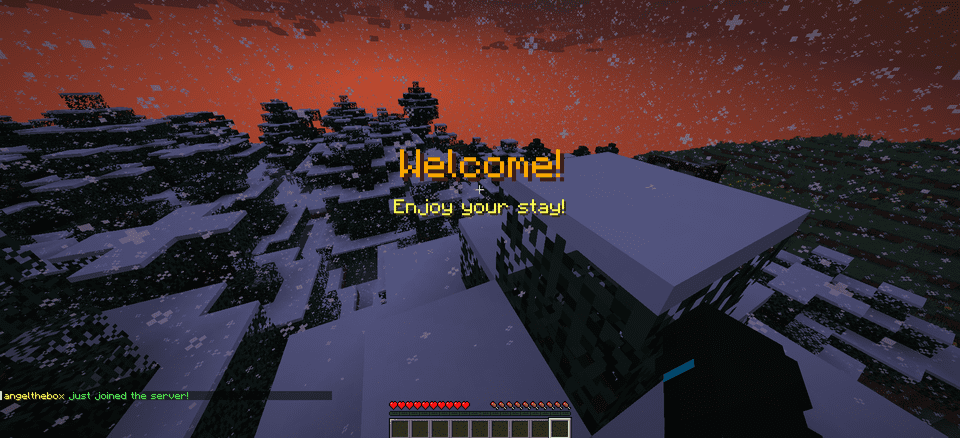
title: “&6Welcome!”
subtitle: “&eEnjoy your stay!”
sounds:
join:
sound: ENTITY_PLAYER_LEVELUP
volume: 1.0
pitch: 1.0
leave:
sound: ENTITY_IRON_GOLEM_DEATH
volume: 0.5
pitch: 1.0
animations:
green-spike:
enabled: true
duration: 40
height: 2.0
# Message Packs
message-packs:
# Currently selected pack (default, friendly, professional, funny, rpg)
selected: “default”
# Default pack (original messages)
default:
join:
– “&e%player% &ajust joined the server!”
leave:
– “&e%player% &chas left the server!”
# Friendly pack
friendly:
join:
– “&d✨ &e%player% &ahas joined the party! &d✨”
– “&aWelcome back, &e%player%&a! We missed you! &d❤”
leave:
– “&e%player% &7had to go… &cSee you soon! &d💕”
– “&7Until next time, &e%player%&7! &d👋”
“`
## 🌐 Language Support
WelcomeMat now supports multiple languages:
“`yaml
# Available languages: english, spanish
selected-language: “english”
languages:
english:
name: “English”
messages:
reload:
success: “&aConfiguration reloaded successfully!”
sound:
enabled: “&aJoin/leave sounds enabled!”
disabled: “&cJoin/leave sounds disabled!”
spanish:
name: “Español”
messages:
reload:
success: “&a¡Configuración recargada con éxito!”
sound:
enabled: “&a¡Sonidos de entrada/salida activados!”
disabled: “&c¡Sonidos de entrada/salida desactivados!”
“`
## 🎵 Available Sounds
### Modern (1.13+)
– `ENTITY_PLAYER_LEVELUP`
– `ENTITY_IRON_GOLEM_DEATH`
– `BLOCK_NOTE_BLOCK_PLING`
– `BLOCK_NOTE_BLOCK_CHIME`
– `BLOCK_NOTE_BLOCK_BELL`
– And more…
### Legacy (1.8-1.12) (Under development)
– `LEVEL_UP`
– `IRONGOLEM_DEATH`
– `NOTE_PLING`
– `NOTE_PIANO`
– And more…
## 💡 Example Configurations
### Professional Server with Message Packs
“`yaml
# Use the professional message pack
message-packs:
selected: “professional”
# Set the language to English
selected-language: “english”
sounds:
join:
sound: BLOCK_NOTE_BLOCK_PLING
volume: 0.8
pitch: 1.5
animations:
green-spike:
enabled: true
duration: 30
height: 1.5
“`
### VIP Server with Custom Messages
“`yaml
messages:
join: “&d✨ &e%player% &ahas joined the party! &d✨”
leave: “&e%player% &7had to go… &cSee you soon!”
player-specific:
VIP_Player:
join: “&6⚡ The legendary &e%player% &6has arrived! ⚡”
leave: “&6The legend &e%player% &6must go… &7Until next time!”
sounds:
join:
sound: ENTITY_PLAYER_LEVELUP
volume: 1.0
pitch: 1.2
animations:
green-spike:
enabled: true
duration: 50
height: 2.5
“`
## 📝 Support
If you encounter any issues or have suggestions:
– Create an issue on our GitHub repository
– Join our Discord server
—
Made with ❤️ by angeldev0
Download • Source • Discord
Welcome++
# 🎉 Welcome++ – The ULTIMATE Minecraft Plugin!
**Transform your server with 50+ incredible features in one lightweight plugin!**
Welcome++ is the most comprehensive server enhancement plugin available, packed with everything you need to create an amazing multiplayer experience. From custom welcome messages to advanced weapons, vehicles, economy systems, and mini-games – this plugin has it all!
## ✨ **Key Features**
### 🎯 **Core Features**
– **Custom Welcome & Leave Messages** – Personalized greetings with player placeholders
– **Fake Names** – Let players change their display names and nametags
– **Player Heads** – Get any player’s head as an item
– **Color Chat Support** – Use color codes in chat messages
### ⚔️ **Advanced Weapons System**
– **Laser Gun** – High-tech energy weapon with particle effects
– **Rocket Launcher** – Explosive projectile weapon
– **Sniper Rifle** – Long-range precision weapon
– **Shotgun** – Close-range spread damage
– All weapons have cooldowns and custom damage values
### 🚗 **Vehicle System**
– **Planes** – Flyable aircraft with upgrade system (3 levels)
– **Cars** – Ground vehicles for fast travel
– **Speed Boats** – Enhanced water transportation
– **Helicopters** – Advanced flying vehicles
– Upgradeable plane system with speed boosts
### 💰 **Complete Economy System**
– **Money Management** – Full player economy with balances
– **Player-to-Player Payments** – Send money to other players
– **Shop System** – Buy items with in-game currency
– **Money Display in Chat** – Show player balance in chat
– Configurable starting money and limits
### 🌍 **Teleportation & Navigation**
– **Home System** – Set and teleport to your home
– **Warp Points** – Create public teleportation points
– **Random Teleport** – Explore new areas instantly
– **Teleport Cooldowns** – Configurable with bypass permissions
– Safe teleportation with world boundaries
### 🐾 **Cosmetics & Pets**
– **Pet System** – Spawn loyal companions (wolves, cats, parrots, rabbits)
– **Particle Trails** – Fire, heart, star, and rainbow effects
– **Hat System** – Wear any item as a hat
– **Auto-following pets** with smart teleportation
### 🎮 **Mini-Games**
– **Parkour System** – Timed challenges with checkpoints
– **Racing** – Competitive gameplay modes
– **Leaderboards** – Track best times and scores
– **Rewards** – Earn money for completing challenges
### 🛠️ **Utility Commands**
– **Flight Toggle** – Creative-style flying
– **God Mode** – Invincibility toggle
– **Heal & Feed** – Instant health and hunger restoration
– **Speed Control** – Adjustable walk speed (1-10)
– **Admin Tools** – Comprehensive server management
### 🎆 **Fun Commands**
– **Fireworks** – Launch colorful explosions
– **Lightning Strikes** – Call down thunder
– **Explosions** – Create safe TNT-like effects
– **Particle Effects** – Visual enhancements everywhere
## 🔧 **Technical Details**
– **Minecraft Versions:** 1.13 – 1.21.x (Full compatibility)
– **Server Software:** Paper, Bukkit, Purpur, Spigot
– **Dependencies:** None required (ProtocolLib optional)
– **Performance:** Lightweight and optimized
– **Configuration:** Fully customizable via config.yml
## 📋 **Quick Setup**
1. **Download** WelcomePlusPlus-2.1.0.jar
2. **Upload** to your server’s `plugins/` folder
3. **Restart** your server
4. **Configure** messages: `/welcome “Welcome {player}!”`
5. **Enjoy** all 50+ features instantly!
## 🎯 **Command Examples**
“`
/welcome “🎉 Welcome to our server, {player}! 🎉”
/leave “👋 {player} left the server!”
/gun – Get a laser gun
/plane – Spawn a flyable plane
/sethome – Set your home location
/money – Check your balance
/pet wolf – Get a wolf companion
/trail fire – Enable fire particle trail
/fly – Toggle flight mode
/parkour start – Begin parkour challenge
“`
## 🔐 **Permissions System**
Comprehensive permission system with sensible defaults:
– **Players** get basic features (teleportation, pets, trails, parkour)
– **OPs** get advanced features (weapons, vehicles, admin commands)
– **Fully customizable** – adjust any permission as needed
## ⚙️ **Configuration**
Extensive configuration options:
– Custom welcome/leave messages
– Economy settings (starting money, limits)
– Weapon damage and cooldowns
– Teleportation cooldowns and distances
– Pet behavior settings
– Particle trail customization
– Shop prices and items
## 🚀 **Why Choose Welcome++?**
✅ **All-in-One Solution** – Replace 10+ plugins with one
✅ **Lightweight** – Optimized performance, minimal server impact
✅ **Regular Updates** – Active development and bug fixes
✅ **Easy Setup** – Works out of the box, no complex configuration
✅ **Extensive Features** – 50+ commands and features
✅ **Wide Compatibility** – Supports 1.13-1.21.x
✅ **Professional Quality** – Clean code, proper error handling
## 📊 **Perfect For**
– **Survival Servers** – Enhanced gameplay with economy and teleportation
– **Creative Servers** – Fun tools and cosmetic features
– **Mini-game Servers** – Built-in parkour and racing systems
– **PvP Servers** – Advanced weapons and combat features
– **Community Servers** – Social features and player interaction tools
## 🔄 **Version 2.1.0 Features**
This massive update includes:
– Complete economy system with money management
– Advanced weapon arsenal (4 different weapons)
– Full vehicle system with upgrades
– Comprehensive teleportation suite
– Pet and cosmetic systems
– Mini-game framework
– 30+ new commands
– Enhanced configuration options
## 📞 **Support**
Need help? Check out:
– In-game `/help` command for all features
– Comprehensive permission system
– Detailed configuration file
– Active community support
—
**Download Welcome++ today and transform your Minecraft server into the ultimate multiplayer experience!**
*Compatible with Minecraft 1.13 – 1.21.x | Works on Paper, Bukkit, Purpur, Spigot*
Magical Login/Register Skript
**Give your players a first impression they’ll never forget! This elegantly designed Skript transforms the moment a player joins your server into a magical experience. With a stunning, centered welcome message, newcomers instantly feel at home, while returning players are smoothly guided to log in.**
**No more confusing logins or impersonal joins—every message, color, and animation is fully customizable to match your server’s unique style. Lightweight, powerful, and fully compatible with Minecraft 1.21.4, this Skript is perfect for servers of any size, from cozy communities to massive public realms.**
**Runs smoothly on Aternos! To use it there, simply install the Skript plugin, and you’re ready to go.**
**Elevate your server’s onboarding, captivate your players, and give every join a professional, polished touch. Make each player feel like a hero from the very first moment!**
**Join our community for support, updates, and exclusive tips: https://discord.gg/Q89W2ebg**
**▶️ Watch tutorials and updates on YouTube: https://youtube.com/@ninja_gamerz2692**
1️⃣ Requirements:
Spigot server (1.21.4 recommended)
Skript plugin .jar file (download: Skript Releases)
Your .sk Skript file
2️⃣ Install Skript Plugin:
Put Skript.jar into your server’s plugins folder.
Start the server.
plugins/Skript folder will be created automatically.
3️⃣ Upload Your Skript:
Unarchive this zip
And..
Place your .sk file into plugins/Skript/scripts/.
**new plugin is here:**
https://modrinth.com/project/7y8POuIN
Weights of Items
# Weight of Items
“`
This plugin introduces a new mechanic to the game – the weight of items.
Now each item has its own weight, which is added to the player’s inventory.
The more weight you carry, the more your movement is slowed down.
If the weight exceeds the critical mark, the player will not be able to move at all.
Keep an eye on your equipment to stay mobile!
“`
**Full customization for your server!**
Everything in this plugin can be finely tuned to the needs and atmosphere of your project!
Flexible effects settings: You set yourself at what weight the player starts to slow down, how strong this slowdown will be, and at what value he will be completely immobilized.
Control over each item: You can assign an individual weight to any item in Minecraft – from a feather to a gold ingot. Make some things light and others really heavy to create a balanced and unique weight economy.
The plugin gives administrators full control to create the perfect gaming experience.
### Commands:
“/reload“- restarts the plugin localization and config
### Permissions:
“weightofitems.reload“ – the ability to restart the plugin
“weightofitems.bypass“ – the ability to bypass weight restrictions
### Placeholders:
“%player_weight%“ – returns the player’s weight
“%player_weight_colored%“ – returns the weight of the player with the appropriate color
“%max_weight%“ – returns the maximum weight value from the config setting
“%high_weight%“ – returns the high weight value from the config setting
“%medium_weight%“ – returns the medium weight value from the config setting
WeHeads
A Minecraft plugin for **Spigot/Paper/Folia (1.20+)** that allows players to get custom heads using Base64 textures.
## Features
– **Simple Base64 Support**: Direct Base64 texture injection into SkullMeta
– **Easy to Use**: Single command with Base64 texture input
– **Inventory Management**: Automatic overflow protection
– **Permission System**: Built-in permission controls
## Commands
### `/wehead give `
Give yourself a custom head using a Base64 texture string from minecraft-heads.com.
**Example:**
“`
/wehead give eyJ0ZXh0dXJlcyI6eyJTS0lOIjp7InVybCI6Imh0dHA6Ly90ZXh0dXJlcy5taW5lY3JhZnQubmV0L3RleHR1cmUv…
“`
## Permissions
| Permission | Description | Default |
|————|————-|———|
| `wehead.give` | Allows using `/wehead give` command | `op` |
## Installation
1. Download the plugin JAR file
2. Place it in your server’s `plugins/` folder
3. Restart your server
4. Plugin is ready to use!
## Requirements
– **Minecraft Version**: 1.20+
– **Server Software**: Spigot, Paper, or Folia
– **Java Version**: 21+
## Building from Source
“`bash
git clone https://github.com/wethink/we-heads.git
cd we-heads
mvn clean package
“`
The compiled JAR will be in the `target/` directory.
## Getting Base64 Textures
1. Visit minecraft-heads.com
2. Find the head you want
3. Copy the Base64 texture value
4. Use it with `/wehead give `
## Error Handling
– **Invalid Command**: Shows usage message
– **No Permission**: Permission denied message
– **Invalid Texture**: Error message with texture validation
– **Full Inventory**: Drops head on ground if inventory is full
## Support
For issues, feature requests, or contributions, please visit our GitHub repository.
## License
This project is licensed under the MIT License.
WeGuardian
# 🛡️ WeGuardian





Professional Punishment Management System for Minecraft Servers
by WeThink
—
## ✨ Features
### 🔨 Punishment System
– **Ban & TempBan** – Permanently or temporarily ban players
– **IP Ban & TempIP Ban** – Ban players by IP address with automatic IP resolution
– **Mute & TempMute** – Silence players permanently or temporarily
– **IP Mute & TempIP Mute** – IP-based muting system
– **Kick** – Instantly remove players from the server
### 🎮 Interactive GUI
– **Punishment GUI** – Beautiful and intuitive punishment selection interface
– **Duration Selector** – Easy-to-use duration selection with presets
– **History Viewer** – Browse punishment history with pagination
### 📊 Database Support
– **SQLite** – Zero-configuration local storage (default)
– **MySQL** – Scale to larger servers with MySQL support
– **HikariCP** – High-performance connection pooling
– **Caffeine Caching** – Lightning-fast data retrieval
### 🌐 Web Dashboard
– Built-in web panel for remote management
– REST API for custom integrations
– Configurable branding and appearance
### 🔗 Discord Integration
– Webhook logging for all punishments
– Batched messages to avoid rate limits
– Beautiful embed formatting
### ⚡ Performance
– **Folia Support** – Full compatibility with Folia servers
– **Async Operations** – Non-blocking database operations
– **Lazy GUI Initialization** – Optimized GUI performance
—
## 📥 Installation
1. Download the latest `WeGuardian.jar`
2. Place it in your server’s `plugins` folder
3. Restart your server
4. Configure `plugins/WeGuardian/config.yml`
—
## 📝 Commands
| Command | Description | Permission |
|———|————-|————|
| `/ban [reason]` | Permanently ban a player | `weguardian.ban` |
| `/tempban [reason]` | Temporarily ban a player | `weguardian.tempban` |
| `/unban ` | Unban a player | `weguardian.unban` |
| `/banip [reason]` | IP ban a player | `weguardian.banip` |
| `/tempbanip [reason]` | Temp IP ban a player | `weguardian.tempbanip` |
| `/unbanip ` | Unban a player’s IP | `weguardian.unbanip` |
| `/mute [reason]` | Permanently mute a player | `weguardian.mute` |
| `/tempmute [reason]` | Temporarily mute a player | `weguardian.tempmute` |
| `/unmute ` | Unmute a player | `weguardian.unmute` |
| `/muteip [reason]` | IP mute a player | `weguardian.muteip` |
| `/tempmuteip [reason]` | Temp IP mute a player | `weguardian.tempmuteip` |
| `/unmuteip ` | Unmute a player’s IP | `weguardian.unmuteip` |
| `/kick [reason]` | Kick a player | `weguardian.kick` |
| `/punish ` | Open punishment GUI | `weguardian.punish` |
| `/history ` | View punishment history | `weguardian.history` |
| `/weguardian reload` | Reload configuration | `weguardian.admin` |
—
## 🔑 Permissions
| Permission | Description | Default |
|————|————-|———|
| `weguardian.staff` | All staff permissions | OP |
| `weguardian.admin` | Admin commands (reload) | OP |
| `weguardian.bypass` | Bypass all punishments | false |
—
## ⏱️ Duration Format
Durations support the following formats:
| Unit | Example | Description |
|——|———|————-|
| `s` | `30s` | Seconds |
| `m` | `30m` | Minutes |
| `h` | `6h` | Hours |
| `d` | `7d` | Days |
| `w` | `2w` | Weeks |
| `M` | `1M` | Months |
| `y` | `1y` | Years |
**Examples:** `1h`, `6h`, `1d`, `7d`, `30d`, `90d`
—
## ⚙️ Configuration
### Database (SQLite – Default)
“`yaml
database:
type: “sqlite”
sqlite:
file: “punishments.db”
“`
### Database (MySQL)
“`yaml
database:
type: “mysql”
mysql:
host: “localhost”
port: 3306
database: “weguardian”
username: “root”
password: “password”
“`
### Discord Webhook
“`yaml
discord:
enabled: true
webhook-url: “YOUR_WEBHOOK_URL”
batch-interval-seconds: 5
“`
### Web Dashboard
“`yaml
web-dashboard:
enabled: true
host: “0.0.0.0”
port: 8080
admin-api-key: “YOUR_SECURE_KEY”
“`
—
## 🛠️ Requirements
– **Minecraft Server:** Paper 1.21+ or Folia
– **Java:** 21 or higher
—
## 📚 Dependencies
– Paper API – Server API
– FoliaLib – Folia compatibility
– Caffeine – Caching
– HikariCP – Connection pooling
– ACF – Command framework
– FastInv – GUI framework
– bStats – Plugin metrics
– Javalin – Web framework
—
## 📞 Support
For support and questions, join our Discord or open an issue on GitHub.
—
## 📄 License
This project is licensed under the MIT License. See [LICENSE.md](LICENSE.md) for details.
—
Made with ❤️ by WeThink
Wedding and Priests

# Wedding & Priests 💍
A complete Marriage management system for Spigot/Paper servers, featuring customizable wedding actions, specialized priest roles, adoption system, family trees, and union level progression.



## 📌 Contents
– [About](#-about)
– [Features](#-features)
– [Installation](#-installation)
– [Marriage Flow](#-marriage-flow)
– [Commands](#-commands)
– [Permissions](#-permissions)
– [Configuration](#-configuration)
– [Multi-Partner Mode](#-multi-partner-mode)
– [Union Levels](#-union-levels)
– [Placeholders](#-placeholders)
– [FAQ](#-faq)
—
## 📖 About
### 💍 What is it?
Wedding & Priests is a complete marriage plugin for your Minecraft server. It lets players propose, accept, and formalize in-game marriages — complete with economy costs, customizable wedding rings, specialized priest roles, divorce mechanics, adoption system, and family tree visualization.
The plugin also features an exclusive **Union Level** system where couples level up their relationship over time, unlocking exclusive bonuses like:
– More adoption slots
– Increased XP boosts
– Custom permissions
### ⚙️ How it works
The process follows a structured flow:
1. **Player A Proposes** → to Player B, naming a specific online Priest
2. **Player B Accepts** → or refuses the proposal
3. **Priest Formalizes** → charges both parties a fee and collects a commission
4. **DONE!** → The couple is married! 💍
### 🔌 Dependencies
| Dependency | Type | Description |
|————|——|————-|
| **Vault** | Required | Must be installed with any supported economy plugin |
| **Economy Plugin** | Required | EssentialsX, CMI, Towny, etc. |
| **LuckPerms** | Optional | Auto-assign groups to married players |
### 🌐 Language
The plugin supports multiple languages. The default language is **English** (`lang_en.yml`). You can create custom language files by copying the default and translating the values. The active language is selected in `config.yml`.
—
## 🎮 Features
| Feature | Description |
|———|————-|
| **Marriage Proposals** | Propose with a named priest, accepts/refuse system |
| **Priest Role** | Specialized role to officiate marriages |
| **Economy** | Marriage costs, divorce costs, priest commissions |
| **Wedding Rings** | Customizable rings with NBT data |
| **Shared Home** | Teleport to a couple’s home |
| **Multi-Partner Mode** | Multiple spouses per player |
| **XP Boost** | Bonus XP when near your partner |
| **Last Seen** | Show offline time in couple list |
| **Priest Blessing** | Speed + Luck buff to nearby players |
| **Adoption System** | Adopt children into the family |
| **Excommunication** | Prevent remarriage after bad divorces |
| **Family Tree** | View complete family hierarchy |
| **Union Levels** | Level up bonuses over time |
—
## 🛠 Installation
### Steps
1. Drop the `WeddingandPriests.jar` file into your server’s `/plugins` folder
2. Ensure Vault and an economy plugin are installed and running
3. Start (or restart) your server to generate configuration files
4. Edit `plugins/WeddingandPriests/config.yml` to your liking
5. Run `/marriagereload` or restart to apply changes
⚠️ **Important:** The plugin will automatically disable itself if Vault is not found on startup.
—
## 🔄 Marriage Flow
“`
Player A Proposes
↓
Player B Accepts
↓
Priest Formalizes
↓
DONE: Married! 💍
“`
– A **Priest must be named** in the initial proposal command
– The proposal expires after `proposal-expiry` seconds
– While pending, the proposer cannot send another proposal
💡 **Tip:** Player B can refuse using `/marry refuse `, which notifies both parties.
—
## 💻 Commands
### Basic Commands
| Command | Description | Permission |
|———|————-|————|
| `/marry ` | Send a marriage proposal | `marry.user` |
| `/marry accept ` | Accept a proposal | `marry.user` |
| `/marry refuse ` | Refuse a proposal | `marry.user` |
| `/marry divorced` | Divorce your partner | `marry.user` |
| `/marry married [page]` | List married couples | `marry.user` |
| `/marry help` | Show help menu | `marry.user` |
### Marriage Features
| Command | Description | Permission |
|———|————-|————|
| `/marry officialize ` | (Priest) Formalize marriage | `marry.priest` |
| `/marry tp` | Teleport to partner | `marry.tp` |
| `/marry sethome` | Set shared home | `marry.user` |
| `/marry home` | Teleport to home | `marry.user` |
| `/marry blessing` | (Priest) Buff nearby players | `marry.priest` |
| `/marry adopt ` | Adopt a child | `marry.user` |
| `/marry acceptadopt ` | Accept adoption | `marry.user` |
| `/marry excommunicate ` | (Priest) Excommunicate | `marry.priest` |
| `/marry family` | View family tree | `marry.user` |
### Admin Commands
| Command | Description | Permission |
|———|————-|————|
| `/marry setitem` | Save wedding ring item | `marry.admin` |
| `/marriagereload` | Reload configuration | `marry.admin` |
| `/priests` | List online priests | `marry.user` |
—
## 🔑 Permissions
| Permission Node | Description | Default |
|—————-|————|———|
| `marry.user` | Basic commands | **TRUE** (All) |
| `marry.tp` | Use `/marry tp` | **TRUE** (All) |
| `marry.priest` | Act as Priest | **OP** |
| `marry.admin` | Admin commands | **OP** |
💡 **Tip:** Give `marry.priest` to a group using LuckPerms: `/lp group permission set marry.priest true`
—
## ⚙️ Configuration
### File: `plugins/WeddingandPriests/config.yml`
“`yaml
# ── General Settings ──────────────────────
language: “en”
settings:
marriage-cost: 500000.0
divorce-cost: 0.0
priest-commission: 0.10
proposal-expiry: 60
tp-cooldown: 30
married-group: “”
marriage-item-base64: “”
# ── Multi-Partner Mode ────────────────────
multi-partners:
enabled: false
max-partners: 1
# ── Wedding Effects ────────────────────
effects:
wedding:
enabled: true
firework-count: 3
firework-colors:
– “255,0,128”
– “255,105,180”
– “255,215,0”
particles-heart:
enabled: true
particles-villager-happy:
enabled: true
# ── Shared Home ────────────────────────
shared-home:
enabled: true
max-radius: 100
# ── XP Boost ────────────────────────────
xp-boost:
enabled: true
multiplier: 1.1
proximity-radius: 10
show-message: true
# ── Last Seen ──────────────────────────
last-seen:
enabled: true
show-in-list: true
# ── Priest Blessing ──────────────────────
blessing:
enabled: true
duration-seconds: 300
radius: 20
# ── Adoption ─────────────────────────
adoption:
enabled: true
base-max-children: 1
cost: 100000.0
# ── Excommunication ──────��────────────
excommunication:
enabled: true
priest-cost: 500000.0
duration-days: 7
prevent-remarriage: true
# ── Union Levels ───────────────────────
union-levels:
enabled: true
xp-per-day: 100
“`
—
## 💑 Multi-Partner Mode
Enable multiple spouses per player:
“`yaml
multi-partners:
enabled: true
max-partners: 3 # or higher
“`
⚠️ **Warning:** Switching between single and multi mode mid-server may cause data inconsistencies. Backup `marriages.yml` first.
—
## ⭐ Union Levels
Couples level up their relationship over time based on days married.
| Level | Days Together | Bonus |
|——-|————-|——-|
| 1 | 5+ | +1 adoption slot, 1.2x XP |
| 2 | 15+ | +2 adoption slots, 1.3x XP |
| 3 | 30+ | +3 adoption slots, 1.4x XP |
| 4 | 60+ | +4 slots, 1.5x XP, custom perm |
| 5 | 100+ | +5 slots, 1.6x XP, legend perm |
—
## 🏷️ Placeholders
Use these placeholders in scoreboards, holograms, or chat plugins:
| Placeholder | Description |
|————|————-|
| `%marry_partner%` | Partner’s name |
| `%marry_time_together%` | Time married (days) |
| `%marry_union_level%` | Current union level |
| `%marry_adoption_slots%` | Available adoption slots |
| `%marry_children_count%` | Number of adopted children |
| `%marry_last_seen%` | Partner’s last seen time |
### Example PlaceholderAPI usage:
“`yaml
# In your scoreboard
partner: “%marry_partner%”
time: “%marry_time_together% days”
level: “Union Level %marry_union_level%”
“`
—
## ❓ FAQ
**Q: The plugin disables on startup — why?**
> A: Vault or an economy provider was not found. Ensure Vault.jar and a compatible economy plugin are installed.
**Q: Can players marry while offline partners exist?**
> A: Proposals require both players to be online. Divorce and couples list work offline.
**Q: Where is marriage data stored?**
> A: `plugins/WeddingandPriests/marriages.yml`. Auto-saved on marriage, divorce, or shutdown.
**Q: How do I set the wedding ring?**
> A: Hold the item and run `/marry setitem` (requires `marry.admin`).
**Q: Can I reload without restarting?**
> A: Yes, run `/marriagereload` (requires `marry.admin`).
**Q: How do I give a player the Priest role?**
> A: `/lp user permission set marry.priest true`