WhereMyFrame
Create invisible item frames in the simplest way by clicking with shears. Just press SHIFT and right-click on the item frame with shears. Everything is ready!
#### The plugin is perfect for vanilla servers!

### Configuration:
“`yaml
# Will the durability of the scissors be wasted when creating an invisible item frame
# Default: true
damagingShears: true
# Is it possible to leave an empty invisible item frame
# Default: false
allowEmptyItemFrame: false
“`
### Commands:
・**/wheremyframe reload** – plugin reload.
・**/wheremyframe info** – plugin information.
#### ❤️ Icon by cheharka
WheatToBread
# WheatToBread
A Minecraft PaperMC plugin that allows you to smelt wheat into bread using furnaces and smokers.




## Author
mituba4154
## Features
– Convert wheat to bread by smelting in furnaces and smokers
– Configurable on/off toggle
– Configurable bread output per wheat
– Admin command to reload configuration
## Compatibility
– **API:** PaperMC/Spigot API 1.20.1
– **Server Versions:** PaperMC 1.20.1 – 1.21.1
## Installation
1. Download the latest `WheatToBread.jar` from releases
2. Place the JAR file in your server’s `plugins` folder
3. Restart your server or use a plugin manager to load it
4. Configure the plugin by editing `plugins/WheatToBread/config.yml`
## Configuration
The configuration file is located at `plugins/WheatToBread/config.yml`:
“`yaml
# Enable or disable the wheat to bread conversion
enabled: true
# Number of bread items produced from one wheat
bread-count: 1
# Cooking time in ticks (20 ticks = 1 second)
cooking-time: 200
# Experience points given when smelting wheat to bread
exp: 0.0
“`
### Options
– `enabled`: Set to `true` to enable wheat to bread conversion, `false` to disable (default: `true`)
– `bread-count`: Number of bread items produced from one wheat (default: `1`, minimum: `1`)
– `cooking-time`: Time in ticks for smelting to complete (default: `200`, minimum: `1`). 20 ticks = 1 second
– `exp`: Experience points awarded when smelting completes (default: `0.0`)
### GeyserMC Compatibility
This plugin uses server-side furnace recipes which work correctly with GeyserMC. However, **Bedrock Edition clients may not see the recipe in their recipe book** due to GeyserMC’s known limitation with custom recipes. Despite this display issue, **the smelting functionality works correctly** – Bedrock players can smelt wheat into bread in furnaces and receive the configured result.
## Commands
| Command | Description | Permission |
|———|————-|————|
| `/wtbreload` | Reload the plugin configuration | `wheattobread.admin` |
## Permissions
| Permission | Description | Default |
|————|————-|———|
| `wheattobread.admin` | Allows reloading the plugin configuration | OP only |
## Usage
1. Place wheat in a furnace or smoker
2. Add fuel to start smelting
3. Wait for the wheat to smelt into bread
4. Collect your bread!
What’s the Nickname?
## ENG
This plugin is hiding nicknames of players. To change language of plugin to English: `/setlanguage en`(or in the `config.yml`) To turn on the nicknames back: `/togglevisibility`. If you wanna make it only for one player: `/togglevisibility ` To show the nickname on action bar press RMB on the player. You can change the look of nickname in the actionbar in `config.yml`.
## РУС
Этот плагин прячет никнеймы игроков. Чтобы поменять язык плагина на английский/русский пропишите: `/setlangage en`/`/setlanguage ru`(или поменяйте в `config.yml`) Чтобы обратно включить показ никнеймов: `/togglevisibility`. Если вы хотите добавить какого-то игрока в список тех, у кого никнейм будет отображаться пропишите: `/togglevisibility <игрок>` Чтобы показать никнейм над хотбаром нажмите ПКМ по игроку. Вы можете поменять внешний вид никнейма над хотбаром в `config.yml`.
What is That?
—
## Features
Adds detailed block and entity information directly in-game, including:
– 2 default display types (Actionbar and Bossbar available by default) more can be added by API.
– Extensive configurability (turn any info/feature off, set entity/block range etc)
– Block break progress
– Container contents
– Redstone levels
– Required tools and tiers
– Horse Speed and Jump strength
– Mob owner
– Villager Profession
– And much more
It also provides a simple and easy-to-use API, allowing other plugins to integrate seamlessly and extend functionality.
—
|

Block Break Progress
|

Redstone Level Detection
|
|

Horse Attributes
|

Villager Professions
|
—
## Credits
Inspired by:
– Jade
– WAILA (What Am I Looking At)
Whales
# Whales Minecraft Plugin
> [!WARNING]
> **This project is no longer under development.** This plugin is discontinued and will not receive any further updates, bug fixes, or support. The repository remains available for archival purposes and for anyone who wishes to use the existing code as a reference.
This Minecraft Plugin adds Whales to Minecraft. It also introduces Barnacles and Barnacle Spikes. The plugin is completely inspired by a post on `X` by `@Vitreous_Glassy`. You can find the post `here`.
## Installation
1. Install the plugin like any other Minecraft plugin.
2. After installation, you need to either use the provided resource pack yourself or set it as mandatory for the whole server. You can find the resource pack on `Modrinth`, `GitHub` or on `MediaFire`.
3. To set it as mandatory, follow `this tutorial` by `@KasaiSora` on YouTube.
4. You also need OptiFine. If you don’t want to use OptiFine you can use these two mods: [`[ETF] Entity Texture Features`](https://modrinth.com/mod/entitytexturefeatures) and this one: [`[EMF] Entity Model Features`](https://modrinth.com/mod/entity-model-features).
## Showcase
### Whale

A majestic whale added to the game.
### Loot

Loot dropped by the whale when you right-click it with shears.
### Whale Fall

The “Whale Fall” structure.
### Barnacle Spike

You can craft the Barnacle Spike using:
– 3 Barnacles (dropped when you shear a whale),
– 1 Redstone Dust,
– 1 Iron Ingot.
Here is the crafting recipe:

If activated with redstone and a player steps on it, it deals damage to the player. It looks like this:

## Contributing
Pull requests are welcome! For major changes, please open an issue first to discuss your ideas.
Ensure to update any relevant tests when making changes.
## License
This plugin is distributed under `GNU General Public License Version 3`.
WGRegionCount
# WGRegionCount
Adds a placeholder for number of players in a WorldGuard region.

Requires WorldGuard and PlaceholderAPI.
## Placeholders
– `%wgrc_players_%` – Number of players in the specified region.
WGBlockRestricter
WGBlockRestricter – Take Full Control of What Happens in Your WorldGuard Regions!
WGBlockRestricter is a powerful WorldGuard addon that gives you total control over blocks and gameplay mechanics within your protected regions.
⚠️ Requires WorldGuard to function. This plugin won’t work without it!
With custom region flags, you can:
🧱 Restrict or allow specific blocks to be placed or broken
🍃 Apply potion effects to players when attempting to break a block
🎯 Fine-tune gameplay with block-specific rules per region
Whether you’re building an adventure map, managing a survival world, or crafting a custom minigame, WGBlockRestricter makes it easy to tailor each area exactly how you want it.
Just plug, flag, and play — and let your regions do the rest.
How to add effect to a block

Deny block break (also works the same with allow-break

I will try to improve the description currently my time is limited i hope you like the plugin 😀
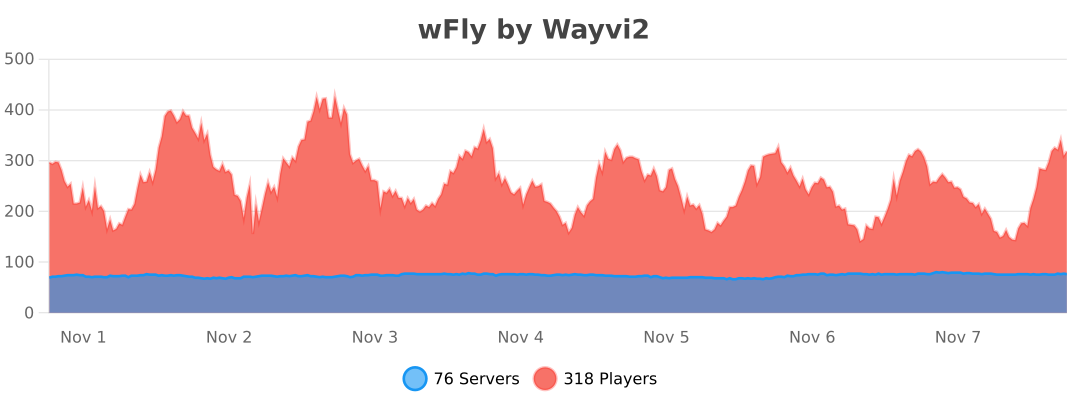
TempFly – wFly


WetFarmlandForever
# WetFarmlandForever
Required Plugin: https://modrinth.com/plugin/kotlinplugins
– This plugin keeps farmland wet forever + prevents trampling on the farmland.
– The purpose of this plugin is to speed up the experience of growing crops without the water!
– Check out other plugins: https://modrinth.com/user/Winlyps
WERM
# WERM – Web Engine for Realm Monetization

The official Minecraft plugin for WERM – the future of game monetization. Global wallets, instant delivery, and powerful analytics—all with the lowest fees in the industry.
Website •
Dashboard •
Discord
—
## 🆕 What’s New in v1.0.4
### ⚡ Performance & Reliability Release
This release adds batch delivery confirmation and async file I/O to improve performance and reliability during high-load scenarios.
| Feature | Description |
|———|————-|
| 📦 **Batch Delivery Confirmation** | Up to 10 confirmations per API call for 90% reduction in network overhead |
| 🔄 **Async File I/O** | Non-blocking queue persistence with debounced writes prevents main thread blocking |
| 🛑 **Graceful Shutdown** | Proper executor termination ensures no data loss during server stops |
| ⚡ **Faster Bulk Deliveries** | Improved performance when multiple items need to be delivered at once |
**Technical Details:**
– Batch size: 10 confirmations per API call
– I/O thread: Daemon thread named `WERM-ConfirmationQueue-IO`
– Shutdown timeout: 5 seconds for graceful termination
– Debounced writes: 2-second delay to coalesce multiple queue changes
### Previous Releases:
v1.0.3 – Performance Optimization
| Feature | Description |
|———|————-|
| 🔗 **HTTP Connection Pooling** | New OkHttp-based connection manager with 5-connection pool and 5-minute keep-alive |
| 📉 **Smart Polling** | Dynamic polling with exponential backoff—reduces API calls by up to 75% during idle periods |
| ⚡ **Faster Response Times** | Keep-alive connections eliminate connection setup overhead |
| 🛠️ **Improved Resource Usage** | Connection reuse reduces memory footprint and CPU usage |
**Technical Details:**
– Connection pool: 5 max idle connections, 5-minute keep-alive
– Timeouts: 10s connect, 30s read, 10s write
– Backoff: Up to 4x base interval after consecutive empty responses
– Instant reset when player joins or delivery found
v1.0.2 – bStats Update
– **🔧 bStats Update** – Updated bStats plugin ID for proper metrics tracking
– All security hardening from v1.0.1 remains in place
v1.0.1 – Security Features
| Feature | Description |
|———|————-|
| 🛡️ **Command Validation** | Blocks dangerous commands (op, deop, ban, stop) from being executed via deliveries |
| 🔐 **TLS 1.2+ Enforcement** | All API connections now require modern TLS protocols |
| 📝 **Debug Redaction** | Sensitive data (tokens, UUIDs) automatically redacted in debug logs |
| 💾 **Confirmation Queue** | Pending delivery confirmations survive server restarts |
| ✅ **Input Sanitization** | Player names and UUIDs sanitized before command execution |
| 🌐 **Endpoint Validation** | HTTPS and domain whitelist enforcement for API endpoints |
| ⏱️ **Rate Limiting** | Verification attempts limited to prevent brute-force abuse |
| 🔄 **Auto-Discovery** | Project ID now auto-discovered from API (no hardcoding) |
—
## 🌐 What is WERM?

WERM is a modern, all-in-one monetization platform built specifically for Minecraft servers. Think of it as a **Tebex alternative**—but with better features, lower fees, and a focus on the modern server owner experience.
### Platform Features
| Feature | Description |
|———|————-|
| 🔍 **Server Discovery** | Get your server listed on our public directory where players can find, vote for, and join servers |
| 💰 **Global Wallet System** | Players have one wallet across all WERM-powered servers (1 credit = 1 USD cent) |
| 🛒 **Built-in Storefront** | Beautiful, customizable store pages with categories, sales, gifting, and wishlists |
| ⚡ **Instant Delivery** | Hybrid delivery system using webhooks + polling ensures items are delivered fast |
| 🗳️ **Voting System** | Integrated voting with Votifier/NuVotifier support to boost your server’s ranking |
| 💬 **Discord Integration** | Display your Discord member count on your server listing |
| 🌍 **Multi-Currency Support** | Accept payments globally with automatic currency conversion |
| 💸 **Lowest Fees** | Starting at just 3% platform fee (vs 5%+ competitors) |
### Why Choose WERM?
– **Free Tier Available** – Start monetizing with no monthly fees (up to $500/month revenue)
– **Modern Dashboard** – Clean, intuitive interface for managing your server and products
– **Real-time Analytics** – Track sales, player engagement, and revenue trends
– **Cross-Server Economy** – Players can use their wallet credits on any WERM server
– **Open & Transparent** – No hidden fees, no surprise charges
—
## ✨ Plugin Features

### 🔗 Account Verification
Players can securely link their Minecraft account to WERM using a simple 6-character verification code. Generate a code on the website, enter it in-game, and you’re connected!
### 📦 Automatic Delivery System
Automatically delivers purchased products to players using configurable console commands. Supports both immediate delivery and requiring players to be online.
### 💓 Server Heartbeat
Keeps your server status updated on the WERM dashboard with real-time player counts and server version information.
### 🎮 Player Join Detection
Automatically checks for and delivers pending purchases when players join the server.
### ⚡ Async Processing
All API calls are processed asynchronously to ensure zero impact on your server’s performance.
### 🛡️ Secure Authentication
Uses secure plugin token authentication to ensure only your server can manage deliveries.
### 📝 Fully Customizable
All messages are fully configurable with Minecraft color code support (`&` codes).
—
## 📜 Commands

| Command | Description | Permission |
|———|————-|————|
| `/werm verify ` | Link your Minecraft account with WERM | `werm.verify` (default: true) |
| `/werm help` | Display help information | None |
| `/werm status` | View plugin connection status | `werm.admin` (default: op) |
| `/werm reload` | Reload plugin configuration | `werm.admin` (default: op) |
**Aliases:** `/w`
---
## 🎯 Permissions
| Permission | Description | Default |
|------------|-------------|---------|
| `werm.verify` | Allows players to verify their Minecraft account | `true` |
| `werm.admin` | Admin commands (reload, status) | `op` |
---
## ⚙️ Configuration
```yaml
# WERM Plugin Configuration
# Generate your plugin token at https://wermpay.com/dashboard/servers
plugin-token: "werm_XXXXXXXX_XXXXXXXXXXXXXXXXXXXXXXXXXXXXXXXX"
# Enable debug logging for troubleshooting
debug: false
# Heartbeat Settings
heartbeat:
interval: 60 # Send status every X seconds
send-player-count: true # Include player count in heartbeat
# Delivery Settings
delivery:
interval: 15 # Check for deliveries every X seconds
# Customizable messages (supports & color codes)
messages:
prefix: "&8[&6WERM&8] &r"
verify-success: "&aYour Minecraft account has been linked successfully!"
verify-failed: "&cVerification failed: &7%reason%"
delivery-received: "&aYou received: &e{product} &ax{quantity}"
# ... and more customizable messages
```
---
## 📦 Delivery Placeholders
When configuring your product commands in the WERM dashboard, you can use these placeholders:
| Placeholder | Description |
|-------------|-------------|
| `{player}` or `{player_name}` | Player's username |
| `{uuid}` or `{player_uuid}` | Player's UUID |
| `{quantity}` | Quantity purchased |
| `{product_id}` | Product ID |
| `{product_name}` | Product name |
| `{order_id}` | Order ID |
| `{delivery_id}` | Delivery ID |
**Example Commands:**
```
give {player} diamond 64
lp user {player} parent add vip
eco give {player} 1000
```
---
## 🚀 Installation

1. **Download** the WERM plugin JAR file
2. **Place** it in your server's `plugins` folder
3. **Start/restart** your server
4. **Generate** a plugin token in your WERM Dashboard
5. **Edit** `plugins/WERM/config.yml` and add your plugin token
6. **Run** `/werm reload` or restart your server
7. ✅ Your server will now appear as **online** in the WERM dashboard!
---
## 📋 Requirements
- **Server Software:** Spigot, Paper, Purpur, or any Spigot-based fork
- **Minecraft Version:** 1.13+
- **Java Version:** 8+
- **WERM Account:** Create one here
---
## 🔧 How It Works
1. **Setup:** Configure the plugin with your unique plugin token from the WERM dashboard
2. **Heartbeat:** The plugin sends periodic heartbeats to keep your server status updated
3. **Purchases:** When a customer makes a purchase on your WERM store, a delivery is queued
4. **Delivery:** The plugin polls for pending deliveries and executes the configured commands
5. **Confirmation:** Successful deliveries are confirmed and marked as completed
---
## 💬 Support
Need help? Join our Discord Server for support and community discussions.
---
## 📄 License
This plugin is provided by WERM for use with the WERM monetization platform.
---
WERM - The Future of Game Monetization
© 2026 WERM | Made with ❤️ for the Minecraft community


