WildRTP
# WildRTP
– Algorithms CIRCLE & SQUARE
– Adjust teleport settings
– Multi Worlds Support
– Cooldown
– MoveTimer
– CustomRTP
– AutoRTP
### Please let me know if you have any issues
## Commands
– /wild – Teleport to a random location
Aliases: [/rtp /randomtp /randomteleport /wildrtp]
– /wild reload – Reloads the config
– /wild info – Display plugin information
– /wild updates – Checks for plugin updates
– /wild help – Display help message
– /customrtp [params…]
Note **<>** are **required arguments**, **[]** are only **optional arguments** and can be omitted.
%player% is a placeholder for the player that executed the command (only in /customrtp).
## Permissions
– wildrtp.rtp – Allows you to run /wild – Default
– wildrtp.reload – Allows you to run /wild reload
– wildrtp.updates – Allows you to run /wild updates
– wildrtp.custom – Allows you to run /customrtp
– wildrtp.cooldown.bypass – Bypass the cooldown, if enabled
– wildrtp.movetimer.bypass – Bypass the movetimer, if enabled
– wildrtp.list.bypass – Bypass the list of disallowed worlds
– wildrtp.list.bypass.world_name – Bypass a specific world from the list of disallowed worlds
(blacklist or whitelist, whichever is enabled)
– wildrtp.help – Allows you to run /wild help
– wildrtp.admin – Grants all WildRTP permissions
## Config
Show config
“`
# __ ___ _ _ _____ _______ _____
# / (_) | | | __ __ __| __
# / / / _| | __| | |__) | | | | |__) |
# / / / | | |/ _` | _ / | | | ___/
# / / | | | (_| | | | | | |
# / / |_|_|__,_|_| _ |_| |_|
#
# by Joni – Thank you for using this plugin
# Language setting
# Available: [en, de, ru]
# You can add/edit languages in the plugin folder (/lang)
lang: “en”
# Global RTP settings
# This section defines the main settings for random teleportation
# Custom settings per world can be defined in the custom section
# If ‘something: null’ is present, and you want to use that feature, remove null and add your settings
global:
# Min & max teleportation range
min: 1000
max: 2500
# Shape of the teleportation area [CIRCLE/SQUARE]
shape: CIRCLE
# Teleportation center
center:
player: false # If true, teleportation is centered on the player
x: 0 # X coordinate of center
z: 0 # Z coordinate of center
# Cooldown settings
cooldown:
enabled: true # Enable cooldown between RTP uses
time: 5 # Cooldown time in seconds
# Move timer settings
movetimer:
enabled: true # If true, no movement allowed before teleportation
time: 5 # Time in seconds
sound-canceled: ENTITY_VILLAGER_NO # Set to ‘false’ to disable.
# Message settings
messages:
start: false # Show message when RTP starts
end: true # Show message when RTP ends
# Title messages displayed when RTP starts/ends
titles:
start:
enabled: false
fadeIn: 0.5
stay: 2
fadeOut: 0.5
end:
enabled: true
fadeIn: 0.5
stay: 2
fadeOut: 0.5
# Sound settings
sound:
start: false # Play a sound when teleport starts. Set to ‘false’ to disable.
end: ENTITY_PLAYER_LEVELUP # Use any valid Bukkit Sound enum, e.g., ENTITY_PLAYER_LEVELUP.
# Blocks to avoid when teleporting
blocks:
– LAVA
– WATER
– AIR
# Y-limits for teleporting
y-min: null
y-max: null
# Biomes to avoid when teleporting
# Example: biomes: [OCEAN, DESERT, PLAINS, FOREST, TAIGA, MUSHROOM_FIELDS, JUNGLE]
# Set to ‘null’ to disable.
biomes: null
# Teleport to another world
# If set to a valid world name, players will be teleported to that world instead of their current one.
# Set to ‘false’ to teleport within the same world.
tp-in-other-world: false
# RTP generation strategy used to determine how safe locations are found.
# This controls the algorithm used to pick valid teleport positions.
#
# Available strategies:
# AUTO – Automatically chooses the best strategy based on world environment.
# HIGHEST_BLOCK – Uses the highest non-air block. Extremely fast. Perfect for normal Overworld and The End.
# BOTTOM_UP – Scans from minY upwards for a solid block with space above it. Essential for the Nether or Cave worlds.
# TOP_DOWN – Scans from maxY downward.
#
# Recommended: AUTO (handles most worlds correctly without configuration)
strategy: AUTO
# Auto-RTP settings
# Should the plugin teleport players automatically?
auto-rtp:
onfirstjoin: false # When a player first joins the server
onjoin: false # Every time a player joins the server
ondeath: false # After a player dies
# List mode: use ‘blacklist’ or ‘whitelist’
list: blacklist
# Set to ‘null’ to disable the blacklist.
blacklist: null # Add blocked worlds here
# – my_blacklisted_world
# Set to ‘null’ to disable the whitelist.
whitelist: null # Add allowed worlds here
# – my_whitelisted_world
# Uncomment and modify to customize settings for specific worlds
# YOU CAN remove any fields you don’t want to customize,
# BUT missing values will be set to the global values
# (e.g. max in global is 1000 and if not set here it will be 1000 as well)
# An example is shown below:
custom: null
# custom_world_name:
# min: 1000
# max: 2500
# shape: CIRCLE
# center:
# player: false
# x: 0
# z: 0
# cooldown:
# enabled: true
# time: 30
# movetimer:
# enabled: true
# time: 5
# sound-canceled: ENTITY_VILLAGER_NO
# messages:
# start: false
# end: true
# titles:
# start:
# enabled: false
# fadeIn: 0.5
# stay: 2
# fadeOut: 0.5
# end:
# enabled: true
# fadeIn: 0.5
# stay: 2
# fadeOut: 0.5
# sound:
# start: false
# end: ENTITY_PLAYER_LEVELUP
# blocks:
# – LAVA
# – WATER
# – AIR
# y-min: null
# y-max: null
# biomes: null
# tp-in-other-world: false
# strategy: AUTO
# Maximum attempts to find a safe location before failing
max-tries: 25
# If you want to change the prefix, you can do it here
prefix: “[&2WildRTP&f] &6”
# Hook settings for third-party plugins
hooks:
worldguard:
enabled: false # When enabled, checks if a location is inside any protected region and skips it if so
protectionstones:
enabled: false # When enabled, checks if a location is inside any protected region and skips it if so
towny:
enabled: false # When enabled, checks if a location is claimed and skips it if so
residence:
enabled: false # When enabled, checks if a location is claimed and skips it if so
# Check for updates
check-updates: true
# Notify admins about plugin updates when they join
notify-updates-on-join: true
# If I am allowed to collect anonymous data about your server and this plugin. So I can see how many servers are using this plugin 🙂
# Learn more https://bstats.org/
# And you can see the data as well here https://bstats.org/plugin/bukkit/WildRTP/17799
metrics: true
# Advanced settings
force-close-inventories: true
per-world-cooldowns: false
# Debug mode
debug: false
# Config version (do not change)
config-version: 10
“`
## Placeholders
To view both internal **placeholders** and **external placeholders**, please visit the wiki.
## Integrations
– WorldGuard
– ProtectionStones
– Towny
– Residence
## Performance
Using async chunk loading on paper servers should have no impact on the performance besides the time it takes to load a chunk async. You can use Chunky to pre-generate chunks, which makes the teleporting maybe a bit faster.
## Need help?
If you need any help, feel free to join my discord support server, or if you have found a bug, you can also use the github issue system. If you have a feature request, you can also make a request via discord or github.
## bStats

WildLife
# A recreation of the WildLife series by Grian!
Note: For now, there is no plan to add superpowers wildcard as it is complex and will require mods
# Usage
## Resource Pack (optional but recommended)
## Compatibility: Works with 1.21.3+
## Commands:
“`mcfunction
/wildlifeinfo # Gives info about the plugin
/wildcard # Activates a random wildcard (wildlife.activate)
/wildcardc # Activates a specific wildcard (wildlife.activate)
/wildlife # Starts, stops or continues the series (health counters)
/lives set # Set number of lives of a player in currently running series (wildlife.editlives)
/wildcardstop # Stops any currently running wildcards
“`
Currently available wildcards are –
– Height_Modifier (from ep 1)
– Food_Randomizer (from ep 2)
– Deadly_Snails (from ep 3)
– Fast_Runner (from ep 4)
– Trivia_Bot (from ep 5)
– Random_Mobs (from ep 6)
/wildlife start starts the series, basically giving each player 6 lives
/wildlife continue loads lives from previous session (saved when server stops or /wildlife stop is run)
/wildlife stop stops the life counter and any current wildcard
For trivia questions, you can get the questions from here. Download this file and place it in ~/plugins/WildLife
### Also check out:
– SummonFriendlyMobs
– WoolBurner
WildCards SMP
# **WildCards**
WildCards adds craftable ability cards to your Minecraft server, each with unique powers, cooldowns, and playstyles.
# Designed for Paper-based servers and compatible with:
– Paper
– Purpur
– Leaf
– Minecraft 1.20.x – 1.21.x
Each card gives players powerful abilities that can be activated by holding the card and using different click combinations.
# Features
– Craftable ability cards
– Unique primary and secondary abilities
– Cooldown system for every power
– Only one active card at a time
– Configurable plugin files
– Designed for modern Paper-based servers
– Lightweight and easy to use
# How It Works
Hold a card in your hand to activate its abilities:
– Right Click → Primary Ability
– Shift + Right Click → Secondary Ability
Each ability has its own cooldown, so players must use them strategically.
Only one card can be active at a time, helping keep gameplay balanced.
# Cards
# Inferno Card
A fire-based card focused on burning enemies and explosive close-range damage.
**Blaze Form**
*Right Click — 20s cooldown*
– Grants Fire Resistance
– Your hits ignite enemies
– Leaves flame particles behind you
**Eruption Burst**
*Shift + Right Click — 25s cooldown*
– Creates a small fire explosion around you
– Damages nearby players
– Knocks back enemies
# Stormbreaker Card
A lightning-themed card built for speed and control.
**Static Surge**
*Right Click — 18s cooldown*
– Grants a Speed boost
– Lightning strikes near enemies
– No terrain damage
**Thunder Lock**
*Shift + Right Click — 30s cooldown*
– Strikes your target with lightning
– Applies brief Slowness
– Applies Blindness
# Abyss Card
A dark mobility and control card.
**Shadow Step**
*Right Click — 15s cooldown*
– Short instant teleport
– Prevents fall damage after use
**Void Grasp**
*Shift + Right Click — 25s cooldown*
– Pulls nearby players toward you
– Applies Weakness
# Frostbite Card
A freezing card focused on slowing and controlling enemies.
**Ice Walker**
*Passive Toggle*
– Freezes water beneath you
– Slows enemies you hit
**Blizzard Zone**
*Shift + Right Click — 20s cooldown*
– Creates a snowstorm around you
– Applies Slowness
– Applies Mining Fatigue to nearby players
# Titan Card
A heavy tank-style card with durability and area damage.
**Stone Skin**
*Right Click — 20s cooldown*
– Grants Resistance
– Increases knockback resistance
**Ground Slam**
*Shift + Right Click — 35s cooldown*
– Leap and smash the ground
– Damages nearby players
– Launches enemies upward
# Phantom Card
A stealth-focused card made for quick attacks and repositioning.
**Phase Walk**
*Right Click — 22s cooldown*
– Grants short invisibility
– Gives a Speed boost
**Backstab Mark**
*Shift + Right Click — 25s cooldown*
– Your next hit deals bonus damage
– Marks the target with Glowing
# Natureborn Card
A support/control card with healing and crowd control.
**Regrowth**
*Right Click — 20s cooldown*
– Grants Regeneration
– Slowly repairs worn armor
**Root Snare**
*Shift + Right Click — 25s cooldown*
– Traps nearby enemies
– Applies heavy Slowness
– Prevents jumping
# Configuration
WildCards automatically creates its plugin folder and configuration files when the server starts.
This allows server owners to customize and manage:
– plugin settings
– ability values
– cooldowns
– balancing options
– card behavior
# Commands
`/wildcards`
Main admin command
`/wc`
Alias of `/wildcards`
Example usage:
– `/wildcards start`
– `/wildcards stop`
– `/wildcards give`
– `/wildcards reload`
– `/wildcards crafteditor`
– `/wildcards list`
– `/wildcards status`
# Permissions
– `wildcards.admin` — Access to admin commands
– `wildcards.use` — Allows using ability cards
– `wildcards.craft` — Allows crafting ability cards
# Compatibility
Supported platforms:
– Paper
– Purpur
– Leaf
Supported versions:
– 1.20.x
– 1.21.x
# Notes
WildCards is built to be lightweight, fun, and easy to use for survival, PvP, and custom server gameplay.
If you want unique combat abilities, magical card powers, and more strategic PvP or events on your server, WildCards is made for you.
WidCore ️⚙️ Essentials / SunLight Alternative!
# WidCore Plugin
WidCore, sunucuyu zorlayan onlarca eklentiyi daha optimize bir şekilde tek bir merkezi yapı altında birleştiren, modüler mimariye sahip ve komutlardan permission yapılarına kadar %99 oranında özelleştirilebilir bir eklentidir. Sunucu yönetimi, güvenlik, ekonomi, optimizasyon ve daha birçok alanda kapsamlı çözümler sunarak sunucunuzun vazgeçilmez bir parçası olmayı hedeflemektedir.
**NOT: Eğer 1.16 sürümünde bir sunucunuz varsa, JDK17’yi yüklemek zorunludur. Bat dosyanıza (-DPaper.IgnoreJavaVersion=true) ekleyerek sunucunuzu JDK17 ile sorunsuz bir şekilde başlatabilirsiniz.**
WidCore is a plugin that consolidates dozens of performance-heavy plugins into a single, optimized central system, featuring a modular architecture and up to 99% customization, including commands and permission structures. It aims to become an indispensable part of your server by providing comprehensive solutions in server management, security, economy, optimization, and many other areas.
**NOTE: If you have a version 1.16 server, installing JDK17 is mandatory. You can start your server with JDK17 without any problems by adding (-DPaper.IgnoreJavaVersion=true) to your bat file.**
TELEMETRİ RAPORU / TELEMETRY REPORT
Widcore adındaki plugin, hatasız bir şekilde ilerlemem için kendisi ile ilgili konsolda oluşan hataları bana iletiyor.
The plugin named Widcore notifies me of its own errors in the console so that I can proceed without any issues.
—
**Support / Destek:** https://discord.gg/dCDYQ3HPct
—
## 🛠 Technical Details / Teknik Detaylar
* **Platforms:** Spigot, Paper, Folia
* **Optional Dependencies:**
* **ProtocolLib:** Vanish ses gizleme / Vanish sound hiding
* **PacketEventsAPI:** Server brand gizleme / Hiding server brand
* **LuckPerms:** Sohbet prefix-suffix / Chat prefix-suffix
* **PlaceholderAPI:** Placeholder desteği / Placeholder support
* **Vault:** Ekonomi sistemi / Economy system
—
🇹🇷 Türkçe Tanıtım / Özellikler / Komutlar (Tıkla ve Aç)
### 🌟 ÖZELLİKLER
* **ANNOUNCER:** Zamanlı otomatik duyurular. Global/dünya bazlı, rastgele/sıralı.
* **ANTIMOBSPAWN:** Belirli mobların doğmasını engeller. Global veya dünya bazlı.
* **BACK:** Son ölüm noktasına ışınlanma.
* **BAN/TEMPBAN:** Kalıcı veya süreli yasaklama. Sebep kısayolları, muaf oyuncular.
* **BANNED ITEMS:** Belirli eşyaların envanterde bulunmasını engeller.
* **CHAT FORMAT:** LuckPerms prefix/suffix, grup bazlı format, PlaceholderAPI. [item]=eşya, [inv]=envanter, [ec]=enderchest paylaşımı.
* **CHATGUARD:** Spam, flood, reklam, yasaklı kelime koruması. Sohbet, örs, kitap, tabela için geçerli.
* **COMPASS TELEPORT:** Pusula ile sol tık = bakılan bloğun yanına ışınlan (maks 200 blok).
* **CUSTOM COMMANDS:** Config üzerinden özel komut. MESSAGE, P_COMMAND, C_COMMAND.
* **ECONOMY:** Vault tabanlı. eco (admin), pay (transfer), baltop (zenginler GUI).
* **ENDERCHEST:** Kendi veya başkasının enderchest’ini açar. Çevrimdışı desteği.
* **FEED:** Oyuncunun açlığını giderir.
* **FIREBALL:** Ateş topu fırlatma. Güç ayarlanabilir.
* **FIREBALL STICK:** Sol tık ile ateş topu fırlatan özel asa.
* **FLY:** Uçuş modunu açar/kapatır.
* **FREEZE:** Oyuncuyu tamamen dondurur. Hareket ve envanter engeli.
* **GAMEMODE:** Oyun modu değiştirme. s/c/a/sp veya 0/1/2/3.
* **GOD:** Ölümsüzlük modu. Hasar almaz, acıkmaz.
* **HEAL:** Oyuncunun canını doldurur.
* **HEAD:** Oyuncunun elindeki eşyayı başına yerleştirmesine olanak tanır.
* **HOME:** Kişisel ev noktaları. GUI menü, limit yetkisi, yasaklı dünyalar. GTA5 tarzı animasyon desteği.
* **INVENTORY ROLLBACK:** Ölüm/giriş/çıkış/dünya değişimi yedekleme. GUI ile geri yükleme.
* **INVSEE:** Başka oyuncuların envanterini canlı gör/düzenle. Çevrimdışı desteği.
* **ITEM:** Belirtilen eşyayı belirtilen miktarda verir.
* **ITEMEDIT:** Eşya düzenleme: isim, lore, büyü, özellik, gizleme, renk, kırılmazlık. Effect GUI: iksir efekti ekleme.
* **ITEM REMOVAL:** Yerdeki eşyaları zamanlı temizler. Hologram geri sayım.
* **JAIL:** Bölge tabanlı hapis. Altın balta + fener ile alan belirleme. Süreli/süresiz.
* **JOINLEAVE:** Giriş/çıkış mesajları. Sohbet/başlık/aksiyon çubuğu seçenekleri.
* **KICK:** Oyuncuyu sunucudan atar. Özelleştirilmiş atılma ekranı.
* **LIGHTNING:** Bakılan yere veya oyuncuya yıldırım düşürür.
* **MERGE EXPERIENCE ORBS:** Tecrübe (XP) kürelerini birleştirir. FPS artışı sağlar.
* **MESSAGING (MSG/R):** Özel mesajlaşma ve hızlı cevap.
* **MOBSTACKER:** Aynı tür mobları birleştirir. Sunucu performansını artırır.
* **MOTD:** Sunucu listesi görünümünü özelleştirme.
* **MUTE/TEMPMUTE:** Kalıcı veya süreli susturma.
* **PLUGIN-HIDER:** Server Brand ve pluginleri tamamen gizler.
* **REPAIR:** Eldeki eşyayı veya tüm envanteri tamir eder.
* **RTP:** Dünyada rasgele ışınlanmanızı sağlar.
* **SHOW ITEM:** Sohbette [item], [inv], [ec] ile paylaşım.
* **SPAWN:** Sunucu başlangıç noktası. GTA5 tarzı animasyon desteği.
* **SPEED:** Yürüme veya uçuş hızını 0-10 arası ayarlar.
* **STACK DEATH DROPS:** Ölümde etrafa saçılan eşyalar tek blokta toplanır.
* **TELEPORT:** tp, tpall, koordinata ışınlanma.
* **TPA:** İstek tabanlı ışınlanma. Hazırlık/bekleme süresi, hasar iptali.
* **TROLL:** 4 troll türü: mlg, rotate, moblook, creeperchest. GUI menü.
* **VANISH:** Tam görünmezlik. Moblar hedef alamaz, sesler gizlenir.
* **VOID SPAWN:** Y=-64 altına düşenleri ışınlar.
* **WARP:** Sunucu geneli ışınlanma noktaları. GTA5 animasyon desteği.
* **WORLDMANAGER [BETA]:** Dünya oluştur/sil/yükle/kaldır. Tipler: normal, flat, empty.
### 📋 KOMUTLAR VE YETKİLER
**ANA**
* `/widcore reload` – `widcore.reload`
**CEZA**
* `/ban [sebep]` – `widcore.ban`
* `/tempban [sebep]` – `widcore.tempban`
* `/unban ` – `widcore.unban`
* `/banlist` – `widcore.banlist`
* `/mute [sebep]` – `widcore.mute`
* `/tempmute [sebep]` – `widcore.tempmute`
* `/unmute ` – `widcore.unmute`
* `/mutelist` – `widcore.mutelist`
* `/kick [sebep]` – `widcore.kick`
* `/jail [sebep]` – `widcore.jail.use`
* `/unjail ` – `widcore.jail.remove`
* `/setjail ` – `widcore.jail.set`
* `/deljail ` – `widcore.jail.delete`
* `/freeze [süre]` – `widcore.freeze`
* `/unfreeze ` – `widcore.freeze`
**YÖNETİM**
* `/vanish [oyuncu]` – `widcore.vanish` (Görünmezleri görme: `widcore.vanish.see`)
* `/irp ` – `widcore.irp`
**IŞINLANMA**
* `/rtp [oyuncu] widcore.rtp`
* `(başkasına) widcore.rtp.other`
* `(ücretsiz kullanım) widcore.rtp.free`
* `(cooldown bypass) widcore.rtp.cooldown.bypass`
* `(özel cooldown süresi) widcore.rtp.cooldown.`
* `/tp ` – `widcore.tp`
* `/tp ` – `widcore.tp.other`
* `/tp ` – `widcore.tp.coords`
* `/tpall` – `widcore.tpall`
* `/tpa ` – `widcore.tpa.send`
* `/tpaaccept` – `widcore.tpa.accept`
* `/tpadeny` – `widcore.tpa.deny`
* `/tpatoggle` – `widcore.tpa.autoaccept`
* `/spawn` – `widcore.spawn`
* `/setspawn` – `widcore.setspawn`
* `/home [isim]` – `widcore.home.teleport`
* `/sethome ` – `widcore.home.create`
* `/delhome ` – `widcore.home.delete` (Limit: `widcore.home.limit.`)
* `/warp [isim]` – `widcore.warp`
* `/setwarp ` – `widcore.setwarp`
* `/delwarp ` – `widcore.delwarp`
* `/back` – `widcore.back`
* `/setvoidspawn` – `widcore.voidspawn.set`
* Pusula Işınlanma: `widcore.compass`
**OYUNCU**
* `/gm [oyuncu]` – `widcore.gamemode` (`widcore.gamemode.`, `widcore.gamemode.other`)
* `/fly [oyuncu]` – `widcore.fly` / `widcore.fly.other`
* `/god [oyuncu]` – `widcore.god` / `widcore.god.other`
* `/heal [oyuncu]` – `widcore.heal` / `widcore.heal.other`
* `/feed [oyuncu]` – `widcore.feed` / `widcore.feed.other`
* `/speed <0-10>` – `widcore.speed` / `widcore.speed.other`
* `/repair [all]` – `widcore.repair` / `widcore.repair.all`
* `/item [miktar]` – `widcore.i`
* `/ec [oyuncu]` – `widcore.enderchest` / `widcore.enderchest.other`
* `/invsee ` – `widcore.invsee`
* `/head` – `widcore.head`
**SOHBET**
* `/msg ` – `widcore.msg`
* `/r ` – `widcore.r`
* Paylaşım: `widcore.showitem`, `.i`,`.inv`, `.ec`
* ChatGuard: `widcore.chatguard.bypass`, `widcore.chatguard.alert`
**DÜNYA**
* `/wm create [biyom]` – `widcore.worldmanager.create`
* `/wm delete ` – `widcore.worldmanager.delete`
* `/wm load ` – `widcore.worldmanager.load`
* `/wm unload ` – `widcore.worldmanager.unload`
* `/wm tp ` – `widcore.worldmanager.tp`
* `/wm list` – `widcore.worldmanager.list`
* `/wm info [dünya]` – `widcore.worldmanager.info`
* `/wm settings` – `widcore.worldmanager.settings`
* `/wm setspawn` – `widcore.worldmanager.setspawn`
**EŞYA**
* `/itemedit name ` – `widcore.itemedit.name`
* `/ilore add|set|remove|clear` – `widcore.itemedit.lore`
* `/enchant ` – `widcore.itemedit.enchant`
* `/itemedit attribute add|remove|clear` – `widcore.itemedit.attribute`
* `/itemedit hide|hideall|show|showall` – `widcore.itemedit.hide`
* `/itemedit color add|clear` – `widcore.itemedit.color`
* `/itemedit unbreaking` – `widcore.itemedit.unbreaking`
* `/itemedit effect` – `widcore.itemedit.effect`
**EKONOMİ**
* `/eco ` – `widcore.eco.admin` (`widcore.eco.give`, `.set`, `.take`)
* `/pay ` – `widcore.pay`
* `/baltop` – `widcore.baltop`
**EĞLENCE**
* `/troll [tür]` – `widcore.troll`
* `/lightning [oyuncu]` – `widcore.lightning`
* `/fireball [güç]` – `widcore.fireball`
* `/fireballstick [güç]` – `widcore.fireball`
**DİĞER**
* Yasaklı eşya bypass: `widcore.banneditem.bypass`
* Özel komut kullanımı: `widcore.customcommand.`
### 📝 NOTLAR
* **aliases.yml:** Tüm komutları ve yetkileri özelleştirebileceğiniz dosya.
* **lang/*.yml:** Dil dosyaları.
* **modules//*.yml:** Modül ayarları.
—
🇺🇸 English Showcase / Features / Commands (Click to Expand)
### 🌟 FEATURES
* **ANNOUNCER:** Scheduled automatic announcements. Global/world-based, random/sequential.
* **ANTIMOBSPAWN:** Prevents specific mobs from spawning. Global or world-based.
* **BACK:** Teleport to the last death location.
* **BAN/TEMPBAN:** Permanent or temporary bans. Reason shortcuts, exempt players.
* **BANNED ITEMS:** Prevents specific items from being in the inventory.
* **CHAT FORMAT:** LuckPerms prefix/suffix, group-based formatting, PlaceholderAPI. [item]=item, [inv]=inventory, [ec]=enderchest sharing.
* **CHATGUARD:** Protection against spam, flood, ads, and banned words. Valid for chat, anvils, books, and signs.
* **COMPASS TELEPORT:** Compass Left Click = Teleport to targeted block (max 200 blocks).
* **CUSTOM COMMANDS:** Custom commands via config. MESSAGE, P_COMMAND, C_COMMAND.
* **ECONOMY:** Vault-based. eco (admin), pay (transfer), baltop (wealthy players GUI).
* **ENDERCHEST:** Open your own or others’ enderchest. Offline support.
* **FEED:** Restores player’s hunger.
* **FIREBALL:** Shoot fireballs. Adjustable power.
* **FIREBALL STICK:** Custom wand that shoots fireballs with left click.
* **FLY:** Toggles flight mode.
* **FREEZE:** Completely freezes the player. Disables movement and inventory.
* **GAMEMODE:** Change game modes. s/c/a/sp or 0/1/2/3.
* **GOD:** Invincibility mode. No damage, no hunger.
* **HEAL:** Restores player’s health.
* **HOME:** Personal home points. GUI menu, limit permissions, banned worlds. GTA5-style animation.
* **HEAD:** Allows the player to place the item in their hand on their head.
* **INVENTORY ROLLBACK:** Backup for death/join/leave/world change. Restore via GUI.
* **INVSEE:** View/edit other players’ inventories live. Offline support.
* **ITEM:** Gives specified item in specified quantity.
* **ITEMEDIT:** Item editing: name, lore, enchantments, attributes, hide, color, unbreaking. Effect GUI: add potion effects.
* **ITEM REMOVAL:** Timed cleanup of dropped items. Hologram countdown.
* **JAIL:** Region-based jail. Selection with golden axe + beacon. Timed/permanent.
* **JOINLEAVE:** Join/leave messages. Chat/title/action bar options.
* **KICK:** Kicks players from the server. Customized kick screen.
* **LIGHTNING:** Strikes lightning at target location or player.
* **MERGE EXPERIENCE ORBS:** Merges XP orbs to increase FPS.
* **MESSAGING (MSG/R):** Private messaging and quick reply.
* **MOBSTACKER:** Stacks mobs of the same type. Improves performance.
* **MOTD:** Customize server list appearance.
* **MUTE/TEMPMUTE:** Permanent or temporary muting.
* **REPAIR:** Repairs held item or entire inventory.
* **PLUGIN-HIDER:** Completely hides the server brand and plugins.
* **RTP:** It allows you to be randomly teleported around the world.
* **SHOW ITEM:** Share [item], [inv], [ec] in chat.
* **SPAWN:** Server spawn point. GTA5-style animation.
* **SPEED:** Sets walking or flying speed (0-10).
* **STACK DEATH DROPS:** Items dropped upon death collected into a single block.
* **TELEPORT:** tp, tpall, coordinate teleportation.
* **TPA:** Request-based teleportation. Warmup/cooldown, damage cancellation.
* **TROLL:** 4 types: mlg, rotate, moblook, creeperchest. GUI menu.
* **VANISH:** Total invisibility. Mobs cannot target, sounds hidden.
* **VOID SPAWN:** Teleports players who fall below Y=-64.
* **WARP:** Server-wide warp points. GTA5 animation support.
* **WORLDMANAGER [BETA]:** Create/Delete/Load/Unload worlds. Types: normal, flat, empty.
### 📋 COMMANDS AND PERMISSIONS
**MAIN**
* `/widcore reload` – `widcore.reload`
**PUNISHMENT**
* `/ban [reason]` – `widcore.ban`
* `/tempban [reason]` – `widcore.tempban`
* `/unban ` – `widcore.unban`
* `/banlist` – `widcore.banlist`
* `/mute [reason]` – `widcore.mute`
* `/tempmute [reason]` – `widcore.tempmute`
* `/unmute ` – `widcore.unmute`
* `/mutelist` – `widcore.mutelist`
* `/kick [reason]` – `widcore.kick`
* `/jail [reason]` – `widcore.jail.use`
* `/unjail ` – `widcore.jail.remove`
* `/setjail ` – `widcore.jail.set`
* `/deljail ` – `widcore.jail.delete`
* `/freeze [duration]` – `widcore.freeze`
* `/unfreeze ` – `widcore.freeze`
**MANAGEMENT**
* `/vanish [player]` – `widcore.vanish` (See vanished: `widcore.vanish.see`)
* `/irp ` – `widcore.irp`
**TELEPORT**
* `/rtp [player] widcore.rtp`
* `(for others) widcore.rtp.other`
* `(free usage) widcore.rtp.free`
* `(cooldown bypass) widcore.rtp.cooldown.bypass`
* `(custom cooldown duration) widcore.rtp.cooldown.`
* `/tp ` – `widcore.tp`
* `/tp ` – `widcore.tp.other`
* `/tp ` – `widcore.tp.coords`
* `/tpall` – `widcore.tpall`
* `/tpa ` – `widcore.tpa.send`
* `/tpaaccept` – `widcore.tpa.accept`
* `/tpadeny` – `widcore.tpa.deny`
* `/tpatoggle` – `widcore.tpa.autoaccept`
* `/spawn` – `widcore.spawn`
* `/setspawn` – `widcore.setspawn`
* `/home [name]` – `widcore.home.teleport`
* `/sethome ` – `widcore.home.create`
* `/delhome ` – `widcore.home.delete` (Limit: `widcore.home.limit.`)
* `/warp [name]` – `widcore.warp`
* `/setwarp ` – `widcore.setwarp`
* `/delwarp ` – `widcore.delwarp`
* `/back` – `widcore.back`
* `/setvoidspawn` – `widcore.voidspawn.set`
* Compass Teleport: `widcore.compass`
**PLAYER**
* `/gm [player]` – `widcore.gamemode` (`widcore.gamemode.`, `widcore.gamemode.other`)
* `/fly [player]` – `widcore.fly` / `widcore.fly.other`
* `/god [player]` – `widcore.god` / `widcore.god.other`
* `/heal [player]` – `widcore.heal` / `widcore.heal.other`
* `/feed [player]` – `widcore.feed` / `widcore.feed.other`
* `/speed <0-10>` – `widcore.speed` / `widcore.speed.other`
* `/repair [all]` – `widcore.repair` / `widcore.repair.all`
* `/item - [amount]` – `widcore.i`
* `/ec [player]` – `widcore.enderchest` / `widcore.enderchest.other`
* `/invsee ` – `widcore.invsee`
* `/head` – `widcore.head`
**CHAT**
* `/msg ` – `widcore.msg`
* `/r ` – `widcore.r`
* Sharing: `widcore.showitem`, `.i`,`.inv`, `.ec`
* ChatGuard: `widcore.chatguard.bypass`, `widcore.chatguard.alert`
**WORLD**
* `/wm create [biome]` – `widcore.worldmanager.create`
* `/wm delete ` – `widcore.worldmanager.delete`
* `/wm load ` – `widcore.worldmanager.load`
* `/wm unload ` – `widcore.worldmanager.unload`
* `/wm tp ` – `widcore.worldmanager.tp`
* `/wm list` – `widcore.worldmanager.list`
* `/wm info [world]` – `widcore.worldmanager.info`
* `/wm settings` – `widcore.worldmanager.settings`
* `/wm setspawn` – `widcore.worldmanager.setspawn`
**ITEM**
* `/itemedit name ` – `widcore.itemedit.name`
* `/ilore add|set|remove|clear` – `widcore.itemedit.lore`
* `/enchant ` – `widcore.itemedit.enchant`
* `/itemedit attribute add|remove|clear` – `widcore.itemedit.attribute`
* `/itemedit hide|hideall|show|showall` – `widcore.itemedit.hide`
* `/itemedit color add|clear` – `widcore.itemedit.color`
* `/itemedit unbreaking` – `widcore.itemedit.unbreaking`
* `/itemedit effect` – `widcore.itemedit.effect`
**ECONOMY**
* `/eco ` – `widcore.eco.admin` (`widcore.eco.give`, `.set`, `.take`)
* `/pay ` – `widcore.pay`
* `/baltop` – `widcore.baltop`
**FUN**
* `/troll [type]` – `widcore.troll`
* `/lightning [player]` – `widcore.lightning`
* `/fireball [power]` – `widcore.fireball`
* `/fireballstick [power]` – `widcore.fireball`
**OTHER**
* Banned item bypass: `widcore.banneditem.bypass`
* Custom command usage: `widcore.customcommand.`
### 📝 NOTES
* **aliases.yml:** Customize all commands and permissions.
* **lang/*.yml:** Language files.
* **modules//*.yml:** Module settings.
WhitelistByTime

## About
This is a plugin for a minecraft server. It allows you to add players for a certain time or permanently.
**The plugin is developed and tested for Paper and Folia 1.20.x-1.21.x. It also supports forks of Paper and Folia.**
## Features
– Fully **customizable**.
– Supports **MiniMessage**.
– Compatible with **any SQL database**.
– **Case-sensitive** nickname support.
– Player **freezing** feature.
– PlaceholderAPI (**PAPI**) support.
– **Lightweight**: minimal load on the **main thread**.
– **Multi-server** support: utilizes **SQL transactions**.
– **Safe**: the code is extensively covered by **automated tests**.
– **UUID support**: stores UUIDs in online/floodgate (GeyserMC) modes to handle nickname changes.
## Feedback
**Please report any bugs, errors, or feature suggestions on Discord:** https://discord.gg/4XUPywnEyE
## Stats
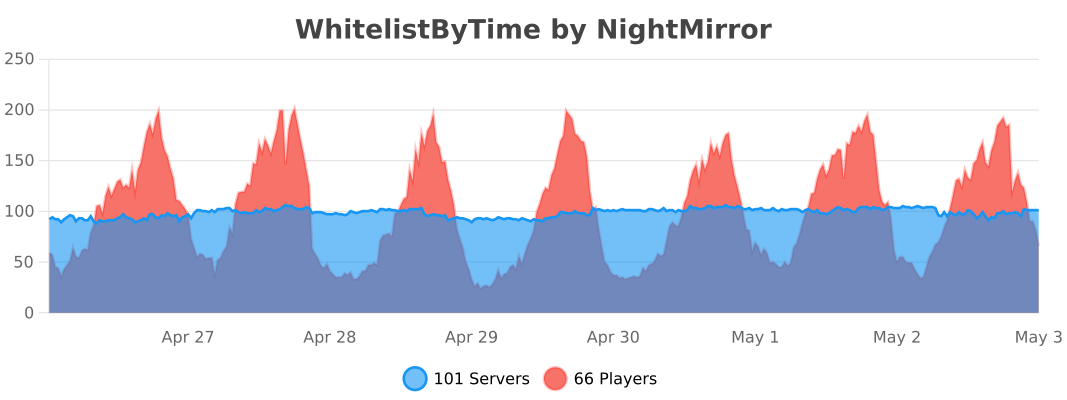
*Statistics are obtained through bstats metrics.*
Whitelist | by DevSarok
## Whitelist | by DevSarok
You might ask me why?
When I play on some server, I got whitelist but when I join it still says that I’m not whitelisted. So this plugin is the same whitelist mechanism. But that
this plugin checks on the name.
So,
you don’t need to ask somebody to join your server before they can be whitelisted.
## Still don’t understand?
Example,
when you made a new server in your network,
the server is just pure new. No one joined,
no one is opped, no plugins at all, except that
whitelist is turned on.
Ok so, when this happens,
you open your console and type “/whitelist add ”
and when you join the server,
it still says that You are not whitelisted.
And the last thing you do is that,
you Turn Off The Whitelist,
Join the server,
Turn the Whitelist back on,
add yourself to the whitelist
But sometimes, when someone wants to join,
you have to repeat that process again.
So this plugin simplifies that process.
Instead of that process above,
now:
1. New Server
2. Install Plugin
3. Turn off Vanilla Whitelist
4. Do /easywl add
5. That’s all.
6. Oops, and make sure you did /easywl on so the easy whitelist is on.
### For Bedrock: /easywl add _username
### For Java: /easywl add username
Commands:

LimeWhiteList
# LimeWhiteList
## Why choose this plugin?
– No hassle, players on the whitelist are stored by their nicknames, not UUIDs
– Easy to use
## How do I get started using the plugin?
– Disable Minecraft whitelist in server.properties (white-list=false)
– Place the plugin in the plugins folder
– Start your server
– Add yourself to the whitelist with the /lwl add command.
– Enable whitelisting with /lwl on
## Commands:
– /lwl add/remove – add or remove a player from the whitelist
– /lwl list – show list of whitelisted players
– /lwl on/off – turn plugin on or off
– /lwl reload – Reload plugin
– /lwl help – Display help menu
## Permissions:
– lwl.manage – access to the /lwl add/remove command
– lwl.list – access to /lwl list command
– lwl.toggle – access to the /lwl on/off command
– lwl.reload – access to command /lwl reload
– lwl.help – access to the /lwl help command
WhiteСord(discord auth)
WhiteCord is a Paper 1.21.1 plugin for Discord-based server access. It runs the Minecraft plugin and Discord bot inside one JAR, so setup is simple: install the plugin, fill bot_token, guild_id, channel_id, and invite_url, then restart.
When a new player joins, WhiteCord shows a one-time code and blocks gameplay until verification is complete. In Discord, the player presses the survey button, submits the form, and confirms with ✅. After confirmation, WhiteCord links the Discord account to the Minecraft account, adds the player to the whitelist, and unlocks access immediately (if the player is online).
Key features:
One JAR (plugin + bot) with no external web service required
Automatic SQLite database (data.db)
One-time login codes with expiration
Reused/updated Discord panel message (no channel spam)
Admin commands: /da reload, /da status , /da unlink
Discord commands: /da post, /da reset
Built-in localization support (en, ru, es, de, fr, pt-br)
White Noise Generator [Archived]
# White Noise Generator Plugin
This plugin generates unique, randomly filled chunks using white noise, creating chaotic and abstract landscapes. The world generation uses noise from octaves to determine the block placement, creating a random yet visually interesting world. You can customize the scale, octaves, and noise intensity, as well as adjust the block palette for the world generation. ⚙️
## Features ✨
– Generates world chunks based on white noise, creating a visually chaotic landscape. ️
– The block palette can be customized to use different concrete blocks for world generation.
– Adjustable parameters: Control the scale, octaves, and noise intensity for more variety and control in the world generation.
– Automatically enforces valid parameter ranges — values outside of the allowed range are automatically adjusted. ⚖️
– Compatible with Minecraft 1.20 and later versions. ️
## Configuration ️
You can customize the generation settings using the following parameters:
– **blocks**: List of blocks to be used for generation (e.g., `blocks=orange_concrete,lime_concrete`).
– **Range**: Any blocks available in Minecraft. It should be a comma-separated list (e.g., `orange_concrete,lime_concrete`).
– **scale**: Controls the frequency of the noise. A lower value makes the noise more “chunky,” while a higher value makes it smoother.
– **Default**: `0.02`
– **Range**: `0.02 to 1.0` (Values outside this range will be automatically adjusted).
– **octaves**: Defines the level of detail in the noise. A higher number of octaves creates more complex patterns.
– **Default**: `8`
– **Range**: `1 to 16` (Values outside this range will be automatically clamped).
– **noise**: Controls the intensity of the noise. A higher value results in more distinct block placements.
– **Default**: `0.5`
– **Range**: `0.0 to 1.0` (Values outside this range will be automatically adjusted).
## How to Use
Simply install the plugin and set the world generator to `WhiteNoiseGenerator` in your world settings. Customize the generation by adding parameters such as block types, scale, octaves, and noise intensity in the world creation command.
### Examples of Using with Multiverse-Core
#### 1. Creating a New World with White Noise Generator
Ensure that Multiverse-Core is installed on your server. To create a new world using the White Noise Generator, use the following command:
“`
/mv create new normal -t FLAT -g WhiteNoiseGenerator
“`
This command will create a new world using your plugin for world generation.
#### 2. Creating a New World with Custom Parameters
If you want to use custom parameters (e.g., different blocks, scale, octaves, etc.), you can specify them in the command:
“`
/mv create new normal -t FLAT -g WhiteNoiseGenerator:{blocks=orange_concrete,lime_concrete;scale=0.2;octaves=8;noise=0.5}
“`
This command will generate a world with specific block types, scale, octaves, and noise intensity.
#### 3. Using the Plugin with World Settings
If you want to automatically set the generator for multiple worlds or adjust additional settings, you can manually edit the `worlds.yml` file found in the Multiverse-Core folder. In this file, under each world’s configuration, you can set the generator key to use the White Noise Generator:
“`
yml
:
generator: WhiteNoiseGenerator:{blocks=blue_concrete;scale=0.03;octaves=8;noise=0.6}
“`
This will apply the generator to that world.
## Automatic Range Enforcement ⚖️
The plugin automatically enforces valid ranges for the parameters. If a user provides a value outside the allowed range (for scale, octaves, or noise), the plugin will adjust the value to the nearest valid option:
– **scale**: Any value below `0.02` will be set to `0.02`, and any value above `1.0` will be set to `1.0`. ⚖️
– **octaves**: Values outside the range of `1 to 16` will be adjusted to the closest value within that range.
– **noise**: Values below `0.0` will be set to `0.0`, and any value above `1.0` will be set to `1.0`.
—
wHit – PvP Combo System
# ⚔️ wHit – PvP Combo System
**Lightweight. Optimized. Satisfying.**




—
## 🚀 Overview
**wHit** is a highly optimized PvP enhancement plugin designed for Practice and Survival servers. It provides satisfying audio feedback and visual indicators when players perform combos.
Unlike other heavy plugins, **wHit** is designed with performance in mind, ensuring 0% lag impact on your server tick rate.
## ✨ Features
* **⚡ Optimized Performance:** Uses `O(1)` HashMap lookups and efficient memory management.
* **🔊 Satisfying Sounds:** Different sounds for normal combos and critical hits.
* **🎯 Smart Detection:** Combo streak starts after the 2nd hit to prevent spam noise.
* **🎨 Hex Color Support:** Full RGB support (e.g., `&#FFA500`) for Action Bar messages.
* **⏱️ Auto-Reset:** Streak resets automatically if no hit occurs within 1 second.
* **🌍 Localization:** Fully configurable messages via `messages.yml`.
## 📥 Installation
1. Download the latest `.jar` from the **Releases** tab.
2. Drop the file into your server’s `plugins` folder.
3. Restart your server.
4. Edit `config.yml` and `messages.yml` to your liking.
5. Run `/whit reload` to apply changes.
## ⚙️ Configuration
📄 config.yml (Click to view)
“`yaml
sounds:
combo-hit:
sound: “ENTITY_EXPERIENCE_ORB_PICKUP”
volume: 1.0
pitch: 1.5
crit-hit:
sound: “ENTITY_ARROW_HIT_PLAYER”
volume: 1.0
pitch: 0.5
“`
💬 messages.yml (Click to view)
“`yaml
reload-success: “�FF00&lwHit &8» &fConfiguration files have been �FF00&nsuccessfully&f reloaded.”
no-permission: “&c&lwHit &8» &cYou do not have permission to use this command!”
command-usage: “&e&lwHit &8» &7Usage: &f/whit reload”
actionbar-format: “&#FFA500&lCOMBO: &e&l%combo%”
“`