WK-Bonus
## 🔵 DESCRIPTION
Plugin for applying bonuses to items with full configuration.
## 🔵 FEATURES
– Applying bonuses to items
– Damage bonus (Sword only)
– Critical damage bonus (Sword only)
– Health bonus (For each armor piece)
– Durability bonus (For each armor piece and every tool) **(Bonus available from version 1.21)**
– Speed bonus (Boots only)
– Bonus to the duration of positive and negative effects (Helmet only)
– Ability to configure the bonus application method via GUI or DRAG & DROP
– Intuitive in-game configuration GUI
– Custom GUI layout configurable in files
– Custom messages configurable in files
– Custom head names and lore configurable in files
– Support for **CustomModelData**
– Formatting support: **Legacy (&, &#FFFFFF)** and **MiniMessage (Adventure API)**
– Language support: **English** and **Polish**
## 🔵 PERMISSIONS
– **wkheads.admin** » Access to all plugin commands and features
– **wkbonus.command.reload** » Access to the /bonus reload command
– **wkbonus.command.settings** » Access to the /bonus settings command
– **wkbonus.command.give** » Access to the /bonus give command
– **wkbonus.command.apply** » Access to the /bonus apply command
## 🔵 COMMANDS
– **/bonus reload** » Reloads the configuration without restarting the server
– **/bonus settings** » Opens a clear and user-friendly plugin settings GUI
– **/bonus give ** » Gives the item required to apply a bonus to an item
– **/bonus apply** » Opens a GUI where a bonus can be applied
## 🔵 IMAGES


Witness
# 🕵️ Witness
### *No crime goes unseen. No truth stays hidden.*




**The walls have eyes.**

—
## 👁️ The Concept
In standard Minecraft, a murder in a dark alley is just a respawn screen. **Witness** changes the stakes. If a crime is committed within the line of sight of another player, it is no longer just your word against theirs—it is an **Official Testimony.**
This plugin creates a tangible “paper trail” for every illegal act, forcing criminals to be calculated and victims to find protection.
—
## ✨ Key Features
### 📜 Official Testimony Records
When a crime (murder, theft, or griefing) is detected, the plugin automatically generates a **Testimony Book** for nearby witnesses.
– **NBT-Secured Data:** Includes the timestamp, coordinates, suspect’s name, and victim’s name.
– **Evidence Level:** Categorizes crimes from “Misdemeanor” to “High Felony.”
– **Non-Forgeable:** Records are signed by the server, making them valid evidence for trials.
### 🕵️ Dynamic Detection Logic
Witness doesn’t just check radius; it checks **Line of Sight**.
– **Stealth Mechanics:** Sneaking or wearing certain gear can reduce your detection profile.
– **Environmental Factors:** Foliage and darkness can affect whether a witness “clearly identifies” the suspect.
– **Anonymous Tips:** Servers can be configured to allow witnesses to remain anonymous to avoid retaliation.
### 📋 The Criminal Record
Every player has a permanent file accessible via the suite.
– **Active Charges:** Lists all witnessed crimes that haven’t been resolved.
– **Prescription System:** Minor crimes eventually fade, but major felonies stay on your record forever.
—
## 🔗 CivCraft Suite Integration
**Witness** is the primary “data feeder” for the rest of the **CivCraft Ecosystem**:
| Integration | Synergy Effect |
|————-|—————-|
| 🏹 **BountyBoard** | Automatically puts a price on a suspect’s head once a report is filed. |
| ⚖️ **Tribunal** | Reports are used as the primary evidence in court cases. |
| 🪪 **Reputation** | Being witnessed committing a crime causes an instant, massive drop in social score. |
| ⚔️ **ReanimateMC** | Failing to help a “Downed” player can be flagged as “Negligence” or “Abandoned.” |
| 🪦 **Epitaph** | Linking a Testimony Record to a Gravestone displays the “Cause of Death” in detail. |
—
## 🛠️ Commands & Permissions
| Command | Description | Permission |
|———|————-|————|
| `/witness report` | Manually file a report for a crime you just saw | `witness.report` |
| `/witness record ` | View the criminal history of a player | `witness.check` |
| `/witness evidence` | View the data of a Testimony Book in your hand | `witness.use` |
| `/witness purge` | (Admin) Clear a player’s criminal record | `witness.admin` |
—
## 📦 Installation
1. Download **Witness.jar**.
2. Install **CivCraft Core** to enable cross-plugin crime reporting.
3. Drop into your `/plugins` folder and restart.
4. Define your “Crime Zones” in the config to toggle detection in specific areas.
—
## ⚙️ Configuration Snippet
“`yaml
# Witness – Configuration
crimes:
detect-murder: true
detect-theft: true # Requires chest-lock or similar plugin
detect-grief: false # Recommended for creative/unprotected zones
detection:
max-distance: 32
require-line-of-sight: true
blindness-blocks-detection: true
reporting:
auto-generate-book: true
alert-guards-on-crime: true
Witherss
# Witherss
## 🇷🇺 Описание
Witherss — это плагин для **Paper Minecraft 1.21.4+**, который позволяет назначать любым блокам уникальные эффекты, звуки и частицы. Теперь игроки смогут получать особые баффы или дебаффы просто находясь на блоке или внутри него.
Плагин отлично подходит для **RPG-серверов**, **мини-игр** и **сюжетных миров**, добавляя атмосферу с помощью визуальных и звуковых эффектов.
—
## ✨ Возможности
– **Эффекты**: привяжите к любому блоку эффекты вроде Скорости, Иссушения, Слепоты и др.
– **Частицы**: выберите любые частицы из игры и просмотрите их прямо в игре.
– **Звуки**: настройте любые звуки из Minecraft с возможностью предварительного прослушивания.
– **Режим работы**: моментальные или постоянные эффекты.
– **Ограничение по положению**: эффекты могут действовать только пока игрок стоит на блоке.
– **Удобное GUI**: настройка эффектов, частиц и звуков прямо в игре.
– **Вкл/Выкл командой**: возможность временно отключить плагин.
– **Оптимизация**: система кэширования для быстрой проверки игроков.
—
## 💡 Примеры использования
– Вода замедляет движение.
– Камень накладывает эффект иссушения.
– Золотые блоки дают ускорение.
– Создание PvP-зон с дебаффами или безопасных зон с баффами.
– Реализация сюжетных механик: заражение, проклятия, магические поля.
—
## 🌍 Почему стоит выбрать Witherss?
– **Гибкость** — эффекты можно задать любому блоку.
– **Атмосфера** — визуальные и звуковые эффекты создают уникальный опыт.
– **Простота** — настройка в игре без редактирования конфигов.
– **Производительность** — оптимизированная проверка игроков.
—
## 🇺🇸 Description
Witherss is a **Paper Minecraft 1.21.4+** plugin that lets you assign unique effects, sounds, and particles to any block. Players can gain buffs or debuffs simply by standing on or inside those blocks.
Perfect for **RPG servers**, **minigames**, and **story-driven worlds**, Witherss adds immersive visual and audio effects to enhance gameplay.
—
## ✨ Features
– **Effects**: Bind effects like Speed, Wither, Blindness, and more to any block.
– **Particles**: Choose from any in-game particles and preview them directly in-game.
– **Sounds**: Select any Minecraft sound with preview playback.
– **Effect mode**: Instant or continuous effects.
– **Position-based activation**: Effects apply only while standing on the block.
– **Convenient GUI**: Configure effects, particles, and sounds directly in-game.
– **Enable/Disable command**: Temporarily disable the plugin when needed.
– **Optimization**: Caching system for fast player checks.
—
## 💡 Example Use Cases
– Water slows players down.
– Stone inflicts wither.
– Gold blocks grant speed boosts.
– Create PvP zones with debuffs or safe zones with buffs.
– Storyline mechanics like infection, curses, or magical zones.
—
## 🌍 Why choose Witherss?
– **Flexibility** — apply effects to any block.
– **Immersion** — particles and sounds create unique atmosphere.
– **Simplicity** — configure everything in-game without editing config files.
– **Performance** — optimized player-checking system.
WitherSpawn
# Features
* Completely disable or enable Wither spawning with ‘/ws toggle’ command
* Keep track of all Withers in your server with uuid, location, and time info stored using SQLite database
* Disable Wither damage, explosions, or status effect
* Armor, armor toughness, attack damage, follow range, knock back resistance, movement speed, & max health of Wither now configurable!
* Optimized and lightweight
* Disable Wither spawning in worlds by listing them in configuration file
* Wither will spawn if a server operator or player with bypass permission is within bypassRadius range in configuration file
* Config option to prevent anvil damage to Wither
* Config options to cancel dropping of Nether Star item or XP if Wither died from listed death reasons – https://hub.spigotmc.org/javadocs/bukkit/org/bukkit/event/entity/EntityDamageEvent.DamageCause.html
* Config option to set minimum/maximum y-coordinates Wither can spawn within
* New scan feature that will add or update database with currently loaded Wither information
* Command ‘/ws list’ will now list all Withers with uuid, last location, and time found in database
* Set maximum amount of Withers allowed to be alive and loaded in the server when spawning new Withers
* Setting maxWithers to 0 will disable Wither spawns unless player has op or witherspawn.bypass permission
* Kill all Withers loaded in the server with command ‘/ws killall’
* Kill all Withers within default or specified radius of player who issued command
* Withers that are killed with commands do not drop anything
* Notification option with location for when players try to spawn Wither but is disabled or prevented
* Notification option with location for when players successfully spawn Wither
* Config option to disable Wither spawning above sea level in Overworld
* Config option to send messages to server console, admins, or players
* Customizable messages in config!
# Commands
**/ws toggle** — Completely disable or enable Wither spawning
**/ws killall** — Kill all Withers loaded in the server
**/ws list** — List uuid, location, and time of all Withers found in database
**/ws radiuskill** — Kill all Withers within killRadius set in configuration file
**/ws radiuskill #** — Replace # with an integer above 0 to kill Withers within specified radius
**/ws reload** — Reload configuration file
# Permissions
**witherspawn.admin** — Allows use of commands
**witherspawn.bypass** — Completely bypass restrictions and allow Wither spawning
**witherspawn.deny** — Completely deny Wither spawning unless player has witherspawn.bypass permission or op
**witherspawn.notify** — Receive message when players attempt to spawn Wither but is disabled/prevented or when successfully spawned
# Config File
* Config file automatically updates to latest version when updating plugin jar file!
* Config regeneration still recommended for updated comments!
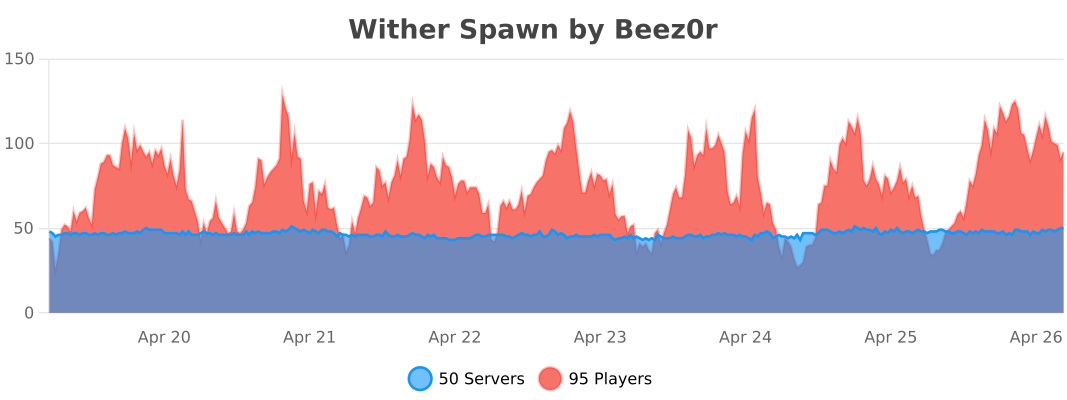
Withdrawer
Withdrawer is a way for players to withdraw their money, exp, hp or others onto physical items, so they can redeem them, trade them, sell them or store them as they wish.
## Features
* Withdraw your money, exp or hp onto items!
* Use the API to implement a new item that fits your needs!
* Bulk-Redeeming while pressing down the Shift Key.
* Messages and Sounds are all configurable, such as plugin prefix.
* The items are all configurable.

WispSMP
> **Disclaimer:** This is an unofficial remake of the WispSMP plugin concept. I am not affiliated with the original WispSMP server or team. This plugin is a fan-made recreation and I do not claim any credit for the original gameplay concept.
# ❤️ WispSMP
Players start with a set number of lives. Each death removes one life. If you hit zero lives, you switch to spectator mode unless revived with the Eye of Revival.

# 🔹Features
– **Visual Lives System**
Custom heart indicators appear in player nametags. They show how many lives a player has left. Hearts update in real time.
– **Spectator on Death**
A player with zero lives switches to spectator mode. No respawn. They watch the world without interaction.
– **Eye of Revival**
Players revive eliminated players with the Eye of Revival. The Eye comes from a pedestal ritual. A revived player returns with full lives.
—
## Commands & Permissions
| Command | Permission | Description |
| ——————– | —————- | ———————————— |
| /revive | wispsmp.revive | Revive a dead player with full lives |
| /pedestal | wispsmp.pedestal | Spawn the pedestal |
| /pedestal deactivate | wispsmp.pedestal | Remove the pedestal |
Aliases: /res, /restore
—
## How It Works
1. **New players join** → Get configured lives (default 3)
2. **Player dies** → Loses one life, hearts update
3. **Out of lives** → Becomes permanent spectator
4. **Revival** → Use the Eye of Revival at the pedestal to restore a player’s full lives
—

# Get the Texture-Pack from my Discord Server
—
Need help or have suggestions? Feel free to reach out via my Discord Server.
**Remade by Lusik21556** (@lusik_2155)
Wireless Redstone Plugin
_Releasing general improvement update soon. Found some weird bugs and missing features_
### ⚡ Wireless Redstone: Lightning Rods
Tired of messy redstone trails across your base? This plugin lets you use Lightning Rods as long-range, wireless transmitters and receivers. It’s lightweight, survival-friendly, and integrates perfectly with the vanilla look of Minecraft.
### 🕹️ How to Use
Releasing video tutorial soon
**_1._ The Setup**
> Place a Lightning Rod.
>
> Place a Redstone Torch directly on top of it.
**_2._ Tuning the Frequency**
> Take a Book and Quill and rename it to either Sender or Receiver using an Anvil.
>
> Open the book and type your desired Frequency (e.g., 100, Base_Alpha, or Gate) on the first page.
>
> Right-click the Lightning Rod with the book to register the device.
**_3._ Transmitting Power**
> When a Sender receives power, the torch on top will light up.
>
> All Receivers on the same frequency will instantly activate, triggering a visual “strike” > effect on the rod.
### 🌟 Key Features
– Full Variant Support: Works with all Lightning Rod stages (Normal, Exposed, Weathered, Oxidized) and even Waxed versions.
– Survival Integrated: No commands needed. Everything is done through blocks and items.
– Auto-Cleanup: If you break a rod or the torch above it, the location is automatically removed from the config—no “ghost” data left behind.
### 🛠️ Installation
– Drop the .jar into your plugins folder.
– Restart your server.
– Start linking your machines!
_Note: The Redstone Torch acts as the antenna tip and signal indicator. Use observers or adjacent redstone dust to pull the signal from your receivers._
WinCMD

**PlayerCONSOLE is REQUIRED!**
Text version
WinCMD is a lightweight PlayerCONSOLE module that brings a Windows command prompt frontend directly into your PlayerCONSOLE developer console. Run system commands, inspect processes, check network stats, and manage your machine, all without leaving the browser. Works on both Bukkit and Velocity.
Wild Tag
Originally made for _Spigot 1.16_, then rewritten for _Paper 1.20.6_, and now slightly tweaked for _Paper/Folia 1.21.6+_!
Remake of a minigame, requested by a friend 😉
—
Ever thought of playing tag in Minecraft using your world? Well this is the plugin for you!
It has some cool features like uh.. a tracker that is a compass and a custom locator bar (if your server is running on 1.21.6 or above).
⚠️ **CAUTION:** Use on a copy of your world or a new one, as the plugin **will** modify inventories & spawn locations.
### Command
| Command | Description | Permission |
|——————————————————-|———————————————-|—————|
| `wildtag start` | Start a normal match | wildtag.cmd |
| `wildtag start ` | Start a custom match | wildtag.cmd |
| `wildtag stop` | Stop a running match in the world you are in | wildtag.cmd |
| `wildtag reload` | Reloads the plugin | wildtag.cmd |
| `wildtag timer ` | Adds/subtracts time from a running match | wildtag.cmd |
### Development
Requires WayTrick due to the custom locator bar.
WildSpawn
# WildSpawn
WildSpawn’s sole purpose is to spread players far apart from eachother while retaining some sense of being fair to them.
### Why
* Vanilla’s `spawnRadius` gamerule is okay but generally unfair for players if set to a large value, say 10000 blocks.
* A little something called “NRMC manifesto”, which is a (WIP) piece of media full of recomendations for setting up an SMP to be perfect from my point of view. This “manifesto” includes _survival first, multiplayer second_ entry.
### How it works
* When the player first joins a server, the plugin will then generate a random 2D vector (X and Z coordinates) within a specific “global” spawn radius.
* When it’s time to respawn whilst not having a valid bed or an anchor, the plugin takes a random offset within a `spawnRadius` gamerule’s value and adds it to the previously calculated spawn point.
* The new two values are the now the player’s spawn location!
**In simple terms:** vanilla spawns all players around one single point, WildSpawn spawns every player around their own little randomly generated point.
# Usage examples
1. Randomizing your own spawn point – `/wsp randomize`:

2. Sharing your spawn point with others – `/wsp share %playername%`:

3. Accepting a shared spawn point – `/wsp accept`:


4. Or politely rejecting it – `/wsp deny`:

# Configuration
Example config:
“`yaml
# plugins/WildSpawn/config.yml
global_spawn_radius: 10000
“`
The value of `global_spawn_radius` defines the radius in which worldspawn point coordinates will be chosen randomly when required. These values (best case scenario) are chosen only ONCE, and then a value offset using the vanilla `spawnRadius` is used as a spawn location.