WorldGuard ItemBlocker
# Summary:
Restrict Players from entering specific regions with restricted items.
Good for pvp zones, mace vs sword area etc
# Features
– Hooks into WorldGuard to prevent users from entering regions with any items you list in the config
– Sends hotbar and or chat message about the block & whats blocking you from entering
– Easily configurable and reload new restrictions and regions with one command
# Commands:
/wgib reload
# Permissions:
– worldguarditemblocker.reload – Reload config
– worldguarditemblocker.bypass – Bypass restrictions
# Dependancies:
– WorldGuard
Config:
“`
# AUTHOR: JAMPLIFIER
# SUPPORT: http://discord.gg/simplestudio
WARNINGS:
HOTBAR: true
CHAT: true
REGION-BLOCKS:
test:
BLOCKED-ITEMS:
– MACE
test2:
BLOCKED-ITEMS:
– MACE
– FIREWORK_ROCKET
MESSAGES:
BLOCKED-HOTBAR: “&cBlocked Item – &f- ”
BLOCKED-CHAT: “&cYou cannot bring &f- &cint
“`
Worldguard flags GUI editor
WarpAreas by wolferynsito is a utility plugin for Bukkit/Paper servers that simplifies region management. Instead of typing long commands, you can manage your WorldGuard flags through a clean Graphical User Interface (GUI).
Features
Quick Access: Open the flags menu with /wap.
Automatic Detection: Automatically detects the WorldGuard region you are currently standing in.
User Friendly: No more memorizing flag names; just click to toggle settings.
Commands
/wap: Opens the flags GUI for the current region.
Requirements
WorldGuard
WorldEdit
WorldGuard ExtraFlags Plus
# WorldGuard ExtraFlags Plus
**Release 4.3.13**
An advanced WorldGuard extension that adds over 30+ extra region flags for full control of player behavior, teleportation, and region rules — featuring Folia support, item blocking (Mace, Firework, Wind Charge, Totem, vanilla Spears), throwable-only blocking (`disable-throw` for egg, snowball, pearl, XP bottle), optional PacketEvents/ProtocolLib packet hooks for full `disable-completely` coverage, and fully customizable messages.
> 🧱 **Folia Ready** | ⚙️ **Custom Messages** | 🪓 **Disable Mace, Totem, Trident, Spears & More** | 🥚 **Disable-throw (egg / snowball / pearl / XP bottle)**
> 🎚️ **XP-Based or PlaceholderAPI (integer output) based region entry limits**
—
## ⚠️ Warning DO NOT USE BOTH PLUGINS TOGETHER!
> If you’re upgrading from `WorldGuardExtraFlags` to `WorldGuardExtraFlagsPlus`, make sure to:
> – **Remove** the old `WorldGuardExtraFlags.jar` plugin file
> – **Only keep** `WorldGuardExtraFlagsPlus.jar` on your server
> – Both plugins cannot coexist – they will conflict with each other
—
## Key Features
– ✅ **Folia support** – fully compatible with async region handling
– 🛡️ **New flag:** `disable-completely` – blocks all usage of specified items *(MACE, FIREWORK_ROCKET, WIND_CHARGE, TOTEM_OF_UNDYING, TRIDENT, vanilla spear tiers 1.21.11+, plus **`SPEAR`** for all tiers at once)*
– *Note: `permit-completely` is replaced. Please use `disable-completely` instead.*
– *Spear **Lunge** (packet **STAB**, including **Lunge** enchant) requires **PacketEvents** or **ProtocolLib** on the server for reliable blocking; without either, Lunge may bypass region checks.*
– 🎯 **New flag:** `disable-throw` – blocks **launching** only these throwables: **`EGG`**, **`SNOWBALL`**, **`ENDER_PEARL`**, **`EXPERIENCE_BOTTLE`**. Tridents and wind charges stay on `disable-completely`.
– 🎚️ **New flags:** `entry-min-level` / `entry-max-level` – restrict entry by **XP level** or **PlaceholderAPI values**
– 💬 **Customizable messages** via `messages-wgefp.yml` (disable, recolor, or use placeholders)
– 🔁 **Message cooldown system** to prevent spam (default 3 seconds)
– 🏪 **New flag:** `villager-trade` – control villager trading in regions
– 🚫 **New flag:** `disable-collision` – disable player collision in regions
– *Uses Minecraft’s native scoreboard teams to control collision. TAB plugin is supported with API integration. May conflict with other plugins that use teams. See (public-documents/disable-collision flag documentation.md) for details.*
– 📝 **PlaceholderAPI Chat Integration** – chat prefix/suffix supports PlaceholderAPI placeholders
– 🧱 **New flags:** `allow-block-place` / `deny-block-place` / `allow-block-break` / `deny-block-break` – fine-grained block placement and breaking control
– 📦 **New flags:** `deny-item-drops` / `deny-item-pickup` – restrict specific items from being dropped or picked up (works when WorldGuard allows drops/pickups)
– 🔨 **New flag:** `permit-workbenches` – block workbench usage (anvil, crafting table, ender chest, etc.) and crafting table crafting in regions
– *Note: `permit-workbenches CRAFT` now only blocks crafting table (3×3) crafting, not inventory (2×2) crafting. Use `inventory-craft` flag to block inventory crafting.*
– 🎨 **New flag:** `inventory-craft` – block inventory crafting (2×2 grid) in regions
– 🛡️ **Godmode & Fly Flag Enhancement** – The `godmode` and `fly` flags now also disable EssentialsX godmode/fly when entering regions with these flags disabled (EssentialsX integration)
– 👥 **New flag:** `player-count-limit` – limit maximum number of players in a region
– 🎯 **New flag (experimental):** `chambered-enderpearl` – mitigates chambered ender pearl bypasses (pearls thrown outside denied regions are removed when the shooter enters a region where the flag denies); subject to change.
—
## About
WorldGuard protects land by defining regions.
**WorldGuard ExtraFlags Plus** extends it with even more customization — adding powerful flags that modify gameplay, teleportation, commands, and behavior within regions.
—
## Included Flags (30+)
> Here’s a quick overview — all managed with standard WorldGuard flag commands.
“`
[teleport-on-entry / teleport-on-exit] [command-on-entry / command-on-exit]
[console-command-on-entry / console-command-on-exit] [walk-speed / fly-speed]
[keep-inventory / keep-exp] [chat-prefix / chat-suffix] [godmode]
[blocked-effects] [respawn-location] [worldedit] [give-effects]
[fly] [play-sounds] [frostwalker] [nether-portals] [glide](elytra-blocker)
[chunk-unload] [item-durability] [join-location](not-on-folia)
“`
**New in Plus:**
“`
[disable-completely] [disable-throw]
[entry-min-level / entry-max-level]
[villager-trade] [disable-collision] [deny-item-drops / deny-item-pickup]
[allow-block-place / deny-block-place] [allow-block-break / deny-block-break]
[permit-workbenches] [inventory-craft] [player-count-limit]
[chambered-enderpearl](experimental)
“`
—
## 📖 Flag Usage Guide
For comprehensive usage examples and detailed flag documentation, see:
**[Complete Flag Usage Guide](https://github.com/tins-dev/WorldGuardExtraFlagsPlus/blob/master/.media/flag-usages.md)**
—
## Version Compatibility
| Minecraft | WorldGuard | ExtraFlagsPlus | Support |
| ————— | ———- | ————– | ——— |
| 1.20 – 1.21.11 | 7.0.15+ | 4.3.13+ | ✅ Active |
| 1.7 – 1.19 | Older | ❌ No support | |
The jar declares **`api-version: 1.21`** in `plugin.yml` so Paper **1.21.x** servers (and forks such as Canvas) load it; the project still compiles against the pinned Paper API artifact in the root `pom.xml`.
—
## Message Customization
All plugin messages live in `plugins/WorldGuard/messages-wgefp.yml`.
– Edit freely to match your style
– Use `{required}`, `{current}`, `{item}`, `{workbench}` placeholders (e.g. **`disable-throw-blocked`** uses `{item}`)
– Color codes supported (`&c`, `&7`, etc.)
– Disable messages with `””`
– Reload instantly using `/wgefp reload` or `/wg reload`
—
## Authors
– **ExtraFlags Plus Developer:** [tins](https://github.com/tins-dev)
– **Original ExtraFlags Author:** [isokissa3](https://joniaromaa.fi)
—
## Support & Community
– 📜 **Changelog:** [CHANGELOG.md](https://github.com/tins-dev/WorldGuardExtraFlagsPlus/blob/master/CHANGELOG.md) — release **4.3.13**
– 💬 **Discord:** [Join our Discord server](https://discord.gg/TCJAwsdqum)
—
## Image Section
—
⭐ If you like this project, give it a star on [Github](https://github.com/tins-dev/WorldGuardExtraFlagsPlus)
WorldGrowth
# WorldGrowth
WorldGrowth sets and changes world borders as a gameplay mechanic.
[]()
## Lore
The idea for WorldGrowth was inspired by my watching of WadZee’s “Minecraft, But I Can’t Leave One Chunk” series, please check it out to see what you can do with this plugin!
## Point System
WorldGrowth’s point system is essentially a series of quotas for different types of actions, such as block placement or brewing, which translates into points to fulfill the World Border Growth point quota. The World Border Growth point quota increases by default as the sizes of the world borders increase.
Additionally, points can only be gained up to the World Border Growth point quota, and there are maximum limits on how much world borders can grow per hour. Point-gaining turns off for the remainder of the server hour once this maximum amount of blocks has been reached.
Server maintainers can use the boost command, perhaps as a donor reward, to hasten the rate at which points are gained towards World Border Growth point quotas.
## Unification Events
“What is a ‘Unification Event?'”, I hear you ask. A Unification Event is something players vote for to happen instead of a World Border Growth. The reason players might do this is because it temporarily expands all world borders to the largest world border, which means a comparatively huge amount of blocks become accessible compared to a permanent World Border Growth.
For example, because 1 block in The Nether is 8 in The Overworld, The Nether’s world border is 8 times smaller than The Overworld’s! This means it would take a lot of World Border Growths to make most Nether structures accessible. By default, this plugin makes The End’s world border 8 times larger than The Overworld’s, which means a Unification Event expands The Nether’s world border by 64 times! Just be careful not to overextend, or else you won’t have time to outrun the shrinking border 😉
Unification Events take one minute each to fully expand and shrink borders, while World Border Growths change border sizes at a rate of one block per second.
## Commands and Permissions
| Command | Permission | Description |
|———————–|———————|—————————————————————————————————-|
| `/worldgrowth` | worldgrowth.command | Base command. |
| `/wg boost [multiplier] [ticks]` | (console only) | Boosts point gaining by the specified multiplier for the specified tick duration. |
| `/wg help` | worldgrowth.help | Links to this README. |
| `/wg reload` | worldgrowth.reload | Reloads WorldGrowth. |
| `/wg stats` | worldgrowth.stats | Displays information about voting, Unification Events, border sizes, and the current boost. |
| `/wg vote [yes/no/y/n]` | worldgrowth.vote | A player uses this to vote for or against a Unification Event. |
WorldGit
# WorldGit
WorldGit is a Paper plugin for Minecraft 1.21.11 that introduces a Git-like
workflow for collaborative world building.
Players branch a selected region from the protected main world into an isolated
branch world, edit safely, submit their work for review, and merge approved
changes back into the main world. The main world stays read-only except through
explicit merges.
For the Chinese version, see [README.zh-CN.md](README.zh-CN.md).
## Target Stack
– Minecraft server: Paper `1.21.11`
– Java: `21`
– Build tool: Gradle Kotlin DSL + Shadow
– Main dependencies:
– Paper API `1.21.11-R0.1-SNAPSHOT`
– WorldEdit `7.4.1-SNAPSHOT`
– Multiverse-Core `5.5.3`
– SQLite JDBC `3.47.2.0`
– Optional integration:
– LuckPerms API
## Core Features
– Region-based branch creation from a WorldEdit selection
– Concurrent overlapping branches during the editing phase
– Isolated branch worlds for editing
– Book-driven player menu with branch-detail, conflict-center, review, and merge-history chest UIs
– Review flow: submit, approve, reject, confirm merge
– Region-scoped rebase onto the latest main-world revision with three-way conflict detection
– Conflict groups with `mine`, `theirs`, and manual resolution flows
– Approved branches are re-checked before merge; stale approvals are revoked and require re-review
– Approved branches become read-only until `/wg forceedit`
– Sign-based coordinate input for `Pos1` / `Pos2` and merge messages
– Crash-safe merge journal and rebase journal with startup recovery
– Invite system for shared branch access
– Revision and commit tracking for the protected main world
– Short-lived integration lock during merge only
– Main-world protection to enforce read-only behavior
– Periodic and manual backups
## Runtime Dependencies
Install these plugins on the Paper 1.21.11 test server:
– WorldEdit
– Multiverse-Core
– WorldGit
LuckPerms is optional and only needed if you want to manage permissions through
it.
## Build
“`bash
./gradlew build
“`
Output JAR:
“`text
build/libs/worldgit-1.1.0.jar
“`
## Installation
1. Copy the built JAR to the server `plugins/` directory.
2. Make sure `WorldEdit` and `Multiverse-Core` are also installed.
3. Start the server once to generate `plugins/WorldGit/config.yml`.
4. Edit the config if needed.
5. Restart the server.
## Default Configuration
“`yaml
main-world: “world”
max-region-size-x: 50
max-region-size-z: 50
use-full-height: false
max-active-branches: 2
backup:
enabled: true
interval-minutes: 30
max-backups: 10
directory: “backups”
branch-world:
prefix: “wg_”
database:
file: “worldgit.db”
“`
## Commands
### Player Commands
– `/wg create`
– `/wg abandon `
– `/wg list`
– `/wg info `
– `/wg submit [id]`
– `/wg confirm [id]`
– `/wg forceedit [id]`
– `/wg invite [id]`
– `/wg uninvite [id]`
– `/wg tp `
– `/wg return`
### Admin Commands
– `/wg review list`
– `/wg review approve [note]`
– `/wg review reject `
– `/wg admin close `
– `/wg admin assign `
– `/wg admin list [player]`
– `/wg admin backup`
– `/wg admin locks`
– `/wg reload`
## Player Menu
– Players receive a menu book in hotbar slot `9`.
– Right-click the book to open the main player menu.
– Branch cards now open a dedicated branch-detail chest UI.
– `Pos1` / `Pos2` support:
– Left click to use the current player coordinates
– Right click to open a sign input
– Coordinate syntax supports absolute values, `~`, `~+n`, and `~-n`
– Branch detail exposes:
– Teleport
– Rebase
– Conflict Center
– Submit for review
– Confirm merge
– Force edit
– Abandon branch
– Conflict Center exposes:
– Conflict-group list
– Accept mine
– Accept theirs
– Teleport for manual resolution
– Mark resolved
– Approved branches are merged through the final confirmation UI plus a sign-based merge message input.
– The paper item in the lower-left area opens paged merge history with:
– Builders
– Approver
– Merger
– Merge message
– `Pos1` / `Pos2`
– Teleport entry back to the branch world
## Permissions
### Player Permissions
– `worldgit.branch.create`
– `worldgit.branch.abandon`
– `worldgit.branch.list`
– `worldgit.branch.info`
– `worldgit.branch.submit`
– `worldgit.branch.confirm`
– `worldgit.branch.forceedit`
– `worldgit.branch.invite`
– `worldgit.branch.tp`
– `worldgit.branch.return`
### Admin Permissions
– `worldgit.admin.review`
– `worldgit.admin.close`
– `worldgit.admin.assign`
– `worldgit.admin.list`
– `worldgit.admin.backup`
– `worldgit.admin.locks`
– `worldgit.admin.reload`
– `worldgit.admin.bypass`
## Workflow
## Terminology
– WorldGit 1.1.0 uses **Rebase** as a product term, and that is acceptable because the plugin is intentionally Git-flavored.
– Technically, this is **not** full Git commit-history rewriting.
– It is a **region-scoped three-way replay** of the branch world onto the latest main-world revision:
– `base`: snapshot captured when the branch was created or last rebased
– `ours`: current branch-world blocks
– `theirs`: latest main-world blocks
– In user-facing docs and UI, the clearest wording is: **Rebase (sync to latest main world)**.
### Create a Branch
1. Stand in the main world.
2. Select a cuboid region with WorldEdit.
3. Run `/wg create`.
4. Edit inside the generated branch world.
### Rebase and Resolve Conflicts
1. Open the branch-detail UI from the player menu.
2. If the main world has overlapping updates since your base revision, the branch is marked stale.
3. Click **Rebase** to replay your region onto the latest main-world revision.
4. If auto-merge is possible, the branch becomes clean immediately.
5. If conflicts remain, open **Conflict Center**.
6. Resolve each conflict group with:
– `mine`
– `theirs`
– manual fix in-world, then mark resolved
7. Once all conflict groups are resolved, the branch becomes clean again.
### Submit, Review, and Merge
1. Run `/wg submit [id]` or submit through the branch-detail UI.
2. If the branch is stale, submission is rejected until it is rebased.
3. An admin reviews the branch.
4. Once approved, the branch becomes read-only.
5. If you want to keep editing after approval, run `/wg forceedit [id]` first.
6. After editing again, re-submit the branch for a fresh review.
7. If the main world changes after approval but before merge, the approval is revoked automatically.
8. Rebase the branch again, resolve conflicts if needed, and submit for re-review.
9. If the branch is still current, run `/wg confirm [id]`, enter a merge message, and merge it back into the main world.
## World Protection Coverage
The plugin blocks direct edits in the configured main world, including:
– Block place and multi-place
– Block break
– Bucket empty/fill
– Bone meal and fertilization updates
– Fluid and block-state changes such as spread, fade, form, and flow
– Pistons
– Explosions including TNT and fireball-style explosions
– Hanging entities such as paintings and item frames
– Armor stand manipulation and damage
– Spawn eggs, dispenser-fired spawn eggs, and egg hatching into chicks
– Natural creature and monster spawning, spawners, and trial spawners
– Patrol, raid, reinforcement, and similar hostile mob spawns
– Entering the Nether or the End from the main world
Admins with `worldgit.admin.bypass` can bypass player-driven protection checks.
## Paper 1.21.11 Test Checklist
### Environment Setup
1. Start a fresh Paper `1.21.11` server.
2. Install `WorldEdit`, `Multiverse-Core`, and `WorldGit`.
3. Confirm all three plugins load without errors.
4. Confirm the main world name matches `config.yml`.
### Branch Creation
1. Join as a player with `worldgit.branch.create`.
2. Select a small cuboid region in the main world.
3. Run `/wg create`.
4. Verify:
– A branch record exists in SQLite
– A branch world named like `wg_` exists
– The selected blocks were copied correctly
– A base snapshot exists for the branch
– The branch stores a base revision
### Protection
1. Try placing and breaking blocks in the main world.
2. Try buckets, bone meal, item frames, and armor stands in the main world.
3. Verify all changes are blocked unless the player has
`worldgit.admin.bypass`.
### Rebase, Review, and Merge
1. Let player A and player B create overlapping branches from the same region.
2. Let player A edit and merge first.
3. On player B, run `/wg submit`.
4. Verify submission is rejected and the branch is marked stale.
5. Use the branch-detail UI to run **Rebase**.
6. If conflicts appear, verify Conflict Center can:
– list groups
– accept mine
– accept theirs
– teleport for manual repair
– mark a group resolved
7. After the branch is clean, submit it again.
8. Approve with `/wg review approve `.
9. Before merging, let another overlapping branch update the main world again.
10. Run `/wg confirm `.
11. Verify the approval is revoked automatically and the branch must be rebased and re-reviewed.
12. Complete the second rebase and submit again.
13. Approve once more, then merge.
14. Verify:
– Players are moved out safely
– Blocks are merged into the main world
– A short-lived merge lock is created and released
– A world commit entry is recorded
– The branch world is unloaded after merge and can be reopened from merge history if needed
– The branch is marked `MERGED`
– Merge history shows builders, approver, merger, merge message, and region coordinates
### Recovery
1. Start a merge.
2. Stop the server during the merge or rebase process.
3. Restart the server.
4. Verify incomplete merge and rebase state is recovered cleanly.
### Backup
1. Run `/wg admin backup`.
2. Verify a backup appears under the configured backup directory.
3. If scheduled backups are enabled, verify old backups are pruned.
## Notes
– This repository currently passes `./gradlew build`.
– No automated unit tests are included yet.
– Runtime validation should still be done on a real Paper 1.21.11 server with
WorldEdit and Multiverse-Core installed.
World Events

# 🌍 World Events & World Events Pro
### The Ultimate Immersion Engine
*Atmospheric Weather, Psychological Horror, Realistic Physics, and Custom Rewards.*
[](https://mbaconz.gitbook.io/world-events) [](https://discord.com/invite/VQjTVKjs46) [](https://bstats.org/plugin/bukkit/WorldEvents/28090)
—
# 🚀 World Events Pro: JUST RELEASED!
**Bring your server to the next level with the Pro version.**
[](https://builtbybit.com/resources/worldevents-pro.88756/)
Upgrade now to unlock enterprise-grade features designed for big networks and content creators:
* **⚡ Folia & Multi-Threading Support:** Built for modern hardware with true multi-threading support.
* **💾 Database Persistence:** Sync active events and player data across your network using **MySQL** or **Redis**.
* **🎥 Twitch & Discord Integration:** Let your stream viewers trigger events via bits/subs, and announce events to your Discord automatically.
* **💻 JavaScript Scripting Engine:** Create your own completely custom events using the powerful JS scripting API.
* **🏆 Achievements & Betting:** Let players bet money on event outcomes and hunt for custom achievements.
* **⚔️ Boss Rush Mode:** Chain events together for the ultimate PVE challenge.
—
## ⚡ Why Choose World Events?
Static worlds lead to bored players. **World Events** transforms your server into a living, breathing ecosystem where every hour brings a new challenge or reward. Whether it’s a terrifying **Blood Moon** or a lucrative **Diamond Fever**, your players will always have a reason to stay logged in.
* **🚀 80+ Pre-Configured Events:** Ready to use out of the box. From simple buffs to complex environmental changes.
* **👻 Immersive Horror:** Features unique “Hidden Events” (**Paranoia**, **Silent Mobs**) that play tricks on players’ minds without obvious warnings.
* **🌲 Realistic Physics:** Trees that topple with gravity, meteors that leave craters, and acid rain that requires actual shelter.
* **🎨 In-Game Editor:** Create, edit, and tweak events live with a beautiful GUI. No YAML knowledge required.
* **✨ Smart Boss Bars:** A single, elegant bar that handles multiple active events with smooth carousel animations and MiniMessage gradient support.
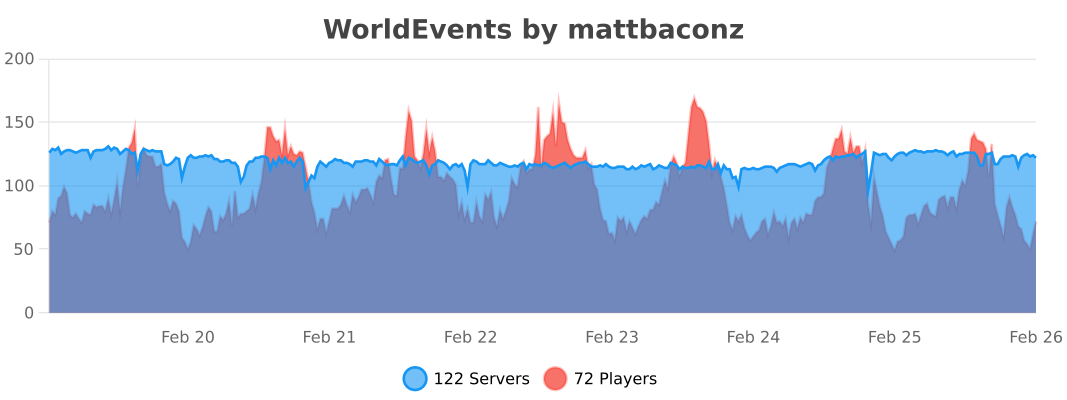
* **⚡ Zero Lag Promise:** Highly optimized implementation maintaining **0.02% CPU usage** even on high-population servers.
—
## 📂 Explore The Categories
### 🌪️ Atmosphere & Weather
* **Acid Rain:** Seek shelter or take toxic damage during storms.
* **Solar Flare:** Direct sunlight burns! Stay in the shadows or underwater to survive.
* **Meteor Shower:** Watch the skies for falling stars that drop rare loot (and cause explosions).
* **Gravity Trees:** Chop one log, and the entire tree falls with realistic animations.
### 👁️ Psychological Horror
* **Paranoia:** Players hear footsteps, creeper hisses, and whispers that aren’t actually there.
* **The Mist:** A thick, blinding fog rolls in, reducing visibility to just a few blocks.
* **Silent Mobs:** Hostile mobs spawn invisible and completely silent—you won’t see them until they strike.
### ⚔️ Combat & Survival
* **Blood Moon:** Mobs spawn with custom **Boss Attributes** (150+ HP), iron/diamond gear, and aggressive AI.
* **Vampirism:** Players heal a percentage of all damage dealt to entities.
* **Exploding Mobs:** Every mob becomes a potential TNT trap upon death.
* **Mob Surge:** 2x-5x spawn rates for a true apocalypse experience.
### 💎 Mining & Economy
* **Diamond Fever:** Greatly increased chance to find diamonds in ores or even regular stone.
* **Auto-Smelt:** All mined ores drop as refined ingots instantly.
* **Treasure Hunt:** A loot-filled chest spawns in the wilderness with coordinates broadcasted to all players.
* **Bumper Harvest:** Massive multipliers for all crop yields.
—
## 🛠️ Administration Made Easy
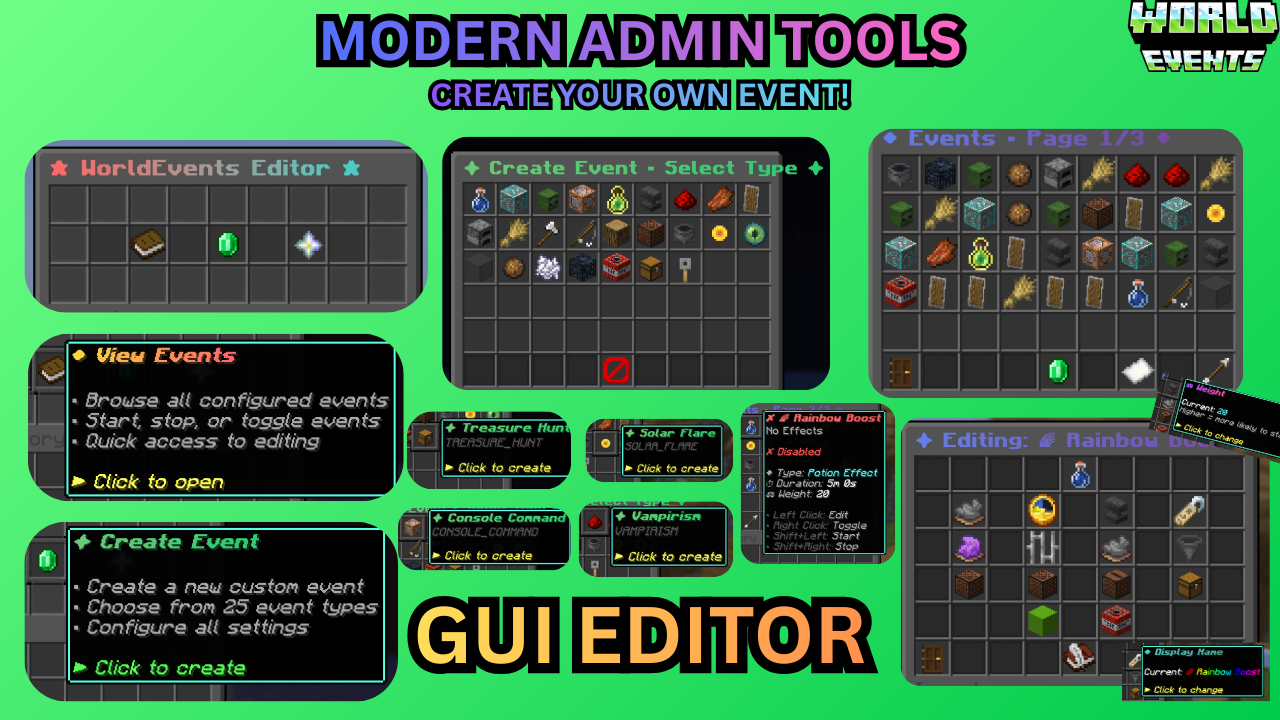
* **/wevent editor:** The ultimate GUI tool. Create, delete, and modify events live.
* **/wevent list:** View exactly what’s running, how much time is left, and which events are hidden.
* **/wevent extend :** Keep the hype going by adding time to an active event on the fly.
* **/wevent debug:** One-click diagnostic check for PAPI, Vault, WorldGuard, and version status.
* **/wevent reload:** Instantly reload all configurations without restarting the server.
—
## 🔌 Smart Integrations
We respect your server’s rules. World Events integrates natively with:
* **🛡️ Protection:** **WorldGuard, GriefPrevention, Towny,** and **Lands**. Meteors and explosions won’t grief protected claims.
* **📱 Bedrock:** **Floodgate** support ensures boss bars and MiniMessage symbols look perfect on mobile/console.
* **💰 Economy:** **Vault** integration for survival rewards and console command rewards.
* **⚔️ Custom Items:** Full support for **ItemsAdder** and **Nexo** in loot pools and mob equipment.
* **📊 Display:** **PlaceholderAPI** support for `%worldevents_active%` and per-event timers.
—
## 📊 Live Performance Metrics
[](https://bstats.org/plugin/bukkit/WorldEvents/28090)
## ❓ Need Support?
[](https://discord.com/invite/VQjTVKjs46)
WorldEditDisplay
# WorldEditDisplay
[](https://www.minecraft.net/)
[](https://www.oracle.com/java/)
[](LICENSE)
A server-side WorldEdit selection visualization plugin
—
### About
WorldEditDisplay is a server-side plugin for Minecraft that adds visual selection rendering for WorldEdit. It intercepts WorldEdit’s CUI (Client User Interface) protocol packets and renders selections using Display Entities on the server side. This means players can see their WorldEdit selections without installing any client-side mods.
### Features
**Selection Types**
– Cuboid – Box selections with edge lines and grid display
– Polygon – 2D polygon boundaries with vertical columns
– Ellipsoid – Smooth elliptical selections
– Cylinder – Circular selections with adjustable height
– Polyhedron – Complex 3D polyhedral structures
**Visual Rendering**
– Uses Minecraft’s Display Entity (TextDisplay) system
– Customizable hex colors (#RRGGBBAA) for all visual elements
– Adjustable line thickness and grid density
– Translucent face filling for Cuboid, Polygon, and Polyhedron regions
– Grid overlay for easier size calculation
**Multi-language Support**
The interface is available in multiple languages with automatic client language detection:
– Traditional Chinese (zh_tw)
– English (en_us)
**Player Settings**
Players can customize their own rendering preferences:
– Choose preferred hex colors for elements
– Enable or disable face filling
– Adjust line thickness within server limits
– Control grid spacing and density
– Changes apply immediately
**Selection Sharing**
– Share your WorldEdit selection with other players in real-time
– Invite, accept, revoke, and unwatch shares via `/wedisplay share`
– Each shared selection is displayed in a unique auto-generated color
– Share relationships persist across server restarts
**View All Mode** *(op-only by default)*
– Toggle monitoring of all online players’ selections via `/wedisplay view`
– Hide specific players from your view, toggle name labels, and list monitored players
**Configuration System**
– Server-wide defaults in `config.yml`
– Per-player overrides in `player_config/*.yml`
– Hot reload without server restart
### Requirements
– Minecraft 1.20 ~ 1.21.x (Paper / Folia / Spigot)
– Java 21 or higher
– Required plugins:
– [PacketEvents](https://github.com/retrooper/packetevents) 2.11.1+
### Installation
1. Make sure WorldEdit and PacketEvents are installed on your server
2. Download `WorldEditDisplay.jar`
3. Place it in your server’s `plugins` folder
4. Restart the server
5. Edit `plugins/WorldEditDisplay/config.yml` if needed
6. Use `/wedisplayreload` to reload the configuration
### Commands
**Admin Commands**
`/wedisplayreload` – Reload plugin configuration
– Permission: `worldeditdisplay.reload` (default: op)
**Player Commands**
`/wedisplay set ` – Configure personal rendering settings
– Example: `/wedisplay set cuboid edge_color #FFD700FF`
– Permission: `worldeditdisplay.use.settings`
`/wedisplay reset [setting]` – Reset to server defaults
– Example: `/wedisplay reset cuboid` (reset all settings)
– Example: `/wedisplay reset cuboid edge_color` (reset specific setting)
`/wedisplay show [renderer]` – Show current settings
– Example: `/wedisplay show` (show all)
– Example: `/wedisplay show cuboid` (show specific renderer)
`/wedisplay toggle` – Toggle rendering on/off
– Quick command to enable or disable selection visualization
– Works independently for each player
`/wedisplay reloadplayer` – Reload your personal configuration file
`/wedisplay lang ` – Set interface language
– Example: `/wedisplay lang en_us`
– Supported: zh_tw, en_us
`/wedisplay share invite ` – Invite a player to view your selection
– Permission: `worldeditdisplay.use.share.invite`
`/wedisplay share accept ` – Accept a pending share invitation
– Permission: `worldeditdisplay.use.share.accept`
`/wedisplay share revoke ` – Revoke a share you previously granted
– Permission: `worldeditdisplay.use.share.revoke`
`/wedisplay share unwatch ` – Stop watching another player’s selection
– Permission: `worldeditdisplay.use.share.unwatch`
`/wedisplay share list [page]` – List current share relationships
– Permission: `worldeditdisplay.use.share.list`
**View All Sub-commands** *(op-only by default)*
`/wedisplay view` – Toggle view-all mode (see all online players’ selections)
– Permission: `worldeditdisplay.use.view`
`/wedisplay view hide ` – Exclude a player from your view-all mode
– Permission: `worldeditdisplay.use.view.hide`
`/wedisplay view hideall` – Exclude all online players from view-all mode
– Permission: `worldeditdisplay.use.view.hide`
`/wedisplay view unhide ` – Remove exclusion for a player
– Permission: `worldeditdisplay.use.view.hide`
`/wedisplay view label` – Toggle name label display for watched selections
– Permission: `worldeditdisplay.use.view.label`
`/wedisplay view list [page]` – Show view-all monitoring status
– Permission: `worldeditdisplay.use.view.list`
### Configuration
The main configuration file is `config.yml`:
“`yaml
language:
default: “en-us” # Default language
auto_detect: true # Auto-detect player’s client language
allow_player_change: true # Allow players to change language manually
renderer:
cuboid:
edge_color: “#FFD700FF” # Color for edges in #RRGGBBAA
edge_thickness: 0.05 # Line thickness
grid_spacing: 8 # Grid spacing
fill_enabled: true # Enable face filling
fill_color: “#FF000040” # Face fill color
# … more settings
player_limits:
thickness:
min: 0.01 # Minimum thickness
max: 0.5 # Maximum thickness players can set
# … more limits
“`
Each renderer type has its own configuration section:
– **cuboid**

– **polygon**

– **ellipsoid**

– **cylinder**

– **polyhedron**

### How It Works
**Core Components**
– Packet listener intercepts WorldEdit CUI protocol messages
– Render engine creates Display Entities to visualize selections
– Configuration manager handles server-wide and per-player settings
– Language manager provides multi-language support
**Rendering Technology**
The plugin uses Minecraft’s Display Entity system:
– Display entities render the visual elements
– More efficient than particle effects
– Works with vanilla clients (no mods required)
**Performance**
– Only updates when selections change
– Server admins can limit grid density and segment counts
– Each player’s settings are independent
### Permissions
“`yaml
worldeditdisplay.use: # Use visualization features (default: true)
worldeditdisplay.use.settings: # Manage personal rendering settings (default: true)
worldeditdisplay.use.share: # General share feature toggle (default: true)
worldeditdisplay.use.share.invite: # Send share invitations (default: true)
worldeditdisplay.use.share.accept: # Accept share invitations (default: true)
worldeditdisplay.use.share.revoke: # Revoke granted shares (default: true)
worldeditdisplay.use.share.unwatch: # Stop watching a shared selection (default: true)
worldeditdisplay.use.share.list: # List share relationships (default: true)
worldeditdisplay.use.view: # Toggle view-all mode (default: op)
worldeditdisplay.use.view.defaultenable: # Auto-enable view-all on join (default: op)
worldeditdisplay.use.view.hide: # Hide players from view-all (default: op)
worldeditdisplay.use.view.list: # List view-all monitoring status (default: true)
worldeditdisplay.use.view.label: # Toggle name label display (default: true)
worldeditdisplay.use.view.label.defaultenable: # Auto-enable labels on join (default: true)
worldeditdisplay.reload: # Reload configuration (default: op)
worldeditdisplay.render.auto-enable: # Automatically enable rendering on join (default: true)
“`
**About Auto-Enable Permission**
The `worldeditdisplay.render.auto-enable` permission controls whether rendering is automatically enabled when a player joins the server:
– **With permission**: Rendering is enabled by default when logging in
– **Without permission**: Players must manually use `/wedisplay toggle` to enable rendering
This allows server admins to control which player groups have rendering enabled by default.
### Usage
**Basic Usage**
1. Use WorldEdit’s `//wand` command to get the selection tool
2. Left/right click blocks to define your selection
3. The selection is automatically visualized (no extra steps needed)
4. Use `/wedisplay` commands to customize the appearance
**Customization Examples**
“`bash
# Change cuboid edges to solid diamond blue
/wedisplay set cuboid edge_color #55FF55FF
# Make lines thicker
/wedisplay set cuboid edge_thickness 0.08
# Change grid spacing
/wedisplay set cuboid height_grid_division 2
# Enable face filling with half-transparent red
/wedisplay set cuboid fill_enabled true
/wedisplay set cuboid fill_color #FF000080
# Toggle rendering on/off
/wedisplay toggle
# Reset all settings
/wedisplay reset cuboid
“`
### Building
To build the plugin from source:
“`bash
mvn clean package
“`
The compiled jar will be in `target/WorldEditDisplay-version-platform.jar`
**Project Structure**
“`
src/main/java/dev/twme/worldeditdisplay/
├── event/ # CUI event system
├── display/ # Render engine
│ └── renderer/ # Renderer implementations
├── config/ # Configuration management
├── lang/ # Language system
├── command/ # Command handlers
├── listener/ # Packet listeners
└── player/ # Player data management
“`
### Contributing
Issues and pull requests are welcome.
### License
See [LICENSE](LICENSE) file for details.
### Credits
– **TWME-TW** – Developer
### Related Projects
– [WorldEdit](https://github.com/EngineHub/WorldEdit) – The core editing tool
– [WorldEditCUI](https://github.com/EngineHub/WorldEditCUI) – Client-side CUI mod (protocol reference)
– [PacketEvents](https://github.com/retrooper/packetevents) – Packet handling library
– [TextDisplayShapes](https://github.com/TWME-TW/TextDisplayShapes) – Shape rendering library used by the plugin
—
**Made with ❤️ by TWME-TW**
WorldEdit Selection Viewer
# WorldEdit Selection Viewer
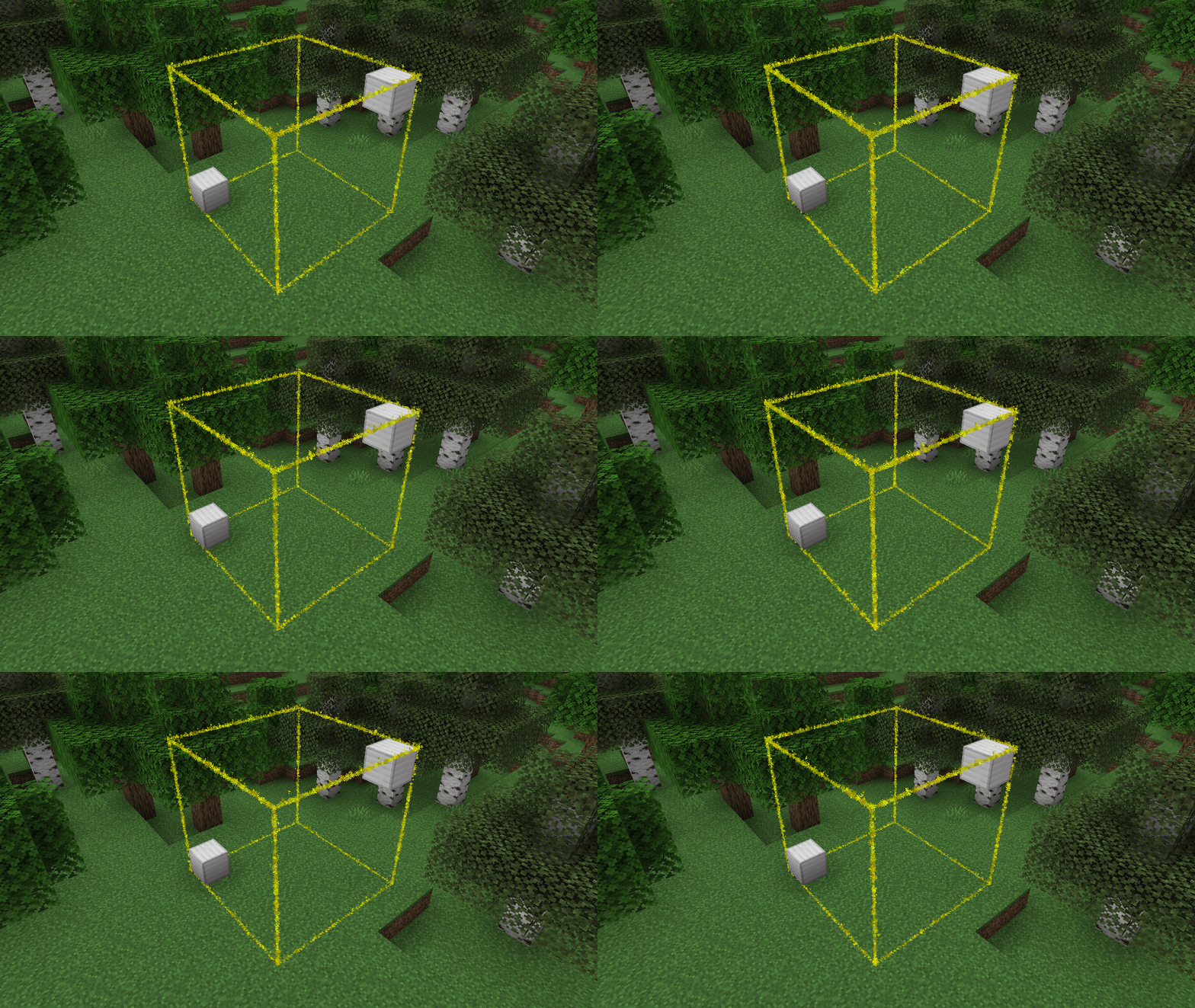
A simple plugin with no config that adds particle borders for viewing one’s
selected [WorldEdit](https://enginehub.org/worldedit) region.
_Note: While [FAWE](https://modrinth.com/plugin/fastasyncworldedit/) is not officially supported, it does seem to work_
## Setup
1. Download the jar
2. Put it into your `plugins` folder
3. Profit! — No configuration necessary!
## Commands
– `/wesv colour ` – Change the colour of the selection border
– `/wesv visibility ` – Change when the selection is visible
– `always` – Always show the selection
– `never` – Never show the selection
– `holding-tool` – Show the selection when holding the select tool (default: Wooden Axe)
## Permissions
– `worldedit-selection-viewer.view` – If the player can see the borders
– Default: Enabled for all players
– `worldedit-selection-viewer.command` – If the player can run the `/wesv` command
– Default: Enabled for all players
WorldColor
## WorldColor – A lightweight Minecraft server plugin that adds a colorful world indicator via the %color% placeholder.
> ## 🌟 Key Features:
Displays a customizable symbol (default: ☁) in different colors based on player’s world:
Overworld: Green (#8FBC8F)
Nether: Red (#F08080)
End: Purple (#9370DB)
Full configuration via config.yml:
Change the display symbol
Customize colors for each world
PlaceholderAPI support
/worldcolor-reload command to apply config changes without restart
> ## 📦 Installation:
Install [PlaceholerAPI](https://www.spigotmc.org/resources/placeholderapi.6245/)
Drop WorldColor.jar into your plugins folder
Configure colors and symbol in plugins/WorldColor/config.yml
Use the %color% placeholder anywhere!
Perfect for TAB plugins, chat formats, and scoreboards. Lightweight with no unnecessary dependencies.
WorldCleaner
# WorldCleaner
Required Plugin: https://modrinth.com/plugin/kotlinplugins
– Cleans up worlds from items every 10 minutes.
– You can access the removed items by command: “`/dustman “`
– Lightweight and efficient solution for cleaning all the worlds.
Required permission to execute the command: “` worldcleaner.dustman “`
– Players who have op ( ./op ) have access to it by default.
– Check out other plugins: https://modrinth.com/user/Winlyps