WorldResetPlugin is a powerful yet straightforward tool that allows server administrators to quickly reset and regenerate worlds directly from in-game or the console. Instead of manually deleting world folders and restarting the server, this plugin automates the entire process with a single command.
Using /resetworld , admins can instantly remove the specified world. The plugin will unload all players from the world, delete its folder from the server, and trigger a server restart, ensuring the world is regenerated cleanly on the next startup.
Key features include:
Simple command /resetworld to remove worlds.
Automatic player handling – all players in the world are safely teleported to the default spawn before deletion.
Permission-based access (worldreset.use) to prevent abuse.
Safe unloading of the target world before deletion.
Server restart integration to ensure clean regeneration.
Lightweight and efficient, with no unnecessary dependencies.
This plugin is perfect for survival servers, minigames, or any environment where worlds need to be reset regularly. With just one command, WorldResetPlugin ensures your server stays fresh, clean, and ready for new adventures.
WorldReset
❤️ **If you enjoy this plugin, please consider leaving a like! It means a lot for me.** ❤️
> **⚠️ Compatibility Note:** This plugin is built for **Minecraft 1.21.5 Purpur**. I tested it on Purpur 1.21.5, 1.21.11 and Spigot 1.21. It should work on 1.21-1.21.11 Spigot/Purpur/Paper/Bukkit.
If you want to report a bug or suggest a new plugin, join my [Discord server](https://discord.gg/A7WVnYj3BP).
Also check my other plugin **[SharedHealthAndHunger](https://modrinth.com/plugin/sharedhealthandhunger)**
# 🌍 WorldReset
**Reset your world instantly without restarting the server! Perfect for Speedruns, Manhunts, and Challenges.**
WorldReset is a plugin designed to manage game worlds dynamically. Instead of kicking players and restarting the server to generate a new map, this plugin moves players to a “Limbo” world, deletes the old map, generates a fresh one, and teleports everyone back—all within seconds!
### ✨ Key Features
* **🔄 Instant Reset:** Regenerates Overworld, Nether, and End without shutting down the server.
* **🌱 Seed Control:** Choose between **Random Seed** for a fresh experience or **Fixed Seed** for practice/speedruns.
* **🏹 Spawn Shifter:** Never reset for a good seed again! Configure a target **Structure** (e.g., Village) or **Biome** (e.g., Cherry Grove). The plugin intelligently scans the generated world and **moves the world spawn** directly to your target.
* **🏝️ Smart Land Seeker:** No more spawning in the middle of the ocean! After generating a new world (or shifting spawn), the plugin scans the terrain to ensure the spawn point is on solid ground.
* **☁️ Seamless Limbo:** Players are moved to a waiting world (“Limbo”) during generation.
* **⏱️ Advanced Speedrun Timer:** Built-in Action Bar stopwatch! Race in **Global** mode (first to finish stops the timer) or **Individual** mode (personal timers). Set automatic stop triggers (Goals) such as killing an entity (e.g., Ender Dragon), entering a specific portal, or getting an advancement!
* **🧭 Player Tracker Radar (Compass):** A dynamic compass ribbon at the top of your screen! Track other players in real-time. Players appear as colored dots (`●`) on the compass based on where you look. Fully customizable player colors.
* **🌍 Multi-Language:** Full support for **English** and **Polish** (changeable via command).
—
### 📜 Commands and Permissions
Main command: `/worldreset` or `/wr`
| Command | Description | Permission |
| — | — | — |
| `/wr reset` | Instantly resets the game: moves everyone to Limbo, regenerates the world, and starts a new game. | `worldreset.reset` |
| `/wr limbo` | Toggles Limbo mode. Moves you to Limbo (Pause) or starts a new game if you are already in Limbo. | `worldreset.limbo` |
| `/wr death` | Toggles **Reset on Death** mode (Hardcore) ON/OFF. | `worldreset.death` |
| `/wr silent` | Toggles **Silent Mode** (hides global chat messages) ON/OFF. | `worldreset.silent` |
| `/wr filter structure ` | Sets a target structure (e.g., VILLAGE). Auto-clears biome filter. | `worldreset.filter` |
| `/wr filter biome ` | Sets a target biome (e.g., PLAINS). Auto-clears structure filter. | `worldreset.filter` |
| `/wr seed ` | Sets a fixed seed for future resets. | `worldreset.seed` |
| `/wr seed` | Disables fixed seed (enables Random Seed mode). | `worldreset.seed` |
| `/wr timer ` | Turns the speedrun stopwatch system ON/OFF. | `worldreset.timer` |
| `/wr timer ` | Controls the built-in speedrun stopwatch. | `worldreset.timer` |
| `/wr timer ` | Configures timer settings (RTA/IGT, Global/Individual, end triggers). | `worldreset.timer` |
| `/wr compass ` | Toggles the player tracker radar on top of the screen. | `worldreset.compass` |
| `/wr compass color [player] ` | Sets a specific radar dot color for a player. | `worldreset.compass` |
| `/wr language ` | Changes the plugin language (English / Polish). | `worldreset.language` |
| `/wr reload` | Reloads configuration and language files instantly. | `worldreset.admin` |
1. Download the `.jar` file.
2. Place it in the `/plugins/` folder of your server (Spigot/Paper/Purpur **1.21+**).
3. **Restart** the server.
4. Done! The plugin will generate the `limbo` world and the `game_world`.
* *Tip: To use your own custom lobby, simply stop the server, delete the generated `limbo` folder, and upload your own world folder named `limbo`.*
—
### ❤️ Credits
The default Limbo map is **Floating Island Sanctuary**.
All credits go to the original creator.
**[Download Original Map Here](https://www.planetminecraft.com/project/floating-island-sanctuary/)**
This plugin outputs the information about the player’s location in the dimension through Placeholder in the Tab or game chat.
– World – green color
– World_nether – red color
– World_end – purple color
Placeholder:
“`
%worldplaceholder%
“`
“`
messages:
noPermission: “&#dc143cYou do not have sufficient permissions to perform this action!”
reloaded: “�ff7fPlugin successfully reloaded”
# It will look like &#c0c0c0◆
worldSymbol: “◆”
# Default color, used for worlds not specified below
defaultColor: “&#c0c0c0”
# You can use both HEX colors in the format &#abcdef and regular colors using &a
worlds:
world: “�ff7f”
world_nether: “&#dc143c”
world_the_end: “a2be2”
“`
In the config.yml, you can change the colors as well as the symbol.
WorldName
## 🌍 Dimension Nickname Colors
> **[EN]**
> This plugin changes the color of player nicknames in chat depending on the dimension they are currently in.
> **[RU]**
> Этот плагин меняет цвет никнеймов игроков в чате в зависимости от измерения, в котором они находятся.
—
## 🎨 Nickname Colors / Цвета никнеймов
> **[EN]**
> – **Overworld** — 🟢 Green
> – **Nether** — 🔴 Red
> – **End** — 🟦 Cyan
1. Download a compatible **server core**
([Paper](https://papermc.io/downloads/paper) / [Purpur](https://purpurmc.org/download/purpur)).
2. Download the plugin `.jar` file from [Modrinth](https://modrinth.com/plugin/worldname/versions).
3. Start the server once to generate all folders.
4. Stop the server completely.
5. Open the `plugins` folder in your server directory.
6. Move the downloaded plugin `.jar` file into the `plugins` folder.
7. Start the server again.
8. The plugin will automatically start working — no configuration required.
—
### 🔧 [RU] Гайд по установке
1. Скачайте подходящее **ядро сервера**
([Paper](https://papermc.io/downloads/paper) / [Purpur](https://purpurmc.org/download/purpur)).
2. Скачайте файл плагина `.jar` со [страницы Modrinth](https://modrinth.com/plugin/worldname/versions).
3. Запустите сервер **один раз**, чтобы создались все папки.
4. Полностью **выключите сервер**.
5. Откройте папку `plugins` в директории сервера.
6. Переместите файл плагина `.jar` в папку `plugins`.
7. Снова запустите сервер.
8. Плагин сразу начнёт работать — настройка не требуется.
WorldMagic is minecraft paper plugin that use nms to provide better world management.
Supports paper versions **1.20.6** and above.
On versions lower than **1.20.6** plugin will be disabled.
—
## Features
– World creation
– Minecraft 1.16 generation pipeline support
– Plugins generation support
– Async world initialization
– Gamerules support
– Worlds without save
—
## Wiki
More information about plugin can be founded on the [wiki](https://github.com/hotwopik/WorldMagic/wiki)
WorldLockPlus
# WorldLockPlus
🔒 **Secure world access with enterprise-grade password protection**
WorldLockPlus is a powerful Bukkit/Spigot plugin that adds password protection to worlds managed by Multiverse-Core. **Even server operators must enter passwords to access protected worlds** (unless they have the bypass permission).
## ✨ Features
– 🔐 **Enterprise Security**: Uses bcrypt password hashing (work factor 12) for maximum security
– 🛡️ **Operator Protection**: Even server operators must enter passwords unless they have bypass permission
– 🚫 **Comprehensive Blocking**: Prevents teleportation, world changes, and unauthorized access
– ⏱️ **Session-Based Access**: Authorization lasts until player logout for convenience
– 💾 **Persistent Storage**: Passwords are securely stored in config files
– 🎯 **Multiverse Integration**: Seamlessly works with Multiverse-Core
– 🔄 **Automatic Migration**: Detects and warns about legacy password formats
1. Install [Multiverse-Core](https://www.spigotmc.org/resources/multiverse-core.390/) first
2. Download WorldLockPlus and place it in your `plugins/` folder
3. Restart your server
4. Configure world passwords using the commands below
## 📖 Commands
### Admin Commands
**`/worldlock`** or **`/wlock`** (aliases)
– `/worldlock set ` – Set a password for a world
– `/worldlock remove ` – Remove password protection from a world
– `/worldlock list` – List all password-protected worlds
**Permission**: `worldlock.admin` (default: OP)
### Player Commands
**`/wunlock`**
– `/wunlock ` – Enter password to unlock access to a protected world
**Permission**: `worldlock.use` (default: true)
## 🔑 Permissions
– `worldlock.admin` – Full access to world lock management (default: OP)
– `worldlock.use` – Ability to unlock password-protected worlds (default: true)
– `worldlock.bypass` – Bypass world password protection entirely (default: false)
## 💡 Usage Example
“`
# Admin protects the “lobby” world
/worldlock set lobby MySecurePassword123
# Player tries to teleport (blocked)
/mv tp lobby
# Message: “⚠ This world is password protected! Use /wunlock lobby to enter.”
# Player unlocks access
/wunlock lobby MySecurePassword123
# Message: “Password correct! Teleporting to ‘lobby’…”
# Message: “Access granted until logout.”
# Player can now access the world
/mv tp lobby
“`
## 🔒 Security Features
– **bcrypt Hashing**: Industry-standard password hashing with work factor 12 (4096 iterations)
– **Built-in Salt**: Each password hash includes a unique salt automatically
– **Brute-Force Resistant**: Adaptive hashing makes attacks computationally expensive
– **Secure Storage**: Passwords are never stored in plain text
– **Session Management**: Access is cleared on logout for security
## ⚙️ Configuration
Passwords are automatically stored in `plugins/WorldLockPlus/config.yml` using bcrypt format. The configuration file is managed automatically – no manual editing required.
## ❓ Troubleshooting
– **Plugin won’t enable**: Ensure Multiverse-Core is installed and enabled first
– **Can’t access world**: Use `/wunlock ` to authorize yourself
– **Operators bypassing**: Check they don’t have `worldlock.bypass` permission
– **Legacy passwords**: If you see warnings about legacy formats, reset passwords using `/worldlock set`
## 📝 Notes
– Authorization persists until player logout for convenience
– Players are automatically teleported away from protected worlds if they lose authorization
– The plugin works with all Multiverse-Core world management features
– Passwords are case-sensitive

Please join the Streamline Hub Discord in order to get updates and for me to fully assist you with bugs, questions, or suggestions.

Block players from entering or teleporting to specified worlds — All configurable with commands.

This offers a very simple configuration and setup all while remaining very light-weight.

1. Download and install BukkitOfUtils. Found here: [BukkitOfUtils](https://modrinth.com/plugin/bukkitofutils)
2. Download the correct version of this plugin for you server version.
3. Place in your `plugins` folder.
4. Stop server.
5. Start server.
6. Use to your liking.

## How to block a world
1. Install plugin. (Shown above.)
2. `/manageworlds add ` – where `` is replaced with the world you want to block.
## Notes
Players with operator or the `*` permission can access all worlds by default.
To disable these players from bypassing the world block, set their permission for `worldlock.bypass.*` to false.
## Functions
* Block specified worlds from:
* Teleportation.
* Moving to.
* Portal-Warping to.
* List blocked worlds.
* Bypassable with permissions.
* Permission: `worldlock.bypass.`

## Commands
* `/manageworlds`
* `/manageworlds add `
* Adds a world to the blocked worlds.
* `/manageworlds remove `
* Removes a world from the blocked worlds.
* `/manageworlds list`
* Lists all worlds in the blocked worlds list.
WorldLobby999
## Core Features
1. World Management System
World Creation
– Players can create unlimited personal worlds
– Worlds persist between server restarts
– Automatic world loading/unloading based on player activity
– Support for different world types and environments
World Categories
– **Creative Build**: Traditional creative building worlds
– **Adventure/Story**: Narrative-driven worlds
– **Parkour**: Obstacle course and challenge worlds
– **PvP/Minigame**: Competitive gameplay worlds
– **Prototype/Development**: Testing and development worlds
World Visibility Settings
– **Public**: Anyone can join
– **Private**: Owner access only
– **Friends Only**: Invited players only
– **Whitelisted**: Specific player whitelist
2. Advanced Mode System
Build Mode
– Unlimited creative inventory
– Flight enabled
– No damage taken
– Fast block breaking
– Access to build tools (copy, paste, fill, brush)
Play Mode
– Game rules enforced
– Adventure/survival restrictions
– Scripts and events active
– Normal gameplay experience
Dev Mode
– Creative permissions with script access
– Developer tools available
– Debugging features enabled
– Testing environment
3. Player Context System
Player Roles
– **Owner**: Full control over world (scripts, settings, delete, invite, promote)
– **Developer**: Can modify scripts and world logic, but not delete world
– **Builder**: Can modify blocks and world structures
– **Player**: Can play the world, subject to script-triggered rules
– **Visitor**: Limited access, cannot modify world unless explicitly allowed
Context Management
– Persistent player settings across sessions
– World-specific preferences and configurations
– Mode-aware player behavior
– Player location tracking across worlds
4. World Permission System
Fine-grained Access Control
– Add/remove builders for your worlds
– Grant developer access for script editing
– Maintain whitelist for restricted worlds
– Manage player roles dynamically
World Browser
– GUI-based world browsing system
– Category filtering
– Search functionality
– World information display
– Pagination for large server lists
– Visual world representation
World Discovery
– `/worldlobby games` – Open world browser
– `/worldlobby list` – Text-based world list
– `/worldlobby join ` – Join specific world
– `/worldlobby locate ` – Find player’s location
6. World Configuration
Dynamic Settings
– Change world visibility (public/private/etc.)
– Set world categories
– Toggle weather systems
– Enable/disable mob spawning
– Update world descriptions
– Configure game rules
Advanced Lobby System
– Themed lobby areas (Space, Ocean, Forest)
– Interactive lobby elements
– Featured worlds display
– Quick travel options
– Lobby-specific features
World Statistics
– Track world usage and metrics
– Player count tracking
– Creation timestamps
– `/worldlobby stats [world-name]`
Data Management
– Persistent world metadata
– Player context preservation
– Configuration file management
– World state tracking
Performance Optimization
– Automatic world unloading
– Efficient player tracking
– Minimal resource usage
– Asynchronous operations where possible
Commands Reference
Basic Commands
– `/worldlobby` – Main command
– `/worldlobby help` – Show help
– `/worldlobby create ` – Create world
– `/worldlobby list` – List all worlds
– `/worldlobby join ` – Join world
– `/worldlobby delete ` – Delete world
– `/worldlobby lobby` – Return to lobby
Feature Parity
WorldLobby999 includes comprehensive feature parity with OpenCreative+:
✅ **World Management**: Full world creation, deletion, and management
✅ **Mode System**: Build, Play, and Dev modes with appropriate rule sets
✅ **Player Roles**: Owner, Developer, Builder, Player, and Visitor roles
✅ **Visibility Controls**: Public, Private, Friends Only, Whitelisted worlds
✅ **World Categories**: Creative, Adventure, Parkour, PvP, and Development categories
✅ **World Browser**: GUI-based world discovery system
✅ **Player Context**: Advanced context system with persistent settings
✅ **Permission System**: Comprehensive access control system
✅ **World Configuration**: Full settings and configuration management
WorldListTrashCan
## Allows players to customize their home world’s trash bin.
This cleaning plugin operates within a specific world (the player’s home) and, when cleaning items, gathers them into a trash bin that the player has personally set up in their home. It combines various features, supports Folia, boasts highly configurable settings, and is compatible with multiple languages.
(This plugin is more suitable for pairing a world with a team’s server, such as the Home server (using the PlayerWorldsPro plugin or other Home plugin servers). If you close the World Garbage can, its functions can also completely replace other cleaning plugins)
**Now, here’s a hellish joke for you:**
**Player** : Hey, my quantum solar panels got swept away by the cleaning plugin. Can you compensate me?
**OP** : No way, you can’t prove it, and my cleaning plugin doesn’t keep records.
**Player** : I just bought them!
**OP** : What if you hid them, and I compensate you, essentially doubling them?
**Player** : ***
**OP** : Even if there were public trash bins on the server, someone would snatch up those solar panels.
**OP** : What should I do?
And there you have it, this plugin was born.
When Foila supports multiple worlds, this cleaning plugin will benefit everyone
### Features:
—
– **Fully customizable tip**
Support multiple prompt messages
You can achieve fully customized prompts
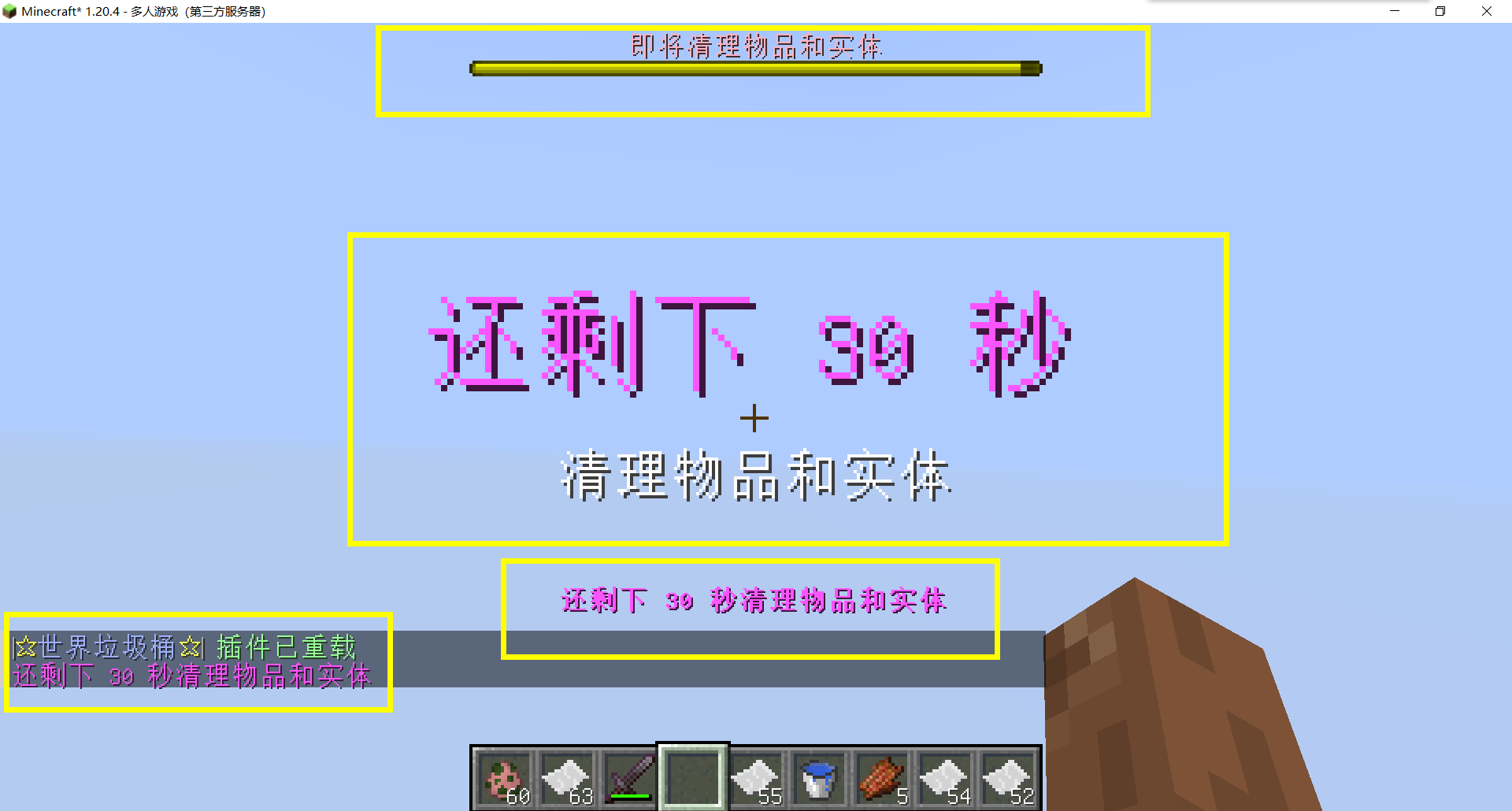
For example, when there are three seconds left, let “bossbar”, “actionbar”, “chat”,and “title” prompt together,
Alternatively, you can have the bossbar change its style every second (solid, non solid, including its color, can be different every second)
After version 5.7.0, it supports switching between different prompt sounds per second, as well as setting different volumes and tones per second
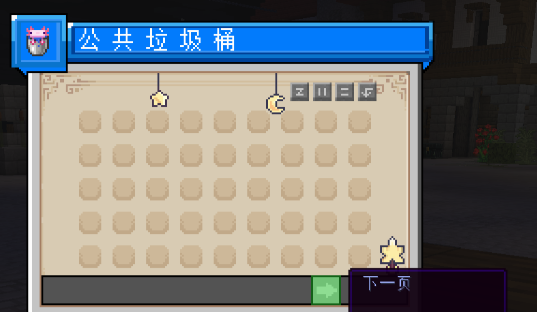
– Thank you to QQ 1664907770 (“笑脸猫”) for providing the material package for the “itemsadder” plugin (applicable to public trash cans) [Click here to download](https://www.hostize.com/zh/v/3TE06XKXx8) (IteamsAdder/WorldTrashCan config and resource)
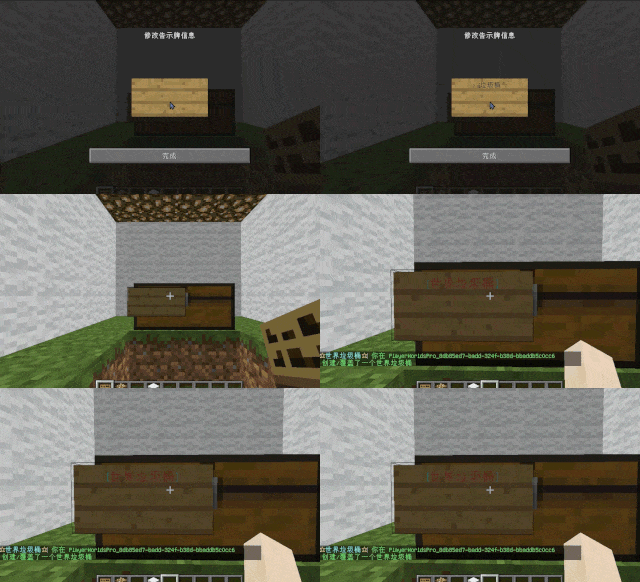
– **Player-Created World Trash Bin:**
Players have the ability to create a trash bin in their world.
Similar to the mechanics of previous sign-locked chests, the font on the sign will undergo a
transformation after creation.
When the cleaning process is initiated, items will be automatically added to the home trash bin.
Configurable settings allow players to specify detection names and transformed names after cleaning.
“To meet the demands of a small number of people, here is a reminder”
How to create a world trash can:
Place the chest on the ground, hold the signboard and right-click on the chest. Enter [世界垃圾桶] in the configuration file (configured in Set. SighCheckName), and once the font is converted, it is created. Every time the garbage is cleaned, it will be placed in the marked chest
In the default configuration file, the names of the three worlds “world, dim-1, dim1” are disabled, creating a “world trash can” (excluding op)
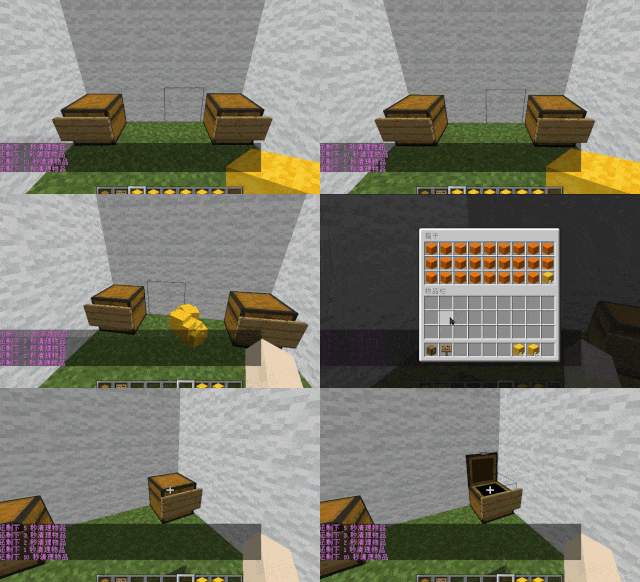
– **Support for Multiple Home Trash Bins:**
Players can use commands to grant special players the ability to place additional home trash bins.
Default quantities for home trash bins are configurable.
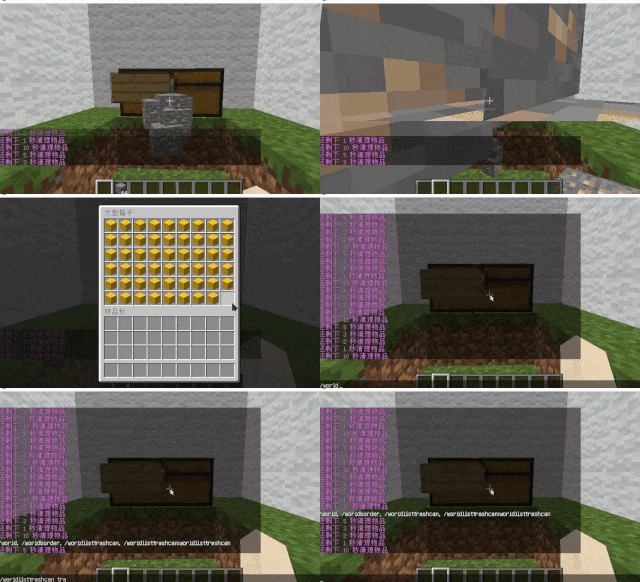
– **Home Trash Bin Overflow to Public Trash Bin:**
Items from home trash bins overflow into the public trash bin.
Public trash bins can have a configurable maximum page count and a blacklist.
– **Item Exclusion and Public Trash Bin Handling:**
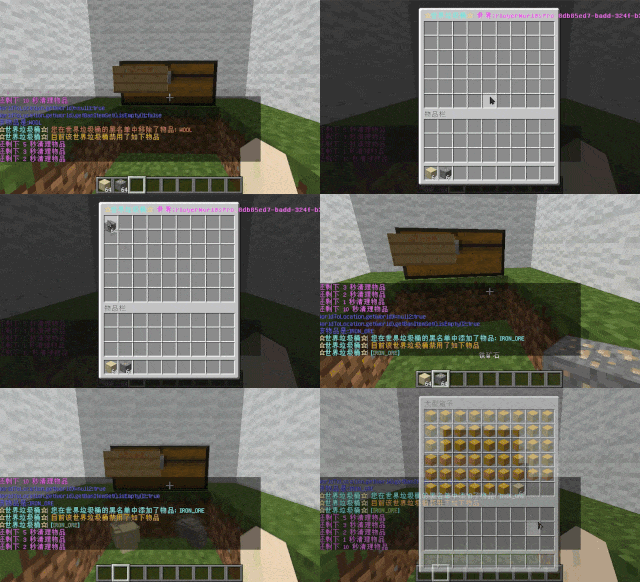
Players can add items to the home trash bin blacklist to prevent their recycling.
Excluded items go directly to the public trash bin.
Configuration includes support for excluding items with special lore (e.g., items from the QS shop with
showLocation).
Public trash bins can either clear new items during each sweep or accumulate all trash without clearing.
– **The public trash can can enable logging:**
Record what items the player took away

– **Entity Cleanup:**
Optional cleanup of all animals/monsters.
Command (/WorldListTrashCan Look) to view entity types and configure entity blacklists/whitelists.
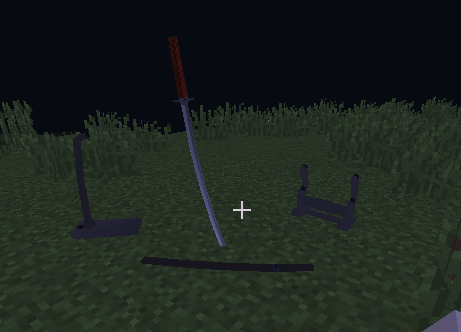
Support for cleaning special entities from mod.
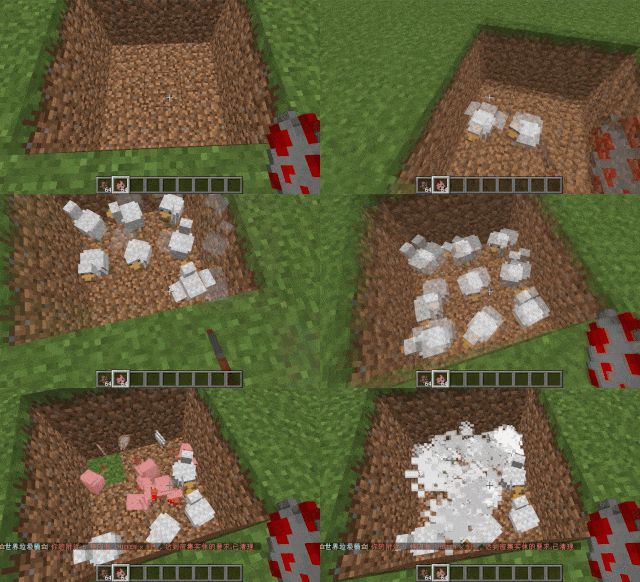
– **Dense Entity Cleanup:**
Configurable radius, target quantity, kill or remove options, and player notifications for dense entity
cleanup.
– **Spam/Command Limitations:**
Configurable chat/command intervals, whitelist commands, and informative messages.
Defense against item dropping.
Players can manually enable or disable the item-drop defense mode.
– **Performance Optimization:**
All optimizations have configurable options in the settings.
1. Quick removal of uncollectible arrows (e.g., arrows from skeletons or bows with infinite
enchantments).
2. Prohibit players from trampling on farmland
### How to Install
—
– **Throw it into the Plugins folder**
### Commands:
—
– **/wtc reload**
Reloads the plugin.
– **/wtc GlobalTrash**
Opens the public trash bin.
– **/wtc help**
Displays help information.
– **/wtc ban**
Opens the local world trash blacklist GUI.
– **/wtc Look**
Right-click to get entity type (useful for adding to the configuration blacklist/whitelist).
– **/wtc GlobalBan**
Opens the global world trash blacklist GUI.
– **/wtc add [WorldName] [Quantity]**
Sets the maximum quantity for the trash bin in the specified world (defaults to the world at your feet if not specified).
– **/wtc DropMode**
Opens or closes drop mode.
### Placeholders
—
– **%WTC_ClearTime%**:
Time until the next cleaning.
### Permission
—
– **WorldListTrashCan.BanGui**:
Permission to open the GUI for adding items to the player’s home trash bin blacklist.
– **WorldListTrashCan.GlobalTrashOpen**:
Permission to open the global trash bin.
– **WorldListTrashCan.help**:
Permission to access command help.
– **WorldListTrashCan.DropMode**:
Permission to open or close drop mode.
***(The above is available by default)***
– **WorldListTrashCan.GlobalBan**:
Permission to open the global trash bin blacklist GUI.
– **WorldListTrashCan.Look**:
Permission to right-click and query the entity type.
***(The above is not available by default)***
WorldGuardRegionProtect
**If you with try first newest, use the latest dev build
Start from version 1.8.0.21 will support Bukkit/Spigot/Folia and other forks of Paper.
Versions after 1.0.3.21 above require JAVA 21+!
If you need plugin support JAVA 17+, so you need just download 1.0.2.17 special version
This is not a WorldGuard. This plugin addon for a WorldGuard!
You don’t know where you can get WG for new released versions?
So you just can check on EngineHub from original authors for dev-builds.**
**Do you want protect from superpickaxe? Or feauters protection for players? Look at premium version.
The free version of the plugin will continue to be updated!
❤️Click here to check out the plus version! ❤️**
Do you speak multiple languages? If so, we always welcome contributions to our [Crowdin project](https://crowdin.com/project/worldguardregionprotect)
If you have a idea for plugin, you can created issue on [github](https://github.com/RSTeamCore/WorldGuardRegionProtect/issues/new/choose)
## Support
When reporting a bug:
Use [the issue tracker](https://github.com/RSTeamCore/WorldGuardRegionProtect/issues)! Don’t report bugs in the reviews and discussions. Please search for duplicates before reporting a new issue!
Provide as much information as possible. Provide your WorldGuardRegionProtect version and Spigot/Paper version.
Provide any stack traces or “errors” using [pastebin](http://pastebin.com/).
## [Join us in the discord!](https://discord.gg/kvqvA3GTVF)
## Opportunities of plugin
By entering the name of the region in the plugin config.yml, you will add protection by plugin. Nobody can interact with the region that is registered in config.yml. Even the operators are not able to do this!
This plugin is for extended protection of an existing region from WorldGuard. For example, possible damage region from the administration. Who has permission access from plugin WorldGuard, or from operators.
## With plugin, you can do advanced protect your region
1. Nobody cannot break or place blocks in region.
2. It is possible to enable/disable the limitation of interaction with the transport.
3. Protecting frame, painting from any damage from arrows, trident, snowball, eggs, enderpearl and player.
4. Protect from any change in the frame (On 1.18 MC glow frame too).
5. Nobody cannot damage armor stand and taking or place armor from it.
6. Cannot use none of the buckets in region.
7. Creeper, Wither, Ghast, Primed TNT, cannot blowing up stuff in the region. Skeleton, Stray and Shulker bullet cannot destroy frame/glow frame and painting.
8. TNT, minecart with TNT, Respawn Anchor and ender crystal can’t damage any blocks/frames in region.
9. Support for banned dangerous commands. Separate commands were added and tested used by FastAsyncWorldEditWorldEdit in the protected region.
10. Nobody cannot remove region or change flags in protected region. Just example using like:
– “/rg rem spawn”,
– “/rg rem -f spawn”,
– “/rg rem -f spawn -w world”,
– “/rg addowner spawn Steve” etc.
11. You can specify a special region inside the protected region in which you can “break and place” or “only break” (specified in config.yml)
## Permissions
1. If you need give access to region for Builder team or any member from your staff, just add permissions on LuckPerms or PermissionsEx: wgrp.regionprotect
2. Who has the permissions star, I mean ‘*’ in LuckPerms or PermissionsEx may will be given access to protected region by WGRP.
3. By default, all who is operators are not allowed access into the region.
## Permissions:
– wgrp.command.wgrpbase – access to /wgrp command.
– wgrp.command.reload – access to /wgrp reload and /wgrp reloadmsg command to reload the configurations file.
– wgrp.command.spy – notifies the administrator about interacting with the protected region (BREAK or PLACE only now).
– wgrp.regionprotect – access to protected regions.
– wgrp.notify.admin – notifies the administrator when an attempt is made to use WGWE(FAWE) commands in a protected region.
– wgrp.command.addregion – access to the command with the ability to add a region to the protected region by admin.
– wgrp.command.removeregion – access to the command with the ability to remove the region from the protection by admin.
## Commands:
– /wgrp help – help on all commands.
– /wgrp about – additional information, useful!
– /wgrp reload – reload config.yml and language files.
– /wgrp addregion [region] [world] – add a region to the configuration for protection.
– /wgrp removeregion [region] [world] – delete a region from the configuration to remove protection.
View the default config you [can here](https://github.com/RSTeamCore/WorldGuardRegionProtect/blob/master/wgrp-common/src/main/resources/config.yml)!