XCommand Rename

**XCommandRename** is a lightweight and powerful plugin for Paper Minecraft servers that allows you to create shortcuts for existing commands!
### Features
– **Simple Configuration** – All commands are configured through a user-friendly config.yml
– **Dynamic Registration** – Commands are automatically registered upon startup
– **Argument Support** – Use {1}, {2}, and so on to pass arguments
– **Permission System** – Configure access rights through permissions and operators-only
– **Colorful Messages** – Full support for RGB color codes
– **Instant Reload** – Apply changes without restarting the server
– **Multiline Messages** – Support for complex text notifications
– **Wide Compatibility** – Works on Paper from 1.16.5 to 1.21.10+
### Examples of use
– **Shortening long commands:**
– Instead of /server hub, players can simply write /hub
– **Commands with arguments:**
– “/gmode creative” will execute “/gamemode creative”
– “/gmode survival Player123” will execute “/gamemode survival Player123”
– **Commands with multiple arguments:**
– “/pay Player123 1000” will execute “/economy give Player123 1000”
### Commands
– **/xcr reload** – Reload the plugin configuration
### Access rights
– **xcr.reload** – Reload the plugin (default for OP)
### Argument support
– Use placeholders in the execute field to pass arguments:
– **{1}** – the first argument
– **{2}** – the second argument
– **{3}** – the third argument
– and so on…
### Technical details
– API version: **1.16**
– Supported platforms: **Paper**
– Supported versions: **1.16.5** – **1.21.10+**
– Requires **Java: 17+**
– Dependencies: **None**
XColor
###### **Update for this plugin incoming!!**
### Features
1. **Customizable Prefixes:**
– Modify the your Name as the owner want with Minimessage Format:
`/cosmetics prefix ` – MiniMessage Support
2. **Reset Options:**
– Reset customizations for name or prefix:
`/cosmetics reset`
### Benefits:
– **Enhanced Personalization:** Express yourself with unique colors, bold styles, and custom statuses.
– **Easy Reset Options:** Quickly return to default settings without hassle.
– **Role-Specific Access (Upcoming):** Admins can control access with a detailed permission system for better server management.
### Commands:
– “/cosmetics prefix “
– “/cosmetics reset“
### Permissions
– “colorstatus.command.cosmetics.reset“
– “colorstatus.command.cosmetics.prefix“
## Placeholder API
– Placeholder
– `%xcolor_cosmetics_prefix_name%`
– `%xcolor_cosmetics_prefix_text%`
### Coming SOON
– ~~Placeholder API~~
– Database for Multi-server support
– More Cosmetics
– More Commands/Commands Options
xCoinFlip
🎲 xCoinFlip
The best modern and immersive betting system for your Minecraft server
—

—
**xCoinFlip** is a highly optimized and fully customizable plugin that adds a “Heads or Tails” (Coinflip) betting system to your server. Designed to offer a fresh and addictive experience, it allows players to wager their money on 1v1 duels with high-quality animations, boosting engagement and improving your network’s economy flow.
—
> ### ✨ Recent Highlights (v1.0.1)
> * **New:** **Cryptographically Secure Randomness** using `SecureRandom` for 100% fair duels.
> * **New:** **Suspenseful Roulette Animation** with realistic friction/slowing effects.
> * **New:** **Trillion (T) Support** in smart amount parsing for large economies.
> * **New:** **Chat-based Creation Prompt** to quickly set bets without long commands.
—
> ### 🔥 Key Features
– 🎰 **Immersive Roulette Animation:** Unlike other basic betting plugins, our GUI features a spectacular “friction” spin effect. The player heads start spinning smoothly and gradually slow down, generating an incredible level of tension and suspense just before the winner is revealed.
– 🔒 **Provably Fair:** The probability engine is entirely unpredictable. Written using secure randomness parameters (`SecureRandom`), it guarantees a purely impartial 50/50 ratio, eliminating any chance of scams or player exploits.
– 💬 **Lightning-Fast Wagers:** Tired of typing long commands? Players can simply open the GUI, click the “Create Game” button, and the plugin will seamlessly capture their next chat message. It even supports amount abbreviations! Drop a `1.5k`, `50m`, `3B`, or even **`2T`** and the plugin handles the rest.
– 💾 **Excellent Performance (H2 Built-in):** Comes with its own asynchronous built-in database manager to store pending games without consuming main-thread resources, meaning you don’t even need to hassle with external MySQL setups.
– 🎨 **100% Customizable:** The power is in your hands. Modify the GUI layouts (slots, titles, items), chat messages, action bars, sounds, win chances, and global broadcasts directly through the `.yml` files.
– 🎆 **Visual Rewards:** Spectacular victory effects including snappy sounds, firework launches, and totem particles to properly celebrate large wins.
– 📡 **Discord Webhook Integration:** Automatically broadcast massive wins and epic duels directly to your Discord community channels via configurable webhooks.
—
> ### ⚙️ Commands & Permissions
**General Commands – `/cf` or `/coinflip`**
* `/cf menu` : Opens the main active games GUI. *(No specific permission required by default)*
* `/cf create ` : Instantly create a new coinflip wager without opening the GUI.
* `/cf help` : View available commands based on player privileges.
**Admin Commands:**
* `/cf reload` : Hot-reload `config.yml`, `gui.yml`, and `animation.yml` without needing to restart your server.
* **Default Admin Permission:** `xcoinflip.admin` (Can be modified in config).
—
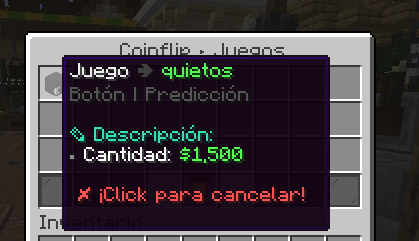
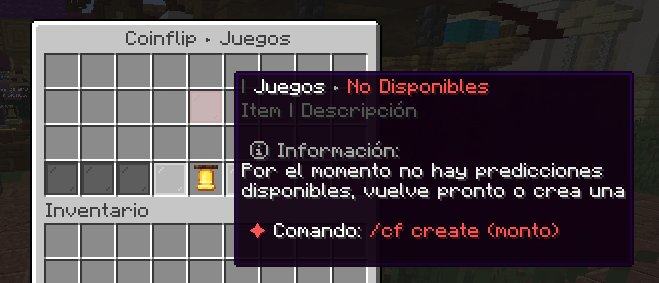
> ### 🎢 Example Menu (Custom)
—
> ### 🧩 Dependencies
To ensure xCoinFlip runs smoothly, your server requires the following:
* **[Vault](https://modrinth.com/plugin/vault)** – *(Required)*
* **Any Economy Provider** (EssentialsX, CMI, etc.) – *(Required)*
* **[PlaceholderAPI](https://modrinth.com/plugin/placeholderapi)** – *(Optional but recommended)*
—
> ## 💗 Servers that use our plugin
> * **SolarCraftMc** (Survival Vanilla)
> * **MineFania** (Survival OP)
—
> ### 💬 Support & Community
> Developed and maintained by the **xPlugins** team.
> If you have any questions, suggestions, or need help configuring the plugin, you are more than welcome to join our official [Discord](https://xplugins.es/).
>
> 😊 **Available in: ES / EN / CUSTOM**
X-Clearlag
[](https://www.spigotmc.org/resources/x-clearlag-custom-cleaning-1-8-1-21-11.132713/) [](https://wiki-x-proyects.vercel.app/) [](https://discord.com/invite/Yb6GsfGWmd)
# **X-ClearLag**
*Next-generation entity cleanup with Folia support, proximity protection, and multi-language modular tasks*
—
## 📄 Description
**X-ClearLag** is the ultimate, professional-grade entity management solution for modern servers. Completely rebuilt from the ground up, it offers **native Folia compatibility**, wall-clock precision tasks, and advanced performance optimizations. Protect your players’ experience with the brand-new **Proximity Protection system**, automatically intervene during lag spikes with **TPS-based emergency cleanups**, and monitor your world smoothly using the **Interactive Chunk Inspector**.
All of this without a single annoying console warning. Supports **Spigot, Paper, Purpur, and Folia (1.8.x – 26.1)**.
## ⚡ Main Commands
**`/xcl [subcommand]`** (*Aliases: `/clearlag`, `/xclearlag`*)
– **`help`** – Shows the interactive help menu.
– **`reload`** – Hot-reloads configuration and language files.
– **`clear`** – Manually triggers the main cleanup tasks instantly.
– **`inspect`** – Opens the **Interactive Chunk Inspector** to hunt down entity clusters.
– **`clearchunk `** – Wipes all entities from a targeted chunk.
– **`tpchunk `** – Teleports instantly to a specific chunk coordinate.
– **`update`** – Checks for the latest X-ClearLag updates.
## ⭐ Key Features
– **Folia & Next-Gen Support** — 100% compatible with Folia’s regional threading model. Built for elite performance.
– **Player Proximity Protection** — Smartly ignores dropped items and entities that are right next to your active players.
– **TPS Monitor & Auto-Cleanup** — Server lagging? X-ClearLag detects TPS drops and automatically triggers an emergency surgical cleanup.
– **Batch Processing & Anti-Spike** — Removes thousands of entities in controlled batches over multiple ticks, preventing the classic “clearlag server freeze”.
– **Interactive Chunk Inspector** — View the Top 12 busiest chunks and manage them through interactive chat clicks.
– **Internal Notifications & PAPI** — Use `[TITLE], [ACTIONBAR], [BROADCAST], [SOUND]` directly in config. Full PlaceholderAPI support.
– **BossBar Countdown** — Elegant visual countdown bar for players during the last 60s (Requires 1.9+).
– **Task-Based Architecture** — Create unlimited independent cleanup tasks. Make one run every 5 mins for drops, and another every 30 mins to run `save-all`.
– **Granular Protection** — Secure mobs by name-tag, leash state, type whitelist, or world blacklists.
## 🌐 Multi-Language Support
– **English** — `en`
– **Español** — `es`
– **Português** — `pt`
– **日本語** — `ja`
– **Русский** — `ru`
– **Custom** — `custom`
## 🔑 Permissions
– **`xclearlag.admin.*`** — Grants all admin permissions (Default: OP).
– **`xclearlag.admin.reload`** — Access to `/xcl reload`.
– **`xclearlag.admin.clear`** — Access to `/xcl clear`.
– **`xclearlag.admin.inspect`** — Access to `/xcl inspect`.
– **`xclearlag.admin.clearchunk`** — Access to `/xcl clearchunk`.
– **`xclearlag.admin.tpchunk`** — Access to `/xcl tpchunk`.
– **`xclearlag.admin.update`** — Access to `/xcl update`.
– **`xclearlag.bypass`** — Bypass countdown messages (Default: false).
– **`xclearlag.notify`** — Receive cleanup notifications (Default: true).
## 🧩 Developer API
X-ClearLag provides a lightweight API for other plugins to interact with the cleanup engine. Support for custom events like `XPreClearEvent` (cancellable) and `XPostClearEvent` allows you to prevent cleanups during critical moments or track performance metrics easily. Full **PlaceholderAPI** support included!
## ⚙️ Configuration Example
> [!TIP]
> This is a basic example. For a full explanation of every setting and module, please visit our [Official Wiki](https://wiki-x-proyects.vercel.app/).
“`yaml
prefix: “&8[&bX-ClearLag&8] &7”
language: “en”
tps-check:
enabled: true
threshold: 16.0
interval: 60
task-to-run: [“clearlag”]
bossbar:
enabled: false
color: “RED”
style: “SOLID”
tasks:
clearlag:
enabled: true
interval: 300
min-players: 3
remove-drops: true
protect-named: true
protect-leashed: true
protect-near-player: false
near-player-radius: 16
countdown: [60, 30, 10, 5, 3, 2, 1]
countdown-commands:
60:
– ‘[TITLE] &b&lX-ClearLag’
– ‘[SUBTITLE] &7Cleanup in &c60s’
– ‘[SOUND] NOTE_PLING’
10:
– ‘[ACTIONBAR] &eEntities removed in &c10s&e!’
entities: [ARROW, SNOWBALL, EXPERIENCE_ORB]
protected-entities: [PLAYER, VILLAGER, ARMOR_STAND]
commands: []
optimizations:
batch-size: 100
chunks-per-tick: 40
“`
—
xChunkHoppers
# xChunkHoppers
### 🚀 The Ultimate Chunk Collector Plugin




—
## 📋 Description
**xChunkHoppers** is the ultimate solution for Survival, SkyBlock, and Factions servers. It allows you to create “Magic Hoppers” that automatically collect items within a specific radius or the entire Chunk without the need for water streams or lag.
Optimized for high performance, with support for **Hex Colors**, **Effects**, **GUI Menu**, and a **complete API** for developers.
## ✨ Key Features
* **🛡️ Extreme Performance:** Smart caching and `PersistentDataContainer` (PDC). Zero lag.
* **📡 Multi-Types:** Create infinite hopper types (VIP, GOD, BASIC) with configurable ranges (8×8, 64×64, Full Chunk).
* **🎨 Premium Design:** Full support for HEX colors (`&#RRGGBB`) and gradients.
* **🖥️ GUI Menu:** Visual admin panel to obtain items (`/xch menu`).
* **💾 Data Persistence:** `data.yml` system to save locations across restarts.
* **🎵 Visual Effects:** Fully configurable sounds and particles when placing blocks.
* **🔌 Developer API:** Simple API to integrate with other plugins.
* **⚙️ Filtering:** Whitelist or blacklist of materials (e.g., only Cactus and Iron).
—
## 📥 Installation
1. Download `xChunkHoppers.jar`.
2. Place it in your server’s `/plugins/` folder.
3. (Optional) Install **PlaceholderAPI** to use variables.
4. Restart the server.
5. Configure the hopper types in `config.yml` and enjoy!
—
## Example Video:
## 💻 Commands and Permissions
| Command | Description | Permission |
| :— | :— | :— |
| `/xch give [amount]` | Gives a specific ChunkHopper to a player. | `xchunkhoppers.admin` |
| `/xch menu` | Opens the GUI menu with all hoppers. | `xchunkhoppers.admin` |
| `/xch reload` | Reloads the configuration and database. | `xchunkhoppers.admin` |
### Other Permissions
* `xchunkhoppers.place` » Allows placing Chunk Hoppers.
* `xchunkhoppers.break` » Allows breaking and retrieving Chunk Hoppers.
—
## 🛠️ Configuration
“`yaml
# ___ _ _
#__ __ / __ |__ _ _ _ __ | | __ / /___ _ __ _ __ ___ _ __ ___
# / // / | ‘_ | | | | ‘_ | |/ // /_/ / _ | ‘_ | ‘_ / _ ‘__/ __|
# > Made with ❤️ by WillfryDev for the community.
xChat

## xChat – Your Ultimate Chat Solution
`〢Use ProtocolLib`
xChat – Advanced and Professional Chat Formatting
Tired of basic and outdated chat plugins? xChat is here to completely transform communication on your server. This plugin doesn’t just format the chat; it turns it into an interactive, modern, and fully customizable experience.
From rank-based formats and interactive text when hovering over to a complete private messaging system with quick replies and socialspy, xChat is designed to be the only chat tool you’ll ever need.
⭐ Main Features ⭐
✅ Professional Chat Formatting
Hex/RGB Colors: Use the full Minecraft color palette! (&#RRGGBB).
Full PlaceholderAPI Support: Show any player statistics directly in the chat.
Rank-based Formats (via Vault): Perfect integration with LuckPerms and other permission plugins to show prefixes and group formats.
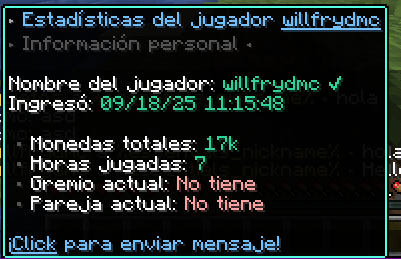
Interactive Hover Text: Show detailed player stats (money, hours played, etc.) just by hovering over their name.
Click to Whisper: Click on a player’s name in the chat to instantly start a private message.
✅ Advanced Private Messaging System
Customizable Formats: Set how the sent and received messages look.
Quick Reply Command (/r): Reply to the last private message with a single command. Essential for your users!
Notification Sounds: A small sound when receiving a message to ensure it doesn’t get missed.
✅ Staff and Server Tools
Social Spy (/socialspy): Allows staff members with permissions to monitor private messages to keep the community safe.
Ignore System (/ignore): Allows users to persistently ignore other players.
Anti-Spam: Prevents chat flooding with a configurable cooldown between messages.
Update Notifier: Alerts in the console when a new version of xChat is available on Modrinth.
✅ Optimization and Compatibility
Lightweight and Optimized: Built on the Paper API and using packets with ProtocolLib for maximum performance.
100% Customizable: Absolutely all messages, formats, and functions can be adjusted from the generated config.yml.
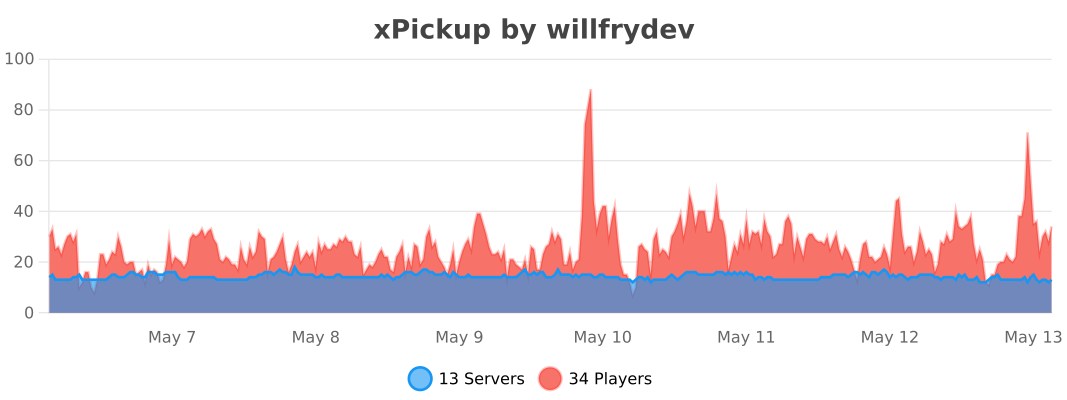
Anonymous Statistics with bStats: To help us understand how the plugin is used and improve it.
🖼️ Plugin Previews


**🔧 Commands and Permissions**
“`yaml
Comando Alias Permiso Descripción
/xchat reload /xc reload xchat.reload Recarga la configuración del plugin.
/xchat help /xc help (Ninguno) Muestra la ayuda principal.
/msg /tell, /w (Ninguno) Envía un mensaje privado.
/reply /r (Ninguno) Responde al último mensaje privado.
/ignore /ign (Ninguno) Gestiona tu lista de ignorados.
/socialspy /spy xchat.socialspy Activa/desactiva el espía de PMs.
(Bypass Spam) – xchat.antispam.bypass Permite saltarse el cooldown del chat.
“`
Export to Spreadsheets
🔌 Required Dependencies
To make xChat work with its full potential, you need to install these three plugins:
Vault: For permission and economy plugin integration.
PlaceholderAPI: To use the thousands of available placeholders.
ProtocolLib: For advanced feature functionality.
**🐠Config.YML**
“`yaml
# ___ _ _
# __ __ / __ |__ __ _| |_
# / // / | ‘_ / _` | __| Plugin by
# > ”
reply_usage: “&cUse it like this: /{label} ”
player-not-found: “&cThat player is not online.”
cannot-message-self: “&cYou cannot message yourself.”
no-reply-target: “&cYou have no one to reply to.”
social-spy-on: “&aSocialSpy enabled. You will now see private messages.”
social-spy-off: “&cSocialSpy disabled.”
# HELP MESSAGES (/xchat help, /ignore help)
# // ___ __ _
# / / __|/ _` | Idea by
# / // __ (_| | xPlugins
# / /___/__, |
# |___/
help-message:
xchat:
– “&7——-&f xChat Help &7——”
– “”
– “&#AEC6CF> /xchat help 󖣃➛&f Displays this help message.”
– “&#AEC6CF> /xchat reload 󖣃➛&f Reloads plugin configuration.”
– “”
– “&7—————————————”
ignore:
– “&7—————–&f Ignore Help &7——————–”
– “”
– “&#AEC6CF /ignore help 󖣃➛&f Displays this help.”
– “&#AEC6CF /ignore list 󖣃➛&f See who you are ignoring.”
– “&#AEC6CF /ignore add 󖣃➛&f Start ignoring them.”
– “&#AEC6CF /ignore remove 󖣃➛&f Stop ignoring them.”
– “”
– “&7—————————————”
# IGNORE SYSTEM (/ignore)
# _____
# _ __ _ _ __ ___ _ __ ___
# / // _` | ‘_ / _ | ‘__/ _ Idea by
# // /_| (_| | | | | (_) | | | __/ xPlugins
# ____/ __, |_| |_|___/|_| ___|
# |___/
ignore:
enabled: true
storage: “ignores.yml”
messages:
added: “&aYou are now ignoring &f%target%.”
removed: “&eYou are no longer ignoring &f%target%.”
not_found: “&cPlayer not found.”
usage: “&eUsage: /ignore [player]”
cannot_ignore_self: “&cYou cannot ignore yourself.”
list_empty: “&7You are not ignoring anyone.”
list_header: “&6Ignoring:”
list_format: “&7- &f%target%”
# Anti Spam
# _ _ _ __
# /_ _ __ | |_(_) / __ __ __ _ _ __ ___
# //_\| ‘_ | __| |_____ | ‘_ / _` | ‘_ ` _ Idea by
# / _ | | | |_| |_____| |_) | (_| | | | | | | xPlugins
# _/ _/_| |_|__|_| __/ .__/ __,_|_| |_| |_|
# |_| 1.0.0
anti-spam:
enabled: true
delay-seconds: 3
message: “&#ff0000 ⚠ Slow down! You must wait %time% second(s) before chatting again.”
# GENERAL PLUGIN MESSAGES
# // ___ __ _
# / / __|/ _` | Idea by
# / // __ (_| | xPlugins
# / /___/__, |
# |___/
plugin-messages:
reload: “Ke25f ✔ Hey! xChat configuration has been reloaded!”
no-permission: “&#ff2c2c ☀ Oops! You don’t have permission to run this command!”
# UPDATE NOTIFIER
# _ _
# / / _ __ __| | __ _| |_ ___
# / / ‘_ / _` |/ _` | __/ _
# _/ / |_) | (_| | (_| | || __/
# ___/| .__/ __,_|__,_|_____|
# |_| 1.0.0
update-checker:
enabled: true
“`
⚙️ Installation
Download the xChat .jar file.
Make sure you have the 3 dependencies above installed.
Place all the .jar files in your server’s plugins folder.
Start or restart the server.
Configure everything to your liking in the generated config.yml file!
❤️ Support and Credits
Created with love by WillfryDev (xPlugins inc.).
XCatch
# XCatch
### Efficient yet effective plugin to catch X-rayers for Minecraft 1.13-1.19.
XCatch analizes how a player is mining by looking it how many turns it makes and how many rare ores it finds in a small period of time.
## Features
– Send an alert to staff after a configurable amount of flags.

– Automatically ban players after a configurable amount of flags (off by default).
– See flags and bans of online or offline players in a gui.

– Ability to specify multiple ban times depending on how many previous bans a player has
– Log flags in a Discord channel with DiscordSRV
– Ability to execute commands after a number of flags
[ ](https://dediamondpro.dev/bisecthosting)
## Why use this over other plugins
– Plugins that hide ores (like Orebfuscator) are generally very CPU intensive, while XCatch is not and those plugins can be bypassed if the player knows the seed, which can be easily obtained with a seedcracker mod, while XCatch cannot be easily bypassed.
– Plugins that announce when a player has mined a lot of ores (like OreAnnouncer) have way more false flags when players are just lucky or when they find a big ore vein
## Commands
– /xcatch help, shows all commands.
– /xcatch view [], shows flags of all players or the player specified.
– /xcatch info, get some statistics about XCatch on your server

– /xcatch reload, reload the XCatch config.
– /xcatch debug , get some debug stats of a player.
## Permissions
– xcatch.alert: Players with this permission get notified of a flag.
– xcatch.command: Players with this permission get access to the XCatch command
– xcatch.bypass: Players with this permission bypass all XCatch checks
– xcatch.noban: Players with this permission will still get flagged as normal, but XCatch won’t automtically ban them
## FAQ
Q: XCatch isn’t detecting me Xraying
A: **Make sure you don’t have the XCatch.bypass permission**
Q: How do I configure XCatch?
A: The configuration file is in the `XCatch` folder an is named `config.yml`, there are clear descriptions of what everything does in the config file.
xBossBar

# xBossBar 〽️
**xBossBar** is a powerful and customizable bossbar management plugin for Minecraft servers. It allows server administrators to create, manage, and display bossbars with personalized colors, styles, titles, and per-player visibility.
### Key Features 💫
– **BossBar Management** – Create, remove, and edit bossbars with ease.
– **Custom Titles** – Set unique titles for each bossbar.
– **Colors & Styles** – Multiple colors and styles including segmented and solid bars.
– **Per-Player Bars** – Show bossbars to specific players or all players.
– **Progress Control** – Dynamically set bossbar progress in-game.
– **API Support** – Fully featured API to integrate bossbars with other plugins or custom systems.
– **User-Friendly** – Simple and clear commands for fast management.
### Useful Links 🔗
– [GitHub Repository](https://github.com/xDrygo/xBossBar) – Access the source code, latest releases, and submit **Issues** for bug reports, feature requests, or questions.
– [Wiki Documentation](https://wiki.drygo.dev/xbossbar) – Guides for commands, configuration, placeholders, and API usage.
### Support ❓
For technical issues, unexpected behavior, or enhancement suggestions, please submit an **Issue** on the [GitHub repository](https://github.com/xDrygo/xBossBar/issues). This ensures your feedback is tracked and addressed efficiently.
—
xBossBar is designed to provide a **robust, flexible, and professional bossbar management solution**, allowing Minecraft server owners to enhance gameplay with visually engaging and fully customizable bossbars.
XaeroSupport

Please join my Discord to get
updates and for me to fully assist you with bugs,
questions, or suggestions.
Discord: [**click here**](https://drak.gg/discord)

## XaeroSupport
Adds XaeroMinimap and XaeroWorldMap support to your Minecraft server!
## Definitions
**Xaero Server-Specifics**:
– How filled out your maps are on a specific world. (The loaded/filled in chunks when you open your map for a specific world.)
– Waypoints.
**Backend Server**:
– A Minecraft server behind a Minecraft proxy that is also not a Minecraft proxy.
**Minecraft Proxy**:
– Such as:
– Velocity and forks.
– BungeeCord and forks.
**Server Id**:
– A unique identifier (that is a number) that tells players’ Xaero mods (on the client) that your server is your server.
## FAQ
**Q**: Does this affect performance?
**A** (Simple): No.
**A** (Full): Most plugins won’t affect performance, even if they are bigger plugins. What effects performance is how the plugins do operations with your server. This plugin does no operations, it is all just packets and it only sends packets when a player joins.
**Q**: Is this a `1:1` (`1 to 1`) replacement of the Xaero **mods** (server-side), but as a **plugin**?
**A** (Simple): No, but eventually yes.
**A** (Full): Right now, all this does is add support for `Xaero Server-Specifics` (look in the `Definitions` to define). Eventually, I will add more `1:1` functionality from the Xaero mods.
**Q**: Why would I use this if it is not a `1:1` replacement?
**A** (Full): Well, keep in mind that eventually it will be. But, in the mean time, this is extremely useful for `Minecraft Proxies` because it makes it so each of your `Backend Servers` can have their own `Xaero Server-Specifics` (look in the `Definitions` to define) — this is very helpful due to how Xaero stores these in your game’s files.
**Q**: What would happen if I don’t use this, or something like this and I have players who use Xaero’s mod join my server?
**A** (Full): Xaero used to keep `Xaero Server-Specifics` defined per world/server name. Which is an issue if you have multiple servers you join with the same name (i.e. if you have all your server’s named `Minecraft Server` — which is the default). Xaero recently added functionality to look at the IP that players used to join your server to differentiate the `Xaero Server-Specifics`, but this only works if you have an updated mod and if your server isn’t behind a `Minecraft Proxy`. **If the players’ mod thinks you are on the same server/world *when you are not*, it will overwrite/reset the map data it already has filled out, or even delete or add some way points. This plugin fixes that.**

– No more need for Paper forks!
– Some paper forks (such as `Leaf` and `DivineMC`) add exactly what this plugin does directly into your server software, this plugin adds it as a plugin so you don’t need to rely on `Leaf` or `DivineMC` to be stable.
– Easy set up! (Drag and drop!)
– It automatically generates a `Server Id` for your server.
XaeroShare

A simple client side mod **or** server-side plugin (only one side needs it) that allows you to share [Xaero’s Minimap](https://modrinth.com/mod/xaeros-minimap) waypoints to specific players instead of being forced into sharing it with all players currently online the server.
# Mod (Fabric)
This is the client side variant of this mod, you install it on your client and you can use it on any server even if that server 100% vanilla* since we piggyback on how waypoints are shared via chat.
*: [Note 1]
## Usage
Currently the mod can be activated using the default hotkey (`Right Alt`); however, this can always be changed via settings.
## Current features
* Sharing waypoints with single and or multiple players
* Automatic delay between sending waypoints to avoid spamming commands
* Commands to share location / waypoints
## Demo
## Detection
The mod has no way of detecting it when it’s just passively installed in the background (excluding exploits such as sign translation) but when it sends waypoints it uses the `/msg` command which on it’s own is a good enough sign that the waypoints aren’t being sent manually as the waypoint share format is too messy to type out manually (and there’s no docs); however, when xaeroshare sends a waypoint it’ll automatically add `:xaeroshare` on the end allowing for servers to detect them for whatever use (this is what the plugin uses to ignore messages from the mod)
# Commands
## `/locationshare`
Syntax: `/locationshare “Location Name” “minecraft:overworld” 1 2 3 Player1 Player2 Player3 […]`
## `/waypointshare`
Syntax: `/waypointshare “Waypoint Name” “minecraft:overworld” Player1 Player2 Player3 […]`
# Plugin (PaperMC & Forks)
The mod has a server side version where the plugin can be installed on the server and anybody on the server (even if they don’t have the mod installed) can select the players who they want to share their waypoint with.
## Usage
The plugin intercepts the regular Xaero’s Minimap share messages and pops up a screen for the player using [Paper’s Dialog API](https://docs.papermc.io/paper/dev/dialogs/) with a list of players that the user can then select and submit or they can choose to ignore the menu entirely and continue with the vanilla sending behaviour.
## Current features
* Sharing waypoints with single and or multiple players
* Automatic interception of Xaero’s Minimap messages
* Transparent (Appears to clients as if the message was never intercepted[Note 1])
* 100% data preservation (The share format isn’t documented so I had to make some assumptions that may turn out to be wrong, but the plugin just copies the mods output directly)
## Demo
# Notes
1: Since we are pretty much lying to the server and clients about what / who is sending the message chat reporting and messaging signing might have some issues with it. If you encounter issues try (or ask the server admin to try) disabling `enforce-secure-profile` in `server.properties`.