Xhomes
### Xhomes – Your Personal Home Management Plugin for Minecraft
**Xhomes** is an essential plugin designed to enhance your Minecraft experience by allowing players to seamlessly set, manage, and teleport to personal homes. With its user-friendly GUI and intuitive functionality, Xhomes simplifies home management and provides an engaging way to navigate the game world.
## Key Features:
– **Set Home**: Easily set your home location using the command `/sethome [homename]`, enabling quick travel back to your favorite spots.
– **Home GUI**: Access a visually appealing GUI to view and select homes, featuring slots filled with blue beds for a straightforward teleportation interface.
– **Teleportation Countdown**: Enjoy a 5-second countdown before teleportation, accompanied by the message: “Teleporting in 5 seconds, don’t move!” to build anticipation.
– **Movement Cancellation**: Teleportation is canceled if the player moves during the countdown, ensuring safe and accurate arrival at the desired location.
– **Delete Home**: Remove homes easily with the command `/delhome [homename]`.
– **Configurable Limits and Tiers**: Server owners can configure the maximum number of homes players can set based on their permission tier:
– **Tier 1 (xhomes.hometier1)**: 2 homes
– **Tier 2 (xhomes.hometier2)**: 4 homes
– **Tier 3 (xhomes.hometier3)**: 6 homes
– **Tier 4 (xhomes.hometier4)**: 8 homes
These limits are fully configurable in the `config.yml` file.
– **Admin-Friendly Management**: Xhomes provides robust tools for server owners to oversee home settings and permissions, offering fine-grained controls for authorized players.
### LuckPerms Permissions:
– `/sethome`: `xhomes.sethome`
– `/delhome`: `xhomes.delhome`
– `/home`: `xhomes.home`
– Tier 1: `xhomes.hometier1` (2 homes)
– Tier 2: `xhomes.hometier2` (4 homes)
– Tier 3: `xhomes.hometier3` (6 homes)
– Tier 4: `xhomes.hometier4` (8 homes)
Elevate your Minecraft gameplay with **Xhomes**—your all-in-one home management solution!
### Source Code
Check out the source code on GitHub: [Xhomes Repository](https://github.com/Akar1881/Xhomes)
xHeadTurns
# 💀 xHeadTurns
### Advanced Floating Heads, Holograms & Animations

[](https://discord.gg/mNdxNVx6cU)
[](https://modrinth.com/plugin/xheadturns)
[]()
—
## 📝 Overview
**xHeadTurns** is the ultimate solution for decorating your server lobbies, hubs, and spawn areas. Bring your server to life with fully interactive **Floating Heads** that support custom textures, real-time rotation, scaling, and dynamic holographic displays.
Now with a **Full In-Game Editor**, you can modify every property of your heads without ever touching a configuration file.
## ✨ Key Features
* **🎮 Full In-Game Editor:** Modify scale, speed, textures, and hologram lines in real-time with `/xhte`.
* **🎨 Custom Textures:** Support for **Base64** values (Minecraft-Heads) and **Player Names**.
* **🔄 Dynamic Rotation:** Fully customizable rotation speed and manual angle (Yaw/Pitch) control.
* **💬 Advanced Holograms:**
* Multi-line support with **HEX Colors** (e.g., `&#a7c7e7`).
* **PlaceholderAPI** support (updates based on the nearest player).
* Customizable backgrounds (RGB + Opacity), billboards, and shadows.
* **✨ Particle Animations:** Styles like `HELIX` and `SPHERE` with custom particle types.
* **⚡ Interactivity:** Execute **Console** or **Player** commands on click with per-head cooldowns.
* **🌍 Multi-Language:** 100% translatable (English and Spanish included).
—
## 🛠️ Commands & Permissions
| Command | Description | Permission |
| :— | :— | :— |
| `/xht help` | Shows the help menu with all commands. | `xheadturns.help` |
| `/xht list` | Opens a GUI with all active floating heads. | `xheadturns.list` |
| `/xhtc ` | Spawns a head at your target location. | `xheadturns.create` |
| `/xhtd ` | Deletes a specific floating head. | `xheadturns.delete` |
| `/xhtm ` | Moves a head to your current target location. | `xheadturns.move` |
| `/xhte ` | **Advanced Editor:** Edit any property in-game. | `xheadturns.edit` |
| `/xht reload` | Reloads configurations and head data. | `xheadturns.reload` |
—
## ⚙️ Advanced Editing Examples
Using the new **Editor System**, you can customize your heads on the fly:
“`bash
# Change the scale of a head
/xhte MyHead head scale 2.0
# Add a new line to a hologram
/xhte MyHead hologram add &fVisit our &b/store
# Change hologram background to a semi-transparent blue
/xhte MyHead hologram background 0,0,255 100
# Update head texture to a player’s skin
/xhte MyHead head texture Dream
“`
> ## 🚀 Installation
1. Download the xHeadTurns .jar.
2. Upload it to your /plugins/ folder.
3. Requirement: Ensure you have PlaceholderAPI installed for dynamic names.
– Restart the server.
> Use /xhtc to start creating your first floating heads!
> ## 🤝 Support & Community
Need help? Found a bug? Join our Discord server!
Plugin developed with ❤️ by xPlugins x WillfryDev
Copyright © 2026 xPlugins. All rights reserved.
XGamemode

### “*You’re not switching modes, you’re switching dimensions.*”
~~*2000 Downloads?! Thanks!*~~
# 1 Feature
## 1.1 Offline Player
You can change the gamemode of a player, **even he (or she) was offline**.
## 1.2 Permissions
Allow permission group plugins (_like Luckperms_) to manage **which gamemodes can be switched to** and **which gamemodes cannot be switched to**.
_e.g. Allow to switch to survival mode but not to any other mode._
## 1.3 Alias
**/gamemode** is simplified to **/gm** and **/g**.
_(of course you can still use /gamemode)_
## 1.4 Cross-Server Storage
Support **MySQL** and **SQLite** storage backends. Player gamemodes are saved and synchronized across multiple servers in a network.
## 1.5 Folia Support
**Fully compatible with Folia servers** — using region-based scheduling for optimal performance.
## 1.6 Lightweight
The Plugin size is only **~25 KB** and has **almost no impact** on server performance!
# 2 Caution
## 2.1 Shortcut Keys
If you need to use shortcut keys such as **F3+F4**, please install another plugin **F3NPerm**.
## 2.2 Versions
**1.8.X +**
**All Bukkit based server** (Paper, Spigot, Purpur, Folia, etc.)
# 3 Commands
“`markdown
– /xgamemode
– /xgamemode reload
– /gm
– /gm
– /gm -all
– /gm -online
– /gm -offline
/g = /gm = /gamemode
/xg = /xgm = /xgamemode
“`
# 4 Permission Node
“`markdown
– xgamemode.survival
– xgamemode.creative
– xgamemode.adventure
– xgamemode.spectator
– xgamemode.others.survival
– xgamemode.others.creative
– xgamemode.others.adventure
– xgamemode.others.spectator
– xgamemode.reload
– xgamemode.admin
“`
# 5 Custom Config
## 5.1 Basic Settings
“`yaml
lang: en-US
“`
**Language** setting
“`yaml
default_gamemode: survival
“`
If a **new player joined your server**, **which gamemode should he (she) be**?
**survival**, **creative**, **adventure**, **spectator**
“`yaml
show_logo: true
“`
Show logo or not when plugin enabled.
**true**, **false**
“`yaml
debug: false
“`
Enable debug logging for troubleshooting.
**true**, **false**
## 5.2 Storage Configuration
“`yaml
storage:
type: yaml
“`
**Storage backend type**: **yaml**, **sqlite**, **mysql**
### SQLite Example
“`yaml
storage:
type: sqlite
# No additional config needed — data.db will be created automatically
“`
### MySQL Example
“`yaml
storage:
type: mysql
mysql:
host: localhost
port: 3306
database: minecraft
username: root
password: your_password
“`
## 5.3 Custom Messages
“`yaml
messages:
en-US: # Original en-US Language by Wind_Blood
reloaded: “&aXGamemode Reloaded!”
# ……
custom_lang: # Add Your Custom Language!
reloaded: “Thank you for using XGamemode!”
# ……
“`
**Customizable Messages**. You can add **your own new language** here!
## 5.4 An Example config.yml
“`yaml
lang: msgForMyServer
default_gamemode: survival
show_logo: false
debug: false
storage:
type: yaml
messages:
msgForMyServer:
reloaded: “很明显作者是中国人 会说中文很正常 然后我也不知道为什么我要在一堆英文里写一段中文 挺好笑的 哈哈哈 对了 看到我就是缘分 XGamemode 官方 QQ 反馈交流群:点击链接加入群聊【XGamemode 反馈群】:https://qm.qq.com/q/rpTk5LK7w4 欢迎加”
usage: “&cUsage: /gm [player/-all/-online/-offline]”
console_usage: “&cUsage: /gm ”
invalid_gamemode: “&cInvalid Gamemode!”
invalid_player: “&cInvalid Player!”
gamemode_self: “&aYour Gamemode Changed to {mode}!”
gamemode_all: “&aChanged All Player’s Gamemode to {mode}!”
gamemode_online: “&aAll Online Player’s Gamemode Changed to {mode}!”
gamemode_offline: “&aAll Offline Player’s Gamemode Changed to {mode}!”
no_permission: “&cYOU ARE NOT ALLOWED TO DO THAT!”
gamemode_other: “&a{player}’s Gamemode Changed to {mode}!”
gamemode_other_offline: “&a{player} (Offline)’s Gamemode Changed to {mode}!”
“`
# 6 Developer API (Async)
## Get Instance
“`java
Main plugin = Main.getInstance();
“`
## Get Player Gamemode
“`java
plugin.getPlayerMode(playerUUID).thenAccept(mode -> {
if (mode != null) {
// mode is GameMode.SURVIVAL, CREATIVE, ADVENTURE, or SPECTATOR
// Player is online or has saved data
} else {
// Player not found or no saved gamemode yet
}
});
“`
## Set Player Gamemode
“`java
plugin.setPlayerMode(playerUUID, GameMode.SURVIVAL).thenAccept(success -> {
if (success) {
// Gamemode changed and saved successfully
// Works for both online and offline players
} else {
// Failed to save (database error, etc.)
}
});
“`
## Listen to Gamemode Changes
“`java
@EventHandler
public void onGamemodeChange(GamemodeChangeEvent event) {
Player player = event.getPlayer(); // Online player only
GameMode oldMode = event.getOldMode();
GameMode newMode = event.getNewMode();
}
“`
> **Note:** All APIs are **fully async** and thread-safe. The `GamemodeChangeEvent` is only fired for **online players** when their mode is actually changed. The `getPlayerMode()` method returns `null` if the player has no saved gamemode data.
# 7 Reprint Post
www.minebbs.com/resources/xgamemode.11041
hangar.papermc.io/Wind_Blood/XGamemode
modrinth.com/plugin/xgamemode
# 8 Feedback
Just e-mail me with **[email protected]**. Thanks!
XGlow
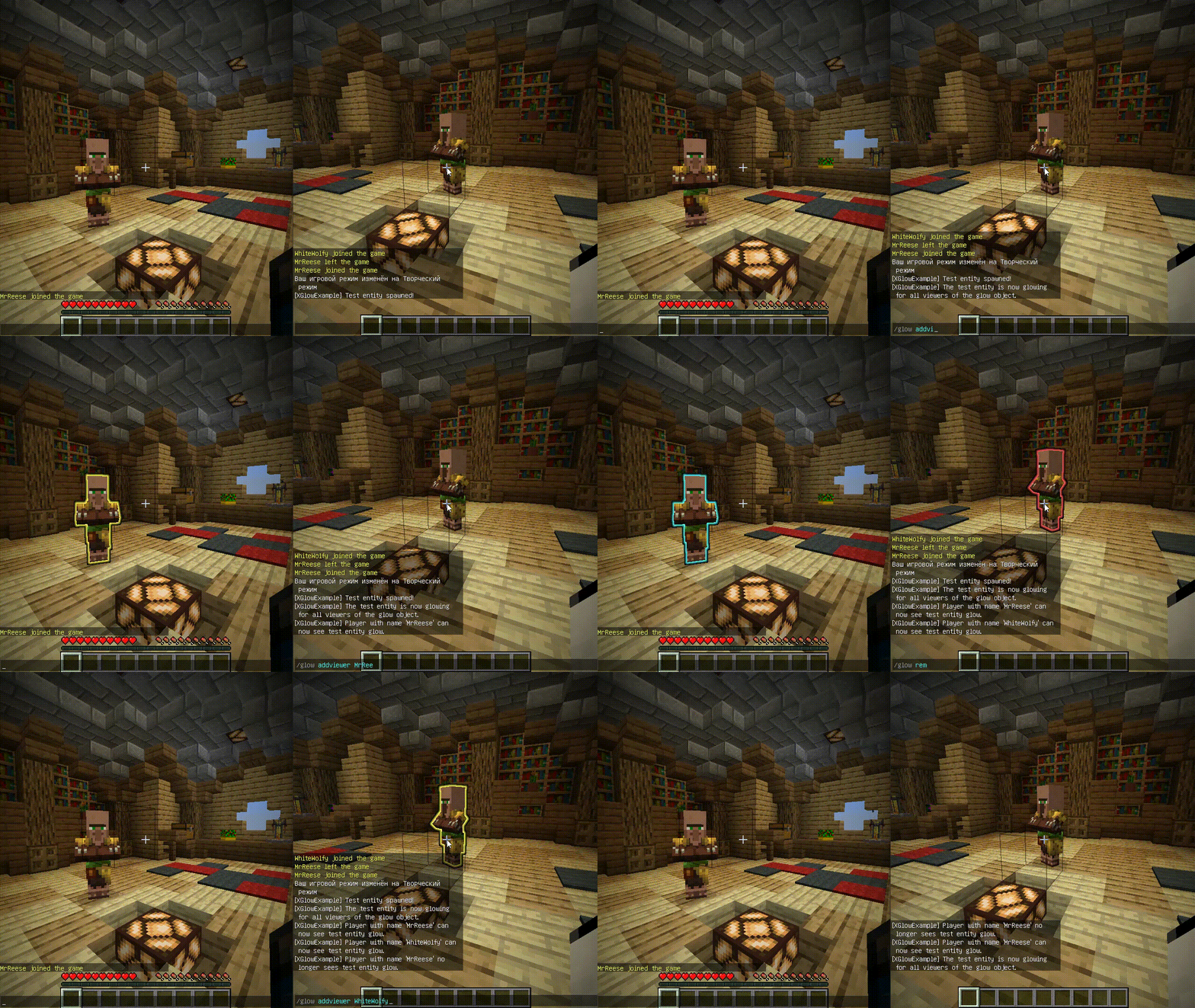
**Works with Java 8 and above.**
(I noticed that the **GlowAPI** from the **inventivetalent** has been abandoned, has not been updated for a long time, has bad reviews and bugs, as well as a rather low-quality code – so I decided to make and publish my own version of the api for the glow)
**XGlow** – is a simple, easy-to-use API to create glow on your entities. The plugin requires [ProtocolLib](https://github.com/dmulloy2/ProtocolLib) to work.
### Usage
First you need to create a Glow object:
(You can use a builder for this)
“`java
Glow glow = Glow.builder()
.сolor(ChatColor.GREEN)
.name(“test”)
.build();
“`
You can add entity to glow object holders,
to make this entity glow with glow object colors.
The glow of the entity will be seen by all viewers
which the glow object contains:
`glow.addHolders(entity);`
To remove the glow of an entity,
you can remove it from the glow object holders.
The entity’s glow will disappear for all viewers of the glow object:
`glow.removeHolders(entity);`
You can add a viewer to the glow object so that he immediately sees the glow of all holders of the glow object:
`glow.display(player);`
When the viewer is removed from the glow object,
all holders of the glow object will
no longer glow for removed viewer:
`glow.hideFrom(player);`
For more features check out XGlow wiki page on github: https://github.com/Xezard/XGlow/wiki
flow
# Flow – Reimagining Communication in Minecraft
## Elegance in Every Detail
Flow isn’t just a chat plugin. It’s a completely reimagined way of communicating in Minecraft, where every detail is meticulously crafted. Minimalist. Intuitive. Revolutionary.
### ✨ The Magic of Simplicity
– **Local Chat**
Communicate naturally with nearby players
– **Global Chat**
Add “!” at the start of your message – and the whole server will hear you
– **Smart Tooltips**
Hover for important information
– **Instant Messages**
Private communication with a single click
### 🎨 Social Features
– **Mentions**
Tag players with @username for instant notifications
– **Emojis**
Express yourself with built-in emoji support
– **Anti-Spam**
Smart protection against chat abuse
– **Chat Filter**
Keep conversations clean automatically
– **Ignore System**
Control who you interact with
### 🔧 Player Settings
– **Private Messages Control**
Enable or disable private messages
– **AFK System**
Set your status and custom AFK message
– **Personal Settings GUI**
Easy-to-use interface for all player settings
### 🎨 Limitless Customization
Customize Flow to your needs:
– Full PlaceholderAPI support
– Flexible message formats
– Interactive tooltips
– LuckPerms integration
### ⚡️ Performance
Built for speed:
– Asynchronous processing
– Optimized code
– Minimal overhead
## 🌟 Perfect for Any Server
| Server Type | Compatibility |
|————-|—————|
| Anarchy | ✓ |
| PvP | ✓ |
| Duels | ✓ |
| RPG | ✓ |
## 📝 Configuration Guide
### Basic Settings
“`yaml
# Radius for local chat in blocks
local-chat-radius: 100
# Prefix for global messages
global-chat-prefix: ‘!’
# Time format for timestamps
time-format: ‘HH:mm:ss’
“`
### Message Formats
Customize how messages appear in different chat types:
“`yaml
format:
# Local chat format
local: ‘%luckperms_prefix%%player_name% &8→ &f%message%’
# Global chat format
global: ‘&6[G] %luckperms_prefix%%player_name% &8→ &f%message%’
# Private messages format
private:
outgoing: ‘&d→ &7%recipient%&8: &f%message%’
incoming: ‘&dFrom &7%sender%&8: &f%message%’
“`
### Player Settings
Configure personal settings for each player:
“`yaml
settings:
# Default AFK message
default-afk-message: “I am currently AFK. I will respond when I return.”
# Default settings state
default-settings:
private-messages-enabled: true
afk-status: false
“`
### Messages Customization
All plugin messages can be customized in messages.yml:
“`yaml
messages:
private-messages:
disabled-sender: “&cYou have private messages disabled!”
disabled-recipient: “&cThis player has private messages disabled!”
player-afk: “&7%player% is AFK: %message%”
settings:
private-messages-enabled: “&aPrivate messages enabled!”
private-messages-disabled: “&cPrivate messages disabled!”
afk-enabled: “&aAFK status enabled!”
afk-disabled: “&cAFK status disabled!”
“`
### Hover Effects
Configure tooltips that appear when hovering over messages:
“`yaml
hover:
enabled: true
format:
– ‘&8&m ‘
– ”
– ‘ &fPlayer: &7%player_name%’
– ‘ &fRank: &7%luckperms_prefix%’
– ‘ &fPing: &7%player_ping%ms’
– ”
– ‘ &fTime: &7%time%’
– ”
– ‘ &7Click to message’
– ”
– ‘&8&m ‘
“`
### Anti-Spam Protection
Prevent chat abuse with customizable limits:
“`yaml
anti-spam:
enabled: true
cooldown: 2 # Seconds between messages
max-messages: 5 # Maximum messages
time-window: 10 # Time window in seconds
“`
### Chat Filter
Keep your chat clean with word filtering:
“`yaml
chat-filter:
enabled: true
banned-words:
– “word1”
– “word2”
“`
### Emoji System
Add expressive emojis to your chat:
“`yaml
emojis:
‘:heart:’: ‘❤’
‘:star:’: ‘⭐’
‘:smile:’: ‘☺’
‘:fire:’: ‘🔥’
‘:rainbow:’: ‘🌈’
# And many more…
“`
### Mention System
Configure how player mentions work:
“`yaml
mentions:
format: ‘§e@%player%§r’
sound:
enabled: true
type: ‘ENTITY_EXPERIENCE_ORB_PICKUP’
volume: 1.0
pitch: 1.0
title:
enabled: true
text: ‘§eMention from %player%’
“`
### Color Schemes
Define default colors for chat elements:
“`yaml
colors:
name: ‘&7’ # Player names
arrow: ‘&8’ # Arrows in format
message: ‘&f’ # Message text
“`
### PlaceholderAPI Integration
Flow supports all PlaceholderAPI expansions:
– `%luckperms_prefix%` – Player’s prefix
– `%luckperms_suffix%` – Player’s suffix
– `%player_name%` – Player’s name
– `%player_ping%` – Player’s ping
– `%player_world%` – Player’s world
### Permissions
– `flow.reload` – Access to /flowreload
– `flow.bypass.filter` – Bypass chat filter
– `flow.bypass.antispam` – Bypass anti-spam
– `flow.emojis` – Use emojis in chat
– `flow.color` – Use color codes in chat
### Color Codes
Flow supports standard Minecraft color codes:
– `&0-9, &a-f` – Colors
– `&k` – Magic
– `&l` – Bold
– `&m` – Strikethrough
– `&n` – Underline
– `&o` – Italic
– `&r` – Reset
### Tips
– Use `&` for color codes
– Test your formats in-game with /flowreload
– Keep anti-spam values balanced
– Regular expressions are supported in chat filter
– Use hover tooltips to display additional information
– Customize click actions for interactive chat
## 💫 Commands
/msg Send a private message
/r Reply to last message
/ignore Ignore/unignore a player
/flowreload Reload configuration
/settings Open settings menu
## 📦 Dependencies
**Required:**
– Paper 1.19+
– PlaceholderAPI
**Optional:**
– LuckPerms (for ranks and prefixes)
## 🚀 Installation
1. Place plugin in plugins folder
2. Install PlaceholderAPI
3. Download required expansions:
“`
/papi ecloud download luckperms
/papi reload
“`
4. Restart server
5. Configure in config.yml
—
You can find [Changelog Here](https://femboypig.github.io/flow-changelog/)
> “Flow – the future of Minecraft communication”
XfeaturesRPGMoney
# 💰 XfeaturesRPGMoney





## 📝 Description
**XfeaturesRPGMoney** is an innovative economic plugin for Minecraft servers that adds RPG elements to your server’s economy. The plugin provides players with a variety of ways to earn in-game currency:
– 💀 **Mob hunting**: earn money for killing various creatures
– 🎣 **Fishing**: earn money by catching different types of fish
– ⛏️ **Block mining**: get a chance to earn money when mining certain blocks
– 🔍 **Archaeology**: get rewards for mining archaeological treasures
The plugin is fully integrated with the Vault API, ensuring compatibility with most economic systems.
## ✨ Key features
– **Flexible reward system**: customizable minimum and maximum amounts for each source of income
– **Luck and loot multipliers**: Fortune and Looting enchantments increase the reward received
– **Player statistics**: track money earned and create a ranking of the best players
– **Visual effects**: animated appearance of coins in the game world
– **Full message customization**: all notifications can be changed in the configuration
– **Easy management**: intuitive commands for players and administrators
## 📋 Requirements
– Spigot/Paper 1.13+
– Vault
– Any economic plugin compatible with Vault (e.g., EssentialsX, CMI)
## 🔧 Installation
1. Download the latest version of the plugin from the [Releases](https://github.com/XfeaturesGroup/XfeaturesRPGMoney/releases) section
2. Place the JAR file in the `plugins` folder of your server
3. Restart the server
4. Configure the configuration files as you see fit
5. Reload the plugin with the command `/rpgmoney reload`
## 🌍 Supported Languages
XfeaturesRPGMoney supports multiple languages for users from around the world. You can change the plugin language using the command `/rpgmoney language `.
### Available Languages:
– English (en)
– Russian (ru)
– German (de)
– Polish (pl)
– Italian (it)
– Portuguese (pt)
– Turkish (tr)
– French (fr)
– Spanish (es)
– Lithuanian (lt)
– Latvian (lv)
– Estonian (et)
– Arabic (ar)
– Hindi (hi)
– Chinese (Simplified) (cn)
### Adding a New Language
If you want to add a new language or improve an existing translation:
1. Copy the `messages-en.yml` file from the `resources/messages/` folder
2. Rename it to `messages-XX.yml`, where XX is your language code
3. Translate all strings to your language
4. Submit the translation via Pull Request or contact the developers
We always welcome new translations and improvements to existing ones!
## ⚙️ Configuration
After the first launch, the plugin will create the following configuration files:
### config.yml
Basic plugin settings, including multipliers for enchantments:
“`yaml
# All available languages can be found here:
# https://github.com/XfeaturesGroup/XfeaturesRPGMoney/tree/master/examples/messages
# Language settings for the plugin
language: “en”
# Coin drop rate from mobs spawned by spawners
spawner-multiplier: 0.6
# Main plugin settings
drop-chance: 0.75 # Probability of coins dropping when mining blocks and killing mobs
show-action-bar-messages: true # Show messages when picking up coins in the Action Bar
player-death-drop-percentage: 0.07 # Coin drop rate from killed players
max-money-drop: 1000.0 # Maximum amount of money in a single coin
# Settings for combining nearby drops
combine-nearby-drops: true
combine-radius: 1.5
# Messages about multipliers
show-fortune-multiplier-messages: false
show-looting-multiplier-messages: false
# Multipliers for the “Fortune” enchantment
fortune-multipliers:
1: 1.25 # Fortune I – increases coin drop rate by 25%
2: 1.5 # Fortune II – increases coin drop rate by 50%
3: 1.75 # Fortune III – increases coin drop rate by 75%
# Multipliers for “Looting” enchantments
looting-multipliers:
1: 1.25 # Looting I – increases coin drop rate by 25%
2: 1.5 # Looting II – increases coin drop rate by 50%
3: 1.75 # Looting III – increases coin drop rate by 75%
“`
### mobs.yml
Setting killing mobs rewards:
“`yaml
# ENTITY: [min, max]
ALLAY: [5, 30]
ARMADILLO: [4, 12]
AXOLOTL: [5, 30]
BAT: [5, 30]
BEE: [5, 30]
BLAZE: [5, 25]
BREEZE: [15, 30]
BOGGED: [10, 20]
CAMEL: [4, 12]
CAT: [5, 30]
CAVE_SPIDER: [2.5, 20]
CHICKEN: [4, 12]
COPPER_GOLEM: [15, 30]
COD: [4, 12]
COW: [4, 12]
CREEPER: [10, 15]
DOLPHIN: [4, 22]
DONKEY: [4, 12]
DROWNED: [10, 20]
ELDER_GUARDIAN: [50, 125]
ENDER_DRAGON: [100, 250]
ENDERMAN: [3, 20]
ENDERMITE: [10, 20]
EVOKER: [50, 100]
FOX: [4, 12]
FROG: [5, 12]
GHAST: [20, 35]
GLOW_SQUID: [4, 20]
GOAT: [4, 20]
GUARDIAN: [10, 25]
HOGLIN: [10, 25]
HORSE: [4, 12]
HUSK: [5, 15]
IRON_GOLEM: [25, 40]
LLAMA: [4, 12]
MAGMA_CUBE: [2, 7]
MOOSHROOM: [4, 14]
MULE: [4, 12]
OCELOT: [4, 12]
PANDA: [4, 12]
PARROT: [4, 12]
PHANTOM: [15, 20]
PIG: [4, 12]
PIGLIN: [4, 15]
PIGLIN_BRUTE: [4, 15]
PILLAGER: [7, 15]
POLAR_BEAR: [4, 12]
PUFFERFISH: [4, 12]
RABBIT: [4, 20]
RAVAGER: [50, 70]
SALMON: [4, 20]
SHEEP: [4, 20]
SHULKER: [10, 20]
SILVERFISH: [10, 20]
SKELETON: [10, 15]
SKELETON_HORSE: [10, 15]
SLIME: [4, 6]
SNIFFER: [10, 25]
SNOW_GOLEM: [10, 15]
SPIDER: [10, 15]
SQUID: [4, 12]
STRAY: [10, 15]
STRIDER: [10, 25]
TADPOLE: [10, 25]
TRADER_LLAMA: [10, 25]
TROPICAL_FISH: [10, 15]
TURTLE: [10, 15]
VEX: [10, 25]
VILLAGER: [10, 55]
VINDICATOR: [10, 25]
WANDERING_TRADER: [10, 25]
WARDEN: [10, 55]
WITCH: [10, 25]
WITHER: [10, 55]
WITHER_SKELETON: [10, 25]
WOLF: [4, 12]
ZOGLIN: [10, 25]
ZOMBIE: [10, 15]
ZOMBIE_HORSE: [10, 15]
ZOMBIE_VILLAGER: [10, 15]
ZOMBIFIED_PIGLIN: [5, 12]
“`
### fishes.yml
Setting fishing rewards:
“`yaml
# LOOT: [min, max]
COD: [10, 30]
SALMON: [10, 30]
PUFFERFISH: [15, 25]
TROPICAL_FISH: [10, 25]
ENCHANTED_BOOK: [25, 45]
LEATHER: [15, 35]
TRIPWIRE_HOOK: [15, 35]
ROTTEN_FLESH: [15, 35]
FISHING_ROD: [15, 35]
NAME_TAG: [15, 55]
NAUTILUS_SHELL: [55, 200]
SADDLE: [15, 35]
“`
### blocks.yml
Setting block mining rewards:
“`yaml
# BLOCK: [min, max]
CROPS: [3.5, 21]
WHEAT: [3.5, 21]
POTATOES: [3.5, 8.75]
CARROTS: [3.5, 8.75]
BEETROOTS: [7, 42]
NETHER_WART: [5.25, 35]
MELON: [8.75, 52.5]
PUMPKIN: [8.75, 52.5]
CACTUS: [1.75, 8.75]
SUGAR_CANE: [1.75, 35]
GLOW_BERRIES: [1.75, 35]
SWEET_BERRIES: [1.75, 35]
COCOA_BEANS: [1.75, 35]
COAL_ORE: [5.25, 10.5]
DEEPSLATE_COAL_ORE: [8.75, 26.25]
IRON_ORE: [8.75, 17.5]
DEEPSLATE_IRON_ORE: [14, 35]
COPPER_ORE: [12.25, 22.75]
DEEPSLATE_COPPER_ORE: [8.75, 21]
GOLD_ORE: [17.5, 21]
DEEPSLATE_GOLD_ORE: [17.5, 35]
NETHER_GOLD_ORE: [8.75, 14]
REDSTONE_ORE: [8.75, 21]
DEEPSLATE_REDSTONE_ORE: [8.75, 22.75]
LAPIS_ORE: [8.75, 14]
DEEPSLATE_LAPIS_ORE: [8.75, 22.75]
DIAMOND_ORE: [17.5, 70]
DEEPSLATE_DIAMOND_ORE: [70, 140]
EMERALD_ORE: [52.5, 105]
DEEPSLATE_EMERALD_ORE: [52.5, 105]
NETHER_QUARTZ_ORE: [8.75, 14]
ANCIENT_DEBRIS: [87.5, 262.5]
“`
### archeology.yml
Setting archaeology rewards:
“`yaml
# DROP: [min, max]
BROWN_CANDLE: [25, 40]
GREEN_CANDLE: [25, 40]
PURPLE_CANDLE: [25, 40]
RED_CANDLE: [25, 40]
LIGHT_BLUE_DYE: [15, 35]
ORANGE_DYE: [15, 35]
BLUE_DYE: [15, 35]
YELLOW_DYE: [15, 35]
WHITE_DYE: [15, 35]
BRICK: [10, 15]
EMERALD: [50, 75]
WHEAT: [20, 30]
WOODEN_HOE: [15, 20]
BLUE_STAINED_GLASS_PANE: [20, 35]
LIGHT_BLUE_STAINED_GLASS_PANE: [20, 35]
MAGENTA_STAINED_GLASS_PANE: [20, 35]
PINK_STAINED_GLASS_PANE: [20, 35]
PURPLE_STAINED_GLASS_PANE: [20, 35]
RED_STAINED_GLASS_PANE: [20, 35]
YELLOW_STAINED_GLASS_PANE: [20, 35]
BEETROOT_SEEDS: [25, 30]
WHEAT_SEEDS: [25, 30]
OAK_HANGING_SIGN: [25, 30]
SPRUCE_HANGING_SIGN: [25, 30]
DEAD_BUSH: [30, 35]
FLOWER_POT: [15, 30]
LEAD: [15, 30]
STRING: [15, 30]
GOLD_NUGGET: [35, 45]
COAL: [30, 35]
MUSIC_DISC_RELIC: [150, 175]
TRIM_PATTERN: [100, 125]
“`
### messages.yml
Configuring all plugin messages:
“`yaml
prefix: “&c[XfeaturesRPGMoney]&r”
# Command messages
no-permission: “&cYou don’t have permission to use this command.”
player-only: “&cThis command is only available for players.”
config-reloaded: “&aConfiguration successfully reloaded.”
invalid-page-format: “&cInvalid page format. Please use a number.”
no-data-for-page: “&cThere is no data for this page.”
# Stats messages
stats-header: “&7===== &cYour Statistics &7=====”
stats-collected: “&eMoney collected: &6%amount%”
# Top players messages
top-header: “&7===== &cPlayer Rankings (Page %page%) &7=====”
top-player-entry: “&7#%rank% &c%player% &7- &7%amount%”
top-next-page: “&7Use &c/rpgmoney top %page% &7for the next page”
# Plugin info messages
info-header: “&7===== &cPlugin Information &7=====”
info-version: “&cVersion: &7%version%”
info-author: “&cAuthors: &7%authors%”
info-fortune-header: “&cFortune Multipliers:”
info-fortune-entry: “&cLevel %level%: &7+%percent%% money”
info-looting-header: “&cLooting Multipliers:”
info-looting-entry: “&cLevel %level%: &7+%percent%% money”
# Help messages
help-header: “&7===== &cXfeaturesRPGMoney Help &7=====”
help-reload: “&c/rpgmoney reload &7- Reload configuration”
help-stats: “&c/rpgmoney stats &7- Display your statistics”
help-top: “&c/rpgmoney top [page] &7- Display player rankings”
help-info: “&c/rpgmoney info &7- Plugin information”
help-language: “&c/rpgmoney language &7- Change plugin language”
# Money collection messages
currency-name: Money
pickup: “&eYou picked up %amount%!”
currency-pickup: “&eYou picked up %amount%!”
money-item-name: “&e%amount%”
money-drop: “&eYou dropped %amount%!”
fishing-reward: “&eYou fished %amount%!”
mining-reward: “&eYou mined %amount%!”
entity-kill-reward: “&eYou received %amount% for this kill!”
player-kill-reward: “&eYou received %amount% for killing a player!”
player-death-drop: “&cYou lost %amount% by dying!”
currency-format: “%amount%”
currency-singular: money
currency-plural: money
currency-few: money
# Language messages
language-usage: “&cUsage: /rpgmoney language ”
language-not-found: “&cLanguage %language% not found.”
language-changed: “&aLanguage changed to %language%.”
“`
## 📜 Commands
| Command | Description | Permissions |
|———|———-|——-|
| `/rpgmoney reload` | Reload configuration | `xfeatures.rpgmoney.reload` |
| `/rpgmoney stats` | Show your stats | – |
| `/rpgmoney top [page]` | Show top players | `xfeatures.rpgmoney.top` |
| `/rpgmoney info` | Plugin information | – |
| `/rpgmoney language ` | Change plugin language | `xfeatures.rpgmoney.language` |
## 🔒 Permissions
– xfeatures.rpgmoney.reload – Access to the reload command
– xfeatures.rpgmoney.top – Access to view the top players
– xfeatures.rpgmoney.admin – Full access to all plugin features
– xfeatures.rpgmoney.language – Access to change the plugin language
## 🛠️ API for developers
The plugin provides an API for integration with other plugins:
“`java
// Getting a plugin instance
XfeaturesRPGMoney plugin = (XfeaturesRPGMoney) Bukkit.getPluginManager().getPlugin(“XfeaturesRPGMoney”);
// Working with mob configuration
MobConfig mobConfig = plugin.mobConfig;
List zombieReward = mobConfig.getReward(“zombie”);
double min = zombieReward.get(0);
double max = zombieReward.get(1);
// Working with the plugin API
RPGMoneyAPI api = plugin.getAPI();
// Get a random value in the range
double amount = api.getRandomInRange(10.0, 20.0);
// Drop money in the world
api.dropMoney(location, amount);
// Check if the block was placed by the player
boolean isPlayerPlaced = api.isPlayerPlacedBlock(location);
“`
## 📊 Performance
### The plugin is optimized for minimal impact on server performance:
– Asynchronous data saving
– Optimized reward calculation algorithms
– Minimal memory usage
## 📝 Future plans
– ✅ More refined configurations **(Implemented)**
– ✅ Support for more languages **(Implemented)**
– Integration with PlaceholderAPI
– Graphical interface for managing settings
– Adding rewards for Archaeology, Research, Creation
## 🤝 Contributing to the project
### Contributions are welcome! If you have ideas for improving the plugin:
1. Fork the repository
2. Create a branch for your feature (git checkout -b feature/amazing-feature)
3. Commit your changes (git commit -m ‘Add some amazing feature’)
4. Push the changes to your fork (git push origin feature/amazing-feature)
5. Open a Pull Request
## 📊 Statistics
### The plugin collects anonymous statistics via bStats to improve functionality:
You can view the plugin statistics on the [bStats](https://bstats.org/plugin/bukkit/XfeaturesRPGMoney/26636) page.


### Data collected:
– Total amount of money in the economy
– Number of players with money records
– Use of messages in the action bar
– Use of Fortune and Looting multipliers
– Number of players and servers
– Online mode status
– Server, plugin, and Java versions
### Disabling statistics
If you want to disable statistics collection, you can do so in the `plugins/bStats/config.yml` file by setting `enabled: false`. Disabling statistics does not affect the functionality of the plugin.
## 📞 Support
### If you encounter any problems or have any questions:
– Create an issue in the repository
– Contact us via [Discord](https://discord.gg/KJU4DjGkeH)



Made with ❤️ by the XfeaturesGroup team
XD’s Utils
## Description
XD’s Utils is a plugin and mod that provides a custom web interface that you can monitor the whole server, create backups to restore points of your server with a simple script to restore to a backup, an API to get and modify data of the server and plugin through sending web requests, and more!
## Features
| Feature | Implementation |
|——————-|—————-|
| Invsee | ✅ |
| AFK Detector | ✅ |
| Bounties | ✅ |
| Custom Shops | ✅ |
| Economy | ✅ |
| Chat Muting | ✅ |
| Chat Censoring | ✅ |
| Disabled Commands | ✅ |
| Disabled Items | ✅ |
| Custom Messages | ✅ |
| Backups | ✅ |
| Web Interface | ✅ |
| Commands | ✅ |
> ✅ : Implemented
>
> 🚧 : Work in Progress
>
> ❌ : Not implemented
## Config
Config Example
“`yml
# /$$ /$$ /$$$$$$$ /$$
# | $$ / $$| $$__ $$| $/
# | $$/ $$/| $$ $$|_//$$$$$$$
# $$$$/ | $$ | $$ /$$_____/
# >$$ $$ | $$ | $$ | $$$$$$
# /$$/ $$| $$ | $$ ____ $$
# | $$ $$| $$$$$$$/ /$$$$$$$/
# |__/ |__/|_______/ |_______/
# /$$ /$$ /$$ /$$ /$$
# | $$ | $$ | $$ |__/| $$
# | $$ | $$ /$$$$$$ /$$| $$ /$$$$$$$
# | $$ | $$|_ $$_/ | $$| $$ /$$_____/
# | $$ | $$ | $$ | $$| $$| $$$$$$
# | $$ | $$ | $$ /$$| $$| $$ ____ $$
# | $$$$$$/ | $$$$/| $$| $$ /$$$$$$$/
# ______/ ___/ |__/|__/|_______/
# ============================ #
# WEB #
# ============================ #
# Enabled (true/false)
enable_web: true
# Hosted Port (1000-99999)
port: 8080
# ============================ #
# BACKUPS #
# ============================ #
# Enabled (true/false)
enable_backups: true
# Folders to back up & Backup interval (Folder Names: Minutes)
folders:
– world: 120
– world_nether: 240
– world_the_end: 240
– plugins/XDs-Utils: 300
# Max folder size (MB) (-1/0 for unlimited)
max_size: 1024
# Max backups (Int) (-1/0 for unlimited)
max_backups: 10
# Compression level (0-9)
compression_level: 7
# ============================ #
# MESSAGES #
# ============================ #
# Message to send when a player joins for the first time (true/false)
enable_first_join_message: true
# %player% – Player’s name
# %message% – Message to send
first_join_message: “%yellow%Welcome %gray%%player% %yellow%to the server!”
# Message to send when a player joins (true/false)
enable_custom_join_message: true
# %player% – Player’s name
# %message% – Message to send
join_message: “%green%+ %gray%%player%”
# Message to send when a player leaves (true/false)
enable_custom_leave_message: true
# %player% – Player’s name
# %message% – Message to send
leave_message: “%red%- %gray%%player%”
# Custom player messages (true/false)
enable_custom_message_format: true
# %player% – Player’s name
# %message% – Message to send
custom_message_format: “%gray%%player% %dark_gray%» %gray%%message%”
# ============================ #
# DISABLED ITEMS #
# ============================ #
# Items to disable (Item IDs)
disabled_items:
# – minecraft:item_1
# – minecraft:item_2
# – minecraft:item_3
# Method to disable items
# 1 – Removes Recipe
# 2 – Removes Recipe & Clears Item
disable_method: 1
# ============================ #
# DISABLED COMMANDS #
# ============================ #
disabled_commands:
# – “/command_1”
# – “/command_2”
# – “/command_3”
# ============================ #
# CHAT CENSORING #
# ============================ #
# Words to censor
censored_words:
# – “censored_word1”
# – “censored_word2”
# – “censored_word3”
# Regex patterns to censor
censor_regex_patterns:
# – “censored_regex_pattern1”
# – “censored_regex_pattern2”
# – “censored_regex_pattern3”
# Method to censor words
# 0 – Do nothing (Only logs)
# 1 – Replaces Words with ‘*’
# 2 – Removes Words from message
# 3 – Do not send message
censor_method: 1
# ============================ #
# ECONOMY #
# ============================ #
# Enable the shop (true/false)
enable_shop: true
# Allow anyone to create shops (true/false)
anyone_create_shops: true
# Enable bounties (true/false)
enable_bounties: true
# Bounty you gain when you kill a player (Int/Float/Double)
kill_reward: 100.00
# Amount of money to give to players when join the next day (Int/Float/Double)
daily_balance: 100.00
# Items in the default shop (Item ID: Cost, Amount, Slot)
shop_items:
– minecraft:elytra:
cost: 50000
amount: 1
slot: 0
– minecraft:netherite_ingot:
cost: 25000
amount: 1
slot: 1
– minecraft:diamond:
cost: 2500
amount: 1
slot: 2
– minecraft:emerald:
cost: 2500
amount: 1
slot: 3
– minecraft:gold_ingot:
cost: 50
amount: 1
slot: 4
– minecraft:iron_ingot:
cost: 50
amount: 1
slot: 5
“`
XD’s Library
### XD’s Library
#### XDPXI’s library for numerous tasks.
—
### Features
> Please view the [Documentation](https://xdlib.xdpxi.dev/) for the correct features for your version
—
### Building from Source
#### To build the mod from source follow the steps below:
– Clone the [Git repository](https://github.com/XDPXI/XDLib)
– Run `gradlew build` or `build.ps1` in your terminal in the cloned repository
#### The compiled mod will be in `build/libs`
XDiscordUltimate
# XDiscordUltimate
The most comprehensive Discord integration plugin for Minecraft servers. Features modern slash commands, chat bridge, verification system, tickets, moderation, and much more.





## Features
– **Chat Bridge** – Seamless chat sync between Minecraft and Discord
– **Verification System** – Secure account linking with verification codes
– **Support Tickets** – Full ticket system with Discord integration
– **Player Stats** – Track and display player statistics
– **Server Status** – Auto-updating status embed in Discord
– **Moderation** – Ban sync, chat filtering, and report system
– **Admin Console** – Execute server commands from Discord
– **Announcements** – Broadcast to both Discord and Minecraft
– **Booster Perks** – Reward Discord server boosters
– **Admin Alerts** – Server health monitoring
– **Server Logging** – Log all events to Discord
## Quick Start
1. Download the latest release
2. Place in your `plugins` folder
3. Start server to generate config
4. Configure `config.yml` with your bot token and guild ID
5. Restart server
“`yaml
discord:
bot-token: “YOUR_BOT_TOKEN”
guild-id: “YOUR_GUILD_ID”
channels:
chat: “CHANNEL_ID”
logs: “CHANNEL_ID”
“`
## Documentation
### Getting Started
**New to XDiscordUltimate?** Start here:
| Guide | Description |
|——-|————-|
| [**Getting Started Guide**](docs/GETTING-STARTED.md) | Step-by-step setup from scratch |
| [Installation Guide](docs/INSTALLATION.md) | Quick installation reference |
### Core Documentation
| Document | Description |
|———-|————-|
| [Installation Guide](docs/INSTALLATION.md) | Complete setup instructions |
| [Configuration Guide](docs/CONFIGURATION.md) | All configuration options |
| [Commands Reference](docs/COMMANDS.md) | All commands and permissions |
| [Features Guide](docs/FEATURES.md) | Detailed feature explanations |
| [Permissions Reference](docs/PERMISSIONS.md) | All permission nodes |
| [Troubleshooting](docs/TROUBLESHOOTING.md) | Common issues and solutions |
| [Messages Configuration](docs/MESSAGES.md) | Customize all messages |
| [Developer API](docs/API.md) | API for developers |
| [Database Reference](docs/DATABASE.md) | Database schema and configuration |
### Module Documentation
| Module | Description |
|——–|————-|
| [Chat Bridge](docs/modules/CHAT-BRIDGE.md) | Minecraft-Discord chat sync |
| [Verification](docs/modules/VERIFICATION.md) | Account linking system |
| [Server Logging](docs/modules/SERVER-LOGGING.md) | Event logging to Discord |
| [Admin Alerts](docs/modules/ADMIN-ALERTS.md) | Server health monitoring |
| [Tickets](docs/modules/TICKETS.md) | Support ticket system |
| [Moderation](docs/modules/MODERATION.md) | Ban sync, filter, reports |
| [Server Control](docs/modules/SERVER-CONTROL.md) | Remote server management |
| [Player Stats](docs/modules/PLAYER-STATS.md) | Statistics tracking |
| [Server Status](docs/modules/SERVER-STATUS.md) | Auto-updating status embed |
| [Booster Perks](docs/modules/BOOSTER-PERKS.md) | Discord booster rewards |
| [Bot Console](docs/modules/BOT-CONSOLE.md) | Discord console access |
| [Announcements](docs/modules/ANNOUNCEMENTS.md) | Cross-platform broadcasts |
| [Module Manager](docs/modules/MODULE-MANAGER.md) | Managing modules |
## Commands
### Player Commands
| Command | Description |
|———|————-|
| `/verify ` | Link your Discord account |
| `/support ` | Create a support ticket |
| `/report ` | Report a player |
| `/stats [player]` | View player statistics |
| `/help` | Open help menu |
### Admin Commands
| Command | Description |
|---------|-------------|
| `/xdiscord reload` | Reload configuration |
| `/xdiscord status` | Show plugin status |
| `/xdiscord modules` | List all modules |
| `/announce ` | Make an announcement |
### Discord Slash Commands
| Command | Description |
|---------|-------------|
| `/verify` | Get verification code |
| `/status` | Show server status |
| `/players` | List online players |
| `/stats [player]` | View player statistics |
| `/console ` | Execute server command |
## Permissions
| Permission | Description | Default |
|------------|-------------|---------|
| `xdiscord.verify` | Use verification | true |
| `xdiscord.support` | Create tickets | true |
| `xdiscord.report` | Report players | true |
| `xdiscord.admin` | Admin commands | op |
| `xdiscord.console` | Console access | false |
| `xdiscord.announce` | Make announcements | op |
| `xdiscord.bypass.verification` | Bypass verification | false |
| `xdiscord.bypass.filter` | Bypass chat filter | false |
## Requirements
- **Minecraft Server**: Spigot/Paper 1.16.5+
- **Java**: 17 or higher
- **Discord Bot**: With MESSAGE_CONTENT intent enabled
### Optional Dependencies
- LuckPerms - For permission groups
- PlaceholderAPI - For placeholders
- Vault - For economy (future)
## Configuration Example
```yaml
# Admin Discord IDs
adminIDs:
- "123456789012345678"
# Enable features
features:
chat-bridge:
enabled: true
chat-channel-id: "1234567890"
minecraft-to-discord: true
discord-to-minecraft: true
verification:
enabled: true
verified-role: "Verified"
code-expiry-minutes: 5
server-logging:
enabled: true
logs-channel-id: "1234567890"
log-join-leave: true
log-commands: true
tickets:
enabled: true
auto-close-hours: 48
save-transcript: true
player-stats:
enabled: true
server-status:
enabled: true
channel-id: "1234567890"
update-interval: 60
moderation:
enabled: true
sync-bans: true
auto-moderate: true
admin-alerts:
enabled: true
tps-threshold: 15.0
ram-threshold: 90
booster-perks:
enabled: true
permission-group: "booster"
# Discord settings
discord:
bot-token: "YOUR_TOKEN"
guild-id: "YOUR_GUILD_ID"
channels:
chat: ""
logs: ""
tickets: ""
moderation: ""
# Database
database:
type: "sqlite"
```
## Support
- **Issues**: [GitHub Issues](https://github.com/xreatlabs/XDiscordUltimate/issues)
- **Discord**: [Join our Discord](https://discord.gg/xreatlabs)
## License
This project is licensed under the MIT License - see the [LICENSE](LICENSE) file for details.
---
Made with ❤️ by XreatLabs
XDailyVoucher
# XDailyVoucher
A feature-rich daily rewards and voucher system for your Minecraft server!
## 📚 Overview
XDailyVoucher brings an engaging rewards system to your server, encouraging player retention through daily login rewards and a flexible voucher system.
### ✨ Features
**Daily Rewards:**
– Progressive rewards with streak bonuses
– Custom rewards for each day
– Special weekly rewards
– Visual GUI interface
– Persistent streak tracking
**Voucher System:**
– Create custom vouchers
– Multiple rewards per voucher
– Support for both command and item rewards
– Visual GUI for editing voucher contents
– Flexible command execution
– Admin distribution controls
– Player redemption system with limits
## 🎮 Usage
### Player Commands:
– `/xdv daily` – Open daily rewards GUI
– `/xdv redeem ` – Redeem available vouchers
### Admin Commands:
– `/xdv reload` – Reload configuration
– `/xdv voucher ` – Create vouchers
– `/xdv vgui ` – Edit voucher items through GUI
– `/xdv give [amount]` – Distribute vouchers
– `/xdv dailyitem ` – Set rewards
– `/xdv active ` – Enable redemption
– `/xdv deactive ` – Disable redemption
– `/xdv vlist` – List all vouchers
## 📋 Requirements
– Paper 1.17+
– Vault
## ⚙️ Configuration
Easily customize through `config.yml`:
– Base reward amounts
– Streak multipliers
– All messages and notifications
## 🔒 Permissions
– `xdv.admin` – Administrative access
– `xdv.use` – Basic player access (default: true)
## 🔧 Installation
1. Download the plugin
2. Place in plugins folder
3. Restart server
4. Configure settings
## 🤝 Support
Need help? Found a bug? Have a suggestion?
– Create an issue on our [GitHub](https://github.com/Akar1881/xdailyvoucher)
## 📝 License
Released under the GNU License