XRaySentinel
# XRaySentinel
Detects suspicious ore mining patterns and alerts staff.
## Features
– Tracks ore vs stone ratios over a rolling window.
– Alerts staff on suspicious mining patterns.
– Configurable thresholds and cooldowns.
– Lightweight memory-only tracking.
## Command
– `/xraysentinel stats | reset | reload`
## Permissions
– `xraysentinel.alert`
– `xraysentinel.admin`
## Config (snippet)
“`yml
window-minutes: 10
alert-ratio: 0.20
min-valuable: 3
“`
## Compatibility
– Server: Paper, Spigot, Purpur
– Minecraft: 1.16.5 – 1.21.4
## Credits
– Modrinth profile: https://modrinth.com/user/yuutaxd
xQuest
# xQuest ⚔️ | Advanced Quest System
  
**xQuest** is a modern and fully configurable quest plugin for Minecraft servers. Designed to be lightweight, aesthetic, and easy to use, without the need for complicated external databases.

—
## 📸 Dashboard Screenshots
| Main Dashboard | Quest in Progress | Completed Quest |
|:—:|:—:|:—:|
|  |  |  |
*(The visual design is 100% configurable via `config.yml`)*
—
## 🔥 Key Features
* **⚡ Local Database (H2):** No MySQL needed. The plugin automatically creates its own high-performance local database.
* **🎨 Premium Design:**
* Full support for **HEX Colors** (&#RRGGBB).
* Fully editable GUI menus.
* Support for **Custom Heads** (Base64) and Player Heads (`HEAD-Name`).
* **⚙️ Fully Configurable:**
* Edit main **Commands** (e.g., use `/missions` instead of `/xquest`).
* Customize all **Permissions**.
* Modify sounds, titles, action bars, and fireworks.
* **🏆 Progress System:**
* Visual Top #1, #2, #3 in the quest lore.
* Automatic “Completed” indicators (Replaces the prize line).
* Console-executable rewards.
* **🔌 Hooks / Compatibility:**
* **PlaceholderAPI:** Use variables in texts.
* **Vault:** Economy support.
—
## 📥 Installation
1. Download the **xQuest** `.jar` file.
2. Place it in your server’s `/plugins` folder.
3. Ensure you have **PlaceholderAPI** and **Vault** installed (Optional, but recommended).
4. Restart your server.
5. Done! The database and config will be created automatically.
—
## 📜 Commands and Permissions
> 💡 **Note:** Both the main command and permissions are **editable** in `config.yml`.
| Command (Default) | Permission (Default) | Description |
| :— | :— | :— |
| `/xquest` | `xquest.use` | Opens the main quest menu. |
| `/xquest reload` | `xquest.admin` | Reloads the configuration and quests. |
*You can change `xquest.use` to `false` in the config if you want everyone to access it without permissions.*
—
## 🛠️ Configuration (Snippet)
The `config.yml` file is the heart of the plugin. Here is an example of how to create a quest with a custom head:
“`yaml
quests:
example_quest:
name: “&fQuest &8• &dSlayer”
type: KILL
target: “ENDER_DRAGON”
amount: 1
slot: 12
# Icon using Base64 texture
icon: “TEXTURE-eyJ0ZXh0dXJlcyI6eyJTS0lOIjp7InVybCI6Im…”
rewards:
– “eco give %player% 5000”
– “msg %player% &aYou killed the dragon!”
lore:
– “&7Defeat the final boss.”
– “”
– “&e⚡ Progress: &f%progress%/%total%”
– “&c✦ Reward: &c5000 Coins”
“`
## Available Quest Types:
– BREAK (Break blocks)
– KILL (Kill entities)
– CONSUME (Eat/Drink)
– WALK (Walk distance)
– SWIM (Swim distance)
– FISH (Catch fish)
– CRAFT (Craft items)
– BREED (Breed animals)
## 👨💻 Credits
* Developed by xPlugins. Made with ❤️ for the Minecraft community.
XPwithdraw
**DM ME ON DC [USER-WolfJTA] IF YOU WANT ME TO UPDATE THIS PLUGIN WITH A FEATURE YOU WANT OR TO HAVE ME MAKE A PLUGIN FOR YOU (FREEE)**
Very straightforward plugin. Allows you to do /withdrawxp to withdraw x levels. config.yml allows you to configure whether xp affect mending armor or not. Uses knowledge book as the consumable, and stacking knowledge books in your inventory can combine (add levels into one book)
XPUtils
# XPUtils
A way to convert your hard-earned experience to bottles for later use. Formerly known as XPExport.
Plugin provides command to export and view your current xp
## Commands
`/exportxp (amount/all)` – export your xp
`/currentxp` – view your current xp
`/transferxp (amount/all) (player)` – give your xp to other online player
`/getxp` – convert XP bottles in your inventory to XP
XPTransactions
With the Plugin you can:
– have unlimited night vision (if you want)
– transfer experience between players
– teleport wherever you want with Exp
– send items to other players
– convert your Exp into potions
– play lotto
Commands:
| Command |
Description |
| /nightvision |
gives you night vision, if the plugin fails to do it automatically |
| /givexp |
transfers the given amount of levels to the targeted player |
| /tpe |
teleports you to the given coords for the cost of (by default) 1 level |
| /send |
sends the item(s) that you are holding in your hand to the targeted player (by default) for free |
| /lotto |
(if enabled) takes a configurable amount of levels (by default 2) to play and randomly gives you either nothing or one of the prizes configured, with the configured probabilities. Default prizes: 5 levels: 20%, 10 levels: 3%, 30 levels: 1% |
| /convert <optional amount> |
converts all (or the given amount) of your levels into a potion that you can drink to get the levels back |
Config:
| allowConversion: true |
enables or disables the convert command (Already converted bottles can still be used) |
| autoNightVision: true |
enables or disables night vision |
| ItemSendCost: 0 |
sets the cost in levels for the sending of items |
| enableExpTeleportation: true |
enables or disables the tpe command |
| ExpTeleportationCost: 1 |
sets the cost of the tpe command |
| enableExpLotto: false |
enables or disables the lotto command |
| lottoCooldown: 600 |
set the cooldown between uses of lotto in seconds |
| lottoPrizes: – ‘:‘ |
define how many levels can be won with what probability. You can have multiple prizes with different probabilities. The probabilities have to add up to less then 100%, else buggy behaviour will occur. You can use fractions of percents with a . as decimal separator. The default values are balanced to have an expected value of -0.4, so on average you lose 0.4 levels each time you’re playing. |
Contact:
If you have any questions, problems, ideas or bugs to report, you can send me an E-Mail at:
[email protected]
xPsMenu
🛡️ xPsMenu – Premium ProtectionStones GUI
The most advanced, interactive, and fully customizable GUI menu for ProtectionStones.
[]()
[]()
[]()

—
## ✨ Features
**xPsMenu** takes the classic ProtectionStones experience and transforms it into a modern, visual, and premium system for your players.
* 🎨 **100% Customizable:** Every single menu, item, lore, and message is fully editable (`gui.yml`, `flags.yml`, `selector.yml`, `config.yml`).
* 🌈 **Hex Colors & MiniMessage:** Full support for modern Hex color codes (`&#FFFFFF`) to make your menus pop out.
* 📋 **Dynamic Region Selector:** A live, auto-updating GUI showing all player regions with an interactive filter (View ALL, OWNERS, or MEMBERS).
* 👤 **Advanced Player Management:** View members and owners using real Player Heads! Kick players directly via Shift + Right-Click.
* ✨ **0-Lag Particle System:** When a protection block is hidden, only the owner will see beautiful magical particles indicating its location (highly optimized, 0 server lag).
* 🚀 **OP / VIP Bypass:** Instantly teleport to your region without the 3-second cooldown using a permission node.
* 🛠️ **Admin Tools:** Nuke all regions from the server database with a single safety-confirmed command.
* 🔌 **Developer API:** Easily hook into the plugin to open menus from other custom plugins or NPCs.
# 🎢 Examples:


Do you want to acquire the best ES/EN configuration?
– ¡Enter the discord!
– It helps us a lot.
—
## 📥 Installation
1. Stop your server.
2. Download the `xPsMenu-v1.0.0.jar` and place it in your `/plugins/` folder.
3. Ensure you have the required dependencies:
* **ProtectionStones** (2.10+)
* **WorldGuard** & **WorldEdit**
* **PlaceholderAPI** (Optional, but highly recommended)
4. Start the server.
5. Customize the configuration files inside `/plugins/xPsMenu/` and type `/psmenu reload`.
—
## ⌨️ Commands & Permissions
### Player Commands
* `Shift + Right Click` (on a protection block) – Opens the main management GUI for that specific region.
* `/psmenu` – Opens the dynamic Region Selector (Shows all your active regions).
* `/psmenu help` – Shows the help menu.
### Admin Commands
* `/psmenu reload` – Reloads all configuration files seamlessly.
* **Permission:** `psmenu.admin`
* `/psmenu clearall confirm` – ⚠️ *DANGER!* Wipes every single ProtectionStones region from the server database.
* **Permission:** `psmenu.admin`
### Extra Permissions
* `psmenu.bypass` – Bypasses the 3-second teleportation delay. Instant teleport!
—
## 📊 Placeholders
### Internal Menu Variables
Use these exclusively inside your `gui.yml` and `flags.yml` to display dynamic data:
* `%region%` – Displays the ID of the region currently being edited.
* `%hidden_status%` – Displays the current state of the block (e.g., Hidden ✘ or Visible ✔ – editable in config).
* *Note: You can also use any global PlaceholderAPI variable inside the menus (like `%player_name%`).*
### PlaceholderAPI Variables (Global)
You can use these variables anywhere on your server (Scoreboards, Holograms, Chat, etc.):
* `%xpsmenu_version%` – Displays the current plugin version.
* `%xpsmenu_player%` – Displays the player’s name.
—
## 💻 Developer API
Building a custom core or an NPC script? You can easily hook into **xPsMenu** to open interfaces for your players using our static API.
### Add to your build.gradle:
“`gradle
dependencies {
compileOnly fileTree(dir: ‘libs’, include: ‘xPsMenu-v1.0.0.jar’)
}
Example Usage:
Java
import jn.willfrydev.xPsMenuAPI;
import org.bukkit.entity.Player;
public class MyCustomPlugin {
public void openMenuForPlayer(Player player, String regionId) {
// Opens the main Editor GUI for a specific region
xPsMenuAPI.openMainMenu(player, “ps10x64y5z”);
}
public void openListForPlayer(Player player) {
// Opens the Dynamic Region Selector GUI for the player
xPsMenuAPI.openSelector(player);
}
}
“`
XPModifier
# **🚀 XPModifier**
A lightweight, performance-friendly plugin for Paper and Purpur (1.21.x) that gives you total control over Experience Point (XP) drops from every single mob in Minecraft.
# **🌟 Key Features**
**Dynamic Mob Detection:** Automatically detects every living entity in your specific Minecraft version.
**Simple Percentage-Based Config:** Adjust XP drops using simple percentages.
– 100 = Vanilla (Default)
– 50 = Half XP
– 200 = Double XP
– 0 = No XP at all!
**Auto-Populating Config:** No need to manually type out 80+ mob names. The plugin generates the full list in config.yml on the first run.
**Zero Lag:** Optimized code that only runs during the EntityDeathEvent.
# config.yml:
“`
# XPModifier Configuration
# All values are in percentages.
# 100 = Vanilla XP (Default)
# 80 = 20% less XP
# 200 = Double XP
# 0 = No XP drops
mobs:
ZOMBIE: 100
SKELETON: 100
CREEPER: 100
SPIDER: 100
ENDERMAN: 100
BLAZE: 100
BREEZE: 100
BOGGED: 100
WITHER: 100
ENDER_DRAGON: 100
ALLAY: 100
ARMADILLO: 80
ARMOR_STAND: 100
AXOLOTL: 100
BAT: 100
BEE: 100
CAMEL: 100
CAMEL_HUSK: 100
CAT: 100
CAVE_SPIDER: 100
CHICKEN: 100
COD: 100
COPPER_GOLEM: 100
COW: 100
CREAKING: 100
DOLPHIN: 100
DONKEY: 100
DROWNED: 100
ELDER_GUARDIAN: 100
ENDERMITE: 100
EVOKER: 100
FOX: 100
FROG: 100
GHAST: 100
GIANT: 100
GLOW_SQUID: 100
GOAT: 100
GUARDIAN: 100
HAPPY_GHAST: 100
HOGLIN: 100
HORSE: 100
HUSK: 100
ILLUSIONER: 100
IRON_GOLEM: 100
LLAMA: 100
MAGMA_CUBE: 100
MANNEQUIN: 100
MOOSHROOM: 100
MULE: 100
NAUTILUS: 100
OCELOT: 100
PANDA: 100
PARCHED: 100
PARROT: 100
PHANTOM: 100
PIG: 100
PIGLIN: 100
PIGLIN_BRUTE: 100
PILLAGER: 100
POLAR_BEAR: 100
PUFFERFISH: 100
RABBIT: 100
RAVAGER: 100
SALMON: 100
SHEEP: 100
SHULKER: 100
SILVERFISH: 100
SKELETON_HORSE: 100
SLIME: 100
SNIFFER: 100
SNOW_GOLEM: 100
SQUID: 100
STRAY: 100
STRIDER: 100
TADPOLE: 100
TRADER_LLAMA: 100
TROPICAL_FISH: 100
TURTLE: 100
VEX: 100
VILLAGER: 100
VINDICATOR: 100
WANDERING_TRADER: 100
WARDEN: 100
WITCH: 100
WITHER_SKELETON: 100
WOLF: 100
ZOGLIN: 100
ZOMBIE_HORSE: 100
ZOMBIE_NAUTILUS: 100
ZOMBIE_VILLAGER: 100
ZOMBIFIED_PIGLIN: 100
“`
**Author:**
“`
Neyox
“`
XPlayerKits

It’s a plugin that allows you to create kits for your players.
This plugin was created due to the lack of an optimized solution for this feature.
It uses very little RAM and is highly customizable.
|  |
|  |
|  |
|
| — | — | — |

**Unlike other plugins that load the data of every single player registered on your server (wasting precious resources), XPlayerKits takes a smarter approach.**
It only loads player data when they actually join, and keeps just the essential information cached. This means **significantly lower RAM usage** without sacrificing performance.
On top of that, XPlayerKits comes with **built-in SQLite support right out of the box**, giving you a reliable and lightweight database solution. No more dealing with the limitations and issues of storing player data in messy YML files.

### Features
– **Migration:** Migrate data and kits from another plugin to save resources and avoid inventory exploits.
– **Kit placeholder requirements:** Use a system to check placeholder conditions.
– **Fully editable inventory:** Customize the kit inventory with an item name system for icons.
– **Claim/Deny actions:** Set actions when claiming or denying a kit, such as commands or sounds.
– **In-game GUI:** Edit kits directly in-game, including properties, icons, and content.
– **One-Time Kits:** Create kits that can only be claimed once, stored in player data.
– **First Join Kit:** Deliver a kit to players the first time they join your server.
– **Database support:** MongoDB, MySQL, and SQLite are supported (Recommended: MongoDB).

### Commands
– `/xkits editor` – Opens the editor for quick kit creation.
– `/xkits kits` – Opens the kit selection menu.
– `/xkits open [rotation/category]` – Opens the kit selection with category or rotation kits.
– `/xkits preview [player]` – Opens preview menu.
– `/xkits give ` – Give kits directly to players without checks.
– `/xkits claim ` – Give kits to players with checks.
– `/xkits reset ` – Reset a player’s data for a specific kit.
– `/xkits resetall ` – Reset all data for a player.
– `/xkits delete ` – Delete a kit.
– `/xkits migrate playerkits2_yml/playerkits2_mysql` – Migrate data from other plugins.
– `/xkits migratekits playerkits2` – Migrate kits from other plugins.

### Permissions
– `xkits.admin` – Allows players to use the `/xkits editor` and `/xkits slots` commands.
– `xkits.preview` – Allows players to use `/xkits preview`.
– `xkits.countdown.bypass` – Allows players to bypass kit countdowns.
– `xkits.onetime.bypass` – Allows players to bypass one-time restrictions.

### Placeholders
– `%xplayerkits_cooldown_%` – Show the time to next claim.
– `%xplayerkits_claimed_onetime_%` – Return yes or no if the kit of player is claimed.
– `%xplayerkits_claimed_cooldown_%` – Return yes or no if the kit of player is in cooldown.

### Actions
| Action | Description | Example |
|————————-|———————————————–|———————————————————–|
| console | Executes a command from the console. | `console:say test` |
| command | Executes a command as the player. | `command:dm open main` |
| sound | Plays a sound to the player. | `sound:ENTITY_ENDERMAN_TELEPORT;1.0f;1.0f` |
| playsound_resource_pack | Plays a sound from a resource pack. | `playsound_resource_pack:ENTITY_ENDERMAN_TELEPORT;1.0f;1.0f` |
| message | Sends a chat message to the player. | `message:You can’t claim this kit.` |
| center_message | Sends a centered message to the player. | `center_message:You can’t claim this kit.` |
| mini_message | Sends a MiniMessage formatted message. | `mini_message:You can’t claim this kit.` |
| broadcast | Sends a message to all players. | `broadcast:You can’t claim this kit.` |
| titles | Sends a title and subtitle to the player. | `titles:
Kit Claimed!;<subtitle>Enjoy your rewards!`|<br />
| wait_ticks | Waits before executing the next action. | `wait_ticks:40` |</p>
<p align="center">
<img decoding="async" src="https://i.imgur.com/OosO7SC.jpeg" alt="links">
</p>
<p>| <a href="https://discord.gg/4R9teKVcbM" target="_blank"><img decoding="async" src="https://i.imgur.com/5mATCrI.jpeg" alt="Discord" /></a> | <a href="https://www.patreon.com/c/insideranh" target="_blank"><img decoding="async" src="https://i.imgur.com/G31oZIG.jpeg" alt="Patreon" /></a> | <a href="https://www.insideranh.dev/docs/xplayerkits" target="_blank"><img decoding="async" src="https://i.imgur.com/zdRGBIY.jpeg" alt="Wiki" /></a> |<br />
| — | — | — |</p>
</article>
<article>
<h1>xPickaxes</h1>
<p># ⛏️ xPickaxes</p>
<p>**xPickaxes** is a professional Spigot/Paper plugin that adds fully customizable pickaxes with area mining, an intuitive GUI, permission-based access, and special effects — all configurable without touching a single line of Java.</p>
<p>> Compatible with **Minecraft 1.19 – 1.21+** (Paper & Spigot)</p>
<p>—</p>
<p>## ✨ Features</p>
<p>– **Area Mining** — Mine 3×3, 5×5, 7×7, or 9×9 areas with a single block break<br />
– **In-game GUI** — Right-click any custom pickaxe to open a clean configuration menu<br />
– **Special Effects**<br />
– 🔥 **Auto-Smelting** — Ores are smelted directly into ingots<br />
– ✨ **Fortune Boost** — Increased drops on all mined blocks<br />
– ⛏ **Vein Miner** — Mines entire connected ore veins at once (up to 64 blocks)<br />
– 🔍 **Ore Highlight** — Visual glow effect on nearby ores *(framework ready)*<br />
– **Per-player Settings** — Each player can toggle area mining and effects individually<br />
– **Permission System** — Fine-grained control over which players access which pickaxes and effects<br />
– **Custom Area Sizes** — Players can choose their preferred area size from the GUI<br />
– **Blacklist Support** — Prevent area mining on specific blocks (bedrock, command blocks, etc.)<br />
– **WorldGuard Compatible** — Respects protected regions<br />
– **Sound & Particle Effects** — Satisfying feedback on area mines (toggleable)<br />
– **Fully Config-Driven** — Add or edit pickaxe types entirely from `config.yml`</p>
<p>—</p>
<p>## 📦 Pickaxe Tiers</p>
<p>| Tier | Area | Material | Effects | Permission |<br />
|——|——|———-|———|————|<br />
| **Novice** | 3×3 | Iron Pickaxe | — | `xpickaxes.pickaxe.novice` |<br />
| **Adept** | 5×5 | Golden Pickaxe | Fortune Boost | `xpickaxes.pickaxe.adept` |<br />
| **Master** | 7×7 | Diamond Pickaxe | Fortune + Auto-Smelting | `xpickaxes.pickaxe.master` |<br />
| **Titan** | 9×9 | Netherite Pickaxe | Fortune + Auto-Smelting + Vein Miner | `xpickaxes.pickaxe.titan` |</p>
<p>All tiers are fully editable or removable in `config.yml`. You can also add your own!</p>
<p>—</p>
<p>## 🎮 Commands</p>
<p>| Command | Description | Permission |<br />
|———|————-|————|<br />
| `/xpickaxe give <type> [player]` | Give a custom pickaxe | `xpickaxes.give` |<br />
| `/xpickaxe list` | List all available pickaxe types | `xpickaxes.use` |<br />
| `/xpickaxe menu` | Open the GUI for your held pickaxe | `xpickaxes.use` |<br />
| `/xpickaxe reload` | Reload the plugin config | `xpickaxes.reload` |<br />
| `/xpickaxe help` | Show help | — |</p>
<p>**Aliases:** `/xpick`, `/xp`</p>
<p>—</p>
<p>## 🔑 Permissions</p>
<p>| Permission | Default | Description |<br />
|————|———|————-|<br />
| `xpickaxes.use` | Everyone | Use custom pickaxes |<br />
| `xpickaxes.give` | OP | Give custom pickaxes |<br />
| `xpickaxes.reload` | OP | Reload the plugin |<br />
| `xpickaxes.admin` | OP | Full admin access (includes give + reload) |<br />
| `xpickaxes.pickaxe.novice` | Everyone | Access to Novice pickaxe |<br />
| `xpickaxes.pickaxe.adept` | OP | Access to Adept pickaxe |<br />
| `xpickaxes.pickaxe.master` | OP | Access to Master pickaxe |<br />
| `xpickaxes.pickaxe.titan` | OP | Access to Titan pickaxe |<br />
| `xpickaxes.effect.autosmelting` | OP | Use Auto-Smelting effect |<br />
| `xpickaxes.effect.veinminer` | OP | Use Vein Miner effect |<br />
| `xpickaxes.effect.fortune` | OP | Use Fortune Boost effect |<br />
| `xpickaxes.effect.xray` | OP | Use Ore Highlight effect |</p>
<p>—</p>
<p>## 🖥️ GUI Overview</p>
<p>**Right-click** any xPickaxes custom pickaxe (or run `/xpickaxe menu`) to open the configuration panel:</p>
<p>“`<br />
┌─────────────────────────────────────────────────────┐<br />
│ [Pickaxe] [Pickaxe Configuration] │<br />
│ │<br />
│ [Toggle Area] [Compass] [3×3][5×5][7×7][9×9][✗]│<br />
│ │<br />
│ [★] [Effect1] [Effect2] [Effect3] [Effect4] │<br />
│ │<br />
│ [ℹ Info] │<br />
│ [✖ Close] │<br />
└─────────────────────────────────────────────────────┘<br />
“`</p>
<p>– **Toggle Area Mining** — Enable/disable area mining for this session<br />
– **Area Size** — Select 3×3, 5×5, 7×7, or 9×9 (or reset to pickaxe default)<br />
– **Effects** — Toggle each special effect independently (respects permissions)</p>
<p>—</p>
<p>## ⚙️ Configuration</p>
<p>All pickaxe types, effects, messages, and behavior is defined in `config.yml`. Here’s an example of adding a custom pickaxe:</p>
<p>“`yaml<br />
pickaxes:<br />
my_custom_pick:<br />
enabled: true<br />
display-name: “&5✦ Void Pickaxe”<br />
lore:<br />
– “&7Area Mining: &e11x11”<br />
– “”<br />
– “&8▸ Right-click to configure”<br />
material: NETHERITE_PICKAXE<br />
area-size: 11<br />
durability-multiplier: 4.0<br />
enchantments:<br />
EFFICIENCY: 5<br />
UNBREAKING: 3<br />
FORTUNE: 3<br />
effects:<br />
– FORTUNE<br />
– AUTOSMELTING<br />
– VEINMINER<br />
permission: myplugin.voidpickaxe<br />
give-command-enabled: true<br />
custom-model-data: 0<br />
“`</p>
<p>### Auto-Smelt Mappings</p>
<p>Add custom smelting recipes in `config.yml`:</p>
<p>“`yaml<br />
smelt-map:<br />
IRON_ORE: IRON_INGOT<br />
GOLD_ORE: GOLD_INGOT<br />
SAND: GLASS<br />
# Add your own!<br />
“`</p>
<p>—</p>
<p>## 🔧 Installation</p>
<p>1. Download `xPickaxes-1.0.0.jar`<br />
2. Drop it into your `plugins/` folder<br />
3. Restart or reload your server<br />
4. Edit `plugins/xPickaxes/config.yml` to customize<br />
5. Run `/xpickaxe reload` to apply changes live</p>
<p>**Requirements:**<br />
– Java 17+<br />
– Paper or Spigot 1.19+</p>
</article>
<article>
<h1>XPHearts</h1>
<p># **About**</p>
<p>[](https://modrinth.com/plugin/xphearts) [](https://www.curseforge.com/minecraft/bukkit-plugins/xphearts)<br />
[](https://ko-fi.com/J3J71G0IUZ)</p>
<p>XPHearts is a plugin that automatically adjust maximum hearts/health depending on your experience level. You can configure the amount of experience level needed in the configuration file.</p>
<p>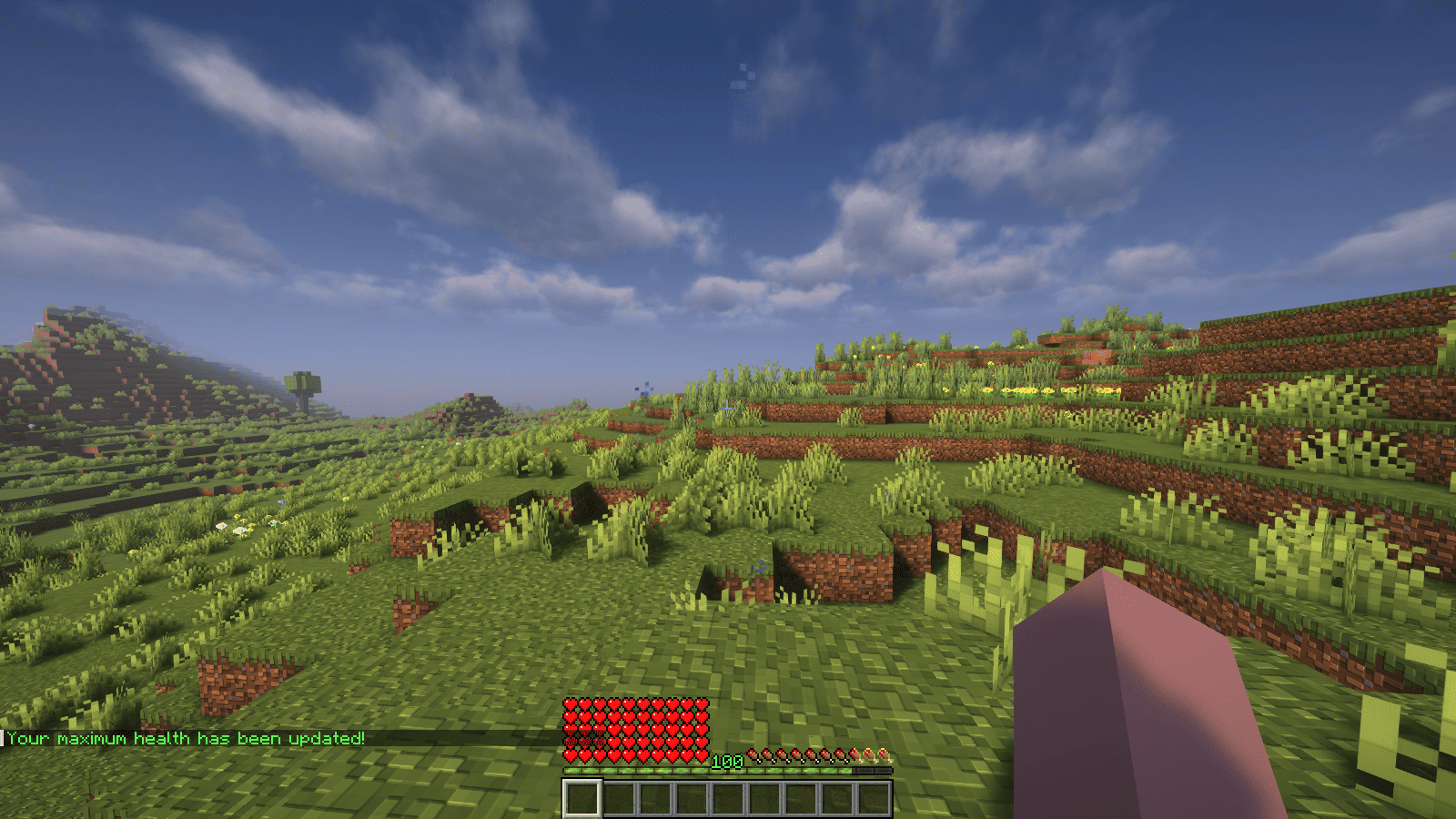<br />
</p>
<p>### Features</p>
<p>– Automatically adjust the player’s maximum hearts/health when they reach the experience level specified in the configuration.<br />
– Easy to understand config.<br />
– Lightweight.</p>
<p></p>
<p>### Commands<br />
| Command | Description | Permission |<br />
|—————-|————————————-|—————–|<br />
| `/xh` | Get the information about the plugin. | `xh.use` |<br />
| `/xh reload` | Reloads the config file. | `xh.admin` |<br />
| Command aliases| **xh, xpheart, xphearts** |</p>
<p></p>
<p>### Issues and Suggestions<br />
Suggest and report issues on [Github](https://github.com/seyviyer2/XPHearts/issues).</p>
</article>
</main>
<script type="speculationrules">
{"prefetch":[{"source":"document","where":{"and":[{"href_matches":"/*"},{"not":{"href_matches":["/wp-*.php","/wp-admin/*","/wp-content/uploads/*","/wp-content/*","/wp-content/plugins/*","/wp-content/themes/minecraft/*","/*\\?(.+)"]}},{"not":{"selector_matches":"a[rel~=\"nofollow\"]"}},{"not":{"selector_matches":".no-prefetch, .no-prefetch a"}}]},"eagerness":"conservative"}]}
</script>
<div class="gtranslate_wrapper" id="gt-wrapper-75974033"></div><script id="gt_widget_script_75974033-js-before">
window.gtranslateSettings = /* document.write */ window.gtranslateSettings || {};window.gtranslateSettings['75974033'] = {"default_language":"en","languages":["ar","az","bn","bg","hr","cs","da","nl","en","fi","fr","de","el","hu","id","it","ja","kk","ko","fa","pl","pt","ro","ru","sl","es","sv","th","uk","uz","vi"],"url_structure":"sub_directory","flag_style":"2d","wrapper_selector":"#gt-wrapper-75974033","alt_flags":[],"custom_domains":{"ru":"minecraft.vpesports.games"},"float_switcher_open_direction":"top","switcher_horizontal_position":"left","switcher_vertical_position":"bottom","flags_location":"\/wp-content\/plugins\/gtranslate\/flags\/"};
//# sourceURL=gt_widget_script_75974033-js-before
</script><script src="https://minecraft.vpesports.com/wp-content/plugins/gtranslate/js/float.js?ver=3.1.1" data-no-optimize="1" data-no-minify="1" data-gt-orig-url="/loader/purpur/page/13/" data-gt-orig-domain="minecraft.vpesports.com" data-gt-widget-id="75974033" defer></script><script id="wp-emoji-settings" type="application/json">
{"baseUrl":"https://s.w.org/images/core/emoji/17.0.2/72x72/","ext":".png","svgUrl":"https://s.w.org/images/core/emoji/17.0.2/svg/","svgExt":".svg","source":{"concatemoji":"https://minecraft.vpesports.com/wp-includes/js/wp-emoji-release.min.js?ver=7.0"}}
</script>
<script type="module">
/*! This file is auto-generated */
const a=JSON.parse(document.getElementById("wp-emoji-settings").textContent),o=(window._wpemojiSettings=a,"wpEmojiSettingsSupports"),s=["flag","emoji"];function i(e){try{var t={supportTests:e,timestamp:(new Date).valueOf()};sessionStorage.setItem(o,JSON.stringify(t))}catch(e){}}function c(e,t,n){e.clearRect(0,0,e.canvas.width,e.canvas.height),e.fillText(t,0,0);t=new Uint32Array(e.getImageData(0,0,e.canvas.width,e.canvas.height).data);e.clearRect(0,0,e.canvas.width,e.canvas.height),e.fillText(n,0,0);const a=new Uint32Array(e.getImageData(0,0,e.canvas.width,e.canvas.height).data);return t.every((e,t)=>e===a[t])}function p(e,t){e.clearRect(0,0,e.canvas.width,e.canvas.height),e.fillText(t,0,0);var n=e.getImageData(16,16,1,1);for(let e=0;e<n.data.length;e++)if(0!==n.data[e])return!1;return!0}function u(e,t,n,a){switch(t){case"flag":return n(e,"\ud83c\udff3\ufe0f\u200d\u26a7\ufe0f","\ud83c\udff3\ufe0f\u200b\u26a7\ufe0f")?!1:!n(e,"\ud83c\udde8\ud83c\uddf6","\ud83c\udde8\u200b\ud83c\uddf6")&&!n(e,"\ud83c\udff4\udb40\udc67\udb40\udc62\udb40\udc65\udb40\udc6e\udb40\udc67\udb40\udc7f","\ud83c\udff4\u200b\udb40\udc67\u200b\udb40\udc62\u200b\udb40\udc65\u200b\udb40\udc6e\u200b\udb40\udc67\u200b\udb40\udc7f");case"emoji":return!a(e,"\ud83e\u1fac8")}return!1}function f(e,t,n,a){let r;const o=(r="undefined"!=typeof WorkerGlobalScope&&self instanceof WorkerGlobalScope?new OffscreenCanvas(300,150):document.createElement("canvas")).getContext("2d",{willReadFrequently:!0}),s=(o.textBaseline="top",o.font="600 32px Arial",{});return e.forEach(e=>{s[e]=t(o,e,n,a)}),s}function r(e){var t=document.createElement("script");t.src=e,t.defer=!0,document.head.appendChild(t)}a.supports={everything:!0,everythingExceptFlag:!0},new Promise(t=>{let n=function(){try{var e=JSON.parse(sessionStorage.getItem(o));if("object"==typeof e&&"number"==typeof e.timestamp&&(new Date).valueOf()<e.timestamp+604800&&"object"==typeof e.supportTests)return e.supportTests}catch(e){}return null}();if(!n){if("undefined"!=typeof Worker&&"undefined"!=typeof OffscreenCanvas&&"undefined"!=typeof URL&&URL.createObjectURL&&"undefined"!=typeof Blob)try{var e="postMessage("+f.toString()+"("+[JSON.stringify(s),u.toString(),c.toString(),p.toString()].join(",")+"));",a=new Blob([e],{type:"text/javascript"});const r=new Worker(URL.createObjectURL(a),{name:"wpTestEmojiSupports"});return void(r.onmessage=e=>{i(n=e.data),r.terminate(),t(n)})}catch(e){}i(n=f(s,u,c,p))}t(n)}).then(e=>{for(const n in e)a.supports[n]=e[n],a.supports.everything=a.supports.everything&&a.supports[n],"flag"!==n&&(a.supports.everythingExceptFlag=a.supports.everythingExceptFlag&&a.supports[n]);var t;a.supports.everythingExceptFlag=a.supports.everythingExceptFlag&&!a.supports.flag,a.supports.everything||((t=a.source||{}).concatemoji?r(t.concatemoji):t.wpemoji&&t.twemoji&&(r(t.twemoji),r(t.wpemoji)))});
//# sourceURL=https://minecraft.vpesports.com/wp-includes/js/wp-emoji-loader.min.js
</script>
</body>
</html>