XGlow
**Works with Java 8 and above.**
(I noticed that the **GlowAPI** from the **inventivetalent** has been abandoned, has not been updated for a long time, has bad reviews and bugs, as well as a rather low-quality code – so I decided to make and publish my own version of the api for the glow)
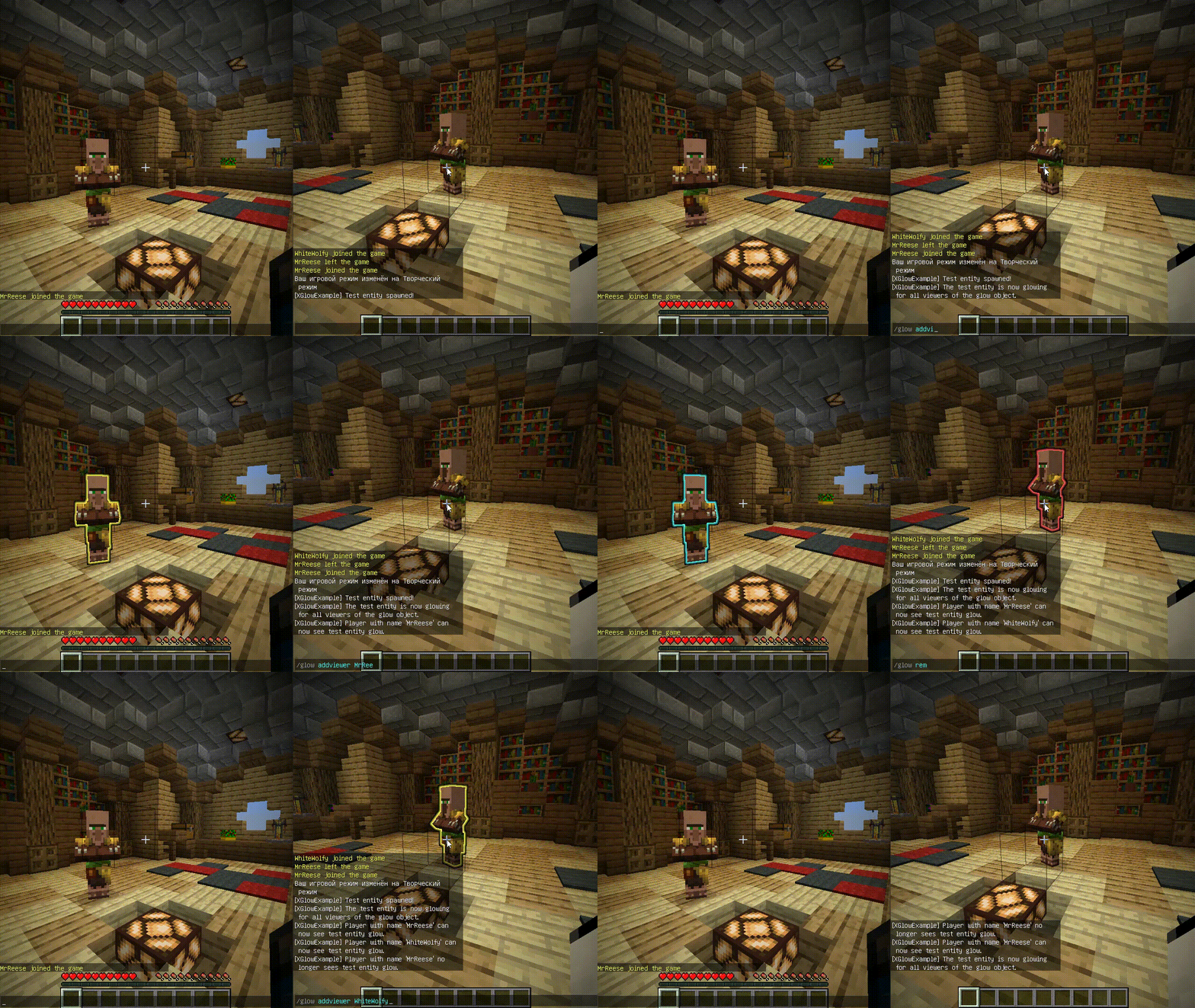
**XGlow** – is a simple, easy-to-use API to create glow on your entities. The plugin requires ProtocolLib to work.
### Usage
First you need to create a Glow object:
(You can use a builder for this)
“`java
Glow glow = Glow.builder()
.сolor(ChatColor.GREEN)
.name(“test”)
.build();
“`
You can add entity to glow object holders,
to make this entity glow with glow object colors.
The glow of the entity will be seen by all viewers
which the glow object contains:
`glow.addHolders(entity);`
To remove the glow of an entity,
you can remove it from the glow object holders.
The entity’s glow will disappear for all viewers of the glow object:
`glow.removeHolders(entity);`
You can add a viewer to the glow object so that he immediately sees the glow of all holders of the glow object:
`glow.display(player);`
When the viewer is removed from the glow object,
all holders of the glow object will
no longer glow for removed viewer:
`glow.hideFrom(player);`
For more features check out XGlow wiki page on github: https://github.com/Xezard/XGlow/wiki
XG7Lobby
# I’ll record it again…
# This plugin depends on a core! Download it below:
https://modrinth.com/plugin/xg7plugins
—
# XG7Lobby – Complete Lobby/Hub System
## 📖 What is XG7Lobby?
**XG7Lobby** is a powerful lobby/hub management plugin designed to revolutionize the server join experience. With a wide range of configurable options, the plugin offers **more than 20 customizable features**, including: **Global PVP**, **interactive menus**, **animated scoreboard/tablist**, **custom forms for Geyser**, and much more!
—
## ⚡ Main Features
### 🏰 Multi-Lobby System
Configure **as many lobbies as you want**, including cross-server locations with SQL database support! Players can easily teleport using the `/lobby` command, with a configurable cooldown system and the option to teleport to a specific lobby ID.
### 🎨 Advanced Menu System
Improve your lobby experience with XG7Lobby’s menu system. You can use custom Geyser forms, personalized GUIs, and configurable hotbars — all adjustable to your liking!
### 📊 Scoreboard, Tablist, Bossbar & More
Bring your server to life with **fully animated** scoreboards, tablists, and bossbars. Display useful information such as player statistics, server status, or events in a visually appealing and dynamic way.
### 🎉 Join, Quit & First Join Events
Customize what happens when players join or leave the server, and make a great first impression on new players with a special welcome. Add messages, sounds, effects, or even rewards to make joining and leaving more memorable.
### ⚔️ Global PVP System
Does the lobby sometimes feel boring? With the global PVP system, that won’t be a problem anymore! Let players fight each other in the lobby with the powerful system provided by XG7Lobby, including full statistics for kills, deaths, and KDR.
### 🦘 Multi-Jump System
Go beyond the classic double jump! Configure triple jumps, infinite jumps, or unique jump effects to add fun mechanics to your server.
### 🚀 LaunchPad
Add excitement with customizable launchpads that throw players into the air. Perfect for hubs, lobbies, or minigame arenas with a fun and interactive touch.
### 🛡️ Complete Moderation System
Keep your server safe with robust moderation tools, including warning systems, mute, kick, ban, IP-ban, and automatic punishments based on configurable infraction levels.
### 💬 Advanced Chat Protection
A complete protection system including anti-swearing, anti-spam, and blocking unwanted commands. Keep your chat clean and organized automatically.
### 🔧 Build System
Control who can build in the lobby using the `/build` command, with full protection against block breaking and placing.
### 👻 Vanish System
Allows staff members to become invisible to other players using the `/vanish` command.
### ⚙️ Custom Commands
Add your own commands to fit your server’s style. Customize shortcuts, actions, and utilities without needing extra plugins.
### 👤 NPC & Hologram System
Create user interaction by taking advantage of the new NPC and hologram creation features!

—
## 📋 Full Feature List
* Fully configurable
* Multiple lobbies
* Global PVP system
* Custom menus (GUI, forms, and hotbar)
* Animated scoreboard, tablist, and bossbar
* Multi-jump system
* Launchpad
* Moderation system
* World-based lobby
* Join and quit events
* First join events
* Repeating events
* Auto broadcast
* Customizable MOTD
* Build system
* Custom commands
* Vanish system
* Anti-swearing
* Anti-spam
* NPCs and holograms
* Action queue system
* Preferences menu
* Hide chat
XFWorldLocker

# XFWorldLocker (XFWL) v1.0.0
## Overview
XFWorldLocker is a professional Minecraft plugin for Paper, Spigot and Bukkit 1.21.1+ that provides advanced world protection and management features.
## Features
### 🌍 World Area Protection
– Define rectangular areas in worlds using X1,Z1 and X2,Z2 coordinates
– Automatic teleportation when players leave defined areas
– Y-coordinate independent (full height protection)
### 🔒 World Restrictions
– **Block Protection**: Control block breaking and placing
– **Interaction Control**: Manage player interactions with blocks/entities
– **Mob Management**: Control mob spawning and cleanup
– **Damage Control**: Enable/disable player damage
– **Explosion Protection**: Prevent explosions (except in creative mode)
### ✨ Player Effects
– Apply custom potion effects to players in specific worlds
– Automatic effect removal when leaving the world
– Configurable effect amplifiers
### 🚀 Dynamic Commands
– Create custom teleportation commands for each world
– Support for command aliases
– Optional permission requirements
– Automatic command registration
### 📝 Multi-language Support
– Fully customizable messages via `language.yml`
– Support for actionbar and chat messages
– Color code support with `&` symbol
## Installation
1. Download the XFWorldLocker.jar file
2. Place it in your server’s `plugins` folder
3. Restart your server
4. Configure worlds in `config.yml`
5. Customize messages in `language.yml`
## Configuration
### config.yml Example
“`yaml
settings:
prefix: “&a[XFWL]”
debug: false
worlds:
world:
enabled: true
spawnWorld: “world”
area:
x1: -100
z1: -100
x2: 100
z2: 100
spawnMobs: false
canBreakBlocks: false
canPlaceBlocks: false
canInteract: false
canTakeDamage: false
effects:
SPEED:
amplifier: 1
JUMP:
amplifier: 0
commands:
command: “/world”
aliases:
– “/worldtp”
– “/w”
permission: “”
“`
### language.yml
All messages can be customized in the `language.yml` file. Use `&` for color codes and `{placeholder}` for dynamic values.
## Commands
### Admin Commands
– `/xfwl reload` – Reload plugin configuration
– `/xfwl help` – Show help message
– `/xfwl version` – Show plugin version
– `/lock ` – Instantly apply default restrictions to a world
### Dynamic World Commands
Custom commands are automatically registered based on your world configurations.
## Permissions
– `xfwl.admin` – Access to all admin commands (default: op)
– `xfwl.lock` – Permission to use the lock command (default: op)
– `xfwl.bypass` – Bypass all world restrictions (default: false)
## Special Features
### Smart Entity Management
– Villagers and NPCs are always protected
– Armor stands and item frames are preserved
– FancyNPCs plugin integration
– Automatic mob cleanup in restricted worlds
### Creative Mode Support
– Creative players can bypass block restrictions
– Explosions work near creative players
– Enhanced building capabilities for admins
### Performance Optimized
– Efficient area checking algorithms
– Minimal server impact
– Asynchronous update checking
## Compatibility
– **Minecraft Version**: 1.21.1+
– **Optimal Minecraft Version**: 1.21.5+
– **Server Software**: Paper, Spigot, Bukkit
– **Java Version**: 17 or higher
## Support
For support, updates, or to report bugs, contact me.
## License
This plugin was created by xfinity. All rights reserved.
XFPoolManager

# 🎣 XFPoolManager (XFPM)
**XFPoolManager** is a **custom loot pool manager**.
It is designed primarily for **CosmicSMP** and servers with **advanced fishing systems**, but it can also be used as a general-purpose loot pool manager.
## 💡 Soft Dependencies:
– **NBT API**
– **Vault**
– **PlaceholderAPI**
> These plugins are **optional**. XFPM will integrate with them if present, but will function normally without them.
## 📜 General Description
XFPM allows you to define **main pools**, with **mini pools** inside them, and finally **items** inside those mini pools.
It also introduces **custom fishing enchantments** (stored as lore on fishing rods, not real enchantments) that affect loot behavior when rolling with `/xfpm loot`.
✅ If no fishing rod with the required lore is present → normal loot rules apply.
✅ If a fishing rod contains specific enchantments in its lore → the plugin modifies loot generation accordingly.
✅ Enchantments marked with `[X]` in the list below are **ignored** by XFPM.
## ✨ Features
– 🎲 **Configurable loot pools** with:
– Main pools → mini pools → items.
– Item rarities: `common, uncommon, rare, epic, mythic, legendary` (and anything rarer).
– Drop chances per item.
– Fixed or ranged amounts with optional **weighted probability**.
– Full **NBT tag** support (complex JSON supported).
– Custom messages (`%nl%` = line break).
– Console commands executed per reward.
– 🪝 **Custom Fishing Enchantments (for CosmicSMP)**:
– Work only if the player holds a fishing rod with the correct lore.
– Levels are expressed in Roman numerals (`I–VI` or `MAX`).
– No need for additional enchantment plugins.
– Modify loot roll logic dynamically:
– Rarer fish.
– More treasure.
– Increased amounts of fish or trash.
– Bonus XP.
– 🔄 Reload config on the fly: `/xfpm reload`.
– 📦 Works out-of-the-box with **CosmicSMP setups** and similar systems.
—
## 🧩 Custom Enchantments
### 🎲 Chance Boosts
– **Rare Catch** → Boosts chance of catching rarer items.
– **Treasure Finder** → Unlocks or increases chance for rolls in the `treasure` mini pool.
– **Bountiful Haul** → Increases amount of fish (+20% per level). Not compatible with *Wasteful Haul*.
– **Wasteful Haul** → Increases amount of trash (+15% per level). Not compatible with *Bountiful Haul*.
– **Angler’s Fortune** → Grants extra XP per successful catch.
### ⚡ Utility & Other (ignored by XFPM)
– Gambler’s Worth [X]
– Swift Bite [X]
– Endless Line [X]
📌 If the enchantment is **not present in lore** → no effect.
📌 If it is **present but marked [X]** → ignored safely.
—
## ⚙️ Commands
| Command | Description |
|———|————-|
| `/xfpm loot ` | Rolls loot for a player, applying enchantment modifiers if their fishing rod lore qualifies. |
| `/xfpm reload` / `/xfpmreload` | Reloads the plugin configuration without restarting the server. |
—
## 🛠️ Example `config.yml`
“`yaml
pool_main:
fish:
salmon_common:
item: salmon
rarity: common
nbt:
– ‘custom_name=[{“text”:”Common Salmon”,”italic”:false,”color”:”white”}]’
message: “You caught a common salmon!”
amount: “1-2”
amount_weighted: false
chance: 0.5
commands:
– “say %player% caught a salmon!”
treasure:
golden_pearl:
item: ender_pearl
rarity: legendary
nbt:
– ‘custom_name=[{“text”:”Golden Pearl”,”italic”:false,”color”:”gold”}]’
message: “§6You fished up a Golden Pearl!%nl%§7Unbelievable luck!”
amount: “1”
amount_weighted: false
chance: 0.05
commands:
– “give %player% diamond 1”
flow
# Flow – Reimagining Communication in Minecraft
## Elegance in Every Detail
Flow isn’t just a chat plugin. It’s a completely reimagined way of communicating in Minecraft, where every detail is meticulously crafted. Minimalist. Intuitive. Revolutionary.
### ✨ The Magic of Simplicity
– **Local Chat**
Communicate naturally with nearby players
– **Global Chat**
Add “!” at the start of your message – and the whole server will hear you
– **Smart Tooltips**
Hover for important information
– **Instant Messages**
Private communication with a single click
### 🎨 Social Features
– **Mentions**
Tag players with @username for instant notifications
– **Emojis**
Express yourself with built-in emoji support
– **Anti-Spam**
Smart protection against chat abuse
– **Chat Filter**
Keep conversations clean automatically
– **Ignore System**
Control who you interact with
### 🔧 Player Settings
– **Private Messages Control**
Enable or disable private messages
– **AFK System**
Set your status and custom AFK message
– **Personal Settings GUI**
Easy-to-use interface for all player settings
### 🎨 Limitless Customization
Customize Flow to your needs:
– Full PlaceholderAPI support
– Flexible message formats
– Interactive tooltips
– LuckPerms integration
### ⚡️ Performance
Built for speed:
– Asynchronous processing
– Optimized code
– Minimal overhead
## 🌟 Perfect for Any Server
| Server Type | Compatibility |
|————-|—————|
| Anarchy | ✓ |
| PvP | ✓ |
| Duels | ✓ |
| RPG | ✓ |
## 📝 Configuration Guide
### Basic Settings
“`yaml
# Radius for local chat in blocks
local-chat-radius: 100
# Prefix for global messages
global-chat-prefix: ‘!’
# Time format for timestamps
time-format: ‘HH:mm:ss’
“`
### Message Formats
Customize how messages appear in different chat types:
“`yaml
format:
# Local chat format
local: ‘%luckperms_prefix%%player_name% &8→ &f%message%’
# Global chat format
global: ‘&6[G] %luckperms_prefix%%player_name% &8→ &f%message%’
# Private messages format
private:
outgoing: ‘&d→ &7%recipient%&8: &f%message%’
incoming: ‘&dFrom &7%sender%&8: &f%message%’
“`
### Player Settings
Configure personal settings for each player:
“`yaml
settings:
# Default AFK message
default-afk-message: “I am currently AFK. I will respond when I return.”
# Default settings state
default-settings:
private-messages-enabled: true
afk-status: false
“`
### Messages Customization
All plugin messages can be customized in messages.yml:
“`yaml
messages:
private-messages:
disabled-sender: “&cYou have private messages disabled!”
disabled-recipient: “&cThis player has private messages disabled!”
player-afk: “&7%player% is AFK: %message%”
settings:
private-messages-enabled: “&aPrivate messages enabled!”
private-messages-disabled: “&cPrivate messages disabled!”
afk-enabled: “&aAFK status enabled!”
afk-disabled: “&cAFK status disabled!”
“`
### Hover Effects
Configure tooltips that appear when hovering over messages:
“`yaml
hover:
enabled: true
format:
– ‘&8&m ‘
– ”
– ‘ &fPlayer: &7%player_name%’
– ‘ &fRank: &7%luckperms_prefix%’
– ‘ &fPing: &7%player_ping%ms’
– ”
– ‘ &fTime: &7%time%’
– ”
– ‘ &7Click to message’
– ”
– ‘&8&m ‘
“`
### Anti-Spam Protection
Prevent chat abuse with customizable limits:
“`yaml
anti-spam:
enabled: true
cooldown: 2 # Seconds between messages
max-messages: 5 # Maximum messages
time-window: 10 # Time window in seconds
“`
### Chat Filter
Keep your chat clean with word filtering:
“`yaml
chat-filter:
enabled: true
banned-words:
– “word1”
– “word2”
“`
### Emoji System
Add expressive emojis to your chat:
“`yaml
emojis:
‘:heart:’: ‘❤’
‘:star:’: ‘⭐’
‘:smile:’: ‘☺’
‘:fire:’: ‘🔥’
‘:rainbow:’: ‘🌈’
# And many more…
“`
### Mention System
Configure how player mentions work:
“`yaml
mentions:
format: ‘§e@%player%§r’
sound:
enabled: true
type: ‘ENTITY_EXPERIENCE_ORB_PICKUP’
volume: 1.0
pitch: 1.0
title:
enabled: true
text: ‘§eMention from %player%’
“`
### Color Schemes
Define default colors for chat elements:
“`yaml
colors:
name: ‘&7’ # Player names
arrow: ‘&8’ # Arrows in format
message: ‘&f’ # Message text
“`
### PlaceholderAPI Integration
Flow supports all PlaceholderAPI expansions:
– `%luckperms_prefix%` – Player’s prefix
– `%luckperms_suffix%` – Player’s suffix
– `%player_name%` – Player’s name
– `%player_ping%` – Player’s ping
– `%player_world%` – Player’s world
### Permissions
– `flow.reload` – Access to /flowreload
– `flow.bypass.filter` – Bypass chat filter
– `flow.bypass.antispam` – Bypass anti-spam
– `flow.emojis` – Use emojis in chat
– `flow.color` – Use color codes in chat
### Color Codes
Flow supports standard Minecraft color codes:
– `&0-9, &a-f` – Colors
– `&k` – Magic
– `&l` – Bold
– `&m` – Strikethrough
– `&n` – Underline
– `&o` – Italic
– `&r` – Reset
### Tips
– Use `&` for color codes
– Test your formats in-game with /flowreload
– Keep anti-spam values balanced
– Regular expressions are supported in chat filter
– Use hover tooltips to display additional information
– Customize click actions for interactive chat
## 💫 Commands
/msg Send a private message
/r Reply to last message
/ignore Ignore/unignore a player
/flowreload Reload configuration
/settings Open settings menu
## 📦 Dependencies
**Required:**
– Paper 1.19+
– PlaceholderAPI
**Optional:**
– LuckPerms (for ranks and prefixes)
## 🚀 Installation
1. Place plugin in plugins folder
2. Install PlaceholderAPI
3. Download required expansions:
“`
/papi ecloud download luckperms
/papi reload
“`
4. Restart server
5. Configure in config.yml
—
You can find Changelog Here
> “Flow – the future of Minecraft communication”
Xfilter
**Xfilter** is a powerful Minecraft plugin designed to maintain clean and safe communication within your server by filtering out unwanted words from player messages. Server administrators can easily manage the list of filtered words using commands, and the plugin supports an unlimited number of filtered words. When a player attempts to send a message containing any filtered word, the message is blocked, and a notification is sent to the player. Xfilter provides full flexibility to customize and update the filtered word list in real-time, ensuring smooth moderation without disrupting gameplay.
## Key Features:
Unlimited filtered words.
Real-time filtering of chat messages.
Easy-to-use commands for managing filtered words.
Only operators (OPs) can add or remove words from the filtered list.
# How to Use Xfilter:
– 1. Adding a Filtered Word:
Command: /xfilterword add or /xfw add
Example: /xfw add badword
This adds the specified word to the filtered word list. If the word is already filtered, you will receive a message saying it’s already in the list.
– 2. Removing a Filtered Word:
Command: /xfilterword remove or /xfw remove
Example: /xfw remove badword
This removes the word from the filtered list. If the word is not found, you will be notified.
– 3. What Happens When a Player Uses a Filtered Word:
If a player sends a message containing a filtered word, the message will not be sent, and the player will receive a message: “Sorry, you can’t send this message because you used a filtered word.”
# Permissions:
Only OPs can use the commands to add or remove words from the filtered list.
Filtered words are stored in filteredwords.yml, and the plugin allows you to add unlimited words for filtering.
XfeaturesRPGMoney
# 💰 XfeaturesRPGMoney





## 📝 Description
**XfeaturesRPGMoney** is an innovative economic plugin for Minecraft servers that adds RPG elements to your server’s economy. The plugin provides players with a variety of ways to earn in-game currency:
– 💀 **Mob hunting**: earn money for killing various creatures
– 🎣 **Fishing**: earn money by catching different types of fish
– ⛏️ **Block mining**: get a chance to earn money when mining certain blocks
– 🔍 **Archaeology**: get rewards for mining archaeological treasures
The plugin is fully integrated with the Vault API, ensuring compatibility with most economic systems.
## ✨ Key features
– **Flexible reward system**: customizable minimum and maximum amounts for each source of income
– **Luck and loot multipliers**: Fortune and Looting enchantments increase the reward received
– **Player statistics**: track money earned and create a ranking of the best players
– **Visual effects**: animated appearance of coins in the game world
– **Full message customization**: all notifications can be changed in the configuration
– **Easy management**: intuitive commands for players and administrators
## 📋 Requirements
– Spigot/Paper 1.13+
– Vault
– Any economic plugin compatible with Vault (e.g., EssentialsX, CMI)
## 🔧 Installation
1. Download the latest version of the plugin from the Releases section
2. Place the JAR file in the `plugins` folder of your server
3. Restart the server
4. Configure the configuration files as you see fit
5. Reload the plugin with the command `/rpgmoney reload`
## 🌍 Supported Languages
XfeaturesRPGMoney supports multiple languages for users from around the world. You can change the plugin language using the command `/rpgmoney language `.
### Available Languages:
– English (en)
– Russian (ru)
– German (de)
– Polish (pl)
– Italian (it)
– Portuguese (pt)
– Turkish (tr)
– French (fr)
– Spanish (es)
– Lithuanian (lt)
– Latvian (lv)
– Estonian (et)
– Arabic (ar)
– Hindi (hi)
– Chinese (Simplified) (cn)
### Adding a New Language
If you want to add a new language or improve an existing translation:
1. Copy the `messages-en.yml` file from the `resources/messages/` folder
2. Rename it to `messages-XX.yml`, where XX is your language code
3. Translate all strings to your language
4. Submit the translation via Pull Request or contact the developers
We always welcome new translations and improvements to existing ones!
## ⚙️ Configuration
After the first launch, the plugin will create the following configuration files:
### config.yml
Basic plugin settings, including multipliers for enchantments:
“`yaml
# All available languages can be found here:
# https://github.com/XfeaturesGroup/XfeaturesRPGMoney/tree/master/examples/messages
# Language settings for the plugin
language: “en”
# Coin drop rate from mobs spawned by spawners
spawner-multiplier: 0.6
# Main plugin settings
drop-chance: 0.75 # Probability of coins dropping when mining blocks and killing mobs
show-action-bar-messages: true # Show messages when picking up coins in the Action Bar
player-death-drop-percentage: 0.07 # Coin drop rate from killed players
max-money-drop: 1000.0 # Maximum amount of money in a single coin
# Settings for combining nearby drops
combine-nearby-drops: true
combine-radius: 1.5
# Messages about multipliers
show-fortune-multiplier-messages: false
show-looting-multiplier-messages: false
# Multipliers for the “Fortune” enchantment
fortune-multipliers:
1: 1.25 # Fortune I – increases coin drop rate by 25%
2: 1.5 # Fortune II – increases coin drop rate by 50%
3: 1.75 # Fortune III – increases coin drop rate by 75%
# Multipliers for “Looting” enchantments
looting-multipliers:
1: 1.25 # Looting I – increases coin drop rate by 25%
2: 1.5 # Looting II – increases coin drop rate by 50%
3: 1.75 # Looting III – increases coin drop rate by 75%
“`
### mobs.yml
Setting killing mobs rewards:
“`yaml
# ENTITY: [min, max]
ALLAY: [5, 30]
ARMADILLO: [4, 12]
AXOLOTL: [5, 30]
BAT: [5, 30]
BEE: [5, 30]
BLAZE: [5, 25]
BREEZE: [15, 30]
BOGGED: [10, 20]
CAMEL: [4, 12]
CAT: [5, 30]
CAVE_SPIDER: [2.5, 20]
CHICKEN: [4, 12]
COPPER_GOLEM: [15, 30]
COD: [4, 12]
COW: [4, 12]
CREEPER: [10, 15]
DOLPHIN: [4, 22]
DONKEY: [4, 12]
DROWNED: [10, 20]
ELDER_GUARDIAN: [50, 125]
ENDER_DRAGON: [100, 250]
ENDERMAN: [3, 20]
ENDERMITE: [10, 20]
EVOKER: [50, 100]
FOX: [4, 12]
FROG: [5, 12]
GHAST: [20, 35]
GLOW_SQUID: [4, 20]
GOAT: [4, 20]
GUARDIAN: [10, 25]
HOGLIN: [10, 25]
HORSE: [4, 12]
HUSK: [5, 15]
IRON_GOLEM: [25, 40]
LLAMA: [4, 12]
MAGMA_CUBE: [2, 7]
MOOSHROOM: [4, 14]
MULE: [4, 12]
OCELOT: [4, 12]
PANDA: [4, 12]
PARROT: [4, 12]
PHANTOM: [15, 20]
PIG: [4, 12]
PIGLIN: [4, 15]
PIGLIN_BRUTE: [4, 15]
PILLAGER: [7, 15]
POLAR_BEAR: [4, 12]
PUFFERFISH: [4, 12]
RABBIT: [4, 20]
RAVAGER: [50, 70]
SALMON: [4, 20]
SHEEP: [4, 20]
SHULKER: [10, 20]
SILVERFISH: [10, 20]
SKELETON: [10, 15]
SKELETON_HORSE: [10, 15]
SLIME: [4, 6]
SNIFFER: [10, 25]
SNOW_GOLEM: [10, 15]
SPIDER: [10, 15]
SQUID: [4, 12]
STRAY: [10, 15]
STRIDER: [10, 25]
TADPOLE: [10, 25]
TRADER_LLAMA: [10, 25]
TROPICAL_FISH: [10, 15]
TURTLE: [10, 15]
VEX: [10, 25]
VILLAGER: [10, 55]
VINDICATOR: [10, 25]
WANDERING_TRADER: [10, 25]
WARDEN: [10, 55]
WITCH: [10, 25]
WITHER: [10, 55]
WITHER_SKELETON: [10, 25]
WOLF: [4, 12]
ZOGLIN: [10, 25]
ZOMBIE: [10, 15]
ZOMBIE_HORSE: [10, 15]
ZOMBIE_VILLAGER: [10, 15]
ZOMBIFIED_PIGLIN: [5, 12]
“`
### fishes.yml
Setting fishing rewards:
“`yaml
# LOOT: [min, max]
COD: [10, 30]
SALMON: [10, 30]
PUFFERFISH: [15, 25]
TROPICAL_FISH: [10, 25]
ENCHANTED_BOOK: [25, 45]
LEATHER: [15, 35]
TRIPWIRE_HOOK: [15, 35]
ROTTEN_FLESH: [15, 35]
FISHING_ROD: [15, 35]
NAME_TAG: [15, 55]
NAUTILUS_SHELL: [55, 200]
SADDLE: [15, 35]
“`
### blocks.yml
Setting block mining rewards:
“`yaml
# BLOCK: [min, max]
CROPS: [3.5, 21]
WHEAT: [3.5, 21]
POTATOES: [3.5, 8.75]
CARROTS: [3.5, 8.75]
BEETROOTS: [7, 42]
NETHER_WART: [5.25, 35]
MELON: [8.75, 52.5]
PUMPKIN: [8.75, 52.5]
CACTUS: [1.75, 8.75]
SUGAR_CANE: [1.75, 35]
GLOW_BERRIES: [1.75, 35]
SWEET_BERRIES: [1.75, 35]
COCOA_BEANS: [1.75, 35]
COAL_ORE: [5.25, 10.5]
DEEPSLATE_COAL_ORE: [8.75, 26.25]
IRON_ORE: [8.75, 17.5]
DEEPSLATE_IRON_ORE: [14, 35]
COPPER_ORE: [12.25, 22.75]
DEEPSLATE_COPPER_ORE: [8.75, 21]
GOLD_ORE: [17.5, 21]
DEEPSLATE_GOLD_ORE: [17.5, 35]
NETHER_GOLD_ORE: [8.75, 14]
REDSTONE_ORE: [8.75, 21]
DEEPSLATE_REDSTONE_ORE: [8.75, 22.75]
LAPIS_ORE: [8.75, 14]
DEEPSLATE_LAPIS_ORE: [8.75, 22.75]
DIAMOND_ORE: [17.5, 70]
DEEPSLATE_DIAMOND_ORE: [70, 140]
EMERALD_ORE: [52.5, 105]
DEEPSLATE_EMERALD_ORE: [52.5, 105]
NETHER_QUARTZ_ORE: [8.75, 14]
ANCIENT_DEBRIS: [87.5, 262.5]
“`
### archeology.yml
Setting archaeology rewards:
“`yaml
# DROP: [min, max]
BROWN_CANDLE: [25, 40]
GREEN_CANDLE: [25, 40]
PURPLE_CANDLE: [25, 40]
RED_CANDLE: [25, 40]
LIGHT_BLUE_DYE: [15, 35]
ORANGE_DYE: [15, 35]
BLUE_DYE: [15, 35]
YELLOW_DYE: [15, 35]
WHITE_DYE: [15, 35]
BRICK: [10, 15]
EMERALD: [50, 75]
WHEAT: [20, 30]
WOODEN_HOE: [15, 20]
BLUE_STAINED_GLASS_PANE: [20, 35]
LIGHT_BLUE_STAINED_GLASS_PANE: [20, 35]
MAGENTA_STAINED_GLASS_PANE: [20, 35]
PINK_STAINED_GLASS_PANE: [20, 35]
PURPLE_STAINED_GLASS_PANE: [20, 35]
RED_STAINED_GLASS_PANE: [20, 35]
YELLOW_STAINED_GLASS_PANE: [20, 35]
BEETROOT_SEEDS: [25, 30]
WHEAT_SEEDS: [25, 30]
OAK_HANGING_SIGN: [25, 30]
SPRUCE_HANGING_SIGN: [25, 30]
DEAD_BUSH: [30, 35]
FLOWER_POT: [15, 30]
LEAD: [15, 30]
STRING: [15, 30]
GOLD_NUGGET: [35, 45]
COAL: [30, 35]
MUSIC_DISC_RELIC: [150, 175]
TRIM_PATTERN: [100, 125]
“`
### messages.yml
Configuring all plugin messages:
“`yaml
prefix: “&c[XfeaturesRPGMoney]&r”
# Command messages
no-permission: “&cYou don’t have permission to use this command.”
player-only: “&cThis command is only available for players.”
config-reloaded: “&aConfiguration successfully reloaded.”
invalid-page-format: “&cInvalid page format. Please use a number.”
no-data-for-page: “&cThere is no data for this page.”
# Stats messages
stats-header: “&7===== &cYour Statistics &7=====”
stats-collected: “&eMoney collected: &6%amount%”
# Top players messages
top-header: “&7===== &cPlayer Rankings (Page %page%) &7=====”
top-player-entry: “&7#%rank% &c%player% &7- &7%amount%”
top-next-page: “&7Use &c/rpgmoney top %page% &7for the next page”
# Plugin info messages
info-header: “&7===== &cPlugin Information &7=====”
info-version: “&cVersion: &7%version%”
info-author: “&cAuthors: &7%authors%”
info-fortune-header: “&cFortune Multipliers:”
info-fortune-entry: “&cLevel %level%: &7+%percent%% money”
info-looting-header: “&cLooting Multipliers:”
info-looting-entry: “&cLevel %level%: &7+%percent%% money”
# Help messages
help-header: “&7===== &cXfeaturesRPGMoney Help &7=====”
help-reload: “&c/rpgmoney reload &7- Reload configuration”
help-stats: “&c/rpgmoney stats &7- Display your statistics”
help-top: “&c/rpgmoney top [page] &7- Display player rankings”
help-info: “&c/rpgmoney info &7- Plugin information”
help-language: “&c/rpgmoney language &7- Change plugin language”
# Money collection messages
currency-name: Money
pickup: “&eYou picked up %amount%!”
currency-pickup: “&eYou picked up %amount%!”
money-item-name: “&e%amount%”
money-drop: “&eYou dropped %amount%!”
fishing-reward: “&eYou fished %amount%!”
mining-reward: “&eYou mined %amount%!”
entity-kill-reward: “&eYou received %amount% for this kill!”
player-kill-reward: “&eYou received %amount% for killing a player!”
player-death-drop: “&cYou lost %amount% by dying!”
currency-format: “%amount%”
currency-singular: money
currency-plural: money
currency-few: money
# Language messages
language-usage: “&cUsage: /rpgmoney language ”
language-not-found: “&cLanguage %language% not found.”
language-changed: “&aLanguage changed to %language%.”
“`
## 📜 Commands
| Command | Description | Permissions |
|———|———-|——-|
| `/rpgmoney reload` | Reload configuration | `xfeatures.rpgmoney.reload` |
| `/rpgmoney stats` | Show your stats | – |
| `/rpgmoney top [page]` | Show top players | `xfeatures.rpgmoney.top` |
| `/rpgmoney info` | Plugin information | – |
| `/rpgmoney language ` | Change plugin language | `xfeatures.rpgmoney.language` |
## 🔒 Permissions
– xfeatures.rpgmoney.reload – Access to the reload command
– xfeatures.rpgmoney.top – Access to view the top players
– xfeatures.rpgmoney.admin – Full access to all plugin features
– xfeatures.rpgmoney.language – Access to change the plugin language
## 🛠️ API for developers
The plugin provides an API for integration with other plugins:
“`java
// Getting a plugin instance
XfeaturesRPGMoney plugin = (XfeaturesRPGMoney) Bukkit.getPluginManager().getPlugin(“XfeaturesRPGMoney”);
// Working with mob configuration
MobConfig mobConfig = plugin.mobConfig;
List zombieReward = mobConfig.getReward(“zombie”);
double min = zombieReward.get(0);
double max = zombieReward.get(1);
// Working with the plugin API
RPGMoneyAPI api = plugin.getAPI();
// Get a random value in the range
double amount = api.getRandomInRange(10.0, 20.0);
// Drop money in the world
api.dropMoney(location, amount);
// Check if the block was placed by the player
boolean isPlayerPlaced = api.isPlayerPlacedBlock(location);
“`
## 📊 Performance
### The plugin is optimized for minimal impact on server performance:
– Asynchronous data saving
– Optimized reward calculation algorithms
– Minimal memory usage
## 📝 Future plans
– ✅ More refined configurations **(Implemented)**
– ✅ Support for more languages **(Implemented)**
– Integration with PlaceholderAPI
– Graphical interface for managing settings
– Adding rewards for Archaeology, Research, Creation
## 🤝 Contributing to the project
### Contributions are welcome! If you have ideas for improving the plugin:
1. Fork the repository
2. Create a branch for your feature (git checkout -b feature/amazing-feature)
3. Commit your changes (git commit -m ‘Add some amazing feature’)
4. Push the changes to your fork (git push origin feature/amazing-feature)
5. Open a Pull Request
## 📊 Statistics
### The plugin collects anonymous statistics via bStats to improve functionality:
You can view the plugin statistics on the bStats page.


### Data collected:
– Total amount of money in the economy
– Number of players with money records
– Use of messages in the action bar
– Use of Fortune and Looting multipliers
– Number of players and servers
– Online mode status
– Server, plugin, and Java versions
### Disabling statistics
If you want to disable statistics collection, you can do so in the `plugins/bStats/config.yml` file by setting `enabled: false`. Disabling statistics does not affect the functionality of the plugin.
## 📞 Support
### If you encounter any problems or have any questions:
– Create an issue in the repository
– Contact us via Discord



Made with ❤️ by the XfeaturesGroup team
xEvents
# ⚡ xEvents — Dynamic Automatic Events
> Keep your server alive. Surprise your players. Reward the brave.
**xEvents** automatically launches dynamic events on your server at random intervals — no admin input required. From meteor showers to acid rain, every event is a fully configurable experience that drives engagement and keeps your community coming back.
—
## 🎮 Built-in Events
### ☄️ Meteor Shower
Meteors fall from the sky targeting random players. Configure the block type, explosion radius, fire, damage, particles, and sounds. Players who survive until the end earn configurable rewards.
### 👾 Mob Invasion
Waves of buffed mobs spawn near players throughout the event. Customize which mobs spawn, how many, their health and damage multipliers, custom names, and loot drops. Top killers are rewarded at the end.
### ⚔️ PvP Tournament
Server-wide PvP is forced for the duration. A live sidebar scoreboard tracks kills in real time. Top 3 players earn configurable prizes. Disconnect to dodge? There’s a configurable punishment for that too.
### 🗺️ Treasure Hunt
A chest is secretly placed somewhere in the world. Players receive automatic directional hints (distance + compass direction) on a configurable interval. First to open it wins — and the chest loot is fully customizable.
### ☣️ Acid Rain
Rain turns toxic. Players standing outside take configurable damage and receive poison, wither, and slowness effects. Helmets reduce damage. A solid roof provides shelter. Players who survive earn rewards.
—
## ✨ Everything is Configurable
Every single setting of every event can be changed in `config.yml`:
– ⏱️ Auto-trigger intervals (min/max per event)
– ⚖️ Weighted random selection between events
– 💬 All messages (with full `&` color code support)
– 🔊 Sounds (broadcast sound, impact sounds, etc.)
– ✨ Particle effects
– 💥 Damage values, explosion radii, effect durations
– 🧟 Mob types, quantities, health/damage multipliers
– 📦 Loot tables with per-item drop chances
– 🏆 Reward commands (per survivor, top killer, winner, etc.)
– 🌍 Allowed worlds — globally or per event
– 🌐 Language — English or Spanish (`language: en` / `language: es`)
—
## 📋 Commands
| Command | Description |
|———|————-|
| `/xevents help` | Show the help menu |
| `/xevents list` | List all events and their status |
| `/xevents info` | Show info about the active event |
| `/xevents start [world]` | Manually start an event |
| `/xevents stop` | Stop the active event |
| `/xevents reload` | Reload config without restarting |
**Aliases:** `/xe`, `/events`
—
## 🔑 Permissions
| Permission | Default |
|————|———|
| `xevents.use` — View event info and list | Everyone |
| `xevents.start` — Start events manually | OP |
| `xevents.stop` — Stop active events | OP |
| `xevents.reload` — Reload configuration | OP |
| `xevents.bypass` — Ignore event effects (acid rain, etc.) | OP |
—
## 📦 Installation
1. Drop `xEvents.jar` into your `plugins/` folder
2. Start or restart your server
3. Configure `plugins/xEvents/config.yml`
4. Run `/xevents reload` — no restart needed
**Requires:** Paper or Spigot · Minecraft 1.20.1 – 1.21.x · Java 17+
—
*Made with ❤️ by Vnxsitoow for xPlugins*
Xenon
## Xenon
Xenon is a lightweight, open-source network core plugin designed for small to mid-sized Minecraft networks. It provides essential backend systems to help you manage players, permissions, and moderation across multiple servers.
## Features
* **Grant System** – Flexible permission grants with support for temporary and permanent ranks
* **Rank System** – Fully manageable rank hierarchy for structured permission control
* **Punishment System** – Bans, mutes, warnings, and other moderation tools
* **Gift Card System** – Redeemable codes for ranks, perks, or rewards
* **Alt Detection System** – Identify and manage alternate accounts
* **Advanced Chat Filter** – Blocks most variations of profanity
* **Server Manager** – Execute and broadcast commands across connected servers
* **Many More..** – There is more..
> **Note:** Xenon is not intended for production environments or large-scale networks. If you’re running a larger or more demanding network, consider using heather instead.
## Authors:
– All credits go to matheus.
XD’s Utils
## Description
XD’s Utils is a plugin and mod that provides a custom web interface that you can monitor the whole server, create backups to restore points of your server with a simple script to restore to a backup, an API to get and modify data of the server and plugin through sending web requests, and more!
## Features
| Feature | Implementation |
|——————-|—————-|
| Invsee | ✅ |
| AFK Detector | ✅ |
| Bounties | ✅ |
| Custom Shops | ✅ |
| Economy | ✅ |
| Chat Muting | ✅ |
| Chat Censoring | ✅ |
| Disabled Commands | ✅ |
| Disabled Items | ✅ |
| Custom Messages | ✅ |
| Backups | ✅ |
| Web Interface | ✅ |
| Commands | ✅ |
> ✅ : Implemented
>
> 🚧 : Work in Progress
>
> ❌ : Not implemented
## Config
Config Example
“`yml
# /$$ /$$ /$$$$$$$ /$$
# | $$ / $$| $$__ $$| $/
# | $$/ $$/| $$ $$|_//$$$$$$$
# $$$$/ | $$ | $$ /$$_____/
# >$$ $$ | $$ | $$ | $$$$$$
# /$$/ $$| $$ | $$ ____ $$
# | $$ $$| $$$$$$$/ /$$$$$$$/
# |__/ |__/|_______/ |_______/
# /$$ /$$ /$$ /$$ /$$
# | $$ | $$ | $$ |__/| $$
# | $$ | $$ /$$$$$$ /$$| $$ /$$$$$$$
# | $$ | $$|_ $$_/ | $$| $$ /$$_____/
# | $$ | $$ | $$ | $$| $$| $$$$$$
# | $$ | $$ | $$ /$$| $$| $$ ____ $$
# | $$$$$$/ | $$$$/| $$| $$ /$$$$$$$/
# ______/ ___/ |__/|__/|_______/
# ============================ #
# WEB #
# ============================ #
# Enabled (true/false)
enable_web: true
# Hosted Port (1000-99999)
port: 8080
# ============================ #
# BACKUPS #
# ============================ #
# Enabled (true/false)
enable_backups: true
# Folders to back up & Backup interval (Folder Names: Minutes)
folders:
– world: 120
– world_nether: 240
– world_the_end: 240
– plugins/XDs-Utils: 300
# Max folder size (MB) (-1/0 for unlimited)
max_size: 1024
# Max backups (Int) (-1/0 for unlimited)
max_backups: 10
# Compression level (0-9)
compression_level: 7
# ============================ #
# MESSAGES #
# ============================ #
# Message to send when a player joins for the first time (true/false)
enable_first_join_message: true
# %player% – Player’s name
# %message% – Message to send
first_join_message: “%yellow%Welcome %gray%%player% %yellow%to the server!”
# Message to send when a player joins (true/false)
enable_custom_join_message: true
# %player% – Player’s name
# %message% – Message to send
join_message: “%green%+ %gray%%player%”
# Message to send when a player leaves (true/false)
enable_custom_leave_message: true
# %player% – Player’s name
# %message% – Message to send
leave_message: “%red%- %gray%%player%”
# Custom player messages (true/false)
enable_custom_message_format: true
# %player% – Player’s name
# %message% – Message to send
custom_message_format: “%gray%%player% %dark_gray%» %gray%%message%”
# ============================ #
# DISABLED ITEMS #
# ============================ #
# Items to disable (Item IDs)
disabled_items:
# – minecraft:item_1
# – minecraft:item_2
# – minecraft:item_3
# Method to disable items
# 1 – Removes Recipe
# 2 – Removes Recipe & Clears Item
disable_method: 1
# ============================ #
# DISABLED COMMANDS #
# ============================ #
disabled_commands:
# – “/command_1”
# – “/command_2”
# – “/command_3”
# ============================ #
# CHAT CENSORING #
# ============================ #
# Words to censor
censored_words:
# – “censored_word1”
# – “censored_word2”
# – “censored_word3”
# Regex patterns to censor
censor_regex_patterns:
# – “censored_regex_pattern1”
# – “censored_regex_pattern2”
# – “censored_regex_pattern3”
# Method to censor words
# 0 – Do nothing (Only logs)
# 1 – Replaces Words with ‘*’
# 2 – Removes Words from message
# 3 – Do not send message
censor_method: 1
# ============================ #
# ECONOMY #
# ============================ #
# Enable the shop (true/false)
enable_shop: true
# Allow anyone to create shops (true/false)
anyone_create_shops: true
# Enable bounties (true/false)
enable_bounties: true
# Bounty you gain when you kill a player (Int/Float/Double)
kill_reward: 100.00
# Amount of money to give to players when join the next day (Int/Float/Double)
daily_balance: 100.00
# Items in the default shop (Item ID: Cost, Amount, Slot)
shop_items:
– minecraft:elytra:
cost: 50000
amount: 1
slot: 0
– minecraft:netherite_ingot:
cost: 25000
amount: 1
slot: 1
– minecraft:diamond:
cost: 2500
amount: 1
slot: 2
– minecraft:emerald:
cost: 2500
amount: 1
slot: 3
– minecraft:gold_ingot:
cost: 50
amount: 1
slot: 4
– minecraft:iron_ingot:
cost: 50
amount: 1
slot: 5
“`