XyPlayTimeRewards
# XyPlayTimeRewards
A modern playtime progression plugin designed for survival servers and long-term player retention.
Players accumulate playtime while online and unlock milestone rewards as they progress. The plugin includes a clean GUI interface, daily rewards system, and playtime leaderboard to encourage consistent player activity.
—
## Features
### Milestone Rewards
Players unlock rewards automatically as they accumulate playtime.
### Daily Rewards
Encourages players to return regularly and stay engaged.
### Playtime Leaderboard
Displays the most active players on the server.
### Clean GUI System
Modern inventory-based interface for viewing and claiming rewards.
### Flexible Rewards
Supports economy rewards, coins and custom commands.
### Lightweight & Optimized
Designed to have minimal performance impact even on busy servers.
—
## Commands
`/playtimerewards`
Opens the rewards menu.
`/playtimerewards top`
Displays the playtime leaderboard.
### Admin Commands
`/playtimerewardsadmin reload`
Reload plugin configuration.
`/playtimerewardsadmin reset `
Reset a player’s reward progress.
`/playtimerewardsadmin settime `
Manually adjust recorded playtime.
—
## Permission
`xyplaytimerewards.admin`
Required to use administrative commands.
—
## Configuration
The plugin includes several configuration files allowing full customization.
config.yml
rewards.yml
data.yml
Server owners can easily adjust reward tiers, GUI messages, and reward commands to match their server’s progression style.
—
## Compatibility
Tested on **Minecraft 1.21**
Works with:
– Paper
– Spigot
– Bukkit
– Purpur
xWorldBlocker

# 🛡️ xWorldBlocker | Total Control Over Your World Access!
> **The ultimate lightweight solution to secure your server’s exclusive areas.**
Have you ever needed to restrict access to a specific world? Whether it’s for a **VIP zone**, a **temporary event**, or a **staff-only area**, **xWorldBlocker** is your solution.
This powerful plugin allows you to block entry to any world on your server, granting access only to players with the specific permissions you define. No complicated setups—just total control.
—
> ## 🚀 Key Features
* **🛡️ Secure World Blocking:** Easily define a list of worlds that remain locked to the public.
* **🔑 Granular Permission System:** * Access a specific world: `xworldblocker.bypass.`
* Access ALL worlds: `xworldblocker.bypass.*`
* **🎨 Full RGB Support:** Custom messages with **HEX colors** (`&#RRGGBB`) and standard Minecraft codes (`&a`, `&l`).
* **⚡ Ultra Lightweight:** Designed for performance. Zero impact on your server’s TPS.
* **⚙️ Instant Reload:** Apply changes instantly with `/xwb reload`—no restart required.
—
> ## 🎮 Commands & Permissions
| Command | Description | Permission Node |
| :— | :— | :— |
| **/xwb help** | Displays the help menu. | None (Public) |
| **/xwb reload** | Reloads the configuration file. | `xworldblocker.admin` |
### Access Permissions
| Permission | Description |
| :— | :— |
| `xworldblocker.bypass.` | Allows entry to a specific locked world. |
| `xworldblocker.bypass.*` | Grants access to **all** blocked worlds. |
—
> ## 🔧 Configuration (`config.yml`)
“`yaml
# __ __ _ _ ___ _ _
# __ __/ / / ___ _ __| | __| | / __ | ___ ___| | _____ _ __
# / / / / / _ | ‘__| |/ _` |/__// |/ _ / __| |/ / _ ‘__|
# > < / / (_) | | | | (_| / / | (_) | (__| < __/ |
# /_/_ / / ___/|_| |_|__,______/_|___/ ___|_|____|_|
# xPlugins - WillfryDev - 777 Studios
# List of worlds to block.
# Permission required: xworldblocker.bypass.
blocked-worlds:
– “events”
– “staff_zone”
– “world_vip”
# Messages support HEX (&#RRGGBB) and & codes.
messages:
reload: “&#A2E4B8 ✔ Done! &#C1FFD7The xWorldBlocker configuration has been reloaded.”
no-permission-entry: “&#FFB6C1 ✘ Error! &#FFDDC1You do not have permission to enter this world.”
no-permission-command: “&#FFB6C1 ✘ Error! &#FFDDC1You do not have permission to use this command.”
help:
– “”
– “&#A2E4B8/xwb reload WCEEB- Reload the plugin settings.”
– “&#A2E4B8/xwb help WCEEB- Display this help message.”
– “”
“`
> ### 📥 Installation
1. Download the “.jar“ file.
2. Drop it into your “/plugins/“ folder.
3. Restart your server.
Configure your worlds in “config.yml“ and run “/xwb reload.“
Developed with ❤️ by xPlugins
If you like this plugin, consider leaving a 5-star review!
xWhitelist

# xWhitelist 📋
**xWhitelist** is a high-performance, hybrid whitelist plugin for Minecraft servers. Designed for flexibility and security, it allows server administrators to manage player access through a local whitelist file, a MySQL database, or a staff-only maintenance whitelist.
### Key Features 💫
– **Hybrid Whitelist Support** – Operates in offline/local mode or online MySQL mode.
– **Maintenance Whitelist** – Restrict server access to staff members during maintenance periods.
– **Customizable Messaging** – Multi-line kick messages, configurable prefixes, and command feedback.
– **Permissions Integration** – Fine-grained control over plugin and whitelist commands.
– **Placeholder Support** – Compatible with PlaceholderAPI for dynamic in-game information.
– **User-Friendly** – Simple configuration and intuitive commands for efficient management.
– **Free and Open Source** – Fully available for download and modification under a permissive license.
### Useful Links 🔗
– [GitHub Repository](https://github.com/xDrygo/xWhitelist) – Access the source code, fast releases, and submit **Issues** for bug reports, feature requests, or questions.
– [Wiki Documentation](https://wiki.drygo.dev/xwhitelist) – Detailed guides, configuration examples, and instructions for using xWhitelist.
### Support ❓
For technical issues, unexpected behavior, or enhancement suggestions, please submit an **Issue** on the [GitHub repository](https://github.com/xDrygo/xWhitelist/issues). This ensures your feedback is tracked and addressed efficiently.
—
xWhitelist is engineered to provide a **robust, reliable, and professional whitelist solution**, ensuring secure and efficient player management for your Minecraft server.
Xwarps
## Xwarp – A Complete Teleportation Solution for Minecraft
Xwarp is a feature-rich teleportation plugin for Minecraft that allows players to easily set and teleport to custom warp points within their world. Whether you’re managing a large server with multiple locations or just want to teleport between your favorite spots, Xwarp offers a seamless and immersive experience.
## Key Features:
Custom Warp Points: Set warp points anywhere in the world with ease using the /setwarp [warpname] command. These warp points can be accessed by any player with the appropriate permissions.
Teleport Countdown: When a player selects a warp, a 5-second countdown begins, with a clear message displayed in the center of the screen: “Teleporting in 5 seconds, don’t move!” (colored in yellow). If the player walks or moves during this time, the teleportation is canceled, adding an element of realism and control to the teleportation process.
Movement Cancellation: Prevent players from teleporting if they move while waiting. This encourages players to remain stationary for teleportation to complete successfully, preventing accidental teleports during gameplay.
GUI-Based Warp Selection:
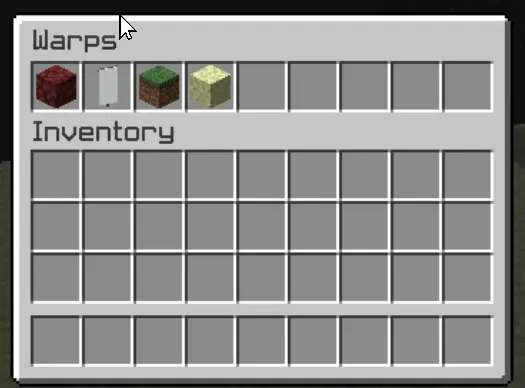
One of Xwarp’s standout features is its Graphical User Interface (GUI) for selecting warps. Instead of relying solely on commands, players can access a sleek warp selection screen where they can visually choose their desired warp point. Here’s what makes the GUI special:
Icon Customization: Each warp point can be represented by a different icon (block/item) in the GUI. Administrators can change the warp icon using the /seticonwarp [warpname] [itemname] command, allowing full customization of the look and feel of the warp menu.
Visual Warp Selection: Players simply open the warp menu and click on the desired warp icon to begin teleporting. The GUI provides an intuitive and engaging way to access teleport points, especially for large servers with multiple destinations.
## Admin-Friendly:
Warp Management: Server administrators can easily add, delete, and manage warp points, and even assign custom icons to each warp point for better organization and clarity.
Permissions Integration: Fine-grained permissions allow you to control which players can set, access, or delete warps. This ensures that only authorized users can manage or use certain warp points.
## How it Works:
1. Setting a Warp: Use /setwarp [warpname] to create a new warp at your current location. The warp is saved along with a default icon.
2. Selecting a Warp: Players can open the warp GUI and click on the icon for their desired destination. A 5-second countdown will start, and if they don’t move, they are teleported to the selected warp.
3. Customizing Warps: Use /seticonwarp [warpname] [itemname] to change the icon representing a warp in the GUI, making it easy for players to distinguish between different warp points.
## Why Xwarp?
Xwarp is designed for flexibility, ease of use, and visual appeal. It’s perfect for large servers that need efficient teleportation management or for small groups of players who want a fast and intuitive way to travel across their world. With its GUI-based approach, teleportation becomes not just a command-line task, but a visually engaging experience that fits right into Minecraft’s world.
Take your server to the next level with Xwarp—your all-in-one teleportation solution!
## LuckPerms
/warp – xwarp.warp
/setwarp – xwarp.setwarp
/delwarp – xwarp.delwarp
/seticonwarp – xwarp.seticonwarp
xVoidSpawn
# ⭐ xVoidSpawn – Advanced Anti-Void & Spawn Management
xVoidSpawn is a lightweight, optimized, and fully configurable Anti-Void plugin designed for modern Minecraft servers. It automatically rescues players when they fall into the void and safely teleports them to a configured spawn location — preventing unnecessary deaths and keeping your lobby or minigame experience smooth and professional.
Perfect for hubs, SkyBlock, void maps, minigames, and large server networks.
—
## 🚀 Key Features
### 🛡 Intelligent Anti-Void System
Automatically teleports players to a safe spawn when they fall below a configurable Y-level.
### ✈ Spawn on Join
Optionally teleport players to the main spawn every time they join the server. Ideal for lobbies and network environments.
### 💥 Fall Damage Protection
Resets the player’s fall distance after teleportation to ensure they never die from fall damage after being saved.
### 🎨 100% Configurable
Fully editable:
– Prefix
– Console messages
– Help menu
– All player messages
– Join behavior
– Void level trigger
Everything is managed inside `config.yml`.
### 🌈 Modern Color Support
Supports:
– Legacy color codes (`&a`, `&l`, etc.)
– HEX color codes (`&#RRGGBB`) for Minecraft 1.16.5+
### ⚡ Lightweight & Performance Friendly
Built to have minimal impact on server performance. No unnecessary tasks or heavy processes.
—
## 🛠 Commands & Permissions
Main Permission: `xvoidspawn.admin`
| Command | Description |
|———-|————-|
| `/xvs setspawn` | Sets the exact teleport spawn location |
| `/xvs reload` | Reloads the configuration without restarting |
| `/xvs help` | Displays the help menu |
All messages and help lines are fully customizable.
—
> ## ⚙ Configuration Overview (config.yml)
“`yaml
# ___ __ _
# / _____ _ __ / _(_) __ _ ⋆✴︎˚。⋆
# / / / _ | ‘_ | |_| |/ _` | Plugin by ˖⁺‧₊˚♡˚₊‧⁺˖
# / /__| (_) | | | | _| | (_| | xPlugins
# ____/___/|_| |_|_| |_|__, |
# |___/ .yml
# Language setting. Options: ‘en’, ‘es’.
# If you change this to ‘es’ and reload, the config messages will update to Spanish.
locale: en
teleport-on-join: true
void-level: 0
console-messages:
plugin-enabled: “7FF55[xVoidSpawn] &#AAAAAAPlugin enabled successfully.”
plugin-disabled: “&#FF5555[xVoidSpawn] &#AAAAAAPlugin disabled successfully.”
prefix: “ᆒDBxVoidSpawn &8» ”
messages:
no-permission: “&#FF0000 ✘ ¡Error! &fYou do not have permission.”
player-only: “&#FF0000 ✘ ¡Error! &fOnly players can use this.”
spawn-set: “�FF49 ✔ ¡Success! &fVoid spawn set.”
spawn-not-set: “&#FAEDCB ℹ ¡Attention! &fSpawn not set.”
void-teleport: “&#FCD05C ☀ ¡Careful! &fSaved from the void.”
reload: “7FF55 ✔ ¡Success! &fConfiguration reloaded.”
help-message:
– “”
– “&#FF5555&l xVoidSpawn – Help”
– “”
– “&8 • ᆒDB/xvs setspawn &8▸ &fSet spawn.”
– “&8 • ᆒDB/xvs reload &8▸ &fReload config.”
– “&8 • ᆒDB/xvs help &8▸ &fShow help.”
– “”
“`
—
> ## 📥 Installation
1. Download the latest .jar file.
2. Place it inside your server’s plugins folder.
3. Restart your server.
– In-game, run “/xvs setspawn“ at a safe location.
-# Your server is now protected from void deaths.
> ## 🎯 Ideal For
1. Lobby Servers
2. SkyBlock Hubs
3. Minigame Worlds
4. Void Maps
5. Network Setups
## 🔧 Compatibility
1. ✔ Spigot
2. ✔ Paper
3. ✔ 1.16.5+
Credits
Developed with ❤️ by xPlugins
xTree

TreeFeller is a Paper plugin for Minecraft 1.21.x that makes tree cutting feel more natural and visually satisfying.
Instead of instantly removing the whole tree, the tree falls over with an animation, lands in the direction it actually falls, drops its loot near the impact point, and leaves behind a few scattered leaves for a nicer result.
The plugin is designed to feel immersive without turning tree cutting into an overpowered instant-break feature.
## Features
– Animated tree falling
– Trees fall away from the player
– Drops appear near the actual impact point
– Sounds and particles play on the correct side
– A few leaves are placed on the ground after impact
– Saplings, sticks and apples can drop naturally
– Sneaking lets players bypass the system and break blocks normally
– Axe-only support
– Improved detection to reduce false positives on player-built wooden structures
– Better separation of connected leaves between nearby trees
– Simple language/message system
## Supported server software
– Paper 1.21.x
Tested on:
– Paper 1.21.11
## Supported tree types
– Oak
– Birch
– Spruce
– Jungle
– Acacia
– Dark Oak
– Cherry
– Mangrove
## How it works
When a player breaks a log with an axe, TreeFeller checks whether the structure looks like a natural tree.
If it is detected as a valid tree:
– the tree is collected
– the blocks are replaced with animated displays
– the tree falls over
– sounds, particles and drops are spawned on the same side as the visual fall
– logs and natural loot are dropped near the landing point
– a few leaves are left on the ground for a more natural look
Sneaking while breaking a log bypasses the plugin and keeps normal block breaking behavior.
## Tree detection
TreeFeller includes extra checks to avoid treating random wooden builds as natural trees.
It also tries to separate leaves from nearby trees more carefully, so if two tree crowns touch, the plugin does not simply take every connected leaf block.
No automatic tree detection is perfect in every edge case, but the current system is built to be much safer than a simple “connected logs and leaves” approach.
## Installation
1. Download the latest release
2. Put the jar into your server’s `plugins` folder
3. Start or restart the server
## Requirements
– Java 21
– Paper 1.21.x
## Configuration
### `config.yml`
“`yaml
language: en
xTranslate
# xTranslate
—————————————————————————————————-
### What is xTranslate ?
_xTranslate is a Minecraft Translation Plugin that translates In-game Chat messages in real time_
### How do i change my language ?
_You can change your language simply by typing /lauguage _
### How many languages are supported ?
_I dont even know the exact count but over 100+ languages are supported_
###
Spoiler
private static final Map SUPPORTED_LANGUAGES = Map.ofEntries(
Map.entry(“af”, “Afrikaans”), Map.entry(“sq”, “Albanian”), Map.entry(“am”, “Amharic”),
Map.entry(“ar”, “Arabic”), Map.entry(“hy”, “Armenian”), Map.entry(“az”, “Azerbaijani”),
Map.entry(“eu”, “Basque”), Map.entry(“be”, “Belarusian”), Map.entry(“bn”, “Bengali”),
Map.entry(“bs”, “Bosnian”), Map.entry(“bg”, “Bulgarian”), Map.entry(“ca”, “Catalan”),
Map.entry(“ceb”, “Cebuano”), Map.entry(“zh”, “Chinese”), Map.entry(“co”, “Corsican”),
Map.entry(“hr”, “Croatian”), Map.entry(“cs”, “Czech”), Map.entry(“da”, “Danish”),
Map.entry(“nl”, “Dutch”), Map.entry(“en”, “English”), Map.entry(“eo”, “Esperanto”),
Map.entry(“et”, “Estonian”), Map.entry(“fi”, “Finnish”), Map.entry(“fr”, “French”),
Map.entry(“fy”, “Frisian”), Map.entry(“gl”, “Galician”), Map.entry(“ka”, “Georgian”),
Map.entry(“de”, “German”), Map.entry(“el”, “Greek”), Map.entry(“gu”, “Gujarati”),
Map.entry(“ht”, “Haitian Creole”), Map.entry(“ha”, “Hausa”), Map.entry(“haw”, “Hawaiian”),
Map.entry(“he”, “Hebrew”), Map.entry(“hi”, “Hindi”), Map.entry(“hmn”, “Hmong”),
Map.entry(“hu”, “Hungarian”), Map.entry(“is”, “Icelandic”), Map.entry(“ig”, “Igbo”),
Map.entry(“id”, “Indonesian”), Map.entry(“ga”, “Irish”), Map.entry(“it”, “Italian”),
Map.entry(“ja”, “Japanese”), Map.entry(“jv”, “Javanese”), Map.entry(“kn”, “Kannada”),
Map.entry(“kk”, “Kazakh”), Map.entry(“km”, “Khmer”), Map.entry(“rw”, “Kinyarwanda”),
Map.entry(“ko”, “Korean”), Map.entry(“ku”, “Kurdish”), Map.entry(“ky”, “Kyrgyz”),
Map.entry(“lo”, “Lao”), Map.entry(“la”, “Latin”), Map.entry(“lv”, “Latvian”),
Map.entry(“lt”, “Lithuanian”), Map.entry(“lb”, “Luxembourgish”), Map.entry(“mk”, “Macedonian”),
Map.entry(“mg”, “Malagasy”), Map.entry(“ms”, “Malay”), Map.entry(“ml”, “Malayalam”),
Map.entry(“mt”, “Maltese”), Map.entry(“mi”, “Maori”), Map.entry(“mr”, “Marathi”),
Map.entry(“mn”, “Mongolian”), Map.entry(“my”, “Myanmar”), Map.entry(“ne”, “Nepali”),
Map.entry(“no”, “Norwegian”), Map.entry(“ny”, “Nyanja”), Map.entry(“or”, “Odia”),
Map.entry(“ps”, “Pashto”), Map.entry(“fa”, “Persian”), Map.entry(“pl”, “Polish”),
Map.entry(“pt”, “Portuguese”), Map.entry(“pa”, “Punjabi”), Map.entry(“ro”, “Romanian”),
Map.entry(“ru”, “Russian”), Map.entry(“sm”, “Samoan”), Map.entry(“gd”, “Scots Gaelic”),
Map.entry(“sr”, “Serbian”), Map.entry(“st”, “Sesotho”), Map.entry(“sn”, “Shona”),
Map.entry(“sd”, “Sindhi”), Map.entry(“si”, “Sinhala”), Map.entry(“sk”, “Slovak”),
Map.entry(“sl”, “Slovenian”), Map.entry(“so”, “Somali”), Map.entry(“es”, “Spanish”),
Map.entry(“su”, “Sundanese”), Map.entry(“sw”, “Swahili”), Map.entry(“sv”, “Swedish”),
Map.entry(“tl”, “Tagalog”), Map.entry(“tg”, “Tajik”), Map.entry(“ta”, “Tamil”),
Map.entry(“tt”, “Tatar”), Map.entry(“te”, “Telugu”), Map.entry(“th”, “Thai”),
Map.entry(“tr”, “Turkish”), Map.entry(“tk”, “Turkmen”), Map.entry(“uk”, “Ukrainian”),
Map.entry(“ur”, “Urdu”), Map.entry(“ug”, “Uyghur”), Map.entry(“uz”, “Uzbek”),
Map.entry(“vi”, “Vietnamese”), Map.entry(“cy”, “Welsh”), Map.entry(“xh”, “Xhosa”),
Map.entry(“yi”, “Yiddish”), Map.entry(“yo”, “Yoruba”), Map.entry(“zu”, “Zulu”)
);
### How does it work and is it free ?
_xTranslate is 100% and uses the offical `GOOGLE TRANSLATOR API`_
XTransfer
# XTransfer
## Features
– Developer API
– Whitelist of Player UUID’s
– Token Whitelist via Paper’s Cookie System.
– Customizable and developer-friendly
## Commands
– `/xtransfer` (or your custom Option) – Permission: `transferpacket.command.`
## Permissions
– `xtransfer.command..transfer`
– `xtransfer.command..whitelist`
– `xtransfer.command..whitelist.list`
– `xtransfer.command..whitelist.player`
– `xtransfer.command..whitelist.player.add`
– `xtransfer.command..whitelist.player.remove`
– `xtransfer.command..whitelist.token`
– `xtransfer.command..whitelist.token.add`
– `xtransfer.command..whitelist.token.remove`
## Developer API
**Use our repo to Download the API**
– [https://repo.jespersen.zip/#/releases/dev/xyzjesper/xtransfer](https://repo.jespersen.zip/#/releases/dev/xyzjesper/xtransfer)
### Project Setup
To access the API use the `XTransferAPI` Menthods and interact with the plugin.
__Note: Please add the Plugin TransferPacket as depend! And check the enabled status.__
“`kts
repositories {
mavenCentral()
maven(“https://repo.jespersen.zip/releases”)
}
dependencies {
compileOnly(“zip.jespersen:xtransfer:“)
}
“`
XTpaz
# **XTpaz – TPA Plugin**
XTpaz is a TPA (Teleport Ask) plugin for Paper/Spigot 1.20+. It provides simple, configurable player teleports with an optional confirmation GUI and strong anti-abuse options.
—
## 🔥 Key Features
### 👤 User experience
– **Confirmation GUI:** Confirm or cancel before sending a request; shows target world, ping, and player head.
– **Teleport countdown:** Configurable delay with action bar and sounds.
– **Movement check:** Teleport is cancelled if the player moves during the countdown.
– **Sounds:** Separate sounds for request sent/received, accept/deny, teleport, cooldown, etc.
### ⚙️ Requests & toggles
– **TPA & TPAHere:** Request to go to another player or bring them to you.
– **Auto-accept:** `/tpauto` and `/tpahereauto` for trusted players.
– **TPA toggle:** `/tpatoggle` to disable receiving requests.
– **Confirm toggle:** `/tpaconfirmtoggle` to switch between GUI and direct requests.
### 📋 Safety & limits
– **Request expiry:** Requests automatically expire (default 60 seconds).
– **Cooldowns:** Configurable cooldown between requests.
– **Offline cleanup:** Pending requests cleared when players quit.
### 🔧 Backend
– **Configurable messages:** Hex color support and placeholders (`{player}`, `{target}`, `{time}`).
– **Live reload:** `/xtpaz reload` reloads config and messages without restart.
—
## 🔧 Commands & Permissions
| Command | Description | Permission |
|——–|————-|————|
| `/tpa ` | Request to teleport to a player | `xtpaz.tpa` |
| `/tpahere ` | Request a player to teleport to you | `xtpaz.tpahere` |
| `/tpaccept [player]` | Accept a pending TPA request | `xtpaz.tpaccept` |
| `/tpadeny [player]` | Deny a pending TPA request | `xtpaz.tpadeny` |
| `/tpacancel [player]` | Cancel your pending request | `xtpaz.tpacancel` |
| `/tpauto` | Toggle auto-accept for /tpa | `xtpaz.tpauto` |
| `/tpahereauto` | Toggle auto-accept for /tpahere | `xtpaz.tpahereauto` |
| `/tpatoggle` | Toggle receiving TPA requests on/off | `xtpaz.tpatoggle` |
| `/tpaconfirmtoggle` | Toggle confirmation GUI on/off | `xtpaz.tpaconfirmtoggle` |
| `/xtpaz reload` | Reload configuration | `xtpaz.reload` |
—
## 📁 Configuration files
– **`config.yml`** – Request timeout, auto-accept delay, cooldown, teleport countdown, sounds, and message texts.
—
## ⛏️ Requirements
– **Server:** Paper or Spigot 1.20+
– **Java:** 17 or higher
xTPA
## 🚀 xTPA: The Definitive Teleportation Suite
The **xTPA** (Extended Teleport Ask) plugin is a next-generation teleportation management system built specifically for high-performance Minecraft servers running **Paper/Folia 1.21+**.
It moves beyond standard TPA functionality by offering an exceptionally feature-rich, optimized, and customizable experience for server administrators and players alike.
### ✨ Core Features & Technical Excellence
* **Asynchronous & Folia-Ready Performance:** Designed from the ground up to utilize modern multi-threading, ensuring zero lag even under heavy load by performing non-critical operations (I/O, cooldown checks) off the main server thread.
* **Deep Customization:** Every element—from messages (supporting MiniMessage gradients and clickables) to GUI layouts, particle effects, and sound cues—is fully configurable via modular YAML files.
* **Advanced Warmup System:** Features highly visual countdowns using Boss Bars and Action Bars, with fully configurable cancellation conditions (movement, damage, interaction), ensuring strategic and fair teleports.
* **Comprehensive Command Set:** Includes standard TPA/TPAHere, but extends to include safe, configurable Random Teleport (`/tpr`), multi-location History (`/back`), and admin utilities like `/tpsummon`.
* **Integrated Economy:** Seamlessly hooks into **Vault** and **PlaceholderAPI** to allow per-command costs, request fees, and acceptance rewards, transforming teleportation into an engaging economic feature.
* **Modern GUIs:** Provides inventory-based interfaces (`/tpagui`, `/tpalist`) for effortless request management and player selection, replacing cumbersome chat commands.
**xTPA is engineered to be the most reliable, flexible, and high-performance TPA solution available for the modern Minecraft ecosystem.**