Glass Config API
An API heavily inspired by [Cloth Config](https://modrinth.com/mod/cloth-config) for beta 1.7.3, which makes it extremely easy to add configuration to your mod.
For players, this adds an autogenerated config screen to [ModMenu Beta](https://modrinth.com/mod/modmenu-beta) for easy editing of config files. This won’t do anything without any mods that use this.
This has a relatively flexible API which can be used to add custom configuration screens, values, and save/load logic. There’s also built-in support for multiplayer syncing, hot-reloading of configs, and descriptions, which are saved inside the JSON file.
FPS Limit Fix
# FPS Limit Fix
Improved FPS limiting for Minecraft Beta 1.7.3 running on the [Ornithe Toolchain](https://ornithemc.net/).
## Details
Changes the `Power Saver` limit from `40` to `60` instead, as this is a more common refresh rate.
Ensures the `Balanced` limit of `120` FPS is actually adhered to, instead of resulting in no limiting.
Additionally, the built-in FPS limiter is replaced with a vastly superior implementation provided by LWJGL.
Enchantment Level Language Patch
**For Forge 1.14.x users:** [MixinBootstrap](https://modrinth.com/mod/mixinbootstrap)
(or any alternative Mixin loader) is required.
**For Forge 1.13.x users:** [ModernMixins](https://modrinth.com/mod/modernmixins)
(or any alternative Mixin loader) is required.
**Telemetry Settings:** You can adjust the telemetry level by creating/editing `config/enchlevel-langpatch-telemetry.txt`.
See our [Privacy Policy](https://telemetry.langpatch.mc.7c7.icu/privacy) for more information.
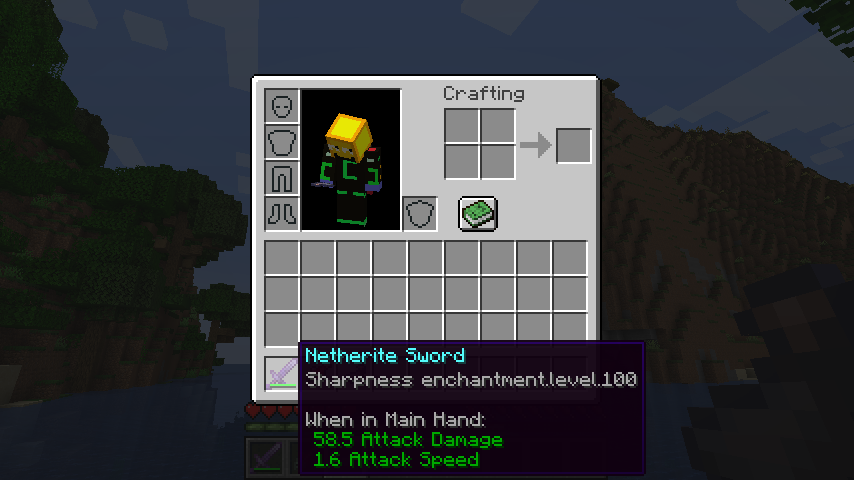
Without the patch:
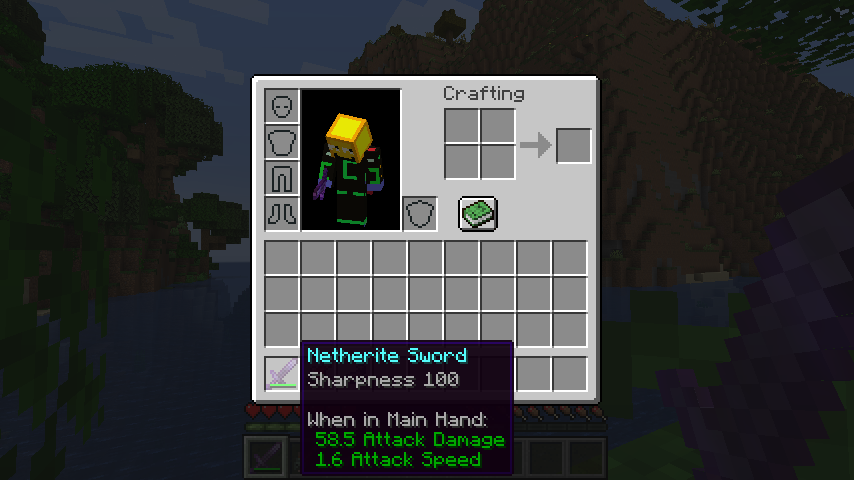
With the patch:
## Common alternative formats
* Want pure arabic numerals (e.g. Sharpness 5)? [Download Stub Mod](https://cdn.modrinth.com/data/Lf4kDKU9/versions/1EKfo2Mc/lpstub-all_arabic-20251209.2.jar)
* Want roman numerals (e.g. Sharpness XXV)? [Download Stub Mod](https://cdn.modrinth.com/data/Lf4kDKU9/versions/1EKfo2Mc/lpstub-roman-20251209.2.jar)
These stub mods should be loaded *with* LangPatch itself.
## I18n API
This mod supports a limited configuration of enchantment level and potion effect level formatting through language files.
### Template Keys
* **`enchantment.level.x`** & **`potion.potency.x`**:
Modify the templates for enchantment levels and potion effect levels, respectively.
* **Default value:** `”%s”`
### Format Types
* **`langpatch.conf.enchantment.default.type`** & **`langpatch.conf.potion.default.type`**:
Modify the format of enchantment levels and potion effect levels, respectively.
| Value | Format | Example |
| :— | :— | :— |
| `simplified`, `chinese`, `zh_normal` | Lowercase Chinese numerals | 一百二十三 |
| `traditional`, `zh_upper` | Uppercase Chinese numerals (traditional) | 壹佰貳拾叄 |
| `numeral`, `number`, `numeric`, `arabic`, `default` | Arabic numerals (default) | 123 |
| `roman` | Roman numerals | CXXIII |
| `skip`, `ignore` | No change (e.g., for only replacing other text) | — |
### Override
* **`langpatch.conf.enchantment.override`** & **`langpatch.conf.potion.override`**:
Whether to override existing translations. Acceptable values are `”true”` or `”false”`.
* If set to `”true”`, existing translations will be replaced. See the implementation of the “pure arabic numeral” pack above.
## For Developers
LangPatch, as is named, allows developers to make dynamic changes to in-game translations without directly modifying lang files.
To introduce LangPatch API as a dependency:
“`groovy
repositories {
// Our new maven
maven { url ‘https://mvn.7c7.icu’ }
}
dependencies {
compileOnly “xland.mcmod:enchlevel-langpatch:3.1.0”
}
“`
Online javadoc can be found [here](https://teddyxlandlee.github.io/enchlevel-langpatch/javadoc).
e4mc Retro

**e4mc Retro** is a backport of [e4mc](https://modrinth.com/mod/e4mc) mod, allowing you to open your Minecraft LAN world to anyone over the internet — even on older Minecraft versions.
## What is e4mc?
e4mc is a reverse tunneling reverse proxy for Minecraft. In simpler terms, it’s a software that allows you to temporarily expose a local Minecraft server to the internet.
## How do I use it?
Simply install the mod, and Open to LAN as normal. A public domain will appear alongside the local port. Others can simply connect to the public domain to connect to your LAN server.
COSTAR
A simple mod that addresses a questionable design decision in minecraft for versions 1.9-1.12 (fixed in 1.12.1-pre1) that affects fabric: the `root.tick.level.entities.blockEntities` directive in the piechart uses `Class#getSimpleName` for the profiler location, leading to fabric having different names from vanilla (and different names in dev than in prod) due to the fact that fabric remaps almost all symbols in the game jar to an intermediary layer. To fix this vanilla parity issue, I just switch out the name with its unmapped equivalent.
See the gallery for an example of what this looks like.
AxolotlClient Waypoints
# AxolotlClient Waypoints
A minimap/worldmap and waypoints mod designed for modern versions.
This means that new features are likely to only get added to the latest version of minecraft.
Features:
– Minimap
– Integrates into AxolotlClient’s HUD system if it is present.
– World and level(/dimension)-specific waypoints
– Worldmap
Certain aspects of the mod can be disabled by servers:
– Whether the minimap is enabled
– Whether caves may be seen on the world map or the minimap
– Whether caves may be seen on the world map in dimensions with roofs (Nether)
This can either be done by
– Installing this mod on the server-side as well as on the client-side.
It will then generate a config file for these options on the server and send them to the client. You can edit the config file and then use the `/axolotlclient_waypoints reload` command to load the edited config or modify it using `/axolotlclient_waypoints modify_config `. After running either command the values will be sent to all connected players again.
– Making use of system message properties for [xaero’s minimap/world map](https://modrinth.com/mod/xaeros-minimap):
– `§f§a§i§r§x§a§e§r§o` to disable caves on both the minimap & worldmap
– `§x§a§e§r§o§w§m§n§e§t§h§e§r§i§s§f§a§i§r` to allow caves on the world map in dimensions with roofs
– `§n§o§m§i§n§i§m§a§p` to disable the minimap
– `§r§e§s§e§t§x§a§e§r§o` to reset all values
Note however that if the mod is installed on the server the use of xaero’s properties will be disabled.
**Disclaimer**: Despite the system described above this mod does not have capabilities to disable itself on servers that do not allow usage of minimaps. It is your responsibility to adhere to server rules.
AxolotlClient Rendering
# AxolotlClient Rendering
This library allows for shader-based rendering of some rounded shapes (e.g. rectangles), static SVGs and TrueType fonts.
For SVGs the Apache Batik library is included, for fonts Freetype¹ is used.
### For Players
This is a library, you should not need to install it manually. (Unless someone declared their dependencies wrong or forgot to include it)
### For Mod Developers
##### Inclusion in your project
This library is published at https://maven.axolotlclient.com.
“`gradle
dependencies {
modImplementation(include(“io.github.axolotlclient.rendering:AxolotlClient-rendering:VERSION+MINECRAFT_VERSION”))
}
“`
Note: you may omit the `include` statement if you do not want to embed this library into your mod. Make sure to declare your dependencies correctly for launchers to download the library in that case.
> Tip: replace `modImplementation` with `modApi` if you’re writing a library that uses this one!
##### General Usage
Most methods of this library are accessible using Minecraft’s `GuiGraphics` class via the injected `GuiGraphicsExtension` interface.
On 1.8.9, since there is no `GuiGraphics` class you should obtain a `GuiGraphicsExtension` using `DrawUtil.get()`.
All methods exposed via this way are prefixed with `axolotlclient_rendering`.
Fonts can be loaded using `Font.read(…)`. If you’re using a variant font
this will automatically read the variants and make use of them appropriately,
however the font features supported by FreeType directly are rather limited.
If a specific feature is provided by a separate font file (for example an *italic* or
**bold** variant) they can be added using `Font#addSubFont`, specifying in which conditions it should be used
(some tags and values can be found as static definitions in the `Font` class).
### Projects that use this library
– [AxolotlClientConfig](https://codeberg.org/AxolotlClient/AxolotlClientConfig)
– [AxolotlClient](https://modrinth.com/mod/axolotlclient)
> Your project makes use of this library and you would like it to appear here? Let us know!
### FAQ
-
I’m using this library on 1.20.1 and the font looks bad
A: Because Minecraft 1.20.1 uses lwjgl 3.3.1 which did not have Freetype bindings yet this library uses STB_Truetype, which does not support hinting (there may also be other bugs we don’t know about).
-
But doesn’t 1.8.9 use lwjgl2 which is also below 3.3.2?
A: Indeed, however with legacy-lwjgl3 we can run it on lwjgl 3.3.6 where we do have bindings to Freetype.
-
Wouldn’t it be possible to use a newer lwjgl on 1.20.1 as well?
A: Yes, but this is more difficult, increases the jar size even further and will produce incompatibilities with mods like sodium which check for which lwjgl version they’re running on.
¹See FAQ, answer #1
AxolotlClient – Customizable HUD & Client QoL Features

AxolotlClient
Your customizable alternative to popular pvp clients like Lunar, Badlion and Feather.
Features
Features include:
– Friends system
– Freelook (Disabled on some servers)
– Nametag
– Beacon Beams
– Low Fire / Low Shield
– Hit Color
– Screenshot Manager
– Screenshot uploading
– Zoom
– Various Hud Modules (port/integration of [KronHUD](https://github.com/DarkKronicle/KronHUD))
– including, but not limited to:
– Ping
– FPS
– CPS
– Armor
– Potions
– Keystrokes
– ToggleModifiers
– Server IP
– Icon
– Speed
– Scoreboard
– Crosshair
– Coordinates
– ActionBar
– BossBar
– Arrow
– Item Update
– Pack Display
– Real Time
– Hotbar
– Memory
– PlayerCount
– Compass
– TPS (Ticks per second)
– Player
– Chat (1.8.9 only)
– Hypixel Features
– AutoGG / GF / GLHF
– LevelHead
– Nick Hider
– Skyblock
– AutoTip
– AutoBoop
– Custom Block Outlines
– Time Changer
– Fullbright
– Motion Blur
– TNT Time
– Scrollable Tooltips
– Particles
– Discord RPC
– Custom Badges
– and many more!
Dependencies
### Before downloading, please also download the respective API package for your version:
| Minecraft Version |
1.8.9 |
>= 1.16 |
>= 1.19 |
| AxolotlClient <= 3.0.6 |
Legacy Fabric API
|
Fabric API |
QSL |
| AxolotlClient >= 3.1.0 |
OSL and
legacy-lwjgl3
- Note: Legacyfabric and Ornithe use different intermediaries!
- Note: Versions starting from 3.1.0 require at least java 17!
|
Fabric API
- Note: Versions starting from 3.1.0 require at least java 17!
|
Fabric API |
Motivation
### Why?
Our goal is to create a better environment for everyone, including you, the user.
You should be in charge to decide what mods you want to use, and what data is sent to other people’s servers. This is only achievable through making everything [open-source](https://opensource.org/osd) (You probably know what this means as you’re currently using an open-source platform).
With AxolotlClient you are deciding what to use and what not. Every aspect of the mod is toggleable in over 200 options.
A little overview of options is available in the [Gallery](https://modrinth.com/mod/axolotlclient/gallery). However the images may be anywhere from slightly to severely outdated, so to get a good impression you should just try it out.
For more information feel free to ask us in our [discord server](https://discord.gg/9Q3brQVQZN).
Disclaimers
### Disclaimers
We do not endorse nor support cheats/hacks. If you feel like one or more options packaged by this mod could be regarded as one of the above, please let us know and we’ll remove said options or prevent people from using them.
A pvp client in the context used above are launcher + game modifications combinations widely used on popular servers such as Hypixel and others. This is not meant in the context of cheats and/or hacks.
Some features of this mod require communication to a backend located at . The usage of these features is governed by our Terms of Service and Privacy policy, available [here](https://axolotlclient.com/terms). You will be asked for your consent to these terms before said features are enabled.
Credits
### Credits
Credit to these wonderful people who create open-source mods.
[DarkKronicle](https://github.com/DarkKronicle), the creator of KronHUD on which the hud modules in this mod are based.
[AMereBagatelle](https://github.com/AMereBagatelle), the author of the wonderful FabricSkyBoxes mod.
Alternate Current
Alternate Current is an efficient and non-locational redstone dust implementation. Its main focus lies in reducing the lag caused by redstone dust, by optimizing the power calculations and reducing the number of shape and block updates emitted. As a side effect of these changes the block update order of redstone dust networks is predictable and intuitive rather than locational and chaotic.
### Performance
MSPT contributions of redstone dust are up to 30 times lower with Alternate Current, all the while maintaining a high level of Vanilla parity. Its low number of code modifications make it minimally invasive, so it’s an easy drop-in replacement for Vanilla redstone dust.
Check out the [GitHub page](https://github.com/SpaceWalkerRS/alternate-current/blob/main/README.md) for a detailed explanation of Alternate Current’s improvements.
## Why is redstone dust so laggy?
There are two main reasons why redstone dust is laggy: unnecessary updates and unnecessary calculations, both of which are caused by the fact that redstone dust updates recursively. A redstone wire can update its power level over half a dozen times before settling on the final value, doing expensive calculations and emitting copious amounts of shape and block updates each time. On top of that, many shape and block updates are completely redundant.
## How does Alternate Current fix that?
Alternate Current fixes these issues by doing power calculations of the entire network before updating the power levels. Each wire will check power from non-wire components just once and power from other wires just twice. Power sources within the network are identified, and the power is spread from there. This makes the calculations more efficient and the update order more intuitive. Shape and block updates are only emitted when the final power level is reached, and each wire emits no redundant updates.
Agenta
# Agenta
A authserver and skin fix for legacy versions of minecraft.
# Compatibility
Requires Java 7. (In theory this can be built for Java 5, but I lack the build tools required for that.)
If running this on Java 12 and newer, please add the following JVM argument: `–add-exports java.base/sun.net.www.protocol.http=ALL-UNNAMED`
1. As a mod: The same Jar will run on forge, bukkit and Risugami’s modloader for Minecaft versions Alpha 1.0.4 to Minecraft release 1.7.10 (These are merely the versions I tested)
2. As a JavaAgent: Add the following JVM argument: `-javaagent:{path}/agent.jar` (replace path with the location of the agent.jar)
3. Inline/static: In this setup, Agenta is essentially taking over the role of Launching minecraft. Add the following JVM argument and change out `{mainClass}` as needed depending on which minecraft version you are launching: `-Dagenta.main.class={mainClass}`
4. As a Bukkit plugin (Tested with bukkit for Minecraft Beta 1.2_01)
# JVM/Congig settings
Non of these are needed to launch Agenta. The available contexts are
“*” => ALL
“static” => When Agenta is launched as the main class with the expectation of chainloading another class manually.
“config” => Only appears in the config file.
| Context |
property |
Argument |
description |
| * |
agenta.assets.fml |
-Dagenta.assets.fml={value} |
A link to an archive Agenta should forward legacy forge download requests to |
| * |
agenta.assets.index |
-Dagenta.assets.index={value} |
The URL for the asset index Agenta should use as a base |
| * |
agenta.assets.routing |
-Dagenta.assets.routing=true |
Should agenta reroute requests the mojang’s asset servers? (default: “true”) |
| * |
agenta.assets.url |
-Dagenta.assets.url={value} |
The URL for the resource server Agenta should pull assets from |
* |
agenta.prt.color |
-Dagenta.prt.color=false |
Pass the value ‘false’ to disable colour printing. |
| * |
agenta.prt.debug |
-Dagenta.prt.debug=false |
Should agenta show debug messages? |
| * |
agenta.save.file |
-Dagenta.save.file=saves.json |
When handling saving for certain versions of old Minecraft that relied on long dead mojang endpoints, what should agenta call the save file? (default: “saves.json”) |
| * |
agenta.skin.resize |
-Dagenta.skin.resize=true |
Should agenta try to resize skins from 64×64 to 64×32 for better compatibility? (default: “true”) |
| * |
agenta.skin.merge |
-Dagenta.skin.merge=true |
Should Agenta take multi layered skins and attempt to flatten the layers down? (default: “true”) |
| * |
agenta.skin.cache |
-Dagenta.skin.cache=true |
Should agenta cache skin lookups? (default: “true”) |
| config |
agenta.config.version |
|
The version of agenta that generated a set config file. Will be used to detect if agenta should upgrade a set config file |
| static |
agenta.main.class |
-Dagenta.main.class={value} |
The class Agenta should try to load next when running in static/inline mode |
# Fixes
– Skin support for pre 1.7.10 versions
– Cape support for pre 1.7.10 versions
– Sound for versions of the game that predate 1.6
– World savings for certain pre-alpha builds (experimental)
– Forge 1.5.2 being unable to fetch it’s library files (experimental)
# Note
– The same jar will work for almost every version of minecraft that predates Release 1.8
– Any miscellaneous fabric based modloader _should_ be supported.
– NilLoader can load Agenta. (Agenta doesn’t meet the criteria of a [NilLoader mod](https://git.sleeping.town/Nil/NilLoader#:~:text=A%20NilLoader%20mod%20includes%20a%20complete%20copy%20of%20NilLoader%20within%20itself))
– Some ancient versions of Forge/modloader may require you to load Agenta as a jar mod.
– LiteLoader inforces compatibility checks and so can never be fully supported