The CTR VCR shader brings the nostalgic feel of old CRT monitors and VHS tapes to your Minecraft experience, adding subtle but impactful visual artifacts and distortions. Inspired by the retro charm of analog technology, this shader introduces static noise, light distortions, chromatic aberration, scan-lines, and more to give the game a vintage, glitchy aesthetic. While these effects evoke a sense of retro realism, they are finely tuned to ensure they don’t overwhelm the visuals, making the shader perfect for regular gameplay. Enjoy the blend of modern gameplay with a retro-futuristic vibe that keeps the world immersive, stylish, and entirely playable.
### Uncut gameplay using the shader (v0.0.1) in Nostalgic Craft v0.1.3o
—
The shader effects were originally a GLSL shader written for Unity in 2023, but were ported to minecraft shader.
Crusher
This shader can reduce both color count and resolution of the image (each function can be toggled on/off for your liking, see gallery for previews)
# Colors
Decreases the amount of colors that is displayed on the screen. This limits each channel to a certain number of values (the value set in settings + black).
For example, if you set the color amount to 2, each color channel will now be able to be at only 0, 127 and 255.
You can also toggle between RGB and HSV modes to change how colors are changed.
## Dithering
This option applies 4×4 bayer matrix dithering to the image which makes the colors appear much smoother but introduce more flickering. Obeys color count and pixel size
# Pixels
Enlarges pixels and in turn decreases the resolution. The large pixels do not average the color of underlying normal pixels, rather pick the color of the top left pixel.
**Larger pixel sizes might create flickering on farther objects**
# Anti-flicker
Decreases flickering on large pixel sizes by averaging colors inside pixels. May decrease performance.
# Corruption
You can enable corruption to make your game look like the universe is getting shut down. **DO NOT USE** if you are photosensitive, it creates **LOTS** of flashing lights.
Fun Fact: this option originated as a failed implementation of the anti-flicker feature, and one of my friends suggested it to be added as a separate option
Crucify
# Crucify Shaders
🔥 Reality-Bending Nightmare Shaders for Minecraft 🔥
Crucify is a horrifying shader pack designed to destroy your sanity with nauseating visual effects, disturbing distortions, and psychedelic colors. Not for the faint of heart!
### ⚠️ WARNING ⚠️
These shaders contain intense visual effects including strobing, flickering, and rapid color changes that may be uncomfortable or potentially trigger photosensitive conditions. Use at your own risk!
### 🧠 Features That Will Break Your Brain
– Sky Insanity: Psychedelic patterns and distortions transform the sky into a nightmare
– Terrain Warping: Watch as the world wobbles and shifts beneath your feet
– Entity Distortion: Mobs and players twist and contort in disturbing ways
– Hand Movements: Your hands perform unnatural, disturbing animations
– Water Chaos: Water becomes a psychedelic, nauseating experience
– Weather Madness: Rain and snow move in chaotic, impossible patterns
– Rainbow Horror: Shifting colors that cycle through nightmarish hues
– Screen Distortion: Your entire view warps and pulses
– Texture Warping: All textures shift and distort unnaturally
“I don’t know why anyone would want to use these lmao” – Developer
Download if you dare, but don’t say we didn’t warn you. This isn’t about making Minecraft pretty – it’s about making it horrifying.
CRT Shader
### CRT Shader aiming to give Minecraft a retro style!
Current features include:
– Imitating Pixels
– Lens Distortion
– Chromatic Aberration and Bleed
– Posterization
– Scan Line
### Customization
While there still are limitied options I aimed to add as much customibitlity as possible giving you the ability to tweak most features to your liking 😀
### Warnings
This shader should work with Optifine and Iris from 1.8.9 – 1.20.1, if you encounter any issues you can allways report them 😀
Also from experience this shader does strain your eyes if you play with it on for hours on end.
The appearance may not be the best in images as it is best experienced in game.
### Installation
– First you need to install either OptiFine or the Iris mod to be able to load shaderpacks. (Choose Iris if you are unsure)
– Then you need to launch the game, and get to the Shaderpacks/Shaders menu in Video Settings.
– Open the shaderpacks folder by clicking the button in the menu.
– Download the CRT Shader and put it in the shaderpacks folder.
– Get back in the game, and choose CRT_Shader in the shaderpacks menu. (Refresh the menu if it doesn’t appear)
CRT Monochrome Shaderpack
# CRT Monochrome Shaderpack
> *”End of Line.”*
**CRT Monochrome Shaderpack** is a lightweight GLSL shader pack for Minecraft Java Edition (Iris/OptiFine) that replicates the high-contrast, phosphor-display aesthetic of early 80s computing.
It replaces standard rendering with a strict two-tone wireframe/threshold visualization, simulating a monochromatic CRT monitor inside the game.
## 🖥️ Visual Style
### The “P1″ Phosphor Aesthetic
By default, the pack utilizes the **”P1 Apple Green” (#33FF33)** color scheme, mimicking the high-persistence green phosphor monitors of the Apple II era. The world is rendered as a stark contrast between illuminated geometry and a pure black void.
### CRT Emulation
The pack includes a fully procedural CRT post-processing stack:
– **Screen Curvature:** subtle geometric distortion to mimic a curved glass tube.
– **Scanlines:** Horizontal beam lines that scroll slowly with time.
– **Chromatic Aberration:** Slight RGB channel separation at the screen edges.
– **Vignette:** darkening at the corners to simulate tube depth.
## ⚙️ Technical Features
– **Depth-Based Rendering:** Uses Sobel Edge Detection and luminance thresholding on the depth buffer to generate outlines and solids.
– **Optimization Friendly:** Extremely low GPU overhead. Disables standard lighting, shadows, and PBR calculations.
– **”Hall of Mirrors” Fix:** Includes a custom Sky Shader module that forces a depth buffer clear. This prevents the “smearing” artifacts common when using optimization mods (like Radon/Sodium) that disable vanilla sky rendering.
– **Driver Support:** Compatible with both NVIDIA and AMD GPUs (OpenGL 3.0+).
## 🎛️ Configuration
While the default is Green, the pack is fully configurable via the **Shader Options** menu in-game.
### RGB Color Channels
You can manually mix the phosphor color using 0-255 sliders.
– **Classic Amber:** R: 255, G: 176, B: 0
– **Macintosh White:** R: 229, G: 251, B: 255
– **Neon Purple:** R: 214, G: 3, B: 220
### World Settings
– **Contrast Threshold:** Controls the sensitivity of the edge detector (higher = darker world, lower = more noise).
– **Void Distance:** Sets the strict cutoff distance where the grid fades into black.
– **CRT Effects:** Sliders to adjust or disable Curvature, Scanline Intensity, and Aberration.
## ⚠️ Known Issues & Troubleshooting
### The “Hall of Mirrors” (Smearing) Effect
If you see the screen “smearing” or trails following your movement, your Depth Buffer is not being cleared correctly.
– **The Cause:** This usually happens with high-performance custom clients or mods that disable the vanilla sky rendering to save FPS. Without the sky pass, the command to clear the previous frame’s depth data is never sent.
– **The Fix:**
1. Ensure **Sky Rendering** is enabled in your client settings.
2. If you are a developer using a custom rendering engine, ensure the depth buffer bit is cleared at the start of the frame.
### Items appear as “Blobs” or lack detail
If hand items look like solid blocks of color:
– Adjust the **Contrast Threshold** in the shader options.
– Lowering the threshold will make the detector more sensitive to smaller depth changes, revealing more detail on close-up objects.
## 📥 Installation
1. Download the `.zip` file.
2. Place it into your `.minecraft/shaderpacks` folder.
3. Launch the game using **Iris** or **OptiFine**.
4. Select **CRT Monochrome Shaderpack** from the Shader list.
*Note: For the best experience, ensure “Render Regions” is enabled if using OptiFine.*
## 📣 Streaming & Content Creation
If you feature this shader pack in a stream or video, please provide credit by linking to the official project page or mentioning **h1ggsk**. I’d love to see what you create with it!
## 📦 Modpack Policy
– **Permission Granted:** You are free to include the `CRT Monochrome Shaderpack` in modpacks hosted on **CurseForge** or **Modrinth**.
– **Requirement:** The modpack must use the official project dependency/link so that downloads are tracked through the original source.
– **Prohibited:** You may not re-upload the shader pack as a standalone file or host it on third-party “mirror” sites.
This software is the intellectual property of **h1ggsk**.
1. **Non-Redistribution:** You may not re-upload, mirror, or redistribute this shader pack as a standalone project.
2. **Modification:** You may modify the code for **personal use only**. You may not distribute modified versions of the code (“forks”) without explicit written permission from the author.
3. **Modpack Exception:** Use in curated modpacks is permitted under the conditions outlined in the “Modpack Policy” above.
CRT-Monitor Shader
# **CRT-Monitor Shader**
Add a touch of vintage tech to your Minecraft world with the **CRT-Monitor Shader** – a visual enhancement designed to replicate the look and feel of classic CRT displays.
### **Featuring:**
* **Curved screen distortion** for that authentic old-school display vibe
* **Scanlines and subtle flicker**, just like vintage TVs and monitors
* **Phosphor glow** that brings retro screens to life
* Perfect for **labs, terminals, arcades**, and **sci-fi builds**
_Whether you’re recreating a retro computer lab or building a high-tech base with analog flavor, this shader brings your screens to life with a nostalgic, immersive touch._
* **OptiFine:** Fully compatible with _all_ OptiFine shader versions (MC 1.7.10 → latest).
* **Iris:** Fully compatible with **Iris/Sodium** on **Minecraft 1.16.5 and newer**.
* Uses **GLSL 1.20**, so it works on all systems supported by OptiFine and Iris.
Creepers Reforged x FA
#
#
# About
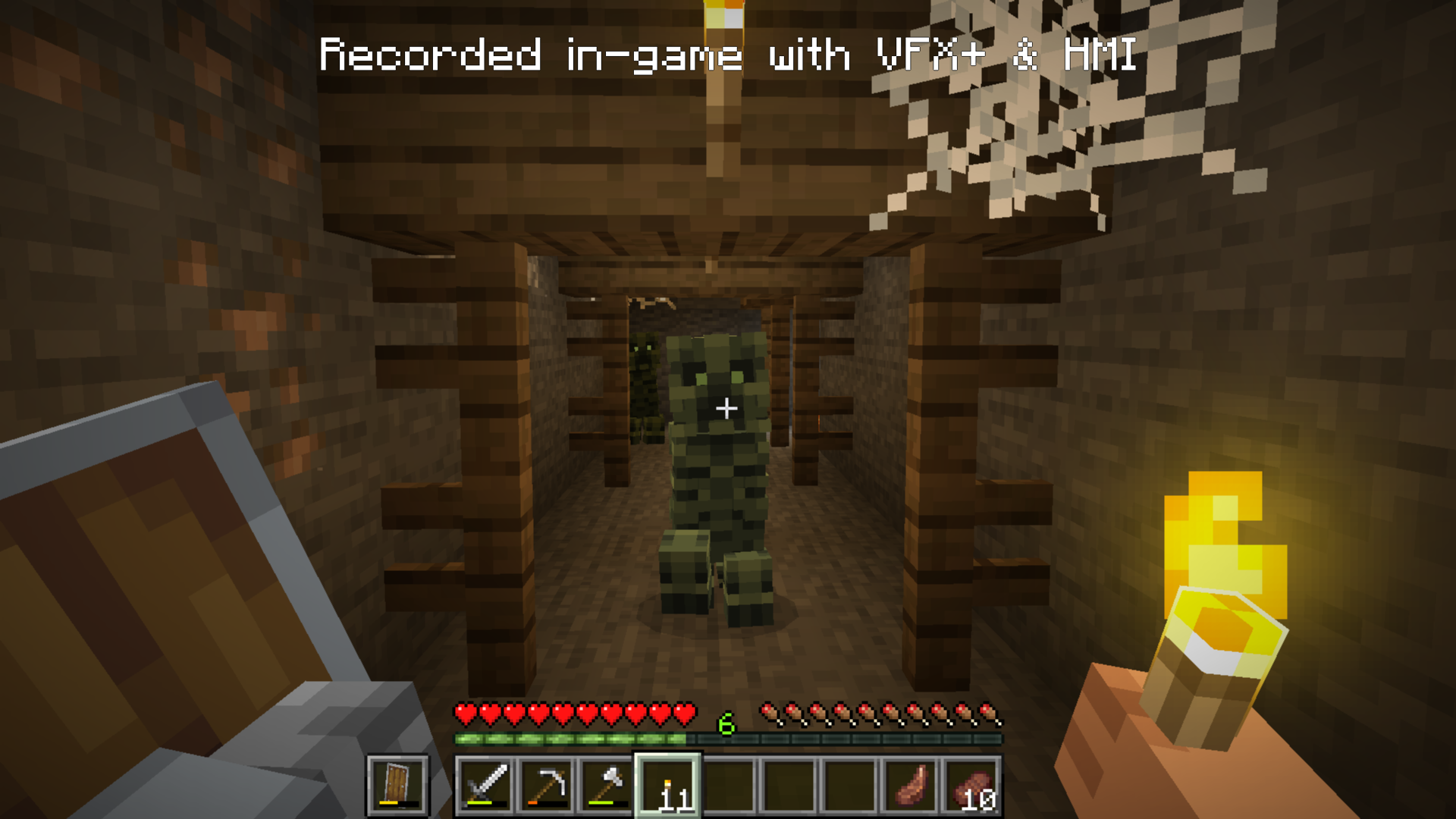
This pack adds a new Creeper texture, inspired by old “REALISTIC” fan arts from years ago. The Creeper now resembles more of a monster, with hollow sunken eyes and a exposed rib cage. They also have GREAT camouflage so watch your back!
# Requirements
This pack requires **Entity Model Features** & **Entity Texture Features** Fabric 1.20.X or 1.21.X, Forge 1.21.X
Cozy Shader
(I know the video seems laggy, but the shader shouldnt have too much of an impact on your game’s performance. It’s just that the software I used to record it wasn’t too great)
**Features:**
– Warm golden sunlight with realistic sunrise and sunset color shifts
– Rich orange torchlight for a cozy indoor atmosphere
– Animated water with depth-based coloring
– Soft directional shadows with distortion for better quality
– Distance fog for atmosphere
– Subtle vignette for a cinematic feel
Cosinus Shader
Sinus, but with cosine!
Contains all options from the original shader (defaults are in bold):
Spoiler
Setting | Values | Description
——- | —— | ———–
Direction | **-Y**, Y, -X, X | Direction.
Only in water | **Off**, On | Only in water.
Height | 0.0, 0.1, …, 1.0, 2.0, …, 29, 30.0 | Y coordinate of the effect position.
Speed | 0, 1, …, 68, 69 | Speed.
Frequency | 0.0, 1.0, …, 59.0, 60.0 | Amount of waves on the screen.
Complementary Shaders – Unbound

### About
Complementary Shaders is a shader pack for Minecraft Java Edition with exceptional attention to detail, high standards of quality, and top tier optimisation. It offers a ton of high quality effects, two default visual style choices, custom effects for almost every block in the game, profiles ranging from Potato to Ultra and it’s designed to never be obstructive during gameplay. It started as an edit of BSL Shaders in 2018, and it received countless major updates including a complete rewrite to meet the standards of our community. Complementary Shaders is dedicated to be shaped by user feedback over anything else, and it still receives regular updates to this day.
“Unbound” is one of the two default styles Complementary Shaders r5 comes with. It is the less restricted style of Complementary that aims for a more realistic image. **Learn more about the two styles here.**
### Choose Your Style
Complementary Shaders comes with two distinct visual style options. The only difference between these two styles is the default settings. The Unbound style is designed for people looking for a more realistic experience, while the Reimagined style is made to reimagine Minecraft while preserving its unique visual elements. Please note that you can still customize everything after you download either style. You can switch to blocky clouds on the Unbound style, or use realistic water on the Reimagined style. All settings are located in Shader Options.