Dithering3D
# 🎨 Dithering3D – Surface-Stable Fractal Dithering




—
## 🖼️ Screenshots
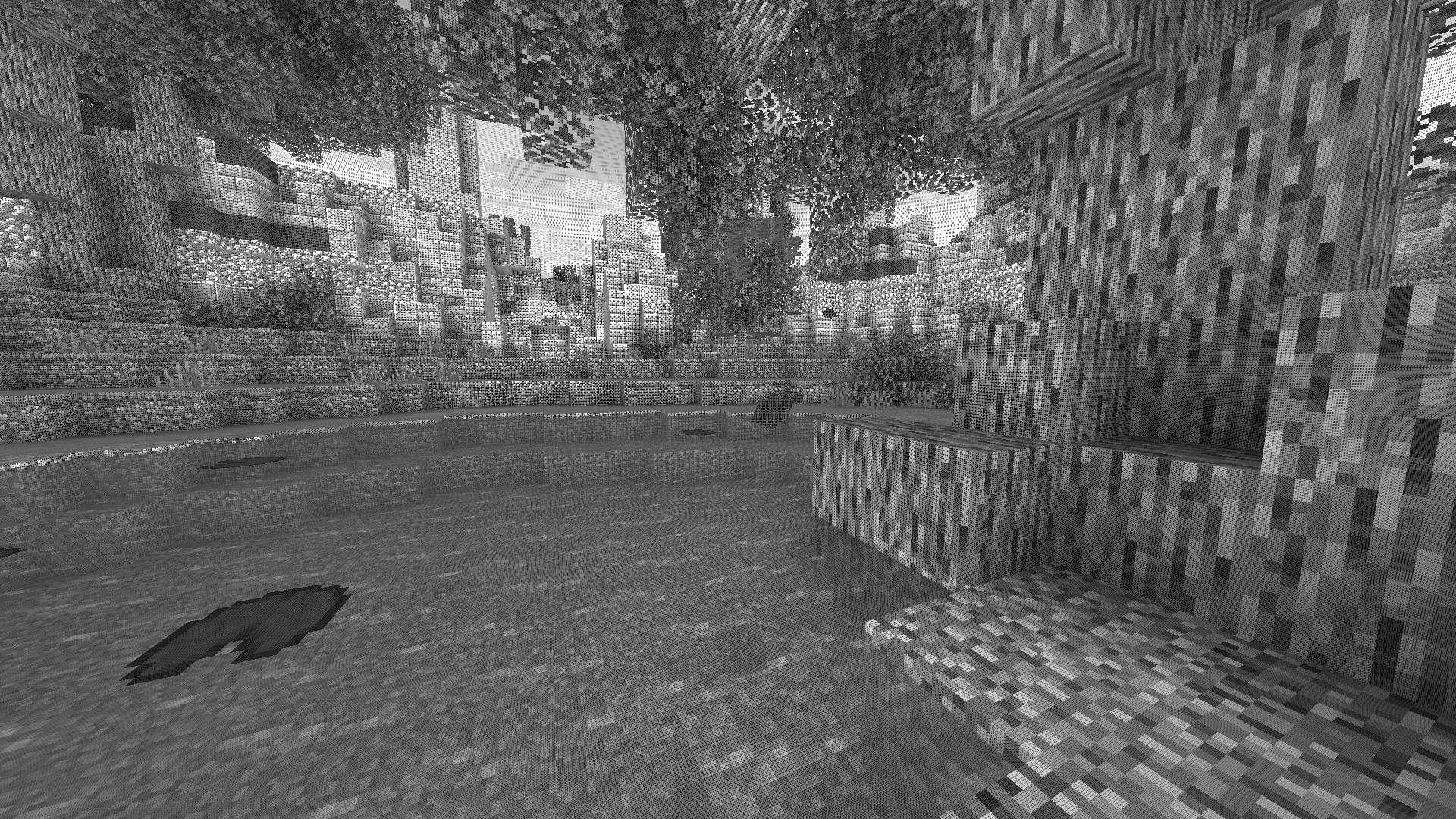
—
## ✨ A Revolutionary Visual Experience
Transform your Minecraft world with **Surface-Stable Fractal Dithering** — a groundbreaking rendering technique where dither dots **stick to 3D surfaces** instead of the screen, creating a unique manga/comic book aesthetic that feels alive.
> 🎬 *Based on the innovative work by Rune Skovbo Johansen* — **Watch the explainer video**
—
## 🖼️ What Makes This Shader Special?
### 📌 **Surface-Stable Dots**
Unlike traditional dithering where patterns “swim” on screen, Dither3D anchors each dot to the actual 3D surface. Walk around blocks, and the dots stay perfectly attached!
### 🔄 **Fractal Scaling Magic**
As you move closer or farther from surfaces, dots dynamically split or merge to maintain **constant screen-space density**. It’s mesmerizing to watch!
### 🎨 **Three Color Modes**
| Mode | Description |
|:—-:|:————|
| **Grayscale** | Classic black & white dithering — clean, minimalist, timeless |
| **RGB** | Each color channel gets its own dot layer — vibrant and unique |
| **CMYK Halftone** | Authentic newspaper/comic print simulation with rotated dot angles |
—
## ⚡ Features at a Glance
| Feature | Description |
|:——–|:————|
| 🎯 **Precision Dithering** | SVD-based frequency analysis for mathematically perfect dot placement |
| 🌀 **Anti-Stretch Technology** | Anisotropic smoothing keeps dots circular even on oblique surfaces |
| 🎥 **Camera Stable** | Radial compensation prevents dot swimming during camera rotation |
| ⚙️ **Highly Configurable** | 10+ parameters to fine-tune your perfect look |
| 🚀 **Performance Optimized** | Efficient 3D texture sampling for smooth gameplay |
| 📱 **Universal Compatibility** | Works with OptiFine AND Iris on virtually any Minecraft version |
—
## 🎛️ Customization Options
Fine-tune every aspect of the dithering effect with our intuitive in-game sliders:
### 🔧 Dither Settings
| Parameter | Range | Effect |
|———–|:—–:|——–|
| **Dot Scale** | 2 – 10 | Control overall dot size (exponential) |
| **Size Variability** | 0 – 1 | 0 = Bayer pattern, 1 = Halftone style |
| **Dot Contrast** | 0 – 2 | Sharpen or soften dot edges |
| **Stretch Smooth** | 0 – 2 | Combat stretched dots on angled surfaces |
### 💡 Input Controls
| Parameter | Range | Effect |
|———–|:—–:|——–|
| **Exposure** | 0 – 5 | Brightness multiplier |
| **Offset** | -1 to 1 | Brightness offset adjustment |
### 🎮 Additional Options
– **Inverse Dots** — Flip dot colors for a negative effect
– **Radial Compensation** — Stabilize during camera rotation *(recommended!)*
– **Quantize Layers** — Prevent dot morphing for a more “classic” look
– **Debug Mode** — Visualize fractal layers for development
—
## 📦 Installation
### For OptiFine Users
1. Download and extract the shader pack
2. Place the `shaders` folder in `.minecraft/shaderpacks/`
3. Launch Minecraft → Options → Video Settings → Shaders
4. Select **Dithering3D** and enjoy!
### For Iris Users (Fabric/Quilt)
1. Install Iris Shaders mod (1.2.0+)
2. Download and extract the shader pack
3. Place the `shaders` folder in `.minecraft/shaderpacks/`
4. Press **O** in-game to open shader menu
5. Select **Dithering3D**
> 💡 **Tip:** Press `F3 + T` to quickly reload shaders after making changes!
—
## 🎨 Preset Profiles
Choose from pre-configured profiles for instant results:
| Profile | Color Mode | Dot Scale | Best For |
|:——-:|:———-:|:———:|:———|
| 🟢 **LOW** | Grayscale | 4.0 | Performance, retro feel |
| 🟡 **MEDIUM** | Grayscale | 5.0 | Balanced experience |
| 🟠 **HIGH** | RGB | 5.0 | Colorful, artistic |
| 🔴 **ULTRA** | CMYK | 6.0 | Maximum visual impact |
—
## 🌟 Perfect For
| 📸 Screenshot enthusiasts | Create unique, artistic captures |
|:————————:|:——————————–|
| 🎬 **Content creators** | Stand out with a distinctive visual style |
| 🎮 **Retro lovers** | Relive the charm of 1-bit graphics |
| 🎨 **Artists** | Manga, comic book, and newspaper aesthetics |
| 🧪 **Tech enthusiasts** | Experience cutting-edge rendering techniques |
—
## ❓ FAQ
**Q: Does this work with other shaders?**
> Dithering3D is a standalone shader pack. Combining with other shaders may cause conflicts.
**Q: Why do some surfaces look different?**
> The sky and some special effects may appear different as surface-stable dithering reveals flat geometry.
**Q: Performance impact?**
> Moderate. The 3D texture sampling is optimized but more demanding than vanilla rendering. Most GPUs handle it smoothly.
**Q: Can I use this in my modpack?**
> Yes! Under MPL-2.0 license. Credit appreciated.
—
## 🔬 The Science Behind It
Dithering3D uses **Singular Value Decomposition (SVD)** to analyze UV coordinate derivatives in real-time, determining the exact frequency and direction of surface textures. This mathematical approach enables:
“`
✅ Perfectly uniform dot density regardless of distance
✅ Seamless fractal transitions between detail levels
✅ Circular dots even on extremely angled surfaces
✅ Rotation-stable patterns that don’t “swim”
“`
—
## 📚 Credits & Resources
| Resource | Link |
|:———|:—–|
| 🔗 **Original Algorithm** | Rune Skovbo Johansen |
| 🎥 **Technique Explanation** | YouTube Video |
| 💬 **Technical Discussion** | FAQ Thread |
—
## 📄 License
“`
Mozilla Public License 2.0 (MPL-2.0)
“`
—
🎨 Transform your world. Experience Dithering3D. 🎨
If you enjoy this shader, consider leaving a ⭐ and sharing this shader page !
Dithered Shader
# Dithering Shader
A Minecraft shader aimed to stylize your game using dithering effects
## Features
– 6 dithering styles:
– Ordered (Bayer)
– Blue Noise
– Triangular Noise
– IGN Noise
– Random Channels
– Halftone
– 6 Ordered Dithering (Bayer) Styles
– Monochrome
– Per-Channel
– Original Color
– Adjusted Threshold
– Hue-Preserving
– Smooth Gradient
– Multiple Bayer matrix sizes: 2×2, 4×4, 8×8, 16×16, 32×32
– Adjustable posterization
– Adjustable scaling factor (pixelation)
## Pictures
Ordered (Bayer) Dithering
– 3× scale, Original Color, 8×8

– 3× scale, Monochrome, 8×8

– 3× scale, Adjusted Threshold, 8×8

– 3× scale, Per-Channel, 8×8

Blue Noise Dithering
– 3× scale

Triangular Noise
– 3× scale

IGN Noise
– 3× scale

Random Channels
– 3× scale


Halftone
– 3× scale

– 6× scale

### Installation
1. First you need to install either OptiFine or the Iris mod to be able to load shaderpacks. (Choose Iris if you are unsure)
2. Then you need to launch the game, and get to the Shaderpacks/Shaders menu in Video Settings.
3. Open the shaderpacks folder by clicking the button in the menu. Download the Dithered Shader and put it in the shaderpacks folder.
4. Get back in the game, and choose Dithered_Shader in the shaderpacks menu. (Refresh the menu if it doesn’t appear)
Despatra’s CRT
Designed to look like you’re playing Minecraft on a CRT Features bloom, a reflective digital CRT rim, and customizable resolution
Derivative Shader
Derivative Shader is a graphic enhancement shader designed to transform your game with high-quality, vibrant, and realistic visuals. It elevates your gaming experience to a new level of beauty and realism through its array of powerful features and immersive elements.
### **What’s inside Derivative Shader?**
Derivative Shader offers three distinct presets: Default, Survival, and Film.
Default: The most popular choice. It delivers stunning graphics and beautiful effects without requiring high-end hardware.
Survival: Specially tuned to increase brightness, allowing players to navigate through the darkness with ease—no more getting lost in the shadows.
Film: The ultimate visual experience. This preset demands high performance to deliver ultra-detailed graphics. It includes Cinema mode and Motion Blur, making your game look as realistic as a live-action movie.
### **What sets Derivative apart from other Shaders?**
**Dynamic Weather: Rain now features realistic interaction effects on both ground surfaces and water bodies**

**The clouds change when Rain and Sun!** 
**Cinematic Experience: Integrated Cinematic bars and professional-grade Motion Blur for a smooth, realistic feel**

**Detailed Environments: Highly realistic and detailed underwater effects**

### **Is Derivative Shader demanding?**
Yes, it is. Since Derivative Shader prioritizes high-end graphics and extreme detail, it is very resource-intensive. It is not recommended for low-end devices or hardware that does not meet the necessary performance standards.
### **Best use cases for Derivative Shader?**
Derivative Shader is perfectly suited for worlds featuring massive structures or grand architecture. It is the ideal choice for players who want to fully experience the epic scale and magnificent atmosphere of their creations.
### **Disclaimer**
I am not the creator or owner of this Shader. I am simply sharing it for the Mondrith community to enjoy. If you encounter any bugs or issues, please contact the developer via this link :https://texture-packs.com/shaders/derivative/
Debug View
# ABOUT:
**This shader can be useful for mod, model, and texture pack developers. It supports various modes that display Wireframe, Normal Maps, Depth, PBR, Position, etc. in a single shader, and they all have labels.**
When I first started working with shaders, I didn’t quite understand how these modes looked visually during debugging. Therefore, I hope to help beginners assemble a convenient ready-made shader in one place.


### Wireframe Demo:

### Normal Maps Demo:

Cyanide Shaders
– About
Cyanide is a simple yet decent shaderpack, with not too many lines of code.
The shaderpack is extremely optimized, and doesn’t make the feeling of the vanilla game fade away.
Colors change based on time, and many improvements were made, with the inclusion of many tonemap operators to choose from, each one giving a different vibe.
– Requirements
A potato
Cursed View

# **Cursed View is not your typical shaderpack.**

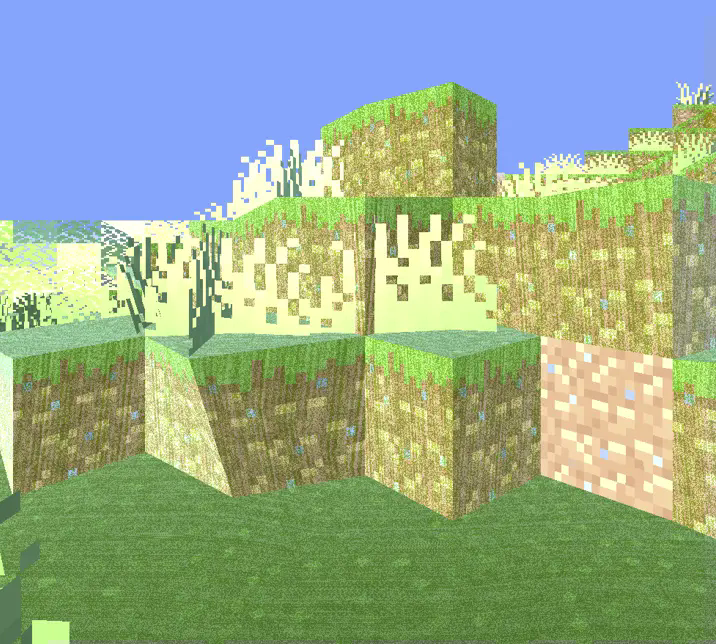
This shader was created to intentionally break the visual norms of Minecraft.
Instead of aiming for beauty or realism, it dives headfirst into chaos, distortion, and discomfort.

With Cursed View, you’ll experience:
* Overexposed lighting that burns your world in light
* Colors that look like they’re fighting each other
* Shadows that don’t behave like they should
* Blocks and entities that feel off, distorted, or almost corrupted
* A surreal atmosphere that turns peaceful villages into cursed zones
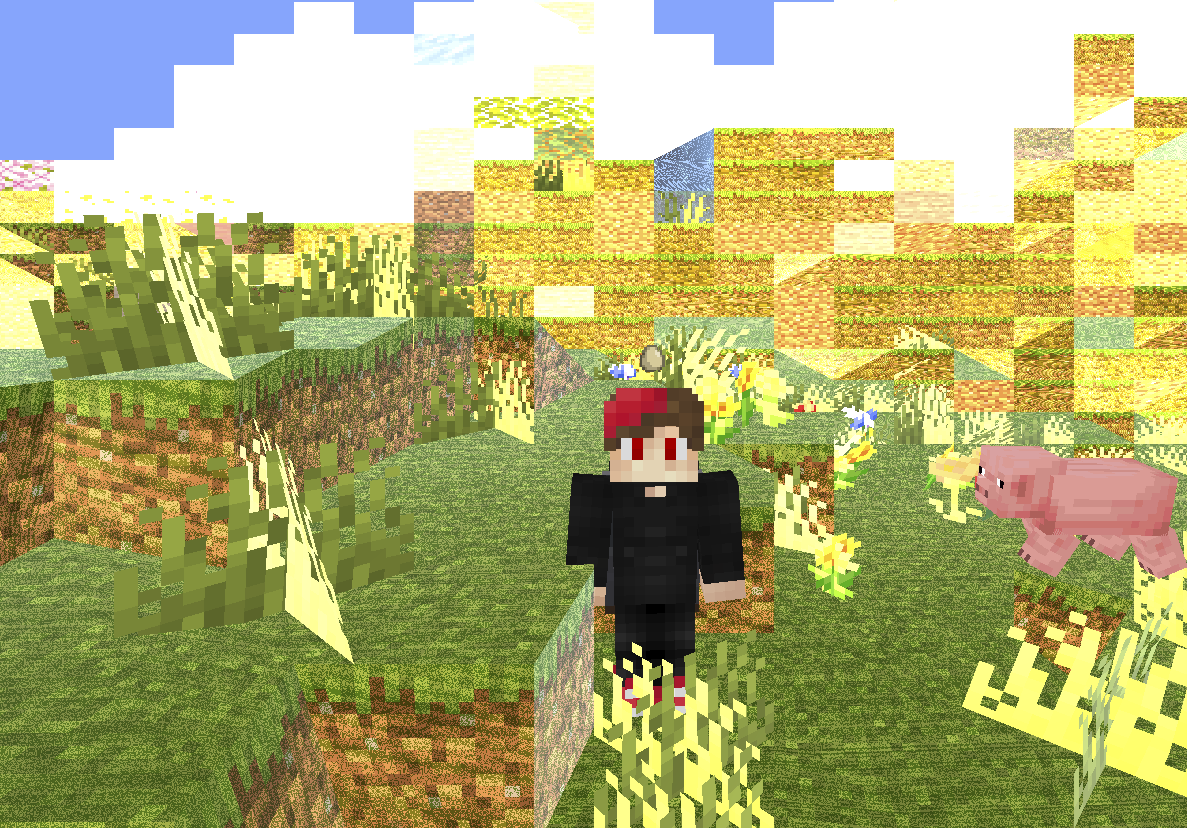
The goal is simple: make Minecraft look _wrong_ — and weirdly fascinating.
Whether you’re exploring glitchcore builds, recording cursed videos, or just want to mess with your perception,
Cursed View delivers an experience that no “normal” shader would dare attempt.
It doesn’t aim to be pretty.
It doesn’t aim to be playable.
It exists to disturb, confuse, and sometimes even amuse.
**Recommended FOV: Quake Pro** — to fully embrace the madness.
If you’ve ever asked,
**_”What if a shader hated you?”_** — this is your answer.


**🧠 Lamapi: Next-Gen Open Source AI**
Pushing the boundaries of accessible intelligence. Whether you need lightweight efficiency or industrial-grade reasoning, the **Next Series** delivers.
**Why build with Lamapi?**
– ⚡ **High Efficiency:** From compact 1B models to powerful 70B reasoning engines.
– 🌍 **Multilingual Mastery:** Optimized for superior performance in English & Turkish.
– 🛠️ **Ready to Deploy:** State-of-the-art open weights available immediately.
**Explore our models and start building:**
🔗 https://huggingface.co/Lamapi

**🚀 KCB Hosting: Power Meets Reliability**
Looking for a host that takes your gaming experience as seriously as you do? We provide robust infrastructure ensuring smooth gameplay and enterprise-grade uptime.
**Why switch to us?**
– 💎 **7-Day Free Trial:** Experience the quality risk-free (No commitment).
– 🛡️ **99.9% Uptime SLA:** Your server stays online, guaranteed.
– ⏰ **24/7 Support:** Expert help whenever you need it.
🔥 Experience the difference with 25% off your first month,
Use code **XSORAS**
**Deploy your server now:**
🌐 https://kcbhosting.com
💬 https://discord.gg/kcbhosting

# **_Welcome to the chaos._**
Cursed Shader (Metamorphopsia)
##  Meaning of Project | Смысл проекта
### ENG
Shaders are created **SOLELY** for fun. Shaders distort the view of the world and **can cause nausea, be careful!**
### RUS
Шейдеры созданы **ИСКЛЮЧИТЕЛЬНО** ради забавы. Шейдеры искажают видение мира и **могут вызвать тошноту, осторожно!**
## 💡Requirements for Use | Требованию к использованию💡
To display shaders correctly, you need to turn off “Clouds”. | Для корректного отображения шейдеров нужно выключить “Облака”.
– Forge
– OptiFine **1.7.2-1.20.4** for Shader function | Для функции Шейдеров
– Fabric
– Fabric API **1.14-1.20.6** API for Sodium | Для Sodium
– Sodium **1.16.5-1.20.6** for Iris Shaders | Для Iris Shaders
– Iris Shaders **1.16.5-1.20.6** for Shader function | Для функции Шейдеров
– Quilt
– Quilted Fabric API (QFAPI) / Quilt Standard Libraries (QSL) **1.18.2-1.20.4** for Sodium | Для Sodium
– Sodium **1.16.5-1.20.6** for Iris Shaders | Для Iris Shaders
– Iris Shaders **1.16.5-1.20.6** for Shader function | Для функции Шейдеров
## ❗️How to Project Works | Принцип работы проекта❗️
## 🪙Optional Addition | Необязательное дополнение🪙
### ENG
Each of my projects is not set up for paid use, but if you want to support me in any way, you can do this by donating. (minimum – 0.15 $)
### RUS
Каждый мой проект не настроен на платное использование, но если у вас есть желание как-либо поддержать меня, то вы можете сделать это путём доната. (минимальная – 10 ₽)

Cursed Shader pack
This Shader Pack makes things look Totally Cursed!! (SuperMJ767 I’m Looking at you) It looks SUUUPER cursed, as the name suggests. Check out the gallery if you want to know what it looks like. This pack needs Iris shaders to run.
Cursed Fog
EN 🌐
# ABOUT:
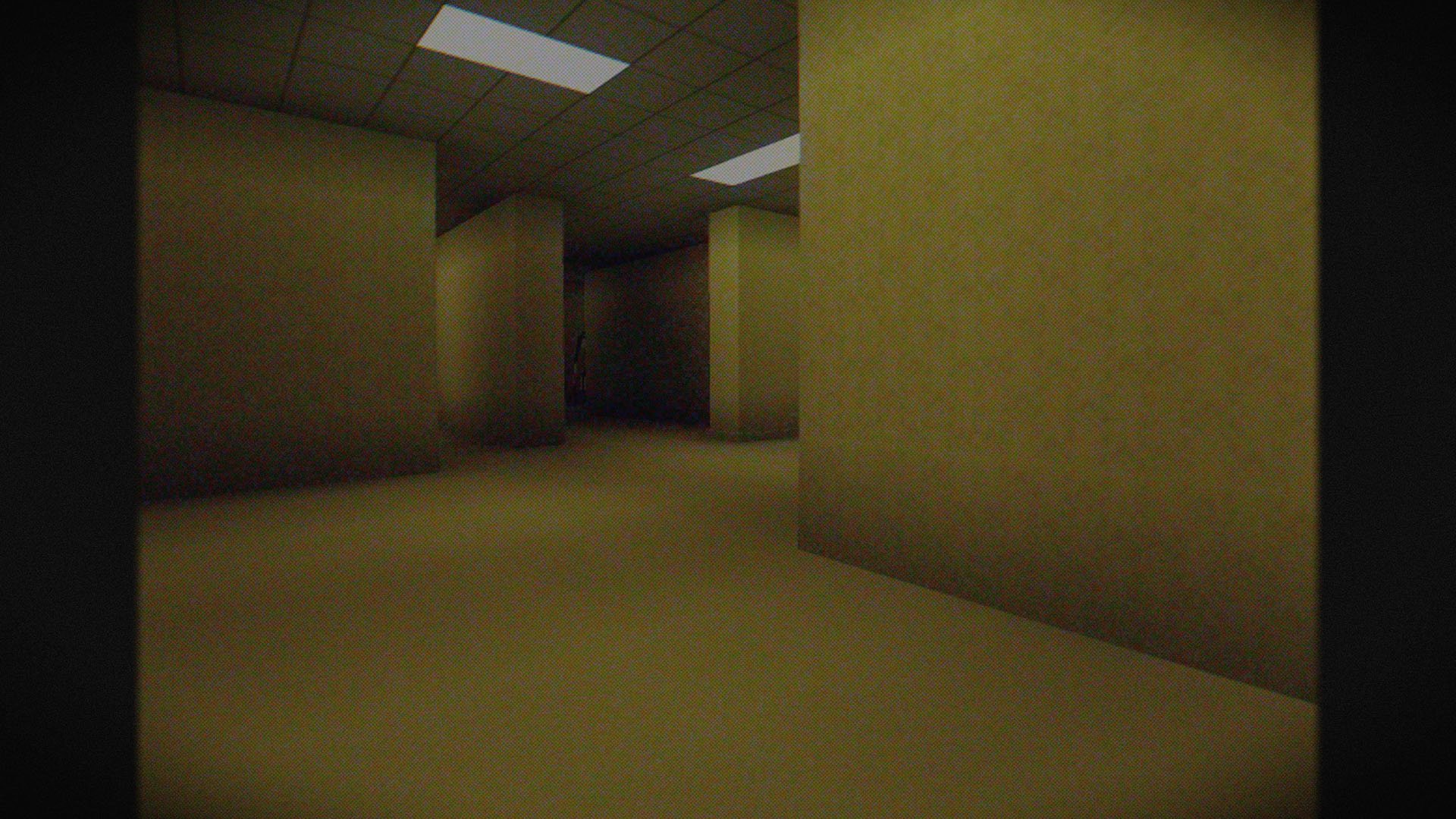
**Hi, I’m LoLip_p! I developed this shader to create a tense and eerie atmosphere, perfect for horror modpacks. I would be delighted if it were included in your projects. It features a CRT mask, various video artifacts, noise effects, and more. If any effects don’t match your preferences, all parameters are fully customizable, allowing you to easily toggle settings on or off. Support the author on Patreon.**
### SCREENSHOT:
## LINKS:
– Discord (Discuss, Bug Reports, Etc.)
– YouTube
– Telegram
## INSTALL THE SHADERS
– Download Client Which Supports Installing Shaders Such As Optifine And Iris
– Download The Shaders
– Copy Shaders to /.minecraft/shaderpacks
– Launch Minecraft, Go To Options –> Video Settings –> Shaders
– Choose **Cursed Fog**
## DEMO VIDEO
RU 🐻
# О:
**Привет, я LoLip_p! Я разработал этот шейдер, чтобы создать напряженную и жуткую атмосферу, идеально подходящую для модпаков в жанре хоррор. Я был бы рад, если бы он был включен в ваши проекты. Он включает в себя маску CRT, различные видеоартефакты, шумовые эффекты и многое другое. Если какие-либо эффекты не соответствуют вашим предпочтениям, все параметры полностью настраиваемы, что позволяет легко включать или отключать настройки. Поддержите автора на Patreon.**
### СКРИНШОТ:

## ССЫЛКИ:
– Discord (Discuss, Bug Reports, Etc.)
– YouTube
– Telegram
## УСТАНОВИТЬ ШЕЙДЕР
– Загрузите клиент, поддерживающий установку шейдеров, таких как Optifine и Iris
– Загрузите шейдеры
– Скопируйте шейдеры в /.minecraft/shaderpacks
– Запустите Minecraft, перейдите в «Настройки» –> «Настройки видео» –> «Шейдеры»
– Выберите **Cursed Fog**
## ДЕМО ВИДЕО
CH 🐉
# 关于:
**你好,我是LoLip_p!我开发了这款着色器,旨在营造紧张诡异的氛围,特别适合恐怖模组合集。若能将其纳入您的项目,我将深感荣幸。它包含CRT滤镜、多种视频伪影、噪点效果等特色功能。若某些效果不符合您的偏好,所有参数均可自由调整,您可轻松启用或禁用各项设置。支持作者请访问 Patreon.**
### 屏幕截图:

## 链接:
– Discord (Discuss, Bug Reports, Etc.)
– YouTube
– Telegram
## 安装着色器
– 下载支持安装着色器的客户端(如Optifine和Iris)
– 下载着色器资源包
– 将着色器复制到 /.minecraft/shaderpacks 目录
– 启动Minecraft,进入选项 –> 视频设置 –> 着色器
– 选择 **诅咒雾**
## 演示视频
DE 🍺
# ÜBER:
**Hallo, ich bin LoLip_p! Ich habe diesen Shader entwickelt, um eine spannende und unheimliche Atmosphäre zu schaffen, die perfekt für Horror-Modpacks geeignet ist. Ich würde mich sehr freuen, wenn er in Ihren Projekten verwendet würde. Er verfügt über eine CRT-Maske, verschiedene Videoartefakte, Rauscheffekte und vieles mehr. Wenn Ihnen bestimmte Effekte nicht gefallen, können Sie alle Parameter vollständig anpassen und die Einstellungen ganz einfach ein- oder ausschalten. Unterstützen Sie den Autor auf Patreon.**
### SCREENSHOT:

## LINKS:
– Discord (Discuss, Bug Reports, Etc.)
– YouTube
– Telegram
## INSTALLIEREN SIE DIE SHADER
– Client herunterladen, der die Installation von Shadern wie Optifine und Iris unterstützt
– Shader herunterladen
– Shader nach /.minecraft/shaderpacks kopieren
– Minecraft starten, zu Optionen –> Videoeinstellungen –> Shader gehen
– **Cursed Fog** auswählen
## DEMO VIDEO