Ebin Resurrected
[](https://ko-fi.com/jbritain)
[](https://discord.gg/b9SHNcvs6c)
Shader development is hard and takes a lot of time. If you enjoy my shaders, please consider supporting my work!
# Ebin Resurrected
Ebin Resurrected is a vibrant and performant Minecraft shaderpack.
[Ebin](https://github.com/BruceKnowsHow/Ebin-Shaders) began with the goal of being fast, beautiful, configurable, feature-rich, and having a base of well-written code. It was developed by [BruceKnowsHow](https://github.com/BruceKnowsHow) from 2016-2020. [jbritain](https://github.com/jbritain) resumed development of the shader in 2024 under the name ‘Ebin Resurrected’. This is a fork of Ebin which brings compatibility with modern versions of Minecraft, and significantly improves upon aspects of the shader, such as PBR.
## Community
If you would like to discuss Ebin Resurrected, or other Minecraft shaderpacks, join my [Discord server](https://discord.gg/b9SHNcvs6c). Alternatively, in the [shaderLABS](https://discord.gg/RpzWN9S) discord, you can head over to `#ebin-resurrected-jbritain`.
## Features
– Multicoloured Blocklight
– Sunlight Shadows / Shading
– PCSS ‘Variable Penumbra’ Shadows with transparency.
– Bloom / Glow
– Procedural 2D/3D Clouds
– Procedural Water Waves
– Deferred Shading Pipeline – Everything is correctly shaded, even behind semi-transparent blocks
– Terrain Deformation – “Animal Crossing” and “Acid” deformations
### LabPBR Compliant
– Rough Screen Space Reflections – accurate specular reflections on all blocks.
– Normal Mapped Lighting.
– Terrain Parallax (POM).
– Material Ambient Occlusion.
– Hardcoded Metal Support.
– Porosity – materials look ‘wet’ in the rain.
## Planned Features
– Distant Horizons support
– End skybox
## Compatibility
### Minecraft
– Optifine and Iris are both supported, however some features only work on Iris. Older Optifine or Iris versions may have issues, as the shader is developed on the latest versions of either.
– Minecraft 1.17.1 is the earliest tested version. The shader may work on older versions but this is not guaranteed.
### Hardware
– OpenGL 4 compatible hardware is required. This boils down to Nvidia GeForce 400, AMD Radeon HD 5000, Intel HD 3rd gen **or later**. Any modern device should work fine.
– The Raspberry Pi is not supported as it does not support OpenGL 4.
– Intel GPUs are untested and you may encounter issues. If you do encounter issues, please report them, as Intel is intended to be supported.
### Operating System
– MacOS is **NOT SUPPORTED**.
## If you run into problems
Having problems? Join my [Discord Server](https://discord.gg/b9SHNcvs6c) and create a thread in `#support`. Alternatively, if you are experiencing a problem with Ebin you consider to be a bug, create a new [issue](https://github.com/jbritain/Ebin-Shaders-Resurrected/issues). Please read the issue guidelines before creating one and make sure somebody else hasn’t raised the same issue already. **You are likely to get a faster response on Discord**.
## Team
– [jbritain](https://github.com/jbritain): Maintainer
– [BruceKnowsHow](https://github.com/BruceKnowsHow): Original Developer (no longer involved in the shader)
## Contributors
– [dotModded](https://github.com/dotModded), [DethRaid](https://github.com/DethRaid), [zombye](https://github.com/zombye)
## Thanks
– [The shaderLABS Discord](https://discord.gg/RpzWN9S) members, for answering the many questions I’ve had in my time developing shaders, some of which were even constructive. Particularly:
– Balint
– Jessie
– Null
– TimeTravelBeard
– Quadro
– BuilderB0y
– NinjaMike
– CyanEmber
– [Capt Tatsu](https://bitslablab.com/), whose shader, [BSL](https://bitslablab.com/bslshaders/) I ported the multicoloured blocklight and FXAA code from.
– [Sonic Ether](https://www.facebook.com/SonicEther/), creator of SEUS and inspiration for Ebin
– [daxnitro](http://www.minecraftforum.net/forums/mapping-and-modding/minecraft-mods/1272365), original creator of the Shaders Mod
– [karyonix](http://www.minecraftforum.net/forums/mapping-and-modding/minecraft-mods/1286604), longtime maintainer of the Shaders Mod
– [sp614x](https://twitter.com/sp614x), Ebin would not be possible without #include.
– [IMS](https://github.com/IMS212), for maintaining Iris and Sodium, which are really cool mods.
– [chocapic13](http://www.minecraftforum.net/forums/mapping-and-modding/minecraft-mods/1293898) & [Sildur](http://www.minecraftforum.net/forums/mapping-and-modding/minecraft-mods/1291396), various code references and help over the years
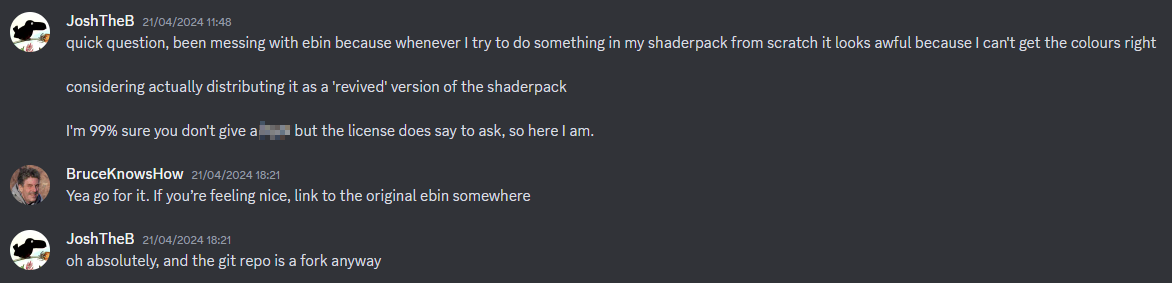
## Evidence of written permission from BruceKnowsHow to distribute this shaderpack
Earth Shaders
### ABOUT
The shader enhances the environment with warm sunlight, subtle bloom around the sun, and gentle fog that adds depth to the mountains. The water looks transparent and reflective, showing detailed underwater terrain. Grass and terrain appear vibrant with improved shading, while the overall lighting feels soft and immersive, creating a peaceful, cinematic look perfect for exploration or content creation.
[](https://fastclient.net/gamesofdev)
### Features
Earth Shaders comes with simple yet powerful features designed to give your game a clean, trailer-like look with smooth performance.
– Bloom Effect: Adds a soft glow to lighting for a cinematic feel. You can easily turn it on or off in the shader settings.
– Custom Color Control: Adjust the red, green, and blue levels in settings to fine-tune the overall tone and mood of your game.
[](https://www.youtube.com/@GlacierServicesMC)
### How to report BUGS!!
Our GlacierDevelopment Discord server is Live you can report bugs and Chat with other GlacierShaders users, report bugs, get help with issues, and join exciting giveaways — all in one place!
[](https://discord.gg/TpsGTtTnSm)
### OFFER!!

Dynamic Light Shader




# Dynamic Light Shader
> A simple baseline shader that glows/emits light from held items in your hand.
Light color based on the item you are holding (torch, lantern, glowstone, redstone, soul items, etc.).
> 
You can **disable(0)/enable(1)** the held_color_light from shader pack settings
thats it!
contributions are welcome (https://github.com/Hiba550/Dynamic-Light-Shader)
Dusk
# Dusk 0.1
This is a shader with semi-PBR support and directional lighting.
Right now it is in very early development and expect _some_ bugs.
Currently it doesn’t support animated textures.
Features (so far):
– Directional illumination from the sun,
– PBR normal suppor,
– PBR reflectiveness,
Note: The shaderpack does not have built-in PBR and will need a resource pack.
Drift POV
# ⚡ DRIFT POV – The Ultimate Motion Blur
**Experience Minecraft like never before.** DRIFT POV is a custom-engineered motion blur designed specifically for high-intensity PVP, SMP gameplay, and cinematic content.
### ✨ Features:
* **🚀 Zero Lag:** Optimized for maximum FPS even on low-end PCs.
* **🌀 Cinematic Smoothness:** Professional-grade blur that makes every move feel fluid.
* **🛡️ PVP Ready:** Designed to enhance visibility during combos and fast turns.
* **🎨 Cyan Aesthetic:** Perfectly tuned for a modern, electric gaming vibe.
### 🛠️ Requirements:
* **OptiFine** OR **Iris/Oculus** Shaders.
### ⚙️ Recommended Settings:
For the best experience, set your **Motion Blur Strength** to **0.5 – 0.7** in the shader options.
—
*Created with ❤️ by Parth POV*
DreamLight Shaders
ABOUT
DreamLight Shaders is a fantasy-inspired, dreamy shader pack designed to bring soft, cinematic lighting and vibrant color tones to Minecraft. Built for both beauty and performance, it transforms your world with warm sunsets, glowing reflections, smooth water, and enhanced skies — all while keeping gameplay fluid and immersive.
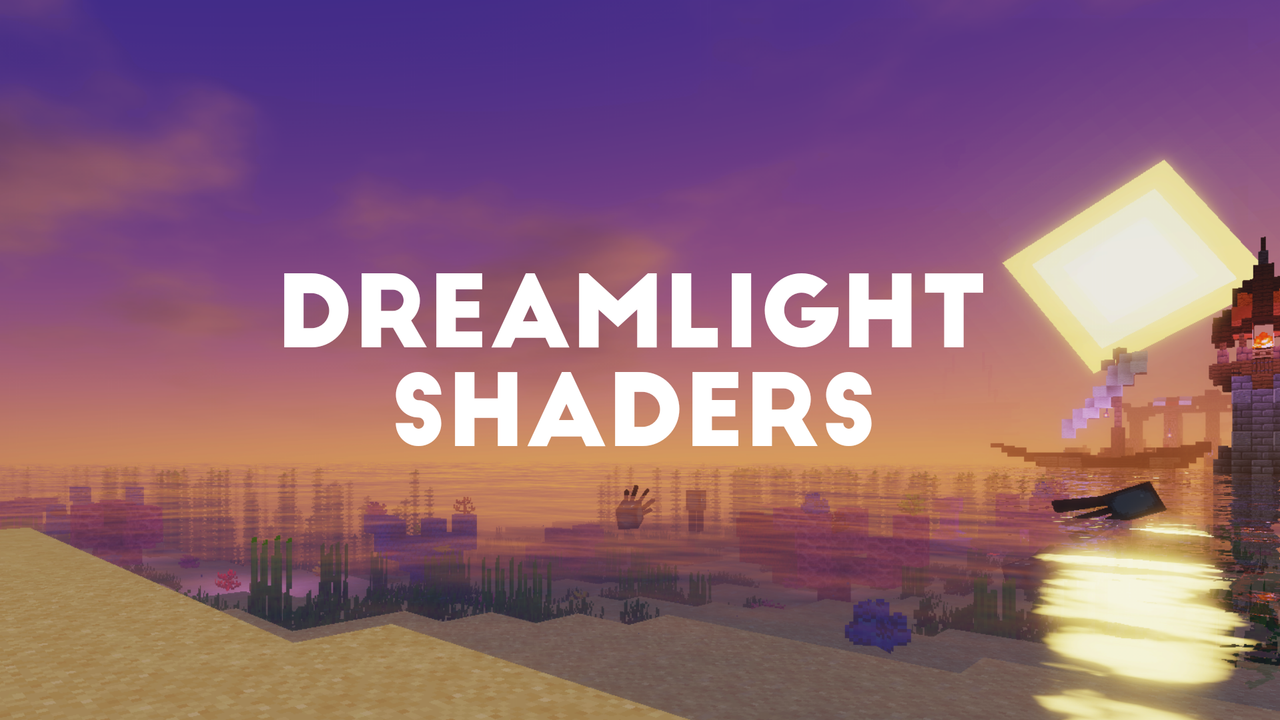
🌙Features DreamLight Shaders
●Dynamic lighting with realistic sunrises and sunsets
●Smooth reflections and gentle water waves
●Enhanced skies and soft clouds for a dreamy look
●Colored global illumination that enhances atmosphere
●Balanced brightness and shadows for natural scenes
●Optimized performance for mid to high-end systems
●Cinematic tone mapping for screenshots and videos
●Glowing nights with subtle ambient lighting
## Requirements
* Minecraft Java Edition
* Iris Shaders or OptiFine
## Credits
Based on code from the Mellow Shader by TheCMK.
Made by **HoneyStudios**.
DrDestens Minecraft Shaders
# DrDestens MinecraftShaders
DrDestens MinecraftShaders is a shaderpack for Minecraft: Java Edition. It features water effects with reflections, ambient occlusion, bloom, realistic depth of field, motion blur, TAA and many other things. The shaderpack supports the LabPBR and OldPBR/SeusPBR standard, and you can use it with PBR texturepacks for added detail.
## Feature Overview
– Screen Space Reflections
– Depth of Field
– Screen Space Ambient Occlusion (SSAO)
– Temporal Anti-Aliasing (TAA)
– Physically Based Rendering
– Various Water Effects
– Godrays
– Bloom
– Motion Blur
– Realistic DoF Chromatic Aberration
– Custom sky gradient
– Improved Fog with Sunsets
– Improved Dynamic Lighting
– Directional Lightmaps
– Outline
– Custom Block Selection Outline
## Full Feature List
### Lighting
– PBR
Enables Physically Based Rendering
Make sure you enable Normal and Specular mapsm in the OptiFine shader options
– PBR Format – *LabPBR 1.3, SeusPBR / OldPBR*
– **Physically Based Rendering**
– Height as AO
Uses the Height information for Ambient occlusion
– Normal Mapping Fix
With newer OptiFine versions this might not be necessary
Enable this if normal maps do not show on entities or handheld objects
– Use Hardcoded Metals
If disabled, the shader will use the color for the reflectance data
LabPBR only
– Subsurface Scattering
– Parallax Occlusion Mapping
Adds additional detail to blocks using the height map
Low performance impact
Can create artifacts at screen borders
– POM Depth
Specifies how deep the POM goes
Higher values will create artifacts
– POM Distortion
Exaggerates the height map
Helps create more depth with small POM Depth values
Creates artifacts when used with high POM Depth values
– Smooth POM
Smooths out the height map
Significantly reduces artifacts
– Skylight AO
Specifies the amount of ambient occlusion on skylight
– Blocklight AO
Specifies the amount of ambient occlusion on blocklight
– Skylight Gamma
Higher = Darker
Lower = Brighter
– Blocklight Gamma
Higher = Darker
Lower = Brighter
– Minimum Light
Restricts blocklight to never go below this value
Prevents caves from being pitch black (unless you set it to zero that is)
– **Lightmap Colors**
– Nether Ambient Brightness
– End Ambient Brightness
– End Ambient Saturation
– Skylight Day *(RGB Color Picker)*
– Skylight Night *(RGB Color Picker)*
– Blocklight *(RGB Color Picker)*
Select blocklight color (torches, glowstone, etc.)
If “Complex Blocklight” is enabled, this color will **NOT** be used
– Complex Blocklight
Allows you to select two colors for blocklight
One for dark parts, one for bright parts
– Blend Curve
Higher: Emphasize “Bright” color
Lower: Emphasize “Dark” color
50 = linear transition
– Complex Blocklight Dark *(RGB Color Picker)*
– Complex Blocklight Bright *(RGB Color Picker)*
### Depth Of Field
– Depth of Field
Blurs non-focused objects, like a real camera
– Bokeh Samples
Quality of the blur
Higher is better
Significantly affects performance
– DoF Intensity
Intensity of the Depth of Field effect
Low performance impact
– Maximum Blur – *High, Unlimited*
Limits the strength of the DoF blur
Helps reduce artifacts when using lower sample counts and is better for gameplay
– DoF Downsampling Amount
Amount of Downsampling that takes place for the Depth of Field effect
Reduces DoF artifacts, increases pixelation artifacts
No/Low performance impact
– Far Blur Only
Only blurs far away things
– Sample Rejection
Improved DoF Quality by (mostly) removing color bleeding
Can have a significant performance impact
– Focus Delay
Sets how long the focus takes to adjust
### Reflections
– Reflection Mode – *OFF, Sky, Flipped Image, Raytraced*
– Raytracing Quality
Number of raytracing iterations
Lower is faster
– Thickness Estimation Modifier – *Infinite*
Increase this if the reflection blind spots annoy you
Influences assumption about how thick a pixel is
No performance impact
– Fade Edges
– Reflection Threshold
PBR only
Sets the minimum required reflectiveness in order for SSR to enable
Higher values may introduce reflection cutoffs
– Screen Space Refraction
Distorts things seen through water
– Refraction Strength
– Glass Reflections
Adds reflections to tinted glass blocks
### Water
– Waving Water
”Physical” Waves
Moves the water surface
– Wave Height
– Wave Normals – *OFF, Noise, Sine*
– Normals Strength
Fake Waves, pretending to be real ones
Added detail
– Normals Scale
– Water Absorption Density
– Water Absorption Bias
Adds a constant to the water fog distance
Can help in making water more visible
– Water Texture
Enables the vanilla water texture
– **Water Color Options**
– Water Absorption *(RGB Color Picker)*
– Absorption Color Multiplier
### Camera and Tonemapping
– Exposure
– Tonemapping – *Custom Reinhard, Unreal*
– Contrast
– Vibrance
– Saturation
– Brightness
– Vignette – *OFF, Round, Square*
Darkens screen borders
– Vignette Strength
### Post Processing
– TAA
Temporal Anti-Aliasing
Smooths edges at the cost of a slightly blurrier image
Might cause problems with OptiFine’s high-res screenshot feature
– **TAA Options**
– TAA Blending Constant
Controls the opacity of the current frame
Set this value lower for smoother TAA
– TAA Sharpening
Changes the strength of the sharpening effect
– Bloom
Creates a glow around bright objects
Looks nice 😉
– Bloom Strength
– Motion Blur
– Motion Blur Intensity
– SSAO
Screen Space Ambient Occlusion
Makes cavities dark
High performance impact
– SSAO Quality – *Low, Medium, High*
– SSAO Strength
### Atmospherics
– Fog – *OFF, Normal, Border*
– Fog Amount
– Morning Fog
Increases fog amount during sunsets
Only works with fog in “Normal” mode
Requires fog and sunsets to be enabled
– Morning Fog Strength
– Cave Fog
– Cave Fog Brightness
– Godrays
– **Godray Colors**
– Godray Sun *(RGB Color Picker)*
– Godray Moon *(RGB Color Picker)*
– Godray Strength
– Godray Radius
– Godray Samples
– **Sky Colors**
– Sky Noon *(RGB Color Picker)*
– Sky Sunset *(RGB Color Picker)*
– Sky Midnight *(RGB Color Picker)*
– End Sky Upper *(RGB Color Picker)*
– End Sky Lower *(RGB Color Picker)*
– Sun Angle
### Weather
– Rain Detection – *Temperature, Color*
– Rain Opacity
– Rain Refraction
– Rain Refraction Strength
### Other Stuff
– Outline – *OFF, White, Black, Rainbow*
– Outline Distance
– Block Selection Outline – *Black, White, Rainbow*
**Only works with newer OptiFine versions (G7 or higher)**
– Block Selection Outline Opacity
– Wavy Blocks
– Wavy Leaves
– World Curvature
– World Radius
– Hand Invisibility Effect
Distorts handheld objects when invisible
– White World
– Directional Lightmaps
Applies normal mapping to dynamic lights
Requires a ressource pack with PBR support
– Directional Lightmap Strength
– Dynamic Light Brightness
Changes the brightness of light from emissive blocks
### Optimisation
– Flat Vertices
Disable when using custom models with smooth surfaces
## Agreement
**You are allowed to**
– Use my shaderpack in your videos / screenshots
**You are not allowed to**
– Redistribute my shaderpack: If you want to provide a download link you **must** link to my Modrinth / Curseforge page
– Use monetized URL shorteners linking to downloads of my shaderpack
– Publish edits of my shaderpack without my permission
DOShader
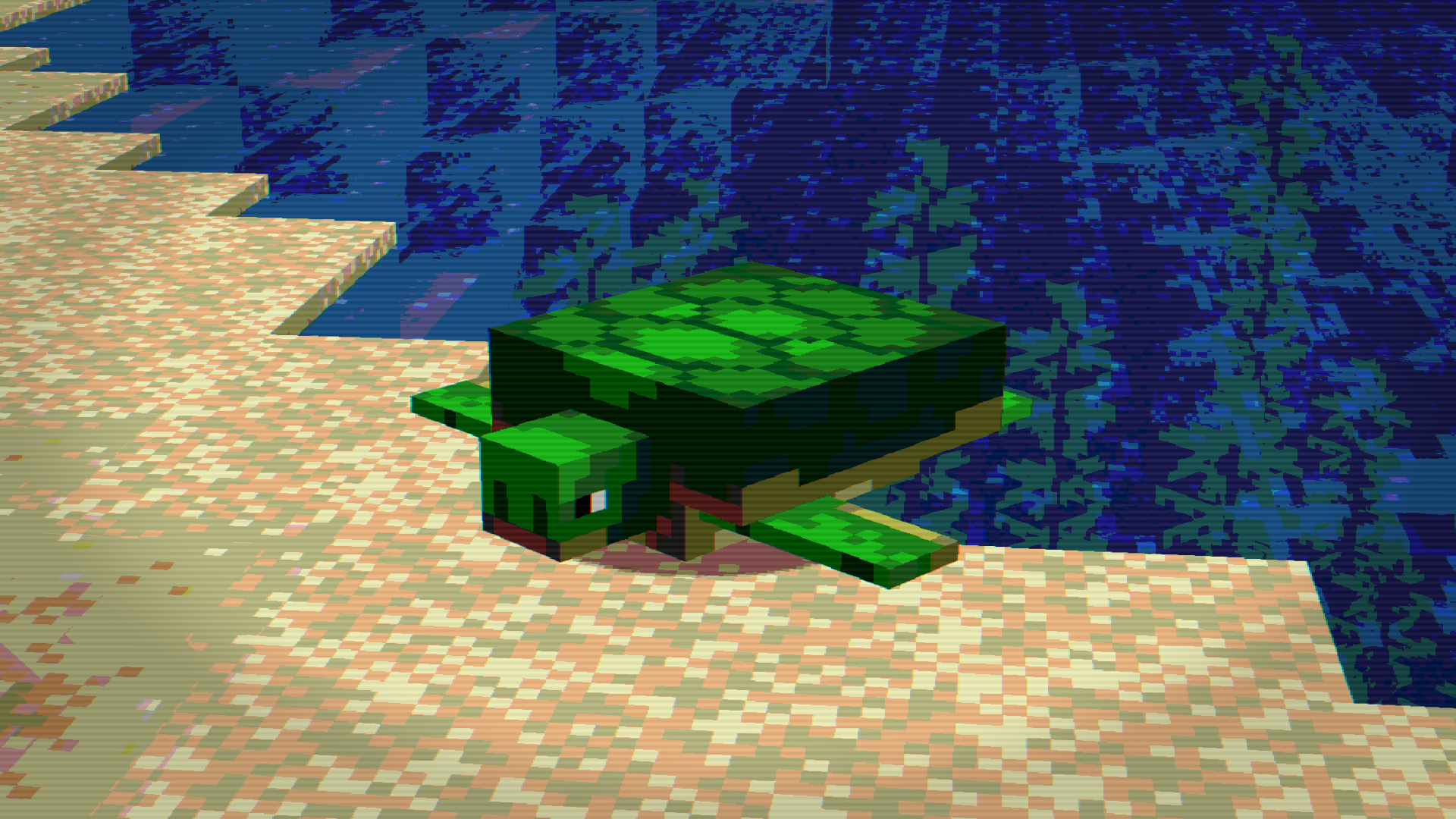
This Minecraft shader simulates the **8bit effect** from old _MSDOS games_
**Features:**
– 8bit blocks
– VHS Effect
– This shader will work even on a VERY weak PC
<3
DMS – Depth Map Shaders
A shader pack that makes your world into a depth map.
The controls include a max distance in chunks along side a falloff curve to control the fade of the depth map.
This is useful for thumbnail artists, graphic designers, and video editors.
Ditherpunk
Ditherpunk is a highly configurable retro shader pack for Minecraft
It is recommended to watch the below showcase in 4K to reduce compression artifacts.
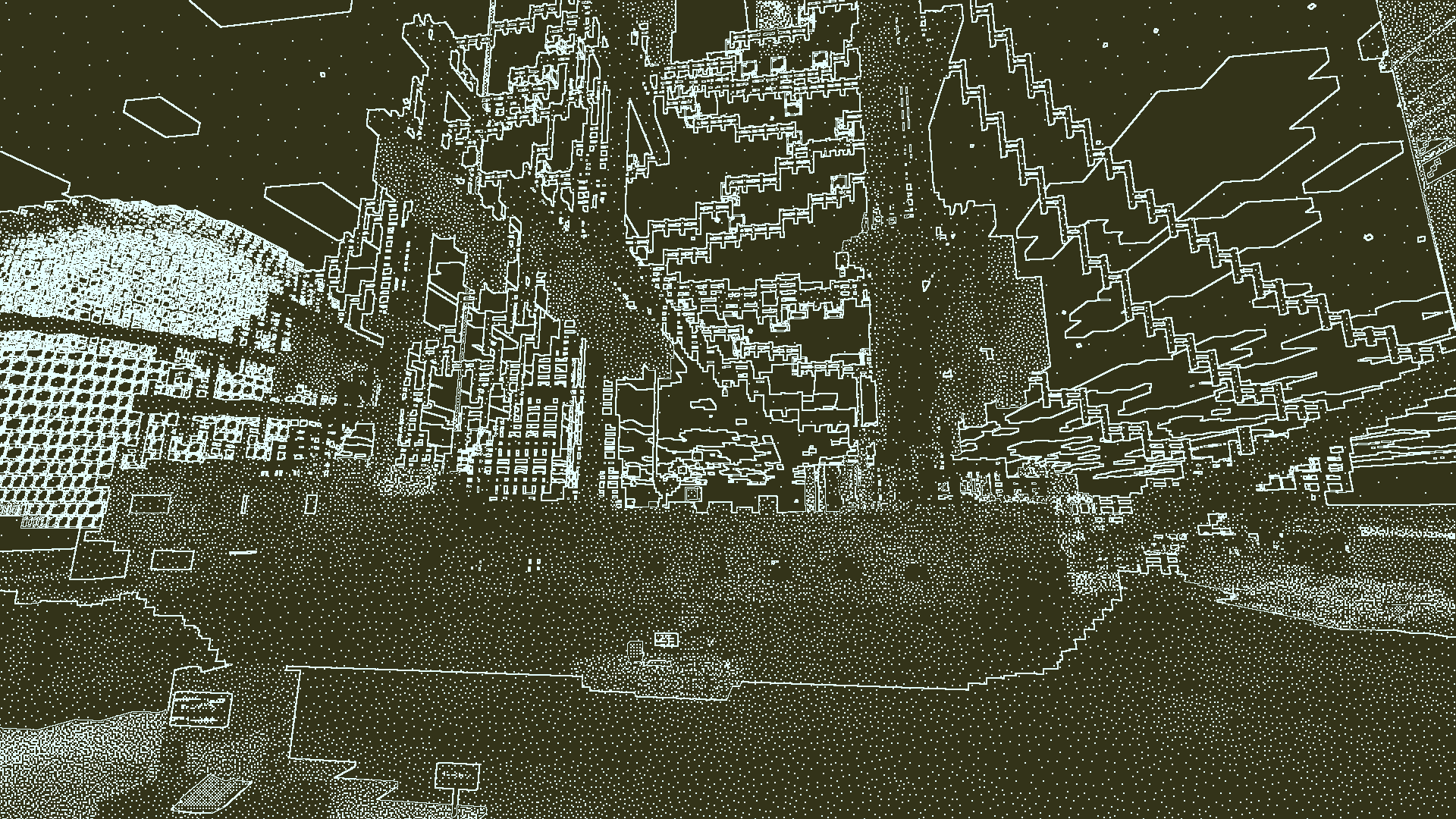
_Pictured: Obra Dinn preset. Obra Dinn recreation built by “Lexi” and photographed by “Birb”_
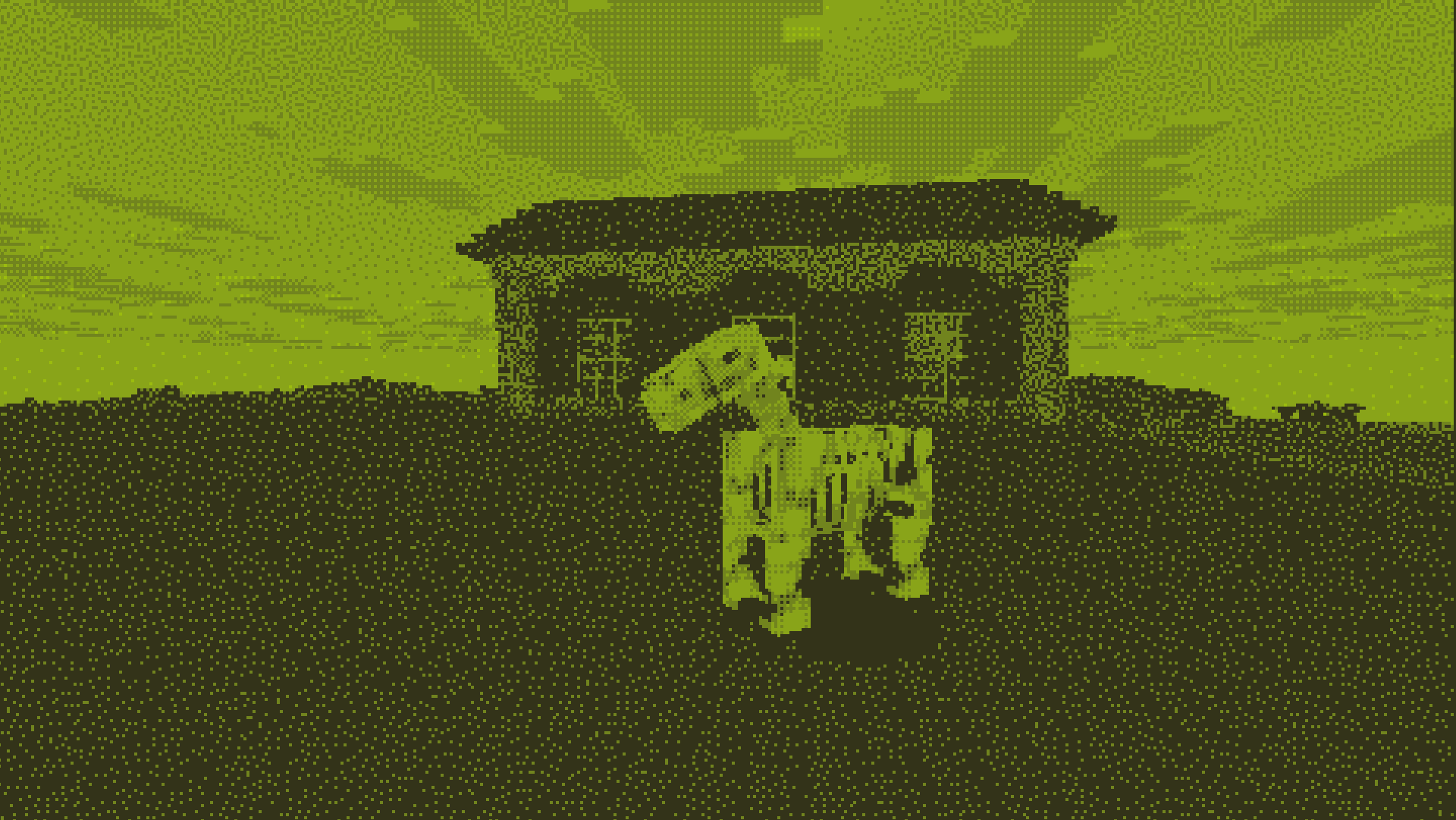
_Pictured: Gameboy preset_
## Features
– Dithering
– Color Quantization
– Render different effects on different render passes
– Procedurally drawn Edge Lines
– Downscaling
– Grayscale color mapping
– Highly configurable
– Variety of presets
## Acknowledgements
– Inspired by [Return of the Obra Dinn](https://obradinn.com/) by Lucas Pope
– References Used:
– Lucas Pope’s [Developer Log](https://forums.tigsource.com/index.php?topic=40832.0)
– Surma’s [Ditherpunk](https://surma.dev/things/ditherpunk/)
(also inspired the name of this shader pack)
– Björn Ottosson’s [Oklab colorspace](https://bottosson.github.io/posts/oklab/)
– Bálint’s [Base 330 shader pack](https://github.com/shaderLABS/Base-330)
– The [Iris Documentation](https://shaders.properties/)
## Known Issues
– Spectral arrow effects ignore shader effects