Pumpkin
## Pumpkin Shaders
Shaders that (try) to not make your computer cry while still somewhat sticking to the vanilla style.
#### PLEASE REPORT ALL ISSUES ON THE [GITHUB ISSUE TRACKER](https://github.com/mekboy21-dev/pumpkin-shaders/issues)
**PLEASE NOTE:** This shader is in early stages of development and you may experience issues while playing.
Tested on Windows & Linux. Iris is recommended over Optifine for versions that support it.
### Why is it called ‘pumpkin’?
I opened Minecraft, went to a village and saw a pumpkin. Thats kinda just it.
PSX Shader NB
# PSX Shader NB
This shader pack is a fork of ckosmic’s [Minecraft PSX Shader](https://github.com/ckosmic/minecraft-psx) that mimics the look and feel of PlayStation 1 graphics.
## Changes in this Fork
### No-Bounce Vertex Fix
Changed vertex transformation to eliminate the bouncing effect when moving.
Changed the vertex transformation from:
“`glsl
vec4 position4 = mat4(gl_ModelViewMatrix) * vec4(gl_Vertex) + gl_ModelViewMatrix[3].xyzw;
“`
to standard transformation:
“`glsl
vec4 position4 = gl_ModelViewMatrix * vec4(gl_Vertex);
“`
### Dynamic Hand Light
Added real dynamic lighting from held light sources (torches, lanterns, etc.). Light now updates continuously as you move, rather than only when breaking/placing blocks. Uses `heldBlockLightValue` / `heldBlockLightValue2` uniforms with linear distance falloff matching vanilla placed light behavior, applied to terrain, entities, water, hand, and basic geometry shaders. Supports both main hand and off hand light sources.
## Installation
Place this shader pack in your Minecraft `shaderpacks` folder.
This shader pack works with both [OptiFine](https://optifine.net/) and [Iris](https://irisshaders.net/).
## Credits
– Original shader by ckosmic
– Iris compatibility by Karen/あけみ (akemin_dayo)
## License
Licensed under the [MIT License](https://choosealicense.com/licenses/mit/).
PSX Shader
# Features:
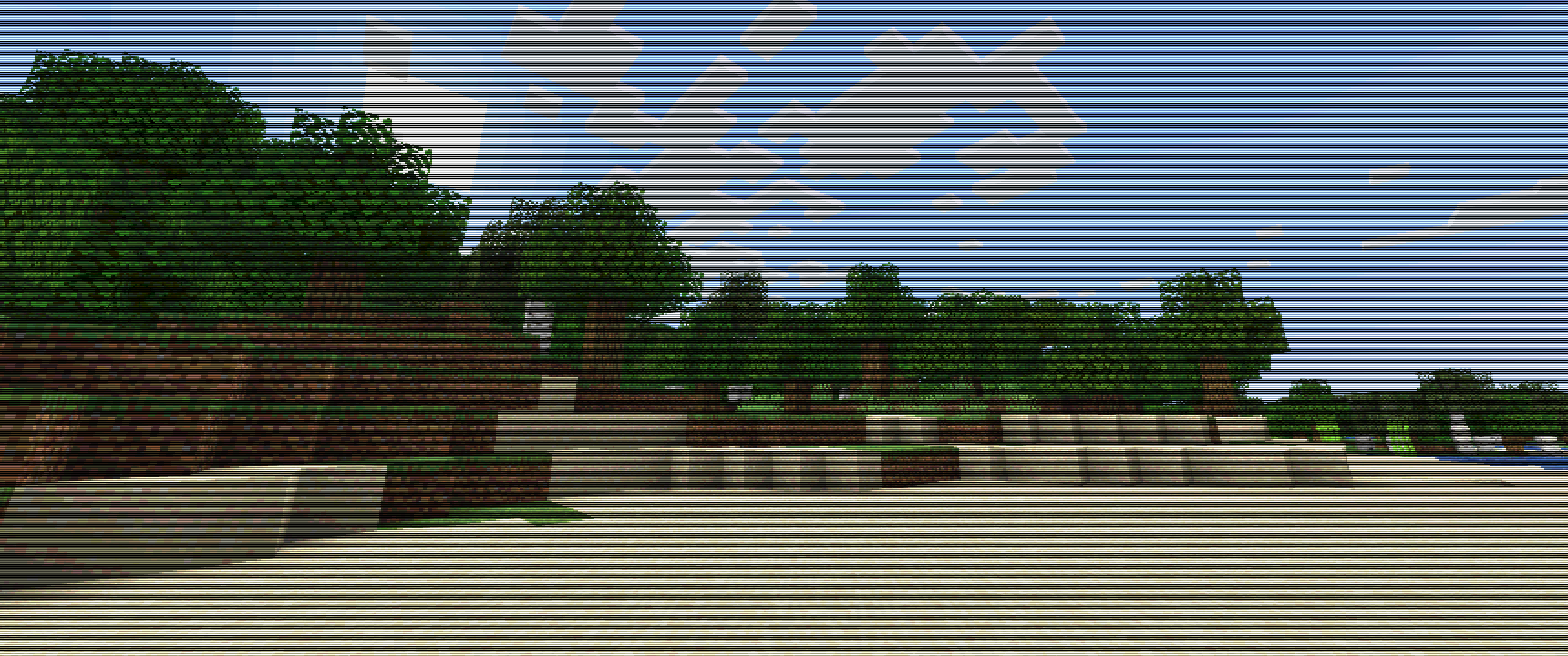
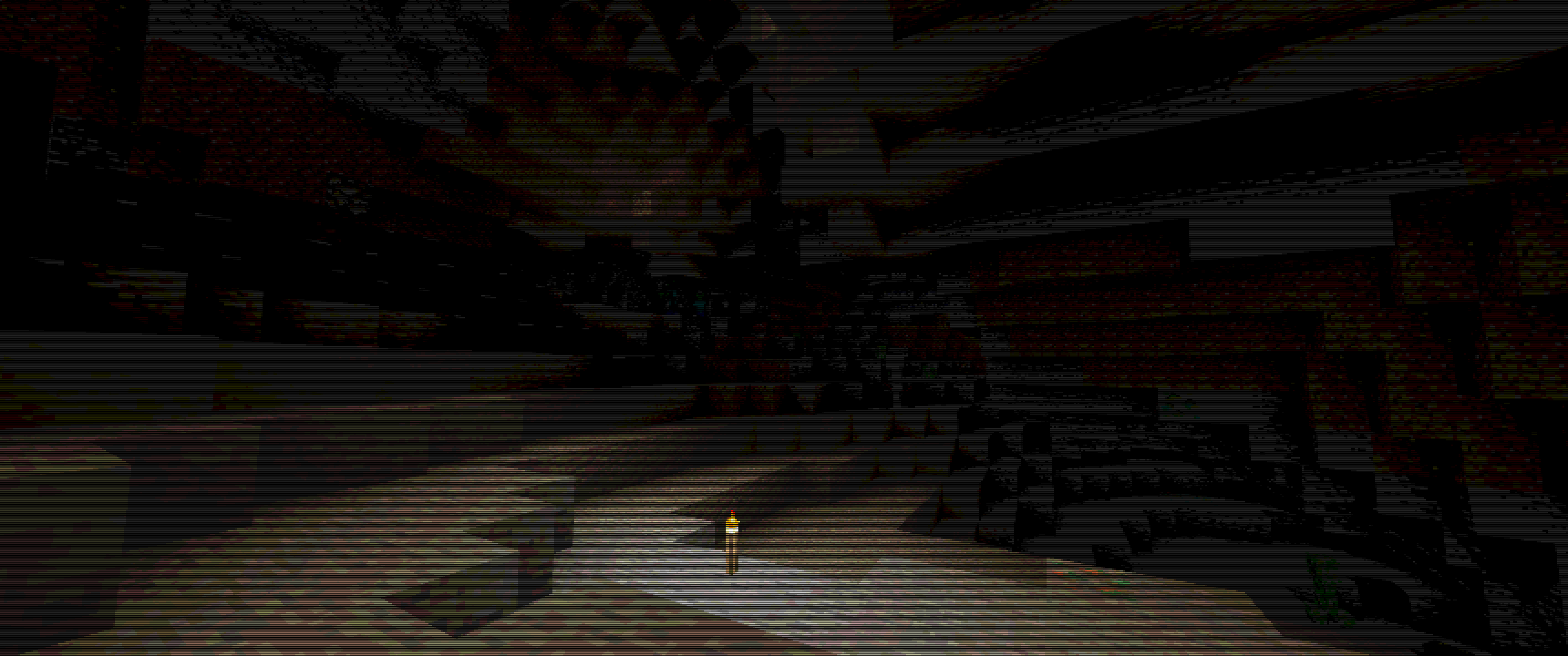
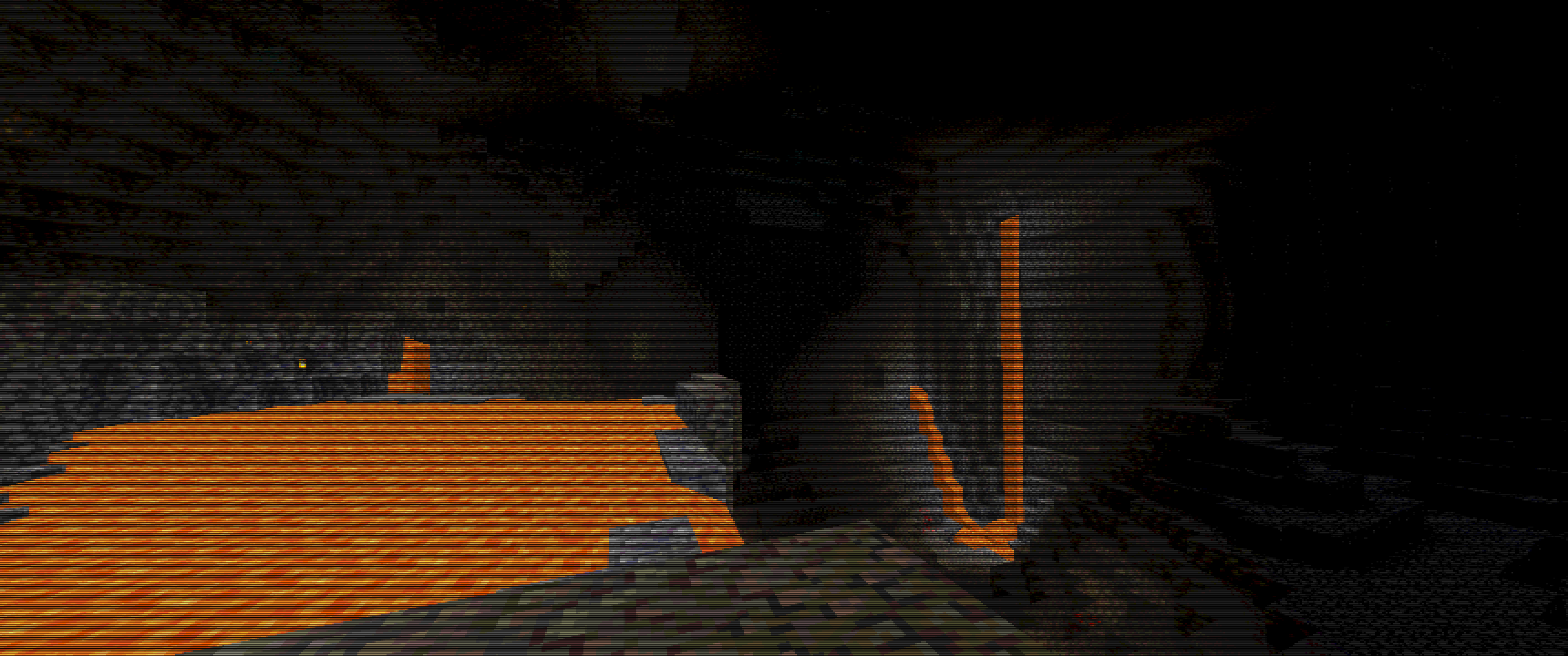
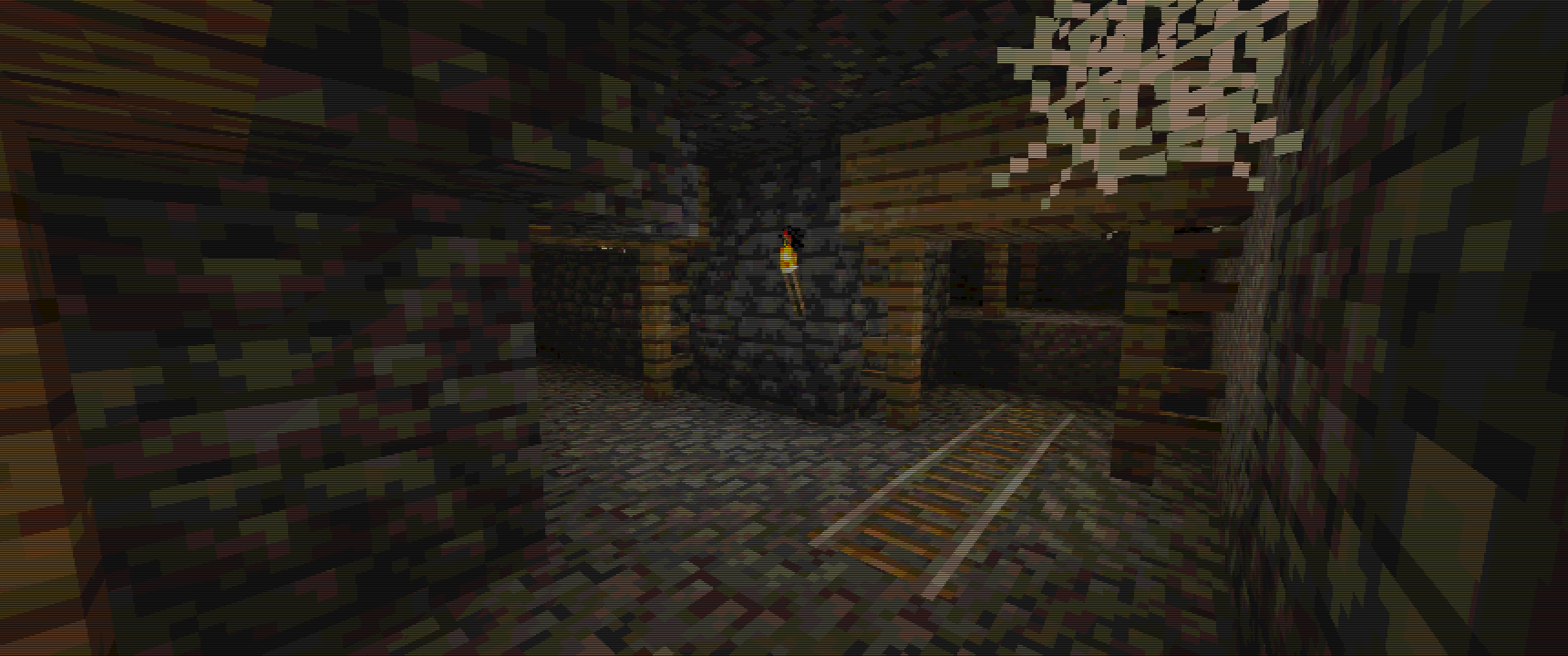
1. Vertex Snap (My favorite, and most crucial effect)
2. Custom Texture Filtering
3. Posterization
4. Scale Lines
5. Pixelization
6. Distant Horizons Support
# Some Examples :
Keep in mind, viewing experience might be different on different resolutions, due to scale lines, you can see weird lines appear on images…
For example my Display is 3440×1440, so its 1440p 21:9, and this is how I tested it.
For best images I recommend going into gallery of this project!
Images
Overworld :
Cave :
Lava Cave :
Mineshaft :
PSX-Core Shader

A Minecraft shader that recreates PS1 visuals. Features:
– Ordered dithering
– 5-bit per-channel color quantization
– Gouraud shading with banded light levels
– Vertex snapping
– Affine texture mapping
– Fog (scary)
Most of these are configurable via the shader settings! Only thoroughly tested with Iris on 1.21.11 (works on older versions too, please report bugs).
# Preview
> See more on the Gallery page!
With fog (default):

Without fog:

In a cave:

> Modpacks are welcome to use this shader, only via adding it as a dependency to your modpack. Do not reupload or repack this shader.
Psiho shader
I do not know how **_psychos_** see the world, but I was curious. That’s how I created this shader.
Caution! If in the settings file.glsl change the shader parameter and make it greater than 100, unpleasant things can happen.
Do you want to try something new? This shader will add a sense of madness and pain to the game. It is especially suitable for those who have already gone through Minecraft many times, built many buildings and created mods and shaders. If you get bored, try to test your strength and become a real masochist!
With this shader, every stage of the game, from the tree to the dragon, will become incredibly difficult. But that’s not all! Try to build something more complicated than two blocks on the sides and three up. Feel the real pain and enjoy the game on a new level!
?
**_what I created…_**
For true connoisseurs of difficulties, open the settings file.glsl and make the following changes:
“`glsl
#define MESS_INTENSITY 250.0 // maybe… more)?
“`
Prismarine Shader
**ABOUT**
+ Prismarine is a BSL Shaders edit. It aims to provide beautiful visuals at moderate performance cost.
**KEY FEATURES**
+ Fancy volumetrics (clouds, fog, Nether & The End smoke)
+ Custom sky effects (nebulae, auroras, planar clouds, stars, moon smoke)
+ Integrated PBR resourcepack
+ Cinematic blur effects (depth of field, motion & distant blur, bloom)
+ Fancy water effects (refraction, caustics, light absorption & scattering and underwater light shafts)
Potato Shaders

## What is the Potato Shader?
This is a shaderpack that tries to stay as lightweight as possible to, as its name might suggest, even be usable on a literal potato of a PC. However it still tries to enhance the visuals in a reasonable way, despite lacking the fabled dynamic shadows and other effects of expensive nature. It also provides a degree of customizability through various ingame settings to allow you to get the experience you want.
## What features does it offer?
* Dynamic Colors
* Tonemapping
* Bloom
* Depth of Field
* Motionblur
* Temporal Anti-Aliasing
* Ambient Occlusion
* Custom Water
* Normalmap Support
and many more.
## Any Requirements?
* OptiFine for 1.12 or newer/Iris 1.5.0 or newer
* A graphics card supporting OpenGL 4.0
* Windows/Linux
* **Intel HD 5000 Graphics and older are NOT supported on Windows (blame Intel Drivers)!**
## External Links:
* The Offical Website of this Project: [Link](https://rre36.com/potato-shader)
* My Discord Server: [Link](https://discord.gg/y5xzQ6H)
[](https://www.patreon.com/bePatron?u=19790203)
PosterizationShader
## **PosterizationShader – Artistic Posterization Shader**
Transform your Minecraft into a stylized poster with this lightweight shader pack!
**What is posterization?** Posterization is an artistic effect that reduces the number of colors in an image to discrete levels, creating a unique visual style with clearly defined color bands instead of smooth gradients.
**Features:**
– Customizable posterization effect (4-32 levels)
– Maximum performance – virtually no impact on FPS
– Full compatibility with Optifine and Iris Shaders
– Supports Minecraft 1.16+
**Configuration:**
Change the POSTERIZATION_LEVELS parameter in the shaders.properties file:
– 4 – Extreme posterization (very few colors)
– 8 – Medium posterization (default, recommended)
– 16 – Light posterization
– 32 – Barely noticeable posterization
**Installation:**
1. Install Optifine or Iris + Sodium
2. Place PosterizationShader.zip in your .minecraft/shaderpacks/ folder
3. Activate the shader in video settings
**Technical Details:** The shader works by quantizing the RGB channels of each pixel at the final rendering stage, which allows for high performance while creating a unique visual effect.
Perfect for:
– Screenshots and artistic content
– Players who want a unique visual experience
– Low-end PCs (shader is very lightweight)
Pomme
# 🍏 Pomme
Pomme is an experimental, early-stage, vanilla-style Minecraft shader that reimagines depth effects. Inspired by Parallax Occlusion Mapping (POM) but designed to overcome its limitations, Pomme extrudes and carves faces to simulate actual 3D geometry.
Unlike classic POM, which flattens at sharp angles and sharply stops at face edges, Pomme maintains its depth effect consistently, offering a more immersive visual style.
## ✨ Features
Pomme can extrude the pixels of any surface, independent of the view angle. It handles intersecting geometry surprisingly well: shared edges between blocks, block-entity collision, and entity-entity intersections should render correctly in most cases.
Currently supports:
– Blocks
– Tile entities
– Entities (including players and items)
– Held items
## ⚠️ Known Limitations
Pomme is still in proof-of-concept territory.
It makes heavy use of geometry shaders, which may cause significant performance issues depending on your GPU.
Current issues:
– “Layered effects” aren’t rendered (enchantment glint, fog, blindness…)
– Sloped liquids aren’t extruded correctly
– Torches can break extrusion when viewed head-on
– Transparent block culling (glass, water) is view-direction dependent
– Some single-plane models render oddly (sunflowers, stonecutter blade, rails…)
– Various rendering glitches (potted plants, tall seagrass, calibrated sculk sensors…)
– Extrusion is based on texture luminance, not actual height maps (yet)
Pollution 2035 Shaders
## Pollution 2035 Shaders
As hazy as smog, as haunting as memory.
Make you experience both cinematic immersion and smooth gameplay.
### Features
#### Performance without compromise.
Optimized from LIGHT Shaders (Chocapic13’s Shaders’ fork) core,
Stripped away resource-heavy effects that don’t serve the atmosphere,
Delivers stable FPS even in entities dense zones.
#### Distinctive polluted aesthetic.
Not just another “pretty” shader pack—
Crafted to immerse you in a world choked by industry.
Let you experience the movie environment as if you were there.
Plus unique post-processing exclusive to this pack.
#### Adaptive darkness handling.
Nether and caves feel appropriately oppressive without becoming unplayable—
specialized exposure adjustment ensures visibility while preserving the grim mood.
### Requirements
– Iris Shaders, Oculus Shaders or OptiFine.
– OpenGL 1.2 support.
– An ordinary GPU. (even extremely below average)
### *If you want to support my work, you can subscribe to my [Patreon](https://www.patreon.com/Author87668/join) membership.*