Reflectify RT

Reflectify RT is designed to elevate your visual experience with advanced reflection techniques and cinematic lighting. It focuses on how surfaces and water interact with the world, transforming your gameplay into a vivid and realistic experience without unnecessary complexity.


💧 **SSR Reflections**: High-quality reflections on ice and smooth surfaces.
🌧️ **Wet Effects**: Realistic ground reflections that appear during rainfall.
🌊 **Underwater**: Crystal-clear water with natural light scattering and distortion.
☀️ **God Rays**: Soft, warm light shafts piercing through trees and buildings.
🌿 **Nature**: Smooth waving animations for leaves, grass, and plants.

You can easily customize your experience by toggling features or adjusting reflection strength in the settings. This shader is highly optimized and runs smoothly even on low-end hardware like the GT 1030 or equivalent.

**Developer**: [in2bubble](https://modrinth.com/user/in2bubble)
**License**: All Rights Reserved
RedHat Shaders
– About
RedHat is a shaderpack that for Iris and Optifine.
It is an edit of an old version of Chocapic13, and has many features.
RedHat’s main features are lighting effects such as Godrays (3D, or 2D, if you have a low-end machine), Shadows, Underwater Light Absorption, and many more.
The shaderpack features reflections too, and reflects some light on all surfaces, to make everything look more similar to the Minecraft trailers style.
There are many cinematic options such as Lens Flares, Depth of Field (Chromatic Aberration included), Grain, Tilt Shift, and others.
The colors, which change depending on the time, make everything more realistic yet they keep the fantasy vibe.
There are many effects related to movement as well. All foliage or hanging things such as lanterns wave. Along those there are Waving Hand and Waving Camera options too, configurable as well.
If that wasn’t enough, RedHat supports all versions from 1.7.10 up to 1.21, and it supports custom skyboxes!
Lastly, there are many atmospherics effects such as Fog and Clouds, Round moon and sun, and other things like PBR support, Auto-Exposure, Stars, and many, many other things.
There are a lot of ways you can customize the shaderpack, and make it look like the way you want.
– Requirements
GPU: Must support OpenGL 3.2 and have at least 1GB of VRAM. AMD, NVIDIA and Intel are all supported (You’ll have to decrease some settings to play smoothly with Intel GPUs).
CPU: Must have a minimum clock speed of 1GHz
RAM: Must have located at least 1.5-2GB of RAM to your game
OS: Windows (7,8, 8.1, 10, 11), Linux (Mesa drivers might lead to issues)
Shadermod: Optifine or Iris
MC Version: 1.7.10, up to 1.21
> Light Settings Recommendation: i3/i5 3-4th Gen, 4GB DDR3 RAM, GT 1030 2GB GDDR5
> Balanced Settings Recommendation: i5/i7 8-9th Gen, 8GB DDR4 RAM, GTX 1050 Ti 4GB GDDR5
> Heavy Settings Recommendation: i5/i7/i9 10th+ Gen, 16GB DDR5 RAM, GTX 1660 Ti 6GB GDDR6
If you use RedHat without meeting these requirements, then keep in mind you’ll take a risk.
RedHat is a pretty heavy shaderpack, thus do not expect it to be FPS friendly on the default settings.
Red And Black Shaders
# ** ARCHIVED **
I am sorry I am giving up on this project since i am working on something better so this project has been archived but
**others are allowed to create their own updated forks / continuations**

Unlike other shader packs, this one stands out by providing visibility through separation of the rendering of the entities from the rest of the world’s scenery. As the entire scenery fades into the darkness, the shader makes use of its own red spectrum glow in order to illuminate everything else that is alive, movable, and even thrown at the player.
# **NOTE**
This Shaders is Mainly for The Minecraft Verison 1.21.9 in the newer verisons its kinda glitchy it will be fixed soon.
also if you find any bugs please report in my discord server.
Recastional
# 🌊 Recastional Shader Pack
> **Elevate your Minecraft experience to a cinematic masterpiece.**
**Recastional** is a shader pack designed to transform your world into an exhilarating visual journey. It creates a unique atmosphere, enveloping the environment in a warm, caressing light that brings every pixel to life.
***
## ✨ Overview
As the sun rises and sets, its rays pierce through the clouds, casting a **soft golden glow** that enhances the natural beauty of the landscape. With **Recastional**, you don’t just play — you immerse yourself in a cinematic experience where every frame is a work of art.
* **Vibrant Textures:** Every rock, tree, and building feels detailed and alive.
* **Shimmering Waters:** Realistic water surfaces that sparkle as if kissed by sunlight.
* **Dynamic Shadows:** Stretching and shifting shadows that add profound depth to your surroundings.
* **Atmospheric Skies:** Volumetric clouds and glowing flora that invite exploration.
***
## 🛠 Complete Feature List
### 🎨 Advanced Rendering Systems
* **Enhanced Particle System** – Physics-based particle rendering with LOD support.
* **Volumetric Clouds** – High-precision ray-marching for realistic skyboxes.
* **Advanced Water System** – Real-time reflections, refractions, and caustics.
* **Parallax Terrain Mapping** – Height-based surface displacement with triplanar mapping.
* **Entity Glow Effects** – Dynamic rim lighting and emissive textures for special entities.
### 🔧 Post-Processing Pipeline
* **Enhanced Composite** – HDR tone mapping, professional color grading, and subtle film grain.
* **Bloom System** – Multi-pass bloom with Gaussian blur and granular intensity control.
* **Depth of Field** – Realistic camera focus with high-quality hexagonal bokeh.
* **Advanced Shadow Mapping** – PCF filtering with support for soft and colored shadows.
### 🚀 Performance & Optimization
* **GPU Optimizer** – Hardware-specific tweaks for **NVIDIA**, **AMD**, and **Intel**.
* **LOD Manager** – Automatic level-of-detail scaling based on distance.
* **Dynamic Quality Scaling** – Real-time performance adjustments to maintain stability.
### 🔄 Compatibility & Legacy
* **OpenGL Compatibility** – Stable fallback shaders for older graphics hardware.
* **Cross-Platform** – Full support for **Windows, macOS, and Linux**.
* **VR & Multi-Monitor** – Stereoscopic rendering and ultra-wide display configurations.
### 📚 Technical Foundation
* **PBR Shading Library** – Physically Based Rendering using the **Cook-Torrance BRDF**.
* **Next-Gen Lighting** – Volumetric lighting, SSAO, and Global Illumination (GI).
* **Weather Module** – Dynamic simulation of rain, snow, and atmospheric fog.
***
## 📋 Configuration & Presets
You can fine-tune your experience using our modular configuration files:
* `advanced.properties` – Toggle high-end rendering features.
* `performance.properties` – Hardware-specific optimization toggles.
* `debug.properties` – Tools for development and analysis.
### ⚠️ Important Note on Performance
To achieve the **ULTRA** and **HIGH** graphics shown in screenshots, **Iris Shaders** is highly recommended.
> **Note:** High settings are hardware-intensive. If you experience low FPS, please adjust your preset in the shader options.
***
## 🎮 Version Support
* **Compatibility:** Fully optimized for **Minecraft 1.21.11**.
* **Engine:** Works best with **Iris** or **OptiFine**.
***
_Created with passion for the Minecraft community._
Also available on CurseForge: [CurseForge](https://www.curseforge.com/minecraft/shaders/recastional)

RealisticallyOptimized
# RealisticallyOptimized Shader
## Overview
RealisticallyOptimized is a stylized, performance-focused shader preset with toon lighting, strong outlines, brighter sky highlights, deeper nights, and improved emissive handling for ores and light sources.
## Features
– Real-time shadow mapping for terrain, entities, textured geometry, and water.
– Toon ramp direct lighting with adjustable shadow darkness and step count.
– Day/night color tinting with global vibrance control.
– White world outline effect in final pass (Complementary-inspired depth-based method).
– Adjustable outline thickness and brightness.
– Brighter sky/sun/moon rendering with preserved geometry separation.
– Darker nighttime grading with optional cool blue weather/night tint.
– Enhanced blocklight contribution across terrain, entities, and textured passes.
– Stronger emissive treatment for major light sources (torch, lantern, glowstone, sea lantern, candles, campfire, etc.).
– Complementary-style glowing ores using per-ore groups and per-pixel ore-part detection:
– Iron, Gold, Copper, Lapis, Emerald, Diamond, Nether Quartz, Nether Gold, Redstone.
– Adjustable ore glow strength (`GLOWING_ORE_MULT`).
– Water shading with toon-lit base and no forced water glow overlay.
– Waving vegetation support via custom block material IDs.
## Install
1. Put `RealisticallyOptimized.zip` in `.minecraft/shaderpacks`.
2. Select `RealisticallyOptimized` in the Iris shader menu.
3. Ensure Shadows are enabled in Iris settings.
## Troubleshooting
– Set Graphics to Fancy or Fabulous.
– Set Shadow Quality to at least 1024.
– Test at noon near a wall and a mob (`/time set noon`).
Real Night Vision Shader
**English version:**
Real Night Vision Shader
Transforms your nights into a cinematic military NVG experience. Fully vanilla by day — at night, everything switches to a green monochrome with scanlines, grain, and a goggle vignette. No performance cost.
**Features:**
– Green NVG tint activates automatically at night
– Brightens dark areas so you can actually see
– CRT scanlines & analog grain for realism
– Goggle-style vignette on screen edges
– Smooth transition at dusk and dawn
– Zero changes during daytime
Compatible with Minecraft 1.17–1.21.x via OptiFine or Iris.
Subscribe so you don’t miss any updates! If you have questions or need support, join our Discord.
**Русская версия:**
Real Night Vision Shader
Превращает ночь в кинематографичный опыт с прибором ночного видения. Днём — полностью ванильно, ночью — зелёный монохром со сканлайнами, зерном и виньеткой как у настоящих NVG очков.
**Возможности:**
– Зелёный тинт автоматически включается ночью
– Brightens тёмные зоны — реально видно в темноте
– CRT сканлайны и аналоговое зерно для реализма
– Виньетка как через очки ночного видения
– Плавный переход на закате и рассвете
– Ноль изменений днём
Совместимо с Minecraft 1.17–1.21.x через OptiFine или Iris.
Подписывайтесь, чтобы не пропустить обновления! Если есть вопросы — заходите в Discord за поддержкой.
Quarter
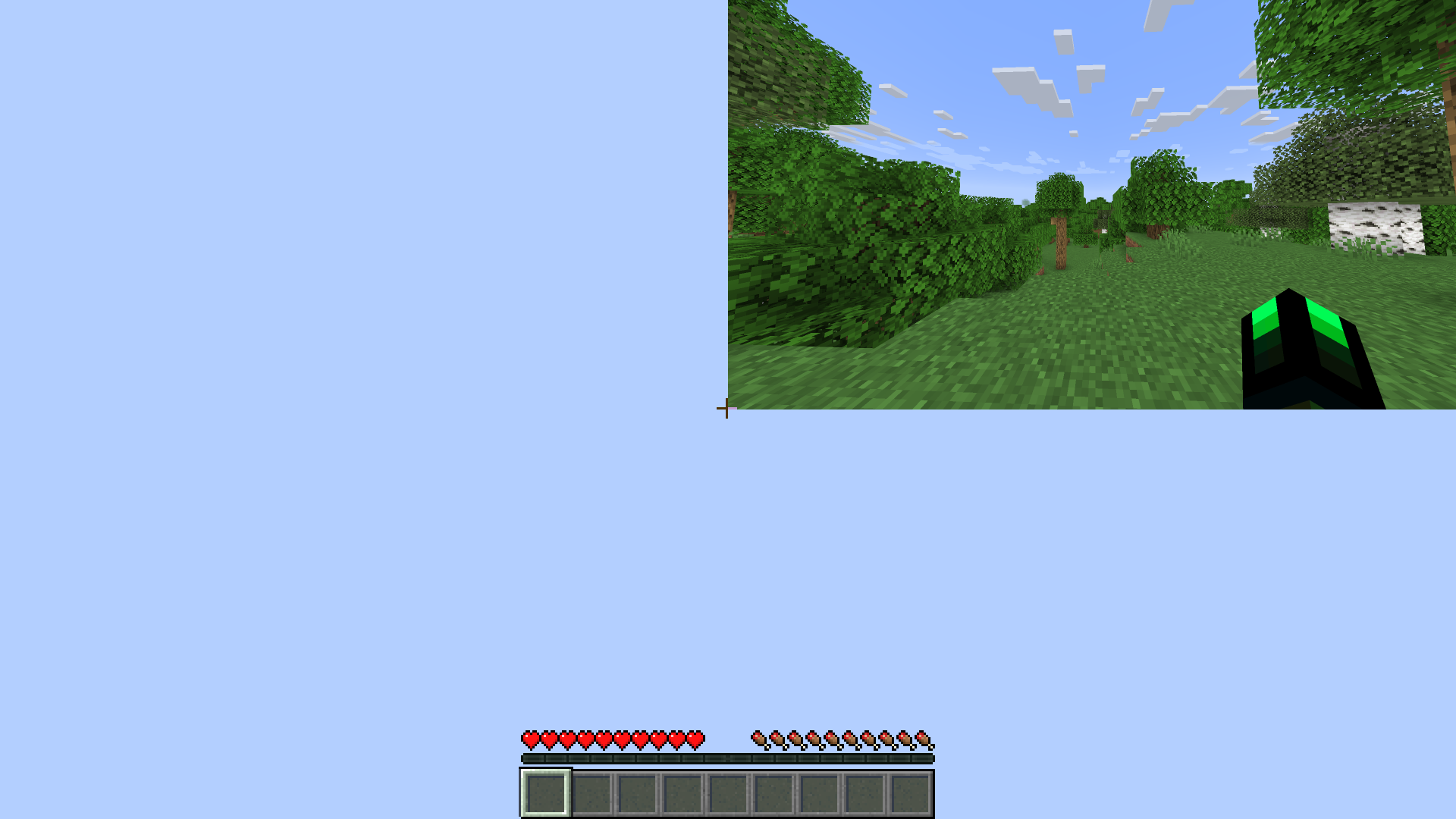
# Quarter
Ever dreamt of playing Minecraft in a miniature world, tucked away in the corner of your screen? The Quarter Shader Pack makes that dream a reality, transforming your entire Minecraft environment into a captivating, small rectangle.
Quanta Shader
# Quanta Shader
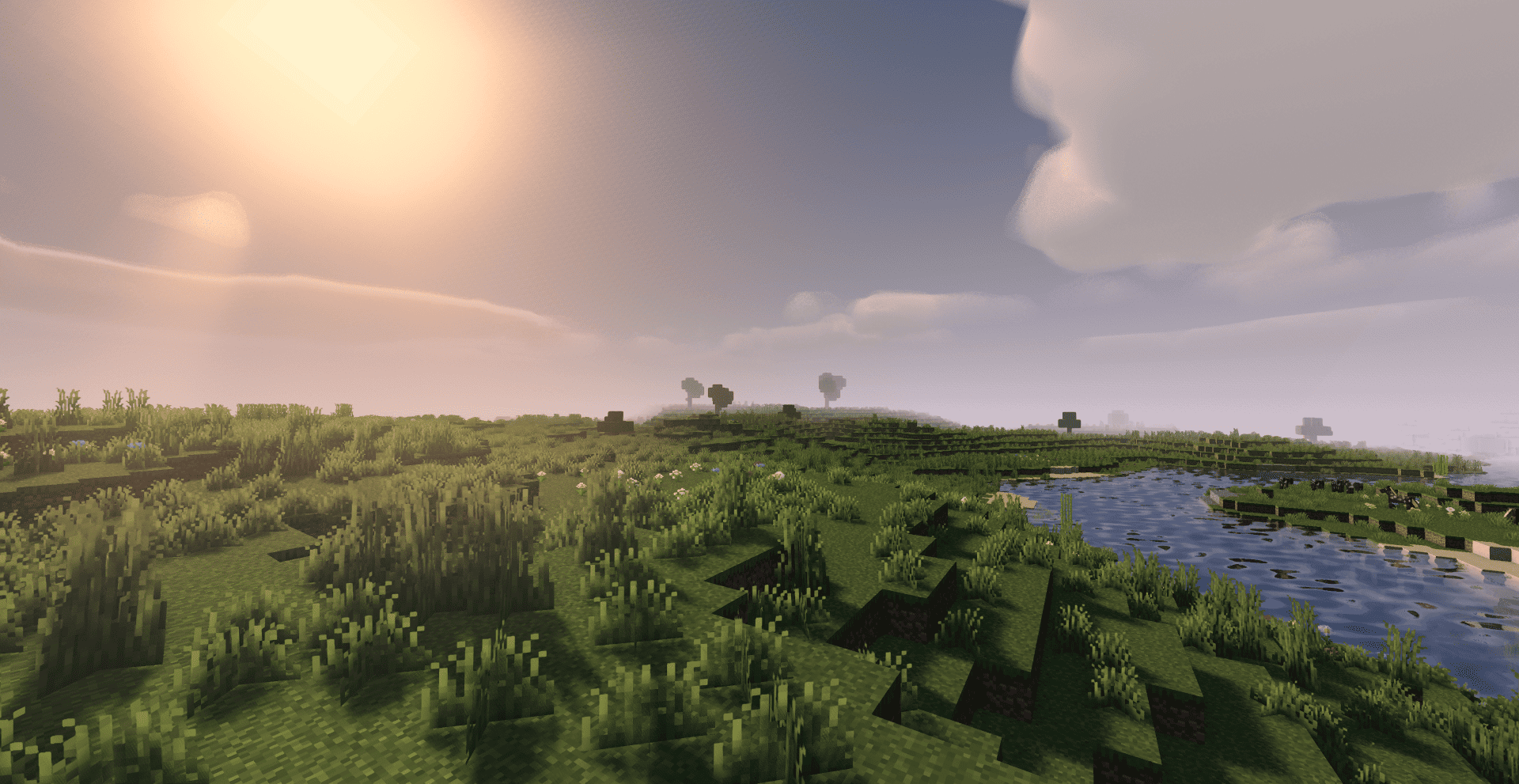
> A simple, fast and beautiful Minecraft shader for Iris/OptiFine.
> Soft sunlight, gentle bloom, real shadows, dynamic clouds and lively
> water — tuned to look great while staying smooth on modest hardware.
—
A huge thank you 🙏
Quanta Shader exists only thanks to **Javier G. Cimarras (`javiergcim`)**
and his amazing project **[MakeUp Ultra Fast]**.
All the heavy lifting — the lighting model, the shadows, the water,
the sky, the clouds, every clever optimization that makes this shader
fast — is his work. This project is just a small, respectful fork:
renamed, cleaned up, and slightly tweaked.
If you like Quanta Shader, please go and support the original author
first. He deserves all the credit. ❤️
* Original project:
* Original author: **javiergcim or KDXavier**
Pyvtron VX
## [Pyvtron VX](https://pyvton.pages.dev/minecraft-shaders/pyvtron-vx)
### Details
Features: Volumetric Fog, Water Caustics, Cumulus Clouds, Cirrus Clouds, High Resolution Graphics, ultra realistic rain and very much features that you will see in the game!
Performance Impact: High / Medium (Medium: If you have a good computer).
You can find older versions and the official release(s) of Pyvtron VX [here](https://pyvton.pages.dev/minecraft-shaders/pyvtron-vx) ([My Website](https://pyvton.pages.dev/))
### Requirements
AMD CPU (Recommended)
Nvidia GPU (Recommended)
A graphics card that supports OpenGL 4.6 or OpenGL 4
Note: I currently only have access to Nvidia GPUs for testing. I cannot make sure if Pyvtron VX works on Intel CPUs and AMD GPUs.
### Installation
Install it like other Minecraft Shaders or read this here if you don’t know how to install minecraft shaders:
1. First download the Iris Shaders Installer / Mod
2. Run the .jar and click on Install.
3. Download the latest version of Pyvtron VX
4. Open the Minecraft Launcher. You’ll see the Iris Shaders profile – select it and start Minecraft.
5. Go to Options → Video Settings → Shaders → Shaderpacks Folder.
6. Drag the downloaded shaderpack into the shaderpacks folder.
7. Select the shaderpack ingame.
8. Enjoy.
### Other Stuff
Before you modify or do something with this shaderpack, you must read the [license](https://pyvton.pages.dev/licenses/pccl)
Pyvtron VX is not path traced etc. VX means Version X
If you want to know, how to add support for modded dimensions (for new dimension mods) read this here on my [docs](https://pyvton.pages.dev/docs/minecraft-shaders/modding/how-to-add-mod-support-for-modded-dimensions)
PVP ZeroX
# ABOUT:
PVP ZeroX is a shader designed for PVP.
It adds:
– Motion Blur (a cool graphic effect that improves game smoothness)
– TAA (removes flickering, more information in the frame)
Features that allow you to focus on PVP:
– Full lighting brightness
– Bright color highlighting of players and mobs
– Arrow highlighting
– Particle disable
– Sharpness adjustment (make the image clearer!)
– Terrain saturation reduction (nothing should distract you from PVP)
All settings can be adjusted, enabled, or disabled. There are also 3 presets to suit your taste. If you have any ideas for what else to add, please write to [Discord](https://discord.gg/Cz2sCWz5Wh).
## PVP GIF:

## LINKS:
– [Discord](https://discord.gg/Cz2sCWz5Wh) (Discuss, Bug Reports, Etc.)
– [Telegram](https://t.me/LoLip_p_Community)
– [YouTube](https://www.youtube.com/@lolip_p)
## INSTALL THE SHADERS
– Download Client Which Supports Installing Shaders Such As Optifine And Iris
– Download The Shaders
– Copy Shaders to /.minecraft/shaderpacks
– Launch Minecraft, Go To Options –> Video Settings –> Shaders
– Choose **PVP ZeroX**