# A simple picking module!
When you are still struggling with the variety of items in your integrated bag, why not give it a try? When your backpack is filled with various flowers and plants, even though each item only has one or two spaces, they cannot be stacked together. Now! When there are no available compartments in the backpack, a bundle will be automatically created and fallen items on the ground will be picked up, allowing you to have a better backpack management experience
The performance test is currently unknown. If you encounter any problems, please let me know!


Yummy Steak
# Yummy Steak
Sprinkle steak with stardust for a filling meal.
## Content
– Craft _Filling Steak_ with 8 _Steak_ and 1 _Nether Star_ (center), which applies the saturation effect for an hour when eaten.
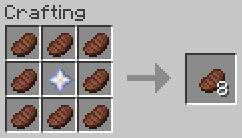
– Adds level 30 enchantment _Yummy_ to never run out of steak (can only be applied on the _Filling Steak_).
## Technical Concept
Besides the gameplay functionality the goal was to provide these custom features without using the global tick function to check for changes in the player’s inventory.
– saturation effect is applied via [`consumable` data component](https://minecraft.wiki/w/Data_component_format#consumable) (added in MC 1.21.2)
– not consuming the item is handled via the [`use_remainder` data component](https://minecraft.wiki/w/Data_component_format#use_remainder) (added in MC 1.21.2)
– as use_remainder would need a recursive definition to be infinitly reuseable, a dummy-item is used, which then is swapped out for the actual food item
– instead of constantly checking whether a dummy item exists and is in need of replacement, the [enchantment effect component `minecraft:tick`](https://minecraft.wiki/w/Enchantment_definition#Components_with_entity_effects) with the [entity effect `run_function`](https://minecraft.wiki/w/Enchantment_definition#run_function) (added in MC 1.21) is used to change the dummy item (only executed for one tick, when the item is first held, so more resource efficient).
**[Fabric API][fapi], [QSL][qsl], or [Sinytra Connector][connector] + [Forgified Fabric API][ffapi] is required.** [EMI][emi] is strongly recommended.
Yttr is an expansive mod for Fabric & Quilt, sort of existing as a love letter to 1.4-1.6 modded. It contains fresh takes on a lot of common features, interesting worldgen, custom music, and all-new mechanics.
Starting as a loose collection of useful tidbits, Yttr has grown into a more cohesive mixture between a content mod and a vanilla overhaul. Presented as three “content branches”, extending those provided by vanilla; Void for the Overworld, Scorched for the Nether, and Continuity for the End.
The first “progression gate” in Yttr is using the multi-mode Yttric Rifle to blast an obsidian/diamond spike into the bedrock, smashing it open, revealing a geyser of liquid Void — created years (or versions) ago due to an alchemical disaster, also resulting in the creation of the familiar Wasteland biome. After thorough preparation, you might even be able to dive through the Void to fast-travel to places you (or your friends (or rivals)) have smashed open geysers elsewhere. If you’re not sufficiently prepared, well, even your items are not protected from the Void’s universal dissolution…
Scorched acts as a complete revamp of the top of the Nether, turning it into an ominous soot-covered biome, and making it simple to access (because let’s be honest, getting on top of the Nether is not difficult). Your farms won’t break, as nothing can spawn in the Scorched Summit on its natural blocks.
Roots of Continuity can be found underneath floating End islands, and smashing them with a pickaxe yields a Drop of Continuity and drops the island into the abyss — however, you may want to watch your back…
Also offered are “abominations”, providing a solution to autocrafting and item sorting that isn’t just a block with a funny texture. (Okay, it’s a block with a funny model.) Put a Skeleton on a table, surgically combine Silverfish and Creepers and house them in a Bee Nest, or splice together an Enderman and Zombie and magically bind them to a hopper — because of course you will just to make your logistics easier, ~~you monster~~.
Yttr treats crafting more as a mechanic than an interface, tightly integrating with the world around it. From automatically crushing and bottling gaseous Shroomlight, to stuffing a skeleton in a snare and feverishly strapping it to a table, Yttr tries to avoid recipes that can be solved by a digital storage system. Every recipe type also comes with detailed [EMI][emi] integration.
Also included are a plethora of useful “Vanilla+” pieces — the Dopper, a dual-output round-robin hopper; the Flopper, a sideways hopper; the Chute, allowing you to send items downward or center items shot from a Dropper; the Yttrium Button, a one-tick button; half-tick delayed note blocks, and even a few more things still.
There’s even more to the mod than mentioned here — solvent-weldable plastic Bloques®, fancy lamps, permanent Neodymium magnets, a centrifuge, Delicaceness of Deep-Sea Squeeze Trees, multiple new enchantments and curses, a new form of circuitry derived from InfraRedstone (not yet finished), …
Check out the [wiki][wiki] for a thorough explanation of ~~everything~~ some things — it has not yet been updated for the latest version, and is stuck on v0.4.3. We’re working on getting it updated. You can come chat on [Discord][discord] or [Matrix][matrix] about it, too.
brings you to Stone Age, increasing difficulty on early game by forcing you to use primitive technology for progression.
Also, vanilla mobs like cows, pigs, sheep and chickens are replaced by their wild ancestors.
Vanilla recipes for early game items are modified, forcing tools on some blocks and adding new tools, items and blocks to help you with progression.
Currently mod covers
– Stone age
– Bronze age
– Beginning of iron age (crafting iron ingot is final step right now)
## Compatibility
These dependencies are optional, but highly recommended:
– The One Probe – Provides more information about in-world blocks and entities
– Just Enough Items – You can see all changed recipes
– Curios API – Needed for jewelry effects, otherwise items are useless
– KubeJS – Easy way to add/modify/remove YTech recipes (API described on [wiki](https://github.com/yanny7/YTech/wiki))
– EMI – You can browse all recipes
– Jade – Provides more information about in-world blocks and entities
All bugs report on [GitHub](https://github.com/yanny7/ytech).
Ideas for expanding implemented ages or for next ages can be shared on [discord](https://discord.gg/HauMDpbkNN).
**For more information check [wiki](https://github.com/yanny7/YTech/wiki)**
## Hints
> – You can’t mine wood and dirt without correct tool
> – Your first goal is to find flint and hit stone with it
> – Grass fibers can be obtained by breaking grass with sharp flint
> – Look for deer, you need it for your first pickaxe
> – Only deer with antlers drops correct item
> – Primitive Smelter and Primitive Alloy Smelter needs chimneys for increasing temperature
> – Each type of chimney can be up to 4 blocks high, otherwise it collapse
> – Using reinforced chimney you can increase height up to 8 blocks, with 4 of each chimney
> – Lead and Cassiterite can be gathered using Strainer
> – It’s recommended to use JEI
> – You have to breed wild animals to get their domesticated versions
> – Aurochs -> Cow
> – Mouflon -> Sheep
> – Fowl -> Chicken
> – Wild Boar -> Pig
akirby’s YouTuber Starter Pack
# 
### This modpack is meant to supply content creators with the _**bare minimum**_ yet _**must have**_ mods to get started recording videos. Available for NeoForge and Fabric. Please check which version you are downloading.
## Features
### Performance
This modpack contains mods like Sodium, Dynamic FPS, Clumps and more to improve performance while playing and creating videos!
### Cinematics
Mods like Flashback or Replay Mod are not available for NeoForge. However, mods like CMDCam, Zume, and Motion Capture give us the opportunity to create some great cinematic shots while using NeoForge.
### Quality of Life
This modpack has a couple of mods to make life a bit easier while playing like sorting chests with Inventory Profiles Next or seeing your location with Coordinates Display!
### Better Visuals
Included in this modpack is four optional shader packs for Iris. Anti-Aliasing provides some upgraded Vanilla visuals. BSL Shaders and Complementary Shaders (Reimagined and Unbound) are some of the most downloaded modpacks available for great reason!
With this mod you can take items from an old world (or at least a copy of them) with you to a new world. This includes items from your inventory, your ender chest and containers placed in the world, like chests, shulker boxes or chiseled bookshelfs.
You can access the screen during world creation under More->Import Items, or via the importItems command.
You can copy items from worlds from versions 1.20.4 and below. (Until a certain point. Oldest version tested is 1.7.10.)
If you want to import modded items from below 1.8 you have to manually add their numeric id to the idMappings.json in the config folder though.
This mod is part of The Vanilla Experience modpack and Serilum’s Quality of Life Bundle mod. Your Items Are Safe is a mod which can function as an alternative to the existing gravestone mods, by using only vanilla blocks. When a player dies, it will keep their items from despawning. It does this by creating an armor stand with equiped gear and a chest with the items from the inventory. A sign will be placed on the chest with the player’s name. If the inventory does not fit into one chest, another one above it is generated. The armor stand stands above the chest. All features can be turned on/off via the config. If a player dies in the void, the chest will be placed above the death coordinates.
To keep it balanced the chests and armor stand can only be created if the player has enough wood in its inventory. A chest requires either 2 logs, 8 planks or an actual chest. The armor stand requires 1 log or 3 planks. The mod searches for logs first, then planks, then chests. If it can’t find the raw material needed, the chest and armor stand is not generated. If you’d like to always generate them, even without raw materials, this can be set in the config file as well.
The mod also contains the functionality to generate a player head and put it on the armor stand. This makes it easier to identify which player has died where. If the player had a helmet equiped, it is placed inside the chest. Enabled by default. But again, this can be disabled in the config.
Configurable:( how do I configure? ) mustHaveItemsInInventoryForCreation (default = true): When enabled and a player dies without any items in their inventory, no chest or armor stand is generated. addPlayerHeadToArmorStand (default = true): If a player head should be added to the armor stand. If a helmet is worn, this will be placed into the chest. createArmorStand (default = true): Whether an armor stand should be created on death. If disabled, the player’s gear will be placed inside the chest. createSignWithPlayerName (default = true): Whether a sign should be placed on the chest with the name of the player who died there.
needChestMaterials (default = true): Whether materials are needed for the chest which spawns on death. This can be the actual chest or the costs in raw materials. needArmorStandMaterials (default = true): Whether materials are needed for the armor stand to spawn on death. This can be the actual armor stand or the costs in raw materials. needSignMaterials (default = false): Whether materials are needed for the creation of the sign when ‘createSignWithPlayerName’ is enabled. ignoreStoneMaterialNeed (default = true): Only relevant if ‘needChestAndArmorStandMaterials’ is enabled. An armor stand needs 1 stone slab to be created, but I think it’s alright to ignore that requirement. If enabled, no stone is needed in the inventory on death.
createChestAboveVoid (default = true): If a chest should be placed right above the minimum build height when a player dies in the void. createVoidPlatform (default = true): If a 3×3 platform should be created below the chest above the void. ‘createChestAboveVoid’ must be enabled.
sendMessageOnCreationFailure (default = true): If a message should be sent if the chest or armor stand can’t be created due to missing materials. sendMessageOnCreationSuccess (default = true): If a message should be sent on successful creation of the chest(s) and armor stand. sendDeathCoordinatesInChat (default = true): If the player’s death coordinates should be sent in the chat below the ‘sendMessageOnCreationFailure’/’sendMessageOnCreationSuccess’ message.
creationFailureMessage (default = “Your items are not safe due to having insufficient materials. Missing: %plankamount% planks.”): The message sent on creation failure with ‘sendMessageOnCreationFailure’ enabled. Possible replacement values: %plankamount%, %stoneamount%. creationSuccessMessage (default = “Your items are safe at your death location.”): The message sent on creation success with ‘sendMessageOnCreationSuccess’ enabled.
Some examples: An armor stand and chest generated after death:
Two chests generated after death, because the inventory didn’t fit in a single one:
One chest and an armor stand created after death:
Show Spoiler
The previous death results in the following:
Show Spoiler
Here the player has no wood in its inventory. The chest/armor stand is not generated:
Show Spoiler
The player does have some planks in its inventory, but not enough. This is shown in the chat via a message:
Show Spoiler
The inventory is completely full, so 2 chests are needed to store everything. Luckily the player has more than 19 planks:
Show Spoiler
When a player dies in the void, the chest is placed on the initial position above it with a cobblestone platform.
Death coordinates are sent in the chat. Can be disabled in the config.
——————
You may freely use this mod in any modpack, as long as the download remains hosted within the Modrinth ecosystem.
Serilum.com contains an overview and more information on all mods available.
Comments are disabled as I’m unable to keep track of all the separate pages on each mod. For issues, ideas, suggestions or anything else there is the Github repo. Thanks!
Your Dog Stats
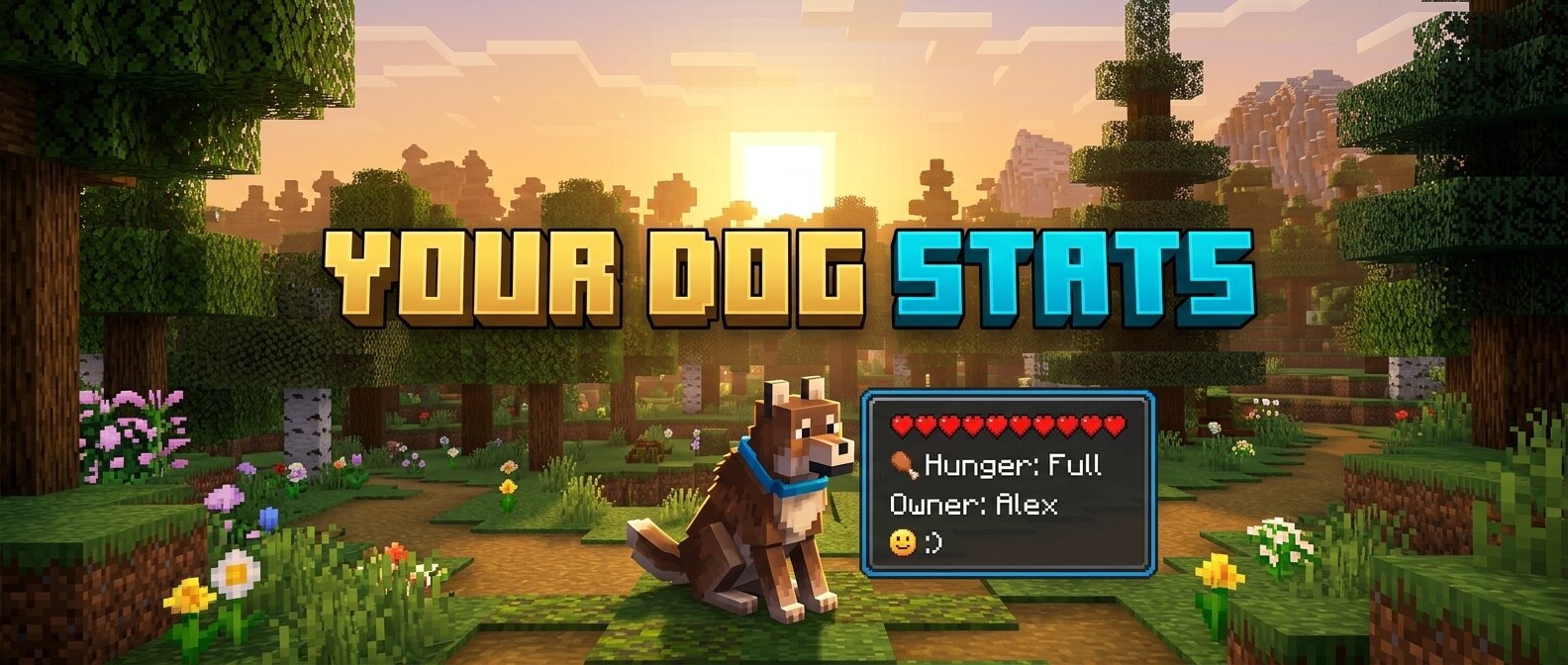
**Your Dog Stats** is a premium Minecraft mod (1.16.5 Forge) that adds an immersive, real-time HUD overlay for your tamed wolves. No more guessing how your dog is feeling or how much health they have left!
## 🐾 Features
– **Owner Tracking:** Always know who the dog belongs to.
– **Dynamic Health Bar:** A beautifully rendered health bar that changes color from Green (Healthy) to Red (Critical).
– **Hunger Status:** Simulated hunger tracking. Since wolves heal when fed, this keeps you informed of when they need a snack!
– **Mood Indicators:** Interactive emoji-based mood tracking:
– `:) Happy` – Your dog is feeling great!
– `:| Neutral` – Your dog is doing okay.
– `>:( Angry` – Something has upset your companion!
– `Relaxed` – When your dog is sitting comfortably.
– **Activity State:** See at a glance if your dog is set to `Sitting` or `Following`.
– **Age Identification:** Clearly distinguishes between `Puppies` and `Adults`.
– **Premium Aesthetics:**
– **Smooth Animations:** HUD fades in and out gracefully when you look at a dog.
– **Dynamic Borders:** The HUD border color automatically updates to match the dog’s collar color!
– **Sleek UI:** Dark, semi-transparent design that doesn’t obstruct your view.
## 🛠️ Requirements
– Minecraft 1.16.5
– Forge (36.2.20 or newer recommended)
## 📥 Installation
1. Download the latest `.jar` file.
2. Place it into your Minecraft `mods` folder.
3. Launch the game and enjoy your new companion stats!
—
*Created with ❤️ for dog lovers.*
Your Best Road
Have you ever built roads in Minecraft? And noticed how bad they look? So, I present to you my mod!
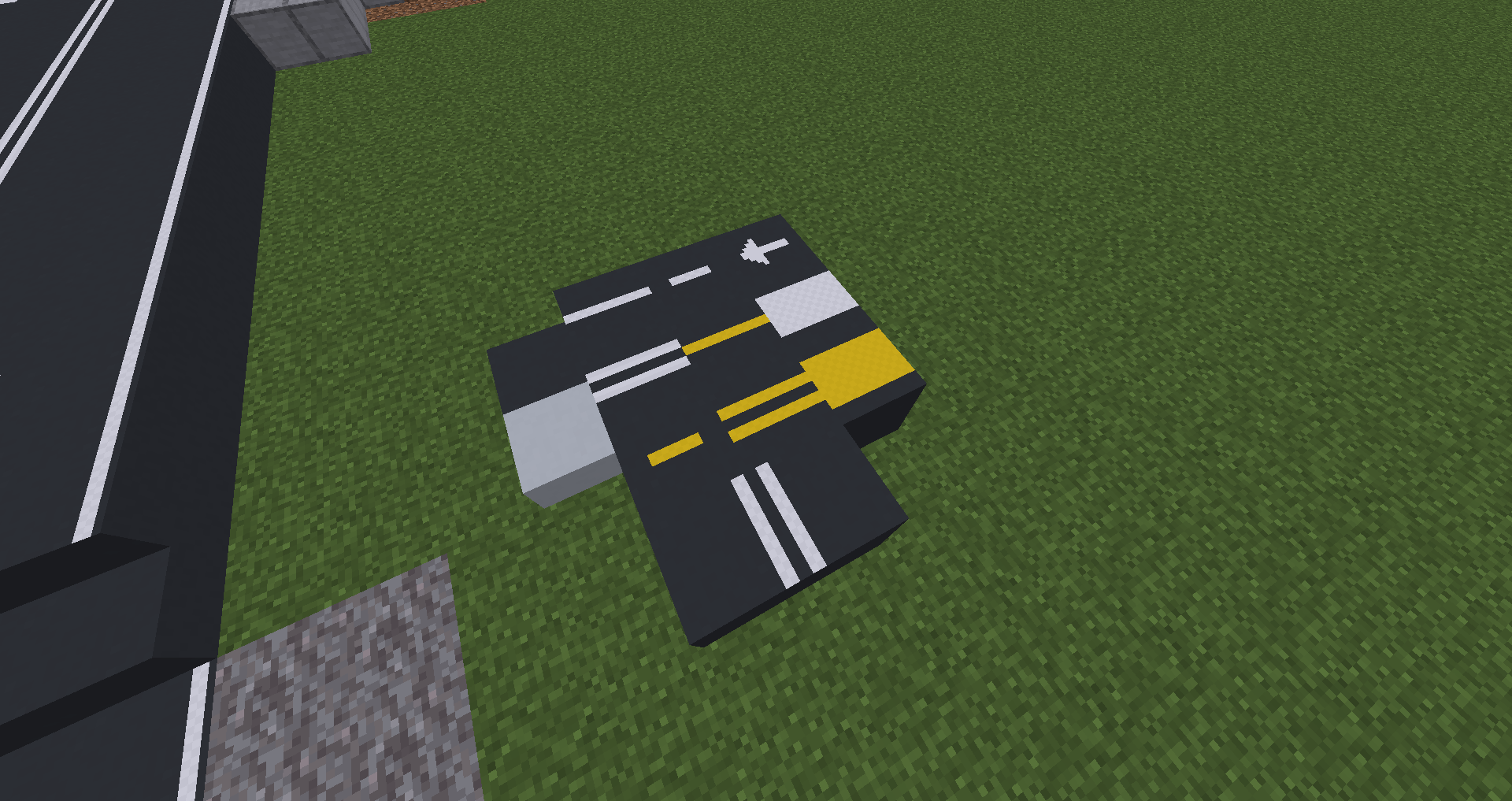
It will add realistic road blocks to Minecraft! No need suffer anymore.
If you find any errors in the mod, you can write to the email [email protected]
Youkai’s Homecoming
[Discord](https://discord.gg/BCHNhsDMXz)
### Required Dependency:
– Farmer’s Delight
# 📖 Introduction.
Youkai’s Homecoming is an add-on mod for Farmer’s Delight. Mainly add new crops and food.
# 📦 New Additions.
## New crops:
– Red beans: Can be found in birch forests, bamboo jungle, and sunflower plains. Plantable only on clay, mud, or coarse dirt.
– Soybeans: Can be found in the dark forest, jungle, and swamp.
– Coffea: Can be found in all kinds of jungles. Plantable only on podzol, mud, or soul soil.
– Tea: Can be found in flower forest, meadow, and groves.
– Udumbara: can be found in swamp. Grows under moonlight and shrinks under sunlight. Flowers for very short period of time only under full moon.
## New Foods:
100+ food including:
– Japanese cuisine such as mochi, miso soup, tricolor dango and tobiko gunkan.
Placeable dishes and feasts
– Coffee: A new drink that has a Caffeine effect and sober effect preventing phantoms from spawning, but also prevents sleeping and drinking another sober drink.
– Tea: Each type of tea has a different effects, but all of them gives sober effect as well.
– Sake: Alcoholic drinks that makes your screen wabble but gives strong effects
– Tofu burger, bamboo water restaurant, and other foods added to the Touhou Project fan fiction.
## New Mobs:
– Lamprey: spawned in oceans and rivers except for the warm ocean. Cooked ones have night vision effect.
– Rumia: spanwed inside youkai nest. Will start a danmaku battle with you if you try to attack her.
## Other:
Plates of food can be placed, please hold shift and right-click.
#💬 Author’s statement
Future update will include more Touhou related contents, and adding some curios with interesting effects


