Woodlands:Extra

**Woodlands:Extra** changes most of the existing biomes and adds 42 new biomes, using only vanilla blocks. Most changes in vanilla biomes are new decorations like bigger and more realistic trees, boulders, flowers and ground cover. Biome distribution is restructured to achive a more natural look with all the new biomes. Major climate zones (snowy and hot ones) are still pretty close to vanilla distribution, so it should not be a big deal to find all of them.
This project includes **Woodlands : The Core (Vanilla)**, so don’t install both!
# Dependencies:
– **[Oh The Trees You’ll Grow](https://modrinth.com/mod/oh-the-trees-youll-grow)** by Corgi_Taco
– Optional: any “Treecapitator”-like mod to chop down trees with non-decying leaves.
# Now compatible with Fabric!
– **[Fabric Api](https://modrinth.com/mod/fabric-api)** is required for the Fabric version of the mod
# Compatible with NeoForge! (>= v.1.21.1-1.3.1)
## Compatible (currently tested):
– Biomes O’Plenty
– Regions Unexplored
– Serene Seasons
Spoiler
All biomes have Serene Seasons tags made accordingly to their appearence. If the biome is already colored brightly or it’s an icy biome- it is blacklisted/ added to “slight seasonal color change” list in order to remain close to how it’s supposed to be when created. Every other biome changes colors as usual.
If you don’t like it this way-you can change biome tags inside the mod’s .jar. Open the .jar with 7zip or another tool and go to “data/sereneseasons/tags/worldgen/biome/…”. Here there are 3 files (open with Notepad):
**blacklisted_biomes**: no seasonal changes at all. Default: Ice Wasteland, Snowy Hills, Aelven Woods and Mossy Swampland
**lesser_color_changed_biomes**: lesser changes, but they still change colors and can have snowfall in winter. Default: Autumnal Grove, Crimson Wood, Elder Forest, Fairy Forest, Fir Woods, Golden Aspen Forest, Grim Forest, Old Swamp, Prairie, Redwood forest, Snowy Forest, Snowy Coniferous Forest and Tundra.
**tropical_biomes**: all hot biomes
– Oh The Biomes We’ve Gone (use v1.1 or later!)
– Quark
– Mystic’s Biomes
– Autumnity
– Nyctophobia
– River Redux
– Swampier Swamps
– Alex Caves
– Yung’s Caves
– Blooming Nature
– Geophyllic Reforged
– Nature Arise
– Tectonic
– Nature’s Spirit (Fabric)
## Partially compatible:
– William Wyther’s Overhauled Overworld (works, but biomes may look unpredictable)
– Dynamic Trees (only vanilla trees will change)
## Incompatible
– Litosphere
– William Wyther’s Expanded Ecosphere
– Exospherical Expansion (does not work properly, but does not crash)
– Terralith (does not wrok but does not crash)
## Known issues and compatibility:
Spoiler
Most of the trees have non-decaying leaves due to their handmade and complex structure
Vines on some trees are not rotated properly, that’s the Oh The Trees You’ll Grow issue. Unfortunately, it’s not fixed yet, but Corgi_Taco is aware of it, so I hope it will be fixed.
As it is a datapack in core, you may experience some incompatibilities with other datapacks/mods, that change the same things, like vanilla biomes, using the datapack system. But mostly it should be comaptible.
As a datapack in core, this will most likely ruin the world if you delete it or change something inside it’s .jar. Be very cautious and create backups of your important worlds!
WoodlandFoxVerses
# Woodland Fox Verses
# 林间狐咏
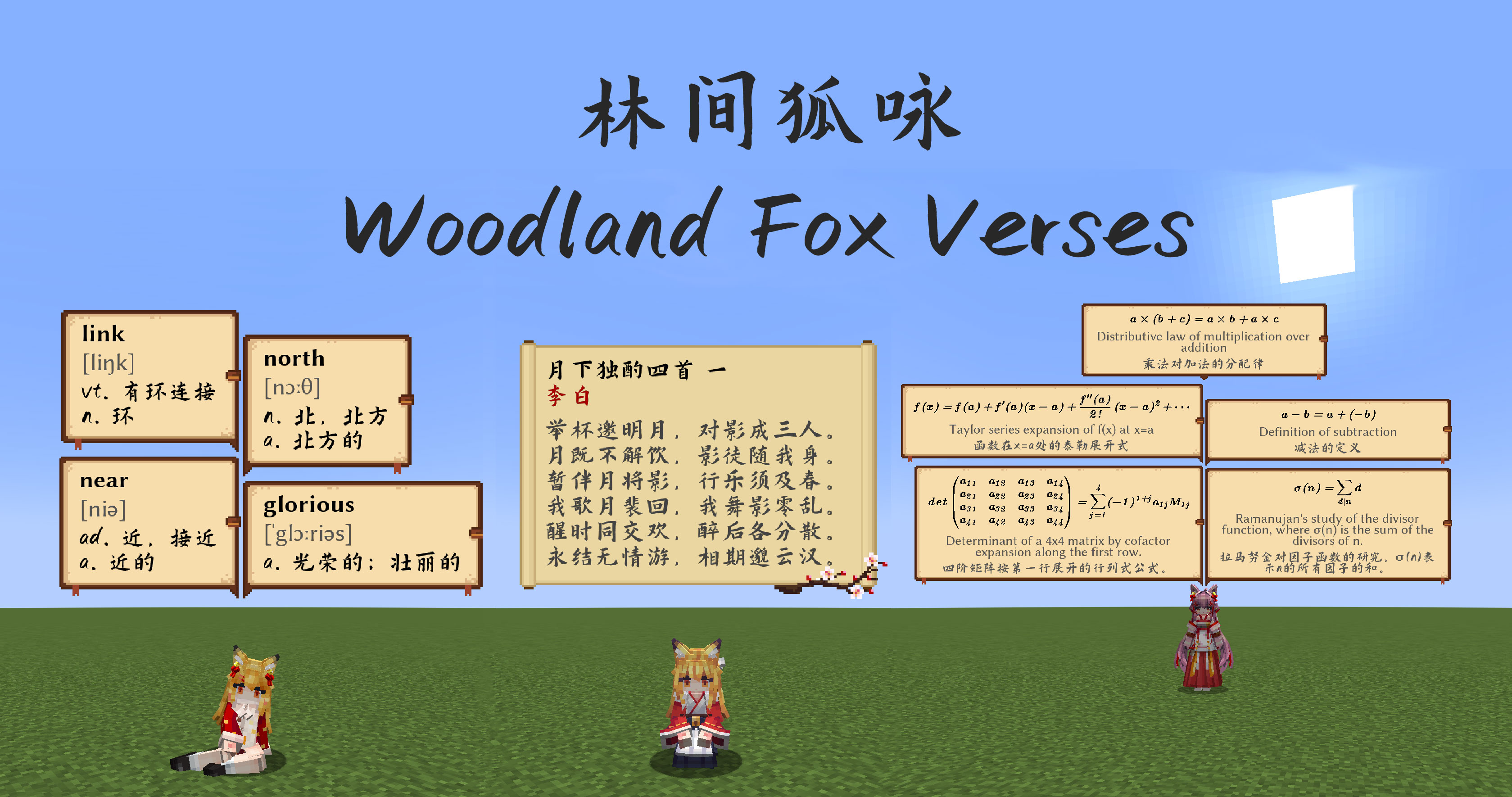
Display various texts such as poetry, vocabulary, math formulas, and more in chat bubbles.
> “When the moonlight passes through the pine branches, you may encounter the well-read fox—”
## Introduction
This is an add-on mod for the Minecraft maid mod (Touhou Little Maid Mod) that randomly displays various chat bubbles in-game. Currently integrated content includes:
* 300 Tang and Song poems
* English vocabulary for junior high, senior high, and CET-4/CET-6 college levels
* Classic mathematical formulas
## Acknowledgements
* Chat bubble textures generously provided by YSBB
* [chinese-poetry project](https://github.com/chinese-poetry/chinese-poetry)
* [Common English Wordlists](https://github.com/mahavivo/english-wordlists)
* [ChillCalligraphy Font (Hanchan Shuti)](https://github.com/Warren2060/ChillCalligraphy)
* [Libertinus Font](https://github.com/alerque/libertinus)
## Others
* Mathematical formulas are generated by GPT-4.1, and related content can be found in the [here](https://github.com/TartaricAcid/WoodlandFoxVerses/tree/master/tool)
## KubeJS Support
You can now use KubeJS to add game tips:
“`
// You need to create JS scripts in the server_scripts directory to add tips
// Add tips in all biomes using the addTipInAllBiome method
WoodlandFoxVerses.addTipInAllBiome(“Press F3 to view coordinates and biome information”)
// You can add n for line breaks, and the game will automatically wrap long text
WoodlandFoxVerses.addTipInAllBiome(“Two roads diverged in a yellow wood,nAnd sorry I could not travel both”)
WoodlandFoxVerses.addTipInAllBiome(“To be or not to be, that is the question:n” +
“Whether ’tis nobler in the mind to suffer the slings and arrows of outrageous fortune,n” +
“Or to take arms against a sea of troubles and by opposing end them.”)
// Add tips in specific biomes using the addTipInBiome method
// The second biome parameter can be a biome ID or biome tag
WoodlandFoxVerses.addTipInBiome(“This is the Nether Wastes, featuring vast lava seas and scattered glowstone clusters”, “minecraft:nether_wastes”)
// Don’t forget that tags need to start with #
WoodlandFoxVerses.addTipInBiome(“You are in a plains biome where villages can generate”, “#minecraft:has_structure/village_plains”)
// Of course, the chat bubble background is also customizable. You can reference existing textures for customization (using nine-slice mechanism)
// Textures need the full path with .png extension
WoodlandFoxVerses.addTipInAllBiomeWithBg(“This is a tip with custom background”, “woodlandfoxverses:textures/verses.png”)
// Since the Woodland Fox Verses mod adds math formulas, English words, and classical poetry by default
// Some people might just want to use it for game tips, so we also provide KJS interfaces to forcibly disable these features
WoodlandFoxVerses.showWords(false) // Disable English word display
WoodlandFoxVerses.showPoetry(false) // Disable classical poetry display
WoodlandFoxVerses.showMathFormula(false) // Disable math formula display
// You can also forcibly specify the bubble display duration and frequency
WoodlandFoxVerses.bubbleAddInterval(60) // Attempt to display a bubble every 60 ticks
WoodlandFoxVerses.bubbleShowDuration(40) // Each bubble disappears after displaying for 40 ticks
“`
Wooden tools are dumb
### Short introduction
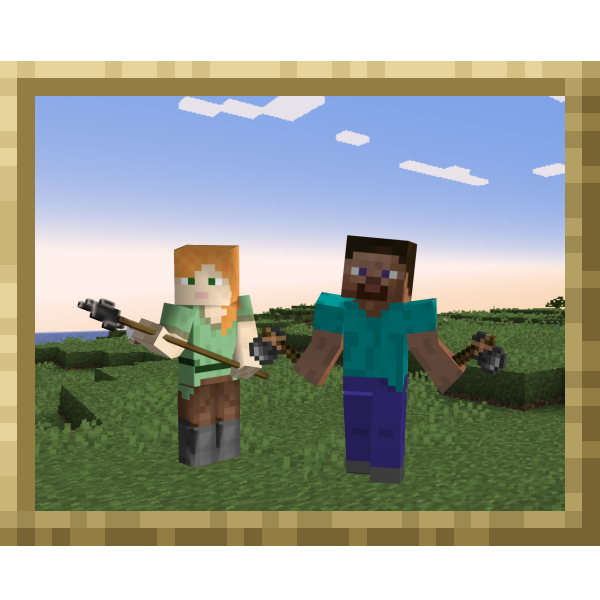
Mod replaces silly wooden tools and tree punching with more reasonable options.
You heard this before. There are small mods that add flint tools and maybe grass fiber; there are large mods like MITE that completely change the game. And I liked none of them.
I wanted a more believable early game. I wanted more difficult but still satisfying early game. Since no modder did it right, here we are…
### How to play
First part of the pre-stone phase – getting wood – is easy. Find some flint in gravel piles, get some sticks, make a flint hatchet. Easy.
Second part – getting cobblestone – is going to be a challenge (unless you turn off challenge in options). Make a wall from fences or food old dirt blocks because this might take a day or two. And start a small farm (wooden hoe still works). Luckily, this mod provides a simple firepit and flint javelins. Make a few javelins (three or four are recommended) and meet the first night with steely resolve in your eyes and flimsy javelins in your hands!
### Vision and history
Although first published for 1.18, this mod is far older but author tends to get to 97% and then stop. And pretty-much finished mod lives in his mod folder.
It was partly inspired by “minecraft is too easy”, where there was a clear pre-stone phase of the game. That is what I wanted to capture. But only that; there are no more similarities with MITE because its author Avernite is clearly a sadist.
I am not a sadist. I can make the start more difficult, I can make you worry about food and shelter, but I want you to get out of all that victoriously – proud of yourself and, perchance, a tad thankful to me for making this.
### Related mods
The idea is that I make a bunch of tiny mods and that you pick what you like. I hate large mods like MITE – they take control of entire game. I will focus on small parts and try not to bother the player when they are not doing the thing the mod is about. For some reason many modders can’t seem to do that.
First one you should look into is [Cook your food](https://modrinth.com/mod/cook-your-food) – tiny mod that pushes players to cook their food or suffer negative effects.
Unpopular choice is [Modest flint overhaul](https://modrinth.com/mod/modest-flint-overhaul) – makes flint more abundant in gravel, but prevents you from finding flint in a gravel block you searched already.
Wooden to Flint Tools

ℹ️ This data pack aims to extend the early game by just a bit by **removing** wooden tools and replacing them with flint ones instead. **Flint tools** are functionally identical to their wooden counterparts except for their textures and recipes.
💡 Tip: Look for flint in rivers and oceans – especially in the early game.
🔗 Fully compatible with [Stone to Copper Tools](https://modrinth.com/datapack/stone-to-copper-tools), a similar data pack that works well along this one.
🖼️ The data pack versions **require** their resource pack (Click on the desired version and download **both files**)
🌐 **Supported languages:** English, Czech, Toki Pona
If you wish to contribute a translation, feel free to contact me on discord at **@shvarra**.
Wooden Stairs Crafts
Modify the recipe for wooden stairs to make it more realistic.
The craft uses three planks to make four stairs.
Works with bamboo, mosaic bamboo and cherry wood in 1.20+ and pale oak in 1.21.10 !
Check my discord server to ask for versions
Wooden slab and stairs
Mod adds slab and stairs made of wood to the game.
Slab and stairs can be made from:
– Oak
– Spruce
– Birch
– Jungle
– Acacia
– Dark Oak
– Mangrove
– Cherry
– Pale Oak
– Bamboo
– Crimson
– Warped
There is also a Stripped wood option!
Wooden Shears
# Wooden Shears
This is a Minecraft mod which adds Wooden Shears to the game. (Forge, NeoForge, Fabric, Quilt) So it is possible to craft shears out of Planks.

It has only a durability of 50. (configurable since mod version 1.2.0.0)
The Fabric / Quilt version needs the following mods:
– Fabric API ([Github](https://github.com/FabricMC/fabric), [Curseforge](https://www.curseforge.com/minecraft/mc-mods/fabric-api), [Modrinth](https://modrinth.com/mod/fabric-api))
– Cloth Config API ([Github](https://github.com/shedaniel/cloth-config), [Curseforge](https://www.curseforge.com/minecraft/mc-mods/cloth-config), [Modrinth](https://modrinth.com/mod/cloth-config))
– (for Mineraft 1.20.4) WSMLMB ([Github](https://github.com/AnAwesomGuy/wsmlmb), [Curseforge](https://www.curseforge.com/minecraft/mc-mods/wsmlmb), [Modrinth](https://modrinth.com/mod/wsmlmb))
There is also a [wiki](https://github.com/cech12/WoodenShears/wiki) where you can read all details about the mod.
## Sponsors
[](https://bisecthosting.com/cech12?r=modrinth-wooden-shears-image)
You need a server? Save 25% on [Bisect Hosting with the promo code “cech12”](https://bisecthosting.com/cech12?r=modrinth-wooden-shears-link)!
## FAQ
### Can I use this mod in my mod pack?
Yes, you are allowed to use this mod in your mod packs.
### Port to another Minecraft version? Which versions are supported?
Sorry, but I do not backport any mod to an older version. Here is a list of all supported and planned versions: [Minecraft mod versions of cech12](https://gist.github.com/cech12/662e37d2f8524037d9fef8fbe90bed5a)
### Is there a Fabric version?
Yes, since 1.20.4 Fabric and Quilt are officially supported. There is no plan to backport Fabric support to earlier Minecraft versions.
### Where is the config file?
There is a defaultconfig directory, where you can find it. If you change something there it has only an effect on new savegames. For existing savegames you need to go to the serverconfig directory of the savegame.
### I found a bug or I have a good idea to enhance this mod!
Very good! Open an [issue at Github](https://github.com/cech12/WoodenShears/issues) or contact me on Discord.
Wooden Hopper
# Wooden Hopper
This is a Minecraft mod which adds a Wooden Hopper to the game. (Forge, NeoForge, Fabric, Quilt)
It acts like a vanilla hopper but is only half as fast as a vanilla hopper. (16 ticks instead of 8 – configurable) and has only one slot.

There is also a [wiki](https://github.com/cech12/WoodenHopper/wiki) where you can read all details about the mod.
## Dependencies
The Fabric / Quilt version needs the following mods:
– Fabric API ([Github](https://github.com/FabricMC/fabric), [Curseforge](https://www.curseforge.com/minecraft/mc-mods/fabric-api), [Modrinth](https://modrinth.com/mod/fabric-api))
– Cloth Config API ([Github](https://github.com/shedaniel/cloth-config), [Curseforge](https://www.curseforge.com/minecraft/mc-mods/cloth-config), [Modrinth](https://modrinth.com/mod/cloth-config))
## Compatibility
This mod is highly compatible with all chests and other containers of multiple mods. If you encounter any compatibility issue, please let me know on Github or on Discrod.
### Hopper+
This mod is not compatible with Hopper+, because it is not open source and I cannot go through the code to find the issue.
## Sponsors
[](https://bisecthosting.com/cech12?r=modrinth-wooden-hopper-image)
You need a server? Save 25% on [Bisect Hosting with the promo code “cech12”](https://bisecthosting.com/cech12?r=modrinth-wooden-hopper-link)!
## FAQ
### Can I use this mod in my mod pack?
Yes, you are allowed to use this mod in your mod packs.
### Port to another Minecraft version? Which versions are supported?
Sorry, but I do not backport any mod to an older version. Here is a list of all supported and planned versions: [Minecraft mod versions of cech12](https://gist.github.com/cech12/662e37d2f8524037d9fef8fbe90bed5a)
### Is there a Fabric version?
Yes, since 1.20.4 Fabric and Quilt are officially supported. There is no plan to backport Fabric support to earlier Minecraft versions.
### Where is the config file?
There is a defaultconfig directory, where you can find it. If you change something there it has only an effect on new savegames. For existing savegames you need to go to the serverconfig directory of the savegame.
### I found a bug or I have a good idea to enhance this mod!
Very good! Open an [issue at Github](https://github.com/cech12/WoodenHopper/issues) or contact me on Discord.
Create: Wooden Cog Solid


# About:
_Wooden Cog Solid is an addon for Create blending the Worlds of Metal Gear Solid and itself together._
Adding features like the Vault Golem, Stealth Camoflauge and the Iconic Bandana all straight from or Ideas from Metal Gear this Mod attempts to blend the two worlds decently well.

# Features:
### Tools:
– Andesite and Brass Stealth Camoflauge making the Player nearly invisible for a period of time.
– The Stun Knife, a low damage weapon giving the Stunned effect to the Target for a second
– The Vault Golem, a Small Craftable Mob that follows you working as Portable Storage
### Cosmetics:
– Bandanas of all Colour types in its own Curios Slot so it doesn’t effect anything else.
### Other Features:
– Lapis Sheet
– Integrated Circuit
– Battery, A placable item used in Recipes
– Tire, A block used in Recipes

# Upcoming Features:
– Dye Depot Compatibly
– Tire Remake: several colours
– Cosmetics for the Vault Golem
– Automatable Food Items
– More Golems more akin to Metal Gears
– Different Armours with different uses
– More Tools/Weapons

# Credits and License:
Made by FTBboi with help from DrogenMaster5729, FixedRL and Polertiger all helping with ideas and Misc things
Feel free to use this mod in your modpacks without asking for permission. Do not redistribute the jar files anywhere else pretty please 🙂
Wooden Bucket
# Wooden Bucket
This is a **Minecraft Forge** mod that adds a Wooden Bucket to the game.

## Dependencies
Since mod version 3.0.0.0 the library mod BucketLib ([Github](https://github.com/cech12/BucketLib/), [Curseforge](https://www.curseforge.com/minecraft/mc-mods/bucketlib), [Modrinth](https://modrinth.com/mod/bucketlib)) is required.
The Fabric / Quilt version needs also the following mods:
– Fabric API ([Github](https://github.com/FabricMC/fabric), [Curseforge](https://www.curseforge.com/minecraft/mc-mods/fabric-api), [Modrinth](https://modrinth.com/mod/fabric-api))
– Cloth Config API ([Github](https://github.com/shedaniel/cloth-config), [Curseforge](https://www.curseforge.com/minecraft/mc-mods/cloth-config), [Modrinth](https://modrinth.com/mod/cloth-config))
## Features
The **Wooden Bucket** acts like a normal bucket and can contain water, lava, milk, powder snow and axolotl/tadpole/fish.
Special features of a Wooden Bucket:
– If the bucket contains lava, it melts as soon as you empty it. (temperature configurable)
– It has a durability of 25. (configurable)
– Obtaining fluids, blocks & entities can be configured via tags and via configuration file.
All bucketable mod fluids, blocks & entities are supported. (see also [BucketLib Wiki](https://github.com/cech12/BucketLib/wiki))
## Sponsors
[](https://bisecthosting.com/cech12?r=modrinth-wooden-bucket-image)
You need a server? Save 25% on [Bisect Hosting with the promo code “cech12”](https://bisecthosting.com/cech12?r=modrinth-wooden-bucket-link)!
## FAQ
### Can I use this mod in my mod pack?
Yes, you are allowed to use this mod in your mod packs
### Port to another Minecraft version? Which versions are supported?
Sorry, but I do not backport any mod to an older version. Here is a list of all supported and planned versions: [Minecraft mod versions of cech12](https://gist.github.com/cech12/662e37d2f8524037d9fef8fbe90bed5a)
Due to technical changes in Minecraft, the effort to port this mod to 1.16 is too large. There is already a similar mod for 1.16: https://www.curseforge.com/minecraft/mc-mods/wooden-buckets
### Is there a Fabric version?
Since 1.20.4 the mod is available for Fabric & Quilt. There is no plan to backport Fabric support to earlier Minecraft versions. For earlier versions please check out this mod: [Early-Game Buckets (Fabric)](https://www.curseforge.com/minecraft/mc-mods/new-buckets-fabric)
### Where is the config file?
There is a defaultconfig directory, where you can find it. If you change something there it has only an effect on new savegames. For existing savegames you need to go to the serverconfig directory of the savegame.
### I found a bug or I have a good idea to enhance this mod!
Very good! Open an issue at Github. You have no Github-Account? You can also contact me here in the comments or via private message.