Worldgen Patches
# Worldgen Patches
This mod aims to patch some minor issues/quirks with world generation. Currently, this includes the following fixes:
– The `steep` surface rule (which in vanilla gives Jagged Peaks stone faces) now affects *all* directions, not just the north and east-facing sides.
– Snow layers correctly generate both below and on trees.
– Beached shipwrecks no longer spawn at different heights and with different block palettes across chunk borders.
– Igloos never generate a trapdoor if there is no basement.
WorldEdit CUI (Unofficial Forge Port)
WorldEdit CUI (Forge)
————
This is a port for the [WorldEdit CUI (Fabric)](https://www.curseforge.com/minecraft/mc-mods/worldeditcui-fabric) utility to the Forge platform.
WorldEdit CUI is a graphical user interface for [WorldEdit]. WorldEditCUI is designed
to assist in using WorldEdit, as well as preventing accidental errors.
Please note that this is not [WorldEdit], which allows you to make changes
to your world, but WorldEditCUI, a frontend for WorldEdit. You must have
WorldEdit installed on your server.
Installation
————
Install this mod into Minecraft mods folder.
WorldEdit selections will be shown without any configuration necessary, and the colours used can be configured from the forge mod menu.
Credits
——-
The Forge port:
* [Zbx1425](https://github.com/zbx1425), which is me
* [Shedaniel](https://github.com/shedaniel) for the Architectury cross-loader build system
Original WorldEdit CUI (Fabric):
* [Mumfrey](https://github.com/Mumfrey), [yetanotherx](https://github.com/yetanotherx), [mikroskeem](https://github.com/mikroskeem), and [zml](https://github.com/zml2008) for maintaining WorldEditCUI previously
* [lahwran](https://github.com/lahwran) – Creator of the original WorldEdit CUI!
* [sk89q](http://sk89q.com) for writing the WorldEdit plugin!
* [Mojang](http://mojang.com) – for making such an awesome game!
Legal stuff
———–
This code is licensed under the [Eclipse Public License v1].
[WorldEdit]: https://enginehub.org/worldedit/
[Eclipse Public License v1]: https://www.eclipse.org/org/documents/epl-v10.php
WorldEdit Items

Does it bother you that WorldEdit uses native objects in Minecraft and ruins the gaming experience? This mod is just for you! This mod adds three new items for use with WorldEdit so that you do not have to use vanilla items.
**Requires [WorldEdit](https://www.curseforge.com/minecraft/mc-mods/worldedit)**
Available for **Fabric** (requires [Fabric API](https://modrinth.com/mod/fabric-api)), **Quilt** (Use the Fabric Version) (requires [Quilt Standard Libraries](https://modrinth.com/mod/qsl)) and **Forge**
## Configuration
1. Check if you have WorldEdit installed (if not the mod is useless)
1. Put the .jar file in your mods folder
1. In game, hold the Wand/NavWand/SuperPickaxe item, and type `/tool selwand` `/tool selwand` (for now, the SuperPickaxe option is not available I think, I will update you soon)
1. After that, try to use the Wand Axe or Nav Wand and see the results
**NOTE**: if Commands i gived are not working, please report this to [WorldEdit Devs](https://github.com/enginehub/worldedit/issues)
WorldEdit Hang Fix
A simple mod that prevents WorldEdit from hanging the Minecraft server when the server is stopping
It fixes https://github.com/EngineHub/WorldEdit/issues/2459. What it does:
– Shutdown `WorldEdit.getInstance().getExecutorService()` on dedicated server stop (or it will hang the server for maximum 60s)
– Ensure the singleton `java.util.Timer` object in `FutureProgressListener` runs on a daemon thread (or it will hang the server forever)
Supported environment
| Platform | Minecraft | WorldEdit |
|———-|————–|———–|
| fabric | MC >= 1.14 | >=7.0.0 |
| forge | MC >= 1.15 | >=7.0.0 |
| neoforge | MC >= 1.20.6 | >=7.0.0 |
WorldEdit

**A Minecraft Map Editor… that runs in-game!**
With selections, schematics, copy and paste, brushes, and scripting.
Use it in creative, or use it temporarily in survival.
Java Edition required.
Compatible with NeoForge, Fabric, and Bukkit-based platforms (Spigot and Paper).

🛑 Make sure that you are using the Java version of Minecraft. **WorldEdit does not support Bedrock!**
Mod version:
1. Install NeoForge or Fabric.
2. Download WorldEdit from this page (make sure you grab the mod version, not the plugin).
3. Put the WorldEdit mod file into your mods folder.
Plugin version:
1. Set up a Bukkit server such as [Spigot](https://spigotmc.org) or [Paper](https://papermc.io/) (Paper is [recommended](https://madelin
emiller.dev/blog/paper-vs-spigot/) over Spigot).
2. Download WorldEdit from this page (make sure you grab the plugin version, not the mod).
3. Put the WorldEdit plugin file into your plugins folder.
Check YouTube for tutorials, or read the official [documentation](https://worldedit.enginehub.org/)

**The most complete source of WorldEdit information is [our documentation, check them out here](https://worldedit.enginehub.org/en/latest/)!**
If you need further help than what the documentation can provide, you can join our Discord server.
[](https://discord.gg/enginehub)




**Do I need cheats on?**
If you’re playing on single player: Yes, cheats must be enabled for the world to use WorldEdit, but you can change this in the configuration. If you’re running a server: Only opped users can use WorldEdit, though this can be changed too.
**Can anyone use it?**
On servers, only opped users or users with permissions supplied with a permissions plugin can use WorldEdit. On LAN, anyone can use it if cheats are enabled.
**How do you use WorldEdit?**
To learn how to use WorldEdit, read the docs. Check YouTube for tutorials too!
**I need help!!**
You may visit our documentation or Discord Guild.
**I have some feature requests…**
Visit our issue tracker. However, if you just have a question, please try one of the methods above.
**Can I include WorldEdit in my modpack?**
You are free to include WorldEdit, without having to asking for explicit permission.
A link back to this page or our GitHub Sponsors would be appreciated, however.
**Can I edit the source code?**
Visit our GitHub repository. WorldEdit is licensed under GPLv3 and you can compile it with Gradle.
🎉 Support us on GitHub Sponsors!
Need a host? We recommend Apex Hosting

Worldbound Items

## Worldbound
**Worldbound** is a Minecraft datapack that lets you make any enchantable item completely invulnerable while on the ground.
To do this, combine the item with a **Netherite Scrap** and a **Netherite Upgrade Smithing Template** in a **Smithing Table**.
Once upgraded, the item gains the following properties while on the ground:
– **Indestructible** – Immune to all forms of destruction
– **Glowing** – It glows if you are close enough to it, even through walls
– **Persistent** – Never despawns
– **Void Recovery** – Automatically teleports to the top of the world if it falls into the void
This datapack is inspired by [Tinkers’ Construct](https://modrinth.com/mod/tinkers-construct) Worldbound Modifier.
You can add more items that can be crafted into Worldbound by following the `README.md` within the Datapack ZIP.
**Note:** *If the item is in a Shulker Box and drops into the Void, or is exposed to an explosion which was triggered by someone who is in Creative Mod, the Item can be destroyed.*
World Start Commands and Global Gamerules
[](https://www.boxtoplay.com/en/minecraft-hosting/minecraft-server)
Check out BoxToPlay for cheap and powerful minecraft servers (seriously, it’s the one I use daily, it’s great)
also available on [curseforge](https://www.curseforge.com/minecraft/mc-mods/world-start-commands-and-global-gamerules) (much worse)
This mod is originally made for setting global gamerules that will apply to every world but it works with any other commands.
v1 description
When you first start your game the mod will create a file called WSCommands.json in your config folder which is formatted like so:
“`
{
“Repeat”: false,
“DedicatedMode”: false,
“1”: “[command1]”,
“2”: “[command2]”,
“3”: “[command3]”
}
“`
The mod will run the commands in order every time you load into a new world.
Make sure to not skip any numbers.
Don’t forget the commas.
The commands don’t include the /
example:
“`
{
“Repeat”: false,
“DedicatedMode”: false,
“1”: “effect give @a minecraft:resistance”,
“2”: “gamerule keepInventory true”,
“3”: “gamerule doInsomnia false”,
“4”: “give @r minecraft:diamond”
}
“`
this will first give the resistance effect to every player, then set keepInventory to true and doInsomnia to false, then give a diamond to a random player in the world
If `Repeat` is set to `true`, the commands will run every single time the world is loaded (or every time a player joins the world if `DedicatedMode` is set to `true`.)
If `DedicatedMode` is set to `true`, the commands will run for every single player that joins the world for the first time.
### important:
`/wsc [target] forcerun` will run the commands directly
`/wsc [target] reset` will run the commands again the next time you load the current world
`/wsc null` is a command that does not do anything
Commands don’t run at world creation ? Try doing `/wsc forcerun` (need OP), if it shows a message in red saying it was unable to run the command, you probably forgot a comma somewhere in your config (all lines have a comma except the last one)
Commands do run but gamerules aren’t set ? Minecraft is very specific with the capitalization of the gamerules (`gamerule keepinventory` or `gamerule Keepinventory` for example will NOT work as the correct capitalization is `gamerule keepInventory`)
Be very careful when going from a command block directly to the toml file as you have to escape anything inside the command that the json format uses (ex: becomes \, ” becomes “) (very useful resource here https://www.freeformatter.com/json-escape.html just type the command you want in the box don’t press enter and just press “escape JSON” and it should give you exactly what you need to copy paste (don’t forget to put what you copied from the website between quotation marks in the command list!!)
A config file called WSCommands.toml will be generated in the config folder, most important information should be contained there
Join my [discord server](https://discord.com/invite/hxbh7UcxgJ) for support about my mods!
icon was taken on game-icons.net
World Start Commands
# Overview #
**This Mod/Datapack can execute any command on starting a world**
The default way of the world counting as “started” is, when a player picks up any wooden log.
Once all players have done so, the commands get executed and you’re ready to play!
# Usage
This pack is intended to use for modpacks or other projects where a special setup has to be done before being able to properly play.
All commands which you want to have executed have to be written in the “setup.mcfunction” under data/world_start/functions. (Copy the file onto desktop, edit it, replace old one)
## Why two versions ##
I’ve decided to make two seperate versions of this pack. One, which is very simple and easy to use and another, fancier version. The fancy version keeps track of who has already “started” and once all players did, it will count down and then “start” the world. The two function identically, it’s just for personal preferrence if you like it simple or fancy.
## How to customize ##
You will have to edit the pack/mod to write the commands into it. Here is a detailed step by step guide for this:
**Mod version:**
1. Rename the mod file from .jar to .zip.
2. Follow instructions for datapack version.
3. Once you’re done, rename it back to .jar
**Datapack version:**
1. Open the .zip file and find the “setup.mcfunction” under data/world_start/functions .
2. Copy the file onto your desktop (out of the .zip archive).
3. Open the file with any text editor.
4. You should find the command “say setup complete”. This is the default example command.
5. For the fancy version, it has two more commands, which just clear a few displays. (Do not remove)
6. Delete the default command and add the commands you need to the file. Don’t include the slash. Command execution order is the top command first and bottom one last. All happen at the same time though.
7. Once all commands are written down, save it and place it back in the .zip folder. It will ask to if you wish to replace the old file which you do.
8. The pack is done! Now you just have to load it into Minecraft and you’re ready to go!
9. If the world is already running, you will have to do /reload to apply the changes to the game.
### Setting a different start
The way of detecting if a player has started to play is by an invisible advancement. It detects if the player has obtained any wooden log and gives a function if they have. This is of course also customizable. I recommend [reading the wiki page](https://minecraft.wiki/w/Advancement_definition) about advancement triggers if you want to change the way the world starts. Just replace the “world_start” advancement in the pack.
### Other
Of course you can use this in your modpack. Feel free to edit this to your liking and include it. I just dont want you to publish this exact version with one tiny change and claim it as your own.
The datapack is marked as incompatible for some versions, but it should still work fine.
World Pregen
# 🗺️ World Pregen
**World Pregen** is a datapack that allows you to automatically pre-generates a map and prevents lag caused by generation while you are playing.
### Commands to know
– ▶️ `/function wp:[dimension]/[size]` > Start pre-generation
– Dimension name: overworld, the_end, the_nether
– Size options: 2k, 4k, 6k, 8k, 10k, 20k (2k → 1000/-1000)
– ⏸️ `/function wp:pause` > Pause pre-generatino
World Pre Generator
## Version 5.X.X
For older versions of the mod, check the [wiki](https://github.com/GeheimagentNr1/WorldPreGenerator/wiki).
This Mod can pre generate the Minecraft dimensions per command.
The Mod is only needed on the server side, but can also be used on the client side.
—
You need a server to play with friends? You don’t know how to set up one? Just rent an already configured server!

Click on the picture above, select a plan (with recommended at least 6 GB),
use my code **[agent](https://bisecthosting.com/agent)** to get **25%** off your first month and enjoy playing with your friends!
—
## Support
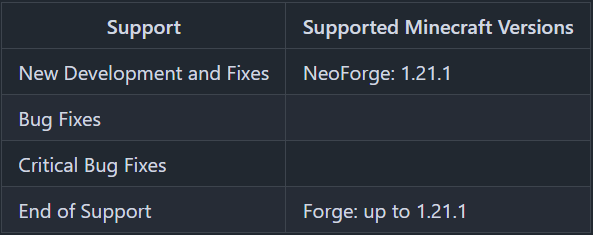
Minecraft versions, for which the mod is not released, are not supported.
You can find a text version [here](https://github.com/GeheimagentNr1/Online_Mod_Data/wiki/Supported-Versions).
## Hints
The pre generation tasks are executed one after the other.
The pre generations are continued after restarts.
Chunks already generated are skipped on pre-generation, if the forced flag is not true.
If you run semi-parallel pre generation, you should set “max-tick-time” in the “server.properties”-file to -1 to prevent crashes, because the tick time gets too long.
In semi-parallel pre generation mode, multiple tasks for pre generation are started in parallel, but the execution is done the Minecraft way. As of 1.20.1, this means, that only one chunk can be generated at a time.
## Server Config
The config file can be found in the “serverconfig” folder in the “world” folder and is named “world_pre_generator-server.toml”. The name of the world folder is set for servers in the “server.properties” file and for clients it is the name of the world/save game in the world list, and it can be found in the “saves” folder in the “.minecraft” folder.
* **send_feedback**
Shall a pre generation feedback send to all online players?
* **generation**
Parameters for generation
* **type**
Type of generation
SERIAL: Every chunk one after another is generated.
SEMI_PARALLEL: Multiple chunk generation tasks are created, but the generation is still serial (speed up the chunk generation).
* **semi_parallel_task_count**
How many chunk generation tasks shall be start in parallel?
If the value is “0”, the number of processor cores is used.
* **delays**
Delays of the print and save tasks
* **print**
Time between 2 status prints
* **save**
Time between 2 saving events
## Commands
* `/pregen list` – Lists all running pre generation tasks.
* `/pregen gen start []` – Creates a pre generation task with the specified centre, radius and dimension. Optional, the force flag (true, false) can be set. If it is set to true, all chunks are loaded. If it is set to false, already generated chunks are skipped. If the force flag is absent, it is set to false.
* **block**: The center coordinates and the radius are in blocks.
If you want to generate a 4000×4000 (2000 in the positive and negative direction) from the center of the world, the command would be:
`/pregen gen minecraft:overworld start block 0 0 2000`
If you want to generate a 4002×4002 (2001 in the positive and negative direction) from x = 100, z = 150 of the world, the command would be:
`/pregen gen minecraft:overworld start block 100 150 2001`
Hint: In the pregeneration list it will show up, with the following center and radius data, because the block data are calculated to chunk data and back:
x = “round down”(100 / 16) * 16 = 96
z = “round down”(150 / 16) * 16 = 144
radius = “round up”(2001 / 16) * 16 = 2016
* **chunk**: The center coordinates and the radius are in chunks.
If you want to generate a 4000×4000 (2000 in the positive and negative direction) from the center of the world, the command would be:
`/pregen gen minecraft:overworld start chunk 0 0 125`
If you want to generate a 4002×4002 (2001 in the positive and negative direction) from x = 100, z = 150 of the world.
“chunk x” = “round down”(100 / 16) = 6
“chunk z” = “round down”(150 / 16) = 9
“chunk radius” = “round up”(2001 / 16) = 126
The command would be:
`/pregen gen minecraft:overworld start chunk 6 9 126`
* `/pregen gen resume` – Resumes the pre generation task of the dimension.
* `/pregen gen pause` – Pauses the pre generation task of the dimension.
* `/pregen gen cancel` – Cancels the pre generation task of the dimension.
* `/pregen clear` – Cancels all pre generation tasks.
* `/pregen sendFeedback` – Shows, if the progression feedback is enabled or disabled.
* `/pregen sendFeedback ` – Enables or disables progression feedback depending on isFeedbackEnabled. Generation start and finish feedback are not affected of that.
## Progression State
The progress state computed is in chunks.
You get the following information in the generation messages: “A B/C (D%) E chunks/s”
* **Dimension (A)**
* **Chunk generated (B)**
* **Total chunks to generate (C)**
* **Percentage of chunks for which generation is finished (D)**
* **Rate of Chunks per second generated between this and the last message (E)**
—
Thanks for the logo to Muse31.
You can use this mod in non-commercial modpacks without asking.
You can find more mods from me on [CurseForge](https://www.curseforge.com/members/geheimagentnr1/projects) and [Modrinth](https://modrinth.com/user/GeheimagentNr1).
