X-Ray World Generation
# X-Ray World Datapack
Have you ever used an X-Ray Resource Pack? Have you wondered “Man, I wonder what it would be like if the entire world was *actually* like this.”
…What do you mean no?
Well, I made a Datapack that does that anyways. The world looks completely normal except for the fact that most of it is missing… Only ores and the shell of structures are left in the world… You’ll most likely spawn on a coal ore vein at y=0 in the middle of no where, stuck floating above the void. But hey! At least Diamonds are easy to find, right?
## This is not an x-ray mod / How to use:
1. This is NOT an X-Ray Mod / Resource Pack. This is a World Generation datapack. It overrides the default world generation to remove terrain.
2. To use, install the datapack / mod and create a new world.
– If you are having issues with this, it may be because some issue with porting the datapack as a mod. File a bug report either on my discord or the github page. Include info like mods used, mod loader used, error, version used, etc.
3. Custom world options are not supported (superflat, amplified, etc. I may add support in the future).
4. This is incompatible with biome mods, and might be incompatible with some terrain mods.
## Sponsor: Sparked Host
[](https://billing.sparkedhost.com/aff.php?aff=2956)
## Check out this pack as well!
[Terrainless World Generation!](https://modrinth.com/datapack/terrainless-worlds)
**Shout out to [Apollo](https://modrinth.com/user/Apollo) for discovering the technique to make this datapack possible!**
Create: Optimized
# ⚙️ Create Optimized
Automation Refined. Performance Perfected.
Create Optimized is a lightweight, performance-focused Minecraft modpack that merges the smooth experience of Optimized FPS
with the elegant machinery of the Create ecosystem.
This pack strips Minecraft back to its essentials, keeping the core vanilla gameplay intact while enhancing it through mechanical creativity and automation.
## 🧩 The Concept
Where Optimized FPS fine-tunes your framerate, Create Optimized fine-tunes your gameplay.
You won’t find a massive overhaul or dozens of magic and tech mods here—just the clean, polished engineering playground that Create offers, running at silky-smooth performance.
## ⚙️ What’s Inside
– **Create and Friends** – The base Create mod and its best-in-class add-ons (like Create: Steam ‘n’ Rails or Create: Deco) bring motion, logic, and artistry to vanilla worlds.
– **Optimized FPS Foundation** – Sodium, Lithium, FerriteCore, and other performance libraries ensure minimal lag, even in automation-heavy builds.
– **Seamless Vanilla Integration** – World generation, progression, and balance remain true to vanilla Minecraft—only now, your farms and factories can move.
– **Simplified, Streamlined Design** – No unnecessary clutter. No broken progression. Just you, your machines, and a beautifully stable sandbox to invent in.
## 🌍 Ideal For
– Builders who love redstone-style automation and mechanical motion.
– Players wanting Create’s beauty and complexity without performance loss.
– Servers seeking a lightweight vanilla+ experience that stays stable under load.
## 🧠 Philosophy
Create Optimized is built around one principle: optimization should never sacrifice creativity.
Every mod, every configuration, and every performance tweak serves a purpose—to give you the best possible Create experience while staying as close to vanilla as possible.
## 🚀 Summary
⚙️ A pure, performance-tuned world of gears, shafts, and innovation. Build smarter, run smoother, and let your imagination spin freely.
X-Hearts
# X-Hearts
Start on one heart, gain a heart every time you die. If you die at 10 hearts you are permanently dead.
Use `/scoreboard players set @s deaths 0` to reset back to 1 heart
Inspired by the X-Life series

## FAQ
**Does this work on a server?**
Yes. Go into your servers folders and go to `world -> datapacks` and put the datapack there. This datapack works multiplayer so play with however many people you would like!
**Is there anyway to change the max amount of hearts?**
Here are all the settings you can change:
– `/function xlife:settings/toggle_hardcore` for toggling whether to go into spectator after running out of hearts or not. By default it is on hardcore mode
– `/function xlife:settings/max_hearts/increase` to increase the max amount of hearts. Default is 10
– `/function xlife:settings/max_hearts/decrease` to decrease the max amount of hearts
## Support us!
Join my Minecraft server **Zonerush.minekeep.gg** for a unique PvP gamemode!
—
**Try my other datapacks! Here are some that you might like.**
[](https://modrinth.com/project/uUdrS8s7) [](https://modrinth.com/project/aik3GVdo)
—
**Join the discord to get updates, support me, and report issues**
[](https://discord.gg/C2WymfUqJx)
## Milestones
– 100 downloads – Dec. 8th | 2025
– 300 downloads – Jan. 13th | 2026
– 1,000 downloads – ???
XPlus Autofish (Fabric / Forge / NeoForge)
## About XPlus Autofish
XPlus autofish is a successor mod to the MrTroot’s autofish mod, including bugfixs and new features.
**If you are looking for autofish mod for 1.19.4-, please check out https://www.curseforge.com/minecraft/mc-mods/autofish .**
## Introduction
In short, just cast the fishing rod into the water once, and it will automatically reel in at the correct time and recast after a couple-second wait. You can open the config screen of the mod via hotkey (V by default).

## Config Screen
– **Autofish**: Easily toggle the entire mod on or off.
– **MultiRod**: Automatically switch to the next fishing rod in your hotbar after using one, allowing you to fish for extended periods.
– **Break Protection**: Ignore fishing rods that are almost broken, preserving your enchanted rods.
– **Persistent Mode**: Keep the fishing rod casted out at all times, automatically recasting it every 10 seconds if necessary. It is useful for dealing with server lag or plugin-related hook clearing.
– **Sound-Based Detection**: In multiplayer, use sounds instead of motion to detect catches. Note that proximity and nearby players’ hooks may affect accuracy.
– **Recast Delay**: Adjust the time interval between reeling in and recasting the rod.
– **Clearlag Chat Pattern**: Some servers clear entities, including fish hooks, to reduce lag and send a chat message when doing so. When the specified chat pattern is matched, the mod will recast the hook.
– **Random Delay**: Add random delay between the reeling in and recasting.
– **Open Water Detection**: Automatically detect whether you are fishing in an open area, which allows you to get treasure loot.
## FAQ
**Q: The auto fishing feature does not work with rods added by mods (such as Aquaculture 2, etc.)**
A: Try enabling “Use Sound Detection” and “Force Multiplayer Detection (Mod Compatibility)” in the config screen of XPlus Autfish (Press V to open by default).
## Installation
– For the **Fabric versions 1.19.4-1.21.11**, [Fabric API](https://modrinth.com/mod/fabric-api) and [Cloth Config API](https://modrinth.com/mod/cloth-config) are needed.
– For the **Fabric versions 26.1+**, [Fabric API](https://modrinth.com/mod/fabric-api) and [Forge Config API Port](https://modrinth.com/mod/forge-config-api-port) are needed.
– For the **Forge or NeoForged versions 1.18.2-1.21.11**, only [Cloth Config API](https://modrinth.com/mod/cloth-config) is needed.

Wyzpack
# 🚀 Description
## Step into a next-level Minecraft adventure!
This modpack upgrades your world to Minecraft 1.21.8, powered by NeoForge for smoother gameplay and better mod support.
## 🌟 What makes it special?
🌄 Endless horizons – With Distant Horizons enabled by default, you can see your world stretch farther than ever before. (Don’t worry, you can toggle it off in the settings if you prefer.)
✨ Stunning visuals – A hand-picked collection of shaders is included, ready to switch on whenever you want:
BSL Shaders v10.0 – Crisp, colorful, and balanced
Complementary Shaders – Reimagined r5.5.1 – Cinematic and vibrant
Complementary Shaders – Unbound r5.5.1 – Ultimate flexibility and beauty
Photon Shaders v1.2a – Lightweight and glowing atmosphere
## 🎮 Why play this pack?
Because Minecraft should feel bigger, brighter, and more epic. Whether you’re building megabases, exploring faraway lands, or just chilling with friends, this pack makes every block shine.
Wynnventory
**Wynnventory – Your Ultimate Wynncraft Loot Companion**
Dive deeper into Wynncraft’s raids and lootruns with real-time data and powerful new in-game tools!
—
### Key Features
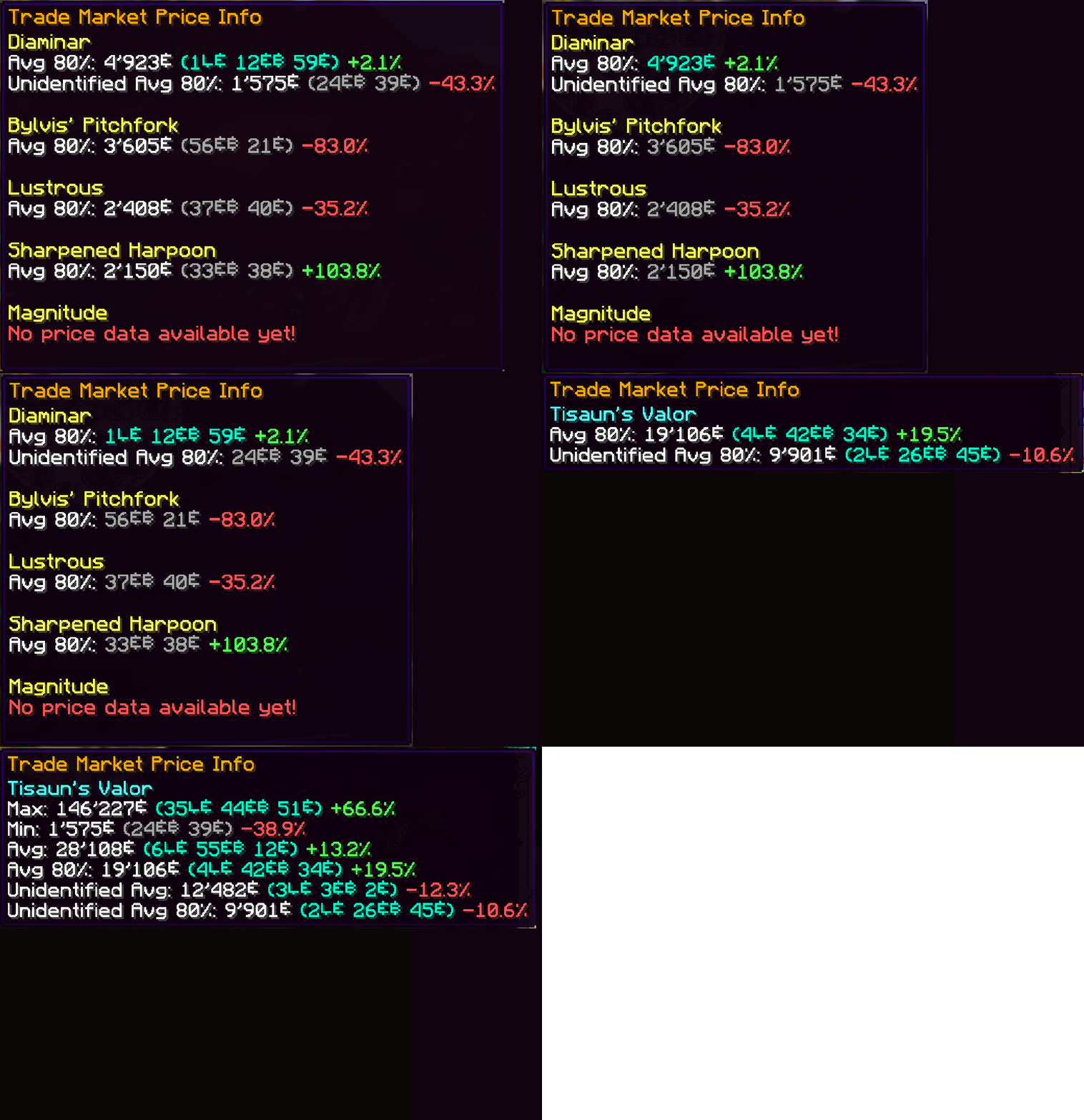
– **Price Tooltips**
Hover over any item—or even boxed items—to display price information from historic trademarket listings of the last 7 days. Crowdsourced data ensures you always know an item’s true value without leaving your inventory.
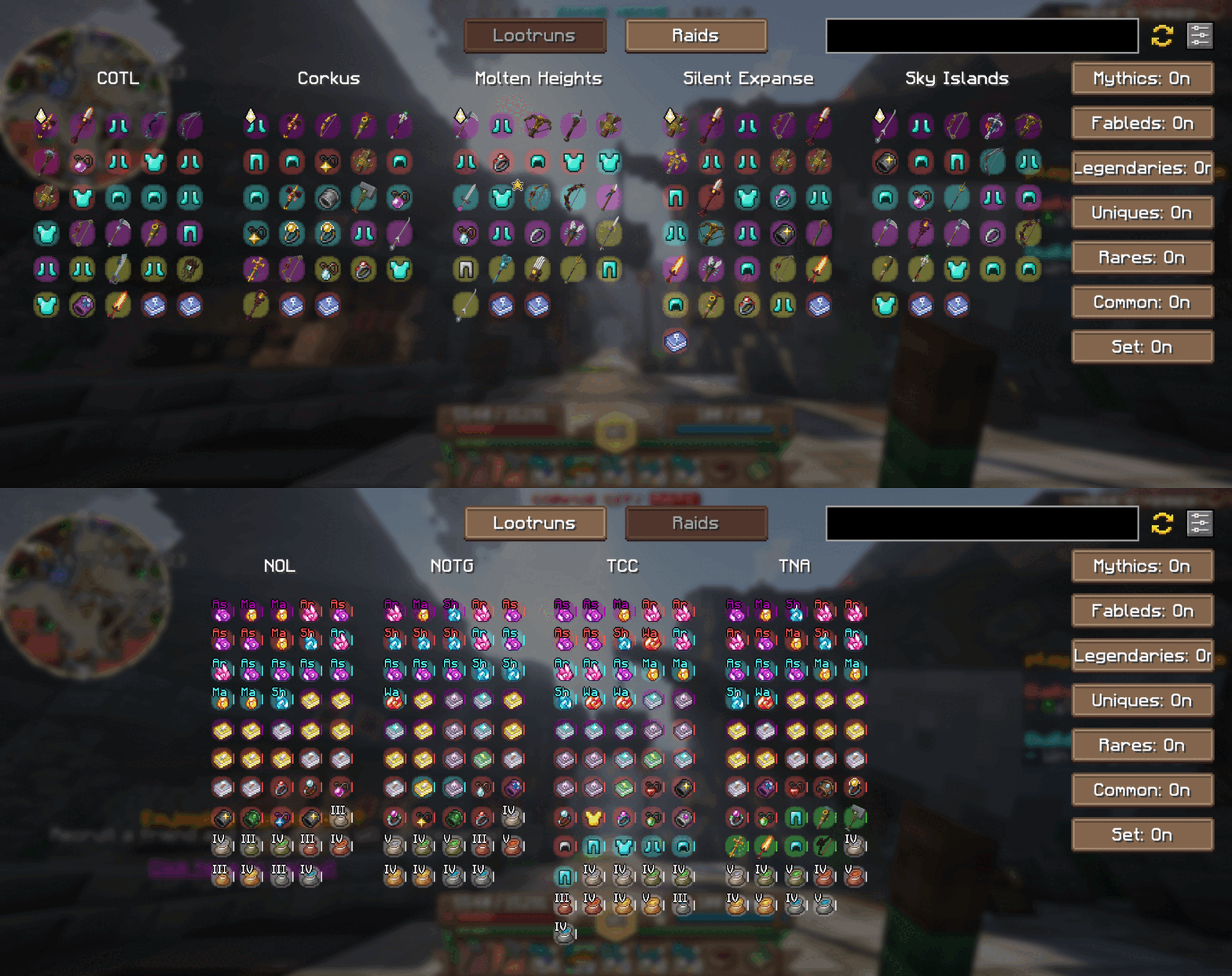
– **In-Game Raid & Lootrun Screen**
Press your the hotkey “N” to open our brand-new in-game screen from anywhere in the world. Quickly browse the current rewards available from raids and lootruns without tabbing out!
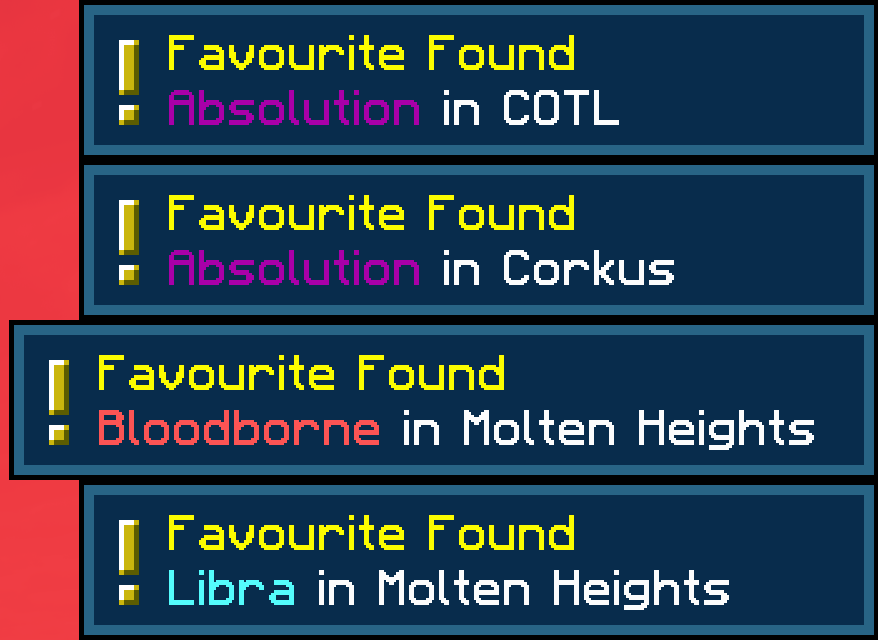
– **Favorite Notifier**
Get alerts for any of your Wynntils “favorited” items and you’ll receive an instant alert whenever it appears in the active raid or lootrun reward pools. Never miss out on that perfect drop!
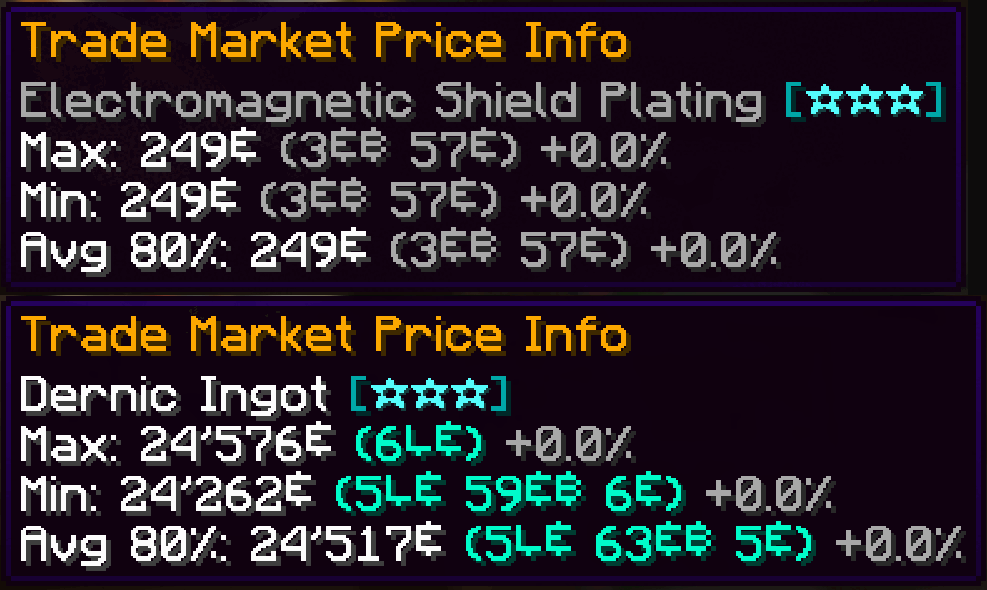
– **Material & Ingredient Tooltips**
We now support all material and ingredient items used in crafting and brewing. Hover over any ingredient to see recent price trends and demand insights at a glance.
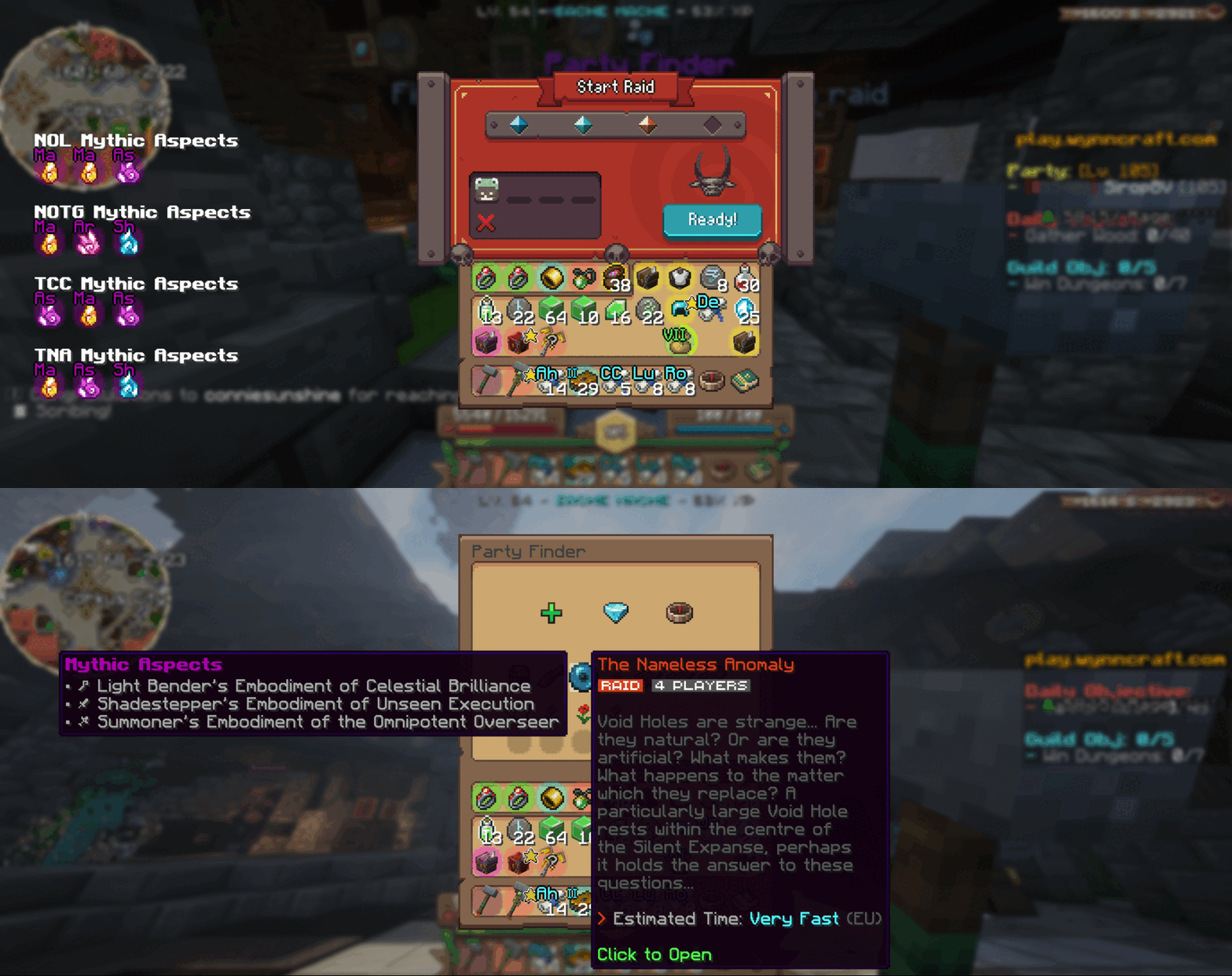
– **Aspect Tooltips**
Planning your next raid? Hover over any raid in the party finder to view its mythic aspects right there in the tooltip. While queueing, browse the full list of available mythic aspects to pick the perfect challenge.
—
### How It Works
– **Data Collection**
Every time you view the trademarket or inspect raid/lootrun reward chests, your client sends anonymized price and reward‐pool data to our backend. This crowdsourced approach powers both in-game tooltips and our website analytics.
– **Customization**
Tailor Wynnventory to your playstyle. Open the configuration menu (hotkey or Esc → Mods → Wynnventory) and choose exactly which stats, tooltips, and notifications you want to see.
—
### Get Even More on wynnventory.com
For deep dives into price histories, trend charts, and community-driven analytics, visit our website at [wynnventory.com](https://wynnventory.com).
—
Elevate your trading and raiding experience—install the new Wynnventory update today!
Wynntils Upgraded
Wynntils is a mod designed to enhance the user experience of Wynncraft. The mods in this modpack seek to further enhance the user experience of Wynncraft through performance and visual enhancement mods. Now including Complimentary Shaders!
Thank you to Complimentary Shaders for allowing me to use them in this modpack! More information on these shaders can be found here https://www.complementary.dev/shaders/
Server IP: play.wynncraft.net
All settings are on default.
Mod List
– Better F3: More info in F3 menu
– Chat Heads: Shows player heads in chats
– Controlling: Search for keybinds
– CraftPresence: Discord integration
– Entity Culling: Skips rendering non-visible blocks and entities
– Euphoria Patches: Adds more features to Complementary Shaders
– FerriteCore: Memory usage optimizations
– FPS Reducer: Reduces FPS when inactive to reduce GPU and CPU load
– ImmediatelyFast: Various Optimizations
– Iris: Allows shaders to run with Sodium
– ModernFix: Improves perfomance, reduces memory usage, fixes bugs.
– Model Gap Fix: fixes https://bugs.mojang.com/browse/MC-73186
– Neoforge Version 21.1.57: [https://projects.neoforged.net/neoforged/neoforge](https://projects.neoforged.net/neoforged/neoforge)
– No Chat Reports: Disables Chat Reporting where legally possible
– Notes: Adds in-game notepad [https://www.curseforge.com/minecraft/mc-mods/notes](https://www.curseforge.com/minecraft/mc-mods/notes)
– Skin Layers 3D: Replaces second layer with 3d modeled version
– Sodium: Performance booster
– Spark: Performance profiler
– Wynntils: https://wynntils.com
Wood you Dye
Wood you Dye is a mod that adds dyable wooden planks into Minecraft. Think of it as wool but its planks.
Credits:
Programmer Art and Russian Translation by Klayzer
Older version’s Arch-Ex support by Woodier Texas
William Wythers’ Overhauled Overworld
# Welcome to William Wythers’ Overhauled Overworld for 1.20.1 and higher!

## Introduction
This mod attempts to recreate the familiar landscapes you know and love in a way that creates a more realistic and atmospheric world.
# WWOO/WWEE difference
We decided to split WWOO in two distinct mods:
– **Expanded Ecosphere**: This mod includes new biomes and builds upon the old 1.19/1.20 WWOO (bad compatibility with other world-gen mods).
– **WWOO**: This new project is focused on overhauling the vanilla biomes and is inspired by the style of the old 1.16/1.17 WWOO (good compatibility with other world-gen mods).
**Use one or the other! Don’t use both. Many features might be doubled and they are NOT intended to be combined.**
## Key Features
### Overhauled Biomes
Every biome has been reworked to provide a more realistic and immersive environment. Say goodbye to the standard biomes and welcome an enhanced world filled with diverse landscapes and exciting adventures.
For an extensive showcase of the (sub)biomes, join our [Discord](https://discord.com/invite/yJng7sC44x) and check out [this channel](https://discord.com/channels/779938168573132801/1381410007035150497) (1.21.5+).
### Biome Transitions
Discover the new transitions between biomes, that eliminate jarring shifts between environments, allowing for a more natural world flow. Check out this [example picture](https://cdn-raw.modrinth.com/data/II7t6llZ/images/415ed50637330b1c39d463076af7f2ab5fe9a283.png) in the Gallery.
### Compatibility with Vanilla Clients
Worried about compatibility issues with your friends? Fear not! Overhauled Overworld exclusively uses vanilla blocks, ensuring that you can install this mod on your server, and your friends can join with their vanilla clients. This makes for a hassle-free and enjoyable multiplayer experience.
## Enhance Your Experience
**Since WWOO 2.6.0 these are included in the mod and can be enabled via the config!**
– **Navigable Rivers**: Improve your river experience with this travel-friendly add-on. [Download Here](https://modrinth.com/datapack/navigable-rivers)
– **Cliffs and Coves**: Improve your world with better coastlines using this add-on. [Download Here](https://modrinth.com/datapack/cliffs-and-coves)
– **Towering Tepuis**: Add a forbidding and mysterious area of adventure to your world. [Download Here](https://modrinth.com/datapack/towering-tepuis)
If you prefer a datapack over a mod, click [here](https://modrinth.com/datapack/4pbhwMQz) to download the datapack version of WWOO.
## Join Our Community
If you have any questions, suggestions, or just want to connect with fellow adventurers, we invite you to join our [Discord Server](https://discord.com/invite/yJng7sC44x). While there’s no Wiki available yet, our friendly community is always ready to assist you on your journey through the Overhauled Overworld.
Winter Wonderland
I made this to change Terralith to have only cold biomes, but I realised it works with any biome datapacks/mods! (Some mods don’t works as well). It essentially changes the temperature and placement of biomes so only cold ones are placed!
I also plan to also add/change some existing biomes.
All screenshots were taken with photon and terralith!