YDM’s Scorpions
YDM’s Scorpions for FORGE/FABRIC/NEOFORGE
This mod adds scorpions to the game!
Brown and Emperor Scorpion spawns in the desert, while the Nether Scorpion Spawns in the Soul Sand Valley.
They will burrow themself in to the ground on daylight.
They drop Scorpion stingers that can be brewed into Venom Coat Potion.
After consuming this potion you will get a venom “armor” that will poison attackers!
If you have a spider eye in your hand then they won’t attack you and are tempted by it.
So like that you can make them follow you.
Other mod biome compatibility!
Spawn config options:
– Biome name(s) where it should spawn
– Spawn rate (The higher, the more chance for spawning a group)
– Minimum and maximum number of a Group
– Poison Duration (20 means -> 20 seconds)
– Health Point
– Damage Value
If you want the scorpions to spawn in another mods biome.
You have to change the biome_name line:
For example to:
biome_name = “modid:name_of_the_biome”
To let it spawn in more biomes you have to put a comma (,) between the biome names like this:
biome_name = “modid:name_of_the_biome,minecraft:desert”
The 1.19 version doesn’t have a spawn config.
The biome world generation changed a bit and now the spawn settings will be editable in json files.
To select the desired biomes for the mob you have to edit the biome tags.
(/data/scorpions/tags/worldgen/biome/…)
To edit the spawn settings you have to edit the biome_modifier
(/data/scorpions/forge/biome_modifier/…)
Suggested by: gohkenytp
Thanks for downloading this mod!
YDM’s Red Panda
This mod adds red pandas to the game!
They will spawn in bamboo jungles and are neutral.
You can tame them with sweet berries and bred them with bamboo.
If you feed them bamboo, then their hp will be restored.
Upon death it has a chance to drop a single bamboo.
You can edit the biome settings in the common config for the 1.16.5/1.18.x versions.
In 1.19 spawn settings can be changed with the biome tag (has_red_panda.json)
and biome modifier (spawn_red_panda.json).
In the fabric versions the name of the spawn config is “ydms_redpandaconfig.properties” in the config folder
This mod was suggested by: gohkenytp
Thanks for downloading this mod
Those who used older versions, please delete your red panda config file if you want to use the new default spawn settings
If not then you can keep the file
YDM’s MobHealthBar
### Mob Health Bar Mod
#### Forge, Fabric and Neoforge
This mod adds a health bar above the mob.
There are 13 type of bars available that are positionable.
You can open the selector by pushing the “H” button.
Other changeable options for the bars are:
– Render distance
– scale size
– name display
– health points display (if the selected bar type supports hp display).
– make a bar only appear when the mob is aggressive, damaged or when you hover over it
– texture visibility
– show only damaged mobs
– blacklist mobs in config
– If you use forge then:
(type after blacklist = minecraft:cow,minecraft:pig and like this these mobs will be blacklisted)
– If you use fabric then:
(type after blacklist = cow,pig and like this these mobs will be blacklisted)
Hope you like it.
Please let me know if you find any bugs.
Thanks for downloading this mod!
YDM’s Iceologer
#### YDM’s Iceologer
**For forge, neoforge and fabric**
This mod adds the Iceologer from the 2020 mob vote and an Ice Chunk Block
that is summoned by the Iceologer and you need to mine it with a tool that is enchanted with Silk Touch.
Currently it spawns in:
– Snowy taiga
– Snowy slopes
– Frozen peaks
-Jagged peaks
– Snowy beach
– Snowy plains
– Ice spikes
– Frozen Ocean
– Frozen river
Other mod biome compatibility!
You can set the spawning biomes for the Iceologer.
You can find the config for it in your run folder.
If you want the iceologer to spawn in another mods biome.
You have to change the biome_name line:
For example to:
biome_name = “modid:name_of_the_biome”
To let it spawn in more biomes you have to put a comma (,) between the biome names like this:
biome_name = “modid:name_of_the_biome,minecraft:snowy_plains”
Other options in the config is:
– spawn rate
– minimum number
– maximum number
– Time between Ice Chunk Summon (40 means -> 40 tick, 40 tick = 2 second)
In 1.19 the config for spawn settings was replaced with biome tag and biome modifier json files.
These can be found under the data folder in the jar.
Thanks for downloading this mod!
YDM’s Allay
YDM’s Allay for Forge/Fabric/Neoforge
Get the Allay to your game.
You can find them in the Flower Forest.
They will try to search for the given items around the player in a 32 block radius.
-Allays naturally regenerate 2♥ per second if damaged
-they glow in dark
-after the allay collects a stack of item it will go back to drop them off
-they can’t hold and search for items that have a max stack size of 1
From v4.0.0 they:
-can be dyed
-can spawn in biomes so if you want them to spawn in a minecraft or another mods biome
in fabric you have to add them into the config and in forge you have to edit the biome_modifier
json file and tag.
(In older versions I didnt put them in cages because i dont wanted to change the world
generation with structures, so they just spawn naturally)
The 1.19 version doesn’t have a spawn config.
Yet Another World Protector
# Yet Another World Protector
Yet Another World Protector (YAWP) is _the_ admin tool to protect your minecraft server (dedicated or LAN as well as single-player!). It’s available for (Neo-) Forge and Fabric.
YAWP designed to be used on dedicated servers, but can also be used in single player worlds and worlds opened to LAN.
It allows admins (and players with assigned permission) to protect their creations against various events/actions of
players, mobs and
the environment.
Create regions for your builds and apply region flags to protect them.
Assign players or vanilla teams to regions, so they can manage their own regions.
YAWP was inspired by the forge mod [WorldProtector](https://www.curseforge.com/minecraft/mc-mods/worldprotector) and
the [WorldGuard](https://dev.bukkit.org/projects/worldguard) plugin.
Join our discord if you have any questions or suggestions: [YAWP Discord](https://discord.gg/d7hArKCUtm)
***
| [Discord](https://discord.gg/d7hArKCUtm) | [Paypal](https://www.paypal.com/donate/?hosted_button_id=XV65M85SPMD3Y) | [Patreon](https://www.patreon.com/z0rdak) | [Github](https://github.com/Z0rdak/Yet-Another-World-Protector) | [Wiki](https://z0rdak.github.io/yawp-docs/) | [Issues](https://github.com/Z0rdak/Yet-Another-World-Protector/issues) | [Curseforge](https://www.curseforge.com/minecraft/mc-mods/yawp) | [Modrinth](https://modrinth.com/mod/yawp) |
|:—————————————-:|:———————————————————————–:|:—————————————–:|:—————————————————————:|:——————————————————————:|:———————————————————————-:|:—————————————————————:|:—————————————–:|
***
***The mod is currently in its beta state, with many features not yet implemented but to come. These features will
include most of the things you know from WorldProtector and WorldGuard.***
This mod will be released for Minecraft versions 1.16.5+. If you are living in the past and are looking for a version for Minecraft 1.12.2, I suggest looking into using [WorldDefender](https://www.curseforge.com/minecraft/mc-mods/world-defender).
Starting with Minecraft **1.20.4**, YAWP will no longer be available for Forge and adapt **NeoForge** instead.
***

In YAWP there are three different kinds of regions to protect your server:
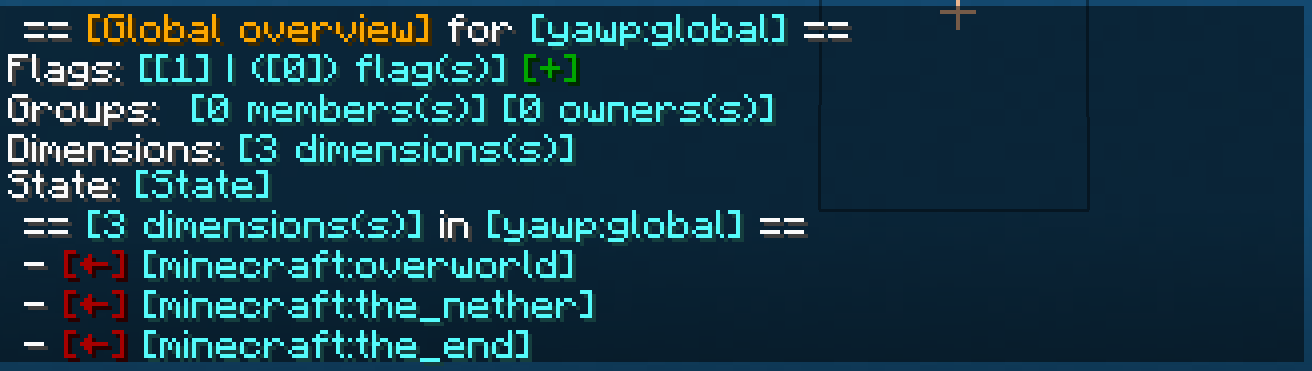
## *The* Global Region
The Global Region is… well global. Flags set in the Global Region, apply to all dimensions of the server and thus all
Local Regions.
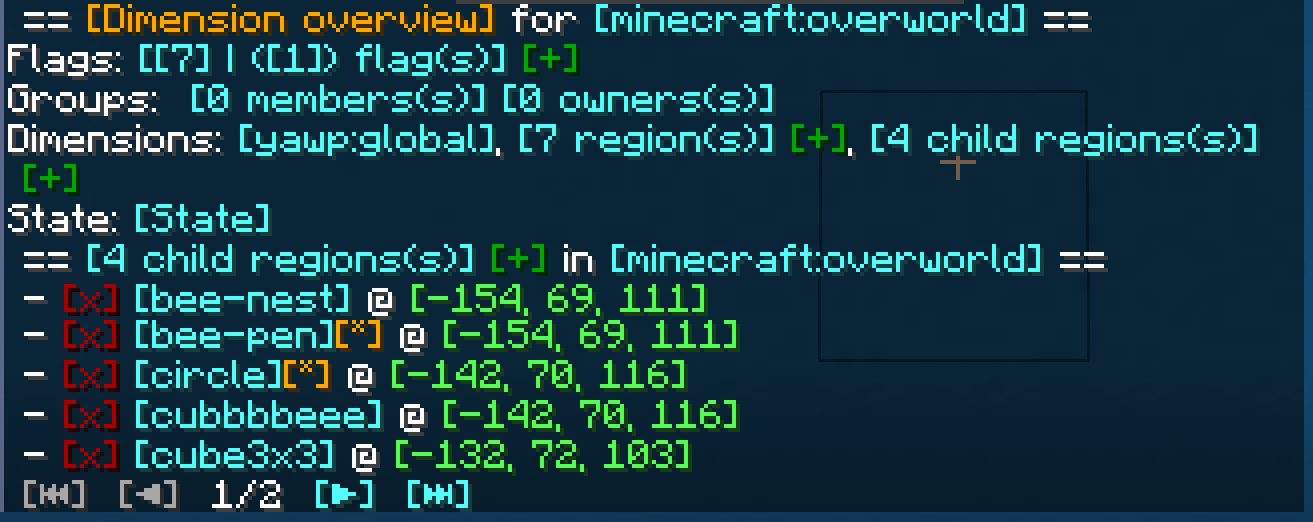
## Dimensional Regions
Dimensional Regions are special regions which are tied to one dimension – like gamerule-flags for different dimensions.
Dimensional Regions have no spatial restrictions in the corresponding dimension. Dimensional Regions work like normal
regions, but are tied to a dimension.
They can’t be created manually. They are in fact automatically generated with each new dimension. The first Dimensional
Region for the overworld is created when the server is created.
The following Dimensional Regions are created whenever a player travels to a new dimension, thus creating the new
dimension with their respective Dimensional Region. Modded dimensions are supported as well.
## Local Regions
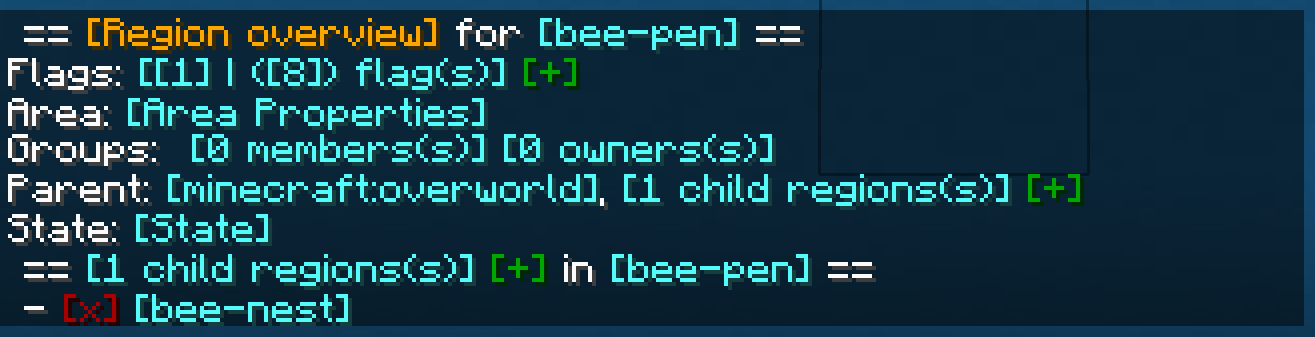
Local Regions are the regions you most likely now from WorldGuard or WorldProtector. They have a defined area in which
they work in and which they are limited to.
With Local Regions you are able to create areas in your world, which you want to protect from certain actions/events
which are caused by players, other entities or the environment.
To create a Local Regions you will need to have the permission of the parent region or permission from the config.
[Local Regions can be created](https://github.com/Z0rdak/Yet-Another-World-Protector/wiki/Commands#creating-a-local-region)
by marking the area with a RegionMarker and executing the corresponding command or by just using a command without the
RegionMarker.
For now the area of a region can be defined as in a cuboid or spherical shape, but I am planning to add more shapes for
region areas in future updates.
***
## Properties of regions
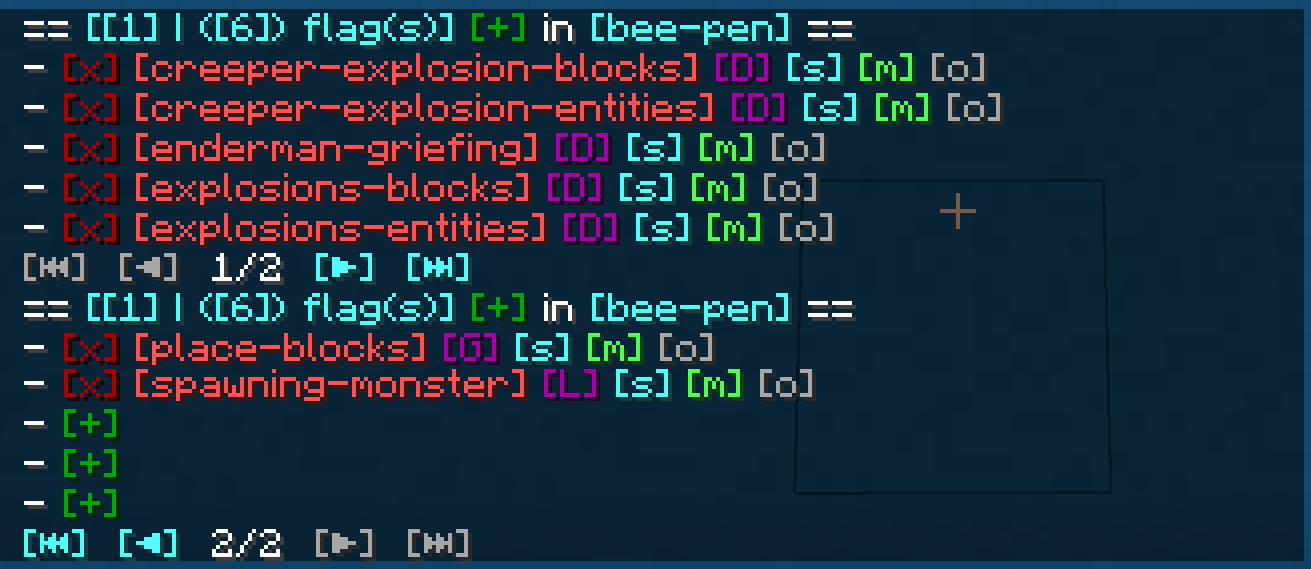
The properties of regions, flags, groups, etc. can all be managed through
an [interactive CLI](https://github.com/Z0rdak/Yet-Another-World-Protector/wiki/Interactive-CLI).
The colored text indicates interactive shortcuts commands or command suggestions. All colored text have a tooltip hint
which explains shortly what clicking on the corresponding link does.
Clicking on them gives the player a suggestion for executing a command or sometimes straight execute the command which
is hinted by the hover text.
Regions can only be managed by their owners, or by players which have the required OP level or have an entry in the
configuration. For more information, visit the wiki.
***

Whenever a new Local Region is created without supplying a parent region, the parent is set to the Dimensional Region
which the new Local Region is created in.
Local Regions can also have child regions. The children of a Local Regions need to be contained in the area of the
parent region. The region hierarchy also defines the region priorities. Child regions always must have a higher priority
than their parent.
Dimensional Regions always have the Global Region as a parent, and thus the Global Region all Dimensional Regions as
child regions.
***

Regions have owners and normal members. Owners are allowed to manage the region and bypass the flags, members are
only allowed to bypass the flags set in the region.
Owners and Members can be individual players or a [team](https://minecraft.fandom.com/wiki/Commands/team).
Groups allow you assign specific region permissions to different players and teams. Currently, there are only two
default groups: **owners** and **members**.
***

– **Owners** can manage their region themselves and add other players/teams to the region. They can also create their
own sub-regions within their region, manage flags, ect. and of course owners bypass flags.
– **Members** are only allowed to bypass flags only.
I am planning on adding a [LuckPerms](https://www.curseforge.com/minecraft/mc-mods/luckperms) integration with a future
update, so you can define your own groups and permissions.
If you have trouble with setting up regions, visit the discord for help.
***

Flags are the core of the region protection system. They define which actions are allowed or denied in a region. Flags
can be set to
– **Allowed**, to allow the corresponding action,
– **Denied**, to deny the corresponding action,
– **Disabled**, to disable the specific flag for flag checks.
Child regions inherit the flags from their parent regions. It is further possible to override the flag state for child
regions by setting the **override** property of the flag of the parent region accordingly.
See the [Flags](https://github.com/Z0rdak/Yet-Another-World-Protector/wiki/Flags) page for more details about the
different flags.
I am planning to add more flag in the future. A list of suggested flags which I’ll slowly add to the mod can be found
here: [Flag suggestions](https://github.com/Z0rdak/Yet-Another-World-Protector/issues/66)
There will also be more complex flags in the future. Like *ListFlag* which will allow you to define a list of allowed
blocks/entities/.. which are forbidden in the context of a flag.
***

***
The commands of mod are also designed to be used by the server console and can be executed by command blocks.
This allows you to automate region setups, add/remove players, enable or disable regions, etc.
***
YAWP provides a growing mod integration API for easier mod and modpack integration. Currently, the API allows other mods
to listen for events for region creation, changes and deletion and cancel these events to prevent them from happening.
Additionally, there are events for flag checks and their results, which can be used to manipulate the outcome of the
flag check.
***
[](https://github.com/Z0rdak/Yet-Another-World-Protector/wiki)
The client side installation of the mod provides language support (I18n) in form of a resource pack. Currently, english,
german and russian language is supported.
Starting with mod version 0.0.2.9-beta2 and Minecraft Version 1.19.4, YAWP provides a default english translation.
If your language is not yet supported, feel free to reach out to me via discord or issue a pull request via github! 🙂
***
The configuration of the mod allows you to control which is allowed to use the mod, sets default flags for Local and
Dimension Regions, command line interface options, etc.
The configuration is split in different files, covering different topics.
– `yawp-common.toml` – config for command permissions
– `yawp-flags.toml` – config for flags, custom flag messages, etc
– `yawp-region-defaults.toml` – config for default region properties
Since YAWP is a server-side mod, the config for it is found in the directory `/serverconfig` in your minecraft world
directory.
***
[](https://github.com/Z0rdak/Yet-Another-World-Protector/wiki)
The documentation of the mod is small but growing. I am trying to keep up with the content. You can find the
documentation [<< here >>](https://github.com/Z0rdak/Yet-Another-World-Protector/wiki).
The documentation covers
* descriptions of different regions
* getting started & FAQ
* available commands & flags
* configuration
* and more …
If something is not covered feel free to hop on our discord server and ask your question there. 🙂
___
## Roadmap
There are many more features to come. The mod is in active development!
The following list is not comprehensive.
* Different flag types (List, Effect, …) for more granular control
* Data pack driven flag configuration
* Region boundary visualization
* Define your own region groups for more granular management of regions (LuckPerms)
* More granular permission system (combined with the more granular group features)
* Region templates for easier managing same regions with different spatial properties
* Region triggers for entering/leaving a region (for displaying messages, executing commands, etc)*
* Regions with different shapes (Cylinder, Prism, 3DPolygon)*
*
YARRP
Has it ever bothered you that so much configuration of blocks, items, recipes,
and now even enchantments is defined in untyped JSON files? Well then you should
probably just use
[data generation](https://docs.fabricmc.net/develop/data-generation/setup) which
is much more battle tested and even used by Mojang for the Vanilla data. _But_,
if you _also_ want to be able to adjust the data dynamically or want some things
to be configurable, then this might just be the thing for you. YARRP is inspired
by [ARRP](https://modrinth.com/mod/arrp) and
[BRRP](https://modrinth.com/mod/brrp) but written from the ground up with an
easy to use Kotlin API. It allows you to create resource packs (i.e. both data
packs and asset packs) at runtime, so you don’t need to have JSON files ready
for all possible options.
## Usage
To add YARRP as a dependency, add the following to your `build.gradle.kts`:
“`kotlin
repositories {
// you can use either one
maven(“https://jitpack.io”)
maven(“https://api.modrinth.com/maven”)
}
dependencies {
// replace the versions and loader as needed. the loader is one of `fabric` or `neoforge`
modImplementation(“com.github.RubixDev.YARRP:yarrp-mc1.21.1-fabric:v0.2.0”) // when using jitpack
modImplementation(“maven.modrinth:yarrp:0.2.0+1.21.1-fabric”) // when using modrinth maven
}
“`
Don’t forget to also list YARRP as a dependency in your `fabric.mod.json` and
`neoforge.mods.toml` files.
You can then use YARRP by creating a pack and adding it to one of the register
callbacks. Here’s an example:
“`kotlin
object MyModResources {
// call this in your mod initializer
fun register() {
YarrpCallbacks.register(PackPosition.AFTER_VANILLA, ResourceType.SERVER_DATA) {
add(PACK)
}
}
@JvmField
val PACK = RuntimeResourcePack(
RuntimeResourcePack.createInfo(
Identifier.of(“modid”, “my_runtime_pack”),
Text.of(“Pack Title”),
“pack version”, // should probably be set to the version of your mod
),
RuntimeResourcePack.createMetadata(Text.of(“pack description”)),
)
val MY_ENCHANTMENT: RegistryKey = PACK.addEnchantment(
Identifier.of(“modid”, “my_enchantment”),
Enchantment.definition(
// this dummy type can be used to create a RegistryEntryList from a given TagKey
// but should only be used for adding resources to a runtime pack
DummyHolderSet(ItemTags.LEG_ARMOR_ENCHANTABLE),
5,
3,
Enchantment.leveledCost(5, 8),
Enchantment.leveledCost(55, 8),
2,
AttributeModifierSlot.LEGS,
),
)
init {
if (MyModSettings.myEnchantmentIsTreasure) {
PACK.addTag(EnchantmentTags.TREASURE) { add(MY_ENCHANTMENT) }
} else {
PACK.addTag(EnchantmentTags.NON_TREASURE) { add(MY_ENCHANTMENT) }
}
if (MyModSettings.enableRecipe) {
PACK.addRecipeAndAdvancement(
Identifier.of(“modid”, “my_recipe”),
ShapedRecipeJsonBuilder.create(RecipeCategory.MISC, Items.DIAMOND, 64)
.criterion(“tick”, TickCriterion.Conditions.createTick())
.pattern(“//”)
.pattern(“//”)
.input(‘/’, Items.STICK),
)
}
}
}
“`
Full API documentation can be found at
[yarrp.rubixdev.de](https://yarrp.rubixdev.de).
(YARL) Yet Another Resource Loader

# Yet Another Resource Loader
**Yet Another Resource Loader (YARL)** is a lightweight utility mod that allows modpack creators to ship default **resource packs** while preserving full in-game configurability.
YARL automatically detects and enables resource packs placed in **`config/YARL/packs`**.
Packs in this folder are selected by default when the game launches, but players remain free to disable them at any time through the standard Resource Packs menu.
This mod is not intended to replace mods such as OpenLoader, which remain ideal for essential startup packs. Instead, YARL provides a flexible way to distribute non-essential resource packs that are enabled by default but fully optional for the user.
## IMPORTANT NOTICE
**Modpack creators should not distribute the generated `yarl.toml` configuration file.**
The file is meant to be created automatically for each user on first launch and should not be pre-packaged with a modpack.
Yapping Tooltips

Yapping Tooltips is a small client mod that adds tooltips to most items, developers can easily add compatibility to their items aswell.
_Feel free to include this project in modpacks!_
## 
– Developers can easily add their own tooltips by adding this to your language file:
`”yapping_tooltips.(translation_key).desc”: “This is a tooltip”`
– An example for adding a tooltip to a stone block that reads “Hello world” would be:
`”yapping_tooltips.block.minecraft.stone.desc”: “Hello world”`

[](https://discord.gg/jmHpajd)
[](https://discord.gg/eJePAPE27T)
[](https://bsky.app/profile/yirmiri.zeus.kitchen)
[](https://twitter.com/Yirmiris)
[](https://www.youtube.com/@Yirmiri)
[](https://www.curseforge.com/members/yirmiri/projects)
[](https://modrinth.com/user/Yirmiri)
[](https://ko-fi.com/yirmiri)
[](https://yirmiri.carrd.co)

[](https://modrinth.com/mod/excessive-building)
[](https://modrinth.com/mod/delicate-dyes)
[](https://modrinth.com/mod/yapping-tooltips)
[](https://modrinth.com/mod/runiclib)
[](https://modrinth.com/mod/urban-decor)
[](https://modrinth.com/mod/dungeons-delight)

[](https://www.bisecthosting.com/Yirmiri?r=MR+YT)

**Q:** I have an issue/bug I want to report, where can I do that?
– **A:** You can leave bug reports on the [GitHub page](https://github.com/Yirmiri/Yapping-Tooltips/issues). Please be sure to see to both see if someone else has reported the same issue to avoid duplicates and to use proper tags when possible.
**Q:** I have a suggestion for the project, where can I leave it?
– **A:** You can leave suggestions for the project in [our Discord server](https://discord.gg/jmHpajd) or the [GitHub page](https://github.com/Yirmiri/Yapping-Tooltips/issues), please make sure to follow the guidelines for posts/issues and use proper tags when possible.
**Q:** Will there be a port to **X** version?
– **A:** I do not have any plans to port to any older versions of Minecraft, as for newer versions of the game I will probably be sticking to the biggest modding version at a given time since that will be the version I will be playing the game on.
Yappadium
Yappadium is a Performance modpack based around a steady FPS and TPS count
The Combined mods have been carefully selected to be safe in your worlds and provide noticeable speed benefits on any device.
Yappadium includes features that allow you to experience Minecraft just as you remember it, no extra mods are included in the modpack
**IMPORTANT MESSAGES FOR THE (NEO) FORGE VERSION**
– **DO NO**T update Nvidum (NeoForge), This wil crash you’re game.
– **DO NOT** download Sodium Extra’s, this will crash you’re game.
– If you want to play with the Create mod, please download the Create version for Yappadium or **delete Radium** from the modlist.
My PC specifications are:
CPU: AMD Ryzen 5 9600X 6-Core z
GPU: NVIDIA GeForce RTX 5060 Ti 16GB Version
**I will regularly update this modpack to newer versions if most of the mods are up to date!**