Zusz’s CoffeeCraft2: ReBrewed
# ☕ Zusz’s CoffeeCraft2: ReBrewed
**Brew. Experiment. Energize.**
**Zusz’s CoffeeCraft2: ReBrewed** is a comprehensive and creative coffee mod that brings **variety, customization, and a jolt of caffeine** to your Minecraft world!
## 1.3.2 Update: Out Now!
## 🔥 Features
* ✅ **264 completely unique coffee combinations** — combine ingredients to your liking!
* ⚡ **Original caffeine system** — experience the perks and side-effects of your coffee intake!
* 🧪 **Dynamic brewing mechanics** — your ingredients matter!
* 📚 **JEI Integration** — easily view coffee recipes, ingredients, and results in-game!
* 🚀 **More content coming soon** — new ingredients, and effects are on the way!
## ☕ Why Zusz’s CoffeeCraft2?
* This mod provides an immersive coffee brewing experience, and a unique caffeine system, seen nowhere else!
* This is the **official successor** to the original **Zusz’s CoffeeCraft**, fully reimagined for modern Minecraft versions, with new mechanics, so **if you liked Zusz’s CoffeeCraft, this is the mod for you!**
* Whether you’re a casual sipper or a coffee-crazed alchemist, this mod offers **a flavorful experience full of experimentation** and discovery!
### 🛠️ Supported Modloader and Versions:
* 🧩 **NeoForge**
* 🧪 Supports Minecraft 1.21.0 and **1.21.1**
## ☕ 1.3.2: The Sack Update
From cherry to cup — expand your brewing with new storage, new drinks, and smoother systems.
### ☕ Additions
– Added a new coffee type: **Americano**
– Added **Coffee Cherry & Ground Coffee Sacks**
– Hot Chocolate now requires milk to brew
### 🐛 Fix
– **Fixed Excelsa coffee bushes missing texture**
## Out Now!
## 🔗 Links
**Zusz’s CoffeeCraft2: ReBrewed**
* [Modrinth](https://modrinth.com/mod/zuszs-coffeecraft2-rebrewed)
* [CurseForge](https://www.curseforge.com/minecraft/mc-mods/zuszs-coffeecraft2-rebrewed)
**Original Zusz’s CoffeeCraft**
* [Modrinth](https://modrinth.com/mod/zuszscoffeecraft)
* [CurseForge](https://www.curseforge.com/minecraft/mc-mods/zuszs-coffee-craft)
**Zusz’s Lil Donuts**
* [Modrinth](https://modrinth.com/mod/zuszs-lil-donuts)
* [CurseForge](https://www.curseforge.com/minecraft/mc-mods/zuszs-lil-donuts)
Zume
# IMPORTANT LICENSE NOTICE
By using this project in any form, you hereby give your “express assent” for the terms of the license of this project (see [LICENSE](https://github.com/Nolij/Zume/raw/master/LICENSE)), and acknowledge that I (the author of this project) have fulfilled my obligation under the license to “make a reasonable effort under the circumstances to obtain the express assent of recipients to the terms of this License”.
# Zume
An ~~over-engineered~~ simple zoom mod.
This mod adds a keybind which zooms in your FOV while it’s held down, allowing you to see further away, and keybinds
for increasing and decreasing the zoom level.
# FAQ
#### Q: Where is the config?
A: You’ll find the config at `.minecraft/global/zume.json5` (note that this is the default `.minecraft` folder, not
the instance `.minecraft`). You can modify the file while the game is running, and the config will be automatically
reloaded. On platforms which have mod menus (such as Forge, and Fabric with [Mod Menu](https://modrinth.com/mod/modmenu)
installed), the config button for Zume will open this file in your system text editor.
#### Q: discord where
A: https://discord.gg/6ZjX4mvCMR
#### Q: What version is this for?
A: Zume supports the following platforms:
– Fabric: Any version supported by Fabric Keybinding API v1 (currently 14.4+)
– NeoForge: 20.4+ (requires NeoForge 20.4.195+)
– LexForge: 14.4 – 20.5 (requires MixinBootstrap before 16.1) (there are currently no plans to support 20.6+)
– Legacy Fabric: Any version supported by Legacy Fabric Keybinding API v1 (currently 7.10 – 12.2)
– Babric (Fabric for Minecraft Beta): Any version supported by Station API (currently b7.3)
– Vintage Forge: 8.9 – 12.2 (requires MixinBooter or UniMixins)
– Archaic Forge: 7.10 (requires UniMixins)
#### Q: Can you add support for ?
A: Every platform I intend to add support for myself is already supported. PRs are welcome for other platforms **if
the following conditions are met**:
– Must not break single-jar compatibility with any already supported platform (obviously).
– Must not be for a platform that has a 1st-party compatibility layer for an already supported platform – explicit
Quilt support will not be accepted so long as Quilt maintains a Fabric compatibility layer; it’d be a waste of CI
time. [Sinytra Connector](https://github.com/Sinytra/Connector) is a 3rd-party compatibility layer, so explicit
Forge support will be provided.
– Must not manually maintain overridden game options; implementations that look like
[Mooz’s](https://github.com/embeddedt/Mooz/blob/92570f7449a7e71c1c0b988788027b10c00f1346/src/main/java/org/embeddedt/mooz/ClientProxy.java#L35-L56)
will not be accepted – no offense [embeddedt](https://github.com/embeddedt). Direct ASM is fine as long as functionality is similar enough.
– Must make a reasonable effort to be maximize compatibility with existing mods on target platforms – see use of
Neo/LexForge API over mixins in Neo/LexForge implementations, and use of `@WrapWithCondition` and
`@ModifyExpressionValue` and such from MixinExtras over `@Redirect` in most implementations.
– Must follow existing format – add a Unimined subproject for each newly supported platform.
– Must not have exclusive features without significant justification – if you’re adding a feature, add it to every
version.
#### Q: What kind of weird license is this?
A: OSL-3.0 is the closest equivalent to a LAGPL I could find. AGPL and GPL are incompatible with Minecraft, and LGPL
doesn’t protect network use. OSL-3.0 protects network use and is compatible with Minecraft.
#### Q: Why though? It’s so strict!!!!
A: This is, and will remain, free, copyleft software. Any requests to change the license other than to make it even
stronger will be denied immediately (unfortunately GPL and AGPL aren’t compatible with Minecraft due to linking
restrictions, as much as I’d like to use them). Even in situations where I use parts of other projects with more
“permissive” licenses, I will treat them as copyleft, free software.
## License
This project is licensed under OSL-3.0. For more information, see [LICENSE](https://github.com/Nolij/Zume/raw/master/LICENSE).
## Need a Minecraft server? Consider CreeperHost!

Zero Point Systems

Zero Point Systems is a mod that adds many unique logistical blocks and items that can be used for creating redstone contraptions, controlling Valkyrien Skies ships, transmitting data, and more!
The primary feature is a unique cable system that allows for four independent signals to be sent through a single block: the Dense Cable. These signals can be either redstone signals or Forge Energy signals, and you can combine them within a single dense cable. Just make sure they’re all on separate channels, or there might be explosive consequences! You can combine single cables into dense cables and vice versa with the use of the Dense Cable Separator block, which transfers the signals between the dense cables and 4 individual ones which are distinguished by colored faces.
To go along with these dense cables, there are several blocks which connect directly to them without the use of the usual separator block:
– The Octo and Dodeca Controllers. These controllers map keys on your keyboard directly to the colored channels of a dense cable when you sit at them. Their primary intended use case is as a control interface for VS ships, but you can also use them to control anything you like.
– The Switch Panel. This panel connects a tiny lever directly to each channel of a dense cable.
– The Graduated Lever. This lever connects to a single cable and allows precise control of the redstone signal strength passing through it.
The Octo and Dodeca Controllers. These controllers map keys on your keyboard directly to the colored channels of a dense cable when you sit at them. Their primary intended use case is as a control interface for VS ships, but you can also use them to control anything you like.
The Switch Panel. This panel connects a tiny lever directly to each channel of a dense cable.
The Graduated Lever. This lever connects to a single cable and allows precise control of the redstone signal strength passing through it.
There is also a Data Cable system that can send strings of letters over long distances. This can be used to send and receive radio signals, display text on panels, compare text, and automatically record incoming messages into books! You can even play the messages out loud using the text-to-speech Loudspeaker block!
Credits:
– French + German translations courtessy of ruralpainter857
ZoomerLibrary
# ZoomerLibrary
LibZoomer **unofficial architectury port**.
A library that allows other mods to create zooms and custom spyglasses easily.
## Usage
**WARNING:** This API is still not finished and breaking changes may happen until a 1.0.0 release happens!
ZoomerLibrary provides zooming through zoom instances, which contains three sub-instances: transition modes, mouse modifiers and zoom overlays. A zoom instance can be created with different subinstances, which can be either provided by the library or implemented by the mod itself. In order to a zoom instance to be functional, it must be registered by the ZoomRegistry. In order to make the instance zoom in, the instance’s zoom state must be set to true, which can be done using the `setZoom` method, the vice-versa can be done by setting it to false.
Zoom Out
This datapack allows u to zoom out while being in the 3rd person camera. There are stages of how much u zoom out to get ur perfect zoom depending on the scoreboard score of the trigger scoreboard. The nearest is only 6 blocks compared to the furthest of 14 blocks (normal is 4)

Zombie Nightmare Expansions – Undead Horror Monsters

**Welcome to Zombie Nightmare Expansions, a new horror mod centred on adding new undead monsters with unique nightmarish mechanics.**
Discord server https://discord.gg/arphex
These mobs appear rarely in any overworld biomes and their spawn rates can be configured individually (including disabling specific mobs if required). All modpack inclusions welcome. More mobs planned in future!
Current mobs:
DISEMBOWELER

Large, monstrous zombie with entrails hanging out, seeking blood and vengeance. Lumbers around looking for players and cows to consume, with attacks packing a heavy punch. Drops “corrupted heart” items on death.
TORMENTED STEVE

A hideous monstrosity disguising itself as a regular player (eight player skin variants). When stationary, it resembles the normal skin, but as soon as it moves, the true nightmarish form comes out. Sometimes found hanging from ceilings ready to drop on your head. A very strong and vicious opponent, dropping enchanted golden apples on death.
BLOOD EAGLE

A huge demon/dragon-like zombie with appendages made entirely from stretched out flesh, and sporting a set of razor-sharp teeth. Capable of both flying and walking, sometimes attacking from the air with spit projectiles or from the ground with melee – Eats pigs. Very strong, plus tameable and rideable (tamed with 10 corrupted hearts, configurable to disable taming).
BRUTALISER

MINIBOSS. A huge, strong zombie that can smash the ground to create block shockwaves dealing devastating damage and knockback on impact. You can jump over shockwaves or evade them – whenever you move close to attack, be sure to evade quickly before it gets the chance to strike! Attacks sheep and drops a “Deathly Onyx” on death, used for crafting a special staff item that lets you repulse nearby undead mobs (right click hold) and even summon crawling minions (ground left click ability, charges up to 5 stored summons by killing undead while it is in your inventory).
SKIN CRAWLER

The weakest enemy in the mod, but more relentless than any other. Capable of camouflaging itself by changing colour to match the blocks around it, and breaking through stone, deepslate, tuff, granite, diorite, andesite, and netherrack to get to you (this can be disabled in config). Moreover, it can climb walls and crawl through tight spaces, making it hard to avoid fully. Also attacks chickens.
SPINE WRENCHER

A tall, thin entity with tendril-like arms and a related appearance to the blood eagle, perhaps coming from a similar origin. This entity has to be close to spot you, unless you look directly at it. If you do so, then it will notice and come running towards your location. Given how thin it is, it has become fragile, so if you block its attacks with a shield, it will take damage whenever it tries to attack, providing a strong way of countering it. It is more than two blocks tall, but can crouch down to get through smaller gaps. Drops “Distorted Vertebrae” on death, used for crafting a powerful whip item.
Staff of the Undead crafting recipe includes both the Deathly Onyx and two Deathly Heart items, along with some vanilla components:

Whiplasher – crafting recipe includes a netherite ingot surrounded by eight “distorted vertebrae” dropped by Spine Wrencher mobs.

Zone Miner Single Use
## Zone Miner is a NeoForge mod that adds configurable area mining.
Switch between simple mining, 3x3x3, 5x5x5, or a fully custom mining shape, all while keeping vanilla-style durability handling and tool restrictions.
### Features
– Multiple mining modes:
– `1×1`
– `3x3x3`
– `5x5x5`
– `Custom`
– In-game keybinds to switch modes and open the custom area settings
– Mining direction follows the player’s look direction
– Live white block outline preview before breaking
– Only breaks extra blocks when the held tool is appropriate
– Ore vein support
– Vanilla block breaking logic is preserved for drops and interactions
## Two Versions Available
This project is available in two separate versions for NeoForge :
### Zone Miner
The standard version uses `legacy durability`.
Your tool loses durability based on the number of blocks actually broken.
[You’ll find it here!](https://modrinth.com/mod/zone-miner-legacy)
### Zone Miner Single Use
This version keeps the same mining features, but only uses `one durability point` for the whole area break.
_You’re on the right page!_
## Controls
– `Y` : Cycle mining mode
– `U` : Open custom area settings
## Custom Area Settings
The custom mode lets you configure:
– Left
– Right
– Up
– Down
– Depth
**Zone Miner is designed to stay simple and practical**
no enchantment requirement, no complicated setup, just configurable area mining with two durability variants depending on how you want to play.
Zone Miner Legacy
## Zone Miner is a NeoForge mod that adds configurable area mining.
Switch between simple mining, 3x3x3, 5x5x5, or a fully custom mining shape, all while keeping vanilla-style durability handling and tool restrictions.
### Features
– Multiple mining modes:
– `1×1`
– `3x3x3`
– `5x5x5`
– `Custom`
– In-game keybinds to switch modes and open the custom area settings
– Mining direction follows the player’s look direction
– Live white block outline preview before breaking
– Only breaks extra blocks when the held tool is appropriate
– Ore vein support
– Vanilla block breaking logic is preserved for drops and interactions
## Two Versions Available
This project is available in two separate versions for NeoForge :
### Zone Miner
The standard version uses `legacy durability`.
Your tool loses durability based on the number of blocks actually broken.
_You’re on the right page!_
### Zone Miner Single Use
This version keeps the same mining features, but only uses `one durability point` for the whole area break.
[You’ll find it here!](https://modrinth.com/mod/zone-miner-single-use)
## Controls
– `Y` : Cycle mining mode
– `U` : Open custom area settings
## Custom Area Settings
The custom mode lets you configure:
– Left
– Right
– Up
– Down
– Depth
**Zone Miner is designed to stay simple and practical**
no enchantment requirement, no complicated setup, just configurable area mining with two durability variants depending on how you want to play.
Zombified Player – Kill Your Inner Zombie
[](https://www.curseforge.com/minecraft/mc-mods/zombified-player) [](https://modrinth.com/mod/zombified-player) [.svg)](https://www.curseforge.com/minecraft/mc-mods/zombified-player) [](https://discord.gg/rSVp3nCpPx) [](https://ko-fi.com/D1D71EVQVC)
# Zombified Player
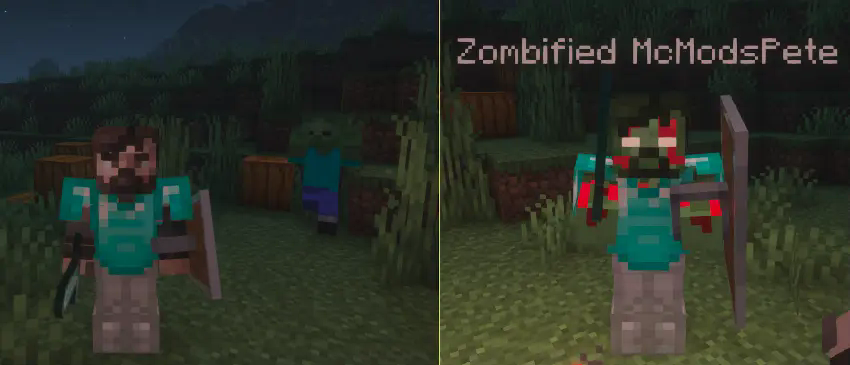
This Mod **spawns a zombified version of the player after death**.
**Beta Version!** Please report any problems you find under: [issues](https://github.com/MC-Mods-Pete/ZombifiedPlayer/issues)
## Features
– spawns a zombified version of the player after death
– uses the players actuall skin (uses the steve skin as fallback)
– applies a zombified overlay to the skin
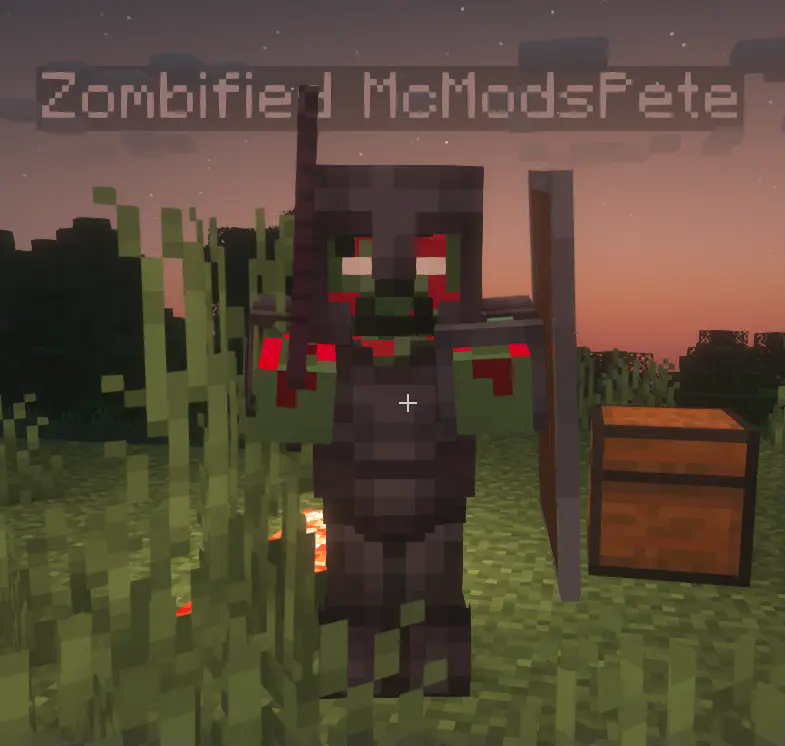
– the dead players inventory can be tranfered to his zombified version
The zombified player mob will use the same skin as the player (with a zombify overlay). Besides that the mob behaves like a regular zombie, but it will not burn in sunlight and it will not despawn.
With a config option it is possible to **transfer the players inventory to the zombified player**. The player will have to fight and defeat the zombified version of himself to get back the items he lost after dying.
Needed Mods:
– Fabric API
– Cloth Config
Optional Mods:
– Mod Menu
Zombie Tactics 2
# Zombie Tactics2 Mod for Minecraft
## Information
* A fork mod of Zombie Tactics, originally created by n643064
## Available Minecraft versions
### Maintaining
* 1.21.11
### Suspended
* 1.21.4 ~ 1.21.10
* 1.21.1
## Requirements
* Architectury API
### Fabric also needs
* MidnightLib
* ModMenu
* Fabric API
## Summary
This mod evolves zombies, beyond the limit.
* Includes almost all features in the original mod
* Modify the general attributes
* Attack range
* Attack speed
* Follow range
* Not burn under the sun
* The faster running speed
* Follow invisible enemies
* Additional Features
* Break blocks if they’re not able to reach the target
* Selectively float on the water
* Climbing the wall when colliding with each other
* Attempt to better items to take
* Jumping over the blocks
* Spawn under the sun
* Break a chest to get loots
* Dynamic target search mechanism
* Summon N zombies with the command `/sumz`.
* And more…
Everything can be configurable!
## Issues
Feel free to post any bugs or suggestions on GitHub.