BuildCraft Silicon
The silicon submodule as provided by [BuildCraft](https://modrinth.com/mod/buildcraft).
This submodule provides higher-technology construction blocks powered by specialized Lasers, such as:
* the Advanced Crafting Table, a powerful auto-crafting block,
* the Assembly Table and the Integration Table, used as a more advanced step in crafting high-tech BuildCraft blocks and items.
Note that the [BuildCraft](https://modrinth.com/mod/buildcraft) project contains the complete mod in single-JAR format – but not all versions are available in this format; likewise, not all versions are available in this multi-JAR submodule format.
Licensing information is provided in the full version’s description above.
BuildCraft Factory
The factory submodule as provided by [BuildCraft](https://modrinth.com/mod/buildcraft).
This submodule adds single-block, smaller-scale machines, such as the following:
* **Mining Well** – 1×1 vertical mining block,
* **Pump** – liquid extraction block,
* **Auto Workbench** – low-tier automatic crafting block,
* **Tank**,
* **Flood Gate**,
* **Chute**,
* **Distiller** and **Heat Exchanger**.
Note that the [BuildCraft](https://modrinth.com/mod/buildcraft) project contains the complete mod in single-JAR format – but not all versions are available in this format; likewise, not all versions are available in this multi-JAR submodule format.
Licensing information is provided in the full version’s description above.
BuildCraft Energy
The energy submodule as provided by [BuildCraft](https://modrinth.com/mod/buildcraft).
This submodule provides content such as:
* Oil fields in world generation,
* MJ/RF-generating engines:
* the low-power Redstone Engine, usable only with specialized low-power consumers,
* the soild fuel-based Stirling Engine,
* the liquid fuel-based Combustion Engine.
Note that the [BuildCraft](https://modrinth.com/mod/buildcraft) project contains the complete mod in single-JAR format – but not all versions are available in this format; likewise, not all versions are available in this multi-JAR submodule format.
Licensing information is provided in the full version’s description above.
BuildCraft Core
The core/library submodule as provided by [BuildCraft](https://modrinth.com/mod/buildcraft).
This submodule provides shared code used by other BuildCraft submodules, as well as some blocks/items shared between them (crafting component items, area marker blocks, etc). Notably, the mod’s Wrench item is provided by this submodule, which is often well-supported by other mods.
Note that the [BuildCraft](https://modrinth.com/mod/buildcraft) project contains the complete mod in single-JAR format – but not all versions are available in this format; likewise, not all versions are available in this multi-JAR submodule format.
Licensing information is provided in the full version’s description above.
BuildCraft Builders
The builders submodule as provided by [BuildCraft](https://modrinth.com/mod/buildcraft).
This submodule adds BuildCraft’s Builders – blocks which allow the construction of user-provided schematics within a world using resources gathered from that world. To create a Schematic, the Architect Table is utilized. Schematics created in this way can be imported and exported using the Blueprint Library and shared with others online.
Note that the Builders only really became fully stable in a multiplayer context with more recent versions for Minecraft 1.7.10.
Note that the [BuildCraft](https://modrinth.com/mod/buildcraft) project contains the complete mod in single-JAR format – but not all versions are available in this format; likewise, not all versions are available in this multi-JAR submodule format.
Licensing information is provided in the full version’s description above.
Broken Generation
Broken Generation adds a new generation to the game, which consists of “steps” of 8 blocks.
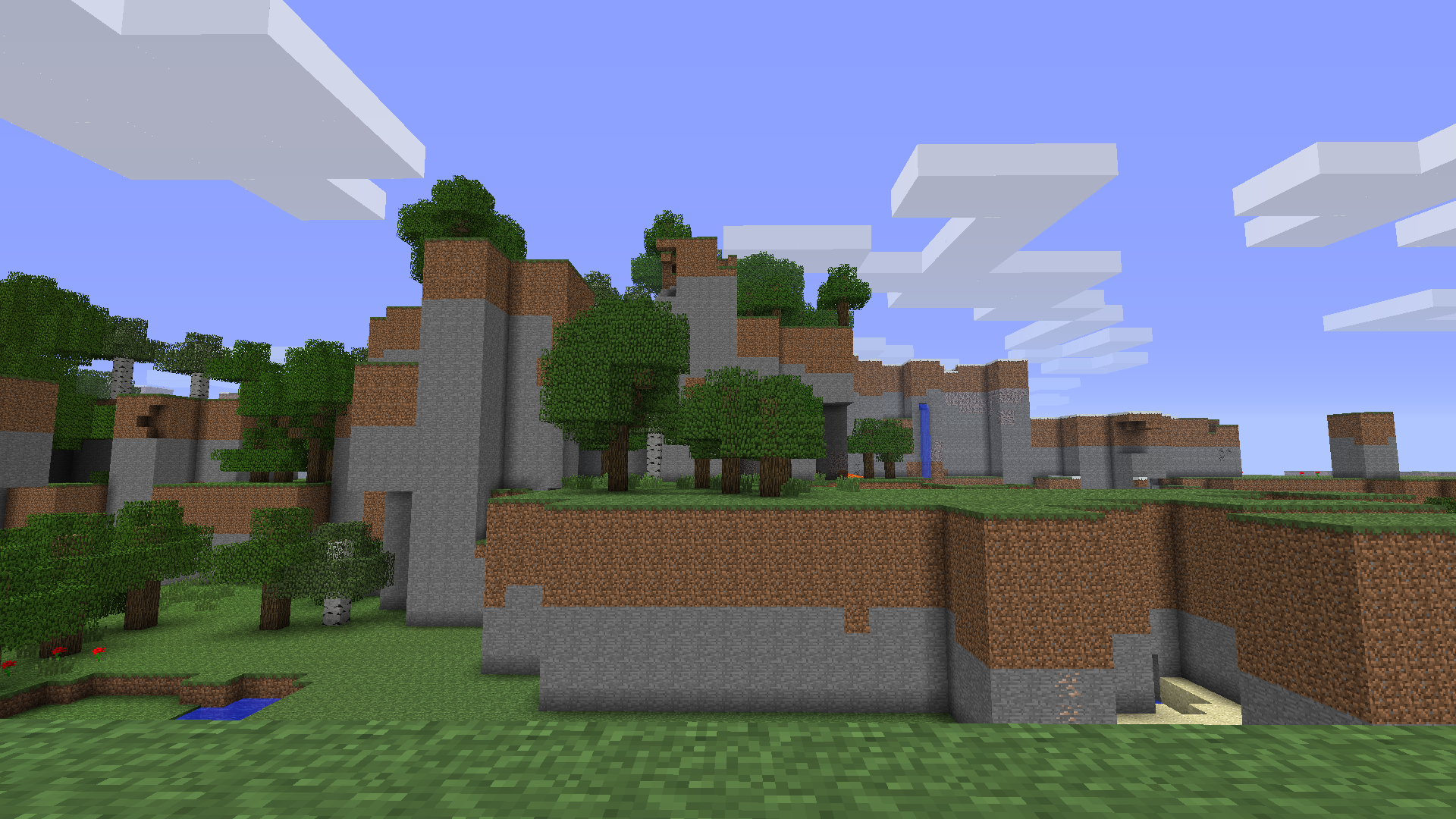
Here you can see caves and other features of normal generation
This mod doesn’t require anything to work, like Risugami’s Modloader.
This mod don’t remove:
– Caves
– Trees
– Mobs spawning
– Water
– Ores
– Cactuses
– Cane
The game with this mod generates regular lakes and lakes 8 blocks deep:

This mod may be ported to newer versions in the future, such as 1.5.2, 1.7.10, 1.12.2 and more.
This mod changes the GenerateTerrain function:
“`
double var15 = this.field_4180_q[((var10 + 1) * var9 + var11 + 0) * var8 + var12 + 0];
double var17 = this.field_4180_q[((var10 + 1) * var9 + var11 + 0) * var8 + var12 + 0];
double var19 = this.field_4180_q[((var10 + 1) * var9 + var11 + 0) * var8 + var12 + 0];
double var21 = this.field_4180_q[((var10 + 1) * var9 + var11 + 0) * var8 + var12 + 0];
double var23 = (this.field_4180_q[((var10 + 1) * var9 + var11 + 0) * var8 + var12 + 0] – var15) * var13;
double var25 = (this.field_4180_q[((var10 + 1) * var9 + var11 + 0) * var8 + var12 + 0] – var17) * var13;
double var27 = (this.field_4180_q[((var10 + 1) * var9 + var11 + 0) * var8 + var12 + 0] – var19) * var13;
double var29 = (this.field_4180_q[((var10 + 1) * var9 + var11 + 0) * var8 + var12 + 0] – var21) * var13;
“`
With normal generation, this passage would look like this:
“`
double var15 = this.field_4180_q[((var10 + 0) * var9 + var11 + 0) * var8 + var12 + 0];
double var17 = this.field_4180_q[((var10 + 0) * var9 + var11 + 1) * var8 + var12 + 0];
double var19 = this.field_4180_q[((var10 + 1) * var9 + var11 + 0) * var8 + var12 + 0];
double var21 = this.field_4180_q[((var10 + 1) * var9 + var11 + 1) * var8 + var12 + 0];
double var23 = (this.field_4180_q[((var10 + 0) * var9 + var11 + 0) * var8 + var12 + 1] – var15) * var13;
double var25 = (this.field_4180_q[((var10 + 0) * var9 + var11 + 1) * var8 + var12 + 1] – var17) * var13;
double var27 = (this.field_4180_q[((var10 + 1) * var9 + var11 + 0) * var8 + var12 + 1] – var19) * var13;
double var29 = (this.field_4180_q[((var10 + 1) * var9 + var11 + 1) * var8 + var12 + 1] – var21) * var13;
“`
Block Helper
# Block Helper
A direct WAILA port for old versions of Minecraft, with almost the same API and many, many additional fixes!
## Download
[**Download on CurseForge**](https://www.curseforge.com/minecraft/mc-mods/block-helper)
[**Download on Modrinth**](https://modrinth.com/mod/block-helper) (More versions are available here)
### Fixers
Some Minecraft versions have bugs. That’s normal. In order to fix some of them, you can install the following fixers:
– [Class Loader Fixer](https://modrinth.com/mod/class-loader-fixer)
– [Font Fixer](https://modrinth.com/mod/font-fixer)
## Old source code
This repository hosts the source code for BlockHelper versions 2.x and onwards.
The source code for older versions (0.x and 1.x), has moved [here](https://github.com/ThexXTURBOXx/BlockHelper-old).
## Installation
### Forge (all versions) / ModLoaderMP (≤ 1.2.3)
#### Client
Just drop the mod into the `mods` folder. Done! 🙂
#### Server
If you are running a server on MC 1.3.x or newer, just copy the Block Helper jar file into the `mods` folder.
On older versions, you need to download the dedicated server build of the mod.
It can be found under “Additional files” both on Modrinth and CurseForge.
In MC b1.5_02 and older, you need to copy all the files from this jar into the server jar.
In all newer versions, it is sufficient to just copy the jar file into the `mods` folder.
#### MCPC+/Cauldron/Bukkit
If you are running a server on MC 1.3.x or newer, just copy the Block Helper jar file into the `mods` folder.
On older versions, you need to download the dedicated Bukkit/MCPC+ build of the mod.
It can be found under “Additional files” both on Modrinth and CurseForge.
In MC b1.7.3 and older, you need to copy all the files from this jar into the Bukkit jar.
In all newer versions, it is sufficient to just copy the jar file into the `mods` folder.
### Fabric
Drop the mod into the `mods` folder and install [Apron](https://github.com/BetterThanUpdates/Apron) or [BetaLoader](https://github.com/paulevsGitch/BetaLoader) (for b1.7.3)
or [Fabricated Forge](https://github.com/arthurbambou/Fabricated-Legacy-Forge) (for 1.3.2+).
## Features
### Mod Compatibility
Next to Vanilla blocks, integration modules for the following mods are in place (list updated only irregularly!):
– Advanced Machines
– Advanced Solar Panels
– Applied Energistics 1
– Barrels
– BuildCraft 2 and 3
– ChickenChunks
– Ender Storage
– Equivalent Exchange 1, 2 and 3
– Factorization
– Falling Meteors
– Flora & Soma / Natura
– Forestry
– Forge Multipart
– GregTech
– IC²
– Immibis’s Microblocks
– IndustrialCraft
– InfiCraft
– NEI
– Pam’s Mods
– Project Zulu
– Railcraft
– Red Power
– Thaumcraft
– Thermal Expansion
– Total Panels
– Twilight Forest
Some of these mods still host downloads to this day.
If you cannot find downloads for some of these,
chances are that they are still downloadable via [MCModArchive](https://mcmodarchive.femtopedia.de/).
### API
Block Helper features WAILA’s API (with minimal changes) from version 2.x onwards.
Since there are many resources online on how to use the API, I will keep this as simple as possible here and just list a few “good” examples:
– [Block Helper’s own plugins](https://github.com/ThexXTURBOXx/BlockHelper/tree/1.5.2/src/main/java/mcp/mobius/waila/addons)
– [BlockHelperAddons](https://github.com/VintageModsReforged/BlockHelperAddons)
Just try to follow these examples and you will succeed. To safely register your plugin, use the code snippet from the
JavaDoc of the `mod_BlockHelper#registerPlugin` function.
### Other features
Yes, Block Helper has a few additional features and integrations you probably have not seen before 🙂
On the Modrinth and CurseForge page, there are a few images of most of these features in action!
_Please note that not every feature is available for every Minecraft version due to modding limitations._
#### NEI/AMI/HMI integration
– Two new keybinds (default: NUM3 and NUM4), which show all the recipes for or using the
block currently looked at
– Show the mod an item is from in the item’s tooltip [this also works without NEI/AMI/HMI in Apron]
– Another keybind specific for NEI (default: I), which shows all the applicable enchantments for the
currently highlighted item in the inventory
#### World Overlays
Just like NEI in MC 1.4.7 and onwards, Block Helper features a light level overlay and chunk border overlay. The default
keybinds for these are F7 and F9, respectively.
## Source Code
Block Helper is being developed for:
– [a1.2.6](https://github.com/ThexXTURBOXx/BlockHelper/tree/a1.2.6)
– [b1.1_01/b1.1_02](https://github.com/ThexXTURBOXx/BlockHelper/tree/b1.1_02)
– [b1.2_02](https://github.com/ThexXTURBOXx/BlockHelper/tree/b1.2_02)
– [b1.3_01](https://github.com/ThexXTURBOXx/BlockHelper/tree/b1.3_01)
– [b1.4_01](https://github.com/ThexXTURBOXx/BlockHelper/tree/b1.4_01)
– [b1.5/b1.5_01](https://github.com/ThexXTURBOXx/BlockHelper/tree/b1.5_01)
– [b1.6.5/b1.6.6](https://github.com/ThexXTURBOXx/BlockHelper/tree/b1.6.6)
– [b1.7-b1.7.3](https://github.com/ThexXTURBOXx/BlockHelper/tree/b1.7.3)
– [b1.8/b1.8.1](https://github.com/ThexXTURBOXx/BlockHelper/tree/b1.8.1)
– [b1.9p5](https://github.com/ThexXTURBOXx/BlockHelper/tree/b1.9p5)
– [1.0/1.0.1](https://github.com/ThexXTURBOXx/BlockHelper/tree/1.0)
– [1.1](https://github.com/ThexXTURBOXx/BlockHelper/tree/1.1)
– [1.2.3](https://github.com/ThexXTURBOXx/BlockHelper/tree/1.2.3)
– [1.2.4/1.2.5](https://github.com/ThexXTURBOXx/BlockHelper/tree/1.2.5)
– [1.3.2](https://github.com/ThexXTURBOXx/BlockHelper/tree/1.3.2)
– [1.4](https://github.com/ThexXTURBOXx/BlockHelper/tree/1.4)
– [1.4.1/1.4.2](https://github.com/ThexXTURBOXx/BlockHelper/tree/1.4.2)
– [1.4.3](https://github.com/ThexXTURBOXx/BlockHelper/tree/1.4.3)
– [1.4.4/1.4.5](https://github.com/ThexXTURBOXx/BlockHelper/tree/1.4.5)
– [1.4.6/1.4.7](https://github.com/ThexXTURBOXx/BlockHelper/tree/1.4.7)
– [1.5.x](https://github.com/ThexXTURBOXx/BlockHelper/tree/1.5.2)
Agenta
# Agenta
A authserver and skin fix for legacy versions of minecraft.
# Compatibility
Requires Java 7. (In theory this can be built for Java 5, but I lack the build tools required for that.)
If running this on Java 12 and newer, please add the following JVM argument: `–add-exports java.base/sun.net.www.protocol.http=ALL-UNNAMED`
1. As a mod: The same Jar will run on forge, bukkit and Risugami’s modloader for Minecaft versions Alpha 1.0.4 to Minecraft release 1.7.10 (These are merely the versions I tested)
2. As a JavaAgent: Add the following JVM argument: `-javaagent:{path}/agent.jar` (replace path with the location of the agent.jar)
3. Inline/static: In this setup, Agenta is essentially taking over the role of Launching minecraft. Add the following JVM argument and change out `{mainClass}` as needed depending on which minecraft version you are launching: `-Dagenta.main.class={mainClass}`
4. As a Bukkit plugin (Tested with bukkit for Minecraft Beta 1.2_01)
# JVM/Congig settings
Non of these are needed to launch Agenta. The available contexts are
“*” => ALL
“static” => When Agenta is launched as the main class with the expectation of chainloading another class manually.
“config” => Only appears in the config file.
| Context |
property |
Argument |
description |
| * |
agenta.assets.fml |
-Dagenta.assets.fml={value} |
A link to an archive Agenta should forward legacy forge download requests to |
| * |
agenta.assets.index |
-Dagenta.assets.index={value} |
The URL for the asset index Agenta should use as a base |
| * |
agenta.assets.routing |
-Dagenta.assets.routing=true |
Should agenta reroute requests the mojang’s asset servers? (default: “true”) |
| * |
agenta.assets.url |
-Dagenta.assets.url={value} |
The URL for the resource server Agenta should pull assets from |
* |
agenta.prt.color |
-Dagenta.prt.color=false |
Pass the value ‘false’ to disable colour printing. |
| * |
agenta.prt.debug |
-Dagenta.prt.debug=false |
Should agenta show debug messages? |
| * |
agenta.save.file |
-Dagenta.save.file=saves.json |
When handling saving for certain versions of old Minecraft that relied on long dead mojang endpoints, what should agenta call the save file? (default: “saves.json”) |
| * |
agenta.skin.resize |
-Dagenta.skin.resize=true |
Should agenta try to resize skins from 64×64 to 64×32 for better compatibility? (default: “true”) |
| * |
agenta.skin.merge |
-Dagenta.skin.merge=true |
Should Agenta take multi layered skins and attempt to flatten the layers down? (default: “true”) |
| * |
agenta.skin.cache |
-Dagenta.skin.cache=true |
Should agenta cache skin lookups? (default: “true”) |
| config |
agenta.config.version |
|
The version of agenta that generated a set config file. Will be used to detect if agenta should upgrade a set config file |
| static |
agenta.main.class |
-Dagenta.main.class={value} |
The class Agenta should try to load next when running in static/inline mode |
# Fixes
– Skin support for pre 1.7.10 versions
– Cape support for pre 1.7.10 versions
– Sound for versions of the game that predate 1.6
– World savings for certain pre-alpha builds (experimental)
– Forge 1.5.2 being unable to fetch it’s library files (experimental)
# Note
– The same jar will work for almost every version of minecraft that predates Release 1.8
– Any miscellaneous fabric based modloader _should_ be supported.
– NilLoader can load Agenta. (Agenta doesn’t meet the criteria of a [NilLoader mod](https://git.sleeping.town/Nil/NilLoader#:~:text=A%20NilLoader%20mod%20includes%20a%20complete%20copy%20of%20NilLoader%20within%20itself))
– Some ancient versions of Forge/modloader may require you to load Agenta as a jar mod.
– LiteLoader inforces compatibility checks and so can never be fully supported
Aether Beta
Aether Beta is a simple modpack aimed to users of Beta 1.7.3 who want to spice things up a little with the Aether mod, fulfilling the fantasy of filling that Glowstone portal with water.
What makes this modpack unique from just downloading the mod and installing it yourself is that everything required to run the mod is included in this pack. This streamlines the process of decompiling the Aether mod, adding it and the modloader to Beta 1.7.3, and ensuring that nothing messed up along the way, into simply clicking a button to download the pack.
Always Enough Items
AEI is an NEI clone. It has no cheat mode. It can only be used to view recipes.
You can press U on an item to see a list of recipes that the item is used in.
Press R on an item to view that item’s recipes.
I planned on adding the auto craft button functionality in a future update and mod support for Better Than Wolves and other mods. But I don’t know when I’ll actually ever get around to doing that.
Version 1.0 for alpha Minecraft doesn’t have recipes. It basically works like TMI