LegacyVoiceChat
# LegacyVoiceChat
**LegacyVoiceChat** adds proximity voice chat to legacy — including **Ornithe**, **StationAPI**, **Better than Adventure!**, **Project Poseidon**, **Risugami Modloader** and **More!**.
## ⚠️ WARNING
> **LegacyVoiceChat is currently a WIP mod.**
> Expect bugs, UI changes, and protocol changes at any time.
## Features
### Proximity Voice Chat
– 3D positional audio
– Directional sound based on player orientation
– Dynamic volume fading with distance
### Audio Device Management
– Choose custom **input** and **output** devices
– **Push-to-Talk** or **Voice Activation** modes
– Adjustable mic sensitivity
### Groups / Parties
– Create or join voice groups
– Talk privately with teammates (ignores distance)
### Mute & Deafen
– Mute specific players or yourself
– Deafen to silence all incoming voice
Looking for the raw jar file for MultiMc or Prism Launcher? [Click Here](https://legacyvoicechat.com/)
### Server Notes
Make sure to port forward “`25566 UDP“` or change the port in the server config
HowManyItems
HowManyItems (HMI) is an inventory editor and recipe viewer mod for older versions of Minecraft.
– Left click on items for recipes.
– Right click on items for uses.
– Go to the previous recipe you searched with ‘BACKSPACE’
– If your inventory contains all the items in a recipe you can click the ‘+’ button to automatically fill the recipe in
– Feel free to configure the mod to your liking in the options: turn cheat mode on to spawn stuff in.
Modmakers can add their own tabs with `addModTab(new Tab())` in `mod_HowManyItems`
# INSTALL
1. Install Modloader
2. Delete META-INF from the minecraft.jar
3. Insert this zip into the .minecraft/mods folder
4. ???
5. Success!
# SUPPORTED MODS
– Industrial Craft 1 & 2 – Macerator, Extractor, Compressor
– Industrial Craft 2 – Canning Machine, Recycler, Matter Fabricator
– Equivalent Exchange v3.55 – Glowstone Aggregator, Obsidian Aggregator, Dark Matter Locus
– Better Than Wolves v2.94 – Millstone, Saw, Turntable, Kiln, Crucible, Cauldron, Anvil
– Aether Mod v1.02 – Enchanter, Freezer (Compatible with older/mp versions)
– Uranium Mod – Reactor
– Flan’s Planes – Plane Workbench
– Buildcraft – Auto fill recipe support for Automatic Crafting Table
– New Frontier Craft – USE BETA PRERELEASE BUILDS OF HMI
# CREDITS AND SOURCES
[Original mod for b1.7.3 by rekadoodle](https://github.com/rekadoodle/HowManyItems)
[Port to b1.8.1 by Logan](https://github.com/LO6AN/MC-Addons/tree/main/Beta%201.8.1/My%20Mod%20Ports)
[Backport of Logan’s b1.8.1 port to b1.5_01 by MagicD3VIL](https://github.com/MagicD3VIL/HowManyItems)
Grimoire of Gaia
[**](http://www.minecraftforum.net/forums/mapping-and-modding/minecraft-mods/1284614-grimoire-of-gaia-3)
#### **Introduction**
My intention with this mod was to make Minecraft remain a challenge and to give it a more unique experience. Because I lack the skill in programming enhanced AI or equipment, I intended for this mod to add mobs and make the game harder while more powerful and well coded mods provide high-end enhancements to the player.
This mod is **not** beginner friendly. It is best used by *experienced players* seeking a challenge or later in the game session.
#### **Mod Compatibility (1.12.2)**
**Mods that the mod has added compatibility with;**
– [Baubles](https://www.curseforge.com/minecraft/mc-mods/baubles “Baubles”)
– [Thaumcraft](https://www.curseforge.com/minecraft/mc-mods/thaumcraft “Thaumcraft”)
– [Just Enough Items (JEI)](https://www.curseforge.com/minecraft/mc-mods/jei “Just Enough Items (JEI)”)
**Mods that have added compatibility;**
– [Ancient Warfare 2](https://www.curseforge.com/minecraft/mc-mods/ancient-warfare-2 “Ancient Warfare 2”)
– [Headcrumbs](https://www.curseforge.com/minecraft/mc-mods/headcrumbs “Headcrumbs”)
– [Universal Bestiary](https://www.curseforge.com/minecraft/mc-mods/universalbestiary “Universal Bestiary”)
#### **Information**
[****](http://the-grimoire-of-gaia.wikia.com/wiki/)
Official Wikia: ***[Link](http://the-grimoire-of-gaia.wikia.com/wiki/The_Grimoire_of_Gaia_Wiki)***
Minecraft Forum Thread:* **[Link](http://www.minecraftforum.net/forums/mapping-and-modding/minecraft-mods/1284614-grimoire-of-gaia-2-1-8-2c-mobs-monsters-monster)***
Join us on Discord:
[******](https://discordapp.com/invite/pGu5afh “Grimoire of Gaia Discord”)
Font Fixer
## Summary
This mod fixes and extends the Font Renderer in Legacy versions of Minecraft by essentially backporting a newer version of the `FontRenderer` class (1.5.2 was used as the base in version 1; 1.12.2 is used as the base in version 2).
## Details
In particular, the following bugs have been fixed and features have been added:
– Fix the text width calculation and shadows when rendering non-ASCII characters
– Change Font height to 9 instead of 8
– Add support for glyphs/unicode characters
– Add missing formatting and color codes
## Installation
### As a ModLoaderMP / Forge mod
This mod needs to be installed as a **jar-mod**. That means, you have to…
1. Be sure to back up your `minecraft.jar`!
2. Extract the content of the mod zip into the `minecraft.jar` file
3. Delete the `META-INF` folder in there
4. Overwrite any existing files when doing so!
5. ???
6. Profit!
### As a Fabric mod
Just place the mod file in your mods folder 🙂
## Issues
– Some **OptiFine** versions have minor issues with Font Fixer installed (e.g., custom fonts do not work)
– ~~Some unicode characters could not be rendered~~ – this has been fixed in version **2**!
CSave
# CSave
csave is a small utility mod for minecraft classic that adds the ability to save files locally
in game you notice no change, but you are able to use the save menu. instead of this going to a minecraft.net server that is down for almost 15 years it will save your level in the minecraft_classic directory in your home folder.
the goal is to have every version of classic supported
yes, i know that there is a betacraft addon offlinedatsave, but csave is just better
and this is a jarmod, so you must add it to the jarfile
CraftPresence
# CraftPresence
Completely customize the way others see you play Minecraft via Discord’s Rich Presence API & the DiscordIPC API
by [jagrosh](https://github.com/jagrosh)!
[](https://opensource.org/licenses/MIT)
[](https://crowdin.com/project/craftpresence)
[](https://app.codacy.com/gl/CDAGaming/CraftPresence/dashboard?utm_source=gl&utm_medium=referral&utm_content=&utm_campaign=Badge_grade)
[](https://gitlab.com/CDAGaming/CraftPresence/commits/master)
[](https://www.curseforge.com/minecraft/mc-mods/craftpresence)
[](https://www.curseforge.com/minecraft/mc-mods/craftpresence)
[](https://modrinth.com/mod/craftpresence)
[](https://modrinth.com/mod/craftpresence)
## General Notes
* Beginning in v2.5.0, [UniLib](https://gitlab.com/CDAGaming/UniLib) is now a **required** dependency
* UniLib is a new library mod I have created to abstract common API functions for more general use cases as well as
future projects
* The mod can be downloaded [here](https://modrinth.com/mod/unilib)
* This mod **will crash** if UniLib is not found or if using an incompatible version
* This mod identifies as a **Client Side-only** mod
* This means it **will not run** on the Server’s side.
* Fabric and Quilt mod loaders will simply ignore the
mod, while other mod loaders may crash.
* Some versions of the mod for Minecraft 1.14.x and above require
the [Fabric API](https://modrinth.com/mod/fabric-api)
and the [Fabric mod loader](https://fabricmc.net/use/installer)
* Some versions of the mod for Minecraft 1.13.x require
the [Rift API](https://www.curseforge.com/minecraft/mc-mods/rift)
and the [Rift mod loader](https://github.com/DimensionalDevelopment/Rift/releases)
* Some versions of the mod for Minecraft 1.1.0 and below
require [Risugami’s ModLoader](https://mcarchive.net/mods/modloader)
## Features
In addition to having the ability to change your discord status from “Playing Minecraft”,
This mod offers plenty of customization options to specify entirely how others see you play.
From having your current biome show up, to which dimension your in, as well as which server you’re in, and more.
The customization possibilities are limitless, with the only real limit being how creative you customize your display.
### Launcher and Pack Integration Support
CraftPresence will detect whether your Launch Directory contains:
* A ATLauncher Instance (instance.json)
* A valid Twitch/Overwolf/Curse/GDLauncher Manifest (manifest.json, minecraftinstance.json)
* A MCUpdater Instance (instance.json)
* A Modrinth Instance (profile.json)
* A MultiMC Instance (instance.cfg)
* A Technic installedPacks File (installedPacks)
If using any of these launchers, note the following:
* Prior to v1.6.0, it’ll put the packs name in your display as well as show its icon (when not in a
server)
* From v1.6.0 until v2.0.0, it’ll instead parse the Pack’s name into the `&PACK&` placeholder, that you can configure
for
usage in the RPC
* In v2.0, the pack’s info is instead parsed into the `pack.name` and `pack.icon` placeholders, that you can configure
for
usage in the RPC
As an example, this is how the mod will convert a pack’s name to an iconKey:
Example: `All the Mods 7` would parse as `allthemods7`
Note: MultiMC natively has an Icon Key Property that is used instead of converting from the Pack’s Display Name
## Commands
CraftPresence currently offers the following Commands:
Keep in mind the following:
* Commands must be prefixed by either `/craftpresence` or `/cp`
* In v1.5.0 and above, these commands are only usable via the Commands Gui, found within the Config Gui
___
* `/cp compile “[expr]”` – Test the output of a placeholder expression, via Starscript
* `/cp search (type:typeName, [searchTerm], all)` – Search for valid placeholders available to use with Rich Presence
* `/cp reload` – Reloads mod data
* `/cp request` – View Join Request Info
* `/cp export` – View export commands for mod data
* `/cp view` – Help command to display the commands available to view and control a variety of display data
* `/cp view placeholders` – Displays all available placeholders for use in the RPC
* `/cp view currentData` – Displays your Current RPC Data, in text form
* `/cp view assets (custom | all)` – Displays all asset icon keys available to you
* `/cp view dimensions` – Displays all Dimension Names available for use, requires `Show Current Dimension` to be
enabled
* `/cp view biomes` – Displays all Biome Names available for use, requires `Show Current Biome` to be enabled
* `/cp view servers` – Displays all Server Addresses available for use, requires `Show Game State` to be enabled
* `/cp view screens` – Displays all Gui Names available for use, if Per-Gui is enabled
* `/cp view items` – Displays all Item Names available for use, if Per-Item is enabled
* `/cp view entities` – Displays all Entity Names available for use, if Per-Entity is enabled
* `/cp reboot` – Reboots the RPC
* `/cp shutdown` – Shutdown the RPC (Can be turned on from `/cp reboot`)
* `/cp (help | ?)` – Help Command to display the above commands and these explanations
## KeyBinds
CraftPresence currently contains the following KeyBinds:
Notes:
* In v1.5.5 up to v1.8.0, KeyBinds are now customized in the Accessibility Settings in the Config Gui, and not the
normal controls menu
* In v1.8.0 and above, KeyBinds can now be customized in either the dedicated menu in the Config Gui or the normal
control menu on applicable versions
___
* `Open Config Gui` – KeyBind to open the CraftPresence Config Gui (Default: GRAVE/TILDE Key)
## About Placeholders and Functions
In some configuration areas, CraftPresence provides some placeholders and functions to make things easier:
Keep in mind the following:
* In v2.0.0, placeholders have been rewritten to be compatible
with [Starscript](https://github.com/MeteorDevelopment/starscript)
* The older list of this section can be
viewed [here](https://gitlab.com/CDAGaming/CraftPresence/-/wikis/Legacy-Placeholders-(v1.x))
* All Placeholders, functions, and code expressions must be surrounded with curly brackets (Example: `{foo.bar}`)
* In the event that you need to combine a placeholder with other data in a function argument, use the `getResult`
function
* Additional functions and standard variables are available
within [StandardLib](https://github.com/MeteorDevelopment/starscript/wiki)
___
### Placeholder List
The following placeholders are available for use anywhere in CraftPresence:
* General Placeholders:
* `general.brand` – The Minecraft branding label
* `general.icon` – The default display icon
* `general.mods` – The amount of mods currently in your mods folder
* `general.title` – The Minecraft title label
* `general.version` – The Minecraft version label
* `general.protocol` – The Minecraft version protocol label
* Menu Event Placeholders (Loading and Main Menu):
* `menu.message` – The main menu’s display data, while applicable
* `menu.icon` – The main menu’s display icon, while applicable
* Pack Placeholders:
* `pack.name` – The currently detected pack’s name
* `pack.icon` – The currently detected pack’s icon
* `pack.type` – The currently detected pack’s type
* Player Placeholders:
* `player.name` – Your username
* `player.uuid.short` – Your UUID (Trimmed Format)
* `player.uuid.full` – Your UUID (Full Format, if valid UUID)
* `player.icon` – Your player head icon, while applicable
* `player.position.x` – Your current in-game X position
* `player.position.y` – Your current in-game Y position
* `player.position.z` – Your current in-game Z position
* `player.health.current` – Your current in-game health
* `player.health.max` – Your current in-game maximum health
* `player.mode` – Your current game mode
* Gui Placeholders:
* `screen.message` – The current Gui Screen’s display data, while applicable
* `screen.name` – The current Gui Screen name
* `screen.icon` – The current Gui Screen icon
* `screen.default.icon` – The default Gui Screen icon
* Biome Placeholders:
* `biome.message` – The current biome’s display data, while in-game
* `biome.name` – The current biome name
* `biome.identifier` – The current biome identifier
* `biome.icon` – The current biome icon
* `biome.default.icon` – The default biome icon
* Dimension Placeholders:
* `dimension.message` – The current dimension’s display data, while in-game
* `dimension.name` – The current dimension name
* `dimension.identifier` – The current dimension identifier
* `dimension.icon` – The current dimension icon
* `dimension.default.icon` – The default dimension icon
* Entity Placeholders:
* `entity.default.icon` – The default entity icon
* `entity.target.message` – The currently targeted entity’s display data, while applicable
* `entity.target.name` – The currently targeted entity’s name
* `entity.target.icon` – The currently targeted entity’s icon
* `entity.riding.message` – The currently riding entity’s display data, while applicable
* `entity.riding.name` – The currently riding entity’s name
* `entity.riding.icon` – The currently riding entity’s icon
* World Placeholders:
* `world.difficulty` – The current world’s difficulty
* `world.weather.name` – The current world’s weather name
* `world.name` – The name of the current world
* `world.type` – The current world type
* `world.time.format_24` – The current world’s in-game time (24-hour format)
* `world.time.format_12` – The current world’s in-game time (12-hour format)
* `world.time.day` – The current world’s in-game day count
* Server Placeholders:
* `server.message` – The current server’s display data, while in-game
* `server.icon` – The current server icon
* `server.default.icon` – The default server icon
* `server.players.current` – The server’s current player count
* `server.players.max` – The server’s maximum player count
* `server.address.full` – (MP) The raw current server address
* `server.address.short` – (MP) The formatted current server address
* `server.name` – (MP) The current server name
* `server.motd.raw` – (MP) The current raw server motd
* `server.minigame` – (Realm) The current realm minigame name
* `server.type` – (Realm) The current realm world type
* Item Placeholders:
* `item.message.default` – The default item display data, while applicable
* `item.message.holding` – The held item(s) display data, while applicable
* `item.message.equipped` – The equipped item(s) display data, while applicable
* `item.[slotId].name` – Current `slotId` item name
* `item.[slotId].message` – Current `slotId` item message
* Integration – Replay Mod:
* `replaymod.time.current` – When in the Video Renderer, retrieves the `renderTimeTaken` field
* `replaymod.time.remaining` – When in the Video Renderer, retrieves the `renderTimeLeft` field
* Extra Placeholders (Advanced Usage):
* `_general.instance` – The `Minecraft` Instance
* `_general.player` – The `Minecraft` Player Instance
* `_general.world` – The `Minecraft` World Instance
* `_config.instance` – The Mod Config Instance
* `_[moduleName].instance` – An instance of one of the modules CraftPresence has
* Module Order: `biome, dimension, entity, item, screen, server, <...>`
* `data.biome.instance` – An instance of the player’s current biome
* `data.biome.class` – The class object for the player’s current biome
* `data.dimension.instance` – An instance of the player’s current dimension
* `data.dimension.class` – The class object for the player’s current dimension
* `data.entity.target.instance` – An instance of the currently targeted entity
* `data.entity.target.class` – The class object for the currently targeted entity
* `data.entity.riding.instance` – An instance of the currently riding entity
* `data.entity.riding.class` – The class object for the currently riding entity
* `data.item.[slotId].instance` – An instance of the current `slotId`
* `data.item.[slotId].class` – The class object for the current `slotId`
* `data.screen.instance` – An instance of the current Gui Screen
* `data.server.motd.line_[number]` – Retrieves a specific line of `server.motd.raw`
* `data.[moduleName].time` – The timestamp at which a module has changed its primary state
* Use `data.general.time` for the current RPC Starting Timestamp
### Function List
The following functions are available for use anywhere in CraftPresence:
* `asIcon(input, whitespaceIndex ?: ”)` – Converts a String into a Valid and Acceptable Icon Format
* `asIdentifier(target, formatToId ?: false, avoid ?: false)` – Converts an Identifier into a properly formatted and
interpretable Name
* `asProperWord(input, avoid ?: false, skipSymbolReplacement ?: false, caseCheckTimes ?: -1)` – Converts input into a
Properly Readable String
* `capitalizeWords(input, timesToCheck ?: -1)` – Capitalizes the words within a specified string
* `clampDouble(num, min, max)` – Clamps the Specified Number between a minimum and maximum limit
* `clampFloat(num, min, max)` – Clamps the Specified Number between a minimum and maximum limit
* `clampInt(num, min, max)` – Clamps the Specified Number between a minimum and maximum limit
* `clampLong(num, min, max)` – Clamps the Specified Number between a minimum and maximum limit
* `convertTime(input, originalPattern, newPattern)` – Convert the specified string into the specified date format, if
able
* `convertTimeFormat(dateString, fromFormat, toFormat)` – Convert a Date String from one format to another format
* `convertTimeZone(dateString, fromFormat, fromTimeZone, toTimeZone)` – Convert a Date String from one timezone to
another timezone
* `dateToEpochMilli(dateString, format, timeZone ?: null)` – Convert Date String to Epoch Timestamp in milliseconds
* `dateToEpochSecond(dateString, format, timeZone ?: null)` – Convert Date String to Epoch Timestamp in seconds
* `epochMilliToDate(epochMilli, format, timeZone ?: null)` – Convert Epoch Timestamp to Date String in the given format
and
timezone
* `epochSecondToDate(epochSecond, format, timeZone ?: null)` – Convert Epoch Timestamp to Date String in the given
format and
timezone
* `executeMethod(classToAccess=Object|String|Class, instance=Object, methodName=String, …)` –
Invokes the specified Method in the Target Class via Reflection
* `format(input=String, args=Object…)` – Returns a formatted string using the specified format string and arguments
* `formatAddress(input, returnPort ?: false)` – Formats an IP Address based on Input
* `getArrayElement(content=Array, index)` – Retrieves the array element from the specified content, or null if unable
* `getAsset(input)` – Retrieves the Specified DiscordAsset data from an Icon Key, if present
* `getAssetId(input)` – Retrieves the Parsed Icon ID from the specified key, if present
* `getAssetKey(input)` – Retrieves the Parsed Icon Key from the specified key, if present
* `getAssetType(input)` – Retrieves the Parsed Image Type from the specified key, if present
* `getAssetUrl(input)` – Retrieves the Parsed Image Url from the specified key, if present
* `getClass(reference=Object|String)` – Attempt to retrieve a class object, via the string path or object reference
* `getComponent(data=DataComponentHolder, path=String)` – (MC 1.20.5+) Attempt to retrieve the Component Data with the
specified path
* `getCurrentTime()` – Retrieve the current time, as an Instant
* `getElapsedMillis()` – Retrieve the elapsed time, in milliseconds
* `getElapsedNanos()` – Retrieve the elapsed time, in nanoseconds
* `getElapsedSeconds()` – Retrieve the elapsed time, in seconds
* `getField(classToAccess=Object|String|Class, instance=Object, fieldName=String…)` – Retrieves the
Specified Field(s) via Reflection
* `getFields(classObj=Object|String|Class)` – Retrieve the available field names for a class object
* `getFirst(args)` – Retrieve the first non-null string from the specified arguments, or return null
* `getJsonElement(url|jsonString, path=Object…)` – Retrieves the json element from the specified content, or null if
unable
* `getMethods(classObj=Object|String|Class)` – Retrieve the available method names for a class object
* `getNamespace(input)` – Retrieve the namespace portion of an Identifier-Style Object
* `getNbt(data=Entity|ItemStack, path=String…)` – Attempt to retrieve the NBT Tag with the specified path
* `getOrDefault(target, alternative ?: ”)` – Retrieve the primary value if non-empty; Otherwise, use the secondary
value
* `getPath(input)` – Retrieve the path portion of an Identifier-Style Object
* `getResult(input)` – Perform recursive conversion on the specified input
* `hasField(classObj=Object|String|Class, fieldName)` – Retrieves whether the specified class contains the specified
field name
* `isColor(input)` – Determines whether an inputted String classifies as a valid Color Code
* `isCustomAsset(input)` – Determines if the Specified Icon Key is present under the Custom Assets List
* `isUuid(input)` – Checks via Regex whether the specified String classifies as a valid Uuid
* `isValidAsset(input)` – Determines if the Specified Icon Key is present under the Current Client ID
* `isValidId(input)` – Determines if the specified Client ID is valid
* `isWithinValue(value, min, max, contains_min ?: false, contains_max ?: false, check_sanity ?: true)` – Determines
whether the specified value is within the specified range
* `length(input)` – Returns the length of the specified string
* `lerpDouble(num, min, max)` – Linearly Interpolate between the specified values
* `lerpFloat(num, min, max)` – Linearly Interpolate between the specified values
* `mcTranslate(input=String, args=Object…)` – Translates an Unlocalized String, based on the game translations
retrieved for
the current language
* `minify(input, length)` – Reduces the Length of a String to the Specified Length
* `nullOrEmpty(input, allowWhitespace ?: false)` – Determines whether a String classifies as NULL or EMPTY
* `randomAsset()` – Attempts to retrieve a Random Icon Key from the available assets
* `randomString(args)` – Retrieves a random element from the specified arguments, as a string
* `removeRepeatWords(input)` – Removes Duplicated Words within an inputted String
* `roundDouble(num, places ?: 0)` – Rounds a Double to the defined decimal place, if possible
* `snapToStep(num, valueStep)` – Rounds the Specified Value to the nearest value, using the Step Rate Value
* `split(input, regex, limit ?: 0)` – Splits this string around matches of the given regular expression
* `stripAllFormatting(input)` – Strips Color and Formatting Codes from the inputted String
* `stripColors(input)` – Strips Color Codes from the inputted String
* `stripFormatting(input)` – Strips Formatting Codes from the inputted String
* `timeFromEpochMilli(epochMilli)` – Retrieve a Time Instant from the specified epoch time
* `timeFromEpochSecond(epochSecond)` – Retrieve a Time Instant from the specified epoch time
* `timeFromString(dateString, fromFormat, fromTimeZone ?: null)` – Format a Date String from one timezone and format
into a valid Instant instance
* `timeToEpochMilli(data)` – Gets the number of milliseconds from the Java Epoch, derived from specified args
* `timeToEpochSecond(data)` – Gets the number of seconds from the Java Epoch, derived from specified args
* `timeToString(date, toFormat, toTimeZone ?: null)` – Format a Date String using the specified timezone and format.
* `toCamelCase(input)` – Converts a String into a Valid and Acceptable Camel-Case Format
* `translate(input=String, args=Object…)` – Translates an Unlocalized String, based on the mod translations retrieved
for
the current language
## Disclaimers & Additional Info
### Minecraft Issues + Additional Build Info
Despite best efforts, issues can occur due to the state of the Minecraft Codebase.
These issues can hinder certain portions of the backend in addition to cause certain parts of the mod to not work.
With this in mind, please note the following:
* **Minecraft 1.16 and above**
* As more parts of the game become data-driven, some modded data is no longer able to be automatically retrieved
without first being in the world.
* So far, Biome and Dimension Modules are effected by this change and only display default data, with extra data
needing to be discovered first.
* **Minecraft 1.15 and below**
* `MC-112292`: When interacting with the `RenderUtils#drawItemStack` method, used in the v2 Item Renderer, blocks
using certain renderers may fail to display properly.
* Additionally, on 1.15.x exclusively, z-level issues may occur on Screens using this method
* **Minecraft a1.1.2_01 and below**
* On these versions, the Biome and Dimension Modules are **stubbed** with default data, due to the logic for these
methods being missing (Having been initially implemented in Alpha 1.2.6)
* **Miscellaneous Issues**
* Due to obfuscation issues in earlier versions of Minecraft, incorrect data may appear when using certain parts of
the mod.
* In this case, the Biome and Dimension Modules may fail to auto-detect some necessary information
* As a fallback, the mod is also designed to add selectable Module Data when said biome/dimension is first
discovered.
* The “Add New” option found in some of the module lists can also be used to work around this issue.
Additionally, some settings or API calls may perform differently under certain MC versions.
### Icon Requesting
Not seeing an Icon you like or have a suggestion for an Icon to add/modify on the default Client ID?
If so, you can make a request on my [Issue Tracker](https://gitlab.com/CDAGaming/CraftPresence/issues/), with the
following requirements:
* If adding an Icon from a dimension, specify the Mod’s link that the dimension derives from
* This is because specific Icon IDs must be used, which can be found by the mod or from checking your Logs/Chat
after entering the dimension as CraftPresence will tell you the ID expected
* An Icon of size between `512×512` and `1024×1024` to be used (Either minimum or recommended size for best quality)
* Icons between these sizes can be used, but may not give a great final quality
* If requesting an icon to be modified or removed from the Default Client ID, please specify a reason why
* Mostly just so it can be logged why it was changed for future reference
Additionally, you can also create your own Set of Icons by
following [this guide](https://gitlab.com/CDAGaming/CraftPresence/-/wikis/Making-your-Own-Client-ID-+-Using-your-own-Images)
### Support
Need some assistance with one of my mods or wish to provide feedback?
I can be contacted via the following methods:
* [Email](mailto:[email protected])
* [CurseForge](https://www.curseforge.com/minecraft/mc-mods/craftpresence)
* [Discord :: ](https://discord.com/invite/BdKkbpP)
Additionally, codebase documentation for this mod is
available [here](https://cdagaming.gitlab.io/craftpresence-documentation/) with further guides available
on [the wiki](https://gitlab.com/CDAGaming/CraftPresence/-/wikis/Home)
#### Licensing
This Mod is under the MIT License as well as the Apache 2.0 License
This project currently makes usage of the following dependencies internally:
* [Starscript](https://github.com/MeteorDevelopment/starscript)
by [MeteorDevelopment](https://github.com/MeteorDevelopment)
* [DiscordIPC API](https://github.com/jagrosh/DiscordIPC) by [jagrosh](https://github.com/jagrosh)
* [UniLib](https://gitlab.com/CDAGaming/UniLib) by [CDAGaming](https://gitlab.com/CDAGaming)
#### Discord Terms of Service
As with other RPC Mods, this Mod uses your in-game data to send display information to a 3rd party service (In this
Case, Discord).
The terms of service relating to Creating a Discord ID for icons can be
found [here](https://discord.com/developers/docs/legal)
The terms of service for using Discord as a service can additionally be located [here](https://discord.com/terms)
(Old MC) Coordinates
# (Old MC) Coordinates
This is a jarmod that adds coordinates to Minecraft Alpha and Infdev debug menus.
Works for Minecraft versions ranging from inf-20100227 to a1.2.2 **(see downloads)**.
# Features
**The display is based off of Notch’s original implementation of coordinates in Alpha**, xyz and f on separate lines.
Since Notch didn’t add coordinates until a1.2.3, there are many older versions with infinite world gen where coordinates are a needed addition.
**There are two display options:**
The “revised” display **(left)** and the unmodified “nostalgia” display **(right)**.
This was done in case some are looking for the OG display by Notch before the various improvements were made in later versions.
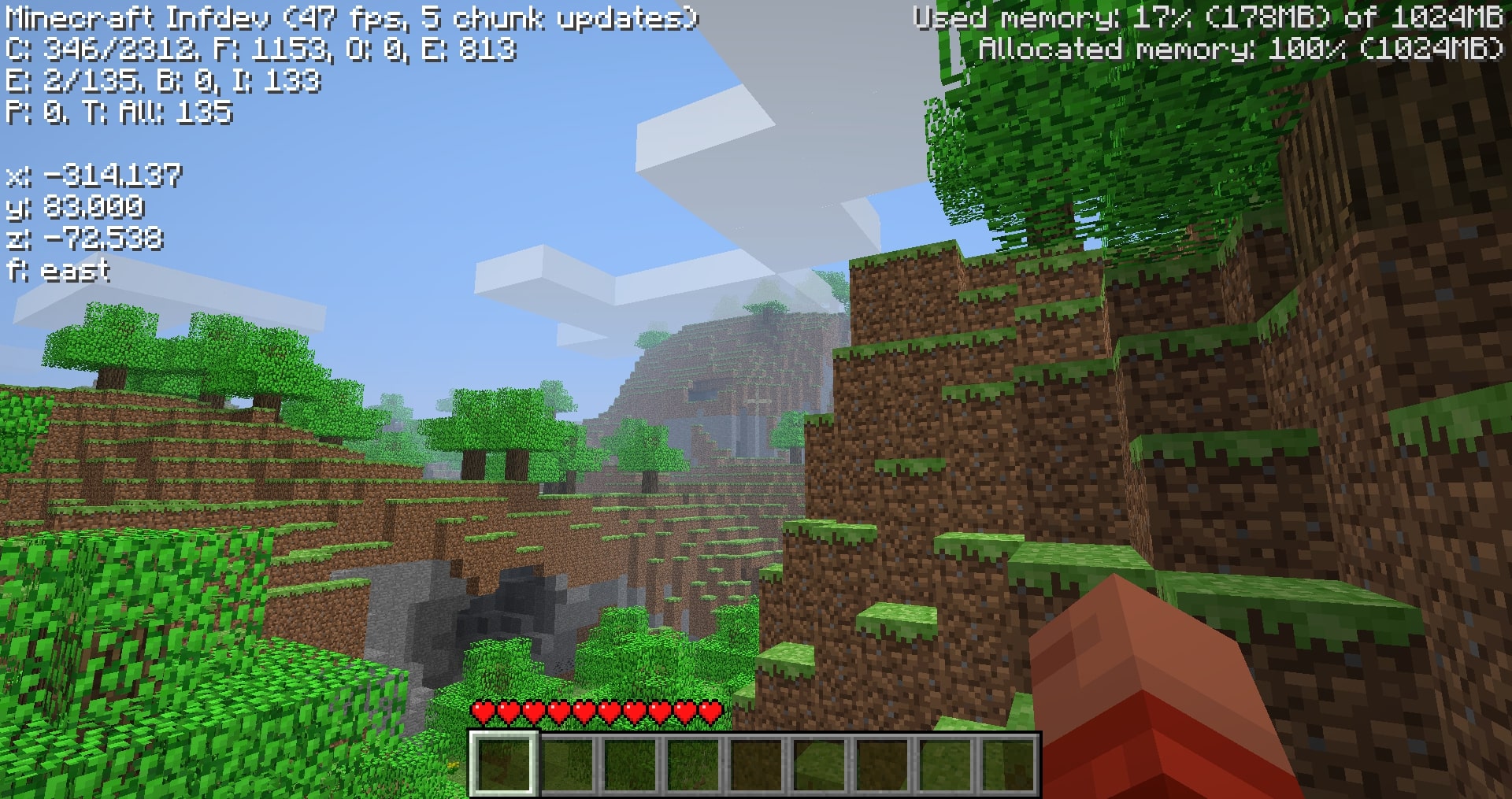
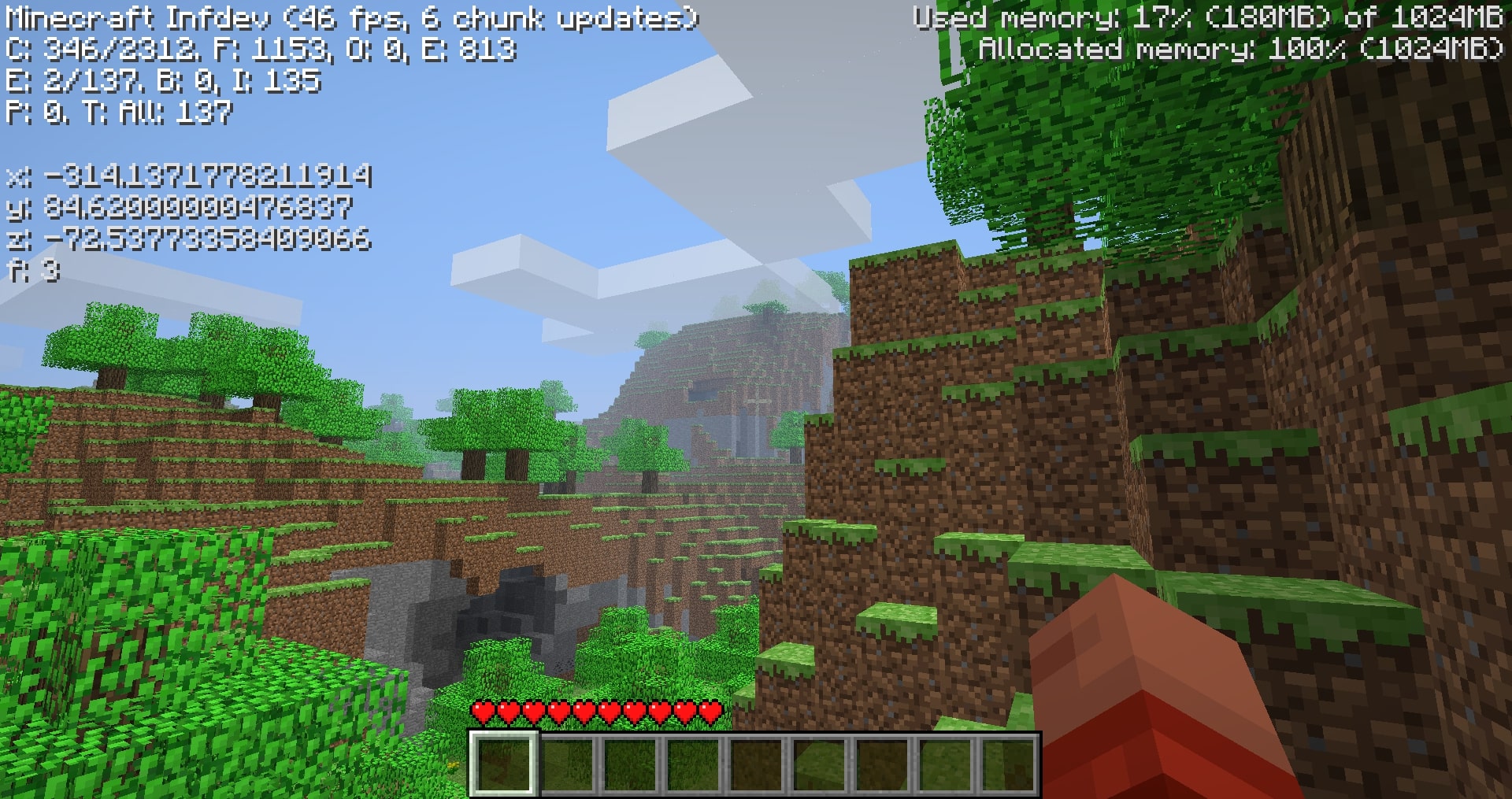
These can be toggled using the N key with the debug screen on. By default, the revised display is shown.
**The revised display simply improves the original format:**
– rounds 15 leading decimals to 3
– brightens text color
– adds cardinal directions in words
– floors the y-axis to feet level (64.000 and not 65.620 when standing on a full block at y-64).
# Compatibility
Overwrites **GuiIngame.java**, the obfuscated **(GuiIngame).class** names vary with versions.
In other words, the mod will likely be compatibile with mods that don’t change the debug menu.
# Downloads
Due to various unforseen circumstances in older versions, I haven’t modded every version (yet) from inf-20100227 to a1.2.2. I managed to mod 39 versions in this range, addressing for the more notable releases. Hopefully you can find the version you’re looking for.
**The downloads are named “Coordinates_v1.0_” followed by “(version name)” ensure that you are downloading the correct version.**
**Note: ONLY read my zip file names for versions.** To upload mods, Modrinth requires default MC launcher versions and mod loader fields to be filled out. *(ex: inf-630 is shown to support inf-618 and risugami’s modloader, which is false)*
# How to install
Install [Java 8](https://www.oracle.com/java/technologies/javase/javase8-archive-downloads.html), most mods for older versions use Java 8. So it’s always a good idea to have it.
This is a jarmod so I recommend using **MultiMC, PrismLauncher, or Betacraft v2.0**. These launchers allow for jarmods to be easily setup older versions. They all have similar ways of adding jarmods… Edit your instance in said launcher, locate the add to Minecraft.jar button, and open the downloaded coords.zip.
For **Betacraft v1.0**, it’s more complex as you will need to jarmod the version yourself. You will also need a zip explorer (I like [WinRAR](https://www.win-rar.com/download.html?&L=0) for Windows)
– after downloading coords.zip for prefered version, search and open your hidden %appdata% folder
– open the .betacraft folder
– open the versions folder
– highlight and right click on the version.jar you are using (ex: a1.1.2_01.jar)
– after right click, you can choose Open with WinRAR
– with the jar open, also open the downloaded coords.zip
– move the single .class file from coords.zip to the opened version.jar.
– Press OK , done! You successfully replaced a game file with my modded game file!
– Relaunch Betacraft v1.0 and play.
# Extras
Any issues can be addressed on [Github](https://github.com/Skellz64/Old-MC-Coordinates)
You can also join the [Modification Station](https://discord.gg/8Qky5XY) discord server, a community dedicated to modding old minecraft!
Once you join the server, you can find my mod post by clicking on the mods tab and searching coordinates. This is where you can contact me directly with questions *(i.e. doesn’t warrant a ticket on Github)*
**Thanks for downloading my mod!**
ComputerCraft
# ComputerCraft
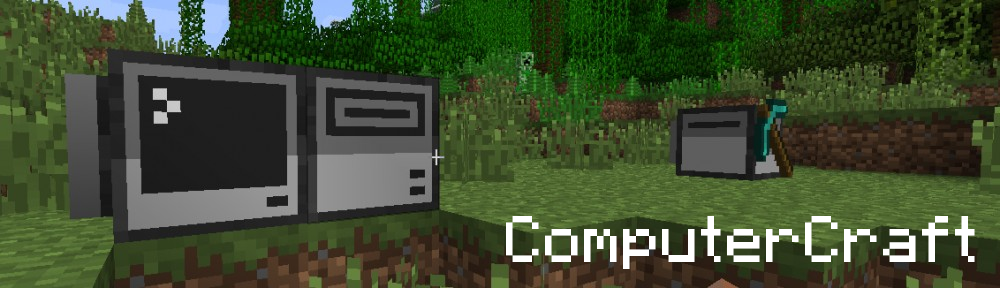
ComputerCraft is a modification for Minecraft that’s all about computer programming. It allows you to build in-game Computers and Turtle Robots, and write programs for them using the Lua programming language. The addition of programming to Minecraft opens up a wide variety of new possibilities for automation and creativity. If you’ve never programmed before, it also serves as excellent way to learn a real world skill in a fun, familiar environment.
If you’re not familiar with ComputerCraft, visit the [Website](https://www.computercraft.info/) or the [Wiki](https://www.computercraft.info/wiki/Main_Page) to find out more.
## History
ComputerCraft was originally released in late 2011 by [Daniel Ratcliffe](https://twitter.com/DanTwoHundred). In early 2017, after working on the mod solo for five years, it was decided to release the source code publicly to allow Dan to devote time to other projects.
## Archival notice
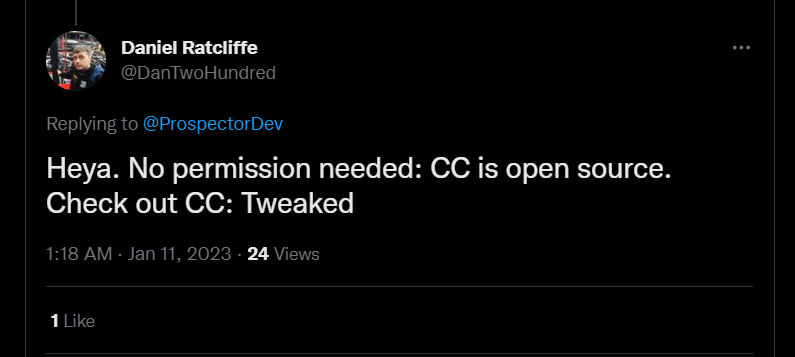
**This mod is abandoned and has been uploaded for archival purposes. It was [originally created](https://www.curseforge.com/minecraft/mc-mods/computercraft) Dec 24, 2011 by [Daniel Ratcliffe](https://twitter.com/DanTwoHundred). It has been uploaded to Modrinth under the ModrinthArchives account with permission from the original author.**
[](https://twitter.com/DanTwoHundred/status/1613103128987172864)
Colorful Spawning Sheep
# Colorful Spawning Sheep! Beta 1.7.3
The spawning of different colors is completely equal. There is no sort of rarity, just sheep spawning with all the color of wool!
This mod makes a very simple change to the ‘EntitySheep’ class. View Code in Spoiler directly below.
**_Modloader not required but I had to select an API._**
Spoiler
Base Fuction
“`java
public static int getRandomFleeceColor(Random random0) {
int i1 = random0.nextInt(100);
return i1 < 5 ? 15 : (i1 < 10 ? 7 : (i1 < 15 ? 8 : (i1 < 18 ? 12 : (random0.nextInt(500) == 0 ? 6 : 0))));
}
```
Edited for this mod
```java
public static int getRandomFleeceColor(Random random0) {
int i1 = random0.nextInt(100);
return i1;
}
```
Here is some extra information about the two diffetent version ‘Normal Drops’ and ‘x2 Drops’.
Normal Drops just means when you shear a sheep you will get the normal amount of wool out of them, 2-5.
X2 Drops will give you 4-10 when you shear the sheep. View Code in Spoiler directly below.
Spoiler
Normal Drops
“`java
public boolean interact(EntityPlayer entityPlayer1) {
ItemStack itemStack2 = entityPlayer1.inventory.getCurrentItem();
if(itemStack2 != null && itemStack2.itemID == Item.shears.shiftedIndex && !this.getSheared()) {
if(!this.worldObj.multiplayerWorld) {
this.setSheared(true);
int i3 = 2 + this.rand.nextInt(3);
for(int i4 = 0; i4 < i3; ++i4) {
EntityItem entityItem5 = this.entityDropItem(new ItemStack(Block.cloth.blockID, 1, this.getFleeceColor()), 1.0F);
entityItem5.motionY += (double)(this.rand.nextFloat() * 0.05F);
entityItem5.motionX += (double)((this.rand.nextFloat() - this.rand.nextFloat()) * 0.1F);
entityItem5.motionZ += (double)((this.rand.nextFloat() - this.rand.nextFloat()) * 0.1F);
}
}
itemStack2.damageItem(1, entityPlayer1);
}
return false;
}
```
x2 Drops
```java
public boolean interact(EntityPlayer entityPlayer1) {
ItemStack itemStack2 = entityPlayer1.inventory.getCurrentItem();
if(itemStack2 != null && itemStack2.itemID == Item.shears.shiftedIndex && !this.getSheared()) {
if(!this.worldObj.multiplayerWorld) {
this.setSheared(true);
int i3 = 4 + this.rand.nextInt(6);
for(int i4 = 0; i4 < i3; ++i4) {
EntityItem entityItem5 = this.entityDropItem(new ItemStack(Block.cloth.blockID, 1, this.getFleeceColor()), 1.0F);
entityItem5.motionY += (double)(this.rand.nextFloat() * 0.05F);
entityItem5.motionX += (double)((this.rand.nextFloat() - this.rand.nextFloat()) * 0.1F);
entityItem5.motionZ += (double)((this.rand.nextFloat() - this.rand.nextFloat()) * 0.1F);
}
}
itemStack2.damageItem(1, entityPlayer1);
}
return false;
}
```
Specifially these lines
```java
int i3 = 2 + this.rand.nextInt(3);
```
```java
int i3 = 4 + this.rand.nextInt(6);
```
2 or 4 is the amount of wool you will always get from the sheep, where the 'this.rand.nextInt(3);' or 6 will give you an extra 0 through 3 or 6 in addition to the 2 or 4 you have already been given. This happens simultaneously but I am trying to explain the fuction :)
Edit: 7 April 2024
No Changes, but I added support for b1.2-b1.8.1, r1.0, r1.1, r1.2.4&5. I will do 1.2, 1.2.1, 1.2.2, and 1.2.3 soon.
Edit: 8 April 2024
Added 1.2.1-3 support. I am considering adding 1.3-1.20 support. It will be a bit before that happens I am sure.
BuildCraft Transport
The transport submodule as provided by [BuildCraft](https://modrinth.com/mod/buildcraft).
This submodule adds BuildCraft’s pipe system – designed to be low-level, simple, and allow a high degree of flexibility and control over the flow of your **items**, **liquids** and **energy** (MJ/RF, depending on version).
The functionality of the pipe system includes, depending on version:
* being able to control the maximum flow rate of liquids and power,
* being able to route items by type and color tagging,
* being able to perform round-robin extraction and insertion,
* being able to use **Gates** to react to events and control pipe behaviour,
* being able to use facades, different types of stones, and pipe staining for decorative and compact building purposes.
Note that the [BuildCraft](https://modrinth.com/mod/buildcraft) project contains the complete mod in single-JAR format – but not all versions are available in this format; likewise, not all versions are available in this multi-JAR submodule format.
Licensing information is provided in the full version’s description above.