Font Fixer
## Summary
This mod fixes and extends the Font Renderer in Legacy versions of Minecraft by essentially backporting a newer version of the `FontRenderer` class (1.5.2 was used as the base in version 1; 1.12.2 is used as the base in version 2).
## Details
In particular, the following bugs have been fixed and features have been added:
– Fix the text width calculation and shadows when rendering non-ASCII characters
– Change Font height to 9 instead of 8
– Add support for glyphs/unicode characters
– Add missing formatting and color codes
## Installation
### As a ModLoaderMP / Forge mod
This mod needs to be installed as a **jar-mod**. That means, you have to…
1. Be sure to back up your `minecraft.jar`!
2. Extract the content of the mod zip into the `minecraft.jar` file
3. Delete the `META-INF` folder in there
4. Overwrite any existing files when doing so!
5. ???
6. Profit!
### As a Fabric mod
Just place the mod file in your mods folder 🙂
## Issues
– Some **OptiFine** versions have minor issues with Font Fixer installed (e.g., custom fonts do not work)
– ~~Some unicode characters could not be rendered~~ – this has been fixed in version **2**!
Fabricated Legacy Forge
# Fabricated Forge
Load Forge/ModLoader mods as if they were Fabric Loader mods.
Supported Minecraft versions: 1.3.2, 1.4.0, 1.4.1, 1.4.2, 1.4.3, 1.4.4, 1.4.5, 1.4.6 and 1.4.7.
This mod requires [Mod Remapping API](https://modrinth.com/mod/mod-remapping-api).
## Credits
### MinecraftForge
– Eloraam
– FlowerChild
– Hawkye
– MALfunction84
– Scokeev9
– SpaceToad
– LexManos
### Forge Mod Loader (FML)
– cpw
– Risugami, author of ModLoader
– LexManos
### Paulscode IBXM Library
– IBXM
– Martin Cameron
### Paulscode SoundSystem CodecIBXM
– Paul Lamb
– IBXM
– Martin Cameron
### Player API (2.0.0>)
– Divisor
### ClassLoaderFixer
– ThexXTURBOXx
### Fabricated Forge itself
– CatCore (aka. arthurbambou)
– Contributors
Exit Confirmation
**Note that the alpha and beta versions can crash Minecraft.**
**This mod supports both forge and fabric, check the files tab to choose between those.**
_See the Bugs / Issues / Crashes section for more info on how to send feedback._
# Features
Configuration, including close prompt when using escape in title screen, when in-game and the quit button in the title screen.
Close prompt when trying to exit minecraft (occurs while following the config that’s set).
# Bugs / Issues / Crashes
**In Alpha / Beta releases stuff might change or break, it’s recommended to use them for testing purposes only.**
If there’s a problem with the mod: don’t post the crash report in the comments, but post it on the issue tracker here: [Exit Confirmation Issues at GitHub](https://github.com/Ultreon/exit-confirmation/issues).
If there’s no crash report but it still crashes, post the debug.log file in your .minecraft/logs folder to the issue tracker.
If there’s no crash report and there’s no crash in the debug.log, then there’s probably a problem with the Java installation or a windows driver (what I have sometimes).
# Feature requests
If you want to request a feature you can do it on [GitHub](https://github.com/Ultreon/exit-confirmation/issues).
[](https://discord.gg/dtdc46g6ry)
Enchantment Level Language Patch
**For Forge 1.14.x users:** [MixinBootstrap](https://modrinth.com/mod/mixinbootstrap)
(or any alternative Mixin loader) is required.
**For Forge 1.13.x users:** [ModernMixins](https://modrinth.com/mod/modernmixins)
(or any alternative Mixin loader) is required.
**Telemetry Settings:** You can adjust the telemetry level by creating/editing `config/enchlevel-langpatch-telemetry.txt`.
See our [Privacy Policy](https://telemetry.langpatch.mc.7c7.icu/privacy) for more information.
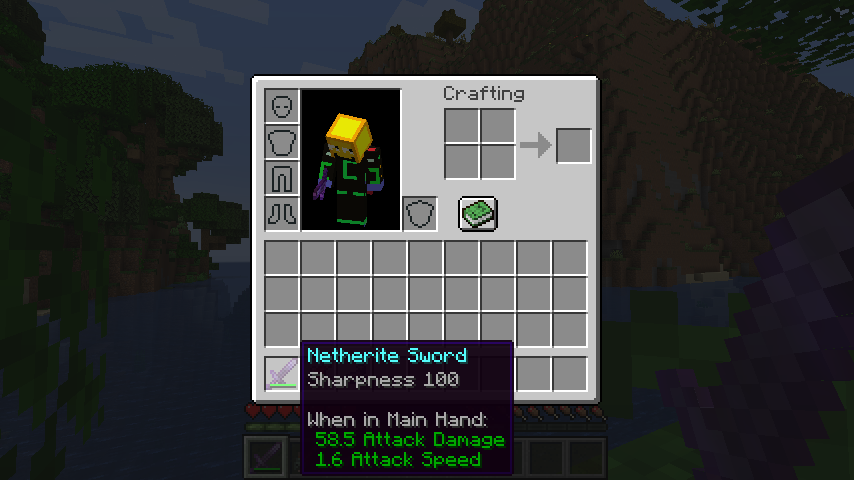
Without the patch:
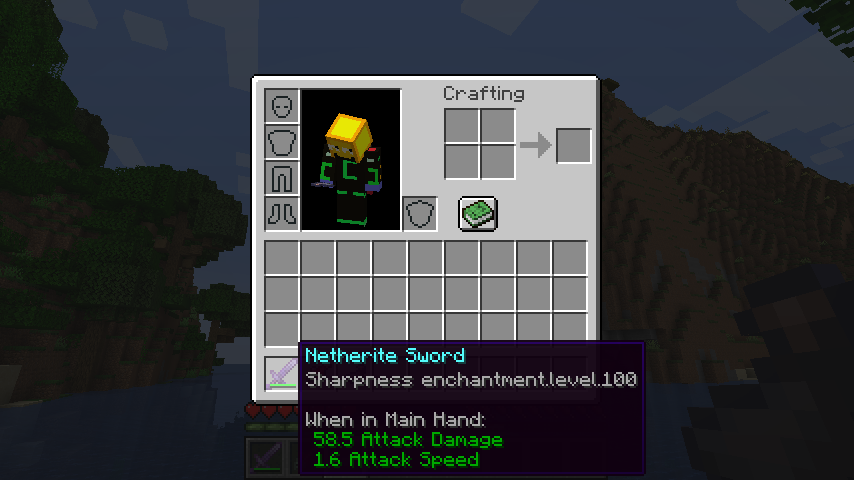
With the patch:
## Common alternative formats
* Want pure arabic numerals (e.g. Sharpness 5)? [Download Stub Mod](https://cdn.modrinth.com/data/Lf4kDKU9/versions/1EKfo2Mc/lpstub-all_arabic-20251209.2.jar)
* Want roman numerals (e.g. Sharpness XXV)? [Download Stub Mod](https://cdn.modrinth.com/data/Lf4kDKU9/versions/1EKfo2Mc/lpstub-roman-20251209.2.jar)
These stub mods should be loaded *with* LangPatch itself.
## I18n API
This mod supports a limited configuration of enchantment level and potion effect level formatting through language files.
### Template Keys
* **`enchantment.level.x`** & **`potion.potency.x`**:
Modify the templates for enchantment levels and potion effect levels, respectively.
* **Default value:** `”%s”`
### Format Types
* **`langpatch.conf.enchantment.default.type`** & **`langpatch.conf.potion.default.type`**:
Modify the format of enchantment levels and potion effect levels, respectively.
| Value | Format | Example |
| :— | :— | :— |
| `simplified`, `chinese`, `zh_normal` | Lowercase Chinese numerals | 一百二十三 |
| `traditional`, `zh_upper` | Uppercase Chinese numerals (traditional) | 壹佰貳拾叄 |
| `numeral`, `number`, `numeric`, `arabic`, `default` | Arabic numerals (default) | 123 |
| `roman` | Roman numerals | CXXIII |
| `skip`, `ignore` | No change (e.g., for only replacing other text) | — |
### Override
* **`langpatch.conf.enchantment.override`** & **`langpatch.conf.potion.override`**:
Whether to override existing translations. Acceptable values are `”true”` or `”false”`.
* If set to `”true”`, existing translations will be replaced. See the implementation of the “pure arabic numeral” pack above.
## For Developers
LangPatch, as is named, allows developers to make dynamic changes to in-game translations without directly modifying lang files.
To introduce LangPatch API as a dependency:
“`groovy
repositories {
// Our new maven
maven { url ‘https://mvn.7c7.icu’ }
}
dependencies {
compileOnly “xland.mcmod:enchlevel-langpatch:3.1.0”
}
“`
Online javadoc can be found [here](https://teddyxlandlee.github.io/enchlevel-langpatch/javadoc).
e4mc Retro

**e4mc Retro** is a backport of [e4mc](https://modrinth.com/mod/e4mc) mod, allowing you to open your Minecraft LAN world to anyone over the internet — even on older Minecraft versions.
## What is e4mc?
e4mc is a reverse tunneling reverse proxy for Minecraft. In simpler terms, it’s a software that allows you to temporarily expose a local Minecraft server to the internet.
## How do I use it?
Simply install the mod, and Open to LAN as normal. A public domain will appear alongside the local port. Others can simply connect to the public domain to connect to your LAN server.
danlib
a lib for my mods and extends vanilla for future mods like keeping block guis open no matter what block calls them and tag based pois are planned it does nothing diffrent from vanilla thats visable to users other then guis it uses mixins to do this altering base class passivly
CTM SpeedrunIGT Integration
### Note: Has a dependency on the [SpeedRunIGT mod](https://modrinth.com/mod/SpeedRunIGT)
## CTM SpeedrunIGT Integration
category files go in `.minecraft/speedrunigt/ctm-srigt-integration` folder (file names do not matter, it will try to parse anything in the folder)
**if it doesn’t work at first, make sure the right category is selected in SpeedRunIGT**
### category file specification
– line 1: category id
– line 2: category display name
– all following lines: criteria for completion
1. [block identifier](https://minecraft.fandom.com/wiki/Resource_location)
2. (optional, 1.7-1.12 only) block data value
– used for wool colors, etc
3. x, y, z position
– if the spec for a category file is broken, an error will be thrown in the logs with a hopefully helpful description of what went wrong
example 1 (targeted at 1.8.9):
“`
spellbound_caves
Spellbound Caves
wool -477 106 608
wool 1 -478 106 608
wool 2 -479 106 608
wool 3 -480 106 608
wool 4 -481 106 608
wool 5 -482 106 608
wool 6 -483 106 608
wool 7 -484 106 608
wool 8 -485 106 608
wool 9 -486 106 608
wool 10 -487 106 608
wool 11 -488 106 608
wool 12 -489 106 608
wool 13 -490 106 608
wool 14 -491 106 608
wool 15 -492 106 608
iron_block -493 106 608
gold_block -494 106 608
diamond_block -495 106 608
“`
in this example, the optional `minecraft:` namespace is omitted
example 2 (targeted at 1.19.4):
“`
take_the_stairs
Take the Stairs
minecraft:yellow_stained_glass -48 -59 63
“`
since this example is for post-1.12, there are no data values
if you have any issue or questions, my discord username is `tildejustin`
have fun running ^-^
Crash Assistant
Shows a GUI after Minecraft crashes, immediately displaying all affected game/launcher logs, crash reports, or hs_err files. Provides a one-click solution to upload them, copy the link, and perform other actions for easier reporting, debugging, and troubleshooting. Analyzes logs for many known crash reasons. Provides many useful analysis tools. Warns if Minecraft is running on an integrated GPU when a dedicated one is available. Includes auto-fixes for many common issues.
Mod is client-only. On a server, it will do nothing.
If you have any questions, feel free to join my Discord server: https://discord.gg/dV8WFrJZK6
# Features:
## GUI:
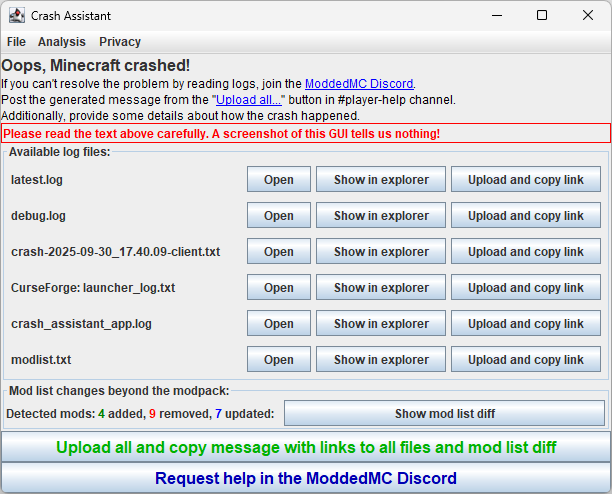
Supports drag&drop. You can move files directly from the GUI to wherever you want, or drag and drop all logs by dragging them from the “Available log files:” label.
## Log Analysis:
Analyzes logs for many known reasons for crashes. If a known issue is detected, it displays a dialog with a problem description and a detailed solution.
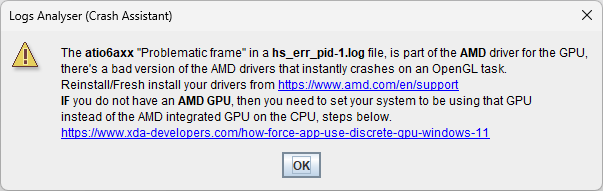
### Supported analysis:
**hs_err (JVM Crash)**:
– `AlLibAlcCleanup` (Some RAM allocation-related cursed issue)
– `atio6axx.dll` (AMD driver issue)
– `glfw.dll` (Generic GPU driver issue)
– `ig7icd64.dll` (Old Intel integrated GPU driver issue)
– `InsufficientMemory` (System is out of physical RAM or swap space)
– `JavaTooHigh` (e.g., Spark mod crashing on Java ≥ 22)
– `jemalloc.dll` (Issue with the jemalloc memory allocator)
– `jvm.dll` (Potential hardware issue or a bug in the JVM itself)
– `libglfw.so` / `libopenal.so` (Common Linux library problems)
– `libGLProgrammability.dylib` (Incompatible shader pack on macOS)
– `~StubRoutines::SafeFetch32` (macOS on Apple Silicon with an incorrect JDK)
– `nglMultiDrawElementsBaseVertex` / `0x0000` (GPU driver issue)
– `nvoglv64.dll` (Nvidia driver issue)
**log / crash-report**:
– `ConnectorIncompatibleFabricMods` (Detects incompatible Fabric mods like Sodium/Iris when using Sinytra Connector)
– `Create6Addons` (Incompatibility between Create versions and its addons, suggests one button to find all incompatible mods, just by one click)
– `CtovWithoutLithostitched` (ChoiceTheorem’s Overhauled Village mod missing a required dependency)
– `CurseForgeCorrupted` (Corrupted Minecraft/Loader installation from the CurseForge launcher)
– `DiskSpaceEnded` (System has run out of disk space)
– `DuplicatedMods` (Multiple versions of the same mod are installed)
– `EpicFightAddons` (Incompatibility between Epic Fight versions and its addons, suggests one button to find all incompatible mods, just by one click)
– `FeatureOrderCycle` (Circular dependency in world generation features)
– `FerriteCoreNeighborTable` (Detects when a mod improperly accesses FerriteCore’s neighbor table, provides a temporary config workaround)
– `GeckoLibOculusCompat` (Warns that GeckoLib Oculus Compat mod is no longer needed on Minecraft 1.20.1+ and causes crashes)
– `GroovyModLoaderIPv6` (GML failed to download mappings due to IPv6 issues, includes Auto-Fix to fix the issue just by one click or to find all mods relying on GML)
– `KubeJSDataPack` (Error while loading a datapack with KubeJS)
– `LanguageProviderMismatch` (Mod requires a different version of Forge/NeoForge)
– `LegacyTooManyIds` (Exceeded the block/item ID limit on old Minecraft versions like 1.12.2)
– `MixinApply` (Detects a wide range of crashes caused by Mixin conflicts or errors, includes missing class detection and Auto-Fix to find mods relying on the missing class)
– `MissingEmbeddiumForOculus` (Oculus mod is installed without its required dependency, Embeddium)
– `MissingIndium` (A mod requires Indium for Fabric Renderer API compatibility but it’s not installed)
– `MissingUnsupportedDependencies` (General dependency conflicts detected by Forge/NeoForge)
– `ModernFixWatchDog` (Integrated server has deadlocked)
– `NeoForgeVersion1_20_1` (Notifies that Neo on 1.20.1 is abandoned and causing many crashes and switching to Forge is an official recommendation from Neo on that version.)
– `ModuleFind` / `ModuleResolution` (Java module system errors, often due to dependency conflicts, immediately identifies which mod is causing the issue, without our mod binary search was needed to find this)
– `Optifine` (Warns that OptiFine is known to cause many incompatibility issues and suggests modern alternatives)
– `OutOfMemoryError` (Minecraft ran out of allocated RAM)
– `ResourceLocationException` (A resource name contains invalid characters, often due to non-English system settings)
– `Rubidium` (Warns that Rubidium is abandoned and causes issues, suggests Embeddium)
– `ServerConfigCorrupted` (A server-side config file is malformed)
– `UnsupportedClassVersion` (A mod was compiled with a newer version of Java than the one being used)
– `UsedByAnotherProcess` (A file is locked by another program)
– `Version1_21` (Warns that Minecraft 1.21 is outdated and causing manny issues; suggests switching to 1.21.1)
**win_event (Windows Event Log)**:
– `WasClosedByWindows` (Game froze and was terminated by the OS, often from user input during loading)
**Codex Logs Analyzer Integration**:
– After uploading, every supported log is analyzed by `mclo.gs`’s Codex logs analyzer. Sometimes Codex messages can be unclear for average users. In such cases, a detailed message with a how-to-fix guide is displayed:
– Erroring block/entity
This significantly reduces the load on modpack support, as a large percentage (more than 75%) of issues are common and easily solvable problems. You can blacklist any analysis in the config if desired.
## Analysis Tools
Crash Assistant includes a suite of powerful analysis tools accessible from the GUI menu:
– **Create/Epic Fight Addons Compatibility**: Scans your mods to find addons that are incompatible with your installed version of Create or Epic Fight.
– **MCreator Mod Detector**: Lists all mods made with the MCreator tool.
– **Package/Class Finder**: Searches all mods to find which one contains a specific Java class or package.
– **Jdeps Dependencies Analysis**: Identifies which mods depend on a specific class or package, helping to debug `NoClassDefFoundError` crashes.
## Integrated GPU Detection:
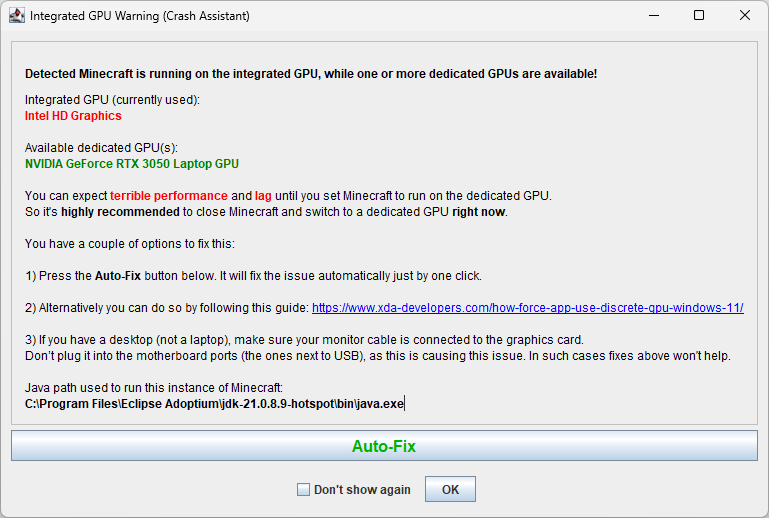
Checks if the game is running on an integrated GPU when a more powerful dedicated GPU is available and displays a warning. Includes a one-click **Auto-Fix** button to configure Windows to use the correct GPU for Java.
## Intel Chip Bug Warning:
Detects if your CPU is among the Intel 13th/14th generation models known to have a critical stability bug. It checks your microcode version and provides a detailed warning and recommendations.
## Compatibility:
The mod is designed for maximum compatibility and stability. It runs in an independent process that waits for the Minecraft JVM to stop. It loads extremely early as a **Coremod** (Forge) or **LanguageAdapter** (Fabric/Quilt), allowing it to catch even early startup crashes.
## Upload all logs and copy link with one click:
You can upload all available logs with one click and get a neatly formatted message ready for pasting on GitHub or Discord. If you are a modpack creator, you will always know that all logs are current and contain all available info without needing to request additional files.
## Button to join pre-configured Link:
Your modpack players can easily, with one click, find your Discord and request help right after a crash. This, combined with the exceptional ease of log uploading, significantly increases the probability of reporting individual crashes. For individual downloads or if not configured, it will direct users to the appropriate modloader’s Discord server.
## Modlist:
Saves the modpack’s modlist every time the game is launched by the modpack creator. You can also manually save the modlist using the `/crash_assistant modlist save` command. It works differently for modpacks and individual downloads:
#### Modpacks:
The generated message includes a list of mods that the end user has added, removed, or updated compared to the official modpack list.
#### Individual downloads / modpack authors:
Tracks modlist changes since the last successful launch, which can be extremely useful if you hit the “update all” button or added problematic mods and forgot which ones.
## Configuration:
Fully configurable: you can enable or disable any feature, change the Discord link, and customize the text of labels, buttons, and more.
## Localization:
Fully localized. Currently supported languages:
– English
– German
– Russian
– Chinese
– Spanish
– Italian
There are no hardcoded strings (except for logging). You can change every visible string. For more localization info, or if you want to add a new language, read the [lang README](https://github.com/KostromDan/Crash-Assistant/tree/1.19.2-1.20.1/common_config/src/main/resources/lang).
## Crash Commands:
`/crash_assistant crash` has 3 options:
– `game` – crashes Minecraft with a crash report.
– `jvm` – crashes the JVM with an hs_err_pid file.
– `no_crash` – applies additional arguments without crashing.
After the crash target, you can use additional arguments:
– `–withThreadDump` – generates a thread dump in the log.
– `–withHeapDump` – generates a heap dump file.
– `–GCBeforeHeapDump` – performs garbage collection before the heap dump.
## Problematic Mods Config:
Adds a config file, `problematic_mods_config.json`, that lets you mark mods as incompatible with your modpack. It has two modes: it can crash the game if an incompatible mod is detected or simply notify the user. The end user who added the mod will be notified with a pre-configured message explaining why it’s incompatible and will be offered a button to remove it.
## Partners
YourKit supports open-source projects with innovative and intelligent tools for monitoring and profiling Java and .NET applications.
YourKit is the creator of [YourKit Java Profiler](https://www.yourkit.com/java/profiler/), [YourKit .NET Profiler](https://www.yourkit.com/.net/profiler/), and [YourKit YouMonitor](https://www.yourkit.com/youmonitor/).
[](https://www.yourkit.com)
## Privacy
Logs are uploaded **only when the user explicitly clicks the “Upload” button**, and they are sent directly to `mclo.gs`, a log-sharing service operated by **Aternos**.
Before publication, `mclo.gs` automatically **redacts sensitive data**—such as access tokens, IP addresses, system usernames, etc—to keep the paste safe to share.
Complete information on retention periods, who can access the logs, and your GDPR rights is available in their [privacy policy](https://aternos.gmbh/en/mclogs/privacy).
Because the mobile UI of `mclo.gs` can be inconvenient, Crash Assistant—by default—**wraps** the returned URL through **`gnomebot.dev`** (e.g. `https://mclo.gs/X` → `https://gnomebot.dev/paste/mclogs/X`). You can disable this behavior in settings. `gnomebot.dev` is an open-source online log viewer created by **Latvian Modder**; it fetches data from `mclo.gs` and displays it to the user with convenient formatting, caches the paste in RAM for **five minutes** after the last access, then discards it.
Crash Assistant itself is **entirely client-side**—it has no servers and never receives a copy of your logs.
This is a brief privacy description. The full privacy policy can be found in the Privacy menu within the Crash Assistant. Crash Assistant will prompt you to read and accept our privacy policy on your first log upload attempt.
CraftDen1al
# Plugin Synopsis
This is a lightweight plugin run on server-side, which allows you to refuse certain crafting operations from client-side.
# How to Use This Plugin
Loading world with this plugin loading, this plugin will not actively modify anything. You need to create and edit a file named `craftden1al.json` (case sensitive on Linux) in the root directory of the world (i.e. in the same directory as `level.dat`).
Example of `craftden1al.json`: (“//” comments for ease of understanding, actual JSON files do not allow comments)
“`json
{
“deny_mode”: false, // defaults ‘true’; ‘true’ for deny mode and ‘false’ for allow mode; accepts: ‘true’ | ‘false’
“patterns”: [
[
{
“type”: “rege_s_simple_datapack:all”, // a string represents a condiion type, registered in rege.rege.minecraftmod.craftden1al.util.ConditionRegistry
“data”: [] // any element, depends on the type’s requirement
}, // an object represents a conditional match, or ‘null’ represents an unconditional match; accepts: an object | ‘null’
[
“minecraft:string”, // a string(available on MC 1.7+) represents the resource location of the item, or a number represents the raw ID of the item, or an object(see below) represents a more detailed item, or ‘null’ represents an empty slot
“minecraft:string”, // the same as the previous line
“minecraft:string”, // the same as the previous line
“minecraft:string” // the same as the previous line
], // an array represents a shaped or shapeless recipe’s ingredients, or ‘null’ represents that the ingredients are unimportant
{
“id”: “minecraft:wool”, // a string(available on MC 1.7+) represents the resource location of the item, or a number represents the raw ID of the item
“dv”: 0, // a number represents the DV(Damage Value) of the item
“count”: 1 // a number represents the count of the result item; won’t be useful in ingredients’ definitions
}, // a string(available on MC 1.7+) represents the resource location of the result item, or a number represents the raw ID of the result item, or an object represents a more detailed result item, or ‘null’ represents that the result item is unimportant
2, // an integer represents the width of the shaped recipe, or null represents that the width of the shaped recipe is unimportant; if both this and next element is absent, it represents that whether the recipe to match is shaped or not is unimportant
2 // an integer represents the height of the shaped recipe, or null represents that the height of the shaped recipe is unimportant; if this element is absent and the previous element is present, it represents that the recipe to match is shapeless
]
] // defaults ‘[]’; an array represents all recipe patterns to match
}
“`
So, after editing the file and restarting the server / re-entering the world, the client player will find they are only able to craft 1 [White Wool](https://minecraft.wiki/w/White_Wool) with 4 [String](https://minecraft.wiki/w/String)s, and when trying to craft other recipes, even though the result item is displayed on the right side of the crafting screen, when trying to take out the item, it will “bounce back”, thus refusing to craft certain recipes.
# Notice
Please refer to the Minecraft Wiki’s history for recipe lists, and the width and height of the shaped crafting patterns are strictly “source-code-based”.
For example, the width and height of [Diamond Axe](https://minecraft.wiki/w/Diamond_Axe)’s are 2 and 3, not 3 and 3; and must be `[“minecraft:diamond”, “minecraft:diamond”, “minecraft:diamond”, “minecraft:stick”, null, “minecraft:stick”]`, not its horizontal-mirrored form (i.e. `[“minecraft:diamond”, “minecraft:diamond”, “minecraft:stick”, “minecraft:diamond”, “minecraft:stick”, null]`).
If you are not able to view the source code, the best way is to write both to the pattern.
# FAQ
Q: Is it useful to run this mod on the client-side?
A: Client-side loading of this mod is useful for entering singleplayer worlds. It takes no effect for entering multiplayer games. Whether it takes effect depends on whether this mod is loaded on the server side.
Q:Seems that the pattern defined in `craftden1al.json` did not being loaded?
A:Please check whether the content of `craftden1al.json` conforms to the syntax of JSON (pay special attention to the presence or absence of commas, whether the symbols are halfwidth, and no comments allowed). If there is a syntax error, the game log will show `Incorrect JSON syntax of craftden1al.json, giving up loading: reason`. As well as confirming that the key names are spelled correctly (e.g. `patterns` is written as `pattern` causing no patterns to load), and that the recipe list is incorrect.
Q: In Creative Mode, I can press a number key to move an item from the result item slot out without bouncing it back?
A: This is a feature of Creative Mode, this won’t happen in Survival/Adventure Mode.
Q: Will `craftden1al.json` be overwritten because it contains invalid item IDs, etc.?
A: No. This plugin will only read the file, not write to it.
COSTAR
A simple mod that addresses a questionable design decision in minecraft for versions 1.9-1.12 (fixed in 1.12.1-pre1) that affects fabric: the `root.tick.level.entities.blockEntities` directive in the piechart uses `Class#getSimpleName` for the profiler location, leading to fabric having different names from vanilla (and different names in dev than in prod) due to the fact that fabric remaps almost all symbols in the game jar to an intermediary layer. To fix this vanilla parity issue, I just switch out the name with its unmapped equivalent.
See the gallery for an example of what this looks like.