MenuFPSUnlocker
# Japanse
メインメニューのフレームレートを30fps(1.7.x~1.12.2)または60fps(1.15.x~1.20.x)から120fpsに上げることで、メニュー画面の遅延を修正するMODです。
# English
This mod fixes the delay in the menu screen by increasing the frame rate of the main menu from 30fps(1.7.x~1.12.2) or 60fps(1.15.x~1.20.x) to 120 fps.
### ModLoader
[LegacyFabric](https://legacyfabric.net/) or
[Forge](https://files.minecraftforge.net/net/minecraftforge/forge/)
### Required mods
[UniMixins 1.7.10 (Forge) ](https://modrinth.com/mod/unimixins)
[MixinBooter 1.8.x~1.11.x (Forge) ](https://modrinth.com/mod/mixinbooter/)
MapWriter Mini Map
Features:
* In game mini-map for multiplayer and singleplayer.
* Exploration progress is saved as you wander the world.
* Full screen map GUI allows you to zoom out and view everywhere that you have explored.
* Set waypoints by right clicking, pan map by click dragging, and zoom with the mouse wheel in full screen mode.
* Rotating circular mini map mode can be enabled in the options menu.
* Entire map can be written to PNG images.
* Explored chunks are also saved in Anvil format from multiplayer servers, so you can view the world using tools such as Eihort.
* Short range underground mode shows air, water and lava around the player.
ManyLib [BTW Addon]
ManyLib is a configuration library for Better Than Wolves Community Edition 3.x (a BTW-focused fork of MaLiLib). It helps mod developers define and manage config values and hotkeys, with automatic JSON persistence. It includes a full in-game config UI with tabs, search/global search, sorting, reset actions, color picker, string-list editing, hotkey recording, and conflict hints. Users can open configs from ModMenu, main/pause menu buttons, or hotkeys. It also provides /manyLib reload and /manyLib reloadAll for fast iteration, plus optional auto load/save on world enter/exit.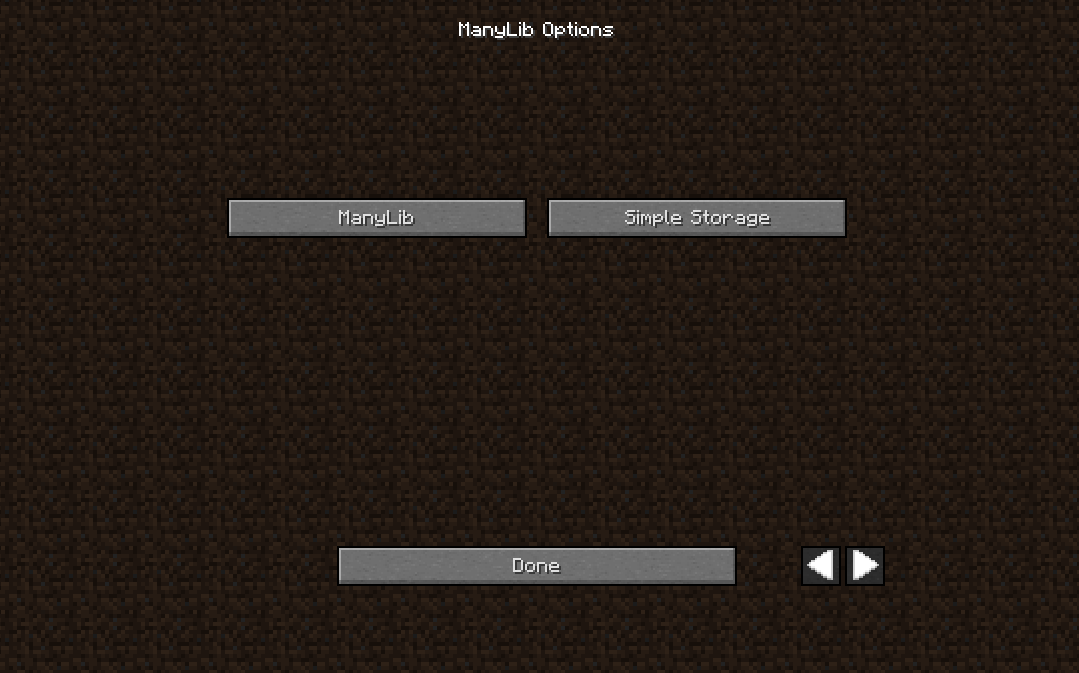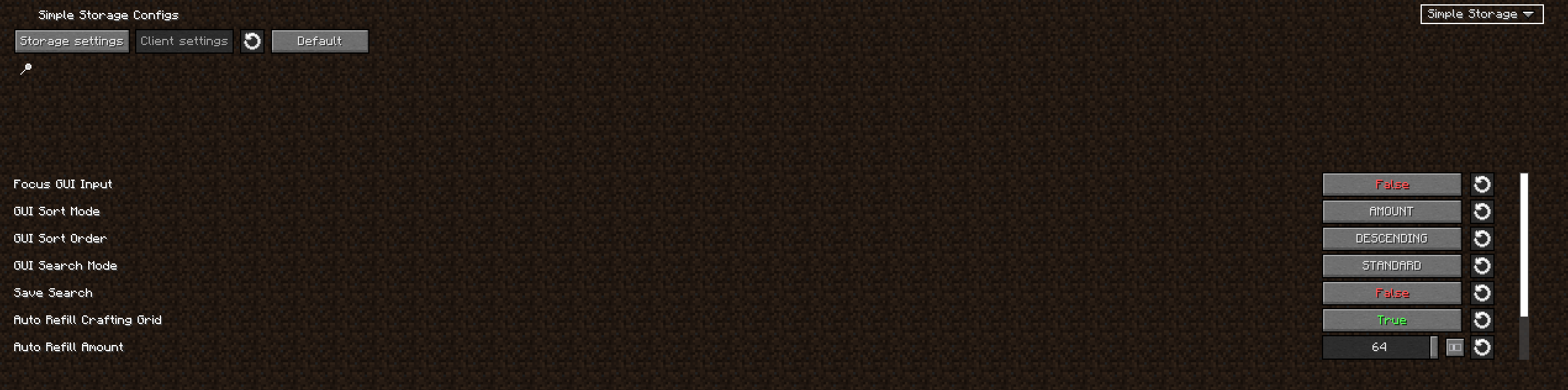
## Credits
– Ported from the original mod [MaLiLib]. Thanks to the authors for the original work.
Librarian
# Librarian
Librarian is a mod for Fabric that improves the saved hotbar system by adding new features and increasing the overall
capacity with a page system. It is the successor to Hotbars+, a mod by the same author.
## Features
### Infinite saved hotbar capacity
Never run out of space in your hotbars again. Librarian introduces a page system which allows you to store as many items
as you could possibly ever want or need.

Since this system is vanilla-compatible, you won’t need to worry about having to convert or do any transfers should you
decide to not use the mod anymore.
### Better saved hotbar performance
Got a lot of data in your saved hotbars? Not a problem. Librarian optimizes the way the game loads and saved hotbars to
run entirely in the background, completely eliminating some notorious lagspikes many have experienced while working with
saved hotbars in the process.

### Accidental overwrite protection
A common problem people experience with the saved hotbar system is the potential to unintentionally overwrite existing
hotbars by pressing the wrong key, losing many items by complete accident in the process. Librarian tries to help
prevent this from happening by comparing the data of the items being saved to that of the items already saved. If it
doesn’t exactly match, a prompt will come up asking for confirmation before continuing, potentially saving you and your
items.

### Renamable saved hotbars
To help facilitate distribution and organization, Librarian introduces a new vanilla-compatible hotbar metadata system
which allows you to rename your saved hotbars to literally anything you want along with other bits of metadata like a
description and even a list of authors. Names and descriptions support both chat color codes and also
[MiniMessage](https://docs.advntr.dev/minimessage/format.html).

All metadata can be customized in-game with the client-side command `/librarian meta`*, but users can also rename their
hotbar page by simply clicking the text in the creative inventory menu.
* – Some versions (such as pre-1.14.4) do not currently have client-side command libraries available, so with these
versions you will have to apply the changes manually with an NBT editor. I personally recommend using NBTExplorer for
this purpose.
### Multi-version support
To account for those holding out on specifics game versions, Librarian supports a wide range of Minecraft versions as
recent as 26.1.1 and as old as 1.12.2 (with the help of [Legacy Fabric](https://legacyfabric.net/) and
[Ornithe](https://ornithemc.net/)). I am committed to supporting as many versions as reasonably possible. The foundation
of Librarian, while similar to its predecessor, is written with the goal of not relying on any particular
version-specific code. This helps make it more future-proof in the long run.
Currently supported versions:
* 1.12.2 (Legacy Fabric or Ornithe)
* 1.13.2 (Legacy Fabric or Ornithe)
* 1.14.4 (Regular Fabric or Ornithe)
* 1.15.2
* 1.16.5
* 1.17.1
* 1.18.2
* 1.19
* 1.19.2
* 1.19.4
* 1.20.1
* 1.20.2
* 1.20.4
* 1.20.6
* 1.21.1
* 1.21.3
* 1.21.4
* 1.21.5
* 1.21.8
* 1.21.10
* 1.21.11
* 26.1.x
## Installing
Download the mod JAR and copy it to your ‘mods’ folder. Depending on the version of Minecraft you are running, you may
need to install some extra mods as well. Here is a table explaining exactly that for each case:
| Version | Loader | Required Mod(s) | Optional Mod(s) |
|———|—————|—————————-|—————————————————|
| 1.12.2 | Legacy Fabric | Legacy Fabric API |
| 1.12.2 | Ornithe | Ornithe Standard Libraries |
| 1.13.2 | Legacy Fabric | None |
| 1.13.2 | Ornithe | Ornithe Standard Libraries |
| 1.14.4 | Fabric | Fabric API | Cotton Client Commands (for client-side commands) |
| 1.14.4 | Ornithe | Ornithe Standard Libraries |
| 1.15.2 | Fabric | Fabric API | Cotton Client Commands (for client-side commands) |
| 1.16.5 | Fabric | Fabric API |
| 1.17.1 | Fabric | Fabric API |
| 1.18.2 | Fabric | Fabric API |
| 1.19 | Fabric | Fabric API |
| 1.19.2 | Fabric | Fabric API |
| 1.19.4 | Fabric | Fabric API |
| 1.20.1 | Fabric | Fabric API |
| 1.20.2 | Fabric | Fabric API |
| 1.20.4 | Fabric | Fabric API |
| 1.20.6 | Fabric | Fabric API |
| 1.21.1 | Fabric | Fabric API |
| 1.21.3 | Fabric | Fabric API |
| 1.21.4 | Fabric | Fabric API |
| 1.21.5 | Fabric | Fabric API |
| 1.21.8 | Fabric | Fabric API |
| 1.21.10 | Fabric | Fabric API |
| 1.21.11 | Fabric | Fabric API |
| 26.1.x | Fabric | Fabric API |
Legacy Skin Fix
## Note: prism launcher has fixed this issue in a much better way, please use that instead, if you can.
This mod brings player textures from the new skin server to versions 1.3-1.7.5.
At the moment it only works for single player although multiplayer shouldn’t be too difficult as it would just be a matter of calculating skins per ClientPlayer instead of globally, if you want that, do lmk (discord is `tildejustin`, I know, so uncreative).
please note: there is a bug in prism / multimc for versions pre-1.6 where the username and session token is not set when launching with the `noapplet` trait, which fabric loader needs to work. This is fixed in specifically [these premade instances](https://github.com/Minecraft-Java-Edition-Speedrunning/legacy-fabric-instance-generator/releases) and I have a pull request to the main legacy fabric instances to add the patch to this but as of writing it is not merged. This is not an issue with the vanilla launcher.
Legacy OptiFabric
**for mcsr**: use [mods.tildejustin.dev](https://mods.tildejustin.dev/)
If you’re looking for OptiFabric for 1.14 to 1.15.2 for regular Fabric instead of Ornithe, check out [OptiFabric Origins](https://modrinth.com/mod/optifabric-origins)
## Legacy OptiFabric
OptiFabric for Legacy Fabric (1.3.1-1.13.2) and Ornithe (b1.7.3-1.14.4)
– Legacy Fabric installer and official MultiMC instances: https://legacyfabric.net/downloads.html
– Ornithe installer (can generate MultiMC instances): https://ornithemc.net
– Legal speedrunning MultiMC instances for Ornithe and Legacy Fabric (vanilla LWJGL, no extra libraries or mods): [Minecraft-Java-Edition-Speedrunning/legacy-fabric-instance-generator/releases](https://github.com/Minecraft-Java-Edition-Speedrunning/legacy-fabric-instance-generator/releases)
based on the work of [RedLime’s OptiFabric-Pre1.14](https://github.com/RedLime/OptiFabric-Pre1.14), a fork of [hYdos’s OptiFabric 1.8.9](https://github.com/hYdos/OptiFabric) which
in turn is a derivative of [modmuss’ original OptiFabric](https://github.com/modmuss50/OptiFabric)
## installing
this mod requires an optifine jar in the mods folder alongside optifabric. for 1.7.2 and onwards this can be sourced
from [OptiFine’s official website](https://optifine.net/downloads), and older versions these can be retrieved either
from [SpeedyCube64’s Pre-1.9 Optifine Archive](https://github.com/speedycube64/Complete_OptiFine_Archive_Pre_1.9) or on
the [OptiFine history thread](https://www.minecraftforum.net/forums/mapping-and-modding-java-edition/minecraft-mods/1286605-b1-4-1-9-optifine-history).
## how it works
this mod uses [Minecraft-Java-Edition-Speedrunning/fabric-asm](https://github.com/Minecraft-Java-Edition-Speedrunning/fabric-asm), a minor derivative
of [Cat Core’s Fabric-ASM/no-guava](https://github.com/thecatcore/Fabric-ASM/tree/no-guava) which itself is an updated version
of [Chocohead’s fabric-asm](https://github.com/Chocohead/Fabric-ASM). fabric asm allows more extreme asm modification and the fork used has no dependency on guava or apache
commons, which older minecraft versions don’t provide.
### steps
1. the mod looks for an optifine installer or mod jar or zip in the current mods folder
2. if it finds an installer jar it runs the extract task in its own throwaway classloader
3. the optifine mod jar is a set of classes that need to replace the ones that minecraft provides
4. optifine’s replacement classes change the name of some lambda methods, so it take a good guess at the old name (using the original minecraft jar)
5. remap optifine to intermediary
6. move the patched classes out as they won’t do much good on the classpath twice
7. add optifine to the classpath
8. register the patching tweaker for every class that needs replacing
9. replace the target class with the class that was extracted, also do some more fixes to it, and make it public (due to access issues)
10. hope it works
## notes
– this mod does not really work in dev or named environments. In Legacy Fabric’s case the yarn builds are corrupted in some versions so this cannot work atm, feather is better but still has issues.
– the accessWideners are created based on the output of tiny remapper’s checkPackageAccess option, but they are unlikely to ever be 100% complete. if you have a crash that has to do with and invalid access, report it and it may be able to be fixed.
## class excluder
this is a kind of hidden feature that is occasionally useful to remove files when remapping the jar. to do this, it reads the `optifabric-excluded-classes.json` file
in `.minecraft/config/` if it exists, and expects the file to contain a mapping of versions (field names) to an array of removable classes (or textures or anything else, it’s just
a filename).
an example file contents to revert the removal of the profiler for 1.3.2 light is provided below. if the optifine version you are trying to make an excluder extry for has already
been loaded before in your instance, delete its folder in the `.optifine` folder in `.minecraft` to force a recache.
“`json
{
“OptiFine_1.3.2_L_B2”: [
“ik.class”
]
}
“`
Legacy LazyDFU
This is an unofficial backport of [LazyDFU](https://modrinth.com/mod/lazydfu) for Legacy Fabric, specifically Minecraft versions 1.13.x
LazyDFU is an optimization mod for Minecraft that defers unnecessary initialization work so that it is only performed if required. Specifically, it makes the initialization of DataFixerUpper “lazy” – that is, it will not immediately create the rules required to migrate data from older versions of Minecraft to newer versions until it actually needs to do so.
The code of this backport is the same as LazyDFU 0.1.2, adjusted to legacy mappings.
For more information about how LazyDFU works, check out the [official LazyDFU modrinth page](https://modrinth.com/mod/lazydfu), containing the 1.14+ releases, also [consider supporting astei](https://github.com/sponsors/astei), the original creator of LazyDFU!
Legacy (Fabric) Fixes
# legacy-fixes
Fixes inconsistencies for legacy versions of Minecraft.
Currently, this fixes the title screen branding for 1.3-1.8.9 because fabric-loader can’t apply it on pre-1.9 versions.
Legacy Fabric API fixes for BTW
Allows using Legacy Fabric API with BTW CE 3.0 without the game crashing.
That’s all there is to this mod.
Legacy Fabric API
Legacy Fabric API is the core library for the most common hooks and inter compatibility measures utilized by mods using the Legacy Fabric toolchain.
More information and full installation instructions can be found on the [Legacy Fabric website](https://legacyfabric.net) and support can be found on the Legacy Fabric discord server.
**This is SEPARATE from the [Fabric loader](https://github.com/Legacy-Fabric/fabric-installer)! You need both for most mods!**
Join our discord server for help: [https://discord.gg/yBTpRXe](https://discord.gg/yBTpRXe)
Join us on #legacyfabric on irc.esper.net