Kefir’s Flashlight
# Advanced Flashlight & True Darkness
Turn Minecraft into an atmospheric horror experience. This shader pack completely replaces the vanilla lighting engine with a highly realistic, customizable flashlight system.
Unlike standard lighting mods that just place a light block where you look, this shader simulates a volumetric light beam projecting from your camera into 3D space. It interacts with fog, fades naturally over distance, and creates a genuine sense of dread.
## ⚙️ Fully Customizable
Access the Shader Options menu to tweak every aspect of the light
* Beam Geometry: Adjust the Core Size, Halo Width, and Intensity of each layer. Make a tight laser pointer or a wide floodlight.
* Volumetric Density: Control how visible the beam is in the air.
* Range & Falloff: Set the maximum distance of the light.
* Color of light: Precisely adjust color for each layer.
* Horror Settings: Toggle Flickering for a spooky effect, or adjust the Ambient Brightness to control how dark the shadows are.
macOS / Linux Friendly: _Written in modern GLSL 330 Core, ensuring full compatibility with M1/M2/M3 Macs and modern Linux drivers._
## 🔓 License
This project is Open Source (MIT). You are free to use this in your modpacks, adventure maps, or modify the code for your own projects.
Kappa Shader

## **What is the Kappa Shader?**
A shaderpack that aims towards a realistic, but also authentic look. So it is not plainly using physically accurate vales and equations like many other packs do. Instead, while still using many accurate calculations, it is tweaked to reproduce what you could observe in nature, which usually goes beyond just having equations to describe most phenomenons.
## **What features does it offer?**
* Dynamic soft shadows
* Screen-space path-tracing (SSPT)
* Temporal Anti-Aliasing and Upscaling (TAAU)
* Procedural realistic skybox with multiple cloud layers
* Screen-space reflections and optional offscreen environment reflections (when enabling the reflection capture)
* Volumetric fog
* Random per-day and daytime driven weather parameters controlling clouds and fog
* labPBR resourcepack support
* Various optional lens effects such as depth of field, lens flares and vignette
and many, many more.
## **Any Requirements?**
* Optifine for 1.16 or newer/Iris 1.5.0 or newer
* GTX 1050/RX 560 or similar/better (has to support OpenGL 4.0, something faster than those is recommended though)
* Windows/Linux
* **DUE TO REPEATED ISSUE-REPORTS: Intel HD 5000 Graphics and older are NOT supported!**
## **External Links:**
* My Website: Link
* My Discord Server: Link

JustVanilla
# JustVanilla Shader Pack
JustVanilla is a lightweight Minecraft shader pack focused on a clean, vanilla-friendly look.
## Features
– Terrain, water, and entity shader passes
– Shadow pass support
– Composite and final post-processing stages
– Separate eye/spider-eye rendering passes
## Folder Structure
This pack uses the standard shaderpack layout:
“`text
JustVanilla/
shaders/
*.vsh
*.fsh
shaders.properties
“`
## Installation
1. Place the `JustVanilla` folder in your shaderpacks directory.
2. Launch Minecraft with a shader-capable mod:
– OptiFine, or
– Iris + Sodium
3. Open `Options -> Video Settings -> Shaders`.
4. Select `JustVanilla`.
## Notes
– Designed to keep the game close to vanilla visuals.
– If the pack does not appear, make sure `shaders/shaders.properties` exists and the folder is not nested twice.
## License
MIT
Just Colored Lighting
Just Colored Lighting and Dynamic Lights added to a very fast shader for Potato computers, with optional shadows, texture upscaling, and great PBR support (even from block lights). Distant Horizons and Voxy are also supported.
It is the fastest colored lighting shader I could make, and the optional Global Illumination has no fps impact.
Beta versions are not tested on all hardware yet. Please let me know if it works for you, or if you get bugs, on discord.
If you find anything in mods that doesn’t glow right, let me know and I’ll try to add support asap. All modded blocks that are light sources should automatically work, and pbr textures can optionally also turn anything into colored light sources.
concrete can also be optionally turned into colored lights for all your neon light needs.
The shader might work on older versions, I just haven’t tested them so let me know!
Jooonah’s Grove

### About Shaders
**Joonah’s Groove is a fanmade shader pack created for Jooonah, a popular Minecraft 1.8 creator. It features a green-themed sky, glowing clouds, and an overall green tone inspired by Jooonah’s 1.8 texture pack.
The shaders include two styles of clouds – realistic and fantasy – which you can customize in the settings.
It’s compatible with all versions of Minecraft and works with both Optifine and Iris.**
### Credit
**The base shaders used is Complementary Reimagined by EminGT, and this project fully follows its license.**
**OFFER!!**

### Styles
**Jooonah’s Grove comes with two types of clouds – Fantasy and Realistic, both customizable in the settings.**
john
# john
John is a really fast shader, high fps anywhere from intergrated graphics to high end GPU’s!
It looks best when you use PBR resource packs!
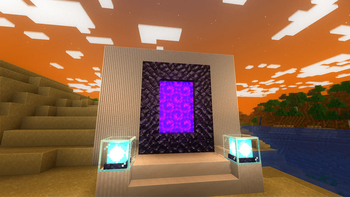
**This shader has:**
– waving plants/leaves/water
– simple specular sky reflections
– emmisive textures support
– colored shadows
– fog
– clouds
– outlines
– high fps on any machine
_Iris only at the moment_
InvertColors-Shader
This is a shader pack that makes your minecraft graphics render in inverted colors.
It supports the default view fog of minecraft and it could toggle the rendering of light level of the blocks.
It supports OptiFine HD and IRIS Shader (1.1.0 supported iris shader, do not run 1.0.0 under iris shader because it will crash your game!)
It supports English and Chinese in shaderpack settings
Insanity Shader






A stylized, horror themed Iris shaderpack with high customizability and performance.
Check out Fear Nightfall, the official modpack that Insanity was made for.
Insanity is based from BSL Shaders by Capt Tatsu! With expanded customizability, new clouds, and a unique scary atmosphere

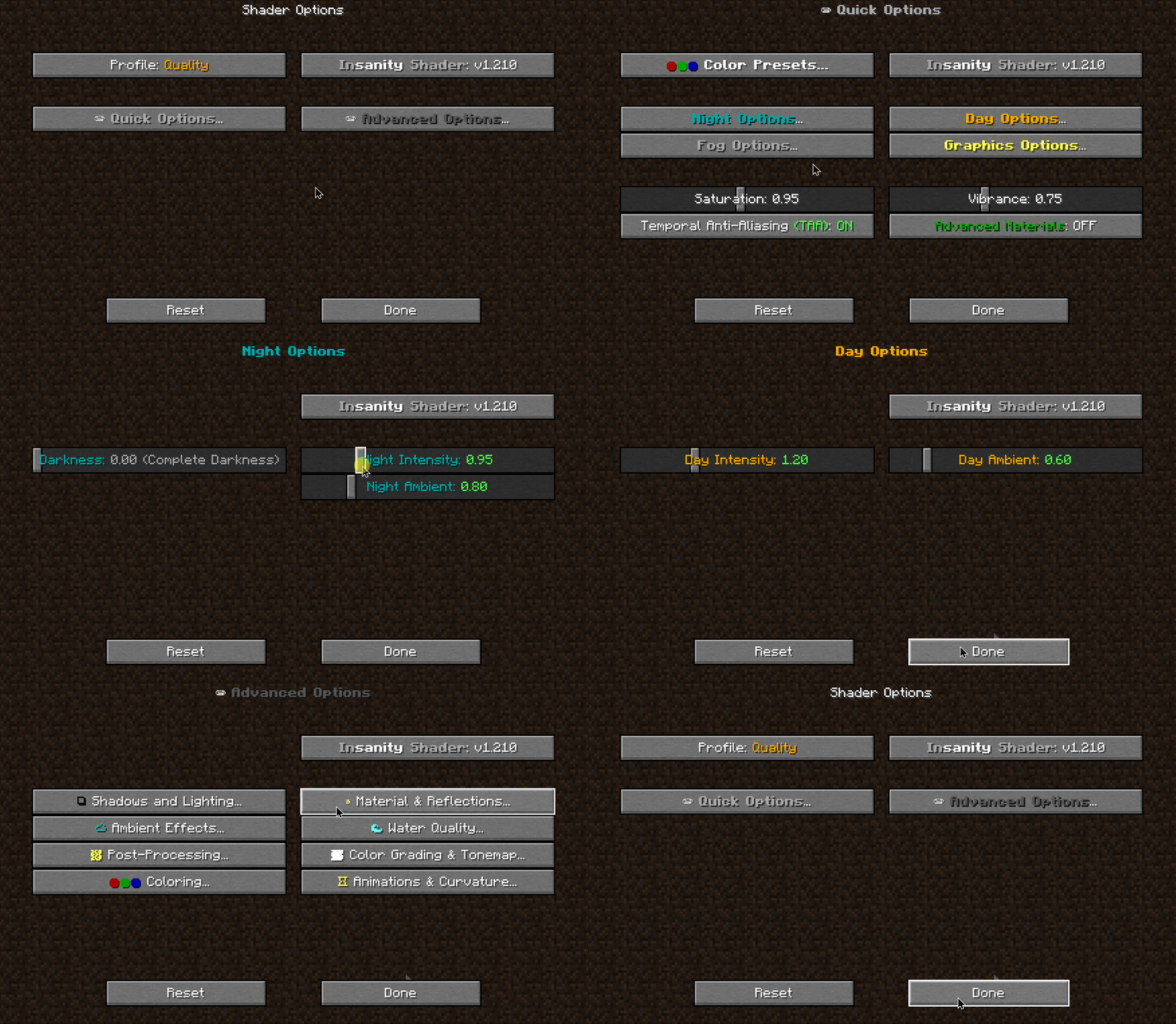

- 🧟 Horror styled gameplay. Great for horror modpacks!
- 📓 Highly customizable shader configuration. Expanded from BSL’s limits.
- ⛈️ Immersive weather. From foggy mornings to torrential rains.
- 📝 User-friendly menu. Including a quick options menu with easy to configure settings.
- 💻 Runs on most modern PC’s! Optimized even for modern low end GPUs.
- 🔦 Always bring some torches. Not only the night is dark, the Nether and End are even worse!
- 🌎 Wide compatibility across versions. Supports all newer MC versions, even 1.19 using Iris!
- ☀️ Support for “realistic” texture packs*
* Please enable “Advanced Materials” on the Materials and Reflections settings
Can I share the shader with my friends/community/followers?
Yes, of course. Just don’t distribute the files. If you want to share the shader, send the link to this modrinth page.
Can I make a video using this shader?
Feel free to make any video with the shader, crediting would be appreciated, but it’s not necessary 🙂
If you plan on making a review, don’t forget to share it in the comments of this page so we can see it!
How do I install the shader? (Iris)
The recommended way to use Insanity is through Iris Shaders, an alternative to OptiFine
- To install it, download it from their website, open the .jar file and install it in your .minecraft folder
- Then download Insanity and place the .zip file onto .minecraftshaderpacks
- Open Minecraft using the Fabric Loader that Iris installed and go to Video Settings > Shaders and select Insanity
- Enjoy the darkness.
Made with 🖤 by ElocinDev
Special thanks to Capt Tatsu for making BSL
ink-wash-shaderpack
# 🎨 Ink Wash Painting Shader Pack
> *Transform your Minecraft world into a flowing Chinese ink wash painting.*
—
## ✨ Overview
**Ink Wash Shader Pack** is an Iris shader pack for Minecraft, inspired by traditional Chinese ink wash painting art. Using post-processing shader technology, it transforms the game’s visuals into a real-time ink painting style—featuring natural gradations of ink tones, varied brushstrokes, distant mountains fading into a dreamlike white space, and foliage swaying in the wind.
Unlike simple desaturation filters, this shader pack deeply simulates multiple traditional ink painting techniques:
– **Five Ink Tones (五墨法)** — Natural transitions between burnt, heavy, dark, light, and clear ink tones.
– **Brush Stroke Outlines (皴法)** — Multi-scale edge detection to simulate the texture of a traditional ink brush.
– **Negative Space (留白)** — Distant scenery and skies fade into large areas of preserved white space, mimicking the ethereal emptiness found in traditional landscapes.
– **Ink Diffusion (墨晕)** — A soft, natural bleeding effect simulating wet ink seeping into rice paper.
– **Rice Paper Texture (宣纸)** — Fractal noise reproduces the authentic fiber texture of traditional Xuan paper.
## 🖼️ Core Features
### 🖌️ Global Ink Tone Palette
All blocks are mapped to ink tones based on luminance. Nearby objects show texture details (like light ink sketches), while distant objects gradually dissolve into negative space.
### ✒️ Three-Tier Brush Outlines
| Brush Size | Detection Method | Visual Effect |
|————|——————|—————|
| **Thick** | Depth + Normal Edges (2x sample) | Major structure outlines (mountains, buildings) |
| **Medium** | Depth + Normal + Color (1x sample) | Block-level edges |
| **Fine** | Color Edges (0.5x sample) | Fine texture detail lines |
### 🌿 Wind Sway Animation
Grass and flowers sway dynamically with a 3-layer wind system (main gust + rustle + fine tremor). Leaf blocks sway gently like entire branches. The shader intelligently differentiates foliage using texture transparency so solid ground blocks will not animate.
### 🌫️ Distant Fading
A depth-based fading system: foregound ink is sharp and clear → midground lightens → background dissolves completely into paper white, much like distant mountains in traditional landscape paintings.
### 💧 Ink Diffusion
A dedicated post-processing pass simulates wet ink seeping into the paper. Light ink areas spread naturally, strong ink remains crisp, and ink flow is subtly influenced by micro-gravity.
### 📜 Rice Paper & Mounting
– **FBM Paper Texture** — Tri-scale fractional brownian motion noise with horizontal fiber bias to recreate authentic papermaking textures.
– **Scroll Border** — Adds a traditional mounted scroll frame around the screen.
– **Vermilion Seal (朱印)** — A toggleable traditional red stone seal stamp.
### 🌙 Time & Dimensions
– Ink tones automatically adapt to Minecraft time—light and elegant during the day, heavy and dark at night.
– Automatically detects the **Nether dimension** and applies a brightness boost and a subtle warm red tint perfectly fitting the lava atmosphere.
– Subtle “Ink Flow” animation brings a breathing, hand-painted feel to the entire display.
## ⚙️ Configurable Parameters (18 Settings)
All parameters can be tuned in real-time via the Iris Shader settings menu, featuring full English/Chinese translations. Options include:
– **Ink Contrast & Color Tints** (Subtle original color preservation up close)
– **Night Darkening & Nether Brightness**
– **Edge Strength** for all three brush tiers
– **Ink Flow & Wind Sway** animations
– **Distance Fade & Ink Diffusion**
– **Paper Grain Intensity**
– **Vignette, Scroll Border, and Seal Stamp** toggles
## 📦 Installation
1. Requires Minecraft with **Fabric** and **Iris Shaders**.
2. Place the downloaded `.zip` file into your `.minecraft/shaderpacks/` folder.
3. Enable the pack in-game: *Options → Video Settings → Shader Packs*.
4. Press `O` in-game to access shader settings and tweak the look to your liking!
Ink Shader
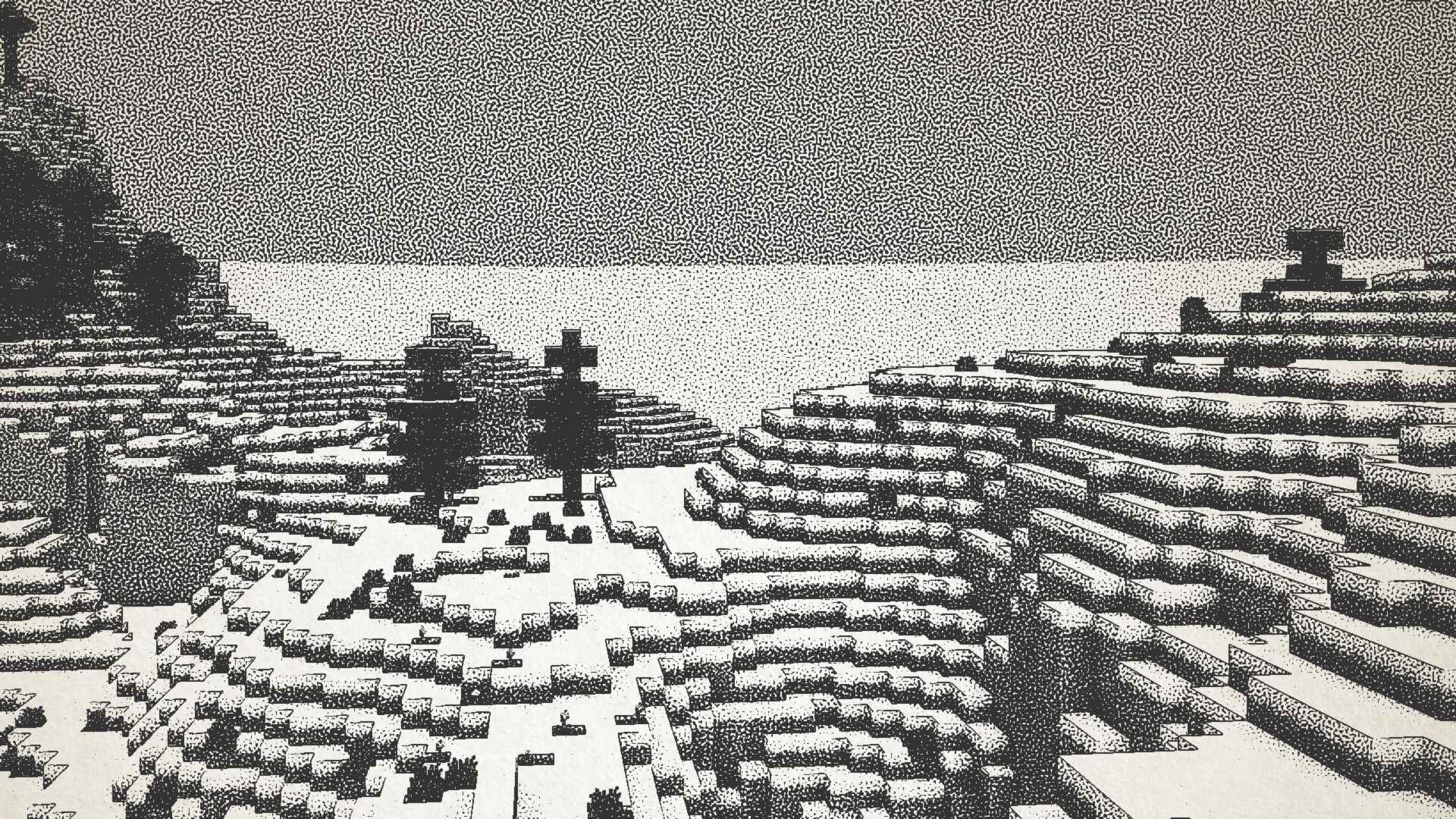
## Ink Shader tries to visualise Minecraft as if it was printed with ink!
Current features include:
– Color Customisation
– Blur Effect
– Stippling
– Edge Detection
– and more!
_This shader was heavily inspired on Acerolas video and uses the paper asset that he uses_
### I mostly tested on Iris 1.21, other versions might not work. If you find any bugs or incompatibilities, you can always report them, it helps me and others out 😀
### Installation
1. First you need to install either OptiFine or the Iris mod to be able to load shaderpacks. (Choose Iris if you are unsure)
1. Then you need to launch the game, and get to the Shaderpacks/Shaders menu in Video Settings.
1. Open the shaderpacks folder by clicking the button in the menu.
1. Download the Ink Shader and put it in the shaderpacks folder.
1. Get back in the game, and choose Ink_Shader in the shaderpacks menu. (Refresh the menu if it doesn’t appear)