Tip4serv Donation Webstore
[Tip4serv.com](https://tip4serv.com/?ads=modrinth) provides gaming communities with a platform to effortlessly set up their virtual store and facilitate the sale of digital goods, including donations.
Managing a community and creating content can be demanding tasks. We aim to streamline the process, enabling managers to efficiently handle donations and automatically reward players.
Our mission is to deliver a user-friendly platform that simplifies the experience for both creators and buyers.
Here are examples of stores that you can customize: [https://murga.tip4serv.com](https://murga.tip4serv.com), [https://neon.tip4serv.com](https://neon.tip4serv.com) and [https://steelcraft.tip4serv.com](https://steelcraft.tip4serv.com)
## Features for starter plan (only 5% fee)
– Unlimited game servers & commands
– Create subscriptions plan
– Commands status tracking
– Stock management
– Deliver roles & messages on Discord
– Create discount coupon
– Add managers for your store
– Purchase email and invoice
– Sales statistics
– Private flow for subscribers
– Custom sub-domain
– Resend commands
– No ads
## Features for PRO members (subscription required)
– Dynamic Dark/Light theme
– Account linking with avatars
– Product page with gallery & video
– GUI colors editor & additional CSS
– Top customers & related products
## Store available in 15 languages
English, Danish, Dutch, English, French, German, Hungarian, Italian, Norwegian, Polish, Portuguese, Romanian, Russian, Spanish, Swedish and Turkish.
## Payment method
Here are the payment methods you can offer your players: Visa, Paypal, Cash App, Google Pay, Apple Pay, Ideal, GiroPay, BanContact, Sofort, Sepa, EPS, BACS, Amazon Pay, Revolut Pay, Mobile Pay, MultiBanco, BECS, Przelewy24, Boleto, Oxxo, Afterpay, Link.
## How does this work?
Tip4Serv checks if a player has made a donation on your Tip4Serv store and delivers the order in a minute (e.g., group, money, etc.) by executing commands in the server console.
Create your store and connect your Minecraft server in **5 minutes** on [Tip4Serv](https://tip4serv.com) in 4 simple steps:
1. **Store Settings:**
Enter your store name and set the desired URL.
2. **Payment Methods:**
Select your preferred payment options.
3. **Connect Server:**
Link your Minecraft server to Tip4Serv using your API key.
4. **Add Products:**
Create and configure products with executable commands on your server.
## Commands
**tip4serv connect** – Link your server to Tip4Serv (Ensure the API key is correctly set in tip4serv/tip4serv.key).
**tip4serv reload** – Deliver pending orders if there are any.
**/storelink** – Show a link to the store in the server chat.
## Proxy commands (Velocity & Bungeecord)
**tip4proxy connect** – Link your server to Tip4Serv.
**tip4proxy reload** – Deliver pending orders if there are any.
## Need help?
– [Documentation](https://docs.tip4serv.com/games/minecraft)
– [Contact us](https://tip4serv.com/contact)
ThirdPartyCosmetics
# ThirdPartyCosmetics
[](https://java.com/)
[](LICENSE)
[](http://discord.geysermc.org/)
[](https://geysermc.org/download/?project=other-projects&thirdpartycosmetics=expanded)
ThirdPartyCosmetics is an extension that adds support for loading ears and other third party cosmetics on java players
### Currently supported providers:
| Name | Cosmetics |
| — | — |
| [MinecraftCapes](https://minecraftcapes.net/) | Ears, Capes |
| [OptiFine](https://optifine.net/) | Capes |
| [LabyMod](https://www.labymod.net/) | Capes |
Season Core
# 🌱 SeasonCore
**The Heart of the Seasons**
> SeasonCore is the seasonal engine that brings your world to life—without events, dimensions, or extra clutter.
> A lightweight, modular plugin focused on natural cycles, biome painting, and survival-friendly gameplay.
– ✅ Compatible with Paper / Spigot **1.21+**
– 🌦️ **Dynamic seasons** – Spring, Summer, Autumn, and Winter shift automatically over time.
– ❄️ **Biome transformation** – Terrain colors, trees, and weather adapt to each season.
– 🌾 **Crop & greenhouse logic** – Crops react to seasonal conditions; greenhouses protect plants during Winter.
– 🧩 **Modular design** – Designed to coexist with other survival / RPG plugins.
– 🧭 **Season Clock item** – Right-click to see day, year, season, weather state, and time until the next change.
– 🐾 **Natural fauna integration** – Seasonal fauna and migration now feel more controlled and organic.
—
## ⚠️ World Safety & Biome Restore
Before installing or updating SeasonCore, always **make a full backup of your world**.
SeasonCore includes a built-in **biome backup & restore system**:
– A dedicated folder stores your **original biomes** in the background.
– If you don’t like the result or want to remove the plugin, you can restore your world’s biomes.
> Keep SeasonCore installed while restoration runs and load the affected chunks so they can be fully restored.
—
## ✨ What’s New in This Update
### `/season biomes` – Control & Restore Biome Painting
A new subcommand has been added:
– `/season biomes on` – Enables biome painting as usual.
– `/season biomes off` – Disables biome painting (no new chunks will be painted).
– `/season biomes restore` – Gradually restores the affected chunks back to their **original** biomes using the internal backup.
This makes it much safer to test SeasonCore on production worlds.
### HUD improvements
– `/season hud` now supports an **OFF** mode:
– `FIXED` – Static HUD that always shows the same player.
– `VARIABLE` – Follows the player that last used the command.
– `OFF` – Completely disables the seasonal HUD (BossBar).
### Snow & upgrade behavior
– When upgrading from older versions (e.g. **1.1 → 1.2**), SeasonCore now:
– Detects **old seasonal snow** and cleans it up correctly.
– Fixes previous issues where legacy snow stayed permanently “valid” in the world.
– Snowfall in **protected areas or regions controlled by other plugins** has been improved:
– Snow now only settles where it is actually allowed.
– No more weird empty patches or chunks without snow in the middle of a storm.
### Fauna & world integration
– Seasonal fauna behavior has been tuned so that animals appear in a **more natural and controlled** way, blending better with vanilla gameplay.
### Translation updates
Several languages have been revised and improved:
– `id_ID` – Indonesian 🇮🇩
– `it_IT` – Italiano 🇮🇹
– `fr_FR` – Français 🇫🇷
– `de_DE` – Deutsch 🇩🇪
– `pt_BR` – Português (Brasil) 🇧🇷
– `ru_RU` – Русский 🇷🇺
– `pl_PL` – Polski 🇵🇱
– `vi_VN` – Tiếng Việt 🇻🇳
– `tr_TR` – Türkçe 🇹🇷
—
## ⌨️ Season Commands
“`
/season – Shows the current day, year, and season.
/season info – Displays detailed season info (day, year, total days, etc.).
/season day – Sets the current day of the season to .
/season skipday [n] – Skips one or more days (default is 1).
/season set
– Forces the current season.
/season hud
– Controls the calendar HUD (BossBar).
/season biomes
– Enables, disables, or restores biome painting.
/season reload – Reloads all plugin files and restarts internal services.
“`
### 📖 Season Guide
“`
/seasonguide – Gives the player the “Season Guide” book
(auto-translated to their language).
“`

—
## 📊 PlaceholderAPI Support
SeasonCore exposes basic seasonal data through PlaceholderAPI:
| Placeholder | Description |
|———————|———————————————————————-|
| `%aeternum_day%` | Current day in the Aeternum calendar. |
| `%aeternum_year%` | Current Aeternum year. |
| `%aeternum_season%` | Current season name, using the plugin’s translations (Spring, etc.) |
### Example: Recommended scoreboard
“`yaml
scoreboards:
aeternum:
title: “&bAeternum Seasons”
lines:
– “&7Day: &f%aeternum_day%”
– “&7Year: &f%aeternum_year%”
– “&7Season: &f%aeternum_season%”
“`
PSG LOGIN
🔐 PSGLogin – Best Minecraft Login Plugin (AntiBot + 2FA + Security)
PSGLogin is one of the best Minecraft login plugins for cracked servers, built for Spigot, Paper, and Purpur. It provides advanced protection against bots, brute-force attacks, and unauthorized access while maintaining high performance.
A modern alternative to plugins like AuthMe Reloaded, nLogin, and LuxAuth.
🚀 Why PSGLogin?
🛡️ Advanced Anti-Bot Protection
🔐 Secure BCrypt Password Hashing
🔑 Built-in Two-Factor Authentication (2FA)
⚡ Fully async & optimized performance
📊 Supports SQLite & MySQL (HikariCP)
🎨 Fully customizable UI (BossBar, Titles, ActionBar)
🔑 Features
🔐 Authentication System
BCrypt hashing (configurable cost)
Constant-time comparison (anti timing attacks)
Password strength validation
Unsafe password blacklist
Password reuse prevention
🛡️ Anti-Bot & Security
IP-based rate limiting
Join spam protection
Automatic IP bans
Account lock system
Brute-force protection
QR code generation
Recovery codes
Secure TOTP system
⚡ Performance
Fully async database operations
Optimized for high player counts
Low CPU & memory usage
🎨 Customization
BossBar login timer
Titles & ActionBar messages
Sounds & placeholders
Fully configurable messages
📊 Database Support
SQLite (default)
MySQL with connection pooling
Auto table creation
SQL injection safe
🆚 Why Choose PSGLogin?
Better performance than many auth plugins
Built-in anti-bot system (no extra plugins needed)
Modern codebase (no outdated APIs)
Easy setup and configuration
🎮 Commands
/login, /register, /logout
/changepassword, /unregister
/2fa enable, /2fa disable
Admin management commands
🎯 Perfect For
Cracked Minecraft servers
Lifesteal & PvP servers
SMP servers
High-traffic public networks
📦 Installation
Place PSGLogin.jar in /plugins/
Start server
Configure files
Done ✅
🔗 Links
Discord: https://discord.gg/HutcT9w9AB
⚠️ Note
This plugin includes real backend security systems.
Misconfiguration may reduce protection.
Natural Compass
# 🌿 Natural Compass — Plugin Recreation of Nature’s Compass (by Chaosyr)
[](https://github.com/gh-Constant/naturalcompass)
[](https://github.com/sponsors/gh-Constant)
**Natural Compass** is a Spigot/Paper plugin that brings **biome-searching functionality** to Minecraft servers, recreating the popular Forge/Fabric mod [Nature’s Compass](https://www.curseforge.com/minecraft/mc-mods/natures-compass) by Chaosyr.
Supports **vanilla, datapack, and modded biomes** (Terralith, Incendium), **all dimensions**, and **Bedrock players via Geyser**.

## 🚀 Quick Installation
[](https://modrinth.com/mod/natural-compass/versions?l=paper)
[](https://modrinth.com/mod/natural-compass/versions?l=purpur)
[](https://modrinth.com/mod/natural-compass/versions?l=bukkit)
[](https://modrinth.com/mod/natural-compass/versions?l=spigot)
1. 📥 Download the `.jar`
2. 📂 Place in `plugins/`
3. 🔁 Restart server
4. 🧭 Craft/give yourself a **Natural Compass** and explore!
### ⚠️⚠️⚠️ Server Admin Note — Bedrock Resource Pack ⚠️⚠️⚠️
The Bedrock resource pack was generated using **Rainbow** (client-side Fabric mod) to create Geyser **Custom Item API v2** mappings.
* **Rainbow:** [GitHub](https://github.com/GeyserMC/Rainbow) — used to build the pack, **not a plugin dependency**
* **Requirement:** Your server must use a [**Geyser fork with Custom API v2**](https://github.com/geyserMC/geyser/pull/5189) for textures/icons to display properly
> Without this setup, Bedrock players can still use the compass — textures and visual features will not appear.
### Java Edition
[](https://www.dropbox.com/scl/fi/c02cldac4jz0tu8mk37ld/aNaturalCompass.zip?rlkey=xa0ayc71f12mtw8oo0salthn7&st=4ji35d8o&dl=0)
— Animated compass needle, ready for Java Edition V1.1-SNAPSHOT.
### Bedrock Edition
[](https://www.dropbox.com/scl/fi/kc04ar4la5ku04adxcwzs/NaturalCompass-bedrock-V1.00SNAPSHOT.rar?rlkey=pzi2vqxdrhxf2y914m9za0w61&st=12uy5xt6&dl=0)
— Requires **Geyser + Custom API v2** to work on Bedrock V1.0-SNAPSHOT.
## 🧭 Main Features
### 🔹 Biome Locator
* Search **any biome**: vanilla, datapack, or modded
* Works in **Overworld, Nether, End**
* Fully compatible with **Java & Bedrock (Geyser)**
### 🎨 Compass Texture
* Original Nature’s Compass texture by Chaosyr
* Single texture for all compass tiers
* **Java resource pack** included (animated needle)
* **Bedrock pack** compatible via Geyser Custom API v2
### 📂 Customizable Compass Tiers
| Tier | Default Range | Recipe |
| —- | ————- | —————————— |
| I | 1,000 blocks | Moss Block + Diamond + Compass |
| II | 2,500 blocks | Heart of the Sea + Tier I |
| III | 5,000 blocks | Amethyst Cluster + Tier II |
| IV | 10,000 blocks | Echo Shard + Tier III |
| V | 25,000 blocks | Nether Star + Tier IV |
> Recipes fully configurable in `config.yml`.
### 🖥 In-Game Interface & Visuals
* **Biome Selection GUI** by provider
* **Search messages**: “searching” & “biome found”
* **Visual Indicators**: Compass points, ActionBar/BossBar, optional coordinates
* **Biome & Provider Icons**: Grass Block, Snow Block, custom heads
### 🖌️ Customizing Biome & Provider Icons
#### Biome Icons (`biomes.yml`)
“`yaml
minecraft:sunflower_plains:
icon: SUNFLOWER
dimension: overworld
“`
* Replace `icon` with any valid Minecraft item/block ID
* Add new biomes by copying an entry and updating ID, name, icon, dimension
#### Provider Icons (`providers.yml`)
“`yaml
terralith:
icon: PLAYER_HEAD
texture: eyJ0ZXh0dXJlcyI6eyJTS0lOIjp7InVybCI6Imh0dHA6Ly90ZXh0dXJlcy5taW5lY3JhZnQubmV0L3RleHR1cmUvZGVhNjExOGI4ZjVlMTI5MjE0Mzc5MTI4Yzc4MmNmYWE0ZDM0ZTVjZmE3YjkyZmIwM2JiNjk2ZjRmZGJhMDBlZSJ9fX0=
“`
* Replace Base64 string to change icon
* Add new providers with `display_name` + `icon`
* Reload plugin: `/naturalcompass reload`
### 🔐 Permissions
| Permission | Description | Default |
| ———————– | ———————————– | ——- |
| `naturalcompass.use` | Use the compass | ✅ true |
| `naturalcompass.craft` | Craft/upgrade compasses | ✅ true |
| `naturalcompass.admin` | Admin commands (reload, GUI access) | ❌ op |
| `naturalcompass.reload` | Reload config | ❌ op |
### 📌 Commands
* `/naturalcompass reload` — Reload configuration *(admin)*
* `/naturalcompass admin` — Open admin GUI *(admin)*
* Aliases: `nc`
MCXboxBroadcast
# MCXboxBroadcast
[](LICENSE)
[](https://github.com/MCXboxBroadcast/Broadcaster/actions/workflows/release.yml)
[](https://discord.gg/Tp3tA2kdCN)
A simple tool that broadcasts an existing [Geyser](https://github.com/GeyserMC/Geyser)/Bedrock server over Xbox Live.
This shows up to the authenticated accounts friends in-game as a joinable session and then anyone thats friends with someone who joined through that method will also see the session as joinable ingame.

# DISCLAIMER
You use this project at your own risk, the contributors are not responsible for any damage or loss caused by the software. We suggest you use an alt account for running the tool in case the account is banned as we emulate some features of a client which may or may not be against TOS.
## Features
– Syncing of MOTD and other server details
– Automatic friend list management
– Easy Geyser integration (as an extension)
– Shows as online and playing Minecraft in the Xbox app and website
– Multi-account support
– Web manager for larger networks
– Uploading of a custom image for the account (see below for more info)
## Pterodactyl Panel
There is an egg for easy instance creation supplied for [Pterodactyl Panel](https://pterodactyl.io/), this being `egg-m-c-xbox-broadcast.json`
## Docker
There is a docker image available for the standalone version of the tool, this can be found at `ghcr.io/mcxboxbroadcast/standalone:latest`
“`bash
docker run –rm -it -v /path/to/config:/opt/app/config ghcr.io/mcxboxbroadcast/standalone:latest
“`
## Installation
### Extension
1. Download the latest release file `MCXboxBroadcastExtension.jar`
2. Drop the extension into the Geyser `extensions` folder
3. Restart the server
4. Wait for the extension to start and present you with an authentication code
– `To sign in, use a web browser to open the page https://www.microsoft.com/link and enter the code XXXXXXXX to authenticate.`
5. Follow the link and enter the code
6. Login to the account you want to use
7. Follow the account on Xbox LIVE
8. Check the friends tab ingame and you should see the server listed
### Standalone
1. Download the latest release file `MCXboxBroadcastStandalone.jar`
2. Start the jar file using `java -jar MCXboxBroadcastStandalone.jar`
3. Wait for the extension to start and present you with an authentication code
– `To sign in, use a web browser to open the page https://www.microsoft.com/link and enter the code XXXXXXXX to authenticate.`
4. Follow the link and enter the code
5. Login to the account you want to use
6. Follow the account on Xbox LIVE
7. Edit the `config.yml` to have the correct ip and port for the target server
8. Restart the tool
9. Check the friends tab ingame and you should see the server listed
## Manager
There is a web manager available for donators. After joining the relevent [GitHub sponsors](https://github.com/sponsors/rtm516) tier you will be able to access its builds at https://github.com/MCXboxBroadcast/Manager/releases
Note: This also requires a MongoDB instance to be running
Screenshots


## Custom Image

You can add a custom image to the profile page for the account by placing a `screenshot.jpg` in the same directory as the `config.yml`.
The best settings for this image are `1200×675`, quality `90` and chroma subsampling `4:2:0`.
This can take a few minutes to update on the Xbox Live servers and show ingame.
## Commands
For the extension version prefix with `/mcxboxbroadcast`
| Command | Description |
| — | — |
| `exit` (Standalone Only) | Exits the program |
| `restart` | Restarts the tool |
| `dumpsession` | Dumps the current session data to files for debugging |
| `accounts list` | Lists the accounts that are currently in use and their followers count |
| `accounts add ` | Adds an account to the list of accounts to use |
| `accounts remove ` | Removes an account from the list of accounts to use |
Ly+ TPA
# Ly+ TPA
**GUI-based teleportation with dimension awareness for the Ly+ suite.**
A polished `/tpa` and `/tpahere` system with a full request GUI, per-player reception settings, and a smooth action bar countdown — all managed from `/settings`.
> 💬 **Support & Community:** [Join our Discord](https://discord.gg/hRWxShEnqa)
> 🔧 **Requires:** [Ly+ Settings](https://modrinth.com/plugin/lyplussettings)
—
## ✨ Features
### 📨 Request GUI *(sender side)*
When you run `/tpa` or `/tpahere`, a confirmation GUI opens **before** anything is sent to the other player. You see exactly who you’re requesting and where they are — then decide whether to confirm or cancel.
– 🌿 **Grass Block** — target is in the Overworld
– 🔴 **Netherrack** — target is in the Nether
– 🪨 **End Stone** — target is in The End
– Player head with name in the center
– **Lime** = confirm & send · **Red** = cancel without sending
### ⚠️ Warning GUI *(receiver side, TPA-Here only)*
If a player has the TPA-Here Warning enabled in their settings, they get a second confirmation GUI showing where they’ll be teleported to before accepting. Prevents TP-trapping.
### ⏱️ Action Bar Countdown
No chat spam — the countdown appears cleanly in the action bar:
“`
✦ Teleporting to Steve ●●●○○ 3s ✦
“`
Progress dots fill down as time counts. Moving during the countdown cancels the teleport immediately.
### 🎛️ Per-Player Settings *(in /settings GUI)*
| Setting | Options |
|—|—|
| Auto-Accept | ON / OFF |
| Countdown | ON / OFF |
| TPA-Here Warning | ON / OFF |
| TPA Reception | Everyone · Friends Only · Nobody |
| TPA-Here Reception | Everyone · Friends Only · Nobody |
—
## 🎮 Commands
| Command | Description |
|—|—|
| `/tpa ` | Send a teleport request |
| `/tpahere ` | Ask a player to come to you |
| `/tpaccept` | Accept a pending request |
| `/tpdeny` | Deny a pending request |
**Aliases:** `/tph` · `/tpyes` · `/tpno` · `/tpcancel`
—
## 🔐 Permissions
| Permission | Default |
|—|—|
| `settings.tpa` | true |
| `settings.tpaccept` | true |
—
## 🧱 Ly+ Addon Suite
| Addon | Description |
|—|—|
| [Ly+ Settings](https://modrinth.com/plugin/lyplussettings) | Core plugin — required |
| **Ly+ TPA** | You are here |
| Ly+ Friends *(coming soon)* | Full friend system with live status tracking |
| Ly+ Messages *(coming soon)* | Private messaging system |
| Ly+ Homes *(coming soon)* | Home and warp management |
—
## 📋 Requirements
– Paper or Purpur **1.21+**
– Java **21+**
– [Ly+ Settings](https://modrinth.com/plugin/lyplussettings) **2.0.0+**
—
## 🚀 Installation
1. Make sure [Ly+ Settings](https://modrinth.com/plugin/lyplussettings) is installed
2. Download `LyPlusTPA-2.0.0.jar` and place it in `/plugins`
3. Start the server
4. Configure `plugins/LyPlusTPA/config.yml` if needed
—
> Made with ❤️ by **Lyvt** · [Discord Support](https://discord.gg/hRWxShEnqa)
Lock With Password (LWP)
———–
FEATURES
——–
– Lock any container with a password
– Secure password hashing and authentication
– Change passwords on locked containers
– Permission system with granular control
– Java and Bedrock player support (Floodgate compatible)
– Intuitive dialog UI for password entry
– Authorize other players to access your locked containers
– Configurable security settings (password length, lockout time, failed attempts)
– Persistent lock data with automatic saving
– Admin bypass capabilities
SUPPORTED CONTAINERS
——————–
Chests, Trapped Chests, Barrels, Shulker Boxes, Hoppers, Furnaces, Blast Furnaces, Smokers, Brewing Stands, Cauldrons, Dispensers, Droppers, and more.
HOW TO USE
———-
LOCK A CONTAINER:
1. Sneak (hold Shift) and right-click on the container you want to lock
2. A dialog will appear asking for a password
3. Enter your password (4-16 characters by default)
4. Confirm the password
5. Container is now locked
CHANGE PASSWORD:
1. Sneak (hold Shift) and right-click on the locked container
2. A dialog will appear asking for the new password
3. Enter your new password
4. Password is updated
REMOVE LOCK:
1. Type /unlock
2. Right-click on the locked container you want to unlock
3. Lock is removed
COMMANDS
——–
/unlock – Remove a lock from a container (then right-click the container)
PERMISSIONS
———–
lwp.use – Use all lock commands (default: true)
lwp.use.lock – Lock containers
lwp.use.unlock – Unlock containers
lwp.use.changepassword – Change container passwords
lwp.admin – Bypass all locks and access any container (default: op)
CONFIGURATION
————-
Config file automatically generated at plugins/LockWithPassword/config.yml
Settings:
– Minimum password length (default: 4)
– Maximum password length (default: 16)
– Lockout time after failed attempts (default: 30 seconds)
– Maximum failed password attempts (default: 3)
REQUIREMENTS
————
– Minecraft Paper 1.21.7 or higher
– Java 21 or higher
– Optional: Floodgate for Bedrock Edition player support
HideCommands
# HideCommands
A simple Geyser extension that hides commands.
# Commands
– **/hidecommands hiddencommands** – Shows all the hidden commands
# Permissions
– **hidecommands.hiddencommands** – Lets you view the hidden commands
# Links
– Donate: https://patreon.com/redned
– Issues: [Open an issue](https://github.com/Redned235/HideCommands/issues/new)
HeadDrop
🎭 HeadDrop – The #1 Head Drop Plugin! 🎭
⚔️ Every Kill Tells a Story – Collect Heads & Show Your Victories! 💀
Make your Minecraft server more competitive and fun with HeadDrop! Collect heads from enemies, customize drop chances, enable leaderboards, and even get Discord alerts when rare drops happen!
🎯 Why Choose HeadDrop? 🎯
- ✅ Player & Mob Head Drops – Collect heads from players and mobs with customizable drop chances.
- ✅ Fully Customizable – Add lore, adjust percentages & more!
- ✅ Looting Enchantment Boost – Increase head drop rates with Looting levels.
- ✅ Special Mob Heads – Get heads for all types of mobs, including bosses.
- ✅ Leaderboard System – Track top players who collect the most heads.
- ✅ Discord Integration – Get real-time Discord notifications when heads drop.
- ✅ Multi-Version Support – Works on multiple Minecraft versions.
- ✅ Folia Compatibility – Seamlessly supports Folia.
- ✅ Custom Sound Effects – Unique sounds for different mob head drops.
- ✅ Highly Optimized – Designed for zero lag, even on large servers.
—
🔑 Permissions & Commands 🔑
- 🎟 headdrop.head – Use
/head to get a head.
- 🎟 headdrop.reload – Reload the config with
/headdrop reload.
- 🎟 headdrop.notify – Receive plugin updates & alerts.
- 🎟 headdrop.player – Enable head drops from players.
- 🎟 headdrop.killer – Enable mob head drops when killed.
- 🎟 headdrop.chance.* – Increase head drop chances per permission.
- 🎟 headdrop.gui.move – Allow players to manage heads in the GUI.
—
🏆 Download HeadDrop & Dominate the Server! 🏆
💬 Support: Join our Discord for help & community!
—
💎 Upgrade to HeadDrop Premium for Exclusive Perks! 💎
- 🚀 Lightning-Fast Performance – Perfectly optimized for large servers.
- ⚡ Premium-Only Features – Unlock advanced customization and mechanics.
- 🎧 Priority Support – Get faster updates and direct help from the dev.
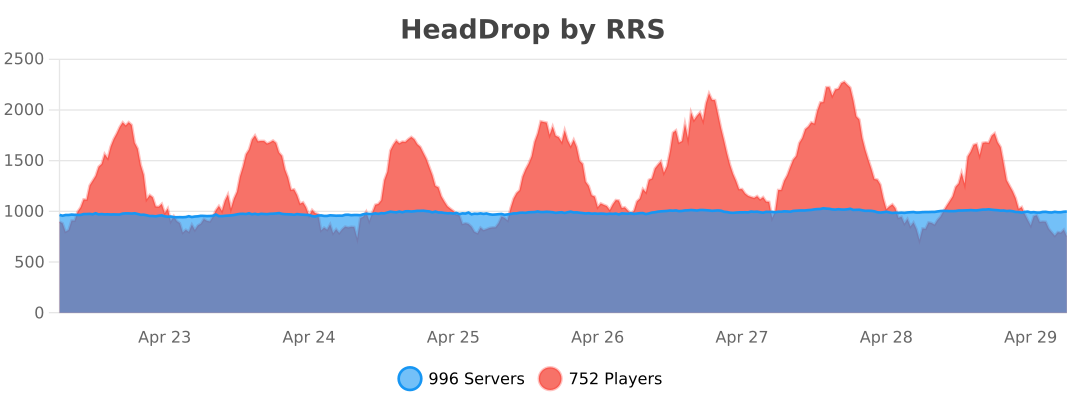
📊 Stats & Analytics:
HeadDrop collects anonymous stats to improve performance.
—