Xtra stuf
This mod has many new features, some may seem hard to figure out. here are some instructions for hard features.
Mars dimension. in order to go to mars, you need to make a portal out of mars block. you craft it with red sand in the middle and corners of the crafting grid, the rest filled in with iron ingots. you make it like a nether portal, but ignite it with the mars portal igniter made with red sand and flint and steel. in mars, you will find iron oxide, volcanic basalt, and mars bases. the iron oxide can be crafted with iron nugget + bottle of water (not water bottle) the bottle of water is crafted with 2 glass on top of each other. iron oxide can be converted to iron nuggets with sandpaper + iron oxide. sandpaper is made with paper and sand on top of the paper. volcanic basalt can be made into slabs, stairs and walls.
2. Biomes. The biomes naturaly generate around the world. the pine forest is the most commen. it is like a tall tree spruce biome, but the trees are a new tree type, pine, they can be crafted into planks, slabs, stairs, door, trapdoor, and fence. i forgot to make wooden tool and stick craftable with it. Biome 2: Orange tree feilds. this biome generates with orange trees and grass. the oranges drop from the leaves. the oranges can be eaten or crafted into with orange + bottle of water. Biome 3: Glowing plains. this biome is less serious, the ground is glow block, and dirt is glowstone. In mars, there is mars biome and mars basalt plains. in the garbage dimension there is landfill.
3. Garbage dimension. garbage is crafted with paper, stick, dirt. 4 garbage makes a garbage block, used to make a garbage portal. be careful to not break the garbage block be cause it drops junk. to ignite the portal use the garbage portal igniter crafted with flint and steel and garbage. the garbage dimension is garbage block and trash water. it is just like water but flows slower.
4. Ores and materials there are 2 new ores and 5 new materials. first uranium its a bit rare and the armour gives you blast protection and the pickact mines a 3×3 area. the sword gives poison 1 for 60 ticks. next, tin. tin is another ore. it can be used to craft bronze with 1 copper and one tin ingot. bronze can be used to craft a sword, pickaxe, and trumpet. the bronze tools are almost as good as diamond. next, stone armour is now a thing. it is crafted with stone, andisite, diorite, and granite, not cobblestone. Next, great material. the tools and armour are overpowered. you craft it with netherite, diamond and iron. it has a sword, axe, pickaxe, and armour.
5. Plants. Many new plants generate all over the world. some plants, like corn, raspberrys, and tomatos can be eaten. corn when you eat it drops a corn husk, which can be crafted into bonemeal. other plants are decorative. the mushroom piles drop mushrooms.
6. mobs. at the time of writing this, the only new mob is a duck. they are a bit buggy.
7. this may change. new things are always being added.
Xtra Commands
This mod has been kept in-private for several years (my Twitch/Trovo team used it for the stream fun!). But I finally decided to share it – maybe someone will want to use it for this purpose as well.
### Here are the main features:
(all commands starts with /xc or /xtracommands)
#### drophelditems:
Throws out items in both hands (useful command to trigger when streamer is near the bottomless pit and holding his valued sword along with his priceless bow).
#### pit [lava|water]:
Teleports player to nearest opening beneath (or digs a 5x5x5 hole for the purpose, if no suitable place has been found). “lava” and “water” arguments doesn’t look for an opening and just teleports player to the lowest position above the bedrock, filling 5x5x5 hole with the appropriate liquid of your choice.
#### quake:
I have no idea why I called this command “quake”. All it’s doing is removing a 3x3x1 square of blocks just beneath player’s feet (useful when streamer is building one-block bridge to cross the lava-lake in the Nether for example). Warning! This command does NOT remove any tile-entities, so it can’t be used to destroy player’s storage.
#### summonrandom “[|[|]]” :
This command chooses random entity from the list and spawns it in a player coordinates. Or a couple of entities if is greater than one. Please note: entity list should be double-quoted and separated by vertical line “|”.
#### unequiparmor:
If you cannot kill the player yourself, try to help those mobs around by removing all the armor! This command does just that. Unequipped armor will be placed in player’s inventory if possible. Otherwise it will be thrown in the world!
#### rtp :
Proper way to do a random teleport of a player. This command is taking a world type in account, so, player won’t be teleported to void in The End or above the bedrock in The Nether.
#### summonnamed []:
Summon named mob while keeping default (vanilla-generated) equipment
#### timeskip :
Add time to nearest day or nearest night (instead of stupid minecraft /time set variant, which resets game day to zero)
### Beside the commands, this mod adds two potion effects:
#### /effect give @s xtracommands:reverse
This effect will switch player’s WASD keys to function in reverse! So, D is for going left, A – for strafing right, W – is backwards and S for moving forward.
#### /effect give @s xtracommands:roll
This effect will rotate player’s camera to be… well… Not so useful to navigate with.
Effect itself depends on the Level:
Level = 0: rotate 180 degrees
Level = 1: rotate 90 degrees clockwise
Level = 2: rotate 90 degrees counter-clockwise
Level = 3 and more: roll the camera! More level equals more speed (mix with Nausea to make everyone sick!)
Xtra Arrows
## The Arrows
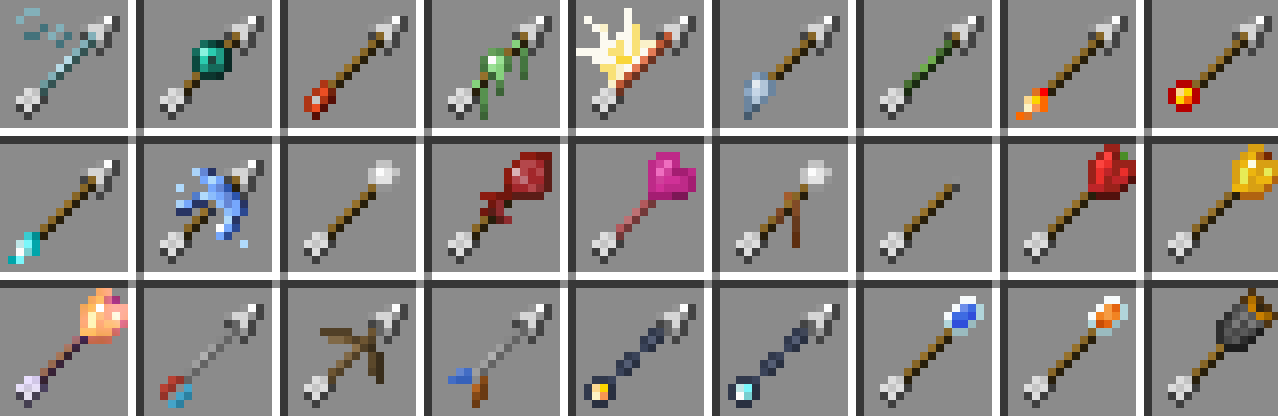
**There are currently 95 new arrows. These arrows come in 27 new types and 5 tiers.**
## Server Hosting Discount
**Follow the link below and use code “JACKBUSTERS” at checkout for 25% off server hosting.**
[](https://bisecthosting.com/jackbusters?r=Xtra-Arrows-Modrinth)
## Media
Xtones Reworked
# Xtones Reworked
Xtones Reworked is a mod for Minecraft 1.19.2 and above that adds various of modern, futuristic, and fantasy style decorative building blocks and a lamp.
This mod will add 512 different building blocks which can be used for building and decoration.. You will find all 34 of the original varieties of blocks with there 15 sub variaties, wich are also found in the original Xtones mod.
You can craft the base blocks like Agon or Kryp over a basic recipe and than alter them to different variants with either dye recipes or with the stonecutter.
It is is a port of the Mod Xtones from TehNut. The code was rewritten from scratch and the existing textures were kept.
## Note
I won’t continue Forge Support and concentrate on Neoforged, but I will start to support a fabric project for this mod.
Xtabay’s Villager Creator
This datapack will help you create custom villagers very easily. Meant for server administrators or map creators. Trades are infinite and unblockable.
**Get the Villager Creator Kit**
/function vg.xtabay:give/villager_creator_kit
USE.
**Villager Creator Stick**
Put all the items you want your villager to trade in a chest in this order, from left to right: 1st buy item, 2nd buy item, sell item. This means every 3 slots are used for a single trade row, up to a maximum of 9 trades per chest. Every trade must have this structure: [Required Item] [Required Item](optional) [Offered Item], if they don’t have this structure, the items will be ignored and the trade won’t be added.
Once you’re done filling a chest with this structure, right click it with a Villager Creator Stick and the villager will be created.
All villagers created by Villager Creator have 40 heart containers, are leatherworkers and snow villagers by default. They’re also riding a block display so they can’t move or be moved.
**Add Trade Stick**
Put a chest next to a villager created with the Villager Creator datapack and repeat the same process as with the Villager Creator Stick but using the Add Trade Stick this time. Once done, all the trades in the chest will be added to the nearest villager and the chest will be deleted.
**Villager’s Properties Stick**
This stick allows you to fully customize your villagers.
These are the values you can modify:
– Profession
– Type
– Name (custom name, styling, color, visibility)
– Invulnerability
– Health
– Silent
**Villager Eraser Stick**
Kill any villager created by the Villager Creator datapack by right clicking it.
Xray Snitch
Are you running a server and want to spend less time trying to detect or prevent Xray? Including this mod in your modpack makes that possible.
—
### What this mod does
– This mod is registering an empty argument, making it required on clients if your server has it installed. Players who try to remove it from their modpack can’t join your server.
– When players join your server, the client checks for Xray **texture packs** and sends a message to the server if one is present (`/config/xray_snitch/`).
### What this mod doesn’t do
– Automatically ban people based on Xray texturepacks
– Provide an easy way to find xraying users in-game
—
### Limitations
– **Detection is limited to texture packs** and isn’t perfect. Most results are true positives, but there can and will be false positives. Never take no detection from this mod as a proof for not using Xray.
– Dedicated troublemakers with knowledge of Java can decompile this mod and create an evil twin, suppressing the results.
Experienced Powers
> This data pack is now discontinued.
> This means that it will no longer receive any more updates.
This data pack gives another use for experience, Magical powers!
You can use this experience points to trade for magical powers (well, effects in other words). For example, You can use 10 experience levels to get fire resistance for 30 seconds, or 7 experience levels to heal yourself.
Yeah I know, it can be a bit overpowered.
To use this data pack, simply use this Command: `/trigger `
Here is a full list of all “powers” and “power_id”:
| Name | Id | Description | XP level required | XP cost
|—————-|—————|—————————————|——|—–|
| Fire resistance | xpower.fire_resistance | Gives 30 seconds of fire resistance. | 25 | 12
| Fire resistance+ | xpower.fire_resistance+ | Gives 2 minutes of fire resistance. | 30 | 18
| Fire resistance++ | xpower.fire_resistance++ | Gives 10 minutes of fire resistance. | 40 | 25
| Slow falling | xpower.slow_falling | Gives 30 seconds of slow falling. | 15 | 5
| Water Breathing | xpower.water_breathing | Gives 1 minutes of water breathing. | 15 | 8
| Water Breathing+ | xpower.water_breathing+ | Gives 5 minutes of water breathing. | 20 | 15
| Water Breathing++ | xpower.water_breathing++ | Gives 20 minutes of water breathing. | 25 | 25
| Heal | xpower.heal | Gives 4 seconds of regeneration V, enough to fill your health bar. | 15 | 5
| Strength+ | xpower.strength+ | Gives 5 minutes of strength I. | 30 | 10
| Strength++ | xpower.strength++ | Gives 10 minutes of strength I. | 35 | 15
| Haste | xpower.haste | Gives 30 seconds of haste I. | 20 | 10
| Haste+ | xpower.haste+ | Gives 2 minutes of haste I. | 30 | 20
| Haste++ | xpower.haste++ | Gives 10 minutes of haste I. | 40 | 25
| Night vision | xpower.night_vision | Gives 2 minutes of night vision | 15 | 4
XP Vial

# 🧪 About
**XP Vial** adds magical glass bottles that allow you to safely store and retrieve your experience points.
This mod is designed to be lightweight and highly configurable in order to enhance any existing gameplay experience of your choosing and to not interfere with any of your other modifications.
For more details, refer to the image gallery, the wiki below, or the following quick summary:
– ‘Xp Vial’ item
– Can store player’s collected xp points
– Three different sizes (500 Xp, 1500 Xp, 3000 Xp)
– ‘Orb Vial’ item
– Special XP Vial item
– Stores player’s collected xp points as experience orbs
– Useful for repairing items with mending
– Items play interactive sounds
– Items have detailed and dynamic texture models (see gallery)
– Highly configurable for individual players and admins through config menus (see below)
– Powered by datapack, configurable through own datapacks
## 🌐 Wiki
If you are looking for a wiki of sorts or just a more detailed walkthrough of the content of this mod, then you can find quick and easy introductions to all the added features of this project below.
If you find no answers to your questions here or want to suggest improvements for the project, then feel free to leave a comment on the CurseForge site ([here](https://www.curseforge.com/minecraft/mc-mods/xp-vial)).
XP Vial
### Description:
XP vials are able to store a limited amount of your collected experience points, preventing you from losing them upon death.
### Usage:
**Right-click** to retrieve stored experience points. Whenever possible, the retrieved amount will match the number of missing experience points needed to reach the next level.
**Shift+Right-click** to store collected experience points. The vial stores the experience points of the player by removing one level at a time.
One can hold down the required buttons for each action to perform the task continuously. Additionally, all vials can be used in both mainhand and offhand.
The fill level of each vial is displayed roughly through the item’s different texture models and denoted exactly in the item’s tooltip.
Small Xp Vial | Medium XP Vial | Large XP Vial
:————————-:|:————————-:|:————————-:
 |  | 
### Recipes:
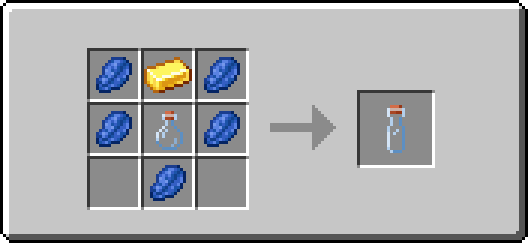

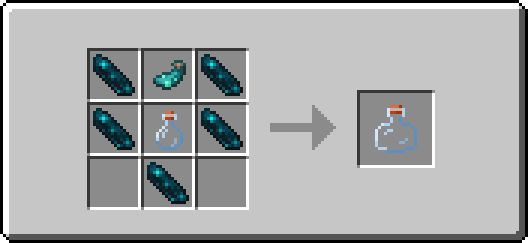
Orb Vial
### Description:
An orb vial is a special variant of an XP vial. It is able to store a limited amount of your collected experience points, preventing you from losing them upon death, and allows you to retrieve experience points in the form of experience orbs.
This enables you to repair items enchanted with mending on the spot and without having to carry large amounts of experience bottles!
### Usage:
**Right-click** to retrieve stored experience points. The retrieved amount will match the minimum of the vial’s remaining fill level and a constant of 100 experience points. The retrieved experience points are then combined into one experience orb that is summoned at the player’s position.
**Shift+Right-click** to store collected experience points. The vial stores the experience points of the player by removing one level at a time.
One can hold down the required buttons for each action to perform the task continuously. Additionally, the vial can be used in both mainhand and offhand.
The fill level of the vial is displayed roughly through the item’s different texture models and denoted exactly in the item’s tooltip.

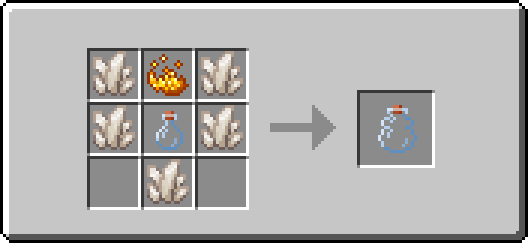
### Recipe:
## 🔧 Configuration
If you’re looking for a detailed description of the configuration options and how to access them, you’ll find brief introductions to all available menus and their default values, grouped by privilege class, below.
Admin
### Access method:
Run the following command: **/function xp_vial:.menu/admin**
### Features:
– Toggle sound events of all items
– Set the use cooldown of the “XP Vial” item
– Set the use cooldown of the “Orb Vial” item
Player
### Access method:
Run the following command: **/trigger XP_VIAL.CONFIG_MENU**
### Features:
– Toggle sound events of all items
# 📬 Remarks
Please keep in mind that at any given time vast amounts of the mod may be edited or completely overhauled! These changes should not, but may leave existing worlds on older versions corrupted. Creating backups before updating to a new version is advised!
I want to reiterate that this is simply a passion project. It may occur that for longer periods no updates or bug fixes are being developed/released simply because I do not want to.
XP Tools

This mod currently lets you change the XP drops of blocks and entities. It lets you specify lists of operations to perform on the XP drops of either all block/entities or specific ones (by ID or TAG). You can also specify a range for your value if you want a randomized amount. Operations are ordered by their specified priorities.
Note: This is a server-sided mod and the configuration file will be generated per-world inside the serverconfig folder.
Example configuration for block breaking:
_The following sets the XP drops of all blocks to 0. Then it adds 0-10 XP for all blocks tagged `#minecraft:mineable/shovel` and sets the XP of blocks tagged `#forge:ores` to 2-5._
“`
#Settings for block breaking
[block_breaking]
#Available operations: [SET, ADD, SUBTRACT, MULTIPLY, DIVIDE]
#List of global operations. Format: ‘[operation],[min],[max],[priority]’
#Global operations are run before any unique operations.
#Examples:
#’set,0,0,0′ – Sets the xp of all blocks to 0.
blockBreakGlobalOperations = [“set,0,0,0”]
#List of unique operations. Format: ‘[block_id/tag_id],[operation],[min],[max],[priority],[is_last]’
#Examples:
#’minecraft:dirt,set,2,2,0,true’ – Sets the xp drop of the dirt block to 2, takes highest priority and stops any additional operations.
#’#forge:ores,multiply,1,2,1,false’ – Multiplies xp drop of all blocks tagged forge:ores by 1-2, allows additional operations.
blockBreakOperations = [“#minecraft:mineable/shovel,add,0,10,0,false”, “#forge:ores,set,2,5,0,false”]
“`
# FAQ
Can I use this in my modpack?
Yes, go for it! Just make sure to use the appropriate source for your modpack (Modrinth/CurseForge).
Will this be ported to x.x.x version?
Feel free to open up a version port request on my issue tracker and I will see what I can do.
XP Tome
### Functionality
This mod adds a single item – the XP Tome. With the XP Tome you can store and retrieve XP. It can store up to 1395 XP by default (can be configured), which equals to having 30 levels on the XP bar.
### Usage
– Sneak + right-click to store XP
– Right-click to retrieve XP
### Recipe

### Config/Item Components
Note: For item components, “true” means the component is on the item, and “false” means it isn’t.
Note: If you want to change the default item components of the XP Tome you can still use the config file, however that comes with caveats explained therein. Consider creating a Data Pack and override the XP Tome’s recipe with the components set as you wish. [Here’s an example recipe.](https://gist.github.com/bl4ckscor3/074fc98a3206a01c8ff239923174543d) More info about [data packs](https://minecraft.wiki/w/Data_pack) and [recipes](https://minecraft.wiki/w/Recipe) on the wiki!
– *max_xp* – The maximum amount of XP points that the XP Tome can hold. The default value (1395) represents having 30 levels on the XP bar.
– *retrieval_percentage* – The percentage of XP that the book will give back, as a sort of cost of using it. Example: If this config value is set to 0.75, and an XP Tome has 100 XP stored, attempting to retrieve these 100 XP will give back 75 XP. Note: This will not be 100% accurate, as Minecraft’s XP does not use decimals.
– *retrieve_until_next_level* – Setting this to true will remove only as much XP from the book at a time as is needed for the player to reach their next level.
– *retrieve_xp_orbs* – Setting this to true will remove XP from the book in XP orb form. This is useful if you want to use XP from the book for tools enchanted with Mending.
– *store_until_previous_level* – Setting this to true will store only as much XP from the player’s XP bar until reaching the previous level, meaning only one level at maximum will be added to the book’s storage at a time.
The configuration file for Minecraft versions 1.14.4-1.20.1 can be found in the serverconfig folder of your world.
### Further Info
This mod was created by me, following a request by Shivaxi. It is based off of [XP Book](https://www.curseforge.com/minecraft/mc-mods/xp-book) and was recreated due to a duplication bug in the original mod, as well as a bug which causes the enchanting table to reset each time the book is used. As this mod uses the same modid and item id as the original, the two mods can not be installed at the same time and switching between them will not lose you any items. I did not take any code or assets from the original mod.
You are allowed to use this mod in any modpack.