A complete overhaul of Minecraft’s Nether fortresses! YUNG’s Better Nether Fortresses completely redesigns Nether fortresses from the ground up. Compared to vanilla, Better Fortresses are much larger, more complex, and more rewarding. Each fortress is comprised of three parts — the bridge networks, the Keep, and the Lava Halls that extend deep underground.
YUNG’s Better Nether Fortresses also includes built-in Create compatibility! If you’re using Create, certain parts of the fortress have a chance of spawning using Create pieces. Note that this is an optional feature — Create is not required to run this mod. Be sure to use the latest release of Create for your Minecraft version! Note that this is for 1.19.2+ only.
YUNG’s Better Nether Fortresses is intended to be fully compatible with every worldgen mod, including:
Infernal Expansion, Better Nether & other Nether biome mods
Apocalyptic Fortress: The AF fortress will spawn alongside the Better Fortress
Bygone Nether: Better Fortresses will spawn instead of Bygone Nether’s enhanced vanilla fortress
YUNG’s Better Mineshafts
This mod completely revamps vanilla abandoned mineshafts, changing them from boring straight lines into dynamic, varied webs of tunnels. Find loot tucked away in the corners of abandoned workstations, or out in the open in a chest on a minecart.
13 biome variants, including a rare mushroom mineshaft!
Abandoned workstations (common)
Workstation cellars (less common)
Ore deposits at the end of some tunnels with coal, iron, redstone, gold, lapis, emerald, and (very rarely) diamond!
Abandoned miners’ outposts (rare)
Surface openings (very rare)
YUNG’s Better Mineshafts is intended to be fully compatible with every worldgen mod, including:
A complete overhaul of Minecraft’s jungle temples! YUNG’s Better Jungle Temples completely redesigns jungle temples from the ground up, featuring a completely new design, traps, puzzles, and loot!
YUNG’s Better Jungle Temples includes built-in compatibility with many mods! If you’re using any of the following mods, certain parts of the temple have a chance of spawning using special pieces. Note that this is an optional feature — these mods are not required to use Better Jungle Temples.
Create
Supplementaries
Alex’s Mobs (Forge only)
Pick Your Poison (Fabric 1.19.2 only)
YUNG’s Better Jungle Temples is also intended to be fully compatible with every worldgen mod, including:
An overhaul of the main End Island where the dragon fight takes place!
Obsidian pillars, End gateways, the spawn platform, and the portal itself in the middle of the island have all been redesigned. Additionally, the dragon no longer spawns from the start – instead, it will be summoned once a player gets close to the bell tower in the center.
To resummon the dragon, the 4 crystals no longer go right next to the portal. Instead, you’ll see 4 bedrock blocks on the floor inside the tower, one in each directional wing of the building. The crystals can be placed on these 4 blocks to start summoning the dragon again. That being said, we do actually still support vanilla crystal summoning positions, to avoid confusing players who aren’t familiar with the mod.
The dragon’s AI itself is unchanged.
To use BEI on an existing world, we’ve provided the /end_island reset command. Using this command while in the End will attempt to reset the dragon fight back to its initial state and replace any previous portal/pillars with our redesigned versions. But this command attempts some major things behind the scenes, so please back up your world before trying! Also note that simply deleting your End dimension files is not suffificient, and you will still need to run the command.
If you’re having issues with the portal/tower spawning after using the command, such as the portal spawning under the island, you can use the full command `/end_island reset true` to attempt to place the portal on the surface again. But once again, back up your world before trying it! Seriously!
YUNG’s Better End Island is intended to be compatible with as many mods as possible. The following are compatibility notes for relevant End mods/datapacks:
Endergetic Expansion
End Gateways in the Outer End will be from EE instead of BEI. Everything should still work properly though.
Progressive Bosses
Extra cage placement may be a little scuffed in older versions of Progressive Bosses. Make sure you’re on the latest version!
/end_island reset command may not properly reset fight history/progress on Progressive Bosses’ side of things. If you use this command, you should also run /progressivebosses difficulty set dragon 0
Better End
Since the island is smaller than in vanilla, obsidian spikes will spawn closer to the center
If any spikes are missing or you have any other issues with generation, try using the /end_island reset command while in the End
Nullscape
Completely compatible on 1.19+. Not compatible on 1.18.2.
Savage Ender Dragon
The crystals Better End Island adds in the center may rarely respawn, if crystal respawning from Savage Ender Dragon is enabled. Otherwise completely compatible.
Ender Trigon
Completely compatible
True Ending: Ender Dragon Overhaul
Lots of little incompatibilities with the dragon’s new attacks, such as it pathing through the central tower and obsidian pillars. Not recommended.
Incompatible
Stellarity
Valkyrien Skies
YUNG’s Better Dungeons
A complete redesign of Minecraft’s dungeons like never before. YUNG’s Better Dungeons redesigns vanilla dungeons while also adding three new dungeons: Catacombs, Fortresses of the Undead, and Spider Caves!
1.19.2 introduces the Nether Update! Now you can find small Nether dungeons scattered throughout the Nether. Note that this is an extra opt-in feature, meaning you will need to manually enable it in the mod’s config.
YUNG’s Better Dungeons is intended to be fully compatible with every worldgen mod, including:
Repurposed Structures. RS also offers a custom data pack you can use in addition to the mod that adds repurposed versions of the small dungeons from Better Dungeons! Check it out here.
YUNG’s Better Caves
YUNG’s Better Caves completely overhauls Minecraft’s cave systems. Caves are small and unassuming at the surface, but the deeper you go, the crazier things get. You’ll find lava caverns, underground lakes and rivers, flooded caverns, and more!
Better Caves is a powerful and customizable Minecraft cave mod, with dozens of options and support for dimension-specific configurability. For information on how to use the extensive configuration, see the wiki!
If you’re looking for older versions of Better Caves (pre-1.20.1), check out the Forge and Fabric pages on CurseForge.
YUNG’s Better Caves is intended to be fully compatible with as many worldgen mods as possible. The following are known compatibility issues:
Concurrent Chunk Management Engine (C2ME) for 1.20.1
Set [threadedWorldGen].enabled to “false”. Otherwise, you may have issues with pockets of lava spawning within water regions. Note that this applies to C2ME on 1.20.1 ONLY – it is not necessary to make this change on 1.21.1.
YUNG’s API
Yumo isk-Stackstackstack
# A simple picking module!
When you are still struggling with the variety of items in your integrated bag, why not give it a try? When your backpack is filled with various flowers and plants, even though each item only has one or two spaces, they cannot be stacked together. Now! When there are no available compartments in the backpack, a bundle will be automatically created and fallen items on the ground will be picked up, allowing you to have a better backpack management experience
The performance test is currently unknown. If you encounter any problems, please let me know!


yumo compactmachines por
# Sorry I don’t speak English so I use a translator
Have you ever wondered why the game Mindustry doesn’t stall at all when there are so many blocks working in production at the same time? This is because each individual block is only counted for production when the player is there, while the player is elsewhere to increase the amount of supplies in that block
Yes, this packet also makes a similar function, you can cram some huge pipeline into the compressed space, evaluate the yield and make it into a yield block, while the compressed space internal block is unloaded after this process to save memory!
# Edible instructions
To use this data packet, it is necessary to install the compressed space module as the front, after installing the data packet, throw the personal space shrinking device on the compressed space machine to mark it, throw the box and the personal space shrinking device together with the interface installed on the compressed wall inside the compressed space to place the yield evaluation box for it. Throwing the funnel together with the personal space shrinking device can add consumable evaluation blocks (note that both blocks can only be generated on a square surface perpendicular to the ground, and only one of each type of yield evaluation consumable evaluation can exist in a compressed space)
Production evaluation must have a production evaluation box, while consumables evaluation box is optional (without this box, items cannot enter the compressed space during evaluation)
If you already have a production line in a compressed space, you can use it with only a few adjustments, using the output evaluation box at the interface of the output space, using the consumables evaluation box at the interface of the input space, regardless of the direction of the interface configuration, and then ensuring that there are no players in the compressed space. The yield calculation can be started by throwing a grinding deep SLATE into the compressed space machine
After the production evaluation starts, the compressed space machine will become a shulker box. Placing the original container close to the shulker box will connect the inside of the compressed space. The contents of the container will be transferred to the consumable evaluation box inside the space, which will then be processed by your production line to the production evaluation box, and finally back to the outer Shulker box, which means that even if it is being evaluated, It does not affect the function of this assembly line at all! After the evaluation, the inner block is automatically unloaded (provided you don’t have a block loader in it) and the block is turned into a yield block, which can be moved at any time, just by digging it down! At the same time, throwing the items of the production box together with the personal space shrinking device can also restore the production box into a compressed space machine, relayout your production line, and because the nesting doll will not need to load all the nesting doll blocks as before, but only need to load the final result of the production box can be greatly improved efficiency
## Matters needing attention
1. The Yield/Consumables calculation box can only record up to 6 types of items (matching nbt), and items that exceed the type limit will be cleared
2. Use the yield cube items (item display boxes) for compositing and your compressed space may say goodbye to you forever
3. In version 1.1.5, the block loading method based on mannequins has been updated, which is very useful for calculating yields that require random engraving (such as crops, saplings). Simply throw deep slate instead of grinding it when starting yield inference. This feature is only available when fabrics/forges are loaded.
4. In version 1.2.0, this mod has a built-in instruction implemented compression space (“gap block”), which can now be used without installing the compression space mod. Of course, this built-in compression space does not conflict with the compression space mod and can be used together. The compression space mod is not available in game version 1.20.1, so this feature can be used as a substitute.
# Usage of built-in compression space

To synthesize the ‘gap block’, you need to first build this multi block structure, and then throw a final shadow pearl into it. The emergence of purple particles indicates successful construction
When there are items in it and the iron flap door is closed, it will start to synthesize and emit flame particle effects, followed by an explosion (without damaging the block). If the items required for the formula are included, they will pop up above the iron flap door and can be synthesized in batches, but unrelated items will be removed.
Recipe List
1. Book → Personal Space Shrinking Device;
2. Copper block → first level gap (3x3x3);
3. Iron block → secondary gap (5x5x5);
4. Gold nugget → third level gap (7x7x7);
5. Obsidian → Level 4 gap (9x9x9);
6. Diamond block → Level 5 gap (11x11x11);
7. Lower bound alloy block → Level 6 gap (13x13x13).
## This packet advantage
1. Better optimization, even if hundreds of production blocks are placed, it will not be too congested (after all, if you can have hundreds of pipelines that are often loaded, the difference is still very big)
2. Strict namespace, all modules within the tag, functions are in the yumo_cmp range to ensure compatibility
3. Contains a configuration file, which is highly configurable, and is located in the configs file, the outermost layer of the packet function file (datayumo_cmpfunctionconfigs.mcfunction).
4. High readability
## Look out
This package was developed in 1.18.2 in the fabric environment and has not been tested for compatibility with forge and other versions (in fact, as long as the item id of the compressed space module does not change, it can be compatible up until the major update of the component).
If you have bugs or suggestions, please contact the author or give feedback in the comments section
# Future plan
Add fluid, energy, stress (Create), mana (Botania), and other mods for yield inference of various resources
Anti-cheating, restrictions on mods such as Ender storage that can transfer items across space to prevent “scram” production (current versions can jam, but what difference is this from cheating?)
Author’s email. If there are any issues, please provide feedback here. [email protected]
Yummy Steak
# Yummy Steak
Sprinkle steak with stardust for a filling meal.
## Content
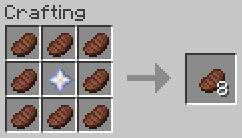
– Craft _Filling Steak_ with 8 _Steak_ and 1 _Nether Star_ (center), which applies the saturation effect for an hour when eaten.
– Adds level 30 enchantment _Yummy_ to never run out of steak (can only be applied on the _Filling Steak_).
## Technical Concept
Besides the gameplay functionality the goal was to provide these custom features without using the global tick function to check for changes in the player’s inventory.
– saturation effect is applied via [`consumable` data component](https://minecraft.wiki/w/Data_component_format#consumable) (added in MC 1.21.2)
– not consuming the item is handled via the [`use_remainder` data component](https://minecraft.wiki/w/Data_component_format#use_remainder) (added in MC 1.21.2)
– as use_remainder would need a recursive definition to be infinitly reuseable, a dummy-item is used, which then is swapped out for the actual food item
– instead of constantly checking whether a dummy item exists and is in need of replacement, the [enchantment effect component `minecraft:tick`](https://minecraft.wiki/w/Enchantment_definition#Components_with_entity_effects) with the [entity effect `run_function`](https://minecraft.wiki/w/Enchantment_definition#run_function) (added in MC 1.21) is used to change the dummy item (only executed for one tick, when the item is first held, so more resource efficient).