zzzZombie World
# Zombie World Horde
Zombie World Horde is a small gameplay-focused mod designed to be used alongside a zombie apocalypse–style modpack.
This mod modifies hostile mob behavior in the Overworld to create a more consistent and immersive zombie survival experience.
## Features
– Prevents non-zombie hostile mobs from spawning in the Overworld
– Spawns zombies in organized groups or hordes
– Allows configuration of minimum and maximum horde sizes using the `/zwhorde` command
This mod is intended to support a specific playstyle and enhance the overall experience of survival-based gameplay.
## Important Notes
This mod is still a work in progress. There are known issues that I have not been able to fully resolve yet and plan to address in future updates.
### Known Issues
– ~~In some cases, hostile mobs may appear as “ghost” entities. These entities are removed server-side, but the client may fail to immediately recognize their removal.~~
**Update:** All reported bugs have been fixed.
## Feedback
Feedback and bug reports are always welcome. The mod will continue to be improved over time as issues are identified and resolved.
Zzoyn HCompass



# **Zzoyn HCompass**
### A clean and customizable HUD compass for everyday gameplay
**Zzoyn HCompass** adds a minimalistic compass bar to the top of your screen, showing cardinal directions and degree markers exactly where you need them — without cluttering your interface.
Designed to stay out of the way, yet always useful.
—
## **Features**
– **Minimalistic design** — clean, sharp and unobtrusive
– **Customizable colors** — set any hex color you want
– **Optional features** — toggle background, degree numbers and more
– **Built-in configuration menu** — change settings in-game (default key: **P**)
– **Lightweight and efficient** — no performance impact
– **Always available** — perfect for exploration, building, travelling, roleplay, or simply keeping your sense of direction
—
## **Why use it?**
Unlike large minimaps or heavy UI mods, **Zzoyn HCompass** stays nearly invisible until you need it.
It gives you quick orientation without distractions — ideal when you want a clean screen but still need reliable navigation.
—
## **Perfect for**
– Survival and exploration
– Building large structures
– Adventure maps
– Minimalistic HUD setups
– Any gameplay where a simple, elegant compass makes life easier
—

## **Controls**
– **P** — open the settings panel
– All options update instantly and save automatically
—
A simple, elegant, customizable compass — exactly when you need it and nowhere else.
Zume
# IMPORTANT LICENSE NOTICE
By using this project in any form, you hereby give your “express assent” for the terms of the license of this project (see [LICENSE](https://github.com/Nolij/Zume/raw/master/LICENSE)), and acknowledge that I (the author of this project) have fulfilled my obligation under the license to “make a reasonable effort under the circumstances to obtain the express assent of recipients to the terms of this License”.
# Zume
An ~~over-engineered~~ simple zoom mod.
This mod adds a keybind which zooms in your FOV while it’s held down, allowing you to see further away, and keybinds
for increasing and decreasing the zoom level.
# FAQ
#### Q: Where is the config?
A: You’ll find the config at `.minecraft/global/zume.json5` (note that this is the default `.minecraft` folder, not
the instance `.minecraft`). You can modify the file while the game is running, and the config will be automatically
reloaded. On platforms which have mod menus (such as Forge, and Fabric with [Mod Menu](https://modrinth.com/mod/modmenu)
installed), the config button for Zume will open this file in your system text editor.
#### Q: discord where
A: https://discord.gg/6ZjX4mvCMR
#### Q: What version is this for?
A: Zume supports the following platforms:
– Fabric: Any version supported by Fabric Keybinding API v1 (currently 14.4+)
– NeoForge: 20.4+ (requires NeoForge 20.4.195+)
– LexForge: 14.4 – 20.5 (requires MixinBootstrap before 16.1) (there are currently no plans to support 20.6+)
– Legacy Fabric: Any version supported by Legacy Fabric Keybinding API v1 (currently 7.10 – 12.2)
– Babric (Fabric for Minecraft Beta): Any version supported by Station API (currently b7.3)
– Vintage Forge: 8.9 – 12.2 (requires MixinBooter or UniMixins)
– Archaic Forge: 7.10 (requires UniMixins)
#### Q: Can you add support for ?
A: Every platform I intend to add support for myself is already supported. PRs are welcome for other platforms **if
the following conditions are met**:
– Must not break single-jar compatibility with any already supported platform (obviously).
– Must not be for a platform that has a 1st-party compatibility layer for an already supported platform – explicit
Quilt support will not be accepted so long as Quilt maintains a Fabric compatibility layer; it’d be a waste of CI
time. [Sinytra Connector](https://github.com/Sinytra/Connector) is a 3rd-party compatibility layer, so explicit
Forge support will be provided.
– Must not manually maintain overridden game options; implementations that look like
[Mooz’s](https://github.com/embeddedt/Mooz/blob/92570f7449a7e71c1c0b988788027b10c00f1346/src/main/java/org/embeddedt/mooz/ClientProxy.java#L35-L56)
will not be accepted – no offense [embeddedt](https://github.com/embeddedt). Direct ASM is fine as long as functionality is similar enough.
– Must make a reasonable effort to be maximize compatibility with existing mods on target platforms – see use of
Neo/LexForge API over mixins in Neo/LexForge implementations, and use of `@WrapWithCondition` and
`@ModifyExpressionValue` and such from MixinExtras over `@Redirect` in most implementations.
– Must follow existing format – add a Unimined subproject for each newly supported platform.
– Must not have exclusive features without significant justification – if you’re adding a feature, add it to every
version.
#### Q: What kind of weird license is this?
A: OSL-3.0 is the closest equivalent to a LAGPL I could find. AGPL and GPL are incompatible with Minecraft, and LGPL
doesn’t protect network use. OSL-3.0 protects network use and is compatible with Minecraft.
#### Q: Why though? It’s so strict!!!!
A: This is, and will remain, free, copyleft software. Any requests to change the license other than to make it even
stronger will be denied immediately (unfortunately GPL and AGPL aren’t compatible with Minecraft due to linking
restrictions, as much as I’d like to use them). Even in situations where I use parts of other projects with more
“permissive” licenses, I will treat them as copyleft, free software.
## License
This project is licensed under OSL-3.0. For more information, see [LICENSE](https://github.com/Nolij/Zume/raw/master/LICENSE).
## Need a Minecraft server? Consider CreeperHost!

Zulu’s Simple Recipes
**Zulu’s Simple Recipes** allows you to create the following recipes!
### 8 Logs = 4 Chest
### 2 Logs = 16 Stick
### 3 Gravel = 1 Flint
More recipes will be added in the future.
You Can Join [Discord](https://discord.gg/5uC3MHpMwb) For Your Questions And Suggestions!
You Can Join My [Patreon](https://www.patreon.com/staciaexpert) To Support The Project!
Need A Server To Play With Friends?
Click [Here](https://bisecthosting.com/stacia) And Use Code “stacia” for %25 Off!

ZTONMC|暮色森林
这是ZTONMC旗下的模组整合包,包含众多模组,部分模组的作用如下:
Xaero的世界地图可以为你展示已探索区域,可与Xaero的小地图配合使用,帮你规划探索路线。
传送石碑/指路石可快速传送回指定位置,适合生存、冒险服务器使用。
暮色森林会为你打造神秘的暮色森林冒险体验,包含独特生物与结构。
自定义游戏加载界面:可自定义游戏启动加载界面,打造专属视觉体验。
Smooth Gui可以打开GUI界面时添加平滑动画,提升操作流畅度。
Balm可以为多加载器模组提供抽象层,优化模组兼容性。
This is a module integration package under ZTONMC, which includes numerous modules. The functions of some modules are as follows:
Xaero’s world map can show you the explored areas and can be used in conjunction with Xaero’s mini map to help you plan your exploration route.
The stone tablet/guide stone can be quickly transported back to the designated location, suitable for survival and adventure servers.
Twilight Forest will create a mysterious Twilight Forest adventure experience for you, featuring unique creatures and structures.
Customize game loading interface: You can customize the game launch loading interface to create an exclusive visual experience.
Smooth Gui can add smooth animations when opening the GUI interface to improve operational fluency.
Balm can provide an abstraction layer for multi loader modules and optimize module compatibility.
ZTONMC|忠诚市
忠诚市是《我的世界》中以铁路系统为核心的终极整合包,整合了数十款专业铁路模组,可一站式完成从基础铺设到复杂运营的铁路项目。
Zhongcheng City is the ultimate modpack in *Minecraft* centered around a railway system. It integrates dozens of professional railway mods, enabling one-stop completion of railway projects from basic laying to complex operations.中城是《我的世界》中以铁路系统为中心的终极模组。它集成了数十种专业铁路模式,可以一站式完成铁路项目从基础铺设到复杂运营。
核心铁路模组
基础与进阶铺设:包含“我的世界铁路”“天津地铁”“云竹铁路扩展”等模组,提供铁轨、信号灯、道岔等基础组件,支持曲线轨道、高架桥等复杂地形铺设,适配不同场景需求。
运输与载具:整合“常磐装饰”模组,涵盖货运车厢、客运列车、缆车等载具,支持自动化调度与多线程运输,可模拟真实铁路物流系统。
Core Railway Mods 核心铁路模型
Basic and Advanced Laying: Includes mods such as “Minecraft Railway”, “Tianjin Metro”, and “Yunzhu Railway Expansion”. It provides basic components like rails, signal lights, and switches, supports laying on complex terrains such as curved tracks and viaducts, and adapts to different scenario needs.基础和高级铺设:包括“我的世界铁路”、“天津地铁”和“云珠铁路扩张”等模式。它提供轨道、信号灯和开关等基本组件,支持在弯曲轨道和高架桥等复杂地形上铺设,并适应不同的场景需求。
Transportation and Vehicles: Integrates the “Tokyo Metro Decoration” mod, covering vehicles such as freight cars, passenger trains, and cable cars. It supports automated scheduling and multi-threaded transportation, and can simulate real railway logistics systems.交通与车辆:整合“东京地铁装饰”模式,涵盖货车、旅客列车、缆车等车辆。支持自动化调度和多线程运输,可以模拟真实的铁路物流系统。
场景与装饰:包含“MSD铁路设施装饰”“伦敦地铁扩展”等模组,提供车站、站台、信号塔等建筑装饰。
Scenes and Decorations: Includes mods such as “MSD Railway Facilities Decoration” and “London Underground Expansion”, providing architectural decorations like stations, platforms, and signal towers.
Zorua Spiral Universe Season 3
The Zorua Spiral Universe Modpack provides multiple mods that enhance the worldbuilding through structures, adds plenty of ores to give the players tons of customization through Tinker’s Construct, and plenty of Create addons to help you automate whatever items you want. This project will get updated as time goes on to add more content to keep players on their toes and continually give them more customization options.
Current Version: ZSU v3.0.1
ZSpeed
What you need to know!
YOU NEED THESE MODS:
tickrate api
player animator
There are currently 3 suits:
^ Flash
^ Reverse Flash
^ Zoom
Key Bindings:
Y = Increase Speed
H = Decrease Speed
R = Enable/Disable Speed
There Is a small meter at the bottom of your screen.
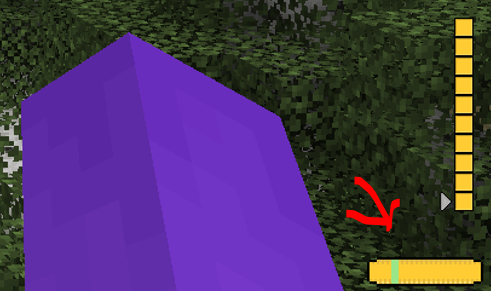
Use Jei or go to [https://legacy.curseforge.com/minecraft/mc-mods/zspeed](https://legacy.curseforge.com/minecraft/mc-mods/zspeed) to see the recipies!
Suit Textures:
I had some preset suits I didn’t make, I took them out but now only the flash suit has a texture, they still work. They just don’t have textures. I will work on them!
Bugs:
There are a few Bugs that I am aware of and trying to fix!
^ Crash – Index (number prob 20-30) Invalid in length 0, This is a bug with the trail, its not you, and its rare. But It can happen, I will try to eliminate it in future versions.
^ Trail is off!!! – At a 45 degree and -135 degree angle the trail is not directly behind the player. I’m not entirely sure why this is. But I will continue to crack at it in the future.
^ Other Players can’t see my trail! – This is because of how I render the trail. I render it directly to the client and not the game itself. I will work on multiplayer compatibility, But Its not here yet!
MULTIPLAYER IS RESTRICTED:
The way I coded some of the features makes it single player only. This mod WILL work in multiplayer, It just wont look as cool 🙁 , I am working on making it compatible, but for now, Only you can see your trail.
I will update this mod over time (especially if yall like it)
Zshoopy Mod
**IF YOU ARE USING THE LASTEST BETA YOU WILL NEED THIS**
[Curios API](https://www.curseforge.com/minecraft/mc-mods/curios)
What You can Expected from the Zshoopy Mod
In this mod you will be able to explore, the great world of Zshoopy, and Zshoopy Biome, with great and new powerful weapons, such as, XFirecookins AXE, NonLethals Sword, Zshoopys Wand, The Atrocity, and Parples Ax, To Craft these weapons you will need new ores such as, Parpleit, Zshoopy Ore, Silver, NonLethal Ore, and Blood Stone, Will all these weapons your unstoppable!
New Entity’s will roam around your world such as, Zshoopy DAGOAT, Xfirecookin, and Enthozic, if you can defeat them they will drop their weapon BESIDES Zshoopy DAGOAT, he will drop the most POWERFUL CHESTPLATE EVER.
Zero Point Systems

Zero Point Systems is a mod that adds many unique logistical blocks and items that can be used for creating redstone contraptions, controlling Valkyrien Skies ships, transmitting data, and more!
The primary feature is a unique cable system that allows for four independent signals to be sent through a single block: the Dense Cable. These signals can be either redstone signals or Forge Energy signals, and you can combine them within a single dense cable. Just make sure they’re all on separate channels, or there might be explosive consequences! You can combine single cables into dense cables and vice versa with the use of the Dense Cable Separator block, which transfers the signals between the dense cables and 4 individual ones which are distinguished by colored faces.
To go along with these dense cables, there are several blocks which connect directly to them without the use of the usual separator block:
– The Octo and Dodeca Controllers. These controllers map keys on your keyboard directly to the colored channels of a dense cable when you sit at them. Their primary intended use case is as a control interface for VS ships, but you can also use them to control anything you like.
– The Switch Panel. This panel connects a tiny lever directly to each channel of a dense cable.
– The Graduated Lever. This lever connects to a single cable and allows precise control of the redstone signal strength passing through it.
The Octo and Dodeca Controllers. These controllers map keys on your keyboard directly to the colored channels of a dense cable when you sit at them. Their primary intended use case is as a control interface for VS ships, but you can also use them to control anything you like.
The Switch Panel. This panel connects a tiny lever directly to each channel of a dense cable.
The Graduated Lever. This lever connects to a single cable and allows precise control of the redstone signal strength passing through it.
There is also a Data Cable system that can send strings of letters over long distances. This can be used to send and receive radio signals, display text on panels, compare text, and automatically record incoming messages into books! You can even play the messages out loud using the text-to-speech Loudspeaker block!
Credits:
– French + German translations courtessy of ruralpainter857