World Altitude Control
# WAC World Altitude Control 世界高度控制
> 这个mod不能解决高度不能超过mc数据结构限制的问题,因为这会摧毁兼容性!
> This mod doesn’t solve the problem that the height can’t exceed the mc data structure limit because it would destroy compatibility
这个Mod用于控制Minecraft维度高度,可在配置文件或在HutoolCore的Web编辑器中进行配置。
This mod is used to control the height of Minecraft dimensions and can be configured in the configuration file or in HutoolCore’s web editor.
它的原理是Minecraft在创建ServerLevel(ServerWorld)时修改ServerLevel(ServerWorld)的高度配置。
It works by Minecraft modifying the height configuration of the ServerLevel (ServerWorld) when it is created.
以下为对参数的解释:
The following is an explanation of the parameters (note in Chinese):
|参数|注释|
|——-|——-|
|id|世界ID|
|logical_height|玩家使用紫颂果或下界传送门可以到达的总高度。不会影响超过该限制高度的既有传送门。取值为0到4064的闭区间,且不能大于 height。|
|min_y|该维度中可以存在方块的最低高度。数值必须在-2032至2031之间且为16的整数倍(也就是说,-2032是最小有效值,2016是最大有效值)。|
|height|该维度中可以存在方块的总高度。数值必须在16至4064之间且为16的整数倍。维度中可以存在方块的最大高度值为min_y与height值之和减去1,不能超过2031。|
原版与使用HutoolCoreWebConfig的配置文件样式:
The original and the profile style using HutoolCoreWebConfig:
“`json
{
“worldConfigs”: {
“minecraft:overworld”: {
“id”: “minecraft:overworld”,
“height”: 1024,
“min_y”: -64,
“logical_height”: 256
},
“minecraft:the_nether”: {
“id”: “minecraft:the_nether”,
“height”: 1024,
“min_y”: -64,
“logical_height”: 256
},
“minecraft:the_end”: {
“id”: “minecraft:the_end”,
“height”: 1024,
“min_y”: -64,
“logical_height”: 256
}
}
}
“`

WLIB

WLIB
Static utility library built for dynamic bukkit plugins
WLIB is a utility library for bukkit servers that simplifies common plugin development tasks and reduces repetitive boilerplate code.
Features include:
* Dynamic command registration
* Static event management
* Plugin management APIs
* Debug and development tools
* Reflection and compatibility helpers
* Cross-platform Bukkit/Paper/Folia support
* General-purpose utility classes for plugin development
WLIB is intended as a lightweight developer library and is primarily used across projects from WebMC Development.
wldc
# WLDC – Discord Whitelist Manager
WLDC is a simple Minecraft-Discord integration plugin that allows you to manage your server’s whitelist directly through Discord commands.
## Commands
### General Commands [DISCORD]
– `/whitelist add ` – Add a player to the whitelist
– `/whitelist remove ` – Remove a player from the whitelist
– `/whitelist list` – View all whitelisted players
– `/whitelist check ` – Check if a player is whitelisted
### Admin Commands [Require ADMINISTATOR on the discord server]
– `/whitelist addadmin ` – Add a Discord user as whitelist admin
– `/whitelist removeadmin ` – Remove a Discord user from admins
– `/whitelist listadmins` – List all admin users
– `/whitelist setgroup ` – Set a Discord role as a whitelisted admin group
### Commands [MINECRAFT]
– `/wldc reload` – Reload the plugin configuration (requires `wldc.reload` permission)
## Configuration
The plugin uses a simple YAML configuration file with the following key settings:
“`yaml
discord:
token: “your-bot-token”
guild-id: “your-guild-id”
status:
type: “PLAYING” # PLAYING, WATCHING, LISTENING, COMPETING
text: “Minecraft” # Custom status text
“`
## Setup
1. Download and install the plugin on your Bukkit/Spigot server
2. Create a Discord bot and get its token
3. Configure the plugin with your Discord bot token and server ID
4. To add users to whitelist / add admins, you need to have Administrator permission on the server.
4. Start the server and use `/whitelist` commands in Discord
## Permissions
– Discord users need the “Send Messages” and “Create Commands” permissions to use whitelist commands.
– In-game reload command requires the `wldc.reload` permission
– Admins can be added via Discord to manage the whitelist
## License
This project is licensed under the MIT License – see the LICENSE file for details.
Made with ❤️ by timuzkas
WildCards SMP
# **WildCards**
WildCards adds craftable ability cards to your Minecraft server, each with unique powers, cooldowns, and playstyles.
# Designed for Paper-based servers and compatible with:
– Paper
– Purpur
– Leaf
– Minecraft 1.20.x – 1.21.x
Each card gives players powerful abilities that can be activated by holding the card and using different click combinations.
# Features
– Craftable ability cards
– Unique primary and secondary abilities
– Cooldown system for every power
– Only one active card at a time
– Configurable plugin files
– Designed for modern Paper-based servers
– Lightweight and easy to use
# How It Works
Hold a card in your hand to activate its abilities:
– Right Click → Primary Ability
– Shift + Right Click → Secondary Ability
Each ability has its own cooldown, so players must use them strategically.
Only one card can be active at a time, helping keep gameplay balanced.
# Cards
# Inferno Card
A fire-based card focused on burning enemies and explosive close-range damage.
**Blaze Form**
*Right Click — 20s cooldown*
– Grants Fire Resistance
– Your hits ignite enemies
– Leaves flame particles behind you
**Eruption Burst**
*Shift + Right Click — 25s cooldown*
– Creates a small fire explosion around you
– Damages nearby players
– Knocks back enemies
# Stormbreaker Card
A lightning-themed card built for speed and control.
**Static Surge**
*Right Click — 18s cooldown*
– Grants a Speed boost
– Lightning strikes near enemies
– No terrain damage
**Thunder Lock**
*Shift + Right Click — 30s cooldown*
– Strikes your target with lightning
– Applies brief Slowness
– Applies Blindness
# Abyss Card
A dark mobility and control card.
**Shadow Step**
*Right Click — 15s cooldown*
– Short instant teleport
– Prevents fall damage after use
**Void Grasp**
*Shift + Right Click — 25s cooldown*
– Pulls nearby players toward you
– Applies Weakness
# Frostbite Card
A freezing card focused on slowing and controlling enemies.
**Ice Walker**
*Passive Toggle*
– Freezes water beneath you
– Slows enemies you hit
**Blizzard Zone**
*Shift + Right Click — 20s cooldown*
– Creates a snowstorm around you
– Applies Slowness
– Applies Mining Fatigue to nearby players
# Titan Card
A heavy tank-style card with durability and area damage.
**Stone Skin**
*Right Click — 20s cooldown*
– Grants Resistance
– Increases knockback resistance
**Ground Slam**
*Shift + Right Click — 35s cooldown*
– Leap and smash the ground
– Damages nearby players
– Launches enemies upward
# Phantom Card
A stealth-focused card made for quick attacks and repositioning.
**Phase Walk**
*Right Click — 22s cooldown*
– Grants short invisibility
– Gives a Speed boost
**Backstab Mark**
*Shift + Right Click — 25s cooldown*
– Your next hit deals bonus damage
– Marks the target with Glowing
# Natureborn Card
A support/control card with healing and crowd control.
**Regrowth**
*Right Click — 20s cooldown*
– Grants Regeneration
– Slowly repairs worn armor
**Root Snare**
*Shift + Right Click — 25s cooldown*
– Traps nearby enemies
– Applies heavy Slowness
– Prevents jumping
# Configuration
WildCards automatically creates its plugin folder and configuration files when the server starts.
This allows server owners to customize and manage:
– plugin settings
– ability values
– cooldowns
– balancing options
– card behavior
# Commands
`/wildcards`
Main admin command
`/wc`
Alias of `/wildcards`
Example usage:
– `/wildcards start`
– `/wildcards stop`
– `/wildcards give`
– `/wildcards reload`
– `/wildcards crafteditor`
– `/wildcards list`
– `/wildcards status`
# Permissions
– `wildcards.admin` — Access to admin commands
– `wildcards.use` — Allows using ability cards
– `wildcards.craft` — Allows crafting ability cards
# Compatibility
Supported platforms:
– Paper
– Purpur
– Leaf
Supported versions:
– 1.20.x
– 1.21.x
# Notes
WildCards is built to be lightweight, fun, and easy to use for survival, PvP, and custom server gameplay.
If you want unique combat abilities, magical card powers, and more strategic PvP or events on your server, WildCards is made for you.
WidCore ️⚙️ Essentials / SunLight Alternative!
# WidCore Plugin
WidCore, sunucuyu zorlayan onlarca eklentiyi daha optimize bir şekilde tek bir merkezi yapı altında birleştiren, modüler mimariye sahip ve komutlardan permission yapılarına kadar %99 oranında özelleştirilebilir bir eklentidir. Sunucu yönetimi, güvenlik, ekonomi, optimizasyon ve daha birçok alanda kapsamlı çözümler sunarak sunucunuzun vazgeçilmez bir parçası olmayı hedeflemektedir.
**NOT: Eğer 1.16 sürümünde bir sunucunuz varsa, JDK17’yi yüklemek zorunludur. Bat dosyanıza (-DPaper.IgnoreJavaVersion=true) ekleyerek sunucunuzu JDK17 ile sorunsuz bir şekilde başlatabilirsiniz.**
WidCore is a plugin that consolidates dozens of performance-heavy plugins into a single, optimized central system, featuring a modular architecture and up to 99% customization, including commands and permission structures. It aims to become an indispensable part of your server by providing comprehensive solutions in server management, security, economy, optimization, and many other areas.
**NOTE: If you have a version 1.16 server, installing JDK17 is mandatory. You can start your server with JDK17 without any problems by adding (-DPaper.IgnoreJavaVersion=true) to your bat file.**
TELEMETRİ RAPORU / TELEMETRY REPORT
Widcore adındaki plugin, hatasız bir şekilde ilerlemem için kendisi ile ilgili konsolda oluşan hataları bana iletiyor.
The plugin named Widcore notifies me of its own errors in the console so that I can proceed without any issues.
—
**Support / Destek:** [https://discord.gg/dCDYQ3HPct](https://discord.gg/dCDYQ3HPct)
—
## 🛠 Technical Details / Teknik Detaylar
* **Platforms:** Spigot, Paper, Folia
* **Optional Dependencies:**
* **ProtocolLib:** Vanish ses gizleme / Vanish sound hiding
* **PacketEventsAPI:** Server brand gizleme / Hiding server brand
* **LuckPerms:** Sohbet prefix-suffix / Chat prefix-suffix
* **PlaceholderAPI:** Placeholder desteği / Placeholder support
* **Vault:** Ekonomi sistemi / Economy system
—
🇹🇷 Türkçe Tanıtım / Özellikler / Komutlar (Tıkla ve Aç)
### 🌟 ÖZELLİKLER
* **ANNOUNCER:** Zamanlı otomatik duyurular. Global/dünya bazlı, rastgele/sıralı.
* **ANTIMOBSPAWN:** Belirli mobların doğmasını engeller. Global veya dünya bazlı.
* **BACK:** Son ölüm noktasına ışınlanma.
* **BAN/TEMPBAN:** Kalıcı veya süreli yasaklama. Sebep kısayolları, muaf oyuncular.
* **BANNED ITEMS:** Belirli eşyaların envanterde bulunmasını engeller.
* **CHAT FORMAT:** LuckPerms prefix/suffix, grup bazlı format, PlaceholderAPI. [item]=eşya, [inv]=envanter, [ec]=enderchest paylaşımı.
* **CHATGUARD:** Spam, flood, reklam, yasaklı kelime koruması. Sohbet, örs, kitap, tabela için geçerli.
* **COMPASS TELEPORT:** Pusula ile sol tık = bakılan bloğun yanına ışınlan (maks 200 blok).
* **CUSTOM COMMANDS:** Config üzerinden özel komut. MESSAGE, P_COMMAND, C_COMMAND.
* **ECONOMY:** Vault tabanlı. eco (admin), pay (transfer), baltop (zenginler GUI).
* **ENDERCHEST:** Kendi veya başkasının enderchest’ini açar. Çevrimdışı desteği.
* **FEED:** Oyuncunun açlığını giderir.
* **FIREBALL:** Ateş topu fırlatma. Güç ayarlanabilir.
* **FIREBALL STICK:** Sol tık ile ateş topu fırlatan özel asa.
* **FLY:** Uçuş modunu açar/kapatır.
* **FREEZE:** Oyuncuyu tamamen dondurur. Hareket ve envanter engeli.
* **GAMEMODE:** Oyun modu değiştirme. s/c/a/sp veya 0/1/2/3.
* **GOD:** Ölümsüzlük modu. Hasar almaz, acıkmaz.
* **HEAL:** Oyuncunun canını doldurur.
* **HEAD:** Oyuncunun elindeki eşyayı başına yerleştirmesine olanak tanır.
* **HOME:** Kişisel ev noktaları. GUI menü, limit yetkisi, yasaklı dünyalar. GTA5 tarzı animasyon desteği.
* **INVENTORY ROLLBACK:** Ölüm/giriş/çıkış/dünya değişimi yedekleme. GUI ile geri yükleme.
* **INVSEE:** Başka oyuncuların envanterini canlı gör/düzenle. Çevrimdışı desteği.
* **ITEM:** Belirtilen eşyayı belirtilen miktarda verir.
* **ITEMEDIT:** Eşya düzenleme: isim, lore, büyü, özellik, gizleme, renk, kırılmazlık. Effect GUI: iksir efekti ekleme.
* **ITEM REMOVAL:** Yerdeki eşyaları zamanlı temizler. Hologram geri sayım.
* **JAIL:** Bölge tabanlı hapis. Altın balta + fener ile alan belirleme. Süreli/süresiz.
* **JOINLEAVE:** Giriş/çıkış mesajları. Sohbet/başlık/aksiyon çubuğu seçenekleri.
* **KICK:** Oyuncuyu sunucudan atar. Özelleştirilmiş atılma ekranı.
* **LIGHTNING:** Bakılan yere veya oyuncuya yıldırım düşürür.
* **MERGE EXPERIENCE ORBS:** Tecrübe (XP) kürelerini birleştirir. FPS artışı sağlar.
* **MESSAGING (MSG/R):** Özel mesajlaşma ve hızlı cevap.
* **MOBSTACKER:** Aynı tür mobları birleştirir. Sunucu performansını artırır.
* **MOTD:** Sunucu listesi görünümünü özelleştirme.
* **MUTE/TEMPMUTE:** Kalıcı veya süreli susturma.
* **PLUGIN-HIDER:** Server Brand ve pluginleri tamamen gizler.
* **REPAIR:** Eldeki eşyayı veya tüm envanteri tamir eder.
* **RTP:** Dünyada rasgele ışınlanmanızı sağlar.
* **SHOW ITEM:** Sohbette [item], [inv], [ec] ile paylaşım.
* **SPAWN:** Sunucu başlangıç noktası. GTA5 tarzı animasyon desteği.
* **SPEED:** Yürüme veya uçuş hızını 0-10 arası ayarlar.
* **STACK DEATH DROPS:** Ölümde etrafa saçılan eşyalar tek blokta toplanır.
* **TELEPORT:** tp, tpall, koordinata ışınlanma.
* **TPA:** İstek tabanlı ışınlanma. Hazırlık/bekleme süresi, hasar iptali.
* **TROLL:** 4 troll türü: mlg, rotate, moblook, creeperchest. GUI menü.
* **VANISH:** Tam görünmezlik. Moblar hedef alamaz, sesler gizlenir.
* **VOID SPAWN:** Y=-64 altına düşenleri ışınlar.
* **WARP:** Sunucu geneli ışınlanma noktaları. GTA5 animasyon desteği.
* **WORLDMANAGER [BETA]:** Dünya oluştur/sil/yükle/kaldır. Tipler: normal, flat, empty.
### 📋 KOMUTLAR VE YETKİLER
**ANA**
* `/widcore reload` – `widcore.reload`
**CEZA**
* `/ban [sebep]` – `widcore.ban`
* `/tempban [sebep]` – `widcore.tempban`
* `/unban ` – `widcore.unban`
* `/banlist` – `widcore.banlist`
* `/mute [sebep]` – `widcore.mute`
* `/tempmute [sebep]` – `widcore.tempmute`
* `/unmute ` – `widcore.unmute`
* `/mutelist` – `widcore.mutelist`
* `/kick [sebep]` – `widcore.kick`
* `/jail [sebep]` – `widcore.jail.use`
* `/unjail ` – `widcore.jail.remove`
* `/setjail ` – `widcore.jail.set`
* `/deljail ` – `widcore.jail.delete`
* `/freeze [süre]` – `widcore.freeze`
* `/unfreeze ` – `widcore.freeze`
**YÖNETİM**
* `/vanish [oyuncu]` – `widcore.vanish` (Görünmezleri görme: `widcore.vanish.see`)
* `/irp ` – `widcore.irp`
**IŞINLANMA**
* `/rtp [oyuncu] widcore.rtp`
* `(başkasına) widcore.rtp.other`
* `(ücretsiz kullanım) widcore.rtp.free`
* `(cooldown bypass) widcore.rtp.cooldown.bypass`
* `(özel cooldown süresi) widcore.rtp.cooldown.`
* `/tp ` – `widcore.tp`
* `/tp ` – `widcore.tp.other`
* `/tp ` – `widcore.tp.coords`
* `/tpall` – `widcore.tpall`
* `/tpa ` – `widcore.tpa.send`
* `/tpaaccept` – `widcore.tpa.accept`
* `/tpadeny` – `widcore.tpa.deny`
* `/tpatoggle` – `widcore.tpa.autoaccept`
* `/spawn` – `widcore.spawn`
* `/setspawn` – `widcore.setspawn`
* `/home [isim]` – `widcore.home.teleport`
* `/sethome ` – `widcore.home.create`
* `/delhome ` – `widcore.home.delete` (Limit: `widcore.home.limit.`)
* `/warp [isim]` – `widcore.warp`
* `/setwarp ` – `widcore.setwarp`
* `/delwarp ` – `widcore.delwarp`
* `/back` – `widcore.back`
* `/setvoidspawn` – `widcore.voidspawn.set`
* Pusula Işınlanma: `widcore.compass`
**OYUNCU**
* `/gm [oyuncu]` – `widcore.gamemode` (`widcore.gamemode.`, `widcore.gamemode.other`)
* `/fly [oyuncu]` – `widcore.fly` / `widcore.fly.other`
* `/god [oyuncu]` – `widcore.god` / `widcore.god.other`
* `/heal [oyuncu]` – `widcore.heal` / `widcore.heal.other`
* `/feed [oyuncu]` – `widcore.feed` / `widcore.feed.other`
* `/speed <0-10>` – `widcore.speed` / `widcore.speed.other`
* `/repair [all]` – `widcore.repair` / `widcore.repair.all`
* `/item [miktar]` – `widcore.i`
* `/ec [oyuncu]` – `widcore.enderchest` / `widcore.enderchest.other`
* `/invsee ` – `widcore.invsee`
* `/head` – `widcore.head`
**SOHBET**
* `/msg ` – `widcore.msg`
* `/r ` – `widcore.r`
* Paylaşım: `widcore.showitem`, `.i`,`.inv`, `.ec`
* ChatGuard: `widcore.chatguard.bypass`, `widcore.chatguard.alert`
**DÜNYA**
* `/wm create [biyom]` – `widcore.worldmanager.create`
* `/wm delete ` – `widcore.worldmanager.delete`
* `/wm load ` – `widcore.worldmanager.load`
* `/wm unload ` – `widcore.worldmanager.unload`
* `/wm tp ` – `widcore.worldmanager.tp`
* `/wm list` – `widcore.worldmanager.list`
* `/wm info [dünya]` – `widcore.worldmanager.info`
* `/wm settings` – `widcore.worldmanager.settings`
* `/wm setspawn` – `widcore.worldmanager.setspawn`
**EŞYA**
* `/itemedit name ` – `widcore.itemedit.name`
* `/ilore add|set|remove|clear` – `widcore.itemedit.lore`
* `/enchant ` – `widcore.itemedit.enchant`
* `/itemedit attribute add|remove|clear` – `widcore.itemedit.attribute`
* `/itemedit hide|hideall|show|showall` – `widcore.itemedit.hide`
* `/itemedit color add|clear` – `widcore.itemedit.color`
* `/itemedit unbreaking` – `widcore.itemedit.unbreaking`
* `/itemedit effect` – `widcore.itemedit.effect`
**EKONOMİ**
* `/eco ` – `widcore.eco.admin` (`widcore.eco.give`, `.set`, `.take`)
* `/pay ` – `widcore.pay`
* `/baltop` – `widcore.baltop`
**EĞLENCE**
* `/troll [tür]` – `widcore.troll`
* `/lightning [oyuncu]` – `widcore.lightning`
* `/fireball [güç]` – `widcore.fireball`
* `/fireballstick [güç]` – `widcore.fireball`
**DİĞER**
* Yasaklı eşya bypass: `widcore.banneditem.bypass`
* Özel komut kullanımı: `widcore.customcommand.`
### 📝 NOTLAR
* **aliases.yml:** Tüm komutları ve yetkileri özelleştirebileceğiniz dosya.
* **lang/*.yml:** Dil dosyaları.
* **modules//*.yml:** Modül ayarları.
—
🇺🇸 English Showcase / Features / Commands (Click to Expand)
### 🌟 FEATURES
* **ANNOUNCER:** Scheduled automatic announcements. Global/world-based, random/sequential.
* **ANTIMOBSPAWN:** Prevents specific mobs from spawning. Global or world-based.
* **BACK:** Teleport to the last death location.
* **BAN/TEMPBAN:** Permanent or temporary bans. Reason shortcuts, exempt players.
* **BANNED ITEMS:** Prevents specific items from being in the inventory.
* **CHAT FORMAT:** LuckPerms prefix/suffix, group-based formatting, PlaceholderAPI. [item]=item, [inv]=inventory, [ec]=enderchest sharing.
* **CHATGUARD:** Protection against spam, flood, ads, and banned words. Valid for chat, anvils, books, and signs.
* **COMPASS TELEPORT:** Compass Left Click = Teleport to targeted block (max 200 blocks).
* **CUSTOM COMMANDS:** Custom commands via config. MESSAGE, P_COMMAND, C_COMMAND.
* **ECONOMY:** Vault-based. eco (admin), pay (transfer), baltop (wealthy players GUI).
* **ENDERCHEST:** Open your own or others’ enderchest. Offline support.
* **FEED:** Restores player’s hunger.
* **FIREBALL:** Shoot fireballs. Adjustable power.
* **FIREBALL STICK:** Custom wand that shoots fireballs with left click.
* **FLY:** Toggles flight mode.
* **FREEZE:** Completely freezes the player. Disables movement and inventory.
* **GAMEMODE:** Change game modes. s/c/a/sp or 0/1/2/3.
* **GOD:** Invincibility mode. No damage, no hunger.
* **HEAL:** Restores player’s health.
* **HOME:** Personal home points. GUI menu, limit permissions, banned worlds. GTA5-style animation.
* **HEAD:** Allows the player to place the item in their hand on their head.
* **INVENTORY ROLLBACK:** Backup for death/join/leave/world change. Restore via GUI.
* **INVSEE:** View/edit other players’ inventories live. Offline support.
* **ITEM:** Gives specified item in specified quantity.
* **ITEMEDIT:** Item editing: name, lore, enchantments, attributes, hide, color, unbreaking. Effect GUI: add potion effects.
* **ITEM REMOVAL:** Timed cleanup of dropped items. Hologram countdown.
* **JAIL:** Region-based jail. Selection with golden axe + beacon. Timed/permanent.
* **JOINLEAVE:** Join/leave messages. Chat/title/action bar options.
* **KICK:** Kicks players from the server. Customized kick screen.
* **LIGHTNING:** Strikes lightning at target location or player.
* **MERGE EXPERIENCE ORBS:** Merges XP orbs to increase FPS.
* **MESSAGING (MSG/R):** Private messaging and quick reply.
* **MOBSTACKER:** Stacks mobs of the same type. Improves performance.
* **MOTD:** Customize server list appearance.
* **MUTE/TEMPMUTE:** Permanent or temporary muting.
* **REPAIR:** Repairs held item or entire inventory.
* **PLUGIN-HIDER:** Completely hides the server brand and plugins.
* **RTP:** It allows you to be randomly teleported around the world.
* **SHOW ITEM:** Share [item], [inv], [ec] in chat.
* **SPAWN:** Server spawn point. GTA5-style animation.
* **SPEED:** Sets walking or flying speed (0-10).
* **STACK DEATH DROPS:** Items dropped upon death collected into a single block.
* **TELEPORT:** tp, tpall, coordinate teleportation.
* **TPA:** Request-based teleportation. Warmup/cooldown, damage cancellation.
* **TROLL:** 4 types: mlg, rotate, moblook, creeperchest. GUI menu.
* **VANISH:** Total invisibility. Mobs cannot target, sounds hidden.
* **VOID SPAWN:** Teleports players who fall below Y=-64.
* **WARP:** Server-wide warp points. GTA5 animation support.
* **WORLDMANAGER [BETA]:** Create/Delete/Load/Unload worlds. Types: normal, flat, empty.
### 📋 COMMANDS AND PERMISSIONS
**MAIN**
* `/widcore reload` – `widcore.reload`
**PUNISHMENT**
* `/ban [reason]` – `widcore.ban`
* `/tempban [reason]` – `widcore.tempban`
* `/unban ` – `widcore.unban`
* `/banlist` – `widcore.banlist`
* `/mute [reason]` – `widcore.mute`
* `/tempmute [reason]` – `widcore.tempmute`
* `/unmute ` – `widcore.unmute`
* `/mutelist` – `widcore.mutelist`
* `/kick [reason]` – `widcore.kick`
* `/jail [reason]` – `widcore.jail.use`
* `/unjail ` – `widcore.jail.remove`
* `/setjail ` – `widcore.jail.set`
* `/deljail ` – `widcore.jail.delete`
* `/freeze [duration]` – `widcore.freeze`
* `/unfreeze ` – `widcore.freeze`
**MANAGEMENT**
* `/vanish [player]` – `widcore.vanish` (See vanished: `widcore.vanish.see`)
* `/irp ` – `widcore.irp`
**TELEPORT**
* `/rtp [player] widcore.rtp`
* `(for others) widcore.rtp.other`
* `(free usage) widcore.rtp.free`
* `(cooldown bypass) widcore.rtp.cooldown.bypass`
* `(custom cooldown duration) widcore.rtp.cooldown.`
* `/tp ` – `widcore.tp`
* `/tp ` – `widcore.tp.other`
* `/tp ` – `widcore.tp.coords`
* `/tpall` – `widcore.tpall`
* `/tpa ` – `widcore.tpa.send`
* `/tpaaccept` – `widcore.tpa.accept`
* `/tpadeny` – `widcore.tpa.deny`
* `/tpatoggle` – `widcore.tpa.autoaccept`
* `/spawn` – `widcore.spawn`
* `/setspawn` – `widcore.setspawn`
* `/home [name]` – `widcore.home.teleport`
* `/sethome ` – `widcore.home.create`
* `/delhome ` – `widcore.home.delete` (Limit: `widcore.home.limit.`)
* `/warp [name]` – `widcore.warp`
* `/setwarp ` – `widcore.setwarp`
* `/delwarp ` – `widcore.delwarp`
* `/back` – `widcore.back`
* `/setvoidspawn` – `widcore.voidspawn.set`
* Compass Teleport: `widcore.compass`
**PLAYER**
* `/gm [player]` – `widcore.gamemode` (`widcore.gamemode.`, `widcore.gamemode.other`)
* `/fly [player]` – `widcore.fly` / `widcore.fly.other`
* `/god [player]` – `widcore.god` / `widcore.god.other`
* `/heal [player]` – `widcore.heal` / `widcore.heal.other`
* `/feed [player]` – `widcore.feed` / `widcore.feed.other`
* `/speed <0-10>` – `widcore.speed` / `widcore.speed.other`
* `/repair [all]` – `widcore.repair` / `widcore.repair.all`
* `/item - [amount]` – `widcore.i`
* `/ec [player]` – `widcore.enderchest` / `widcore.enderchest.other`
* `/invsee ` – `widcore.invsee`
* `/head` – `widcore.head`
**CHAT**
* `/msg ` – `widcore.msg`
* `/r ` – `widcore.r`
* Sharing: `widcore.showitem`, `.i`,`.inv`, `.ec`
* ChatGuard: `widcore.chatguard.bypass`, `widcore.chatguard.alert`
**WORLD**
* `/wm create [biome]` – `widcore.worldmanager.create`
* `/wm delete ` – `widcore.worldmanager.delete`
* `/wm load ` – `widcore.worldmanager.load`
* `/wm unload ` – `widcore.worldmanager.unload`
* `/wm tp ` – `widcore.worldmanager.tp`
* `/wm list` – `widcore.worldmanager.list`
* `/wm info [world]` – `widcore.worldmanager.info`
* `/wm settings` – `widcore.worldmanager.settings`
* `/wm setspawn` – `widcore.worldmanager.setspawn`
**ITEM**
* `/itemedit name ` – `widcore.itemedit.name`
* `/ilore add|set|remove|clear` – `widcore.itemedit.lore`
* `/enchant ` – `widcore.itemedit.enchant`
* `/itemedit attribute add|remove|clear` – `widcore.itemedit.attribute`
* `/itemedit hide|hideall|show|showall` – `widcore.itemedit.hide`
* `/itemedit color add|clear` – `widcore.itemedit.color`
* `/itemedit unbreaking` – `widcore.itemedit.unbreaking`
* `/itemedit effect` – `widcore.itemedit.effect`
**ECONOMY**
* `/eco ` – `widcore.eco.admin` (`widcore.eco.give`, `.set`, `.take`)
* `/pay ` – `widcore.pay`
* `/baltop` – `widcore.baltop`
**FUN**
* `/troll [type]` – `widcore.troll`
* `/lightning [player]` – `widcore.lightning`
* `/fireball [power]` – `widcore.fireball`
* `/fireballstick [power]` – `widcore.fireball`
**OTHER**
* Banned item bypass: `widcore.banneditem.bypass`
* Custom command usage: `widcore.customcommand.`
### 📝 NOTES
* **aliases.yml:** Customize all commands and permissions.
* **lang/*.yml:** Language files.
* **modules//*.yml:** Module settings.
WhitelistByTime
[](https://discord.gg/4XUPywnEyE)
## About
This is a plugin for a minecraft server. It allows you to add players for a certain time or permanently.
**The plugin is developed and tested for Paper and Folia 1.20.x-1.21.x. It also supports forks of Paper and Folia.**
## Features
– Fully **customizable**.
– Supports [**MiniMessage**](https://docs.advntr.dev/minimessage/format.html).
– Compatible with **any SQL database**.
– **Case-sensitive** nickname support.
– Player **freezing** feature.
– PlaceholderAPI (**PAPI**) support.
– **Lightweight**: minimal load on the **main thread**.
– **Multi-server** support: utilizes **SQL transactions**.
– **Safe**: the code is extensively covered by **automated tests**.
– **UUID support**: stores UUIDs in online/floodgate (GeyserMC) modes to handle nickname changes.
## Feedback
**Please report any bugs, errors, or feature suggestions on Discord:** [https://discord.gg/4XUPywnEyE](https://discord.gg/4XUPywnEyE)
## Stats
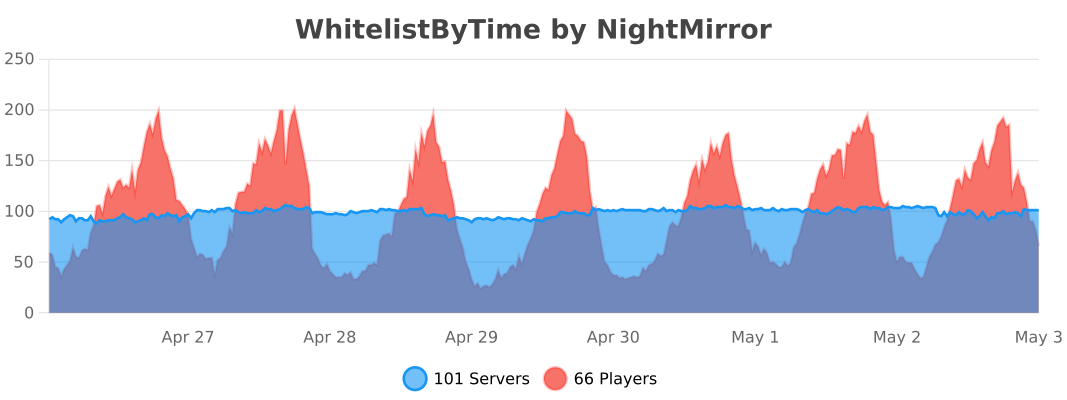
*Statistics are obtained through bstats metrics.*
WorldEditSelectionVisualizer
# WorldEditSelectionVisualizer
## Overview
WorldEditSelectionVisualizer (WESV) is essentially the famous [WorldEditCUI mod](http://www.minecraftforum.net/forums/mapping-and-modding/minecraft-mods/1292886-worldeditcui-1-11-2-version-available) in the form of a bukkit plugin, which means that players **don’t need to install anything on their client**.
## Features
* Spawns particles around WorldEdit selections so players can see them
* No client mod required
* Supports cuboid, sphere, ellipsoid, cylinder, polygon and convex selections
* Can display the current clipboard (use `/wesv toggle clipboard` to enable)
* Use `/wesv toggle` to toggle the visualizer
* Option to only show the selection when holding the selection item
* Configurable particle effect and view distance
* Prevent players from spawning too many particles when selecting huge regions
* Highly customizable for the performance of your server
* Supports both [WorldEdit](https://enginehub.org/worldedit) and [FastAsyncWorldEdit](https://www.spigotmc.org/resources/fastasyncworldedit.13932/)
* Compatible with all Minecraft versions starting with 1.7.10
* [PlaceholderAPI](https://placeholderapi.com/) support (you can use the placeholders `%wesv_toggled_selection%`, `%wesv_toggled_clipboard%`, `%wesv_volume_selection%` and `%wesv_volume_clipboard%`)
* Support for RGB color codes in messages on Minecraft 1.16 and higher, with the `&#rrggbb` format
* [Folia](https://github.com/PaperMC/Folia) support for better performance
## Screenshots
| Cuboid selection | Cylinder selection | Convex selection |
|——————————————————|——————————————————–|——————————————————|
|  |  |  |
[More screenshots](https://modrinth.com/plugin/wesv/gallery)
## Usage
### Commands
* `/wesv toggle` and `/wesv toggle clipboard`: toggle the selection/clipboard visualization
* `/wesv lock`: lock/unlock the origin of the clipboard visualization to your current location
* `/wesv lock tp`: teleport to the lock location (when clipboard visualization lock is enabled)
* `/wesv reload`: reload the configuration
### Permissions
* `wesv.toggle`: use the toggle command
* `wesv.use`: allows the visualizer to be turned on
* `wesv.reload`: allows the configuration of this plugin to be reloaded from the config.yml file
### Configuration
This plugin can be very resource expensive, try adjusting the configuration if you experience lag.
Configuration File
“`yaml
# WorldEditSelectionVisualizer configuration
# When enabled, if a new update is available it will display a message in the console on enable
check-updates: true
# You can edit the plugin messages here
messages:
no-permissions: “&cYou don’t have the permission to use this command.”
config-reloaded: “&aThe config was reloaded”
selection-too-large: “&6The visualizer only works with selections up to a size of %blocks% blocks.”
visualizer-enabled: “&6Your visualizer has been &eenabled.”
visualizer-disabled: “&6Your visualizer has been &cdisabled.”
visualizer-clipboard-enabled: “&6Your clipboard visualizer has been &eenabled&6.”
visualizer-clipboard-disabled: “&6Your clipboard visualizer has been &cdisabled&6.”
# When enabled, if a player disables the selection visualization and leaves the server, when he will
# come back, the selection visualization will be still disabled until he activates it again with /wesv toggle.
save-toggle: true
# Delay in ticks when the WorldEdit selection and clipboard are updated.
# This doesn’t affect particles spawning and players performances.
# The server impact is medium
selection-update-interval: 20
# When enabled, the particles are displayed only when holding the WorldEdit selection wand item (by default a wooden axe)
# You can change the WorldEdit wand item in the WorldEdit configuration
need-we-wand: false
# When enabled, top and bottom particles will be displayed for cuboid selections
cuboid-top-bottom: false
# Settings for visualization
# ‘selection’: The WorldEdit current selection
# ‘clipboard’: The WorldEdit clipboard (when you use //copy or //schem load )
# ‘primary’: The primary selection points (the region borders)
# ‘secondary’: The secondary selection points
# ‘fade-delay’: The number of seconds before the particles disappears. You can set it to 0 to remove the fade delay
# ‘max-selection-size’ : The maximum size of a selection to be display. A big value (> 1000000) can cause important lags
# ‘points-distance’: The distance between each particle. The higher this number is, fewer particles will be spawn
# ‘lines-gap’ (secondary selection only): The distance between each particles lines on cuboid and polygon. The higher this number is, fewer particles will be spawn. Set it to 0 to remove cuboid lines
# ‘update-interval’: The delay in ticks between particles spawn. This impact the players performances
# ‘view-distance’: The maximum distance in which players can see the particles. On 1.7.10 the particle distance is limited to 16 (Minecraft limitation)
# ‘particles’: The particles type and data. The data can be a color for redstone like in the form ‘r,g,b’ or a Material for block crack/item crack
# The particle types are available on https://hub.spigotmc.org/javadocs/spigot/org/bukkit/Particle.html
visualization:
selection:
fade-delay: 0
max-selection-size: 50000
primary:
points-distance: 1.0
update-interval: 12
view-distance: 64
particles:
type: “FLAME”
data: “”
secondary:
points-distance: 3.0
lines-gap: 5.0
update-interval: 18
view-distance: 32
particles:
type: “REDSTONE”
data: “RED”
clipboard:
fade-delay: 0
max-selection-size: 50000
primary:
points-distance: 1.0
update-interval: 12
view-distance: 64
particles:
type: “FLAME”
data: “”
secondary:
points-distance: 3.0
lines-gap: 5.0
update-interval: 18
view-distance: 32
particles:
type: “REDSTONE”
data: “BLUE”
“`
### Video
## Bugs & suggestions
Please don’t post bugs or suggestions in the review section, but please open an [issue on GitHub](https://github.com/MrMicky-FR/WorldEditSelectionVisualizer/issues).
If you just have a question, you can ask it on my [Discord server](https://discord.gg/q9uwabt).
And if you like this plugin you can leave a review or star the [GitHub project](https://github.com/MrMicky-FR/WorldEditSelectionVisualizer).
## Original Author
WorldEditSelectionVisualizer (WESV) has been originally created by [rojet601](https://dev.bukkit.org/members/rojet601). Since this user’s gone inactive since November 2015 and the plug-in contains some errors, [ZathrusWriter](https://www.spigotmc.org/members/zathruswriter.137995/) decided to release an 1.8. forward-compatible version with those errors fixed.
Wemmbu’s Orbital Strike Cannon
# 💣 Wemmbu’s Orbital Strike Cannon
> This plugin adds the Orbital Strike cannon weapon from the Unstable Universe with protagonists Wemmbu, ParrotX2, SpokeIsHere and FlameFrags. Supports both nuke and stab shots.
## ⚒️ Permission
Note – This is the permission that disallows the command, if a player some how gets one without the permission they will still be able to use the rod.
`wemmbu.orbital.use`
## 🤖 Commands
– `/orbital nuke` – gives you the nuke rod
– `/orbital stab` – gives you the stab rod
## 📸 Preview
A good preview is displayed in Wemmbu’s videos. This one in particular uses it for most of the video.
🔗 https://youtu.be/oBZ7ydMaQis?si=hAMVbYvIy4yMYiig
## ⚠️ Optional Dependencys
This plugin supports WorldGuard and Multiverse core to disable the orbital strike cannon in worlds and regions.
## 💻 Configuration
Configuration File
“`
# Worlds where orbital is DISABLED (comma-separated)
# Example: world, world_nether
disabled-worlds: “”
# WorldGuard region names that disable the orbital when the target is inside them (comma-separated)
# Example: spawn,protected-area
# NOTE: WorldGuard integration is optional and uses reflection; if WG is not present this list is ignored.
disabled-worldguard-regions: “”
# Default behaviour
default-type: “nuke” # nuke or stab
default-nuke-rings: 8
default-stab-depth: 320
default-delay-ticks: 10 # ticks to wait after right-click before strike spawns
# One-use in creative? true = consume rods in creative too.
one-use-creative: false
# Misc
range-blocks: 200
tnt-per-ring-base: 3
nuke-offset-height: 50
nuke-base-fuse: 60
stab-spacing: 3
stab-tnt-count: 5
stab-offset: 0.5
“`
WelcomeX
**WelcomeX** is a lightweight yet powerful Minecraft server plugin designed to give your community a warm, immersive, and professional welcome experience.
From the moment players join, WelcomeX greets them with fully customizable titles, subtitles, and sounds, setting the tone for your server’s personality and theme.
Even non-technical staff can tweak messages, colors, and effects on the fly, no server restarts required. ( **/welcomex reload** )
# __Features at a glance__
– 🎯 Customizable Join Titles & Subtitles, Edit colors and messages directly in config.yml.
– 🔊 Join Sounds & Effects, Trigger any Minecraft sound.
– ⚡ Instant Changes, No need to restart simply update the plugin with **/welcomex reload**
– 🎨 Highly Configurable, From text styles to fade timings, make every detail match your server’s theme.
# __Perfect for__
Community focused SMPs, event servers, themed worlds, and any Minecraft network looking to create a professional first impression that players will remember.
**With WelcomeX, your server doesn’t just say “hi”, it makes players feel like they belong.**
**For any bugs or suggetions please visit [Discord](https://discord.gg/jsThKrDA3d) and create a ticket**.
Welcome Mat
### A friendly way to roll out the welcome mat for your players!
**WelcomeMat** is a lightweight, powerful plugin that enhances your server’s welcome experience. It provides customizable join/leave messages, titles, animations, and sounds to make players feel at home on every login.
## 🎉 What’s New!
### Version 1.3.1 (Latest)
– 🍃 **Folia-Ready Animations**: Visual effects now use the latest Folia entity schedulers (1.21.8+) with automatic signature detection, clamped delays, and no unsafe Bukkit fallbacks.
– 🧠 **Smarter Diagnostics**: If future Folia builds introduce new scheduler signatures, they’re logged automatically so you can keep running the same jar everywhere.
– 🧾 **Auto Version Metadata**: `plugin.yml` now inherits the Gradle version, guaranteeing accurate version strings inside the jar.
– 🌌 **Skyward & Copper Packs**: Two new message packs inspired by the 1.21 “Chase the Skies” and “Copper Age” updates, selectable right from the GUI.
### Version 1.2.x Highlights
– **Message Packs System**: Multiple themed collections (default, friendly, professional, funny, RPG) with GUI switching.
– **Multi-Language Support**: English and Spanish out of the box with easy CLI/GUI selection.
– **Improved Configuration Display**: Human-friendly display names and cleaner GUI organization.
—
## 🔄 Compatibility
– Fully tested on **Bukkit/Spigot, Paper, Purpur, and Folia** from **Minecraft 1.13 through 1.21.10**.
– Region-aware scheduler paths keep Folia’s watchdog happy while the same jar continues to run flawlessly on single-threaded servers.
—
## Features
– 🎨 **Customizable Messages**
– Rich join/leave text with color codes and placeholders
– Player-specific greetings and per-pack collections
– Display-name helpers and multi-language support (EN/ES)
– 📜 **Welcome Titles**
– Configurable title/subtitle timing and colors
– 🔊 **Interactive Sounds**
– Join/leave sounds with per-player toggles, volume, and pitch
– ✨ **Animation System**
– Fire Spiral, Green Spike Firework, and more join effects
– Folia-safe schedulers and per-player animation preferences
– ⚙️ **Extensive Configuration**
– Feature toggles, admin logging, instant `/wm reload`
– GUI-driven settings for packs, languages, sounds, and more
## 📋 Commands
– `/welcomemat` or `/wm` – Base command
– `/wm sound` – Toggle join/leave sounds for yourself
– `/wm reload` – Reload the plugin configuration
– `/wm help` – Show help message
– `/wm animation` – Toggle join animations for yourself
– `/wm language` – Change the plugin language
– `/wm pack` – Change the message pack
– `/wm config` – Modify plugin configuration
## 🔑 Permissions
– `welcomemat.reload` – Allow reloading the configuration (default: op)
– `welcomemat.bypass` – Bypass welcome messages (default: false)
– `welcomemat.sound.toggle` – Allow toggling sounds (default: true)
– `welcomemat.animation.toggle` – Allow toggling animations (default: true)
– `welcomemat.admin.log` – Receive admin log messages (default: op)
– `welcomemat.language` – Allow changing the plugin language (default: op)
– `welcomemat.pack` – Allow changing message packs (default: op)
– `welcomemat.config` – Allow modifying plugin configuration (default: op)
## 📦 Installation
1. Download the latest version of WelcomeMat
2. Place the `.jar` file in your server’s `plugins` folder
3. Restart your server
4. Configure the plugin in `plugins/WelcomeMat/config.yml`
## ⚙️ Configuration
“`yaml
features:
join-message: true
leave-message: true
join-title: true
join-sound: true
leave-sound: true
other-players-sounds: true
join-animation: true
admin-logging: true
messages:
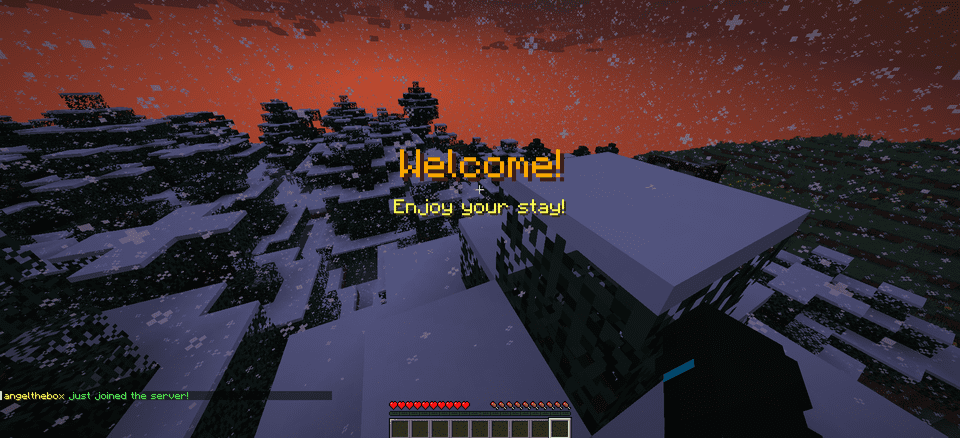
join: “&e%player% &ajust joined the server!”
leave: “&e%player% &chas left the server!”
player-specific:
example-player:
join: “&6Welcome back, special player %player%!”
leave: “&eGoodbye, special player %player%!”
titles:
join:
title: “&6Welcome!”
subtitle: “&eEnjoy your stay!”
sounds:
join:
sound: ENTITY_PLAYER_LEVELUP
volume: 1.0
pitch: 1.0
leave:
sound: ENTITY_IRON_GOLEM_DEATH
volume: 0.5
pitch: 1.0
animations:
green-spike:
enabled: true
duration: 40
height: 2.0
# Message Packs
message-packs:
# Currently selected pack (default, friendly, professional, funny, rpg)
selected: “default”
# Default pack (original messages)
default:
join:
– “&e%player% &ajust joined the server!”
leave:
– “&e%player% &chas left the server!”
# Friendly pack
friendly:
join:
– “&d✨ &e%player% &ahas joined the party! &d✨”
– “&aWelcome back, &e%player%&a! We missed you! &d❤”
leave:
– “&e%player% &7had to go… &cSee you soon! &d💕”
– “&7Until next time, &e%player%&7! &d👋”
“`
## 🌐 Language Support
WelcomeMat now supports multiple languages:
“`yaml
# Available languages: english, spanish
selected-language: “english”
languages:
english:
name: “English”
messages:
reload:
success: “&aConfiguration reloaded successfully!”
sound:
enabled: “&aJoin/leave sounds enabled!”
disabled: “&cJoin/leave sounds disabled!”
spanish:
name: “Español”
messages:
reload:
success: “&a¡Configuración recargada con éxito!”
sound:
enabled: “&a¡Sonidos de entrada/salida activados!”
disabled: “&c¡Sonidos de entrada/salida desactivados!”
“`
## 🎵 Available Sounds
### Modern (1.13+)
– `ENTITY_PLAYER_LEVELUP`
– `ENTITY_IRON_GOLEM_DEATH`
– `BLOCK_NOTE_BLOCK_PLING`
– `BLOCK_NOTE_BLOCK_CHIME`
– `BLOCK_NOTE_BLOCK_BELL`
– And more…
### Legacy (1.8-1.12) (Under development)
– `LEVEL_UP`
– `IRONGOLEM_DEATH`
– `NOTE_PLING`
– `NOTE_PIANO`
– And more…
## 💡 Example Configurations
### Professional Server with Message Packs
“`yaml
# Use the professional message pack
message-packs:
selected: “professional”
# Set the language to English
selected-language: “english”
sounds:
join:
sound: BLOCK_NOTE_BLOCK_PLING
volume: 0.8
pitch: 1.5
animations:
green-spike:
enabled: true
duration: 30
height: 1.5
“`
### VIP Server with Custom Messages
“`yaml
messages:
join: “&d✨ &e%player% &ahas joined the party! &d✨”
leave: “&e%player% &7had to go… &cSee you soon!”
player-specific:
VIP_Player:
join: “&6⚡ The legendary &e%player% &6has arrived! ⚡”
leave: “&6The legend &e%player% &6must go… &7Until next time!”
sounds:
join:
sound: ENTITY_PLAYER_LEVELUP
volume: 1.0
pitch: 1.2
animations:
green-spike:
enabled: true
duration: 50
height: 2.5
“`
## 📝 Support
If you encounter any issues or have suggestions:
– Create an issue on our [GitHub repository](https://github.com/coffeeisle/welcome-mat)
– Join our [Discord server](https://discord.gg/cJ4uP2xF7h)
—
Made with ❤️ by angeldev0
[Download](https://modrinth.com/plugin/welcome-mat) • [Source](https://github.com/coffeeisle/welcome-mat) • [Discord](https://discord.gg/cJ4uP2xF7h)