XP Vials
# 📦 XP Vials — Bottle Your Experience!
Turn your XP into **bottles of experience** with a simple right-click on an enchanting table!
Perfect for **saving XP**, **sharing with friends**, or **keeping it safe before risky adventures**.
## ✨ Features
– Right-click an **Enchanting Table** with a *Glass Bottle* to store XP
– **Sneak-click** to convert *all* bottles at once
– Configurable **XP cost per bottle**
– Smooth & immersive **sound effects**
– **Permission support:** `xpstore.use`
## 🎮 How it works
| Action | Result |
|——-|——–|
| Right-click Enchanting Table with Glass Bottle | Store XP into one bottle |
| Sneak + Right-click | Convert all bottles in hand |
## ⚙️ Permissions
“xpstore.use“ — allows XP bottling
📁 Config
Modify the XP cost in the config file:
“`yaml
xp-cost: 10
“`
## Start banking your XP today — smarter players store their levels 😉
XPMerge
# ✨ XpMerge
> **Less orbs. More frames. Same XP.**
> Automatically merges nearby experience orbs into one — silently, safely, and without ever duping a drop.
—
## 📖 Overview
**XpMerge** is a lean, Folia-native XP orb merging plugin built for servers that care about performance. Every configured interval, it sweeps all loaded chunks, finds clusters of experience orbs in close proximity, and collapses them into a single orb — no XP lost, no exploits, no drama.
Massive mob farms, XP grinders, and enchanting setups can spawn hundreds of orbs in seconds. XpMerge kills that lag at the source by reducing entity count without touching collection logic. Players never notice it’s running — they just notice the server feels smoother.
—
## ✨ Features
– 🔁 **Interval-based sweeping** — merges fire on a configurable tick schedule, not every frame
– 📐 **Radius-based clustering** — orbs within a set block radius collapse into one, preserving total XP
– 🧵 **Folia-native threading** — uses `RegionScheduler` per 8×8 chunk region, meaning all entity reads and writes happen on the correct regional thread with zero unsafe cross-region access
– 🔒 **Dupe-safe design** — re-validates orbs immediately before removal to handle race conditions from collection events mid-sweep
– 🌍 **Multi-world support** — sweeps every loaded world simultaneously
– 🛠️ **Live reload** — update config without restarting via `/xpmerge reload`
– 📊 **Status command** — inspect current settings and lifetime merge count at a glance
– 🐛 **Debug mode** — optional per-merge console logging for diagnostics, off by default
—
## 🔒 Dupe Safety & Bottled XP Compatibility
XpMerge was rigorously tested against plugins that bottle, extract, or otherwise manipulate XP orb entities — a category of plugins that are particularly vulnerable to dupe exploits when combined with orb merging.
The key safeguard: **XpMerge re-validates every orb immediately before removal.** If a player or plugin has already collected an orb between the sweep scan and the merge execution, that orb is skipped entirely. XP is never double-counted or awarded twice.
Tested and confirmed dupe-free with:
| Plugin | Repository |
|—|—|
| **Experience Manager (XPM)** by FruitLoopin | [github.com/jwkerr/XPManager](https://github.com/jwkerr/XPManager) |
| **BottleEXP** by Mooshlol304 | [github.com/Mooshlol304/BottleEXP-1.21.5](https://github.com/Mooshlol304/BottleEXP-1.21.5/tree/main) |
| **XP Bottling** by HoneyBerries | [github.com/HoneyBerries/XPBottling](https://github.com/HoneyBerries/XPBottling) |
> XP values are accumulated as a `long` internally before being written back as an `int`, preventing overflow edge cases on large orb clusters. The final value is clamped to `Integer.MAX_VALUE` as a hard ceiling.
—
## 🖥️ Compatibility
| Platform | Supported Versions |
|—|—|
| **Paper** | 1.21.10 — 1.21.11 *(1.21.x broadly supported)* |
| **Folia** | 1.21.10 — 1.21.11 *(natively threaded)* |
> ⚠️ Spigot/Bukkit are **not** supported. Paper or Folia is required.
> Folia support is first-class — the sweep architecture was designed around `RegionScheduler` from the ground up, not bolted on after.
—
## 🔧 Commands & Permissions
| Command | Description | Permission |
|—|—|—|
| `/xpmerge status` | Shows current interval, radius, debug state, and total orbs merged | `xpmerge.admin` |
| `/xpmerge reload` | Hot-reloads config and restarts the merge task | `xpmerge.admin` |
> `xpmerge.admin` defaults to **OP only**.
—
## ⚙️ Configuration
The config file is located at:
“`
plugins/XpMerge/config.yml
“`
Below is the full default configuration:
“`yaml
# How many ticks between each merge sweep. 20 ticks = 1 second.
# Lower = more aggressive merging, slightly more CPU. Minimum: 1.
merge-interval: 5
# Block radius within which orbs are merged together.
# All orbs within this distance of each other collapse into one.
merge-radius: 20.00
# Print a line to console every time orbs are merged. Turn off in production.
debug: false
“`
### Config Breakdown
– **`merge-interval`** — How often the sweep fires, in ticks. `5` = every quarter second. Lower values merge more aggressively at the cost of slightly more CPU overhead. Hard minimum of `1`.
– **`merge-radius`** — The block radius used to cluster nearby orbs. `20.0` casts a wide net, ideal for large farms and high-density XP setups.
– **`debug`** — When enabled, logs every individual merge to console including location, orb count, and total XP. Useful for testing — leave it off in production.
—
## 📦 Installation
1. Download the latest `.jar` from the releases section
2. Drop it into your `/plugins` folder
3. Restart your server *(not `/reload`)*
4. Edit `plugins/XpMerge/config.yml` to your liking
5. Use `/xpmerge reload` to apply config changes live
—
## 📜 License
XpMerge is open-source and distributed under the **MIT License**.
Contributions, issues, and pull requests are welcome on the project repository.
—
*Built for servers that don’t want to choose between XP farms and good performance.*
XPlayerKits

It’s a plugin that allows you to create kits for your players.
This plugin was created due to the lack of an optimized solution for this feature.
It uses very little RAM and is highly customizable.
|  |
|  |
|  |
|
| — | — | — |

**Unlike other plugins that load the data of every single player registered on your server (wasting precious resources), XPlayerKits takes a smarter approach.**
It only loads player data when they actually join, and keeps just the essential information cached. This means **significantly lower RAM usage** without sacrificing performance.
On top of that, XPlayerKits comes with **built-in SQLite support right out of the box**, giving you a reliable and lightweight database solution. No more dealing with the limitations and issues of storing player data in messy YML files.

### Features
– **Migration:** Migrate data and kits from another plugin to save resources and avoid inventory exploits.
– **Kit placeholder requirements:** Use a system to check placeholder conditions.
– **Fully editable inventory:** Customize the kit inventory with an item name system for icons.
– **Claim/Deny actions:** Set actions when claiming or denying a kit, such as commands or sounds.
– **In-game GUI:** Edit kits directly in-game, including properties, icons, and content.
– **One-Time Kits:** Create kits that can only be claimed once, stored in player data.
– **First Join Kit:** Deliver a kit to players the first time they join your server.
– **Database support:** MongoDB, MySQL, and SQLite are supported (Recommended: MongoDB).

### Commands
– `/xkits editor` – Opens the editor for quick kit creation.
– `/xkits kits` – Opens the kit selection menu.
– `/xkits open [rotation/category]` – Opens the kit selection with category or rotation kits.
– `/xkits preview [player]` – Opens preview menu.
– `/xkits give ` – Give kits directly to players without checks.
– `/xkits claim ` – Give kits to players with checks.
– `/xkits reset ` – Reset a player’s data for a specific kit.
– `/xkits resetall ` – Reset all data for a player.
– `/xkits delete ` – Delete a kit.
– `/xkits migrate playerkits2_yml/playerkits2_mysql` – Migrate data from other plugins.
– `/xkits migratekits playerkits2` – Migrate kits from other plugins.

### Permissions
– `xkits.admin` – Allows players to use the `/xkits editor` and `/xkits slots` commands.
– `xkits.preview` – Allows players to use `/xkits preview`.
– `xkits.countdown.bypass` – Allows players to bypass kit countdowns.
– `xkits.onetime.bypass` – Allows players to bypass one-time restrictions.

### Placeholders
– `%xplayerkits_cooldown_%` – Show the time to next claim.
– `%xplayerkits_claimed_onetime_%` – Return yes or no if the kit of player is claimed.
– `%xplayerkits_claimed_cooldown_%` – Return yes or no if the kit of player is in cooldown.

### Actions
| Action | Description | Example |
|————————-|———————————————–|———————————————————–|
| console | Executes a command from the console. | `console:say test` |
| command | Executes a command as the player. | `command:dm open main` |
| sound | Plays a sound to the player. | `sound:ENTITY_ENDERMAN_TELEPORT;1.0f;1.0f` |
| playsound_resource_pack | Plays a sound from a resource pack. | `playsound_resource_pack:ENTITY_ENDERMAN_TELEPORT;1.0f;1.0f` |
| message | Sends a chat message to the player. | `message:You can’t claim this kit.` |
| center_message | Sends a centered message to the player. | `center_message:You can’t claim this kit.` |
| mini_message | Sends a MiniMessage formatted message. | `mini_message:You can’t claim this kit.` |
| broadcast | Sends a message to all players. | `broadcast:You can’t claim this kit.` |
| titles | Sends a title and subtitle to the player. | `titles:
Kit Claimed!;<subtitle>Enjoy your rewards!`|<br />
| wait_ticks | Waits before executing the next action. | `wait_ticks:40` |</p>
<p align="center">
<img decoding="async" src="https://i.imgur.com/OosO7SC.jpeg" alt="links">
</p>
<p>| <a href="https://discord.gg/4R9teKVcbM" target="_blank"><img decoding="async" src="https://i.imgur.com/5mATCrI.jpeg" alt="Discord" /></a> | <a href="https://www.patreon.com/c/insideranh" target="_blank"><img decoding="async" src="https://i.imgur.com/G31oZIG.jpeg" alt="Patreon" /></a> | <a href="https://www.insideranh.dev/docs/xplayerkits" target="_blank"><img decoding="async" src="https://i.imgur.com/zdRGBIY.jpeg" alt="Wiki" /></a> |<br />
| — | — | — |</p>
</article>
<article>
<h1>XpAnvils</h1>
<p> XPAnvils is a lightweight plugin that allows server admins to set the max XP cost for anvil usage.</p>
<p>Minecraft typically limits anvil combinations to a 40-level cost. With XPAnvils, you can take this restriction away — make it 80, 100, or more!</p>
<p> Features<br />
Set the max anvil XP price via command:<br />
/xpanvil set <level><br />
Example: /xpanvil set 80</p>
<p>Prevents expensive enchantment combinations from being broken due to the vanilla cap.</p>
<p>Convenient to use, no config file needed.</p>
<p>Ships on Minecraft 1.21.5 and Paper servers.</p>
<p>Use Case<br />
Want to allow combining high-level enchanted items without being interrupted by XP level limits? This plugin is ideal for survival, semi-vanilla, and RPG servers where progression and equipment enchantments matter.</p>
</article>
<article>
<h1>XP2HP</h1>
<p># ✨ XP2HP – Level Up Your Life ✨</p>
<p>> A modern, configurable, and **Folia-compatible** plugin that turns XP into power. </p>
<p>—</p>
<p>## 🧠 What Is XP2HP?<br />
**XP2HP** is a lightweight, plug-and-play plugin that transforms a player’s **experience level into real power**. As players gain XP, their **maximum health and key attributes** scale with them—offering a dynamic and immersive RPG-like progression system for any Minecraft server.</p>
<p>Perfect for **Survival**, **RPG**, **Adventure**, or even **competitive PVP** servers looking to spice up vanilla mechanics with meaningful progression.</p>
<p>—</p>
<p>## 🔥 Core Features<br />
– ✅ **Folia-Compatible** – Built specifically for Paper Forks like Folia (1.21.4+)<br />
– ❤️ **Max Health Scaling** – Configurable health per level from 0 to 400<br />
– 🛡️ **Stat Boosting** – Boost core attributes like:<br />
– Attack Damage<br />
– Armor<br />
– Movement Speed<br />
– and more.<br />
– ⚙️ **Fully Configurable** – Toggle health messages, healing behavior, level caps, and more<br />
– 📈 **No Commands Needed** – Works silently in the background<br />
– 🧪 **Smooth Respawn & Death Handling** – Stats reset and re-apply reliably with no XP exploits</p>
<p>—</p>
<p>## 🧾 Example Use Cases<br />
– 🔄 Encourage XP farming and leveling as part of your economy<br />
– 🎯 Make high-level players genuinely feel stronger<br />
– ⚔️ Create custom PVE events where scaling health matters</p>
<p>—</p>
<p>## 📦 Installation<br />
1. Download the latest `.jar`<br />
2. Drop it into your `/plugins` folder<br />
3. Restart your server ✅</p>
<p>—</p>
<p>## 🧪 Compatibility<br />
| Server Type | Supported? |<br />
|————-|——————–|<br />
| Paper | ✅ |<br />
| Purpur | ✅ |<br />
| Folia | ✅ |<br />
| Spigot | ⚠️ Not guaranteed |<br />
| Bukkit | ❌ Not supported |</p>
<p>—</p>
<p>## 💡 Why Choose XP2HP?<br />
This isn’t just another level plugin—it’s **precisely tuned** for performance, future support, and RPG potential. Whether you’re building a world of elite heroes or rewarding grinders, XP2HP turns vanilla mechanics into something special.</p>
<p>> *”Level up your world—literally.”*</p>
<p>—</p>
<p>## 🛠️ About the Developer<br />
🎉 This is one of our top **official plugin releases**! The Team is constantly developing, and is constantly doing updates, fixing bugs, and take community feedback seriously.</p>
<p>If you like XP2HP, please leave a review or follow. It means a lot to us💖</p>
<p>—</p>
<p>## 📬 Need Help or Have Ideas?<br />
> Join the Discord Server, you can @ us on Discord or open an issue. We’re open to suggestions, feature requests, and feedback!</p>
<p>—</p>
<p>Thanks for checking out **XP2HP** – I hope it becomes a core part of your server’s gameplay experience. 💖</p>
</article>
<article>
<h1>XP Multiplier</h1>
<p># About</p>
<p>Simple plugin that mutliply XP that is picked up. You can change multiplier and the permission name in config.yml file.</p>
<p># config.yml<br />
“`<br />
bonus-multiplier: 2<br />
permission-node: xpbonus.receive<br />
“`</p>
<p># Credits</p>
<p>[Eelviny](https://www.spigotmc.org/resources/xp-multiplier.209/) uploaded a plugin without any support back in 2013. I decided to finally made my own but slightly better. Expect more updates to come from me.</p>
</article>
<article>
<h1>XP Bottling</h1>
<p># XP Bottling Plugin 🧪✨</p>
<p>XP Bottling is a lightweight Minecraft plugin that allows players to store their experience points (XP) into bottles for later use. This plugin is designed for Bukkit/Spigot servers and provides a simple yet useful feature for managing XP.</p>
<p>## Features 🌟</p>
<p>– **XP Bottling**: Players can right-click an enchanting table with a glass bottle to convert their XP into an experience bottle.<br />
– **Permission-Based Access**: Only players with the `xpbottling.use` permission can use the XP bottling feature. (Note: This permission is granted to players by default.)<br />
– **Custom XP Cost**: Bottling XP costs 7 experience points per bottle. (Note: 7 XP points is the average amount of experience an experience bottle will give when thrown, as it drops a random amount of XP between 3 and 11 points.)<br />
– **Sound Effects**: Plays a custom sound when XP is bottled for an immersive experience. 🔊<br />
– **Error Messages**: Players are notified if they lack permissions, XP, or the required items. ❌</p>
<p>## How It Works 🛠️</p>
<p>1. Hold a glass bottle in your main hand. 🍼<br />
2. Right-click an enchanting table. 📚<br />
3. If you have at least 7 XP points, the plugin will:<br />
– Deduct 7 XP points. ➖<br />
– Consume one glass bottle. 🧴<br />
– Add an experience bottle to your inventory. ✨<br />
– Play a sound effect. 🎵</p>
<p>If you don’t meet the requirements, the plugin will notify you with a message. 📢</p>
<p>## Permissions 🔑</p>
<p>– `xpbottling.use`: Grants permission to use the XP bottling feature. (Default: Granted to all players)</p>
<p>## Installation ⚙️</p>
<p>1. Download the plugin `.jar` file. 📥<br />
2. Place the `.jar` file in your server’s `plugins` folder. 📂<br />
3. Restart or reload your server. 🔄<br />
4. Ensure players have the `xpbottling.use` permission to use the plugin.</p>
<p>## Issues 🐛</p>
<p>If you encounter any bugs or have feature requests, please open an issue in the [GitHub Issues](https://github.com/HoneyBerries/xPBottling/issues) section.</p>
<p>## License 📜</p>
<p>This project is licensed under the MIT License. See the `LICENSE` file for details.</p>
<p>Enjoy the plugin and happy bottling! 🧪✨</p>
</article>
<article>
<h1>XLeaderboards</h1>
<p></p>
<p>This plugin is designed for users seeking a fast and efficient leaderboard system, supporting time-based rankings such as **daily**, **weekly**, **monthly**, and **permanent** leaderboards. Everything is handled through **placeholders**, eliminating the need for NPCs or menus. Its main strength lies in the ease of setting up time-based leaderboards—an area where few plugins truly excel.</p>
<p>| <a href="https://modrinth.com/plugin/xplayerkits" target="_blank"><img decoding="async" src="https://i.imgur.com/73PSalz.jpeg" alt="XPlayerKits" /></a> | <a href="https://modrinth.com/plugin/xplayerkits" target="_blank"><img decoding="async" src="https://i.imgur.com/lwannlh.jpeg" alt="XLeaderboards" /></a> | <a href="https://modrinth.com/plugin/stellarprotect" target="_blank"><img decoding="async" src="https://i.imgur.com/tCvyf0Y.jpeg" alt="StellarProtect" /></a> |<br />
| — | — | — |</p>
<p></p>
<p>### Features</p>
<p>– **Fully Reworked Core:** XLeaderBoards has been completely redesigned to support both **SQLite** and **MySQL**, allowing the plugin to scale effortlessly and efficiently with large amounts of data.<br />
– **Improved Performance:** Successfully tested with over 2 million real records, capable of updating them in under one minute.<br />
– **Timed Leaderboards:** Efficient ranking system with full support for **daily**, **weekly**, **monthly**, and **permanent** leaderboards.<br />
– **Easy Setup:** Create and configure leaderboards easily using just placeholders.<br />
– **Unlimited Possibilities:** Thanks to placeholder-based logic, you can create tops for any plugin—even if it lacks native support. XLeaderBoards handles number formatting and comparison automatically.<br />
– **Player Ranking:** Shows each player’s position across all leaderboards (daily, weekly, etc.) with built-in placeholder support.<br />
– **Command Improvements:** New features like **tab-completion** and a **/reload** command have been added for easier management.<br />
– **Optimizations:** Fully configurable write frequency, data limits, and time intervals to suit your server’s capacity and activity.<br />
– **All Versions Supported:** Includes support for **1.21.4** to **1.21.8**. Although XLeaderBoards doesn’t rely on NMS, it includes compatibility logic for version-specific changes.<br />
– **Folia Support:** As Folia is becoming a performance standard in modern Minecraft servers, XLeaderBoards now fully supports it—just like **StellarProtect**.<br />
– **Top rewards:** You can set rewards for the players who are in the daily leaderboards.<br />
– **Need More Features?** Join our [Discord](https://discord.com/invite/4R9teKVcbM) and suggest new features. We’re actively listening to community feedback!</p>
<p></p>
<p>## How to Get Started</p>
<p>1. **Download and install the plugin.**<br />
By default, the plugin supports **SQLite** and **MySQL** out of the box.</p>
<p>2. **Start your server.**<br />
Once the plugin folder is generated, configure your database credentials depending on your chosen engine.</p>
<p>3. **Set up your tops.**<br />
Use the placeholders of your choice to create customized leaderboards.</p>
<p>4. **Integrate with DecentHolograms or your preferred plugin.**<br />
Ensure that your chosen plugin supports PlaceholderAPI, and follow the example configuration provided below.</p>
<p>5. **Refer to the placeholders section.**<br />
All available formats for placeholders are listed in the dedicated section.</p>
<details>
<summary>DecentHolograms Example Config</summary>
<p>“`yaml<br />
location: Spawnb:6.022:33.500:11.943<br />
enabled: true<br />
display-range: 48<br />
update-range: 48<br />
update-interval: 20<br />
facing: 0.0<br />
down-origin: false<br />
pages:<br />
– lines:<br />
– content: ‘#ICON: PLAYER_HEAD (eyJ0ZXh0dXJlcyI6eyJTS0lOIjp7InVybCI6Imh0dHA6Ly90ZXh0dXJlcy5taW5lY3JhZnQubmV0L3RleHR1cmUvZWM2ZTYwNGJkNTNkOTc4ODc1OTVhMDYyYjdjNTEyY2E0ZGJiZmU0OGJiNGFkY2VmNzEyNWQxZGIxMDNhYjdmZiJ9fX0=)’<br />
height: 0.7<br />
– content: ‘#F4F149&lJ#F5F246&lU#F5F242&lG#F6F33F&lA#F7F33B&lD#F8F438&lO#F8F535&lR#F9F531&lE#FAF62E&lS<br />
#FBF727&lM#FBF727&lI#FBF727&lL#FBF727&lL#FBF727&lO#FBF727&lN#FBF727&lA#FBF727&lR#FBF727&lI#FBF727&lO#FBF727&lS’<br />
height: 0.3<br />
– content: ‘&7(La riqueza y ellos son uno)’<br />
height: 0.3<br />
– content: ”<br />
height: 0.3<br />
– content: ‘#FBF727#1. &f%xleaderboard_top_coins;daily;top_name;1% &8- #FBF727%xleaderboard_top_coins;daily;top_value;1%<br />
#FAFF2E⛃’<br />
height: 0.3<br />
– content: ‘#FBF727#2. &f%xleaderboard_top_coins;daily;top_name;2% &8- #FBF727%xleaderboard_top_coins;daily;top_value;2%<br />
#FAFF2E⛃’<br />
height: 0.3<br />
– content: ‘#FBF727#3. &f%xleaderboard_top_coins;daily;top_name;3% &8- #FBF727%xleaderboard_top_coins;daily;top_value;3%<br />
#FAFF2E⛃’<br />
height: 0.3<br />
– content: ‘#FBF727#4. &f%xleaderboard_top_coins;daily;top_name;4% &8- #FBF727%xleaderboard_top_coins;daily;top_value;4%<br />
#FAFF2E⛃’<br />
height: 0.3<br />
– content: ‘#FBF727#5. &f%xleaderboard_top_coins;daily;top_name;5% &8- #FBF727%xleaderboard_top_coins;daily;top_value;5%<br />
#FAFF2E⛃’<br />
height: 0.3<br />
– content: ‘&r’<br />
height: 0.3<br />
– content: ‘&8► &fTu posición: #FBF727#%xleaderboard_ranking_daily_coins% &8- #FBF727%xleaderboard_amount_daily_coins%<br />
#FAFF2E⛃ &8◄’<br />
height: 0.3<br />
– content: ‘&r’<br />
height: 0.3<br />
– content: ‘#F4F149&l[Diario] &7[Semanal] [Mensual] [Permanente]’<br />
height: 0.3<br />
actions:<br />
RIGHT:<br />
– NEXT_PAGE:tops_DINERO<br />
– SOUND:UI_BUTTON_CLICK:0.7:2.7</p>
<p>– lines:<br />
– content: ‘#ICON: PLAYER_HEAD (eyJ0ZXh0dXJlcyI6eyJTS0lOIjp7InVybCI6Imh0dHA6Ly90ZXh0dXJlcy5taW5lY3JhZnQubmV0L3RleHR1cmUvZWM2ZTYwNGJkNTNkOTc4ODc1OTVhMDYyYjdjNTEyY2E0ZGJiZmU0OGJiNGFkY2VmNzEyNWQxZGIxMDNhYjdmZiJ9fX0=)’<br />
height: 0.7<br />
– content: ‘#F4F149&lJ#F5F246&lU#F5F242&lG#F6F33F&lA#F7F33B&lD#F8F438&lO#F8F535&lR#F9F531&lE#FAF62E&lS<br />
#FBF727&lM#FBF727&lI#FBF727&lL#FBF727&lL#FBF727&lO#FBF727&lN#FBF727&lA#FBF727&lR#FBF727&lI#FBF727&lO#FBF727&lS’<br />
height: 0.3<br />
– content: ‘&7(La riqueza y ellos son uno)’<br />
height: 0.3<br />
– content: ”<br />
height: 0.3<br />
– content: ‘#FBF727#1. &f%xleaderboard_top_coins;weekly;top_name;1% &8- #FBF727%xleaderboard_top_coins;weekly;top_value;1%<br />
#FAFF2E⛃’<br />
height: 0.3<br />
– content: ‘#FBF727#2. &f%xleaderboard_top_coins;weekly;top_name;2% &8- #FBF727%xleaderboard_top_coins;weekly;top_value;2%<br />
#FAFF2E⛃’<br />
height: 0.3<br />
– content: ‘#FBF727#3. &f%xleaderboard_top_coins;weekly;top_name;3% &8- #FBF727%xleaderboard_top_coins;weekly;top_value;3%<br />
#FAFF2E⛃’<br />
height: 0.3<br />
– content: ‘#FBF727#4. &f%xleaderboard_top_coins;weekly;top_name;4% &8- #FBF727%xleaderboard_top_coins;weekly;top_value;4%<br />
#FAFF2E⛃’<br />
height: 0.3<br />
– content: ‘#FBF727#5. &f%xleaderboard_top_coins;weekly;top_name;5% &8- #FBF727%xleaderboard_top_coins;weekly;top_value;5%<br />
#FAFF2E⛃’<br />
height: 0.3<br />
– content: ‘&r’<br />
height: 0.3<br />
– content: ‘&8► &fTu posición: #FBF727#%xleaderboard_ranking_weekly_coins% &8- #FBF727%xleaderboard_amount_weekly_coins%<br />
#FAFF2E⛃ &8◄’<br />
height: 0.3<br />
– content: ‘&r’<br />
height: 0.3<br />
– content: ‘&7[Diario] #F4F149&l[Semanal] &7[Mensual] [Permanente]’<br />
height: 0.3<br />
actions:<br />
LEFT:<br />
– PREV_PAGE:tops_DINERO<br />
– SOUND:UI_BUTTON_CLICK:0.7:2.7<br />
RIGHT:<br />
– NEXT_PAGE:tops_DINERO<br />
– SOUND:UI_BUTTON_CLICK:0.7:2.7</p>
<p>– lines:<br />
– content: ‘#ICON: PLAYER_HEAD (eyJ0ZXh0dXJlcyI6eyJTS0lOIjp7InVybCI6Imh0dHA6Ly90ZXh0dXJlcy5taW5lY3JhZnQubmV0L3RleHR1cmUvZWM2ZTYwNGJkNTNkOTc4ODc1OTVhMDYyYjdjNTEyY2E0ZGJiZmU0OGJiNGFkY2VmNzEyNWQxZGIxMDNhYjdmZiJ9fX0=)’<br />
height: 0.7<br />
– content: ‘#F4F149&lJ#F5F246&lU#F5F242&lG#F6F33F&lA#F7F33B&lD#F8F438&lO#F8F535&lR#F9F531&lE#FAF62E&lS<br />
#FBF727&lM#FBF727&lI#FBF727&lL#FBF727&lL#FBF727&lO#FBF727&lN#FBF727&lA#FBF727&lR#FBF727&lI#FBF727&lO#FBF727&lS’<br />
height: 0.3<br />
– content: ‘&7(La riqueza y ellos son uno)’<br />
height: 0.3<br />
– content: ”<br />
height: 0.3<br />
– content: ‘#FBF727#1. &f%xleaderboard_top_coins;monthly;top_name;1% &8- #FBF727%xleaderboard_top_coins;monthly;top_value;1%<br />
#FAFF2E⛃’<br />
height: 0.3<br />
– content: ‘#FBF727#2. &f%xleaderboard_top_coins;monthly;top_name;2% &8- #FBF727%xleaderboard_top_coins;monthly;top_value;2%<br />
#FAFF2E⛃’<br />
height: 0.3<br />
– content: ‘#FBF727#3. &f%xleaderboard_top_coins;monthly;top_name;3% &8- #FBF727%xleaderboard_top_coins;monthly;top_value;3%<br />
#FAFF2E⛃’<br />
height: 0.3<br />
– content: ‘#FBF727#4. &f%xleaderboard_top_coins;monthly;top_name;4% &8- #FBF727%xleaderboard_top_coins;monthly;top_value;4%<br />
#FAFF2E⛃’<br />
height: 0.3<br />
– content: ‘#FBF727#5. &f%xleaderboard_top_coins;monthly;top_name;5% &8- #FBF727%xleaderboard_top_coins;monthly;top_value;5%<br />
#FAFF2E⛃’<br />
height: 0.3<br />
– content: ‘&r’<br />
height: 0.3<br />
– content: ‘&8► &fTu posición: #FBF727#%xleaderboard_ranking_monthly_coins% &8- #FBF727%xleaderboard_amount_monthly_coins%<br />
#FAFF2E⛃ &8◄’<br />
height: 0.3<br />
– content: ‘&r’<br />
height: 0.3<br />
– content: ‘&7[Diario] [Semanal] #F4F149&l[Mensual] &7[Permanente]’<br />
height: 0.3<br />
actions:<br />
LEFT:<br />
– PREV_PAGE:tops_DINERO<br />
– SOUND:UI_BUTTON_CLICK:0.7:2.7<br />
RIGHT:<br />
– NEXT_PAGE:tops_DINERO<br />
– SOUND:UI_BUTTON_CLICK:0.7:2.7</p>
<p>– lines:<br />
– content: ‘#ICON: PLAYER_HEAD (eyJ0ZXh0dXJlcyI6eyJTS0lOIjp7InVybCI6Imh0dHA6Ly90ZXh0dXJlcy5taW5lY3JhZnQubmV0L3RleHR1cmUvZWM2ZTYwNGJkNTNkOTc4ODc1OTVhMDYyYjdjNTEyY2E0ZGJiZmU0OGJiNGFkY2VmNzEyNWQxZGIxMDNhYjdmZiJ9fX0=)’<br />
height: 0.7<br />
– content: ‘#F4F149&lJ#F5F246&lU#F5F242&lG#F6F33F&lA#F7F33B&lD#F8F438&lO#F8F535&lR#F9F531&lE#FAF62E&lS<br />
#FBF727&lM#FBF727&lI#FBF727&lL#FBF727&lL#FBF727&lO#FBF727&lN#FBF727&lA#FBF727&lR#FBF727&lI#FBF727&lO#FBF727&lS’<br />
height: 0.3<br />
– content: ‘&7(La riqueza y ellos son uno)’<br />
height: 0.3<br />
– content: ”<br />
height: 0.3<br />
– content: ‘#FBF727#1. &f%xleaderboard_top_coins;permanent;top_name;1% &8- #FBF727%xleaderboard_top_coins;permanent;top_value;1%<br />
#FAFF2E⛃’<br />
height: 0.3<br />
– content: ‘#FBF727#2. &f%xleaderboard_top_coins;permanent;top_name;2% &8- #FBF727%xleaderboard_top_coins;permanent;top_value;2%<br />
#FAFF2E⛃’<br />
height: 0.3<br />
– content: ‘#FBF727#3. &f%xleaderboard_top_coins;permanent;top_name;3% &8- #FBF727%xleaderboard_top_coins;permanent;top_value;3%<br />
#FAFF2E⛃’<br />
height: 0.3<br />
– content: ‘#FBF727#4. &f%xleaderboard_top_coins;permanent;top_name;4% &8- #FBF727%xleaderboard_top_coins;permanent;top_value;4%<br />
#FAFF2E⛃’<br />
height: 0.3<br />
– content: ‘#FBF727#5. &f%xleaderboard_top_coins;permanent;top_name;5% &8- #FBF727%xleaderboard_top_coins;permanent;top_value;5%<br />
#FAFF2E⛃’<br />
height: 0.3<br />
– content: ‘&r’<br />
height: 0.3<br />
– content: ‘&8► &fTu posición: #FBF727#%xleaderboard_ranking_permanent_coins% &8- #FBF727%xleaderboard_amount_permanent_coins%<br />
#FAFF2E⛃ &8◄’<br />
height: 0.3<br />
– content: ‘&r’<br />
height: 0.3<br />
– content: ‘&7[Diario] [Semanal] [Mensual] #F4F149&l[Permanente]’<br />
height: 0.3<br />
actions:<br />
LEFT:<br />
– PREV_PAGE:tops_DINERO<br />
– SOUND:UI_BUTTON_CLICK:0.7:2.7<br />
“`<br />
</details>
<details>
<summary>config.yml</summary>
<p>“`yaml<br />
tops:<br />
kills:<br />
## This placeholder will parse to retrieve the current count of this leaderboard.<br />
placeholder: “%statistic_player_kills%”<br />
name: “Asesinatos”<br />
databaseId: survival_top<br />
debug: false<br />
optimizations:<br />
## Max bulk size for mongodb, if you have a lot of players, you can increase this value,<br />
## but be careful with the memory usage.<br />
max-bulk-size: 1000<br />
## Max cached top entries your server loads on memory.<br />
cached-top-entries: 10<br />
## If you have a lot of players, you can increase this value.<br />
ticks-between-updates: 600<br />
## Max bulk size for resetting temporal values, this have minor size<br />
## you can increase this value, but be careful with the memory usage.<br />
max-reset-bulk-size: 5000<br />
topUpdates:<br />
daily:<br />
minutes: 10<br />
weekly:<br />
minutes: 30<br />
monthly:<br />
hours: 3<br />
permanent:<br />
hours: 6<br />
databases:<br />
mongodb:<br />
host: localhost<br />
port: 27017<br />
database: leaderboards<br />
user: root<br />
password: root<br />
“`<br />
</details>
<details>
<summary>lang.yml</summary>
<p>“`yaml<br />
tops:<br />
noPermission: “&cYou don’t have permission to use this command.”<br />
noRanking: “&6Unranked”<br />
noTop: “&6No record”<br />
loading: “&fLoading…”<br />
hologram:<br />
daily: “&6&l[Daily] &7[Weekly] [Monthly] [Permanent]”<br />
weekly: “&7[Daily] &6&l[Weekly] &7[Monthly] [Permanent]”<br />
monthly: “&7[Daily] &7[Weekly] &6&l[Monthly] &7[Permanent]”<br />
permanent: “&7[Daily] &7[Weekly] &7[Monthly] &6&l[Permanent]”<br />
daily: “Daily”<br />
weekly: “Weekly”<br />
monthly: “Monthly”<br />
permanent: “Permanent”<br />
invalidTimeType: “&cThe leaderboard time type is not valid.”<br />
toggleWait: “&cPlease wait a bit before changing the leaderboard time.”<br />
toggleTime: “&fThe leaderboard time is now: &e<timeType>”<br />
tops: |-<br />
&d &a<br />
<center>&6&l<name> TOPS<br />
&d &f<br />
<tops><br />
&d &b<br />
topLine: “&b#<#> &8- &f<name> &8- &e<value>”<br />
“`<br />
</details>
<details>
<summary>rewards.yml</summary>
<p>“`yaml<br />
enabled: false<br />
rewards:<br />
kills:<br />
top1:<br />
top: 1<br />
rewards:<br />
– “command: give <player> diamond_sword”<br />
– “message: &7 &a”<br />
– “center_message: &6&lTOP &e#<top> &6&lKILLS &f&l<amount>”<br />
– “message: &7 &d”<br />
– “message: &7You have received a diamond sword for staying in top!”<br />
– “message: &7 &a”<br />
top2:<br />
top: 2<br />
rewards:<br />
– “command: give <player> iron_sword”<br />
– “message: &7 &a”<br />
– “center_message: &6&lTOP &e#<top> &6&lKILLS &f&l<amount>”<br />
– “message: &7 &d”<br />
– “message: &7You have received a iron sword for staying in top!”<br />
– “message: &7 &a”<br />
top3:<br />
top: 3<br />
rewards:<br />
– “command: give <player> stone_sword”<br />
– “message: &7 &a”<br />
– “center_message: &6&lTOP &e#<top> &6&lKILLS &f&l<amount>”<br />
– “message: &7 &d”<br />
– “message: &7You have received a stone sword for staying in top!”<br />
– “message: &7 &a”<br />
“`</p>
</details>
<p></p>
<p>**TimeType:** daily/weekly/monthly/permanent</p>
<p>– **/xlb gettop <timeType> <topKey>** » Gets the top of the day, week, month, or permanent.<br />
– **/xlb forceupdate <timeType>** » Forces the update of the top.</p>
<p></p>
<p>– **xleaderboards.forceupdate** » Forces the update of the top.<br />
– **xleaderboards.gettop** » Gets the top of the day, week, month, or permanent.</p>
<p></p>
<p>**TopName:**<br />
– **name** – This is established in the `config.yml` key. For example, in `tops.coins`, “coins” is the name of the top.</p>
<p>**TimeType:**<br />
– **daily** – Displays the top player or value for the last 24 hours.<br />
– **weekly** – Displays the top player or value for the last 7 days.<br />
– **monthly** – Displays the top player or value for the last 30 days.<br />
– **permanent** – Displays the top player or value permanently.</p>
<p>**ValueType:**<br />
– **top_name** – Displays the player’s name at this top index position.<br />
– **top_value** – Displays the value at this top index position.<br />
– **top_uuid** – Displays the player’s UUID at this top index position.</p>
<p>**Index:**<br />
– **min** – The minimum index is 1.<br />
– **max** – The maximum index is the one established in the config under `cached-top-entries`.</p>
<p>%xleaderboard_top_<topName>;<timeType>;<valueType>;<index>%</p>
<details>
<summary>Examples</summary>
<p>“`yaml<br />
%xleaderboard_top_coins;daily;top_name;1%<br />
%xleaderboard_top_coins;weekly;top_name;2%<br />
%xleaderboard_top_coins;monthly;top_name;3%<br />
%xleaderboard_top_coins;permanent;top_name;4%</p>
<p>%xleaderboard_top_coins;daily;top_value;1%<br />
%xleaderboard_top_coins;weekly;top_value;2%<br />
%xleaderboard_top_coins;monthly;top_value;3%<br />
%xleaderboard_top_coins;permanent;top_value;4%<br />
“`<br />
</details>
<p>%xleaderboard_ranking_<timeType>_<topName>%</p>
<details>
<summary>Examples</summary>
<p>“`yaml<br />
%xleaderboard_ranking_daily_coins%<br />
%xleaderboard_ranking_weekly_coins%<br />
%xleaderboard_ranking_monthly_coins%<br />
%xleaderboard_ranking_permanent_coins%<br />
“`<br />
</details>
<p>%xleaderboard_amount_<timeType>_<topName>%</p>
<details>
<summary>Examples</summary>
<p>“`yaml<br />
%xleaderboard_amount_daily_coins%<br />
%xleaderboard_amount_weekly_coins%<br />
%xleaderboard_amount_monthly_coins%<br />
%xleaderboard_amount_permanent_coins%<br />
“`<br />
</details>
<p>%xleaderboard_update_cooldown_<timeType>%</p>
<details>
<summary>Examples</summary>
<p>“`yaml<br />
%xleaderboard_update_cooldown_daily%<br />
%xleaderboard_update_cooldown_weekly%<br />
%xleaderboard_update_cooldown_monthly%<br />
%xleaderboard_update_cooldown_permanent%<br />
“`<br />
</details>
<p>%xleaderboard_reset_cooldown_<timeType>%</p>
<details>
<summary>Examples</summary>
<p>“`yaml<br />
%xleaderboard_reset_cooldown_daily%<br />
%xleaderboard_reset_cooldown_weekly%<br />
%xleaderboard_reset_cooldown_monthly%<br />
“`<br />
</details>
<p></p>
<p>| <a href="https://discord.gg/4R9teKVcbM" target="_blank"><img decoding="async" src="https://i.imgur.com/5mATCrI.jpeg" alt="Discord" /></a> | <a href="https://www.patreon.com/c/insideranh" target="_blank"><img decoding="async" src="https://i.imgur.com/G31oZIG.jpeg" alt="Patreon" /></a> | <a href="https://www.insideranh.dev/docs/xleaderboards" target="_blank"><img decoding="async" src="https://i.imgur.com/zdRGBIY.jpeg" alt="Wiki" /></a> |<br />
| — | — | — |</p>
<p></p>
<p><br />
<br />
<br />
</p>
<details>
<summary>More Images</summary>
<p> <br />
<br />
<br />
<br />
<br />
<br />
<br />
</p>
</details>
</article>
<article>
<h1>xJumPads</h1>
<p></p>
<p>🌌 xJumPads</p>
<p>xJumPads is a powerful and highly customizable plugin that introduces advanced jump pads to your Minecraft server. Whether you’re building immersive parkour courses, interactive lobbies, or creative minigames, xJumPads gives you all the tools you need to design unique gameplay experiences with style and precision.</p>
<p>Jump pads can be configured to launch players in any direction, add particle effects, play sounds, or trigger special actions. Everything is easily managed through a modern GUI system and fully supports HEX colors, PlaceholderAPI, and translations for any language.</p>
<p>✨ Key Features</p>
<p>✅ Supports Minecraft 1.16+ (regularly updated to stay compatible)</p>
<p>🎨 Full HEX color support for vibrant messages, GUIs, and placeholders</p>
<p>🌍 Multi-language support: suitable for global communities</p>
<p>🔧 PlaceholderAPI integration for dynamic customization</p>
<p>📑 Intuitive in-game menu system (/xjp) to create and manage jump pads easily</p>
<p>🎆 Customizable effects: particles, sounds, velocities, and more</p>
<p>🚀 Lightweight & optimized for both small and large networks</p>
<p>🛡️ User-friendly permissions system</p>
<p>🕹️ Common Use Cases</p>
<p>Parkour maps with spectacular jump mechanics</p>
<p>Server hubs and lobbies with interactive movement features</p>
<p>Minigames where jump pads add strategic depth and excitement</p>
<p>Creative builds that benefit from mobility and visual effects</p>
<p>📜 Commands</p>
<p>/xjp menu – Opens the main xJumPads menu (easy GUI setup and management).<br />
/xjp help – Displays the full list of available commands and usage.<br />
/xjp create – Create a new jump pad at your current location.<br />
/xjp remove – Remove an existing jump pad.<br />
/xjp list – View all existing jump pads on your server.<br />
/xjp reload – Reload configuration files without restarting the server.</p>
<p>⚙️ Permissions</p>
<p>xjumpads.admin → Full access to all commands and menus</p>
<p>👉 With xJumPads, you can transform your server into a dynamic playground where movement is part of the fun. From parkour challenges to stylish hub navigation, this plugin gives you complete control over how players interact with your world.</p>
<p>📜 Config<br />
“`yaml<br />
# _____ __ _<br />
## | / / ___ _ __ | |_ _ __ _<br />
# | | / _ | ‘_ | _| |/ _` | Plugin By<br />
# | __/ (_) | | | | | | | (_| | WillfryDev<br />
# ____/___/|_| |_|_| |_|__, |<br />
# __/ | .yml<br />
#<br />
# Particles that will constantly appear above the JumpPad block.<br />
# Particle list: https://jd.papermc.io/paper/1.20/org/bukkit/Particle.html<br />
# __<br />
# ( _/ /_<br />
#__)/(/((-<br />
# /<br />
idle-particles:<br />
enabled: true<br />
type: “ENCHANTMENT_TABLE”<br />
count: 15</p>
<p># Effects when using a JumpPad.<br />
launch-effects:<br />
sound:<br />
# Sound list: https://hub.spigotmc.org/javapods/spigot/org/bukkit/Sound.html<br />
type: “ENTITY_ENDER_DRAGON_FLAP”<br />
volume: 1.0 # 0.1 – 2.0<br />
pitch: 1.2 # 0.1 – 2.0<br />
particles:<br />
enabled: true<br />
type: “PORTAL”<br />
count: 50<br />
# __♥__♥_____♥__♥___ Want To<br />
# _♥_____♥_♥_____♥__ Work As<br />
# _♥______♥______♥__ A<br />
# __♥___________♥__ Translator?<br />
# ___♥_________♥___ Join Our<br />
# ____♥______♥_____ Discord At<br />
# ______♥_♥_______ https://discord.gg/<br />
# ________♥_________ AH5k9YE78b</p>
<p>“`</p>
<p>👑 Messanges (All editable, if you want configuration in Spanish open a ticket to discord) 🙂<br />
“`yaml<br />
# __ __<br />
# | / |___ ______ __ _ _ _ __ _ ___ ___<br />
# | |/| / -_|_-<_-</ _` | ' / _` / -_|_-<
# |_| |____/__/__/__,_|_||___, ___/__/
# |___/
# 📖 Wiki & Support:
# Join our Discord: https://discord.gg/AH5k9YE78b
# Use &#RRGGBB for HEX colors. Colors used:
# Pastel Pink: &#FFD1DC
# Pastel Blue: &#AEC6CF
# Pastel Green: &#B8E986
# Light Grey: &#E0E0E0
# White: &#FFFFFF
prefix: "&#AEC6CF[&#FFD1DCxJumPads&#AEC6CF]&#E0E0E0 "
reload: "%prefix%&aConfiguration successfully reloaded!"
no-permission: "%prefix%&cYou don't have permission to run this command."
player-only: "%prefix%&cThis command can only be executed by a player."
jumppad:
created: "%prefix%&aSuccessfully created JumpPad &#B8E986%name%&a!"
removed: "%prefix%&aSuccessfully removed JumpPad &#B8E986%name%&a!"
already-exists: "%prefix%&cA JumpPad with the name &#B8E986%name%&c already exists."
not-found: "%prefix%&cNo JumpPad found with the name &#B8E986%name%&c."
list-header: "&#AEC6CF========== &#FFD1DCJumpPads List &#AEC6CF=========="
list-format: "&#E0E0E0- &#B8E986%name% &#E0E0E0(&#AEC6CFX: %x%, Y: %y%, Z: %z%&#E0E0E0)"
list-empty: "%prefix%&cNo JumpPads have been created."
usage:
main: "%prefix%Incorrect usage. Use &a/jp help &fto see the help menu."
set: "%prefix%Usage: &a/jp set <name> <power> <direction>”<br />
remove: “%prefix%Usage: &a/jp remove <name>”</p>
<p>help-menu:<br />
– “&8&m———– &#FFD1DCxJumPads Help &8&m———–”<br />
– “”<br />
– “&#E0E0E0/jp set <name> <power> <direction> » &#AEC6CFCreate a JumpPad.”<br />
– “&#E0E0E0/jp remove <name> » &#AEC6CFRemove a JumpPad.”<br />
– “&#E0E0E0/jp list » &#AEC6CFShow the list of JumpPads.”<br />
– “&#E0E0E0/jp menu » &#AEC6CFOpen the JumpPads menu.”<br />
– “&#E0E0E0/jp reload » &#AEC6CFReload the configuration.”<br />
– “”<br />
– “&8&m————————————”</p>
<p>menu:<br />
title: “&#AEC6CF» &#FFD1DCJumpPads &#AEC6CF«”<br />
item-name: “&#B8E986%name%”<br />
item-lore:<br />
– “&#E0E0E0Location:”<br />
– “&#AEC6CF X: %x%, Y: %y%, Z: %z%”<br />
– “”<br />
– “&#FFD1DCClick to teleport!”<br />
no-pads: “&cThere are no JumpPads to display.”<br />
teleport: “%prefix%&aYou have been teleported to JumpPad &#B8E986%name%&a.”<br />
“`<br />
🏃Jumps (Data saver) 😀</p>
<p>“`yaml<br />
# ____.<br />
# | |__ ________ ______<br />
# | | | ____ / ___/ ⋆˙<br />
# /__| | | / |_> >___<br />
# ________|____/| __/____ > ⋆˙⟡<br />
# |__| / .yml<br />
pads:<br />
test:<br />
location:<br />
world: ‘world’<br />
x: 100.0<br />
y: 64.0<br />
z: -250.0<br />
pitch: 0.0<br />
yaw: 0.0<br />
power: 3.0<br />
directionType: FORWARD<br />
angle: 0.0<br />
“`</p>
<details>
<summary><strong>Show/Hide <code>Api :3</code></strong></summary>
<p>package com.example.soydev;</p>
<p>import jn.willfrydev.xjumpads.xJumPads;<br />
import jn.willfrydev.xjumpads.api.xJumPadsAPI;<br />
import org.bukkit.plugin.java.JavaPlugin;</p>
<p>public class SoyDev extends JavaPlugin {</p>
<p> private xJumPadsAPI jumpPadsAPI;</p>
<p> @Override<br />
public void onEnable() {<br />
// Comprobación de seguridad<br />
if (getServer().getPluginManager().getPlugin(“xJumPads”) == null) {<br />
getLogger().severe(“xJumPads no fue encontrado. El plugin SoyDev se desactivará.”);<br />
getServer().getPluginManager().disablePlugin(this);<br />
return;<br />
}</p>
<p> this.jumpPadsAPI = xJumPads.getApi();<br />
getLogger().info(“¡Conectado exitosamente con la API de xJumPads!”);<br />
}<br />
}<br />
</details>
</article>
<article>
<h1>xJobs</h1>
<p># 👷 xJobs | The Ultimate Professional Job System 👷<br />
<br />
—</p>
<p>**xJobs** is a high-performance, premium-grade job system designed for modern Minecraft servers. Featuring a stunning **Cyan & Midnight Blue** interface, seamless **Discord integration**, and a robust **database-driven** backend, it provides your players with an immersive and rewarding professional experience.</p>
<p>—</p>
<p>> ## ✨ Premium Features<br />
* **💎 High-End GUI**: A modern, columnar selection menu with custom heads and vibrant accent colors.<br />
* **🌐 100% Internationalized**: Professionally translated into English, with global label management.<br />
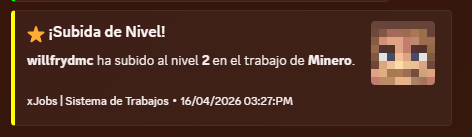
* **🤖 Discord Webhooks**: Real-time notifications for level-ups, job changes, and more with fully customizable embeds.<br />
* **📊 Optimized Backend**: Support for H2 and MySQL databases with efficient caching.<br />
* **🎭 Dynamic Lore**: Each job features unique premium descriptions and action hints.<br />
* **🛠️ Developer Friendly**: Full PlaceholderAPI support and a simple yet powerful YML API for creating jobs.<br />
* **⚡ Lightweight**: Built for performance, ensuring zero impact on your server’s TPS.</p>
<p>—</p>
<p>> ## 🚀 How to Create a Custom Job<br />
Adding new professions to your server is incredibly simple. Follow this step-by-step guide:</p>
<p>1. Navigate to the `/plugins/xJobs/jobs/` folder.<br />
2. Create a new file named `your_job_id.yml` (e.g., `alchemist.yml`).<br />
3. Copy and customize the template below:</p>
<p>“`yaml<br />
name: “Alchemist”<br />
permission: “default”<br />
max-level: 200</p>
<p>icon:<br />
material: PLAYER_HEAD<br />
base64: “eyJ0ZXh0dXJlcyI6eyJTS0lOIjp7InVybCI6Imh0dHA6Ly90ZXh0dXJlcy5taW5lY3JhZnQubmV0L3RleHR1cmUv…”<br />
slot: 10<br />
name: “Alchemist”<br />
lore:<br />
– “”<br />
– ” &#A2FF5C✦ &f{info_label}:”<br />
– ” &e⭐ &f{level_label}: &e{level}&f/&e{max_level}”<br />
– ” &a👥 &f{workers_label}: &#D0FFD3{workers}”<br />
– “”<br />
– ” &#A2FF5C✦ &f{blurb_label}:”<br />
– ” &7A master of volatile reactions. Brew concoctions”<br />
– ” &7and elixirs that grant inhuman strength and life.”<br />
– “”<br />
– ” &#A2FF5C✦ &f{actions_label}:”<br />
– ” &8▪ &7Brew magical potions”<br />
– “”<br />
– ” {join_action}”</p>
<p>actions:<br />
block_break: # Logic for breaking blocks<br />
‘WHEAT’:<br />
xp: 5<br />
money: 10.0<br />
kill_mob: # Logic for hunting<br />
‘ZOMBIE’:<br />
xp: 15<br />
money: 20.0<br />
“`</p>
<p>4. Use `/jobs reload` in-game to apply your new profession immediately!</p>
<p>—</p>
<p>> ## 📌 Placeholders & Variables<br />
Enhance your GUIs and chat with our dynamic placeholders:</p>
<p>| Placeholder | Description |<br />
| :— | :— |<br />
| `{player}` | The name of the player |<br />
| `{job}` | The current profession name |<br />
| `{level}` | The player’s current job level |<br />
| `{max_level}` | The maximum level reachable |<br />
| `{xp}` | Current experience points |<br />
| `{xp_needed}` | Experience needed for next level |<br />
| `{progress}` | A visual progress bar (e.g., `|||||…..`) |<br />
| `{workers}` | Total number of players in that job |</p>
<p>—</p>
<p>> ## 🛠️ Commands & Permissions<br />
Manage your professions with these simple commands:</p>
<p>| Command | Description | Permission |<br />
| :— | :— | :— |<br />
| `/jobs` | Open the main professional selection menu | *None* |<br />
| `/jobs stats` | View your personal progress and statistics | *None* |<br />
| `/jobs leave` | Resign from your current job | *None* |<br />
| `/jobs help` | Show the command help menu | *None* |<br />
| `/jobs reload` | Reload all configurations and jobs | `xjobs.admin` |</p>
<p>—</p>
<p>> ## 📦 Requirements<br />
Ensure your server meets these criteria for optimal performance:</p>
<p>| Requirement | Description | Status |<br />
| :— | :— | :— |<br />
| **Vault** | Essential for economy rewards and money management | **Required** |<br />
| **Java 17+** | Modern runtime required for high-performance execution | **Required** |<br />
| **PlaceholderAPI** | Enables dynamic labels and custom variables | *Recommended* |</p>
<p>—</p>
<p>> ## 🛰️ Discord Integration<br />
Keep your community engaged by linking your Discord server.<br />
In `config.yml`, set `webhooks.discord.enabled: true` and paste your URL.</p>
<p>**Features:**<br />
* **Custom Embeds**: Edit colors, footers, and thumbnails per event.<br />
* **Async Processing**: Webhooks never lag your server.<br />
* **Player Avatars**: Automatically fetches the player’s head for the notification.<br />
<br />
—</p>
<p>> **Pro Tip**: You can edit the titles of all GUI sections (like “Information” or “Active Workers”) globally in `messages.yml`. Edit once, update everywhere!</p>
<p>> Got some cash? Get a PREMIUM (ES/EN) config on Discord.</p>
</article>
</main>
<script type="speculationrules">
{"prefetch":[{"source":"document","where":{"and":[{"href_matches":"/*"},{"not":{"href_matches":["/wp-*.php","/wp-admin/*","/wp-content/uploads/*","/wp-content/*","/wp-content/plugins/*","/wp-content/themes/minecraft/*","/*\\?(.+)"]}},{"not":{"selector_matches":"a[rel~=\"nofollow\"]"}},{"not":{"selector_matches":".no-prefetch, .no-prefetch a"}}]},"eagerness":"conservative"}]}
</script>
<div class="gtranslate_wrapper" id="gt-wrapper-70918449"></div><script id="gt_widget_script_70918449-js-before">
window.gtranslateSettings = /* document.write */ window.gtranslateSettings || {};window.gtranslateSettings['70918449'] = {"default_language":"en","languages":["ar","az","bn","bg","hr","cs","da","nl","en","fi","fr","de","el","hu","id","it","ja","kk","ko","fa","pl","pt","ro","ru","sl","es","sv","th","uk","uz","vi"],"url_structure":"sub_directory","flag_style":"2d","wrapper_selector":"#gt-wrapper-70918449","alt_flags":[],"custom_domains":{"ru":"minecraft.vpesports.games"},"float_switcher_open_direction":"top","switcher_horizontal_position":"left","switcher_vertical_position":"bottom","flags_location":"\/wp-content\/plugins\/gtranslate\/flags\/"};
//# sourceURL=gt_widget_script_70918449-js-before
</script><script src="https://minecraft.vpesports.com/wp-content/plugins/gtranslate/js/float.js?ver=3.1.1" data-no-optimize="1" data-no-minify="1" data-gt-orig-url="/loader/folia/page/5/" data-gt-orig-domain="minecraft.vpesports.com" data-gt-widget-id="70918449" defer></script><script id="wp-emoji-settings" type="application/json">
{"baseUrl":"https://s.w.org/images/core/emoji/17.0.2/72x72/","ext":".png","svgUrl":"https://s.w.org/images/core/emoji/17.0.2/svg/","svgExt":".svg","source":{"concatemoji":"https://minecraft.vpesports.com/wp-includes/js/wp-emoji-release.min.js?ver=7.0"}}
</script>
<script type="module">
/*! This file is auto-generated */
const a=JSON.parse(document.getElementById("wp-emoji-settings").textContent),o=(window._wpemojiSettings=a,"wpEmojiSettingsSupports"),s=["flag","emoji"];function i(e){try{var t={supportTests:e,timestamp:(new Date).valueOf()};sessionStorage.setItem(o,JSON.stringify(t))}catch(e){}}function c(e,t,n){e.clearRect(0,0,e.canvas.width,e.canvas.height),e.fillText(t,0,0);t=new Uint32Array(e.getImageData(0,0,e.canvas.width,e.canvas.height).data);e.clearRect(0,0,e.canvas.width,e.canvas.height),e.fillText(n,0,0);const a=new Uint32Array(e.getImageData(0,0,e.canvas.width,e.canvas.height).data);return t.every((e,t)=>e===a[t])}function p(e,t){e.clearRect(0,0,e.canvas.width,e.canvas.height),e.fillText(t,0,0);var n=e.getImageData(16,16,1,1);for(let e=0;e<n.data.length;e++)if(0!==n.data[e])return!1;return!0}function u(e,t,n,a){switch(t){case"flag":return n(e,"\ud83c\udff3\ufe0f\u200d\u26a7\ufe0f","\ud83c\udff3\ufe0f\u200b\u26a7\ufe0f")?!1:!n(e,"\ud83c\udde8\ud83c\uddf6","\ud83c\udde8\u200b\ud83c\uddf6")&&!n(e,"\ud83c\udff4\udb40\udc67\udb40\udc62\udb40\udc65\udb40\udc6e\udb40\udc67\udb40\udc7f","\ud83c\udff4\u200b\udb40\udc67\u200b\udb40\udc62\u200b\udb40\udc65\u200b\udb40\udc6e\u200b\udb40\udc67\u200b\udb40\udc7f");case"emoji":return!a(e,"\ud83e\u1fac8")}return!1}function f(e,t,n,a){let r;const o=(r="undefined"!=typeof WorkerGlobalScope&&self instanceof WorkerGlobalScope?new OffscreenCanvas(300,150):document.createElement("canvas")).getContext("2d",{willReadFrequently:!0}),s=(o.textBaseline="top",o.font="600 32px Arial",{});return e.forEach(e=>{s[e]=t(o,e,n,a)}),s}function r(e){var t=document.createElement("script");t.src=e,t.defer=!0,document.head.appendChild(t)}a.supports={everything:!0,everythingExceptFlag:!0},new Promise(t=>{let n=function(){try{var e=JSON.parse(sessionStorage.getItem(o));if("object"==typeof e&&"number"==typeof e.timestamp&&(new Date).valueOf()<e.timestamp+604800&&"object"==typeof e.supportTests)return e.supportTests}catch(e){}return null}();if(!n){if("undefined"!=typeof Worker&&"undefined"!=typeof OffscreenCanvas&&"undefined"!=typeof URL&&URL.createObjectURL&&"undefined"!=typeof Blob)try{var e="postMessage("+f.toString()+"("+[JSON.stringify(s),u.toString(),c.toString(),p.toString()].join(",")+"));",a=new Blob([e],{type:"text/javascript"});const r=new Worker(URL.createObjectURL(a),{name:"wpTestEmojiSupports"});return void(r.onmessage=e=>{i(n=e.data),r.terminate(),t(n)})}catch(e){}i(n=f(s,u,c,p))}t(n)}).then(e=>{for(const n in e)a.supports[n]=e[n],a.supports.everything=a.supports.everything&&a.supports[n],"flag"!==n&&(a.supports.everythingExceptFlag=a.supports.everythingExceptFlag&&a.supports[n]);var t;a.supports.everythingExceptFlag=a.supports.everythingExceptFlag&&!a.supports.flag,a.supports.everything||((t=a.source||{}).concatemoji?r(t.concatemoji):t.wpemoji&&t.twemoji&&(r(t.twemoji),r(t.wpemoji)))});
//# sourceURL=https://minecraft.vpesports.com/wp-includes/js/wp-emoji-loader.min.js
</script>
</body>
</html>