Powerful and customizable AutoBroadcaster/AutoAnnouncer plugin for Minecraft servers. It allows server administrators to set up automatic and forced broadcasts with a variety of features, including support for MiniMessage format, MiniPlaceholders. and PlaceholderAPI placeholders.
## Folia Supported ✔️
## Features
– **Automatic Broadcasts**: Set up automatic broadcasts that are sent to all players on the server at a configurable interval.
– **Forced Broadcasts**: Set up forced broadcasts that can only be run via command.
– **Weighted Broadcasts**: Control how often each broadcast is shown with the “weight” field. Broadcasts with a higher weight will appear more often.
– **[MiniMessage Support](https://docs.advntr.dev/minimessage/format.html)**: The messages use MiniMessage format, allowing for rich text formatting and color codes.
– **PlaceholderAPI Support**: Use any PlaceholderAPI placeholders in your messages. (Requires the [PlaceholderAPI](https://github.com/PlaceholderAPI/PlaceholderAPI) plugin)
– **MiniPlaceholders Support**: Use any MiniPlaceholder placeholders in your messages. (Requires the [MiniPlaceholders](https://github.com/MiniPlaceholders/MiniPlaceholders/) plugin)
## Commands
– `/zab reload`: Reloads the `broadcasts.yml` file.
– `/zab broadcast `: Broadcasts a message with the given key.
– `/zab custom `: Broadcasts a custom message.
– `/zab interval get/set `: Gets or sets the broadcast interval.
– All commands require the `zautobroadcast.admin` permission.
## Version Compatibility
– Compatible with [**Folia**](https://github.com/PaperMC/Folia), a powerful library for Minecraft plugins.
– Must be run on Paper or a Paper fork.
– Requires Java 17 or higher.
– Compatible with at least 1.20.4 and above.
## Installation
1. Download the latest version of ZAutoBroadcast from the [versions page](https://modrinth.com/plugin/zautobroadcast/versions).
2. Place the downloaded `.jar` file into your server’s `plugins` folder.
3. Restart your server.
4. Configure the plugin to your liking by editing the `config.yml` and `broadcasts.yml` files in the `plugins/ZAutoBroadcast` folder.
## Configuration
Refer to the comments in the `config.yml` and `broadcasts.yml` files for information on how to configure the plugin.
## Support
If you encounter any issues or have any questions, please [open an issue](https://github.com/Zepsi/ZAutoBroadcast/issues) on GitHub.
## License
ZAutoBroadcast is licensed under the [MIT License](https://github.com/Zepsi/ZAutoBroadcast/blob/main/LICENSE).
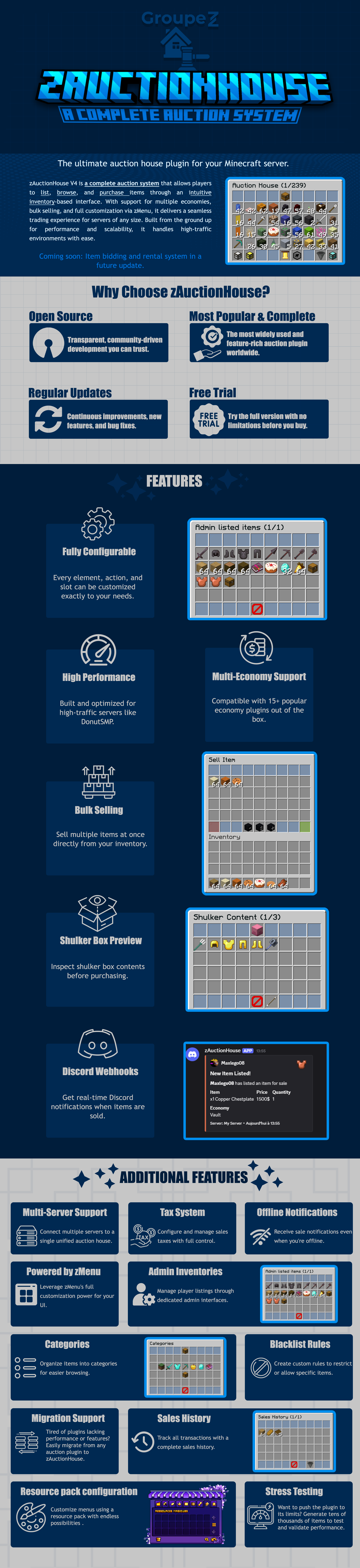
zAuctionHouse
### **This is a free demo version of zAuctionHouse. It is similar to the paid or open-source version, but you cannot receive support with this version.**
The free version will always be one version behind the paid versions. To get support and the latest version, you can purchase the plugin on the other sales platforms.
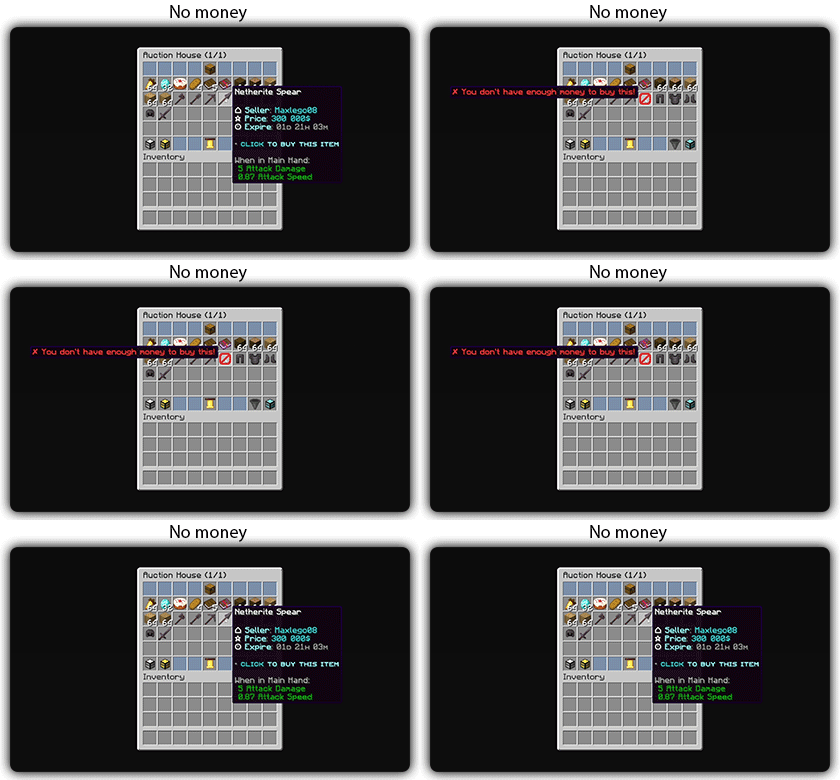
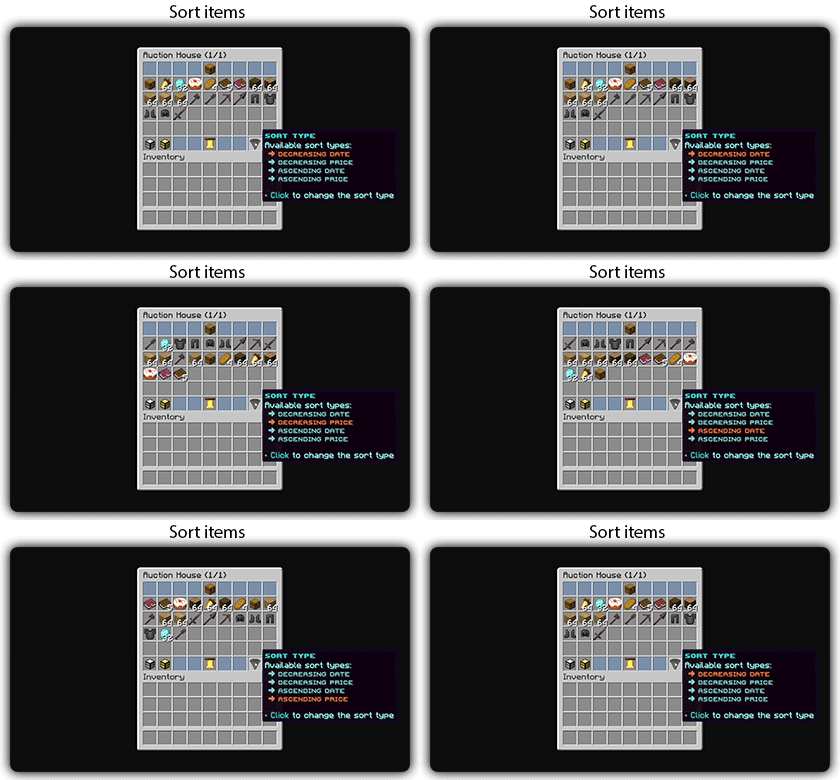
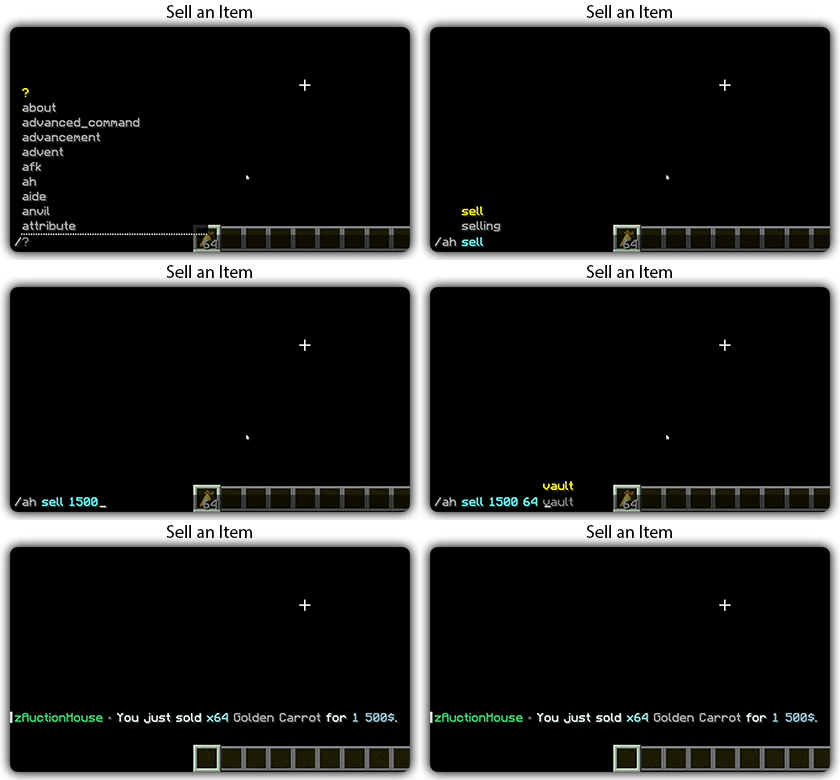
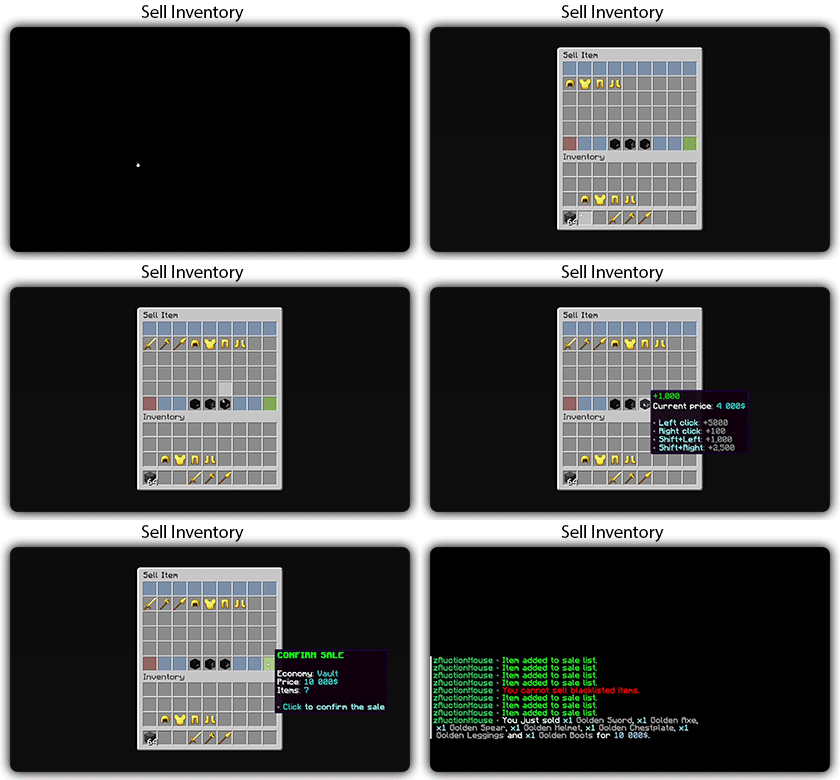
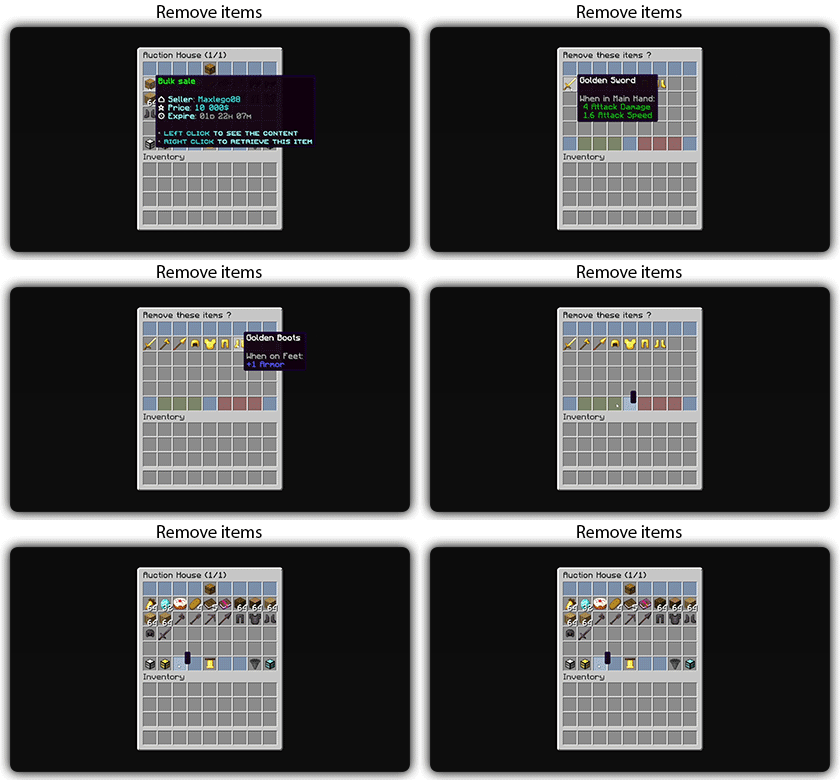
## Gifs
Text version
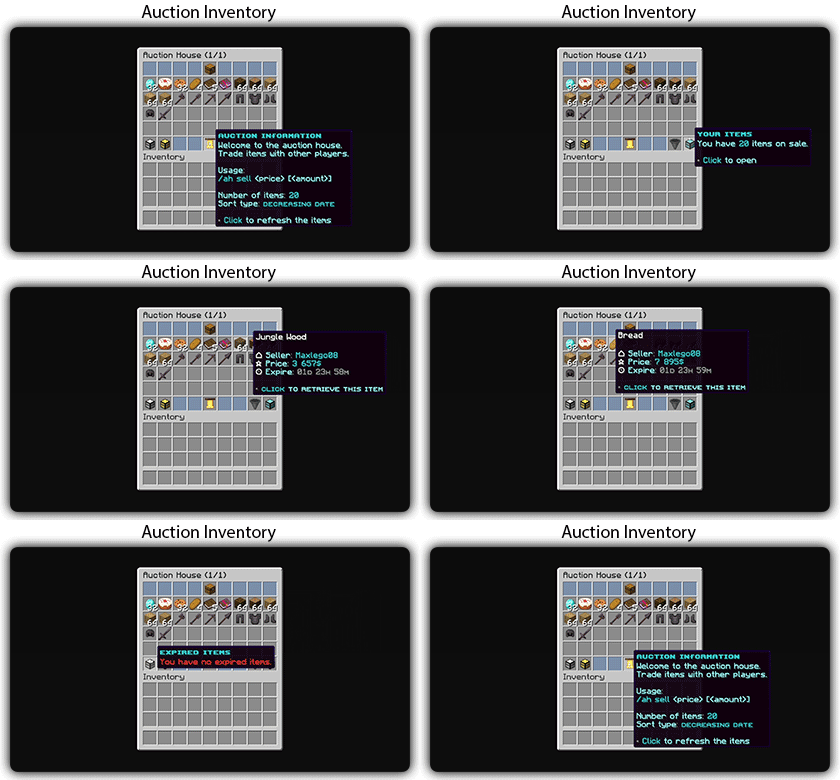
zAuctionHouse V4 is a complete auction system that allows players to list, browse, and purchase items through an intuitive inventory-based interface. With support for multiple economies, bulk selling, and full customization via zMenu, it delivers a seamless trading experience for every server type. Built from the ground up for performance and scalability, it handles high-traffic environments with ease.
# Why Choose zAuctionHouse?
## Open Source
Transparent, community-driven development you can trust.
## Most Popular & Complete
The most widely used and feature-rich auction plugin worldwide.
## Regular Updates
Continuous improvements, new features, and bug fixes.
## Free Trial
Try the full version with no limitations before you buy.
# Additional Features
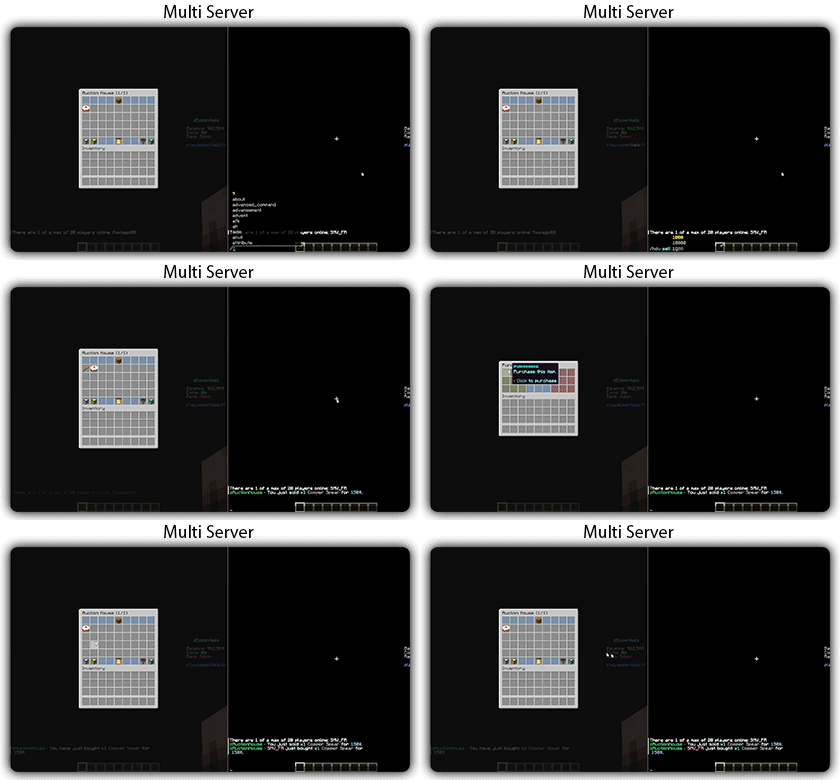
## Multi-Server Support
Connect multiple servers to a single unified auction house.
## Tax System
Configure and manage sales taxes with full control.
## Offline Notifications
Receive seller notifications when you’re offline.
## Powered by zMenu
Leverage **zMenu’s full customization power** for your UI.
## Admin Inventories
Manage player listings through dedicated admin interfaces.
## Categories
Organize items into categories for easier browsing.
## Blacklist Rules
Create custom rules to restrict or allow specific items.
## Migration Support
Tired of plugin locking or performance issues?
Easily migrate from any auction plugin to zAuctionHouse.
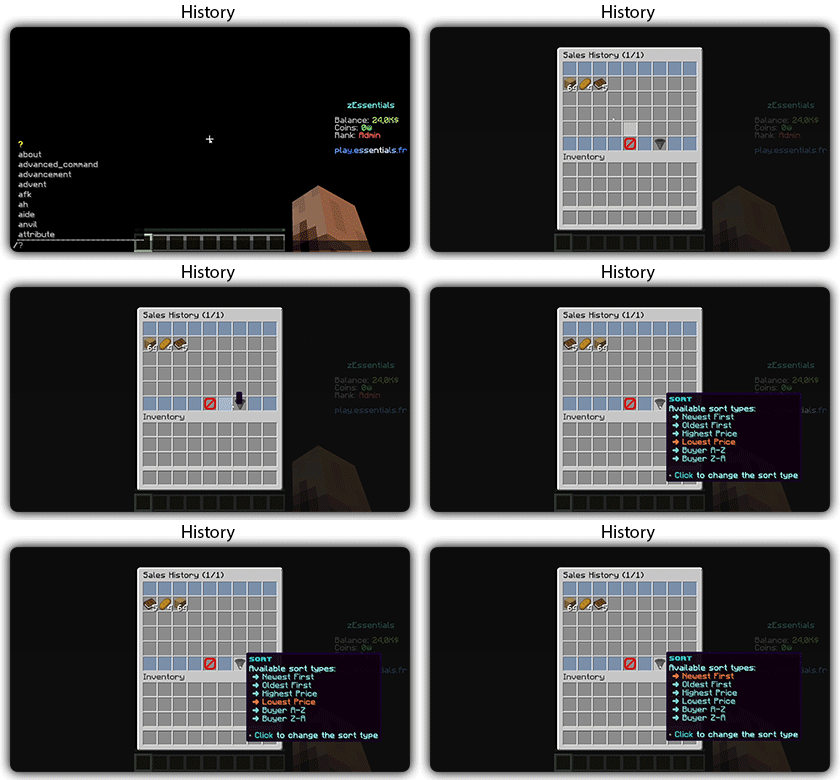
## Sales History
Track all transactions with a complete sales history.
## Resource Pack Configuration
Customize menus using a resource pack with endless possibilities.
## Stress Testing
Want to push the plugin to its limits?
Generate tens of thousands of items to test and validate performance.
# **Features**
– **## Selling & Buying**
– **Instant buy listings** List items for a fixed price
– **Bulk selling** Sell multiple items at once
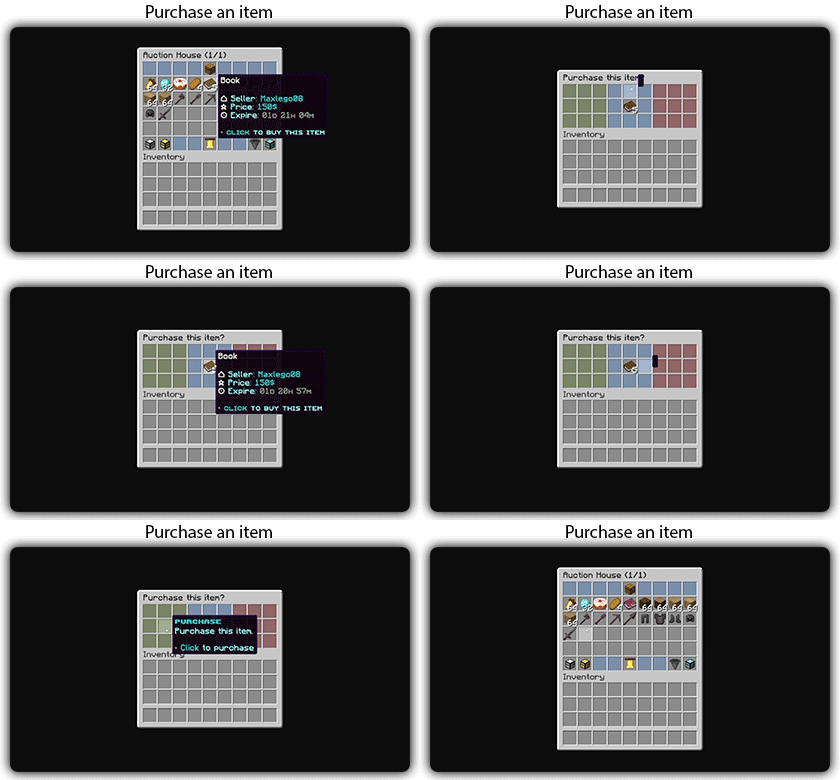
– **Purchase confirmation** Confirm before buying
– **Sell confirmation** Confirm before listing
– **Price limits** Set min/max prices per item or globally
– **Item quantity selection** Choose how many items to sell
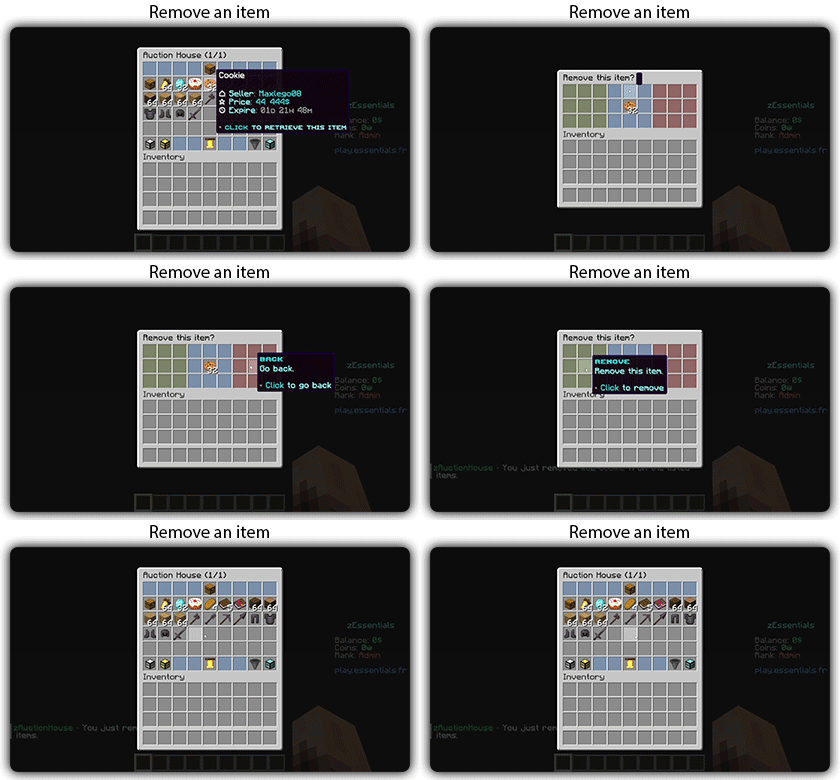
– **Expired items recovery** Retrieve unsold items
– **## User Interface**
– **Inventory-based UI** No commands needed
– **Shulker box preview** View contents before purchase
– **Categories** Browse items by type
– **Sorting options** Sort by price, date, name
– **Search system** Find items by name or type
– **Player listings** View your own items
– **Purchase history** Track your purchases
– **## Economy & Taxes**
– **15+ economy plugins** Vault, PlayerPoints, and more
– **Tax on sales** Configurable seller tax
– **Tax on purchases** Configurable buyer tax
– **Permission-based taxes** Different rates per group
– **## Administration**
– **Admin inventories** Manage all player listings
– **Blacklist system** Block specific items
– **Whitelist system** Allow only specific items
– **Item rules** Advanced filtering (lore, name, NBT)
– **Player limits** Max listings per player
– **Expiration system** Auto-expire old listings
– **Log system** Track all transactions
– **## Performance & Storage**
– **Async operations** Non-blocking database queries
– **SQLite support** Zero-config local storage
– **MySQL/MariaDB support** Scalable database
– **Redis support** Multi-server synchronization
– **Folia compatible** Works with Folia servers
– **Caching system** Optimized data access
– **## Customization**
– **zMenu integration** Full UI customization
– **Custom messages** Edit every message
– **Custom sounds** Configure all sounds
– **PlaceholderAPI** Use placeholders anywhere
– **Command aliases** Customize command names
– **Configurable slots** Place buttons anywhere
– **## Notifications**
– **Discord webhooks** Post sales to Discord
– **Offline notifications** Notify on next login
– **Title messages** Display on screen
– **ActionBar messages** Subtle notifications
– **Chat messages** Traditional notifications
– **## Migration & Testing**
– **Plugin migration** Convert from other plugins
– **Test data generator** Stress test with fake items
– **Debug mode** Troubleshoot issues
– **## Security**
– **Anti-dupe protection** Prevent item duplication
– **Permission system** Control access to features
– **Confirm dialogs** Prevent misclicks
– **Price validation** Block invalid prices
Zenith-Mod
# Zenith-Mod – Professional Moderation Plugin
Missing something?
Do you miss something in this Plugin? Open a Ticket in our [Discord](https://discord.gg/2a4a3mWR4r) and we’ll implement it very asap!
A comprehensive moderation plugin built for modern Paper servers. Zenith-Mod gives you everything you need to manage your community effectively, with a focus on performance and reliability.
## Core Features
### Complete Moderation Suite
**Ban System** – Full ban management with IP bans, temporary and permanent bans, automatic escalation, and template support. Ban players whether they’re online or offline.
**Mute System** – Chat muting with command blocking support. Works for offline players too, so you can mute someone before they even join. Includes IP-based muting and automatic escalation.
**Warning System** – Track warnings with escalation levels and customizable thresholds. See a player’s warning history at a glance.
**Freeze System** – Freeze players in place with movement restrictions. Perfect for investigations or preventing griefers from escaping.
**Kick System** – Enhanced kick functionality with custom reasons and staff notifications.
**AutoMod** –
The AutoMod system automatically monitors chat and removes messages that violate your server rules — no manual intervention needed.
Word Filter automatically detects and removes messages containing blacklisted words. Thanks to built-in Leetspeak normalization, bypass attempts like 1d10t, i.d.i.o.t or @ssh0le are caught automatically — you only need to add the base word to the list.
AntiSpam detects two types of spam: players sending the same message repeatedly (duplicate detection) and players flooding the chat with too many messages in a short time (flood detection). Both thresholds are fully configurable.
When a message is blocked, the player receives a notification and staff members with the alert permission are instantly notified in-game. Alerts are also sent to a configurable Discord channel as an embed. Staff can toggle their own alerts on/off with /automod alerts.
**Banlist GUI** –
The Banlist GUI gives your staff a clean overview of all bans on your server — both active and inactive — directly in-game via /banlist.
Active bans are displayed in red, expired or already unbanned players in green, making it easy to see the current status at a glance. Each entry shows the player head, ban reason, type (Ban or IP-Ban), remaining duration, the staff member who issued the ban, and the Case ID.
Staff can filter the list to show all bans, active bans only, or inactive bans only. A built-in Case ID search lets you find a specific case instantly by typing the ID in chat. Clicking on an active ban entry unbans the player directly from the GUI.
### Advanced Management Tools
**Vanish System** – Complete invisibility with tab list hiding, god mode, and permission-based visibility. Staff can stay hidden while monitoring the server.
**Alt Detection & Limiting** – Automatically detect alt accounts and limit how many accounts can connect from the same IP address (configurable up to 5 accounts per IP).
**Client Detection** – Detect what client players are using and take action based on that information.
**Chat Freeze** – Temporarily freeze all chat for announcements or emergencies. Useful for server-wide announcements.
**Notes System** – Staff-only notes for players with full history tracking. Keep internal notes that players can’t see.
**History System** – Complete audit trail with case IDs for all moderation actions. Every action is logged and searchable.
### Template & Escalation System
**Pre-configured Templates** – Ready-to-use punishment templates that automatically escalate based on repeat offenses. Set up once and let the system handle repeat offenders.
**Multi-level Escalation** – Automatic duration increases based on how many times a player has been punished. First offense gets a warning, second gets a short ban, third gets longer, and so on.
**IP/UUID Tracking** – Choose whether to track by IP address or UUID per template. Some offenses might need IP tracking, others don’t.
**Custom Reason Suffixes** – Automatically add offense level information to ban reasons. Makes it clear why someone got a longer ban.
**Template Permissions** – Granular permission system so junior staff can only use certain templates.
### Offline Player Support
One of Zenith-Mod’s key features is that you can moderate players even when they’re not currently online. This means you can ban, mute, warn, freeze, or add notes to players who are offline – the action will take effect as soon as they try to join. This is especially useful for handling reports or taking action on players who logged off before you could deal with them.
Note: This refers to players who are currently offline, not offline-mode (cracked) Minecraft servers. The plugin works with standard online-mode authentication.
### API & Integrations
#### Java API System (Beta)
Zenith-Mod includes a comprehensive Java API for developers who want to integrate moderation features into their own plugins.
**Available APIs:**
– **FreezeAPI** – Programmatically freeze and unfreeze players with history tracking
– **ChatFreezeAPI** – Control server chat programmatically
– **EssentialsAPI** – God mode, fly mode, heal, feed, clear inventory, teleport
– **VanishAPI** – Vanish and unvanish players programmatically
– **Event System** – Listen to moderation actions with custom events (Ban, Mute, Warn, Kick events)
All API methods use `CompletableFuture` for non-blocking operations, so they won’t slow down your server. Staff notifications and history logging happen automatically for all API actions.
The Java API is currently in **Beta**. While core plugin functionality is stable, API features may undergo changes in future versions. Use at your own risk.
#### Other Integrations
**Web-API** (Premium) – RESTful API for external integrations and web panels. Token-based authentication with real-time server statistics and license validation for premium features.
**Discord Integration** (Beta) – Use slash commands in Discord to perform moderation actions. Great for remote moderation or integrating with Discord bots.
### Performance Optimized
Everything in Zenith-Mod is built with performance in mind. All operations are fully asynchronous, so nothing blocks the main server thread. We use HikariCP for database connection pooling, which means fast and efficient database operations. Configuration changes can be reloaded without restarting the server, and all database queries are non-blocking.
### Modern Architecture
**Multi-Database Support** – Works with H2 (default), SQLite, MySQL, or MariaDB. Use H2 for single servers, MySQL/MariaDB for multi-server setups.
**Proxy Support** – Full support for Velocity and BungeeCord IP forwarding.
**Modular Configuration** – Each module has its own config file, making it easy to customize what you need.
**Permission-Based** – Comprehensive permission system so you can control who can do what.
**Error Handling** – Robust error handling means the plugin won’t crash your server if something goes wrong.
## Modules
| Module | Description |
|——–|————-|
| **Ban** | Complete ban management with IP bans and escalation |
| **Mute** | Chat muting with command blocking and escalation |
| **Warn** | Warning system with customizable thresholds |
| **Freeze** | Player freezing with restrictions |
| **Kick** | Enhanced kick system |
| **Vanish** | Complete invisibility system |
| **Limiter** | Alt detection and IP limiting |
| **History** | Complete moderation history tracking |
| **Notes** | Staff notes system |
| **Check** | Player information and status checks |
| **Client Detector** | Client type detection |
| **Chat Freeze** | Temporary chat freezing |
| **Essentials** | God mode, fly mode, heal, feed, clear, teleport |
| **Web-API** (Premium) | RESTful API integration |
| **Discord** (Beta) | Discord bot integration |
**What we’re planning:**
– Punish Command – Take moderation actions through a GUI
– VoiceChat Muting – Mute people in voice chat using [Simple Voice Chat](https://modrinth.com/plugin/simple-voice-chat)
## Technical Specifications
### Compatibility
– **Paper 1.21.4+** – Fully tested and supported
– **Paper 1.21.x** – Very likely compatible
– **Paper 1.20.x** – Very likely compatible
– **Paper 1.19.4** – Probably compatible
– **Paper 1.19.x** – May work with minor issues
– **Paper 1.18.x and older** – Not supported
– **Spigot** – Partially supported (some features may not work)
### Requirements
– **Java**: 17 or higher
– **Server**: Paper 1.19.4+ recommended
– **Database**: H2 (default), SQLite, MySQL, or MariaDB
– **Permissions**: LuckPerms or similar (recommended)
### Configuration
– **Hot-Reload**: Use `/zenith reload` to reload all configs without restarting
– **Modular Config**: Each module has its own YAML file in the `modules/` directory
– **Color Support**: Full hex color support and Minecraft color codes
– **Placeholders**: Dynamic placeholders in all messages
## Key Commands
– `/ban ` – Ban a player using a template
– `/mute ` – Mute a player using a template
– `/warn ` – Warn a player using a template
– `/freeze ` – Freeze a player in place
– `/vanish` – Toggle vanish mode
– `/history ` – View a player’s moderation history
– `/notes ` – Manage staff notes for a player
– `/check ` – Check a player’s current status
– `/zenith reload` – Reload all configuration files
– `/zenith help` – Show all available commands
## Staff Features
– Real-time notifications for all moderation events
– Auto-escalation based on repeat offenses
– IP-based tracking to prevent alt account abuse
– Complete audit trail with searchable case IDs
– Offline player moderation support
– Template-only mode for junior staff members
## Performance Highlights
– **Async Operations**: Nothing blocks the server thread
– **Connection Pooling**: HikariCP for optimal database performance
– **Smart Caching**: Frequently accessed data is cached
– **File Rotation**: Automatic log file rotation by date
– **Error Recovery**: Automatic retry for database operations
## Statistics & Tracking
– Player join and leave tracking
– Moderation action counts
– Active ban and mute tracking
– Offense count per template
– Alt account detection
– IP address tracking (with proxy support)
## Customization
– **Messages**: Fully customizable in `messages.yml`
– **Colors**: Hex color support throughout
– **Placeholders**: Dynamic content in all messages
– **Prefix**: Configurable prefix for all messages
– **Duration Format**: Customizable duration display
## Getting Started
1. Download the plugin and place it in your `plugins/` folder
2. Restart your server
3. Configure your database settings in `config.yml`
4. Customize messages in `messages.yml` if needed
5. Configure modules in the `modules/` directory
6. Use `/zenith reload` to apply any configuration changes
## For Plugin Developers
Zenith-Mod provides a comprehensive Java API for plugin integration:
“`java
ZenithAPI api = ZenithAPI.getInstance();
if (api != null && api.isAvailable()) {
// Use FreezeAPI, ChatFreezeAPI, EssentialsAPI, VanishAPI
// Subscribe to events with ZenithEventBus
}
“`
**Full API Documentation**: [http://javadocs.zenith-studios.org/](http://javadocs.zenith-studios.org/)
API Usage Example
“`java
// Subscribe to ban events
ZenithEventBus bus = ZenithEventBus.getInstance();
bus.subscribe(PlayerBanEvent.class, event -> {
getLogger().info(event.getPlayerName() + ” was banned: ” + event.getReason());
});
// Freeze a player via API
FreezeAPI freezeAPI = api.getFreezeAPI();
freezeAPI.freeze(playerUuid, staffUuid, “Investigation”).thenAccept(success -> {
if (success) {
getLogger().info(“Player frozen successfully”);
}
});
“`
## Important Notes
– **Java API**: Currently in **BETA** – API structure may change in future versions
– **Discord Integration**: Currently in BETA – use with caution
– **Premium Features**: Some features require a license
– **Database**: H2 is recommended for single-server setups
– **MySQL/MariaDB**: Recommended for multi-server setups
## Support & Resources
– **Discord**: [Join our Discord](https://discord.gg/2qCMn6KHj4)
– **Premium Modules**: Available on Discord
– **Documentation**: [Zenith-Mod Docs](https://docs.zenith-studios.org/zenith-mod/introduction/)
– **API Documentation**: [Javadocs](http://javadocs.zenith-studios.org/)
– **Support**: Available on Discord
## Why Zenith-Mod?
**Performance First** – Zero thread blocking, fully async operations
**Modern Design** – Built for Paper 1.21.4+ with latest APIs
**Complete Solution** – Everything you need in one plugin
**Developer Friendly** – Comprehensive Java API for integrations
**Scalable** – Works great for small and large servers
**Professional** – Enterprise-grade reliability
**Configurable** – Highly customizable to fit your needs
**Well Documented** – Comprehensive documentation and support
# YuRandomTeleport | Cross-Version · High Performance · Universal Compatibility
**Supported Versions: 1.8.x – 1.26.x**
**Compatible Server Types: Spigot / Paper / All Hybrid Forks (Mohist, Magma, Arclight, etc.)**
—
## 🎉 Promotional Text
### ✦ Escape the Crowd. Explore the Unknown. — YuRandomTeleport
Tired of overcrowded spawn points? Struggling to find untouched, pristine land?
**YuRandomTeleport** is an intelligent random teleportation plugin built for Minecraft servers, delivering a safe, smooth, and highly customizable teleport experience.
#### ✨ Why Choose YuRandomTeleport?
– **Ultimate Cross-Version Compatibility**
From 1.8 to the latest 1.26.x, it runs seamlessly on Spigot, Paper, and all hybrid server forks—one plugin for every version.
– **Smart & Safe Location Algorithm**
Automatically avoids lava, cacti, the void, fire, and other hazardous blocks. Players always land on solid ground with open sky above—safe upon arrival.
– **Granular Per‑World Configuration**
Each world can have independent radius, height limits, safety rules, and blocked material lists. Perfectly tailored for Overworld, Nether, and End dimensions.
– **Seamless Economy & Cooldown Integration**
Supports Vault economy deductions and customizable cooldowns. Granular permission nodes keep everything under control and prevent abuse.
– **Programmable Command Hooks**
Execute custom commands (including JSON titles and particle effects) before and after teleportation, taking your server’s interactivity to the next level.
– **Zero‑Fuss, Out‑of‑the‑Box**
Default configurations work immediately. No complex setup required—even novice server admins can deploy it effortlessly.
– **Active Maintenance & Community**
The plugin is under continuous development. Join our official community **1080918424** to report issues, request features, or just chat with fellow admins.
#### 🚀 Join Us
**Official Community Group: 1080918424**
Bug Reports · Update Announcements · Tech Support · Customization Inquiries
—
## 📖 User Manual
### 1. Installation Guide
1. Place `YuRandomTeleport-.jar` into your server’s `plugins` folder.
2. Restart the server or load the plugin using a plugin manager.
3. The plugin will automatically generate `config.yml` and `messages.yml` inside `plugins/YuRandomTeleport/`.
4. (Optional) Edit the configuration files as desired and apply changes with `/yurtp reload`.
### 2. Commands & Permissions
#### Player Commands
| Command | Description | Permission |
|———|————-|————|
| `/yurtp` or `/rtp` | Randomly teleports yourself within your current world. | `yurtp.use` |
| `/yurtp ` | Randomly teleports the specified player within their current world (requires permission). | `yurtp.teleport.others` |
| `/yurtp ` | Randomly teleports the specified player to the specified world (requires permission). | `yurtp.teleport.others` |
| `/yurtp help` | Displays the help menu. | None |
# Custom commands to execute (supports placeholders: {player}, {x}, {z}, etc.)
commands:
on-teleport:
– “title {player} title {“text”:”Searching for a safe location…”,”color”:”yellow”}”
on-success:
– “title {player} title {“text”:”Teleport Successful!”,”color”:”green”}”
on-fail:
– “title {player} title {“text”:”Teleport Failed”,”color”:”red”}”
“`
#### Notes on `messages.yml`
All frontend messages support color codes (`&` in place of `§`) and can be fully translated or customized. After editing, run `/yurtp reload` to apply changes.
### 4. Frequently Asked Questions
**Q: Why can’t a player teleport?**
A: Verify that the world is not listed in `world-blacklist`, the player has the `yurtp.use` permission, and cooldown/balance requirements are met.
**Q: The teleport locations aren’t ideal. How can I improve them?**
A: Adjust the `radius` range, `height` limits, or relax the `blocked-materials` rules for the specific world. Enable `debug: true` in the config to view detailed location‑search logs in the console.
**Q: Does the plugin support sounds on 1.8?**
A: Yes. A built‑in cross‑version sound compatibility layer ensures sounds work across all supported versions without errors or silence.
**Q: Is Moonrise asynchronous server supported?**
A: Moonrise is not currently supported due to conflicts between its asynchronous architecture and some core plugin logic. We will evaluate potential compatibility in future updates.
– **Documentation & Updates**
The latest version and detailed documentation are always available within the community group.
—
**YuRandomTeleport — Every journey begins with anticipation.**
YUpdateChecker
[](https://discord.gg/kZJhKZ48j8)
# YUpdateChecker
Plugin and datapack update checker that works out of the box. No need to configure anything. Too good to be true? Well, yes. The catch is that it works only with projects downloaded from Modrinth, thanks to their awesome [API](https://docs.modrinth.com/api/).
## How it works?
It’s really simple. Plugin hashes a file (.jar or .zip), checks the hash using Modrinth API and logs the results. Yep, that’s it. Modrinth is doing the heavy lifting by hashing every single file that is uploaded and then making it available via their API. Only caveat is – you can’t change the contents of a downloaded jar or datapack. So no editing `plugin.yml` or MC functions. That’s how hashing works, different file – different hash. I mean, you can change it of course, it just won’t be picked by the plugin ¯\_(ツ)_/¯
### Additional info
– Messages are fully customizable with a lang file, supporting [PlaceholderAPI](https://github.com/PlaceholderAPI/PlaceholderAPI) and [MiniMessage](https://docs.advntr.dev/minimessage/index.html)
– Commands have tab completions
– Modrinth API is currently [rate limited](https://docs.modrinth.com/api#ratelimits) at 300 requests per minute per IP. Which means that an update check may take a little bit longer, if you have wayyy too many plugins/datapacks ~~or if you spam the check command~~. (Plugin makes 1 request per every Modrinth project that you use)
# Media
Checking updates

Looking through results

# Integrity with other plugins
I make these plugins for me, according to my needs, meaning, I don’t search for every possible plugin that I don’t care about, that could be somehow better integrated with mine. But, if you care about better integration between this plugin and some other, then just let me know through [Discord](https://discord.gg/kZJhKZ48j8) or [GitHub](https://github.com/Ynfuien/YUpdateChecker) and I will see what I can do.
Same goes for any features that you think may be missing. If something isn’t outside the scope of the plugin, then I’ll probably do it.
# License
This project uses [GNU GPLv3](https://github.com/Ynfuien/YUpdateChecker/main/blob/LICENSE) license.
YuPay
# 🎮 YuPay —— Make Sponsorship Management a Pleasure
> **Minecraft server sponsorship has never been been this elegant.**
>
> Direct integration with WeChat Pay & Alipay, redeem code system, refund review, multi-language, full lifecycle event listening — everything you need, YuPay delivers it all at once. Free, no middlemen, no tricks. 100% of the revenue goes straight to your account. The only fees are those charged by Alipay and WeChat.
—
## 📦 What Is It
**YuPay** is a free, modern payment plugin tailored for Minecraft servers. It breaks down the hassle of “sponsorship management” into four steps: **Initiate → Pay → Receive → Record**. Every step is automated, every step traceable.
Server operators use it to collect sponsorships, players use it to scan and pay. Both sides enjoy a worry-free experience. Supports direct API integration with WeChat Pay and Alipay — no third-party relay, your funds stay secure in your own hands.
> ⚠️ This plugin is designed for scenarios where “players voluntarily sponsor server operations”. Please ensure usage complies with local laws and payment platform regulations.
—
## ✨ Highlights at a Glance
| Category | What You Get |
|———-|—————|
| 💳 **Payment** | WeChat + Alipay dual channels, Native QR scan payment, automatic fallback |
| 💰 **Economy** | Vault + PlayerPoints dual support, one-click switch |
| 🎁 **Rewards** | Base rewards, single milestone, total achievements, limited-time sprints — four trigger layers |
| 🔑 **Redeem Code** | Create/redeem/query/modify, supports paid codes, complete logs |
| 💵 **Refund** | Players can request refunds, admin approve/deny, forced refund, partial refund |
| 📊 **Data** | Leaderboards, order history, page browsing, one-click copy order ID |
| 🌐 **Multi-language** | Default Chinese + English, server owners can customize any language, different players see different languages |
| 🔌 **PAPI** | 40+ placeholders, use in scoreboards/titles/item lore |
| 🛡️ **Security** | Signature verification, IP whitelist, 24h event monitoring, anti-duplicate delivery |
| ⚡ **Performance** | Fully async, HikariCP connection pool, 600% startup speed boost |
| 🧩 **Extensibility** | Full lifecycle event API for deep integration by developers |
—
## 🔄 What a Complete Sponsorship Looks Like
1. Player executes a command, e.g. `/donate 50 wechat`
2. System creates order asynchronously, writes to database
3. Calls WeChat/Alipay API to generate payment QR code
4. Depending on your config, sends **clickable link**, **text-art QR** in chat, or **map QR** in inventory
5. Player scans and completes payment
6. Payment platform calls back to your server
7. Plugin verifies signature, confirms receipt, grants rewards (economy + commands)
8. Leaderboard and placeholders update in real time
9. All logs written, traceable anytime
Fully automated. You just configure the rewards, YuPay handles the rest.
—
## 🎁 Four Reward Layers, Mix and Match
YuPay’s reward system is like a Lego box — four trigger modes you can combine freely.
| Layer | Trigger | Example |
|——-|———|———|
| **Base Reward** | Every successful payment | `give {player} diamond 1` |
| **Single Milestone** | Single payment reaches threshold | 50 yuan → 5 gold blocks |
| **Total Achievement** | Lifetime total reaches new height | 500 yuan → SVIP permission group |
| **Limited Sprint** | Cumulative within specified time period | 200 yuan in 24h → enchanted golden apple |
Each layer’s commands are fully customizable, support variables like `{player}`, `{amount}`, `{points}`, and can integrate with permission/economy plugins like LuckPerms, CMI, etc.
> 💡 Adding `-n` (e.g. `/donate 10 -n`) makes it a **no-reward sponsorship** — pure server support, no rewards triggered.
—
## 🔑 Redeem Code System: More Than Just a Voucher
YuPay’s redeem code module goes far beyond typical “gift codes”:
– **Free codes**: Players enter to claim — great for event giveaways
– **Paid activation codes**: Players must scan and pay a specified amount before redeeming — suitable for selling item entitlements, redeeming codes from other platforms, etc.
– **Economy rewards**: Automatically grant Vault currency or PlayerPoints upon redemption
– **Custom commands**: Each code can bind a set of commands executed on redemption
– **Usage limits & expiry**: Independent control per code
– **Code PAPI**: Placeholders directly read any code’s status, amount, remaining uses
Create a paid activation code with a single command:
“`
/yp code create –code VIP2026 –amount 50 –economy vault –eco-amount 5000 –commands “lp user {player} parent set vip” –max-uses 100 –expire 30d
“`
—
## 💵 Refund System: Bad Debt Terminator
Refunds are no longer a nightmare. YuPay’s refund process is complete and reassuring:
– **Players request refund**: Submit application with reason
– **Admin reviews**: Approve/deny in an orderly manner
– **Forced refund**: Direct operation for urgent cases, no waiting for review
– **Partial refund**: Flexible handling, precise to the cent
– **Code refund**: Refund money and rollback usage count, status automatically restored
– **Refund callback**: Interfaces with WeChat/Alipay official refund API, money returns to original payment method
– **Complete logs**: Who refunded, how much, when, why — all clear
—
## 🌐 Thousand Players, Thousand Languages — No Language Fights
A lifesaver for international server operators.
– Comes with **Simplified Chinese** and **English** complete translations
– Server owners can add any language file in `language.mappings`
– Players switch preference with `/yp lang `, stored in database, persists across sessions
– New players automatically **detect client language** and match the best translation
– Different players on the same server see different language prompts — truly per-player localization
—
## 🔌 Complete PAPI Placeholder List
YuPay provides **40+ built-in PlaceholderAPI placeholders**, covering personal, server, leaderboard, and redeem code dimensions. All monetary values keep two decimal places. Full list below:
—
### 1. Personal Dimension (requires player context)
| Placeholder | Description | Example Return |
|————-|————-|—————-|
| `%yupay_is_banned%` | Whether the player is banned from sponsoring | `true` / `false` |
| `%yupay_total%` | Player’s lifetime total sponsorship (yuan) | `158.00` |
| `%yupay_total_orders%` | Player’s total orders (including failed) | `7` |
| `%yupay_success_orders%` | Player’s successful orders | `5` |
| `%yupay_rank%` | Player’s sponsorship rank (off-rank shows text from language file) | `3` or `Not ranked` |
| `%yupay_has_paid_in_
| Placeholder | Description | Example Return |
|————-|————-|—————-|
| `%yupay_top__name%` | Player name at rank N | `Steve` |
| `%yupay_top__amount%` | Total sponsorship at rank N (yuan) | `2000.00` |
| `%yupay_top_name%` | (legacy format) Same as above | `Alex` |
| `%yupay_top_amount%` | (legacy format) Same as above | `1500.00` |
> `` ranges `1` ~ `10`. If rank doesn’t exist, name returns fallback text from language file (default “None”), amount returns `0.00`.
—
### 4. Redeem Code Dimension
Includes global statistics (no player needed) and specific code attributes (where `redeemed` and `can_redeem` require player context).
#### Global Statistics
| Placeholder | Description | Example Return |
|————-|————-|—————-|
| `%yupay_code_total%` | Total number of codes | `25` |
| `%yupay_code_active%` | Number of active codes (status ACTIVE) | `18` |
#### Specific Code Attributes — replace `` with actual code string (auto-uppercase)
| Placeholder | Description | Example (code = `VIP2026`) |
|-------------|-------------|----------------------------|
| `%yupay_code__status%` | Current status of the code | `ACTIVE` |
| `%yupay_code__amount%` | Required payment amount (yuan) | `50.00` |
| `%yupay_code__economy_type%` | Economy reward type | `vault` |
| `%yupay_code__economy_amount%` | Economy reward amount | `5000.00` |
| `%yupay_code__used%` | Number of times redeemed | `23` |
| `%yupay_code__max_uses%` | Max redeem count (-1 = unlimited) | `100` |
| `%yupay_code__expire%` | Expiry timestamp (ms), -1 = never | `1798675199999` |
| `%yupay_code__expire_formatted%` | Formatted expiry time | `2026-12-31 23:59` |
| `%yupay_code__remark%` | Code remark | `"VIP activation code"` |
| `%yupay_code__locked%` | Whether locked by a payment (someone is paying) | `true` / `false` |
| `%yupay_code__redeemed%` | Whether **current player** has redeemed this code | `true` / `false` |
| `%yupay_code__can_redeem%` | Whether **current player** can redeem now (comprehensive check) | `true` / `false` |
> 💡 `_can_redeem` checks: code status normal, not expired, uses left, not locked by others, and current player hasn't redeemed it.
---
### Usage Notes
- **All monetary placeholders** are in `yuan`, with two decimal places, e.g. `99.50`. Integer amounts also show `.00`.
- Dynamic time parameter `
---
## 🧩 Gift for Developers
If you can write plugins, these events will make your secondary development experience fly:
All events support sync. You can intercept before order creation, trigger联动 other systems after payment, sync data on refund — every detail of the sponsorship lifecycle is observable.
---
## 🛡️ Security Is Not Just Talk
- **Signature verification**: WeChat/Alipay callbacks are fully signature-verified against forgery
- **Anti-duplicate delivery**: Order status check + idempotent handling
- **IP whitelist**: Callback interface can restrict access to official payment platform IPs only
- **TLS/HTTPS**: Supports certificate-encrypted communication
- **Event monitoring**: `/yp audit` one-click audit, 24h monitoring of which plugins are listening to YuPay's fund events
- **Map virtual lock**: When a payment QR is placed in the inventory, the player is locked in place, cannot drop/switch items, payment unlocks
---
## ⚡ Blazing Fast Startup
The rewritten dependency loading system means YuPay no longer requires cumbersome JVM startup parameters. All dependencies are automatically managed, verification speed increased by 600%, out-of-the-box. Drop it into the `plugins` folder, start the server, it's ready.
---
## 📊 Data at Your Fingertips
`/yp history` is one of your most-used commands. Order history supports **page browsing**, click an order ID to **copy it with one click** — reconciliation efficiency doubled.
`/yp top` lets you know at any time who is contributing to the server — leaderboard data syncs with placeholders in real time.
`/yp total` for personal stats, `/yp total all` for server-wide stats — all available at your fingertips.
---
## 🚀 Two-Minute Quick Start Guide
1. Drop `YuPay.jar` into the `plugins/` folder
2. Start the server, wait for `config.yml` and `messages.yml` to generate
3. Open `config.yml`, fill in your WeChat/Alipay parameters
4. Ensure the callback port (default `8080`) is open in your server firewall and security group
5. In-game, type `/donate 0.01` to test a small payment
6. Confirm callback works and rewards arrive — start business 🎉
---
## 🏆 Why Server Owners Are Using YuPay
- ✅ **Stable**: Production-tested, compatible with Spigot/Paper 1.8 to latest versions
- ✅ **Reliable**: Direct official API connection, no middlemen, money goes to your account directly
- ✅ **Worry-free**: From payment to rewards fully automated, you just configure
- ✅ **Flexible**: Reward logic fully programmable, command aliases freely definable
- ✅ **Secure**: Signature verification + anti-duplicate + IP whitelist + event monitoring
- ✅ **Transparent**: Every order, every refund, every code redemption has logs
- ✅ **Evolving**: Actively maintained, continuously iterated, community-driven
---
> 💬 **Plugin Discussion Group: 1080918424**
>
> For issues, feature requests, or just to chat — welcome. Every improvement of YuPay comes from feedback from server owners.
> 💛 **Support the Author on AiFaDian**: https://ifdian.net/item/012b6c1c4a0911f18d1b52540025c377
>
> If YuPay has helped your server, consider buying the author a milk tea ~ Your support is the biggest motivation for the plugin's continued evolution.
**Stop struggling with sponsorship management. Leave the professional stuff to YuPay, and focus on running your server well.**
> 🎉 **Good news**: You no longer need to manually add JVM startup parameters for Java 9+. YuPay's latest version has built-in smart dependency management — out-of-the-box.
## 2. Installation & Startup
1. Download `YuPay.jar`, place it in the server's `plugins/` directory
2. Start the server, the plugin will automatically generate `config.yml`, `messages.yml`, and SQLite database files
3. Edit `plugins/YuPay/config.yml`, fill in payment channel configuration parameters
4. Depending on your payment method, configure callback URLs in the payment platform backend:
- WeChat: `http(s)://your-domain-or-ip:port/pay/wechat/notify`
- Alipay: `http(s)://your-domain-or-ip:port/pay/alipay/notify`
5. Ensure the callback port (default `8080`) is open in firewall and security group
6. Execute `/yupay reload` or type `reload` in console to apply configuration
7. In-game, type `/donate 0.01` to test a small payment
## 3. Configuration Quick Reference
### 3.1 Core Payment Parameters
| Path | Description | Example |
|------|-------------|---------|
| `pay.default-method` | Default payment method | `wechat` / `alipay` |
| `pay.min-amount` | Minimum amount per order (yuan) | `0.01` |
| `pay.max-amount` | Maximum amount per order (-1 = unlimited) | `500` |
| `pay.max-daily-amount` | Daily cumulative limit (-1 = unlimited) | `1000` |
| `pay.order-subject` | Order subject template | `Sponsorship-{player}-{amount}yuan` |
### 3.2 WeChat Pay Parameters
| Path | Description |
|------|-------------|
| `wechat.enabled` | Enable (true/false) |
| `wechat.mchid` | Merchant ID |
| `wechat.appid` | Official account / Mini Program AppID |
| `wechat.serial-no` | API certificate serial number |
| `wechat.private-key-path` | Merchant private key (relative to `pems/` directory) |
| `wechat.public-key-path` | Platform public key (relative to `pems/` directory) |
| `wechat.public-key-id` | Platform public key ID |
| `wechat.api-v3-key` | API v3 key (32 characters) |
| `wechat.notify-url` | Complete callback notification URL |
Triggered when cumulative amount within a specified time period (milliseconds) reaches the target. Great for holiday events, weekend leaderboard pushes, etc.
1. Player or admin submits refund request: `/yp refund request [amount]`
2. Admin views pending list: `/yp refund pending`
3. Approve or reject: `/yp refund approve ` / `reject`
4. Upon approval, actual refund automatically executes; upon rejection, requester is notified
### 7.3 What Happens After Refund
- Payment platform (WeChat/Alipay) receives refund request, money returns to original payment method
- Plugin updates order refund status (`FULL_REFUND` / `PARTIAL_REFUND`)
- If code refund: code usage count -1, status restored to `ACTIVE`
- Executes commands configured in `commands.on-refund`
- Triggers `RefundCompletedEvent` for other plugins to react
- Complete refund logs written to database
## 8. Multi-Language System
### 8.1 Adding a Language
Add under `language.mappings` node in `config.yml`:
Then create `plugins/YuPay/messages_ja.yml`, translating based on `messages.yml`. Plugin will automatically fill in missing keys.
### 8.2 Switching Language
- Players switch manually: `/yp lang en` (supports aliases, e.g. `english`)
- First join auto-detects client language and matches best translation
- Language preference stored in database, remembered across sessions
## 9. Database Selection Guide
| Server Scale | Recommended Type | Reason |
|--------------|------------------|--------|
| Single small server | SQLite | Zero configuration, out-of-the-box |
| Multi-server network | MySQL | Unified data, cross-server sync |
| Large network | MySQL + connection pool | High concurrency support, connection reuse |
## 10. Troubleshooting Common Issues
### Callback server fails to start
- Check if port is occupied
- Confirm firewall/security group has opened the port
- Check console error logs
### Payment successful but rewards not received
- Check order `status` in database — should be `SUCCESS`
- Confirm `economy.enabled` and `commands.enabled` are both `true`
- Check console for economy plugin load errors
### Map QR code not showing
- Confirm ProtocolLib matching server version is installed
- Check if `qrcode.default-output-mode` is set to `map`
- If ProtocolLib missing, mode auto-falls back to `link`
### WeChat Pay says public key file not found
- Check existence of `plugins/YuPay/pems/` directory
- Confirm `wechat.public-key-path` is correct
- Go to WeChat Merchant Platform → API Security → API Certificates → download platform certificate
### Configuration lost after plugin upgrade
- YuPay has built-in smart config upgrader — automatically backs up old file (`.bak` suffix) and merges new keys
- Manual backup before upgrade for extra peace of mind
## 11. Database Tables
| Table Name | Stored Content |
|------------|----------------|
| `yu_payments` | All payment orders, including refund status |
| `yu_total_levels` | Cumulative reward tier records |
| `yu_banned_players` | Sponsorship blacklist |
| `yu_player_lang` | Player language preferences |
| `yu_redeem_codes` | Redeem code master table |
| `yu_redeem_logs` | Redemption records |
| `yu_refund_logs` | Refund operation logs |
| `yu_refund_requests` | Refund review requests |
## 12. Uninstallation Steps
1. Execute `/yp reload` (ensure in-memory config is flushed)
2. Stop the server
3. Delete `plugins/YuPay.jar`
4. For complete removal, delete `plugins/YuPay` folder (including database)
---
> 💬 Plugin Discussion Group: **1080918424**
> Don't struggle alone — bring your logs and config screenshots to the group, the author and helpful server owners are there.
> 💛 **Support the Author on AiFaDian**: https://ifdian.net/item/012b6c1c4a0911f18d1b52540025c377
>
> If YuPay has helped your server, consider buying the author a milk tea ~ Your support is the biggest motivation for the plugin's continued evolution.
```
YoTPA is a lightweight and powerful teleport request plugin with adaptive performance optimization. Simple to use, easy to configure, and built for modern Minecraft servers.
## Features
### Adaptive Performance System
The plugin automatically detects your server’s available RAM and optimizes itself accordingly – zero configuration needed!
**4 Performance Modes:**
– **ULTRA_LIGHT** – For 512 MB – 1 GB RAM (Free/Cheap VPS)
– Best for: 5-10 players, minimal plugins
– **LIGHT** – For 1-2 GB RAM (Low-end servers)
– Best for: 10-15 players, light plugins
– **BALANCED** – For 2-4 GB RAM (Mid-range servers)
– Best for: 15-25 players, moderate plugins
– **HIGH_PERFORMANCE** – For 4+ GB RAM (High-end servers)
– Best for: 25+ players, any plugins
**Performance Benefits:**
– 30-70% less memory usage
– 25-60% less CPU usage
– Up to 83% faster maintenance tasks
– Dynamic optimization based on your server specs
### Core Features
– **Simple TPA System** – Request to teleport to other players or invite them to you
– **Countdown Timer** – Configurable delay before teleporting with visual feedback
– **Title Display** – Clear visual indication of teleport countdown
– **Movement Detection** – Teleport cancels if player moves during countdown
– **Custom Sound Effects** – Fully customizable audio feedback using Minecraft’s sound registry
– **Config Validation** – Prevents server crashes from broken configs with detailed error messages
– **Permission System** – Fine-grained access control
– **Request Management** – Toggle receiving requests, cancel outgoing requests
– **Multi-Threading Support** – Thread-safe for more concurrent players
– **Customizable Messages** – Fully localizable and configurable messages
### Internationalization (NEW in 1.4.0)
Customize all plugin messages in any language with full MiniMessage support:
“`yaml
prefix: “[YoTPA] ”
commands:
tpa:
sent: “Teleport request sent to {target}”
received: “{requester} wants to teleport to you.”
“`
**MiniMessage Features:**
– Rich text formatting (bold, italic, underlined)
– Color gradients: `text`
– Rainbow effect: `text`
– Hex colors: `<#FF5733>text`
### Custom Sound Effects
Customize all plugin sounds using Minecraft’s sound IDs:
# All messages are customizable
commands:
tpa:
usage: “Usage: /tpa ”
sent: “Teleport request sent to {target}”
received: “{requester} wants to teleport to you.”
commands:
tpa:
usage: “Uso: /tpa ”
sent: “Solicitud enviada a {target}”
received: “{requester} quiere teletransportarse a ti.”
“`
Then use `/tpareload` to apply changes!
### Add Beautiful Gradients
“`yaml
prefix: “✦ YoTPA ✦ ”
teleport:
countdown:
title: “Teleporting…”
message: “Teleporting in {seconds} seconds”
“`
### Customize Colors
“`yaml
prefix: “[TPA] ”
commands:
tpa:
sent: “Request sent to {target}”
“`
### Use Hex Colors
“`yaml
prefix: “[YoTPA] ”
teleport:
success: “Teleported to {target} successfully!”
“`
**Placeholders:**
– `{player}` – Player name
– `{target}` – Target player name
– `{requester}` – Requester player name
– `{seconds}` – Number of seconds
– `{cooldown}` – Cooldown duration
### Configuration Sections Explained
**General Settings:**
– `request-timeout` – How long (in seconds) teleport requests remain valid (recommended: 30-120)
– `request-cooldown` – Time (in seconds) before a player can send another request (recommended: 15-60)
– `teleport-delay` – Countdown time (in seconds) before teleportation happens (minimum: 1)
**Performance Settings:**
– `performance.mode` – AUTO (recommended), ULTRA_LIGHT, LIGHT, BALANCED, or HIGH_PERFORMANCE
– AUTO automatically detects your server’s RAM and selects the best mode
**Sound Settings:**
– All sounds use Minecraft’s sound registry format (lowercase with dots)
– The plugin validates sounds on config reload
– Full sound list: https://minecraft.wiki/w/Sounds.json
**Feature Toggles:**
– `statistics` – Enable or disable statistics tracking
– `bstats` – Enable or disable bStats metrics
– `titles` – Enable or disable title animations during countdown
– `sounds` – Enable or disable all sound effects
### Config Validation
When reloading with `/tpareload`, the plugin validates:
– YAML syntax
– All values are in valid ranges
– Sounds exist in Minecraft’s registry
– Shows detailed error messages if invalid
Example validation output:
“`
Configuration validation failed!
✗ teleport-delay must be at least 1 second
✗ Sound ‘countdown’ (invalid.sound) not found in registry
Warnings:
• request-timeout (5) is very low, recommended: 30-120
Config not applied. Fix errors and try again.
Using previous configuration.
“`
## How to Edit and Reload
1. Edit the `plugins/YoTPA/config.yml` file
2. Save your changes
3. Use `/tpareload` in-game to apply changes with validation
## Commands Overview
| Command | Description | Permission |
| :—— | :———- | :——— |
| `/tpa ` | Request to teleport to another player | `yotpa.tpa` |
| `/tpaccept` | Accept a pending teleport request | `yotpa.tpaccept` |
| `/tpadeny` | Deny a pending teleport request | `yotpa.tpadeny` |
| `/tpahere ` | Request a player to teleport to you | `yotpa.tpahere` |
| `/tpacancel` | Cancel your outgoing teleport request | `yotpa.tpacancel` |
| `/tpatoggle` | Toggle receiving teleport requests | `yotpa.tpatoggle` |
| `/tpareload` | Reload the plugin configuration | `yotpa.reload` |
| `/tpainfo` | View plugin information and statistics | `yotpa.info` |
| `/tpastats` | View teleport statistics | `yotpa.stats` |
**Default:** All permissions are granted to all players by default.
## Detailed Commands
### TPA Command
Send a request to teleport to another player.
“`
/tpa
“`
| Parameter | Type | Description |
| :——– | :— | :———- |
| `player` | `string` | **Required**. The player name you want to teleport to |
**Examples:**
“`
/tpa Steve # Request to teleport to player named Steve
/tpa Alex123 # Request to teleport to player named Alex123
“`
**Notes:**
– You cannot send a request to yourself
– There is a configurable cooldown between sending requests (default: 30 seconds)
– Request will expire after a configurable time (default: 60 seconds)
– Target player will receive a notification with clickable accept/deny buttons
—
### TPAccept Command
Accept a pending teleport request from another player.
“`
/tpaccept
“`
No parameters required – accepts the most recent teleport request.
**Examples:**
“`
/tpaccept # Accept the pending teleport request
“`
**Notes:**
– Only works if you have a pending teleport request
– After accepting, the teleportation will begin with a countdown
– The player must stay still during the countdown or it will be cancelled
– If accepting a `/tpa` request, the requester will teleport to you
– If accepting a `/tpahere` request, you will teleport to the requester
—
### TPADeny Command
Deny a pending teleport request from another player.
“`
/tpadeny
“`
No parameters required – denies the most recent teleport request.
**Examples:**
“`
/tpadeny # Deny the pending teleport request
“`
**Notes:**
– Only works if you have a pending teleport request
– The requester will be notified that their request was denied
– Request is immediately removed from the system
—
### TPAHere Command
Request another player to teleport to your location.
“`
/tpahere
“`
| Parameter | Type | Description |
| :——– | :— | :———- |
| `player` | `string` | **Required**. The player name you want to request to teleport to you |
**Examples:**
“`
/tpahere Steve # Request Steve to teleport to you
/tpahere Alex123 # Request Alex123 to teleport to you
“`
**Notes:**
– You cannot send a request to yourself
– There is a configurable cooldown between sending requests (default: 30 seconds)
– Request will expire after a configurable time (default: 60 seconds)
– The target player must accept with `/tpaccept`
—
### TPACancel Command
Cancel your outgoing teleport request.
“`
/tpacancel
“`
No parameters required – cancels your most recent outgoing request.
**Examples:**
“`
/tpacancel # Cancel your pending request
“`
**Notes:**
– Only works if you have an active outgoing request
– The target player will be notified that the request was cancelled
– Useful if you sent a request by mistake
—
### TPAToggle Command
Toggle whether you want to receive teleport requests.
“`
/tpatoggle
“`
No parameters required – toggles your request reception status.
**Notes:**
– When toggled off, other players cannot send you teleport requests
– You will receive a message showing your current status
– Your setting persists across server restarts
—
### TPAReload Command
Reload the plugin configuration with validation.
“`
/tpareload
“`
No parameters required – reloads and validates the configuration file.
**Examples:**
“`
/tpareload # Reload the plugin configuration
“`
**Notes:**
– Requires the `yotpa.reload` permission (default: op only)
– Validates YAML syntax and all configuration values
– Checks that all sounds exist in Minecraft’s registry
– Shows detailed errors if config is invalid
– Only applies config if all validation passes
– Useful after making changes to the config.yml file
—
### TPAInfo Command
View plugin information and real-time statistics.
“`
/tpainfo
“`
No parameters required – displays plugin information.
**Examples:**
“`
/tpainfo # View plugin info and stats
“`
**Shows:**
– Current performance mode (auto-detected based on RAM)
– Optimization level and settings
– Active teleport requests
– Ongoing teleports
– Memory usage statistics
– Plugin version
**Notes:**
– Useful for monitoring plugin performance
– Helps diagnose issues
– Shows how the plugin has optimized itself for your server
—
### TPAStats Command
View teleport statistics and usage data.
“`
/tpastats
“`
No parameters required – displays teleport statistics.
**Shows:**
– Total teleport requests sent
– Total teleport requests received
– Success rate
– Most active players
– Other usage metrics
**Notes:**
– Requires `features.statistics: true` in config
– Statistics are tracked per player
– Data persists across server restarts
## Optimization Tips
### For FREE/LOW-SPEC servers (512 MB – 1 GB):
– Keep mode as AUTO or ULTRA_LIGHT
– Limit total plugins to 5-8
– Set view-distance to 4 in server.properties
– Use Paper instead of Spigot
– Limit players to 5-10 concurrent
### For MID-RANGE servers (2-4 GB):
– Use AUTO or BALANCED mode
– Can run 10-15 plugins
– view-distance 6-8
– 15-25 players should be fine
### For HIGH-END servers (4+ GB):
– Use AUTO or HIGH_PERFORMANCE mode
– No significant plugin limitations
– view-distance 10-12
– 25+ players supported
## Performance
YoTPA is built with performance in mind:
– **Lightweight** – Minimal impact on server TPS
– **Thread-Safe** – No lag from concurrent operations
– **Memory Efficient** – Adapts to your server’s resources automatically
– **Async Operations** – Non-blocking task execution
– **Lock-Free** – No race conditions or deadlocks
## Installation
1. Download the latest JAR from the releases
2. Place the JAR in your server’s `plugins` folder
3. Restart your server
4. That’s it! The plugin will auto-configure based on your server’s specs
**Yeth’s TPA is a Teletransportation Accept mod for Minecraft designed to be compatible, stable, and sufficient.**
## Commands
– **/tpa ** Sends a TPA request to a user
– **/tpa accept ** Accepts a TPA request from a user
– **/tpa here** Sends a TPA Here request to a user
– **/tpa cancel** Cancels an outgoing TPA request
– **/tpa ignore ** Ignores a player from making TPA requests
– **/tpa help** Sends a list of all commands
– **/tpa disable** Disables TPA requests from being sent to you
– **/tpa enable** Enables TPA requests to be sent to you
– **/tpa setting ** Configures settings in TPA
## Features
– Automatic expiry of TPA requests
– TP delay w/ countdown
– Multiple request handling
– Permissions for server owners
– Anti-TPA-traps
## Support
Yeth’s TPA supports the following mod loaders:
– Fabric
– Neoforge
– Forge
– Quilt
– Legacy Fabric
– Babric
– Ornithe
– BTA
– LiteLoader
For Minecraft versions 1.7.2 – 26.1.2
YeeeesMOTD
Customized server motd and random icon, it can use player’s head as server icon,like this:
also use player’s name as motd description, and random icon
everything is up to you
for more information please go to github: https://github.com/RTAkland/YeeeesMOTD
YChatManager
# YChatManager
Plugin for chat management, formatting, anti-spam etc. Requires at least **[Paper](https://github.com/PaperMC/Paper)**, won’t work on Spigot or Bukkit.
# Features
### Chat formatting
– Custom chat format with [MiniMessage](https://docs.advntr.dev/minimessage/index.html), [PlaceholderAPI](https://github.com/PlaceholderAPI/PlaceholderAPI) and [Vault](https://github.com/milkbowl/Vault).
– Custom displayname format also with [MM](https://docs.advntr.dev/minimessage/index.html), [PAPI](https://github.com/PlaceholderAPI/PlaceholderAPI) and [Vault](https://github.com/milkbowl/Vault).
– Per permission colors, formats and [MiniMessage](https://docs.advntr.dev/minimessage/index.html) tags to use in messages.
### Private messages
– With receive sound
– And socialspy for admins
### Other
– Custom nicknames using simple command, where every [MiniMessage](https://docs.advntr.dev/minimessage/index.html) tag and legacy format is available per permission.
– Clear chat command.
– Join, quit and death messages, also with an option to disable them
– Fully customizable messages with lang file, supporting [PlaceholderAPI](https://github.com/PlaceholderAPI/PlaceholderAPI) and [MiniMessage](https://docs.advntr.dev/minimessage/index.html)
– Commands with tab completions
– [API](https://github.com/Ynfuien/YChatManager/wiki/4.-Developer-API) for developers
# Documentation
You can read about plugin’s [permissions](https://github.com/Ynfuien/YChatManager/wiki/2.-Permissions), [placeholders](https://github.com/Ynfuien/YChatManager/wiki/3.-Placeholders) etc. on the [wiki](https://github.com/Ynfuien/YChatManager/wiki) page.
# Media


# Integrity with other plugins
I make these plugins for me, according to my needs, meaning, I don’t search for every possible plugin that I don’t care about, that could be somehow better integrated with mine. But, if you care about better integration between this plugin and some other, then just let me know through [Discord](https://discord.gg/kZJhKZ48j8) or [GitHub](https://github.com/Ynfuien/YChatManager) and I will see what I can do.
Same goes for any features that you think may be missing. If something isn’t outside the scope of the plugin, then I’ll probably do it.
# License
This project uses [GNU GPLv3](https://github.com/Ynfuien/YChatManager/main/blob/LICENSE) license.