## Brief introduction
Meow meow meow~
### Download:
Plugin version
Mod version
## How to use
You only need to put it in the `plugins` or `mods` folder of the server/client.
Pre-mods required for the mod version (must be added): ctlib, geckolib
Pre-plugin required for the plugin version: ctlib
## Tips
If you found that some text isn’t your language, just modify [the config file](#configuration) to your language.
## Supported versions (but it does not mean that it cannot run on other versions):
– Fabric 1.21
– Paper/Folia 1.21
## Communication&Support
– Discord
## How to become a neko
If you want to become a neko, it’s very simple. You just need to make a neko collector and then get close to cats. When the energy is full, a bottle of neko potion will drop. Just drink it.
If you need to become the owner of another neko (of course you can do it yourself), just execute `/toneko player `. The prerequisite is that the other party must be a neko (Tips: a neko can have multiple owners)
## Linkage
Linkage mods: luckperms
## Shortcuts
Some functions of toNeko can be used by shortcuts, the default is as follows:
– `K`: Ride nearby creatures (same as executing `/neko ride`)
– `I`: Lie down (literally)
– `O`: Lie down (also literally)
– `J`: Open quirks settings interface
These shortcuts have corresponding commands (I will never tell you that I call the command directly)
## Neko NPC
toNeko has added some neko to make it more playable in single-player mode. You can meet them in the wild, or you can choose to spawn them directly
You can open the interactive menu by shift+right-clicking on the neko. The interactive menus of different neko may be slightly different. The effective distance is 16 grids. If you walk far away and click the button, it will be invalid.
Each neko may have a different skin after refreshing. There are not many built-in skins at present, but new skins can be added through resource packs. As for how to add them, I will write a document specifically for it after the skin function is perfected, so please stay tuned~^_^~
Neko will have different variants, and their refresh locations may also be different. If you want to add your own, you can tell me directly and I will try my best to do it. Of course, there is also a special variant that will only refresh on toNeko’s birthday (September 26). As for what it is, you can go and see it yourself.
## Accessories
toNeko has added several accessories, which you can see in the creative inventory. Of course, these are all craftable. Accessories can be worn directly on the armor slot, and if you have added trinkets, they can also be placed in the accessories slot.
## Commands & permissions (all owned by default)
“`yaml
# If you want to know how to use it, please add help after each command, for example /toneko help
# Commands for the owner (permission is command.toneko.xxx)
/toneko
# Commands for neko (permission is command.neko.xxx)
/neko
# Commands for administrators (permission is command.tonekoadmin.xxx)
/tonekoadmin
# Set your quirks (permissions are command.quirk.xxx)
/quirk
“`
## Configuration
Although you may not need a configuration file in most cases, sometimes you can use it to customize your experience.
### Main configuration file: `config.yml`
#### Path:
Fabric/Quilt: `config/toneko.yml`
Spigot/Paper: `plugins/toNeko/config.yml`
I won’t go into details about how to edit it, there are comments.
That’s all.
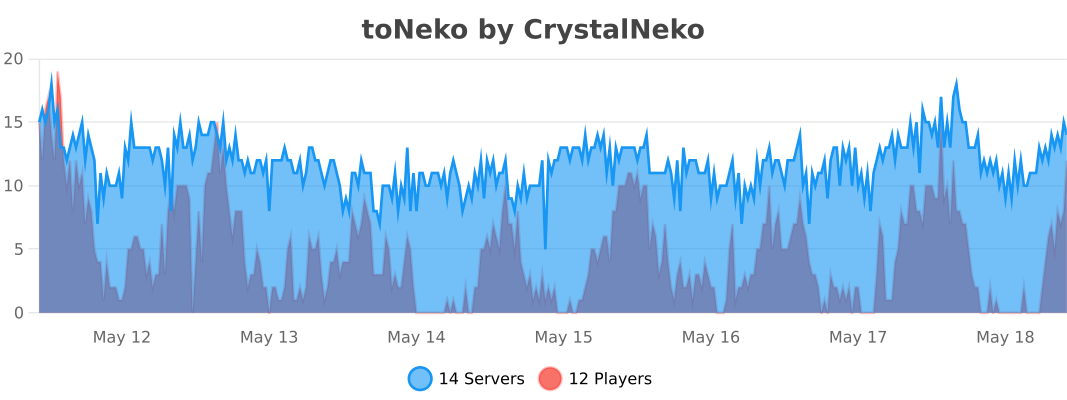
## bStats:
PVP Toggle
# PVP Toggle
A Paper 1.21 PVP toggle plugin: players choose whether to participate in PVP; admins can manage others’ state. Supports Folia, LuckPerms, PlaceholderAPI, and per-world PVP state.
—
## Features
– **Players**: `/pvp` or `/pvp on` / `off` / `toggle` to change your own PVP
– **Admins**: `/pvp on|off|toggle ` to manage someone else’s PVP
– **Status**: `/pvp status` for yourself, `/pvp status ` for others (with permission)
– **Reload**: `/pvp reload` to reload config (with permission)
– **Per-world**: Optional separate PVP state per world
– **Debounced save**: Fewer disk writes
– **Cooldown**: Configurable cooldown after toggling your own PVP
– **Feedback**: Configurable sound, ActionBar, and Title on toggle
– **PlaceholderAPI**: Placeholders like `%pvptoggle_status%`
– **Folia**: Region-aware scheduling; async save so it doesn’t block
– **LuckPerms**: Permissions handled by LuckPerms when installed
—
## Commands
| Command | Description | Permission |
|———|————–|————|
| `/pvp` | Same as `/pvp toggle`; toggles your PVP | pvptoggle.use |
| `/pvp on` | Enable PVP for yourself | pvptoggle.use |
| `/pvp off` | Disable PVP for yourself | pvptoggle.use |
| `/pvp toggle` | Toggle your PVP | pvptoggle.use |
| `/pvp status` | View your own PVP status | pvptoggle.use |
| `/pvp status ` | View another player’s PVP status | pvptoggle.status.other |
| `/pvp on|off|toggle ` | Set PVP for another player | pvptoggle.admin |
| `/pvp reload` | Reload config.yml | pvptoggle.reload |
—
## Permissions
| Permission | Description | Default |
|————|————–|———|
| `pvptoggle.use` | Use /pvp, on/off/toggle, and /pvp status (self) | true |
| `pvptoggle.admin` | Use /pvp on|off|toggle | op |
| `pvptoggle.reload` | Use /pvp reload | op |
| `pvptoggle.status.other` | Use /pvp status | op |
—
## config.yml
– **default-pvp**: Default PVP state for new or unknown players (true/false)
– **persist-on-rejoin**: Whether to keep each player’s choice when they rejoin
– **per-world**: Whether to store PVP state per world (separate per world)
– **save-debounce-seconds**: Debounce time in seconds before writing to disk; 0 = save every time
– **command-cooldown-seconds**: Cooldown in seconds after toggling your own PVP; 0 = no cooldown
– **toggle-feedback**: Feedback when toggling
– **play-sound**: Play a sound
– **sound**: Sound name (e.g. ENTITY_EXPERIENCE_ORB_PICKUP)
– **sound-volume** / **sound-pitch**: Volume and pitch
– **use-actionbar**: Show message in ActionBar
– **actionbar-message**: ActionBar text; `%status%` = on/off
– **use-title**: Show title
– **title** / **subtitle**: Title and subtitle; `%status%` = on/off
– **placeholder-on** / **placeholder-off**: Values returned by PlaceholderAPI placeholders
– **messages.***: All messages; supports `&` color codes and `%player%`, `%seconds%`, `%status%`
—
## PlaceholderAPI
With PlaceholderAPI installed, these placeholders are registered (return values are configurable):
| Placeholder | Description |
|————-|————-|
| `%pvptoggle_status%` | Current player’s PVP status (in that player’s context) |
| `%pvptoggle_status_%` | A specific player’s PVP status (e.g. `%pvptoggle_status_Steve%`) |
Default return values are `on` / `off`; change them with **placeholder-on** and **placeholder-off** in config.
—
## Compatibility
– **Server**: Paper 1.21+ (or compatible forks)
– **Folia**: Supported (`folia-supported: true`); uses AsyncScheduler for saves
– **LuckPerms**: Soft dependency; permissions are managed by LuckPerms when present
– **PlaceholderAPI**: Soft dependency; placeholders are registered when present
—
TNTNuke
TNTNuke is a fun and powerful Minecraft plugin that lets you create huge TNT explosions with a single command: /nuke. With it, you can quickly clear large areas by spawning lots of TNT at once. All TNT explodes at the same time, and a bossbar shows the progress so you can see how much has already exploded.
The plugin is fully configurable through its _config.yml_ file. You can adjust many features, such as how many TNT spawn, the explosion radius, the countdown timer before the TNT explodes, and the cooldown between nukes. This makes it easy to customize the plugin for your server and your players.
### Permissions:
**tntnuke.use** → allows a player to use /nuke
**tntnuke.bypasscooldown** → allows a player to ignore the cooldown completely
Currently, the default maximum is 100 TNT at once to keep server performance safe, but you can increase this if your server is strong enough. Big explosions use a lot of server power, so adjust carefully!
TheNewEconomy
**Note: This resource is no longer maintained/supported.**
# The New Economy


The New Economy, TNE, is the ultimate economy plugin for your Minecraft server, no matter what platform you’re on. While
TNE is pushed as being “feature-packed,” but it’s not feature-packed in the normal sense of jamming a bunch of useless features
into the core plugin, but rather using modules.
The economy plugin for server owners that want more out of their economy.
# About TNE
TNE was originally created for hey0’s hMod long before Bukkit/Spigot/Paper was a thing. Since then, it has taken on many
forms and this is the future form of the plugin. This core is designed to be robust and carry TNE into the future with or
without Minecraft by not being platform-dependent.
# Requirements
TNE has some minimum requirements that should be followed.
– MySQL 8.0+ (if using MySQL for storage)
– MariaDB 10.7.0+
– Java 17+
# Switched?
– Converter Coming Soon! Take the poll: here
# Support
To get an actual response use a support method below, not the reviews.
– Developer API Docs
– Discord
– Github
# Features
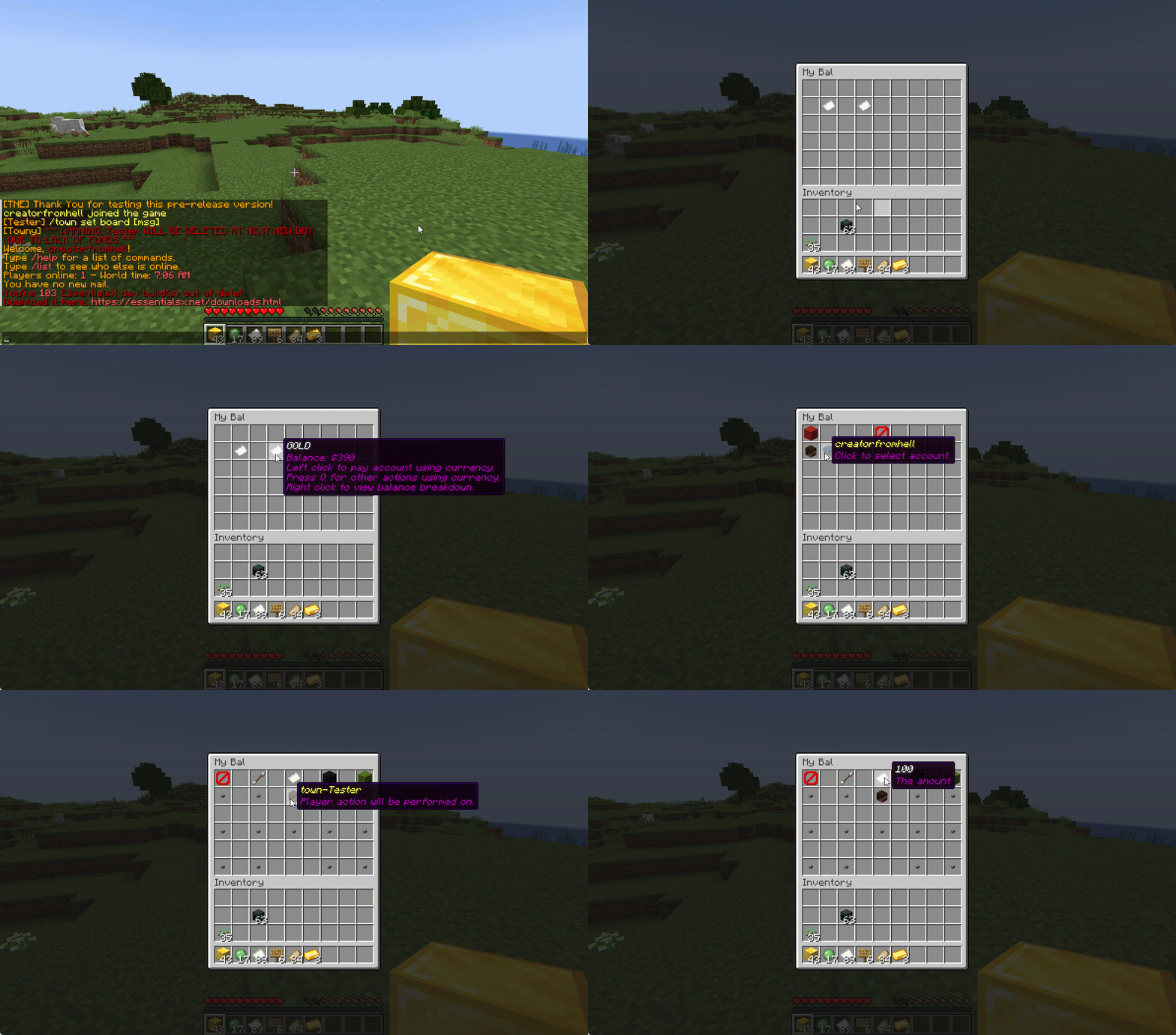
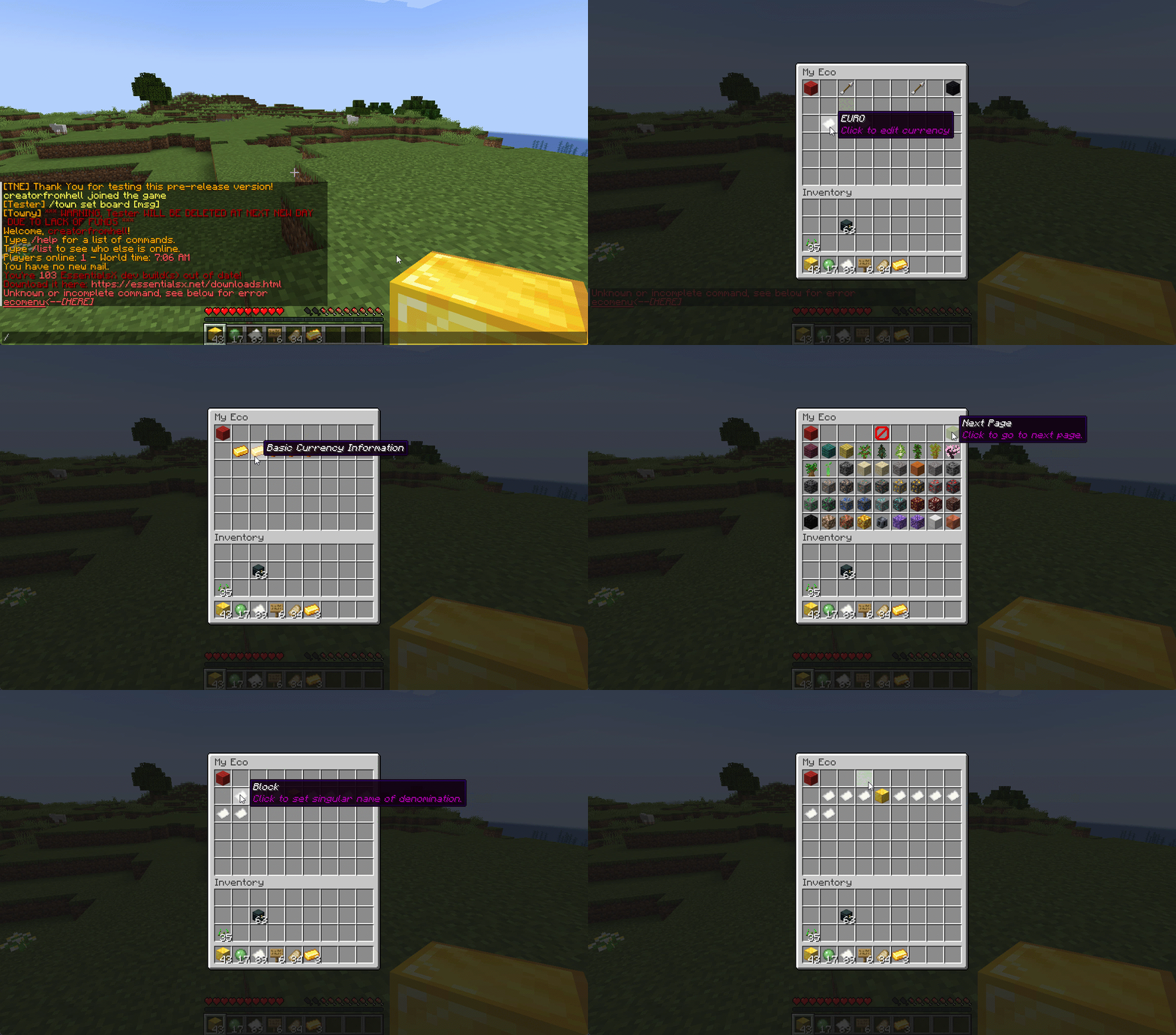
## Menu System
Want to use menus for currency creation and player actions? We got you!
### MyBal for Players
### MyEco for Admins
## Support your favorite plugins
We provide support for all your favorite plugins from Towny to Factions. Anything that supports Vault, supports TNE!
## Cross-Server
We support cross-server balance syncing through our velocity and bungee plugins, as well as Redis!
### Bungee
Download: here
### Velocity
Download: here
## Updates
We continue to develop updates for TNE for free, and fix bugs as they’re reported.
## All the currencies – Unlimited
TNE Allows you to create unlimited currencies with ease through the currency creation GUI.
### Types
TNE Supports different types of currencies!
#### Virtual: Simple currency that exists in thin air
#### Item: Use minecraft items as currency.
– Shulker Box Support
– Bundle Support
### Fine Tune your Currency
Lots of per-currency configuration options.
– Create a custom balance format for each currency
– Set a starting amount for each currency
– Set custom conversion rates for each currency
– Create custom crafting recipes for item currencies
– Block Mob drops for each currency
– Set the max balance for each currency
– Set enderchest balance inclusion per currency
– Set item currencies to use MiniMessage inputs for display name and lores!
– Set custom note items for each currency, used to have a currency voucher for each currency.
– Allows for use of model data items as currency items
### Fine Tune Who Can Access What Currency
TNE allows you to fine tune who can run commands with each currency. You’re able to block players from using
/pay for certain currencies, and even checking their balance for others!
#### Mixed: This type uses both virtual and item balances, and allows players to switch their balance between items and virtual whenever!
#### Experience: Use experience as currency.
#### Experience-level: Use experience levels as currency.
## Money Notes
Convert your virtual currency into a physical money note using the /money note command.
## Multi-platform
Use Sponge? Sure. Paper? Why not? Both? Over Velocity? Definitely! Switch between, your TNE data works
for you no matter your platform. More platforms soon!
### Supported:
– Paper/Spigot/Purpur
– Sponge8
### Coming:
– Fabric
– Sponge7
## Discord Server
We have a discord server available to those users that have questions or need support!
## Configurability
TNE strives to allow you to configure things as much as possible. From the messages to starting money, to max holdings!
## MISC Features
– Adventure Chat support for translations to allow for awesome colorful messages!
– Support for Placeholders, include top 10
– Easy commands for easy administration
– Transaction Logging
– Easy-to-use menu system for currency creation and balance actions!
– Multiple data types
– SQL, YAML, and Maria DB
– Tab completion for commands!
– baltop command
## Open Source
Contribute on the github!
## Placeholders
| Name | Description |
|——————————————————-|—————————————————————-|
| tne_balance | Returns player’s balance. |
| tne_balance_formatted | Returns formatted player’s balance. |
| tne_world_worldname | returns player’s balance for specific world. |
| tne_world_worldname_formatted | returns the formatted player’s balance for specific world. |
| tne_currency_currencyname | returns player’s balance for specific currency. |
| tne_currency_currencyname_formatted | returns player’s balance for specific currency. |
| tne_wcur_worldname_currencyname | returns player’s balance for specific world and currency. |
| tne_wcur_worldname_currencyname_formatted | returns player’s balance for specific world and currency. |
| tne_toppos | returns player’s position on baltop |
| tne_toppos_world name or all | returns player’s balance for specific currency. |
| tne_toppos_world name or all_currency name or all | returns player’s balance for specific world and currency. |
| tne_toppos__position_ | returns the value for the position based on the value of Messages.Money.PlaceholderTopEntry in messages.yml |
## Permissions & Commands
## /tne
**About:** All commands that are designated as being for administrative purposes.
**Shortcuts:** /tne menu(/ecomenu), /tne(/ecomin, /ecoadmin, /ecomanage, /tneneweconomy)
**Base node:** tne.admin (default: ops)
**Wildcard node:** tne.admin.*
| Command | Permission | Description | Default |
|———————————–|——————-|———————————————————————————————————–|—————|
| tne backup | tne.admin.backup | Creates a backup of all server data. | ops |
| tne create [balance] | tne.admin.create | Creates a new economy account. Player ~ The account owner. Balance ~ The starting balance of the account. | ops |
| tne debug [level] | tne.admin.debug | Toggles console debug mode to the specified level. | ops |
| tne delete | tne.admin.delete | Deletes a player account. Player ~ The account owner. | ops |
| tne extract | tne.admin.extract | Extracts all player balances with their username attached for database related debugging. | ops |
| tne menu | tne.admin.menu | Opens up the tne economy admin menu | ops |
| tne purge | tne.admin.purge | Deletes all player accounts that have the default balance | ops |
| tne reload [configs] | tne.admin.reload | Used to reload configurations. | ops |
| tne reset | tne.admin.reset | Deletes all economy-related data from the database. | ops |
| tne restore | tne.admin.restore | Restores all balances that are located in extracted.yml after performing the extract command. | ops |
| tne save | tne.admin.save | Force saves all TNE data. | ops |
| tne status [status] | tne.admin.status | Displays, or sets, the current account status of an account. Player ~ The account owner. | ops |
| tne version | tne.admin.version | Displays the version of TNE currently running. | ops |
## /money
**About:** All commands that are used to interact with the server’s money system.
**Shortcuts:** /money balance(/bal, /balance), /money pay(/pay), /money top(/baltop), /money menu(/mybal)
**Base node:** tne.money (default: everyone)
**Wildcard node:** tne.money.*
| Command | Permission | Description | Default |
|————————————————————|———————–|—————————————————————————————-|—————|
| money balmenu | tne.money.mybal | Opens up the mybal menu. | everyone |
| money balance [world] [currency] | tne.money.balance | Displays your current holdings. | everyone |
| money convert [from currency] | tne.money.convert | Convert some of your holdings to another currency. | everyone |
| money deposit [currency] | tne.money.deposit | Deposits money from an item form into a virtual bank for mixed currencies. | everyone |
| money give [world] [currency] | tne.money.give | Adds money into your economy, and gives it to a player. | ops |
| money givenote [currency] | tne.money.givenote | Gives the specified player a currency note for the specified amount. | ops |
| money note [currency] | tne.money.note | Makes your virtual currency physical, for storage/trading purposes. | everyone |
| money other [world] [currency] | tne.money.other | Retrieves the balance of a player. | everyone |
| money pay [currency] | tne.money.pay | Use some of your holdings to pay another player. | everyone |
| money request [currency] | tne.money.request | Request money from a player. |
| money set [world] [currency] | tne.money.set | Set the holdings of a player. | ops |
| money setall [world] [currency] | tne.money.setall | Set the holdings of all players. | ops |
| money take [world] [currency] | tne.money.take | Removes money from your economy, specifically from a player’s balance. | ops |
| money top [page] | tne.money.top | A list of players with the highest balances. | ops |
| money top [page] [refresh(true/false)] | tne.money.top.refresh | This permission allows the user to include the refresh argument to refresh the baltop. | ops |
| money withdraw [currency] | tne.money.withdraw | Withdraws money from your virtual balance into its item form. | ops |
## /transaction
**About:** All commands that are used to interact with the transaction system.
**Shortcuts:** /trans
**Base node:** tne.transaction (default: everyone)
**Wildcard node:** tne.transaction.*
| Command | Permission | Description | Default |
|——————————————————————–|———————————————————|—————————————————————————————|—————|
| transaction away [page #] | tne.transaction.away | Displays transactions that you missed since the last time you were on. | everyone |
| transaction history [player:name] [page:#] [world:name/all] | tne.transaction.history / tne.transaction.history.other | See a detailed break down of your transaction history. Page ~ The page number you wish to view. World ~ The world name you wish to filter, or all for every world. Defaults to current world. | everyone |
| transaction info | tne.transaction.info | Displays information about a transaction. UUID ~ The id of the transaction. | everyone |
| transaction void | tne.transaction.void | Undoes a previously completed transaction. UUID ~ The id of the transaction. | ops |
TKOTH
▶ ▶ 🇹🇷 TR – Türkçe Tanıtım
# 🏆 TKoth – Modern King of the Hill Plugin
**TKoth**, Minecraft 1.16.5+ için geliştirilmiş, Folia/Leaf/Paper desteğiyle çalışan modern bir King of the Hill eklentisidir.
—
## ✨ Özellikler
– **Çoklu Sürüm Desteği**: 1.16.5’ten 1.21.8’e kadar tüm sürümler
– **Folia/Paper Uyumluluğu**: Otomatik algılama ve thread-safe çalışma
– **Otomatik Başlatma**: Zamanlanmış etkinlikler
– **Modern Adventure API**: Renk kodları ve zengin metin formatlaması
– **Özel Fontlar**: Normal ve Small Caps (ᴋᴜᴄᴜᴋ ʜᴀʀғʟᴇʀ) desteği
– **Hologram Desteği**: DecentHolograms ile canlı liderlik tablosu
– **Tab List/BossBar/Scoreboard**: Özelleştirilebilir görsel öğeler
– **Oyuncu İstatistikleri**: Kazanma sayısı, süre takibi, sıralama
– **PlaceholderAPI**: Diğer eklentilerle entegrasyon
– **WorldEdit Entegrasyonu**: Kolay bölge ayarlama
—
## 📦 Kurulum
1. `tkoth-x.x.x.jar` dosyasını `plugins` klasörüne kopyalayın
2. Sunucuyu başlatın (config otomatik oluşturulur)
3. WorldEdit ile bölge ayarlayın: `/tkothpos kaydet`
4. Etkinliği başlatın: `/tkoth baslat`
– `%tkoth_status%` – Etkinlik durumu
– `%tkoth_leader%` – Lider oyuncu
– `%tkoth_time%` – Kalan süre
– `%tkoth_players%` – Oyuncu sayısı
– `%tkoth_rank_1%`, `%tkoth_rank_2%`, `%tkoth_rank_3%` – İlk 3 sıralama
– Tüm ayarlar `config.yml` dosyasından özelleştirilebilir
– Tab list, BossBar ve Scoreboard özellikleri komutlarla açılıp kapatılabilir
– Folia desteği otomatik algılanır
– Adventure API ile modern renk kodları ve formatlamalar desteklenir
▶ ▶ 🇬🇧 EN – English Introduction
# 🏆 TKoth – Modern King of the Hill Plugin
**TKoth** is a modern King of the Hill plugin developed for Minecraft 1.16.5+, compatible with Folia/Leaf/Paper.
—
## ✨ Features
– **Multi-Version Support**: All versions from 1.16.5 to 1.21.8
– **Folia/Paper Compatibility**: Auto-detection and thread-safe operation
– **Auto-Start**: Scheduled events
– **Modern Adventure API**: Color codes and rich text formatting
– **Custom Fonts**: Normal and Small Caps (sᴍᴀʟʟ ᴄᴀᴘs) support
– **Hologram Support**: Live leaderboard via DecentHolograms
– **Tab List/BossBar/Scoreboard**: Customizable visual elements
– **Player Statistics**: Win counts, time tracking, and rankings
– **PlaceholderAPI**: Integration with other plugins
– **WorldEdit Integration**: Easy region setup
—
## 📦 Installation
1. Copy the `tkoth-x.x.x.jar` file into the `plugins` folder
2. Start the server (config is generated automatically)
3. Set the region with WorldEdit: `/tkothpos kaydet`
4. Start the event: `/tkoth baslat`
– All settings can be customized in the `config.yml` file
– Tab list, BossBar, and Scoreboard features can be toggled via commands
– Folia support is automatically detected
– Modern color codes and formatting are supported via Adventure API
TitleBroadcast
# TitleBroadcast
**Advanced scheduled broadcasting plugin for Paper servers with extensive customization options**
## 🌟 Features
### 📋 **Scheduled Broadcasting System**
– **Automatic broadcasts** with fully customizable intervals
– **Random or sequential** broadcast ordering
– **Player-based conditions** – only broadcast when players are online
– **Minimum player requirements** for broadcasts
### 🎨 **Multiple Display Types**
– **📺 Titles & Subtitles** with custom fade timings
– **📊 Action Bars** with duration control
– **💬 Chat Messages** with custom prefixes
– **🔗 Combination Support** – use multiple types simultaneously
### 🔊 **Enhanced User Experience**
– **🎵 Sound Effects** – fully customizable per broadcast
– **✨ Particle Effects** – with count, offset, and speed controls
– **🎭 Rich Text Formatting** via Adventure API & MiniMessage
– **🌈 Gradients & Colors** – modern text styling support
### 🔐 **Permission-Based Broadcasting**
– **Fine-grained permissions** for different broadcast types
– **Per-broadcast permission** requirements
– **Receive permissions** for announcements, alerts, events, tips
– **Admin permissions** for management commands
### 🌍 **World Management**
– **World-specific broadcasts** – different messages for different worlds
– **Disabled worlds** – exclude certain worlds from broadcasts
– **Per-world broadcast lists** – complete customization
### ⚡ **Performance & Compatibility**
– **🔥 Folia Support** – full compatibility with Folia servers
– **📦 Permission Caching** – optimized performance for large servers
– **🧵 Threaded Scheduler** – uses region scheduler when available
– **🔌 PlaceholderAPI Integration** – dynamic content support
## 🎮 Commands
| Command | Description | Permission |
|———|————-|————|
| `/titlebroadcast` | Main command with help | `titlebroadcast.command` |
| `/titlebroadcast reload` | Reload configuration | `titlebroadcast.reload` |
| `/titlebroadcast list` | List all broadcasts | `titlebroadcast.list` |
| `/titlebroadcast send ` | Send specific broadcast | `titlebroadcast.send` |
| `/titlebroadcast toggle` | View broadcast status | `titlebroadcast.toggle` |
| `/titlebroadcast info` | Plugin information | `titlebroadcast.command` |
| `/titlebroadcast next` | Show next scheduled broadcast | `titlebroadcast.list` |
**Aliases:** `tb`, `broadcast`, `titlebc`
## 🔑 Permissions
### **Admin Permissions**
– `titlebroadcast.command` – Use the main command
– `titlebroadcast.reload` – Reload configuration
– `titlebroadcast.list` – List broadcasts
– `titlebroadcast.send` – Send manual broadcasts
– `titlebroadcast.toggle` – Toggle broadcasts
Full support for Adventure API’s powerful MiniMessage formatting:
– **Gradients:** `Text`
– **Colors:** `Yellow text`
– **Decorations:** `Bold`, `Italic`
– **Hover & Click Events:** Interactive text elements
– **And much more!**
## 🔗 PlaceholderAPI Integration
### **Built-in Placeholders**
– `{player}` – Player name
– `{displayname}` – Player display name
– `{world}` – Current world name
– `{online}` – Online player count
– `{tps}` – Server TPS
– `{health}`, `{level}`, `{exp}` – Player stats
### **PlaceholderAPI Support**
All PlaceholderAPI placeholders are supported when the plugin is installed!
## 🚀 Installation
1. **Download** the latest release
2. **Drop** the JAR file into your `plugins/` folder
3. **Restart** your server
4. **Configure** broadcasts in `config.yml`
5. **Enjoy** automated broadcasting!
This is a private project. Source code is not available.
The compiled plugin is available as `TitleBroadcast-1.0.0.jar`
## 🎪 Example Broadcasts Included
The plugin comes with pre-configured broadcast examples:
– **🎉 Welcome Messages** – Greet new players
– **💡 Server Tips** – Helpful gameplay hints
– **📜 Rules Reminders** – Keep rules visible
– **🗳️ Vote Reminders** – Encourage server voting
– **🎊 Event Announcements** – Promote special events
## 📞 Support
Need help? Join our Discord server:
– **Discord:** https://discord.gg/yUghaxRSZs
—
*Made with ❤️ for the Minecraft community*
Tip4serv Donation Webstore
Tip4serv.com provides gaming communities with a platform to effortlessly set up their virtual store and facilitate the sale of digital goods, including donations.
Managing a community and creating content can be demanding tasks. We aim to streamline the process, enabling managers to efficiently handle donations and automatically reward players.
Our mission is to deliver a user-friendly platform that simplifies the experience for both creators and buyers.
Here are examples of stores that you can customize: https://murga.tip4serv.com, https://neon.tip4serv.com and https://steelcraft.tip4serv.com
## Features for starter plan (only 5% fee)
– Unlimited game servers & commands
– Create subscriptions plan
– Commands status tracking
– Stock management
– Deliver roles & messages on Discord
– Create discount coupon
– Add managers for your store
– Purchase email and invoice
– Sales statistics
– Private flow for subscribers
– Custom sub-domain
– Resend commands
– No ads
## Features for PRO members (subscription required)
– Dynamic Dark/Light theme
– Account linking with avatars
– Product page with gallery & video
– GUI colors editor & additional CSS
– Top customers & related products
## Store available in 15 languages
English, Danish, Dutch, English, French, German, Hungarian, Italian, Norwegian, Polish, Portuguese, Romanian, Russian, Spanish, Swedish and Turkish.
## Payment method
Here are the payment methods you can offer your players: Visa, Paypal, Cash App, Google Pay, Apple Pay, Ideal, GiroPay, BanContact, Sofort, Sepa, EPS, BACS, Amazon Pay, Revolut Pay, Mobile Pay, MultiBanco, BECS, Przelewy24, Boleto, Oxxo, Afterpay, Link.
## How does this work?
Tip4Serv checks if a player has made a donation on your Tip4Serv store and delivers the order in a minute (e.g., group, money, etc.) by executing commands in the server console.
Create your store and connect your Minecraft server in **5 minutes** on Tip4Serv in 4 simple steps:
1. **Store Settings:**
Enter your store name and set the desired URL.
2. **Payment Methods:**
Select your preferred payment options.
3. **Connect Server:**
Link your Minecraft server to Tip4Serv using your API key.
4. **Add Products:**
Create and configure products with executable commands on your server.
## Commands
**tip4serv connect** – Link your server to Tip4Serv (Ensure the API key is correctly set in tip4serv/tip4serv.key).
**tip4serv reload** – Deliver pending orders if there are any.
**/storelink** – Show a link to the store in the server chat.
## Proxy commands (Velocity & Bungeecord)
**tip4proxy connect** – Link your server to Tip4Serv.
**tip4proxy reload** – Deliver pending orders if there are any.
## Need help?
– Documentation
– Contact us
TimeToFly
## ⚠️ **LANGUAGE NOTICE**
This plugin is currently available in Spanish only. All messages, menus, and documentation are in Spanish. English translation coming soon!
# Key Features
1. Flight time system – Players consume time whilst flying
1. Interactive menus – Complete GUI with customisable configuration
1. Particle effects – 10+ customisable effects that follow the player
1. Alert system – Configurable notifications when time is running low
1. SQLite database – Efficient storage with automatic purging
1. ItemsAdder compatibility – Support for custom items in menus
1. PlaceholderAPI integration – 12+ placeholders for scoreboards and chat
1. ️ Debug mode – Complete diagnostics for development
1. World control – Define which worlds allow flight
1. MiniMessage – Fully customisable messages with advanced formatting
1. Permissions system – Granular control over features and effects
1. WorldGuard support – Region-based restrictions
# Installation
1. Download the plugin
2. Place the .jar file in your plugins/ folder
3. Restart the server
4. Configure in plugins/TimeToFly/
# Requirements
– Minecraft: 1.18 or higher (up to 1.21)
– Java: 17 or higher
– Server: Spigot, Paper or forks
– Optional: ItemsAdder, PlaceholderAPI, WorldGuard
# Commands
Players:
“`
/fly – Toggle flight mode
/fly settings – Open configuration menu
/fly shop – Display shop information
“`
Administrators:
“`
/flyadmin add

# Notes
– Compatible with Tebex for automatic sales
– ItemsAdder support (custom items)
– WorldGuard integration (region restrictions)
– Configurable cooldown system
– Fully customisable messages
– No mandatory dependencies
– Plugin currently in Spanish – English translation coming soon
# Support & Community
Need help or have questions?
– Join our Discord Server for support and updates
– Post in the discussion section below
– Contact the developer through private message
# Integration Examples
Tebex Shop Integration:
“`
flyadmin add {username} 30d
“`
LuckPerms Configuration:
“`
lp group VIP permission set timetofly.unlimited true
lp group Premium permission set timetofly.effects.* true
“`
**Join our Discord for support :)**
Timer
# Timer
—
## DE
Timer ist ein hochentwickelter Minecraft-Timer für Spigot/Paper-Server, der direkt in der ActionBar angezeigt wird. Das Plugin unterstützt einen **dynamischen Farbverlauf**, der von der gewählten Basisfarbe zu einer dunkleren Version führt, und bietet einen **Schatteneffekt** für maximale Lesbarkeit. Der Timer zählt hoch, zeigt nur die notwendigen Zeiteinheiten an und kann automatisch bei bestimmten Advancements gestoppt werden.
—
### Features
– Hochzählender Timer in der ActionBar
– Farbverlauf innerhalb der gewählten Basisfarbe
– Schatteneffekt für bessere Sichtbarkeit
– Dynamische Zeitanzeige:
– Sekunden immer
– Minuten, Stunden, Tage nur wenn > 0
– Commands:
– `/timer start` – startet den Timer
– `/timer pause` – pausiert den Timer
– `/timer restart` – startet den Timer neu
– `/timer stop` – stoppt den Timer permanent
– `/timer colour ` – ändert die Timerfarbe (TabCompletion mit Farbnamen)
– `/timer reload` – lädt die Config neu
– `/timer goal ` – setzt ein Ziel für automatische Timerbeendigung
– TabCompleter für einfache Command-Nutzung
– Standardfarbe: `dark_green`
—
## Installation
1. Lade das Plugin herunter und lege die `.jar` in deinen `plugins`-Ordner.
2. Starte oder lade den Server neu.
3. Passe die `config.yml` an (optional).
—
## Config
“`yaml
base-color: dark_green
“`
—
## EN
Timer is an advanced Minecraft timer plugin for Spigot/Paper servers that displays the timer directly in the ActionBar. It features a **dynamic color gradient** that transitions from the chosen base color to a darker shade, and includes a **shadow effect** for better visibility. The timer counts up, shows only relevant time units, and can automatically stop upon reaching specific advancements.
—
## Features
– Up-counting timer displayed in the ActionBar
– Color gradient based on the selected base color
– Shadow effect for enhanced readability
– Dynamic time display:
– Seconds always shown
– Minutes, hours, days shown only when > 0
– Commands:
– `/timer start` – starts the timer
– `/timer pause` – pauses the timer
– `/timer restart` – restarts the timer
– `/timer stop` – permanently stops the timer
– `/timer colour ` – changes the timer color (TabCompletion with color names)
– `/timer reload` – reloads the config
– `/timer goal ` – sets a goal for automatic timer stopping
– TabCompleter for easy command usage
– Default color: `dark_green`
—
## Installation
1. Download the plugin and place the `.jar` file into your `plugins` folder.
2. Start or reload the server.
3. Optionally, adjust the `config.yml` to customize your timer.
—
## Config
“`yaml
base-color: dark_green
TimePortals
# **TimePortals**
Ever wanted to disable portals so players can’t teleport? You’ve come to the right place, this plugin makes it possible and you can schedule the times when the portals are to be active.
You can also set the date from when the portals should be active.
> ### Commands:
>
> * `/timeportals localtime` – Displays the current time of the server.
> * `/timeportals worlds` – Displays all the worlds that are included.
> * `/timeportals info ` – Displays information about a particular world.
> * `/timeportals ignore ` – It sets the given world to be disregarded.
> * `/timeportals open ` – It opens up the world.
> * `/timeportals close ` – It closes the world.
> * `/timeportals disable ` – Turns off the world completely.
> * `/timeportals open-date <2024/01/22-20:00>` – Sets the date from which the world will be active.
> * `/timeportals auto-open ` – Sets whether the world should be active at given times.
> * `/timeportals open-hour <10:00>` – Sets from which time the world should be active.
> * `/timeportals close-hour <10:00>` – Sets until what time the world should be active.
> * `/timeportals reload` – Reload the plugin.
**Permissions:**
* `timeportals.use` » `/timeportals`
* `timeportals.tabcomplete` » `Allows to use tab completion for timeportals command`
* `timeportals.manage.reload` » `/timeportals reload`
* `timeportals.localtime` » `/timeportals localtime`
* `timeportals.manage.worlds.info` » `/timeportals info `
* `timeportals.manage.worlds.ignore` » `/timeportals ignore `
* `timeportals.manage.worlds` » `/timeportals worlds`
* `timeportals.manage.worlds.open` » `/timeportals open `
* `timeportals.manage.worlds.close` » `/timeportals close `
* `timeportals.manage.worlds.openhour` » `/timeportals open-hour
## Donate
You can donate by using HERE. Any donation is appreciated. 😀

## Known Bugs
No known bugs. Please report them if you find any. Thanks!