TraceSMP
# Plugin
This is a recreation of minecrafts Trace SMP. There will be many updates on this minecraft plugin. There are powers, effects, and particles.
## Why Download this?
It can add fun gameplay to your server, whether its pvp based, or just chilling. My friends used this for a minigame thing so they could find each other once (1.1).
## Who originally made this?
Jitscraft made TraceSMP with the custom plugin, shut down a bit later.
## What are the effects/powers
### Red
Effect: Fire resistance
Power: Right Click to turn lava into obsidian in a 5 block radius.
### Blue
Effect: Water Breathing
Power: Make a player Drown for a minute.
### Yellow
Effect: Speed
Power:Strike lightning
### Green
Effect: Hero Of The Village
Power: Get resistance 2 for 30 seconds
### Black
Effect: Invisability
Power: Teleport
### White
Effect: Slow falling. Do /slowfalling to toggle it. (Plugin version 1.2.1 or higher)
Power: Shoot up into the sky with levatation, no fall damage
### Pink
Effect: Regeneration
Power: gain 5 extra hearts for 30 seconds.
### Orange (Version 1.4.0+)
Effect: Strength
Power: Lazar Beam
# Stones (Upgrade, Version 1.4.1+)
You get a stone when you kill a mob. You need a different stone for each power.
### Black
Spiders (0.5%)
### White
Skeletons (0.5%)
### Green
Zombies (0.5%)
### Red
Blazes (1%)
### Blue
Drowned (1%)
### Pink
Which (1%)
### Yellow
Piglin (1%)
### Orange
Gaurdians (2%)
# Power Swapper
### Look in gallery for recipe!
# Help
You can get help in the discord under trace-smp-talk
TPA+


# SetHomes
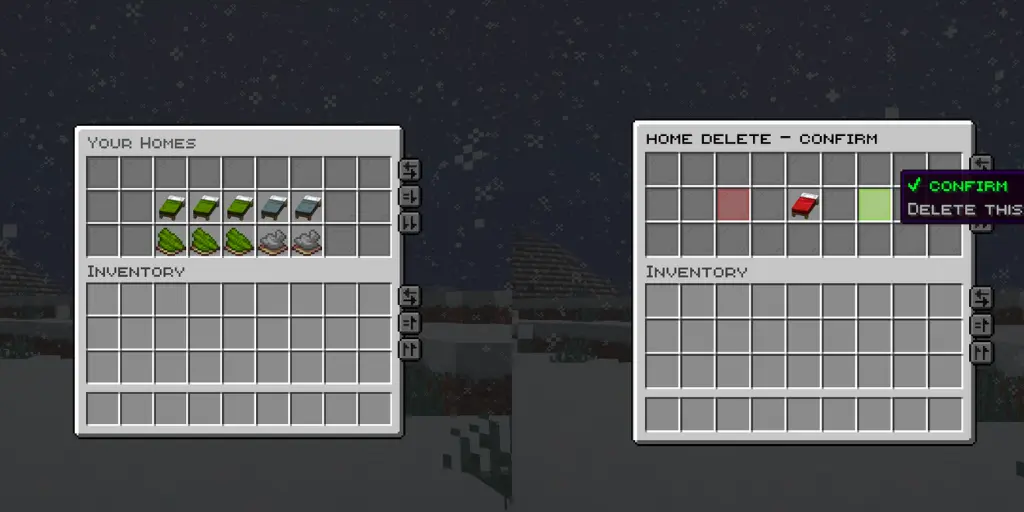
# Menus & Features

## Join Discord Server (Custom Plugins/Community)
[](https://discord.gg/z2pPkb9tjX)
# Storage Options
DataBase Setup is Optional and not required by default

# **TPA+ PREMIUM TELEPORT SYSTEM**
**Version:** 2.1.9
**Platform Support:** Spigot • Paper • Purpur
**MC Compatibility:** 1.16 → 1.21.11
**Java Requirement:** 17+
—
## What makes TPA+ different?
**8-Language System**
English, Spanish, German, French, Portuguese, Chinese, Russian, Japanese
**Java 17 Performance**
Built to handle 1000+ players, async processing, and near-zero lag
**Dual Storage**
Optional MySQL & PostgreSQL support with database connection pooling
**Professional GUI**
Interactive menus, teleport dashboard, player stats, and request tracking
**Smart Anti-Abuse**
Cooldowns, request limits, player blocking, spam protection, and safe teleport checks
—
## Teleport Commands
/tpa
/tpahere
/tpaccept
/tpdeny
/tpcancel
/tpback
/tpatoggle
/tpblock
/tpastats
/tpasettings
/tpaadmin and more..
—
## Plugin Perks
– Lifetime updates and support
– All 8 language translations included
– Database setup assistance
– Configuration optimization help
—
## Why choose TPA+?
– Most teleport plugins still run on outdated Java versions
– TPA+ uses the latest JVM for better performance & flexibility
– Fully translated interfaces
– Reliable for large servers
– Fast support responses
—
## Wiki & Support
[Click to open Wiki](https://github.com/lunocratic/tpa_pluse/wiki)
[DM me on Discord](https://discord.com/users/223844571145175040)
[Join Support Server](https://discord.com/invite/RBc9bh9MJB)
—
Need help? DM me anytime — I reply within 1 hour (unless a creeper reaches you first)
—
Made with love by **Luno**
tpagui
# TpaGui
A simple plugin that provides GUI functionality for TPA, supporting chest menus and Bedrock Edition forms.
## Features
### Java Edition
– Chest menu interface
– Displays skulls of all online players
– Left-click to request teleportation to a player
– Right-click to request a player to teleport to you
– Supports multi-page display
– Previous/Next page buttons
### Bedrock Edition
– Dropdown form interface
– Player selection dropdown menu
– Teleport method toggle switch
– Automatically identifies Bedrock Edition players
– Teleport request popup
– Shows requester’s name
– Shows teleport direction
– Accept/Decline buttons
– Closing the window automatically declines the request
### Common Features
– Supports customizing all message texts
– Supports color codes
– Allows viewing the list of online players from the console without relying on other plugins
## Commands
– `/tpagui` – Opens the teleport request menu
– Aliases: `/tpag`, `/tgui`
## Permissions
– `tpagui.use` – Permission to use the `/tpagui` command (default: all players)
## Dependencies
– Required: Paper 1.13+
– Optional: Floodgate (for Bedrock Edition support)
TPA
—
# TPA
[English](https://github.com/WarSkyGod/TPA/blob/main/README_en-US.md)
一个支持 **Folia** 的简易传送插件,支持 **Bukkit/Spigot/Paper/Folia**。
## 特点
– **简单**:易于使用和配置。
– **可配置**:支持自定义配置文件。
– **多语言支持**:内置多种语言文件。
– **可自定义语言文件**:支持用户自定义语言文件。
## 命令
### 传送
– **/tpa <玩家名称>**
向玩家发送传送请求。
– **/tphere <玩家名称>**
请求玩家传送到你身边。
– **/tpall [player/warp/spawn] [玩家名称/传送点名称]**
强制将所有在线玩家传送到目标位置(如果不加参数,默认传送到使用者身边)。
– **/tplogout <玩家名称>**
传送到该玩家最后一次下线的位置。
– **/tpaccept**
接受传送请求(你可以点击聊天框里的 **[接受]** 来直接接受)。
– **/tpdeny**
拒绝传送请求(你可以点击聊天框里的 **[拒绝]** 来直接拒绝,点击聊天框中的 **[拒绝并拉黑]** 将拒绝请求并且拉黑该玩家)。
– **/denys [add/remove] [玩家名称]**
列出玩家的黑名单列表。
### 传送点
– **/warp <传送点>**
传送到传送点。
– **/setwarp <传送点>**
设置传送点。
– **/delwarp <传送点>**
删除传送点。
### 家
– **/home <家>**
传送到家。
– **/homes**
列出你设置的家。
– **/sethome <家>**
设置家。
– **/setdefaulthome <家>**
设置默认的家。
– **/delhome <家>**
删除家。
### 主城
– **/spawn**
传送到主城。
– **/setspawn**
设置主城。
– **/delspawn**
删除主城。
### 其他
– **/back**
传送到上一次的位置。
– **/rtp**
随机传送。
– **/tpa version**
检查插件更新。
– **/tpa setlang **
设置客户端显示语言。
– **/tpa reload**
重新加载配置文件。
## 权限
### 管理员
– **tpa.admin**
最高权限,可执行所有操作。
– **tpa.tpall**
可使用 `/tpall` 命令强行将所有在线玩家传送到你的位置。
– **tpa.tplogout**
可使用 `/tplogout` 传送到玩家最后的下线位置。
– **tpa.reload**
可使用 `/reload` 命令重新加载配置文件。
– **tpa.version**
拥有这个权限的玩家会收到插件更新通知,可使用 `/tpa version` 来检查插件更新。
– **tpa.nodelay**
拥有这个权限的玩家不会受到命令等待时间的限制。
### 传送
– **tpa.tpa**
可使用 `/tpa` 命令请求传送到指定玩家的位置(默认关闭权限检查)。
– **tpa.tphere**
可使用 `/tphere` 命令请求指定玩家传送到你的位置(默认关闭权限检查)。
– **tpa.rtp**
可使用 `/rtp` 命令随机传送(默认关闭权限检查)。
### 黑名单
– **tpa.denys**
可使用 `/denys` 管理黑名单。
### 主城
– **tpa.spawn**
可使用 `/spawn` 命令传送到主城(默认关闭权限检查)。
– **tpa.setspawn**
可使用 `/setspawn` 命令设置主城。
– **tpa.delspawn**
可使用 `/delspawn` 命令删除主城。
### 传送点
– **tpa.spawn**
可使用 `/warp` 命令传送到传送点(默认关闭权限检查)。
– **tpa.setwarp**
可使用 `/setwarp` 命令设置传送点。
– **tpa.delwarp**
可使用 `/delwarp` 命令删除传送点。
### 家
– **tpa.home**
可使用 `/home`、`/homes`、`/sethome`、`/setdefaulthome`、`/delhome`(默认关闭权限检查)。
### VIP
– **tpa.vip**
– **tpa.vip+**
– **tpa.mvp**
– **tpa.mvp+**
– **tpa.mvp++**
可在配置文件中设置拥有该权限的玩家最多可以设置多少个家(-1 为不限制)以及命令间隔时间等。
### 其他
– **tpa.back**
可使用 `/back` 命令传送到上一次的位置(默认关闭权限检查)。
## 关于配置迁移问题
3.2.0 版本添加了老版本配置文件自动迁移的功能,无需过多担心。
但出于安全考虑,迁移后会自动备份旧版本配置文件到 `plugins/TPA/backup/旧版本号` 目录下。如果迁移失败,请手动尝试迁移配置文件。
## 感谢
本插件使用了 [FoliaLib](https://github.com/handyplus/FoliaLib) 来做 **Folia** 兼容。
### 代码贡献者
– [fanlepian1](https://github.com/fanlepian1)
– [Apleax](https://github.com/Apleax)
– [LFWQSP2641](https://github.com/LFWQSP2641)
– [sky-3311](https://github.com/sky-3311)
– [Ukiyograin](https://github.com/Ukiyograin)
### Bug 报告者
– [fanlepian1](https://github.com/fanlepian1)
– [Apleax](https://github.com/Apleax)
– [luckeist](https://github.com/luckeist)
– [DuckCattyCotton](https://github.com/DuckCattyCotton)
– [Ry4nnnnn](https://github.com/Ry4nnnnn)
– [sky-3311](https://github.com/sky-3311)
– [zhgiuu45](https://github.com/zhgiuu45)
– [notwhitebear](https://github.com/notwhitebear)
– [Amin2478](https://github.com/Amin2478)
– [TritiumBro](https://github.com/TritiumBro)
– [XiaoST-one](https://github.com/XiaoST-one)
– [Cc-Cece](https://github.com/Cc-Cece)
– [Ukiyograin](https://github.com/Ukiyograin)
– [xszx-tbh](https://github.com/xszx-tbh)
– [Carrot520](https://github.com/Carrot520)
### 功能建议者
– [Apleax](https://github.com/Apleax)
– [xiaoleaw](https://github.com/xiaoleaw)
– [Onako2](https://github.com/Onako2)
### AI 大模型
– [DeepSeek](https://www.deepseek.com/)
—
# TPA
[简体中文](#)
A simple teleportation plugin that supports **Folia**, compatible with **Bukkit/Spigot/Paper/Folia**.
## Features
– **Simple**: Easy to use and configure.
– **Configurable**: Supports custom configuration files.
– **Multilingual Support**: Built-in multiple language files.
– **Customizable Language Files**: Allows users to customize language files.
## Commands
### Teleportation
– **/tpa **
Send a teleportation request to a player.
– **/tphere **
Request a player to teleport to your location.
– **/tpall [player/warp/spawn] [player name/warp name]**
Force all online players to teleport to the target location (if no parameters are provided, defaults to teleporting to the user’s location).
– **/tplogout **
Teleport to the last logout location of the specified player.
– **/tpaccept**
Accept a teleportation request (you can click **[Accept]** in the chat to directly accept).
– **/tpdeny**
Deny a teleportation request (you can click **[Deny]** in the chat to directly deny, or click **[Deny and Block]** to deny the request and block the player).
– **/denys [add/remove] [player name]**
Manage the player’s blacklist.
### Warp
– **/warp **
Teleport to a warp point.
– **/setwarp **
Set a warp point.
– **/delwarp **
Delete a warp point.
### Home
– **/home **
Teleport to a home location.
– **/homes**
List all your home locations.
– **/sethome **
Set a home location.
– **/setdefaulthome **
Set the default home location.
– **/delhome **
Delete a home location.
### Spawn
– **/spawn**
Teleport to the spawn point.
– **/setspawn**
Set the spawn point.
– **/delspawn**
Delete the spawn point.
### Others
– **/back**
Teleport to the previous location.
– **/rtp**
Random teleportation.
– **/tpa version**
Check for plugin updates.
– **/tpa setlang **
Set the client display language.
– **/tpa reload**
Reload the configuration file.
## Permissions
### Admin
– **tpa.admin**
Highest permission, allows execution of all commands.
– **tpa.tpall**
Allows using the `/tpall` command to force all online players to teleport to your location.
– **tpa.tplogout**
Allows using the `/tplogout` command to teleport to a player’s last logout location.
– **tpa.reload**
Allows using the `/reload` command to reload the configuration file.
– **tpa.version**
Players with this permission will receive plugin update notifications and can use `/tpa version` to check for updates.
– **tpa.nodelay**
Players with this permission are not restricted by command cooldowns.
### Teleportation
– **tpa.tpa**
Allows using the `/tpa` command to request teleportation to a specified player (permission check is disabled by default).
– **tpa.tphere**
Allows using the `/tphere` command to request a specified player to teleport to your location (permission check is disabled by default).
– **tpa.rtp**
Allows using the `/rtp` command for random teleportation (permission check is disabled by default).
### Blacklist
– **tpa.denys**
Allows using the `/denys` command to manage the blacklist.
### Spawn
– **tpa.spawn**
Allows using the `/spawn` command to teleport to the spawn point (permission check is disabled by default).
– **tpa.setspawn**
Allows using the `/setspawn` command to set the spawn point.
– **tpa.delspawn**
Allows using the `/delspawn` command to delete the spawn point.
### Warp
– **tpa.warp**
Allows using the `/warp` command to teleport to a warp point (permission check is disabled by default).
– **tpa.setwarp**
Allows using the `/setwarp` command to set a warp point.
– **tpa.delwarp**
Allows using the `/delwarp` command to delete a warp point.
### Home
– **tpa.home**
Allows using the `/home`, `/homes`, `/sethome`, `/setdefaulthome`, and `/delhome` commands (permission check is disabled by default).
### VIP
– **tpa.vip**
– **tpa.vip+**
– **tpa.mvp**
– **tpa.mvp+**
– **tpa.mvp++**
Allows configuring the maximum number of homes a player with this permission can set (-1 for unlimited) and command cooldowns in the configuration file.
### Others
– **tpa.back**
Allows using the `/back` command to teleport to the previous location (permission check is disabled by default).
## About Configuration Migration
Version 3.2.0 added automatic migration for old configuration files, so there is no need to worry.
However, for safety reasons, the old configuration files will be automatically backed up to the `plugins/TPA/backup/old version number` directory. If the migration fails, please manually attempt to migrate the configuration files.
## Acknowledgments
This plugin uses [FoliaLib](https://github.com/handyplus/FoliaLib) for **Folia** compatibility.
### Code Contributors
– [fanlepian1](https://github.com/fanlepian1)
– [Apleax](https://github.com/Apleax)
– [LFWQSP2641](https://github.com/LFWQSP2641)
– [sky-3311](https://github.com/sky-3311)
– [Ukiyograin](https://github.com/Ukiyograin)
### Bug Reporters
– [fanlepian1](https://github.com/fanlepian1)
– [Apleax](https://github.com/Apleax)
– [luckeist](https://github.com/luckeist)
– [DuckCattyCotton](https://github.com/DuckCattyCotton)
– [Ry4nnnnn](https://github.com/Ry4nnnnn)
– [sky-3311](https://github.com/sky-3311)
– [zhgiuu45](https://github.com/zhgiuu45)
– [notwhitebear](https://github.com/notwhitebear)
– [Amin2478](https://github.com/Amin2478)
– [TritiumBro](https://github.com/TritiumBro)
– [XiaoST-one](https://github.com/XiaoST-one)
– [Cc-Cece](https://github.com/Cc-Cece)
– [Ukiyograin](https://github.com/Ukiyograin)
– [xszx-tbh](https://github.com/xszx-tbh)
– [Carrot520](https://github.com/Carrot520)
### Feature Suggesters
– [Apleax](https://github.com/Apleax)
– [xiaoleaw](https://github.com/xiaoleaw)
– [Onako2](https://github.com/Onako2)
### AI Models
– [DeepSeek](https://www.deepseek.com/)
—
Tpa Plus
# TPAPlugin
A fully optimized, feature-rich TPA (Teleport Ask) plugin for **Paper, Folia Purpur & More** servers with customizable GUIs, clickable messages, sound effects, proxy support, HEX color Support, and PlaceholderAPI integration.
—
## 🚀 Features
– ✅ **Paper & Folia Compatible** – Fully optimized for both platforms
– 🎨 **Customizable GUIs** – **Three** fully configurable GUIs:
– `tpa.yml` (single request)
– `tpahere.yml` (teleport-here request)
– `tpaaccept.yml` (request list)
– `tpa-confirm.yml` (teleport-confirm menu)
– ⏱️ **Configurable Teleport Delays**
– 🔄 **Advanced Request Management** – Accept, deny, cancel & expire requests
– 🚫 **Toggle System** – Players can disable TPA / TPAHere requests / TPA confirm menu
– 🤖 **Auto-Accept Mode**
– 🌐 **Proxy Support** – Velocity / BungeeCord compatible with server blacklist
– 📊 **PlaceholderAPI Support**
– 💾 **Persistent Player Data**
– 🛡️ **Teleport Cancellation** – Cancel on move or damage
– 🖱️ **Clickable Chat Messages** – Accept / Deny directly from chat
– 🔊 **Configurable Sounds** – Full sound control for all actions
– 📝 **Fully Configurable Messages**
—
## 📋 Commands
| Command | Description | Permission |
|——-|————|————|
| `/tpa ` | Send a teleport request | `tpaplugin.tpa` |
| `/tpahere ` | Request player to teleport to you | `tpaplugin.tpahere` |
| `/tpaaccept [player]` | Accept request or open GUI | `tpaplugin.tpaaccept` |
| `/tpadeny [player]` | Deny teleport request | `tpaplugin.tpadeny` |
| `/tpacancel ` | Cancel your request | `tpaplugin.tpacancel` |
| `/tpatoggle` | Toggle receiving TPA requests | `tpaplugin.tpatoggle` |
| `/tpaheretoggle` | Toggle receiving TPAHere requests | `tpaplugin.tpaheretoggle` |
| `/tpaconfirmtoggle` | Toggle TPA confirm menu | `tpaplugin.confirmtoggle` |
| `/tpauto` | Toggle auto-accept | `tpaplugin.tpauto` |
| `/tpareload` | Reload config & GUIs | `tpaplugin.reload` |
—
## 🔑 Permissions
“`yaml
tpaplugin.* # All permissions (OP)
tpaplugin.tpa # Send TPA requests
tpaplugin.tpahere # Send TPAHere requests
tpaplugin.tpaaccept # Accept requests
tpaplugin.tpadeny # Deny requests
tpaplugin.tpacancel # Cancel requests
tpaplugin.tpatoggle # Toggle TPA
tpaplugin.tpaheretoggle # Toggle TPAHere
tpaplugin.tpauto # Auto-accept
tpaplugin.reload # Reload plugin
tpaplugin.confirmtoggle # Toggle TPA Confirm Menu
“`
## 📊 PlaceholderAPI Placeholders
| Placeholder | Description | Output |
|————-|————-|——–|
| `%tpa_tpastatus%` | Shows if TPA is enabled | ON/OFF |
| `%tpa_tpaherestatus%` | Shows if TPA here is enabled | ON/OFF |
| `%tpa_tpautostatus%` | Shows if auto-accept is enabled | ON/OFF |
| `%tpa_confirmmenustatus%` | Shows if TPA here is enabled | ON/OFF |
| `%tpa_pendingrequests%` | Number of pending requests | Number |
## ⚙️ Configuration
### config.yml
“`yaml
teleport-delay: 5
request-expire-time: 60
teleport-on-accept: true
cancel-on-move: true
cancel-on-damage: true
proxy:
enabled: false
server-blacklist:
– lobby
– hub
world-aliases:
world: “Overworld”
afk3: “AFK AREA”
world_nether: “Nether”
messages:
prefix: ‘&8[&9✦&bᴛᴘᴀ&5✦&8] &r’
tpa-sent: ‘&bᴛᴇʟᴇᴘᴏʀᴛ ʀᴇǫᴜᴇѕᴛ ꜱᴇɴᴛ ᴛᴏ &9{player}&b.’
tpa-received: ‘&9{player} &bʜᴀѕ ꜱᴇɴᴛ ʏᴏᴜ ᴀ ᴛᴇʟᴇᴘᴏʀᴛ ʀᴇǫᴜᴇѕᴛ.’
tpahere-sent: ‘&bᴛᴇʟᴇᴘᴏʀᴛ-ʜᴇʀᴇ ʀᴇǫᴜᴇѕᴛ ꜱᴇɴᴛ ᴛᴏ &9{player}&b.’
tpahere-received: ‘&9{player} &bᴡᴀɴᴛѕ ʏᴏᴜ ᴛᴏ ᴛᴇʟᴇᴘᴏʀᴛ ᴛᴏ ᴛʜᴇᴍ.’
request-accepted: ‘&bʏᴏᴜ ᴀᴄᴄᴇᴘᴛᴇᴅ &9{player}&b’ѕ ᴛᴇʟᴇᴘᴏʀᴛ ʀᴇǫᴜᴇѕᴛ.’
request-denied: ‘&cʏᴏᴜ ᴅᴇɴɪᴇᴅ &9{player}&c’ѕ ᴛᴇʟᴇᴘᴏʀᴛ ʀᴇǫᴜᴇѕᴛ.’
request-accepted-receiver: ‘&bʏᴏᴜ ᴀᴄᴄᴇᴘᴛᴇᴅ &9{player}&b’ѕ ᴛᴇʟᴇᴘᴏʀᴛ ʀᴇǫᴜᴇѕᴛ.’
request-accepted-sender: ‘&9{player} &bʜᴀѕ &aᴀᴄᴄᴇᴘᴛᴇᴅ &bʏᴏᴜʀ ᴛᴇʟᴇᴘᴏʀᴛ ʀᴇǫᴜᴇѕᴛ.’
request-denied-receiver: ‘&cʏᴏᴜ ᴅᴇɴɪᴇᴅ &9{player}&c’ѕ ᴛᴇʟᴇᴘᴏʀᴛ ʀᴇǫᴜᴇѕᴛ.’
request-denied-sender: ‘&9{player} &cʜᴀѕ ᴅᴇɴɪᴇᴅ &cʏᴏᴜʀ ᴛᴇʟᴇᴘᴏʀᴛ ʀᴇǫᴜᴇѕᴛ.’
request-cancelled: ‘&cʏᴏᴜ ᴄᴀɴᴄᴇʟʟᴇᴅ ʏᴏᴜʀ ᴛᴇʟᴇᴘᴏʀᴛ ʀᴇǫᴜᴇѕᴛ ᴛᴏ &9{player}&c.’
request-expired: ‘&cʏᴏᴜʀ ᴛᴇʟᴇᴘᴏʀᴛ ʀᴇǫᴜᴇѕᴛ ᴛᴏ &9{player} &cʜᴀѕ ᴇxᴘɪʀᴇᴅ.’
no-pending-requests: ‘&cʏᴏᴜ ʜᴀᴠᴇ ɴᴏ ᴘᴇɴᴅɪɴɢ ᴛᴇʟᴇᴘᴏʀᴛ ʀᴇǫᴜᴇѕᴛѕ.’
teleporting-in: ‘&bᴛᴇʟᴇᴘᴏʀᴛɪɴɢ ɪɴ &9{seconds}&b ꜱᴇᴄᴏɴᴅѕ…’
teleported: ‘&bʏᴏᴜ ʜᴀᴠᴇ ʙᴇᴇɴ &9ꜱᴜᴄᴄᴇꜱꜱꜰᴜʟʟʏ ᴛᴇʟᴇᴘᴏʀᴛᴇᴅ&b!’
teleport-cancelled-move: ‘&cᴛᴇʟᴇᴘᴏʀᴛ ᴄᴀɴᴄᴇʟʟᴇᴅ &8(&7ʏᴏᴜ ᴍᴏᴠᴇᴅ&8)’
teleport-cancelled-damage: ‘&cᴛᴇʟᴇᴘᴏʀᴛ ᴄᴀɴᴄᴇʟʟᴇᴅ &8(&7ʏᴏᴜ ᴛᴏᴏᴋ ᴅᴀᴍᴀɢᴇ&8)’
player-not-found: ‘&cᴘʟᴀʏᴇʀ ɴᴏᴛ ꜰᴏᴜɴᴅ.’
cannot-tpa-yourself: ‘&cʏᴏᴜ ᴄᴀɴɴᴏᴛ ᴛᴇʟᴇᴘᴏʀᴛ ᴛᴏ ʏᴏᴜʀꜱᴇʟꜰ.’
player-offline: ‘&cᴛʜᴀᴛ ᴘʟᴀʏᴇʀ ɪѕ ᴄᴜʀʀᴇɴᴛʟʏ ᴏꜰꜰʟɪɴᴇ.’
tpa-disabled: ‘&9{player} &cʜᴀѕ ᴛᴇʟᴇᴘᴏʀᴛ ʀᴇǫᴜᴇѕᴛѕ ᴅɪѕᴀʙʟᴇᴅ.’
tpahere-disabled: ‘&9{player} &cʜᴀѕ ᴛᴇʟᴇᴘᴏʀᴛ-ʜᴇʀᴇ ʀᴇǫᴜᴇѕᴛѕ ᴅɪѕᴀʙʟᴇᴅ.’
tpa-toggled-on: ‘&bᴛᴇʟᴇᴘᴏʀᴛ ʀᴇǫᴜᴇѕᴛѕ ᴀʀᴇ ɴᴏᴡ &9ᴇɴᴀʙʟᴇᴅ&b.’
tpa-toggled-off: ‘&cᴛᴇʟᴇᴘᴏʀᴛ ʀᴇǫᴜᴇѕᴛѕ ᴀʀᴇ ɴᴏᴡ &7ᴅɪѕᴀʙʟᴇᴅ&c.’
tpahere-toggled-on: ‘&bᴛᴇʟᴇᴘᴏʀᴛ-ʜᴇʀᴇ ʀᴇǫᴜᴇѕᴛѕ ᴀʀᴇ ɴᴏᴡ &9ᴇɴᴀʙʟᴇᴅ&b.’
tpahere-toggled-off: ‘&cᴛᴇʟᴇᴘᴏʀᴛ-ʜᴇʀᴇ ʀᴇǫᴜᴇѕᴛѕ ᴀʀᴇ ɴᴏᴡ &7ᴅɪѕᴀʙʟᴇᴅ&c.’
tpauto-enabled: ‘&bᴀᴜᴛᴏ-ᴀᴄᴄᴇᴘᴛ ɪѕ ɴᴏᴡ &9ᴇɴᴀʙʟᴇᴅ&b.’
tpauto-disabled: ‘&cᴀᴜᴛᴏ-ᴀᴄᴄᴇᴘᴛ ɪѕ ɴᴏᴡ &7ᴅɪѕᴀʙʟᴇᴅ&c.’
already-have-request: ‘&cʏᴏᴜ ᴀʟʀᴇᴀᴅʏ ʜᴀᴠᴇ ᴀ ᴘᴇɴᴅɪɴɢ ʀᴇǫᴜᴇѕᴛ ᴡɪᴛʜ ᴛʜɪѕ ᴘʟᴀʏᴇʀ.’
config-reloaded: ‘&bᴄᴏɴꜰɪɢᴜʀᴀᴛɪᴏɴ ʀᴇʟᴏᴀᴅᴇᴅ &9ꜱᴜᴄᴄᴇꜱꜱꜰᴜʟʟʏ&b.’
no-permission: ‘&cʏᴏᴜ ᴅᴏ ɴᴏᴛ ʜᴀᴠᴇ ᴘᴇʀᴍɪꜱꜱɪᴏɴ ᴛᴏ ᴜꜱᴇ ᴛʜɪꜱ ᴄᴏᴍᴍᴀɴᴅ.’
blacklisted-server: ‘&cʏᴏᴜ ᴄᴀɴɴᴏᴛ ᴛᴇʟᴇᴘᴏʀᴛ ᴛᴏ ᴘʟᴀʏᴇʀѕ ᴏɴ ᴛʜᴀᴛ ꜱᴇʀᴠᴇʀ.’
tpa-confirm-enabled: ‘&bᴛᴘᴀ ᴄᴏɴꜰɪʀᴍ ᴍᴇɴᴜ ɪѕ ɴᴏᴡ &aᴇɴᴀʙʟᴇᴅ&b.’
tpa-confirm-disabled: ‘&bᴛᴘᴀ ᴄᴏɴꜰɪʀᴍ ᴍᴇɴᴜ ɪѕ ɴᴏᴡ &cᴅɪѕᴀʙʟᴇᴅ&b.’
click:
accept:
text: ‘&a[✔ ᴀᴄᴄᴇᴘᴛ]’
hover: ‘&7ᴄʟɪᴄᴋ ᴛᴏ ᴀᴄᴄᴇᴘᴛ ᴛʜᴇ ᴛᴇʟᴇᴘᴏʀᴛ ʀᴇǫᴜᴇѕᴛ’
command: /tpaaccept {player}
deny:
text: ‘&c[✖ ᴅᴇɴʏ]’
hover: ‘&7ᴄʟɪᴄᴋ ᴛᴏ ᴅᴇɴʏ ᴛʜᴇ ᴛᴇʟᴇᴘᴏʀᴛ ʀᴇǫᴜᴇѕᴛ’
command: /tpadeny {player}
sounds:
tpa_request_sent: ENTITY_EXPERIENCE_ORB_PICKUP
tpa_request_received: ENTITY_PLAYER_LEVELUP
tpa_accept: ENTITY_ENDERMAN_TELEPORT
tpa_deny: ENTITY_VILLAGER_NO
tpa_expired: ENTITY_ITEM_BREAK
tpa_toggle_enabled: BLOCK_NOTE_BLOCK_BASS
tpa_toggle_disabled: BLOCK_NOTE_BLOCK_PLING
“`
### GUI/tpa.yml
“`yaml
title: ‘&8ᴛᴇʟᴇᴘᴏʀᴛ ʀᴇǫᴜᴇѕᴛ’
size: 27
items:
accept:
slot: 15
material: LIME_STAINED_GLASS_PANE
name: ‘&a&lᴀᴄᴄᴇᴘᴛ’
deny:
slot: 11
material: RED_STAINED_GLASS_PANE
name: ‘&c&lᴅᴇɴʏ’
player-head:
slot: 13
name: ‘&e{player}’
lore:
– ‘{request_type}’
– ‘&7ꜰʟɪɢʜᴛ: {flight_status}’
– ”
– ‘&7ᴇxᴘɪʀᴇѕ ɪɴ: &e{time}ѕ’
– ‘&7ʟᴏᴄᴀᴛɪᴏɴ: &f{world}’
“`
### GUI/tpahere.yml
“`yaml
title: ‘&8ᴛᴇʟᴇᴘᴏʀᴛ ʜᴇʀᴇ ʀᴇǫᴜᴇѕᴛ’
size: 27
items:
accept:
slot: 15
material: LIME_STAINED_GLASS_PANE
name: ‘&a&lᴀᴄᴄᴇᴘᴛ’
deny:
slot: 11
material: RED_STAINED_GLASS_PANE
name: ‘&c&lᴅᴇɴʏ’
player-head:
slot: 13
name: ‘&e{player}’
lore:
– ‘{request_type}’
– ‘&7ꜰʟɪɢʜᴛ: {flight_status}’
– ”
– ‘&7ᴇxᴘɪʀᴇѕ ɪɴ: &e{time}ѕ’
– ‘&7ʟᴏᴄᴀᴛɪᴏɴ: &f{world}’
“`
### GUI/tpaaccept.yml
“`yaml
title: ‘&8ᴘᴇɴᴅɪɴɢ ʀᴇǫᴜᴇѕᴛѕ’
size: 54
request-item:
name: ‘&e{player}’
lore:
– ‘{request_type}’
– ‘&7ꜰʟɪɢʜᴛ: {flight_status}’
– ‘&7ʟᴏᴄᴀᴛɪᴏɴ: &f{world}’
– ‘&7ᴛɪᴍᴇ ʟᴇꜰᴛ: &e{time}ѕ’
– ”
– ‘&aʟᴇꜰᴛ-ᴄʟɪᴄᴋ &7ᴛᴏ ᴀᴄᴄᴇᴘᴛ’
– ‘&cʀɪɢʜᴛ-ᴄʟɪᴄᴋ &7ᴛᴏ ᴅᴇɴʏ’
“`
### GUI/tpa-confirm.yml
“`yaml
tpa-confirm-menu:
enabled-by-default: true
title: ‘&8ᴛᴘᴀ ᴄᴏɴꜰɪʀᴍ’
size: 27
player-head:
slot: 13
name: ‘&b{player}’
lore:
– ‘&7ꜰʟɪɢʜᴛ: {flight_status}’
– ‘&7ʟᴏᴄᴀᴛɪᴏɴ: &f{world}’
confirm:
slot: 15
material: LIME_STAINED_GLASS_PANE
name: ‘&aᴄᴏɴꜰɪʀᴍ’
deny:
slot: 11
material: RED_STAINED_GLASS_PANE
name: ‘&cᴄᴀɴᴄᴇʟ’
“`
### Installing on Server
1. **Download** or build the plugin JAR
2. **Place** the JAR file in your server’s `plugins/` folder
3. **Restart** your server
4. **Configure** the plugin:
– Edit `plugins/TPAPlugin/config.yml`
– Edit `plugins/TPAPlugin/GUI/tpa.yml`
– Edit `plugins/TPAPlugin/GUI/tpahere.yml`
– Edit `plugins/TPAPlugin/GUI/tpaaccept.yml`
– Edit `plugins/TPAPlugin/GUI/tpa-confirm.yml`
5. **Reload** using `/tpareload` or restart the server
## 🌐 Proxy Support
### Enabling Proxy Mode
1. Set `proxy.enabled: true` in `config.yml`
2. Configure `server-blacklist` to prevent teleports to specific servers
3. Ensure plugin is installed on **all** servers in your network
### Server Blacklist
Players cannot teleport to/from servers in the blacklist:
“`yaml
proxy:
enabled: true
server-blacklist:
– lobby
– hub
– minigames
“`
## ⚡ Performance Optimizations
– **Concurrent Hash Maps** for thread-safe data storage
– **Asynchronous file I/O** for player data
– **Efficient request expiration** with scheduled tasks
– **Memory-optimized** GUI rendering
– **Minimal packet sending** for better network performance
– **Folia-compatible** scheduling for multi-threaded chunk loading
## 🤝 Support
For issues, suggestions, or contributions:
– Contact SOULESS STUDIOS
TP Spawn
# **🌍 TPSpawn – Simple & Configurable Spawn Teleportation**
TPSpawn is a lightweight and highly configurable plugin that allows players to teleport to the world’s spawn point with ease. Perfect for survival, semi-vanilla, or roleplay servers, this plugin enhances player navigation while providing cooldown and sound options for a balanced experience.
## **📌 Features**
✅ Teleport to Spawn – Instantly teleport to the world’s spawn with /spawn.
✅ Customizable Cooldown – Set a cooldown to prevent spam (/tpspawn cooldown ).
✅ Teleport Sound Effect – Enable or disable a sound when teleporting (/tpspawn sound ).
✅ Configuration Reload – Quickly apply changes with /tpspawn reload.
✅ Permissions Support – Manage player access with permission nodes.
✅ Folia Support – Fully compatible with Folia for enhanced performance and scalability, ensuring smooth operation even on large servers.
## **🎮 Commands**
🔹 `/spawn` – Teleports the player to the world spawn.
🔹 `/tpspawn reload` – Reloads the plugin configuration.
🔹 `/tpspawn cooldown ` – Sets the teleport cooldown.
🔹 `/tpspawn sound ` – Toggles the teleport sound.
🔹 `/tpspawn help` – Displays available commands.
## **🔑 Permissions**
`tpspawn.command.spawn` – Allows use of /spawn.
`tpspawn.command.edit` – Grants access to admin commands.
`tpspawn.cooldown.bypass` – Bypass the teleport cooldown.
## **⚙️ Configuration**
Modify settings directly in the config file or use commands to adjust values dynamically.
## **📥 Installation**
1️⃣ Download the plugin .jar file.
2️⃣ Place it into your server’s plugins folder.
3️⃣ Restart the server.
4️⃣ Configure settings in config.yml (optional).
## **🚀 Compatibility**
✔️ Minecraft Version: [1.21+]
✔️ Platform: Paper / Purpur (Bukkit & Spigot not tested, proceed at your own risk!)
✔️ Folia: Fully supported for enhanced performance and scalability
TPSpawn is designed to be simple yet powerful, giving server owners control over spawn teleportation without unnecessary complexity.
TownyWaypoints
# TownyWaypoints

Configurable plot types for Towny that players can teleport between.
Requires [Paper](https://github.com/PaperMC/Paper) or a fork of it. Supports [Folia](https://github.com/PaperMC/Folia). It will not work on Bukkit or Spigot.
### Traveling
Players can travel between different waypoints with `/twp travel `
When players teleport it uses Townys warmups, so if you have a teleport warmup in Towny / make movement or damage cancel the warmup those will apply when players attempt to travel to waypoints.
—
### Config
Default config:
“`yaml
# This is the current version. Please do not edit.
version: ‘1.9’
# The language file you wish to use.
language: en_US.yml
waypoints:
############################################################
# +——————————————————+ #
# | Economy | #
# +——————————————————+ #
############################################################
economy:
# The percentage of the travel cost that gets added to the waypoints town bank, the rest goes to the nation. If it has no nation then 100% goes to the town bank.
# Disabled with value of -1
split: ‘0.5’
############################################################
# +——————————————————+ #
# | Restrictions | #
# +——————————————————+ #
############################################################
restrictions:
# The maximum number of blocks a player can travel between waypoints.
# Disabled with value of -1
max_distance: ‘2700’
# The amount of seconds a player must wait between waypoint travels.
cooldown: ‘300’
# If true players can only teleport from one waypoint type to another.
peer_to_peer: ‘true’
“`
– `waypoints.restrictions.max_distance` is the maximum number of blocks a player can travel via waypoints. A player cannot travel to a waypoint that is `max_distance` blocks away from their current location.
– `waypoints.restrictions.cooldown` is the amount of time in seconds a player must way between waypoint travels.
– `waypoints.restrictions.peer_to_peer` when set to true means that players must be standing in a waypoint of the same type to teleport to another waypoint, meaning I must be standing in a stable plot if I want to travel to another stable waypoint.
—
### The `waypoints.yml` file
In `waypoints.yml` you define different types of waypoints.
“`yaml
stable:
name: “stable”
mapKey: ‘S’ # A single character to be shown on the /towny map and /towny map hud.
cost: 4500.0 # Cost to create the waypoint.
travel_cost: 450 # Cost to travel to waypoint.
max: 1 # Max number of plots of this type allowed per town.
travel_with_vehicle: true # If true, player’s vehicle will travel with the player.
permission: townywaypoints.landpoint.stable # Permission node required to set a plot to a type of this waypoint, if no permission is set anyone can create this waypoint, grant it in townyperms.yml
# The maximum number of blocks a player can travel between waypoints.
# Uses the global value if -1
max_distance: -1
allowed_biome_tags: # List of biome tags this plot can be created on. Takes priority over allowed_biomes.
– minecraft:is_overworld
allowed_biomes: # List of biomes this plot type can be created on. If it’s not provided the plot type can be created on any biome.
– FOREST
– PLAINS
– SUNFLOWER_PLAINS
– TAIGA
– BIRCH_FOREST
– SAVANNA
– WINDSWEPT_FOREST
– WINDSWEPT_SAVANNA
– FLOWER_FOREST
seaport:
name: “seaport”
mapKey: ‘P’ # A single character to be shown on the /towny map and /towny map hud.
cost: 2500.0 # Cost to create the waypoint.
travel_cost: 250 # Cost to travel to waypoint.
max: 1 # Max number of plots of this type allowed per town.
travel_with_vehicle: false # If true, player’s vehicle will travel with the player.
permission: townywaypoints.seapoint.seaport # Permission node required to set a plot to a type of this waypoint, if no permission is set anyone can create this waypoint, grant it in townyperms.yml
# The maximum number of blocks a player can travel between waypoints.
# Uses the global value if -1
max_distance: 6000
allowed_biome_tags: # List of biome tags this plot can be created on. Takes priority over allowed_biomes.
– minecraft:is_beach
allowed_biomes: # List of biomes this plot type can be created on. If it’s not provided the plot type can be created on any biome.
– COLD_OCEAN
– DEEP_COLD_OCEAN
– DEEP_OCEAN
– LUKEWARM_OCEAN
– OCEAN
– WARM_OCEAN
“`
A `waypoints.yml` like this means two plot types will be available to players, stables and seaports.
Stables
– Have a map key of `S`
– Cost $4500 to create
– Cost $450 to travel to
– Are limited to 2 per town
– Can be created only by players with the `townywaypoints.landpoint.stable` permission
– Can be created in most land biomes
– Use the max distance of 2700 from config.yml
Seaports
– Have a map key of `P`
– Cost $2500 to create
– Cost $250 to travel to
– Are limited to 2 per town
– Can be created by all players
– Can only be created in beach and ocean biomes
– Have their own max distance of 6000 seperate the one in config.yml
A player designates a plot as a waypoint by doing `/plot set `.
They can change things about the waypoint with `/twp set [value]`.
Waypoints travel can be open to everyone or limited to allies, nation members, town members, or noone (closed) with `/twp set open `.
The block a player gets teleported to on traveling to a waypoint can be changed with `/twp set spawn` a waypoints default spawn is where the player was standing when they designated the plot as a waypoint.
—
### Permission nodes
– `townywaypoints.admin` Allows use of the reload command and disables all permission checks.
– Towny’s `towny.command.town.set.spawn` permission node is needed for a player to set the spawn of a waypoint.
– Towny’s `towny.command.town.toggle.public` permission node is needed for a player to set the open status of a waypoint.
—
### Translations
If you’d like to help translating TownyWaypoints into the available languages or add entirely new languages, [we’re on Crowdin](https://crowdin.com/project/townywaypoints)!
[](https://crowdin.com/project/townywaypoints)
—
### Links
– [Hangar](https://hangar.papermc.io/ewof/TownyWaypoints)
– [Modrinth](https://modrinth.com/plugin/townywaypoints)
– [Github](https://github.com/ewof/TownyWaypoints)
—
Inspired by [TownyPorts](https://github.com/darthpeti/TownyPorts/)
TownyPersistentToggle
TownyPersistentToggle is a Minecraft plugin built on the Paper API that preserves the state of Towny resident modes and HUDs across player logins and server restarts.
This plugin supports all resident modes (accessed via `/res toggle [mode]`), Towny’s map HUD (`/towny map hud`) and Towny’s plot permission HUD (`/plot perm hud`).
## Dependencies
– [Towny]([https://github.com/TownyAdvanced/Towny](https://modrinth.com/plugin/towny))
## Issues
If you encounter any bugs or would like a new feature added, please open an [issue](https://github.com/SulkyWhale/TownyPersistentToggle/issues/new). Be sure to check existing issues first to avoid duplicates.
## Contributing
Contributions are welcome. If you have any bug fixes, improvements, or new features you would like to add to this project, feel free to open a [pull request](https://github.com/SulkyWhale/TownyPersistentToggle/pulls).
## License
TownyPersistentToggle is licensed under the GNU GPL v3. Please see the [license](https://github.com/SulkyWhale/TownyPersistentToggle/blob/main/LICENSE) for more information.
TownyPacifist – Addon
# ☮ TownyPacifist
[](https://modrinth.com/project/townypacifist-addon)
[](https://github.com/renan3235/TownyPacifist/releases/latest)
[](LICENSE)
> A lightweight [Towny](https://github.com/TownyAdvanced/Towny) addon that enforces peace for peaceful towns — everywhere, not just within their borders.
—
## 📖 About
Many servers struggle with a common problem: players from peaceful towns getting killed by aggressive towns, or peaceful town members attacking others without consequence.
**TownyPacifist** solves this by hooking directly into Towny’s own peaceful flag (`/t toggle peaceful`). No custom data, no extra commands — if a town is marked as peaceful in Towny, this plugin enforces that everywhere on the map.
—
## ✨ Features
– **Zero custom storage** — reads directly from Towny’s `isNeutral()` flag
– **Bidirectional protection** — peaceful towns can’t attack OR be attacked
– **Arena support** — peaceful players can still PvP inside Towny arena plots (`/plot set arena`)
– **EventWar integration** — works naturally alongside EventWar’s neutrality system
– **SiegeWar integration** — respects SiegeWar’s own peaceful town system when installed
– **TownyCaptureSites integration** — allows peaceful players to fight inside capture sites when installed
– **Multi-language** — ships with 9 languages (en-US, pt-BR, es-ES, fr-FR, de-DE, zh-CN, ru-RU, pl-PL, tr-TR)
– **Lightweight** — a single event listener, no databases, no commands
– **Cross-platform** — runs on Bukkit, Spigot, Paper, Purpur and Folia
—
## 🔗 Dependencies
| Plugin | Required |
|—|—|
| [Towny](https://github.com/TownyAdvanced/Towny) | ✅ Required |
| [EventWar](https://townyadvanced.github.io/eventwar.html) | ➕ Optional (integrates automatically) |
| [SiegeWar](https://github.com/TownyAdvanced/SiegeWar) | ➕ Optional (integrates automatically) |
| [TownyCaptureSites](https://github.com/LlmDl/SponsorPlugins/blob/main/TownyCaptureSites.md) | ➕ Optional (integrates automatically) |
—
## ⚙️ How It Works
TownyPacifist listens to `TownyPlayerDamagePlayerEvent` and checks both players’ towns using Towny’s API:
“`
Player A hits Player B
└─ Is either player from a neutral (peaceful) town?
├─ No → do nothing, let Towny handle it normally
├─ Yes → are they inside an arena plot?
│ ├─ Yes + arenas allowed → permit combat (no spam, notified on entry)
│ └─ No → cancel damage + send message
└─ Both peaceful → cancel damage + specific message
“`
The “peaceful” status is set by the town mayor using Towny’s own command:
“`
/t toggle peaceful
“`
No TownyPacifist commands needed.
—
## 📁 Config
“`yaml
# Enable or disable all protection globally
enabled: true
# Allow peaceful town members to PvP inside Towny arena plots
allow-pacifist-in-arenas: true
# Allow peaceful town members to fight inside TownyCaptureSites plots (requires TownyCaptureSites)
allow-pacifist-in-capture-sites: true
“`
—
## 🌍 Adding a Language
TownyPacifist uses Towny’s built-in translation system. Messages are delivered in each player’s own language automatically.
1. Go to `plugins/TownyPacifist/lang/`
2. Copy `en-US.yml` and rename it (e.g. `es-ES.yml`)
3. Translate the messages
4. Towny picks it up automatically — no config change needed
—
## 🔨 Building from Source
**Requirements:**
– JDK 21 (for compilation)
– Gradle 8.12 (or use the included `gradlew`)
– Towny JAR → `libs/Towny-x.x.x.x.jar` (download from [Towny releases](https://github.com/TownyAdvanced/Towny/releases))
– EventWar JAR → `libs/EventWar-x.x.x.jar` *(optional, for IDE support only)*
“`bash
./gradlew build
# Output: build/libs/TownyPacifist-1.0.jar
“`
—
## 🗺️ Planned Integrations
– [x] Capture sites
– [x] SiegeWar
—
## 📜 License
Apache 2.0 — see [LICENSE](LICENSE)
—
## 👤 Author
Made by **RN_Axol**
TownyMenus
[Github](https://github.com/TownyAdvanced/TownyMenus) | [Discord](https://discord.gg/gnpVs5m)
# TownyMenus
An easy-to-use and accessible way for players to use Towny commands.
## Requirements
– [Towny](https://github.com/TownyAdvanced/Towny) version 0.101.2.5 or newer.
– Paper 1.20.1 or newer.
## About
TownyMenus is a plugin that adds lots of inventory menus that trivializes interfacing with Towny. Instead of having to scour through documentation, commands are just a mouseclick away.
Players can open the main menu using /townymenu or one of its aliases. The menu subcommand of many towny commands can also be used, such as /town menu to directly open the town menu.