**[★ DISCORD SUPPORT ★](http://discord.gg/GGDxDnpnDP)**
**UltraCoinFlip** is the most advanced and feature-rich **coinflip gambling plugin** for Minecraft servers.
Bring the thrill of **high-stakes gambling** to your server. Players create and join coinflip games, betting their in-game currency against each other. Every flip is powered by a **cryptographically secure random algorithm**, guaranteeing provably fair outcomes. Ideal for **economy, survival, skyblock, factions, prison**, and any server looking to boost player engagement.
*Why choose UltraCoinFlip over other coinflip plugins?*
– **Most feature-rich** coinflip plugin available
– **Optimized performance** with smart caching and async operations
– **Actively maintained** with regular updates and new features
– **17 languages** ready to use
– **Free & Fastest support** via Discord
—
## ⭐ Features
– **Multi-currency support**: Vault, [PlayerPoints](https://www.spigotmc.org/resources/playerpoints.80745/), [TokenManager](https://www.spigotmc.org/resources/tokenmanager.8610/), [BeastTokens](https://www.spigotmc.org/resources/beasttokens-custom-currency.20806/), [CoinsEngine](https://www.spigotmc.org/resources/coinsengine-%E2%AD%90-economy-and-custom-currencies.84121/), and PlaceholderAPI with unlimited custom currencies
– **Database support**: SQLite and MySQL with HikariCP connection pooling
– **Comprehensive statistics**: Track wins, losses, profit, net profit, and winstreaks with 60+ PlaceholderAPI placeholders
– **Leaderboard system**: Top 15 players with customizable GUI, filter by wins/losses/profit/largest win/winstreak
– **Winstreak tracking**: Consecutive wins for each player, resets on loss
– **Dynamic tax system**: Tier-based tax rates based on bet amount
– **Fully customizable GUI**: Layout, items, colors, animations, all visual elements
– **Discord webhook integration**: Send game results to your Discord server
– **Folia compatible**: Full support for Paper’s Folia server software
– **High performance**: Smart caching, batch updates, async operations, minimal resource usage
– **Game history**: Complete game history with custom GUI and advanced filtering
– **Security features**: Anti-exploit protection, automatic refunds, backup system, transaction safety
– **Anvil GUI input**: Alternative to chat input for better user experience
– **Multiple notifications**: Title, ActionBar, BossBar, and Sound notifications
– **Per-currency config**: Enable/disable tax, min/max bets, settings per currency
– **World restrictions**: Restrict currencies by world (whitelist/blacklist) and permissions
– **Amount formatting**: Supports k, M, B, T (thousands, millions, billions, trillions)
– **Player settings**: 17 toggleable settings for messages and notifications
– **Play with Bot**: Play against server bot with customizable name, head, and animations
– **Betting limits**: Daily/weekly limits per player per currency with permission bypass
– **Earnings & loss limits**: Cap cumulative win/loss per period with smart auto-tune from real activity data
– **Public developer API**: Other plugins can integrate via JitPack with events, queries, and custom currency hooks
– **Smart update notifications**: Severity-aware GitHub release alerts, [CRITICAL] fixes stand out from cosmetic ones
– **Admin dashboard**: Real-time monitoring GUI for server status and active transactions
– **17 Languages**: 🇬🇧 English, 🇻🇳 Vietnamese, 🇫🇷 French, 🇳🇱 Dutch, 🇷🇺 Russian, 🇨🇳 Chinese (Simplified), 🇹🇼 Chinese (Traditional), 🇪🇸 Spanish, 🇩🇪 German, 🇸🇦 Arabic, 🇮🇹 Italian, 🇱🇹 Lithuanian, 🇧🇷 Portuguese (Brazil), 🇵🇱 Polish, 🇹🇷 Turkish, 🇰🇷 Korean, 🇯🇵 Japanese
—
## 📝 Commands
| Command | Description |
|———|————-|
| `/coinflip` | Open the coinflip menu |
| `/coinflip help` | Display all available commands |
| `/coinflip create ` | Create a new coinflip game |
| `/coinflip create bot` | Play against the server bot |
| `/coinflip delete` | Cancel your active coinflip game |
| `/coinflip reload` | Reload plugin configuration |
| `/coinflip history` | View your game history |
| `/cf settings` | Open player settings GUI |
| `/cf leaderboard` | View top players leaderboard |
| `/cf stats [player]` | View player coinflip statistics |
| `/cf limit me` | View your earnings/loss limits and current usage |
| `/cf limit player ` | Staff: view another player’s limits |
| `/cf limit reset ` | Admin: reset a player’s earnings in the current period |
| `/cf limit auto-tune ` | Admin: suggest cap values from your last 30 days of activity |
| `/cf audit` | Admin dashboard (real-time monitoring) |
—
## 🔑 Permissions
| Permission | Description | Default |
|————|————-|———|
| `ultracoinflip.use` | Use basic coinflip commands | true |
| `ultracoinflip.reload` | Reload plugin configuration | op |
| `ultracoinflip.admin` | Access admin commands | op |
| `ultracoinflip.command.menu` | Use `/cf` (open the main menu) | true |
| `ultracoinflip.command.create` | Use `/cf create` | true |
| `ultracoinflip.command.delete` | Use `/cf delete` | true |
| `ultracoinflip.command.history` | Use `/cf history` | true |
| `ultracoinflip.command.leaderboard` | Use `/cf leaderboard` | true |
| `ultracoinflip.command.settings` | Use `/cf settings` | true |
| `ultracoinflip.command.stats` | Use `/cf stats` | true |
| `ultracoinflip.command.help` | Use `/cf help` | true |
| `ultracoinflip.silent` | Disable notifications | false |
| `ultracoinflip.bypass.tax` | Bypass tax, receive full winnings | false |
| `ultracoinflip.bypass.bettinglimit` | Bypass daily/weekly betting limits | false |
| `ultracoinflip.limit.me` | View your own earnings/loss limits | true |
| `ultracoinflip.limit.staff` | View other players’ earnings/loss limits | op |
| `ultracoinflip.admin.limit` | Reset / auto-tune earnings limits | op |
| `ultracoinflip.house.use` | Use “play with bot” feature | true |
| `ultracoinflip.house.bypass.limit` | Bypass daily bot game limit | false |
| `ultracoinflip.house.bypass.delay` | Bypass delay between bot games | false |
| `ultracoinflip.stats.others` | View other players’ stats | false |
| `ultracoinflip.settings.bypass` | Bypass all player settings | false |
—
## 📊 PlaceholderAPI Placeholders (60+)
### Basic Statistics
– `%coinflip_wins%` — Total wins
– `%coinflip_losses%` — Total losses
– `%coinflip_total_games%` — Total games played
– `%coinflip_winstreak%` — Current winstreak
### Win Percentage
– `%coinflip_winrate%` — Overall win percentage
– `%coinflip_winrate_formatted%` — Win percentage with % symbol
– `%coinflip_winrate_%` — Winrate for specific currency
– `%coinflip_winrate__formatted%` — Winrate for specific currency with % symbol
*Supported currencies: `money`, `playerpoints`, `tokenmanager`, `beasttokens`, and custom placeholder currencies.*
### Profit Tracking
– `%coinflip_profit_%` — Total profit
– `%coinflip_loss_%` — Total loss
– `%coinflip_net_profit_%` — Net profit (profit – loss)
– `%coinflip_profit__formatted%` — Formatted profit
– `%coinflip_loss__formatted%` — Formatted loss
– `%coinflip_net_profit__formatted%` — Formatted net profit
– `%coinflip_total_profit%` — Total profit across all tracked currencies
– `%coinflip_total_loss%` — Total losses across all tracked currencies
– `%coinflip_total_net%` — Total net profit across all tracked currencies
### Player Ranking
– `%coinflip_position%` — Player’s rank by wins (default)
– `%coinflip_position_wins%` — Player’s rank by wins
– `%coinflip_position_losses%` — Player’s rank by losses
– `%coinflip_position_winstreak%` — Player’s rank by winstreak
– `%coinflip_position_profit_%` — Player’s rank by profit
– `%coinflip_position_largest-win_%` — Player’s rank by largest win
– `%coinflip_position_worst-profit_%` — Player’s rank by worst profit
### Leaderboard
– `%coinflip_top____name%` — Top player name
– `%coinflip_top____value%` — Top player value
– `%coinflip_top____value_formatted%` — Formatted value
– `%coinflip_top__wins_name%` — Top player by wins
– `%coinflip_top__losses_name%` — Top player by total losses
– `%coinflip_top__winstreak_value%` — Top player’s winstreak
– `%coinflip_leaderboard_refresh_in%` — Live countdown to the next leaderboard cache refresh (e.g. `2m20s`). Format customizable in `config.yml`
Full integration guide (Gradle, listener examples, all 9 events, API stability promise): [github.com/hiiamken/UltraCoinFlip-API](https://github.com/hiiamken/UltraCoinFlip-API)
# Ultra Leaf Decay – Instant Leaf Removal with High Optimization
**Ultra Leaf Decay** makes leaves disappear immediately after trees are cut down, drastically improving server performance.
**Join our** [**Discord**](https://discord.gg/YGzA4UxzFB) — discover other cool plugins, suggest new features, or get help with configurations.
### Features ✨
– **Instant Leaf Cleanup**
Leaves vanish the moment logs are broken, eliminating floating leaf blocks.
– **Vanilla-Compatible Distance**
Configurable max log distance (1–7) matching or surpassing vanilla behavior.
– **Performance Boost**
Highly optimized to reduce server lag during large-scale tree felling.
– **Hot Reload**
Reload the plugin config on-the-fly with `/ultraleafdecay reload`.
### Main config (`config.yml`) ⚙️
config.yml
“`yaml
# Join our discord – https://discord.gg/YGzA4UxzFB you can find another good plugins there.
# Maximum distance from leaves to the nearest log block
# Leaves with distance greater than or equal to this value will be destroyed
# Default: 6 (matches vanilla Minecraft behavior)
# Range: 1-7 (values outside this range may cause unexpected behavior)
max-log-distance: 6
# Permission required to use “/ultraleafdecay reload” command
reload-permission: “ultraLeafDecay.reload”
# supports MiniMessage
no-permission-to-reload: “✘ You don’t have permission to reload Config!”
config-reloaded: “✔ Config reloaded!”
““
Before use this plugin, please read our Wiki [https://ultimateshop.superiormc.cn/](https://ultimateshop.superiormc.cn/) and read the Requirements page to make sure your server can use our plugins, thanks!
# 🛒 Welcome to **UltimateShop**
> **UltimateShop** is a powerful shop plugin for Spigot!
—
## 🔒 No Need to Worry About Custom Item Changes
**UltimateShop** uses **NBT-based item recognition** instead of comparing entire items.
It fully supports compatibility with most popular item plugins like **MMOItems**, **eco**, **ItemsAdder**, **Nexo**, **Oraxen**, **MythicMobs**, **CraftEngine** etc..
Even if an item is enchanted, renamed with an anvil, or modified by other plugins (like lore changes),
UltimateShop can still recognize it correctly and allow it to be sold.
You don’t need commands to give players items.
UltimateShop’s built-in item syntax supports all these plugins natively —
just **two lines of configuration** enable buying and selling functionality.
Need to tweak items from other plugins (e.g., change name, replace lore)?
UltimateShop fully supports modifying items based on plugin-provided templates.
—
## 🧭 Menu System
UltimateShop includes a fully customizable menu system inspired by **TrMenu** slot configuration.
– Customize item layout for each shop.
– Support auto-check limits, prevent misclicks.
– Set custom click actions for buttons or products.
– Add custom buttons with actions and conditions.
– Fully configurable menus both inside and outside shops.
– One config file working both for Java chest UI and Bedrock form UI. (PREMIUM)
– Support auto update menu buttons and titles. (Update title require PREMIUM)
—
## ⏳ Item Limits and Cooldowns
UltimateShop allows you to configure:
– Global and personal limits for **buy** and **sell** (4 attributes);
– Global and personal cooldowns for **buy** and **sell** (4 attributes).
That’s a total of **8 configurable attributes**, usually only found in premium shop plugins!
Reset modes include:
– Daily/weekly/monthly reset;
– Timer-based reset;
– Cron expression reset;
– Permanent (no reset);
– Custom reset via placeholders from other plugins.
Support recalculating the reset time with each purchase or selling, or saving the time until the next reset time arrives.
Personal limits can be conditional — for example, VIPs can have higher limits.
Both personal and global limits support math expressions and PlaceholderAPI variables.
You can even create a **real-stock system**, where items can only be bought after others sell them, keeping the economy balanced.
Cooldowns ensure players must wait a period after each buy or sell before repeating.
—
## 💰 Highly Customizable Prices and Products
**UltimateShop** uses a **many-to-many relationship** between products and prices.
This means:
– A **single product** can be bought or sold using **multiple different price options**.
For example, one item could be purchased with Vault currency, PlayerPoints, or by trading another material.
– At the same time, a **single price rule** can apply to **multiple different products**.
So you don’t need to duplicate price settings for every item — one price definition can serve all products that link to it.
Prices and products can both be defined using **items or currency**.
Supports:
– 10+ economy plugins;
– Multiple apply times, rules and conditions per single price;
– Math operations and PlaceholderAPI variables;
– Seasonal or time-based pricing;
– Discounts and random shops.
With this flexibility, you can:
– Set VIP discounts;
– Create daily limited offers;
– Product cheaper after buy 10 times;
– Rotate daily random shops;
– Implement a **dynamic market** where frequent purchases increase prices, and frequent sales lower them.
You can even exchange money for points or create custom virtual currencies —
no need for extra plugins.
Suppport:
– Use item or economy as products or prices.
– Use placeholder to check price and use actions to take money.
– Use contains lore or name etc. check item and take them.
—
## 📦 Item and Economy Format
UltimateShop supports **item and economy format** in:
– Prices and products;
– Menus and display items.
Powered by the **ManyouItems**, you can:
– Sell detailed vanilla items (e.g., custom cloaks, mob spawners);
– Support partial Mod items;
– Sell custom tool, custom armor, custom food, etc.;
– Almost all vanilla item component can be easily configure by using ItemFormat.
– Retrieve items directly from other plugins with just two lines of config.
Economy format supports:
– Vanilla XP and XP levels;
– 10+ third-party economy plugins.
—
## 📄 Powerful Placeholders
Support use those placeholders almost everywhere you can!
Including:
– Math Placeholder
– Cron Placeholder
– Random Placeholder
– Conditional Placeholder
– Lang Placeholder
– Compare Placeholder
etc.
—
## ⚙️ Actions and Conditions
UltimateShop allows actions and conditions to be triggered by:
– Buying or selling items;
– Fail actions;
– Clicking buttons;
– Opening/Closing menus;
– and much more!
**Available actions:**
– Run commands;
– Spawn entities;
– Play sounds;
– Teleport players;
– and 10+ much more!
**Available conditions:**
– PlaceholderAPI;
– World, biome, or permission checks.
—
## 🧱 Advanced Features (Some PREMIUM Only)
– **Fully MiniMessage and Legacy Color Parser support**.
– **Common Message/Action Bar/Title/Boss Bar/Sound** support in language message!
– **Per Player Language**: Display the corresponding custom text content based on the player’s client language.
– **Buy More Menu**: Choose quantity, support buy only, sell only and common buy more menu.
– **Quick-Sell Menu**: Drag and drop items for instant auto-sell.
– **Plugin Enchant Support**: Add plugin enchantments like AdvancedEnchantments via item syntax.
– **Sell Wand**: Quickly sell items inside containers by clicking them.
– **Sell Chest**: Auto selling items inside.
– **Bedrock Menu Support**: Detect Floodgate players and auto-convert GUI to Bedrock FormUI.
—
### ❤️ UltimateShop — The Most Flexible Economy Shop System
UltimateServerProtector
• This is an incredibly lightweight plugin, that add an “admin-password” to your server.
• The main features should be considered the function of adding rights to check and creating a personal admin password for each player! All together, this creates an almost insurmountable barrier for the “hackers”.
Each admin login attempt can be recorded in logs in a separate file in the plugin folder. Each activation and deactivation of the plugin can also be logged.
You can add a list of admin IP addresses and if someone wants to hack the admin’s account, punishment will be applied to him.
It is also possible to add commands that the player can write even before entering the admin password, which is convenient if you use plugins like AuthMe.
It is worth saying that if a player is not recorded in the config, but has admin rights, then with the punish function enabled, you can punish a player who illegally obtained admin permissions as you like.
• Advantages over others “sequrity plugins”
1) Plugin regularly checks players for admin’s permissions. Not just for OP and not just on join.
2) Large and fully customizable functionality that is not available in any other plugin
3) Asynchrony and multithreading, which ensure high performance. Plugin does not load the server at all.
• Permissions
*serverprotector.protect* – if available, asks the player to enter the admin password. Inserted into the plugin so that you don’t have to specify an extra permission in the config.
*serverprotector.admin* – allows you to use the /usp command and see notifications about successful/failed password entry attempts.
• Commands
/pas – you need to have admin rights or OP to enter it. (you can change this command in the config)
/usp reload – config reload command
/usp reboot – plugin restart command
Admin commands that can be included in the config:
/usp setpass (nickname) (pass) – add a player and his pass to the config
/usp addop (nickname) – add a player to the list of operators
/usp addip (ip) – add IP to adminipwhitelist
/ultimateserverprotector and /serverprotector – analogs of the /usp command
Ultimateservercore
UltimateServerCore is an all-in-one Minecraft server core plugin built for Paper 1.21+. It combines essential commands, login security, skin management, and multiple protection systems into a single lightweight plugin.
The plugin includes Essentials commands like /spawn, /home, /warp, /tp, /heal, /feed, and /fly with permissions, cooldowns, and customizable messages. It also features a secure login system with /register and /login, blocking movement, chat, and commands until the player authenticates.
UltimateServerCore also provides a skin system that lets players change skins using Minecraft usernames, even on offline-mode servers. For server protection, it includes anti server advertising, anti hack detection (speed and fly), and anti bot protection to prevent join floods and bot attacks.
All modules and settings are fully configurable through config.yml, allowing server owners to enable, disable, and customize every feature easily.
UltimateMobCoins
UltimateMobCoins adds a new virtual currency to your server to make it more unique. It has a integrated shop system with two types of shops, which is Normal Shop and Rotating Shop. Because it is very customizable it is suitable for many type of game modes.
## Features
– Fully customizable menus
– Highly customizable integrated shop system.
– Configurable per-mob drop chances and coin amounts with range and decimal support
– SQLite, MySQL, MariaDB PostgreSQL and MongoDB database support
– Withdrawable MobCoins (Change mobcoins into a physical item and redeem them)
– Decimal support
– Support for looting enchant
– Configurable messages
– Prevent mobcoins from dropping in some worlds
– Permission based multiplier
– Log file that logs all purchases and payments between players.
– MythicMobs support
– EcoMobs support
– Oraxen support (Untested since I don’t own the plugin)
– ItemsAdder support
– PlaceholderAPI support
– MiniPlaceholders support
– UpgradableHoppers support (Prevent mobcoins being sucked into Upgradable hoppers)
– WorldGuard support
– HeadDatabase support
– Spinner with rewards.
– Sound effects
– Supports skull textures on items
UltimateDonutSmp is a server-side Paper/Folia/Spigot plugin built for DonutSMP-style survival servers. It combines economy, teams, teleportation, marketplace systems, PvP features, staff tools, menus, and network utilities into one configurable plugin.
## Features
– Player economy with money, shards, payments, shop, sell, sell history, worth browser, and Vault support
– Marketplace systems including Auction House, Orders, Billford trades, crates, and keys
– Team system with creation, invites, team homes, team chat, PvP toggle, and management menus
– Teleport features such as spawn, homes, TPA, RTP, warps, portals, and random player teleport
– PvP tools including duels, duel queues, FFA arenas, bounty system, and match stats
– Staff and moderation tools such as staff mode, freeze, vanish, invsee, reports, helpop, alts, and punishment history
– Player utilities including stats, playtime, leaderboards, settings, profile viewer, scoreboard, and tablist data
– Network support with Redis staff chat, staff alerts, server status menu, and Discord webhook support
– Storage support for SQLite by default, with MySQL and MongoDB-backed modes available
Most commands, messages, GUI layouts, prices, cooldowns, permissions, and feature toggles can be configured without recompiling the plugin.
## Requirements
– Paper/Folia/Spigot
– Java 21-25 runtime
– Optional integrations: PlaceholderAPI, LuckPerms, Vault, ProtocolLib, Apollo
– Optional Redis setup for cross-server staff chat, reports, helpop, and server status
## What are the Commands and Permissions?
Read the [official documentation](https://hellstar.site/ultimatedonutsmp/overview) for a list of commands and permissions.
## What if I need support?
If you need any support you can [join our Discord server](https://dsc.gg/hellstarr), so we can help you out 🙂
## What if I find a bug?
if you find any bugs, you can report them on [GitHub issues](https://github.com/BeestoXd/UltimateDonutSMP/issues) or in [our Discord server](https://dsc.gg/hellstarr).
## Donation
We provide a [PayPal](https://paypal.me/suryapratamaa) and [SocialBuzz](https://sociabuzz.com/beestoxdd/support) donation link to keep supporting this project 🙂
UltimateBlood
# What is this plugin about?
UltimateBlood is a highly customizable Minecraft plugin designed to intensify and enrich gameplay with unique bleeding mechanics. Players can experience progressive bleeding effects that vary in severity, introducing a layer of realism to combat. To stop the bleeding, players must use bandages, and they will receive visual feedback through a red-screen effect as a warning.
## DISCLAIMER
Plugin requires WorldBorder API, link down below!
## Customization
The plugin offers a range of configuration options, allowing server owners to fine-tune how and when players bleed, ensuring compatibility with different gameplay styles.
### Commands
Some commands you can use in-game are: /ub or /ultimateblood as base command followed by:
– gui : to open a gui where you can get bandages and futures items as an administrator
– reload : to reload configuration
## Resources
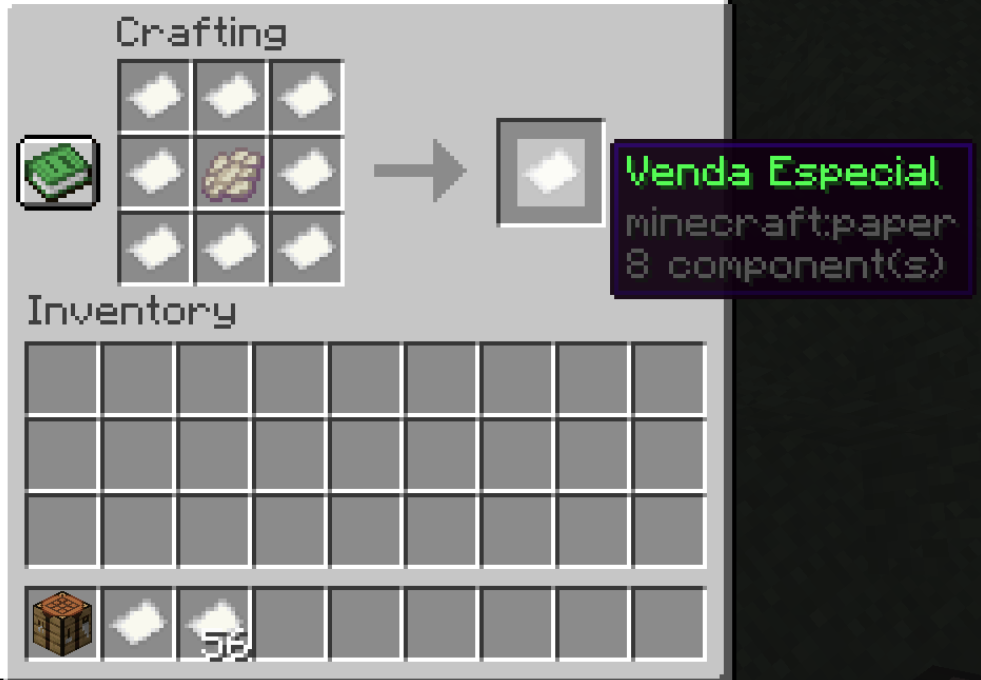

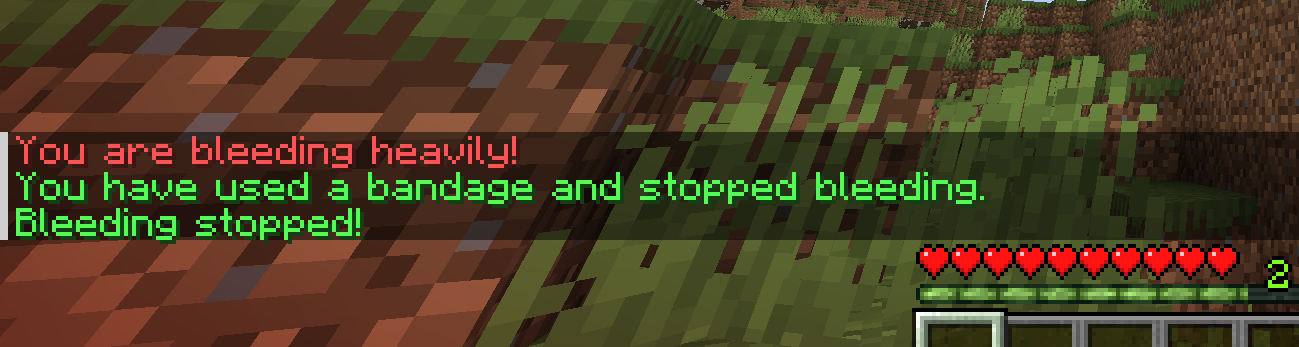
_**Bleeding and red screen**_
## Permissions
– ub.toggle : for all admin management
– ub.reload : reload the configuration
### Extra
**Supported languages:** English, Spanish, French, German, Russian, Chinease
**Inspiration:** Pixel Blood by MythicGoul
**Dependency:** [WorldBorder API](https://github.com/yannicklamprecht/WorldBorderAPI/releases) (SpigotMC) (required)
Please install version 1.XXX being XXX the root server version (If the server is in 1.20.4, XXX = 204)
If link above not working, please copy this one:
(https://github.com/yannicklamprecht/WorldBorderAPI/releases)
Ultimate Teams
UltimateTeams is a light-weight teams plugin for Minecraft servers running Spigot and most of its forks, with cross-server support, developed with optimization in mind!
UltimateTeams does offer the ability to disable friendly fire within your team and allies!
**Looking for a Player Reports plugin?**
Check my other plugin: [UltimateReports](https://modrinth.com/plugin/ultimate-reports)
## [Check the Images Gallery!](https://modrinth.com/plugin/ultimate-teams/gallery)
UltimateTeams does support H2 (preferred over SQLite), SQLite, MySQL, MariaDB (preferred over MySQL) and PostgreSQL, check the config for further information.
**All database operations are executed asynchronously, to prevent any form of lag**
## [Check the plugin Wiki!](https://ultimateteams.gitbook.io/ultimateteams-docs)
⭐ **Works Cross-Server**
The plugin will synchronize all data real-time between proxied servers using MySQL and a message broker (check the config).
⭐ **Optimization**
The whole plugin is developed with optimization in mind, and it has been tested with more than 100 active players.
⭐ **Team Enderchests**
Teams can have one or more shared enderchests with configurable slots. Admin can manage (add, remove, see, modify etc) them, and they are updated real-time between viewers to avoid dupe glitches.
⭐ **Home & Warps**
Each team can have a home and one ore more warps (check the config). Teleportation can also be handled by HuskHomes. Max warps/members can also be dynamically modified with a permission
⭐ **GUI**
Teams can be managed in a GUI. Team list can also be accessed in a paginated GUI.
⭐ **Economy**
Economy can be enabled to support features like team creation cost, team join fee, team bank…
⭐ **Team & Allies chat**
Players of each team and all its allies can talk in their dedicated channels
⭐ **Allies and Enemies**
Other teams can be marked as allies or enemies
⭐ **PlaceholderAPI**
Some placeholders are already available without requiring to download an external jar
⭐ **Admin commands**
Staff members can force players to join a team or disband another
⭐ **LuckPerms contexts**
The plugin provides context for LuckPerms such as “is-in-team”/”is-team-owner”
⭐ **HuskHomes support**
The plugin will use its own teleportation handler (even between servers if cross-server is enabled), but it supports [HuskHomes](https://modrinth.com/plugin/huskhomes) for a more seamlessly integration
⭐ **Bedrock Support**
With floodgate correctly installed, bedrock players are automatically managed
## /team command
Aliases: `/team`
The `/team` command is the main command of the plugin, with `/team` you can do the following:
* `/team create ` – Creates A new team if not already in one
* `/team disband` – If you are the team owner, this will destroy your team
* `/team leave` – If you are in a team, this will remove you from it
* `/team invite ` – Will invite a player to your team if they are not already in one
* `/team join` – Will add you to a team that you have been invited too.
* `/team kick ` – Will kick a player from your team
* `/team info` – Will display information about your current team
* `/team list` – Will list all teams in the server
* `/team prefix ` – Will change the prefix for your team in chat
* `/team ally [add|remove] ` – Will either add or remove an allied team to yours
* `/team enemy [add|remove] ` – Will either add or remove an enemy team to yours
* `/team pvp` – Will toggle the friendly fire status for your team
* `/team [sethome|home]` – Will set a team home location or teleport you or you team members to this location.
* `/team [promote|demote] ` – Will promote/demote a team member to/from team manager.
* `/team permission [add|remove] ` – Will add/remove a permission to make team managers use specific team commands.
* `/team deposit ` – deposit money into the team bank
* `/team withdraw ` – withdraw money from the team bank
* `/team fee [set/disable] [amount]` – see, disable, or set the team join fee
* `/invites ` – enable/disable invites from teams
## /teamadmin command
Aliases: `/ta`
The `/teamadmin` command is purely for server admins only.
* `/teamadmin reload` – This reloads the plugins `config.yml` & the `messages.yml` files from disk.
* `/teamadmin disband ` – This allows admins to delete any unauthorised teams.
* `/teamadmin join ` – forces a player to join a team
* `/teamadmin about` – This give you an overview of the plugin’s core information.
* `/teamadmin echest` – this command has a lot of subcommand to see, edit, delete, add, backup, rollback etc all the shared ender chests of each team
## /tc command
Aliases: /teamchat, /tchat, /tc
Used for sending messages to only players in the same team
`/tc ` – This will send a message to only the members of YOUR team or the team you are in.
## /ac command
Aliases: /allychat,
Used for sending messages to only players in allied teams
`/ac ` – This will send a message to only the members of YOUR team, the team you are in, and the players of all allied teams.
## /invites command
Used for enabling/disabling invitations
`/invites ` – This will enable/disable a player invitations status. If disabled, that player cannot be invited in a team.
**All the placeholders are listed in the wiki (link on the right panel)**
> To be able to use the placeholders, the latest release of [PlaceholderAPI](https://www.spigotmc.org/resources/placeholderapi.6245/) MUST be installed!
—
**If you like the plugin, consider donating to help me bring more features!**
**Please report any issue on GitHub.**
###### This plugin was originally based on ClansLite by Loving11ish
**Thank you for using my plugin!**
Ultimate Reports
# UltimateReports – Advanced Player Reporting System
UltimateReports is a light-weight, high-performance **player report plugin** for Minecraft servers. It offers seamless cross-server synchronization and full **Discord integration**.
Developed with optimization in mind, all database operations are **asynchronous** to ensure zero lag for your players.

[Check the Images Gallery for more previews!](https://modrinth.com/plugin/ultimate-reports/gallery)
## 🚀 Key Features
### 🌐 Cross-Server Synchronization (Bungee/Velocity)
The plugin synchronizes data in real-time between proxied servers. Using **MySQL/MariaDB** and a message broker, your moderation team can handle reports from any server in the network.
### 💬 Advanced Discord Integration
Bring your moderation to Discord. You can configure UltimateReports to:
* Send simple **Webhooks** for new reports.
* Run a full **Discord Bot** to manage and update reports directly from your Discord server.
### ⚡ Optimized Performance
Written from scratch to be lightweight. It supports extensive database options with async connections:
* **H2** (Default, preferred over SQLite)
* **MariaDB** (Recommended for performance)
* MySQL, PostgreSQL, and SQLite.
## 🛠️ Moderation Tools
* **Interactive GUIs:** View, manage, and resolve reports entirely in-game via a clean inventory interface.
* **Minecraft Dialogs:** Utilizes the new dialogs feature for supported versions.
* **Reward System:** Encourage community reporting by configuring rewards for players who submit valid reports.
* **Punishment System:** Prevent spam by putting players on cooldown if they abuse the report command.
* **PlaceholderAPI Support:** Integrated placeholders available out of the box.
* **Full Customization:** Every message and setting is configurable.
## 📜 Commands & Permissions
### Player Commands
* `/report [reason]` – Submit a new report against a player.
### Admin Commands (`/reports`)
Manage the moderation queue efficiently:
* `/reports check ` – Open the **GUI manager** for a specific report.
* `/reports comment [comment]` – Add staff notes to a report.
* `/reports notify` – Toggle staff notifications on/off.
* `/reports cooldown
—
**Thank you for choosing UltimateReports!**
*Need help? Check the [Documentation](https://ultimatereports.gitbook.io/ultimatereports-docs/) or open an issue on [GitHub](https://github.com/xF3d33/UltimateReports/issues).*