## **ANNOUNCEMENT**
– Announcements appear at specific intervals in the form of, Chat, Actionbar, Title, Bossbar, and Toast (Achievement).
– Messages are parsed using MiniMessage, meaning there is support for all vanilla chat colors and Hex color codes, as well as gradients
– Send/broadcast Messages, Titles, Action Bars, Boss Bars, and Toasts to worlds or players using commands.
– Edit auto broadcast messages in the announcer.yml file.
– The auto-broadcast feature can send messages globally.
– The auto-broadcast feature can send messages via Action bar.
– The auto-broadcast feature can send messages via Title.
– The auto-broadcast feature can send messages via Boss bar.
– The auto-broadcast feature can send messages via Toast (Achievement).
## **CUSTOM MESSAGE**
– Join & Quit and First join messages
– Join & Quit and First join action bar messages
– Join & Quit and First join title messages
– Play sound when players join or leave the server
– Customizable title delays
– Custom join MOTD messages ( Personalized Avatar )
## **MENTION SYSTEM**
– If a player’s name is mentioned by another player, they will be notified with a sound and a message!
– Notify the player with a Title/SubTitle/ActionBar (Each can be disabled in the config)
– Notify the player with a Title/SubTitle/ActionBar (Each can be disabled in the config)
– Play sound via Mention
– After being mentioned, the tone of the conversation does not change.
## **CHAT HOVER**
– All player names visible in chat, messages displayed when hovering over them, and click – – – actions, such as interaction features
– Custom hover text
– Click event (suggest, execute and open links)
– Per group hover text
– Fully configurable
## **INVENTORY DISPLAY**
– Type [item] in chat to show off the item in your hand!
– Type [inv] in chat to show off your inventory
– Type [ender] and you guessed it! Show your ender chest!
## **CHAT COLOR & NICK COLOR**
– Players can change their own chat (/chatcolor) and name (/nickcolor) colors. (minimessage – – supports this)
– Colors are fully customizable
– The menu is fully customizable
## **PLUGIN HIDER**
– Show the players only commands that they should see
– Customize or disable the /pl message
– Customize tab-completions (also subarg tab-completion)
## **COUNTDOWN TIMER**
– Start a countdown with your desired time interval
– You can start a countdown separately with the Boss bar and Action Bar.
– You can start countdowns in minutes, hours, and days.
– You can start a countdown based on a date
– MiniMessage supported text
## **MORE INFO**
– Staff Chat
– Mute Chat
– Prevent players from talking in chat.
– Prevents specific commands from being executed when chat is disabled.
– Bypass permission so staff can talk in chat.
– Chat Filter
– Anti-Spam: Block sequential messages
– Anti-Capslock: Limit use of capital letters
– Ad and Profanity Blocker: Banned word and link filter (whitelist supported).
Break one log and whole tree comes down with a great animation.
# Features
– Every tree is configurable.
– Crouch(shift) to disable.
– Required tools (any item, default: axes).
– Optimized tree detection NO LAG.
– Sapling replant.
# Video
# VERSION
This plugin should work from 1.16 to the latest version of minecraft.
# NOTE
Heavily inspired from the plugin UltimateTimber by Songoda.
I’ve made this plugin because theirs must be updated every version and they don’t do it fast.
## Join Our Discord
For **support**, **updates**, and **community discussion**, join our Discord:
[](https://discord.gg/VV4bQEdGAd)
UtilityCore
## Player Features
– Keep Inventory (balanced) – Items are kept on death, tools & armor lose 10% durability
– RTP (Random Teleport) – Teleport to a random location (configurable radius)
– /home system – Set up to 3 homes and teleport anytime
– /back – Return to your last death location
– /sit & /afk – Sit anywhere and enter AFK mode (auto spectator)
– Tree Feller – Break one log to fell the entire tree
– TPS Display – Live TPS shown above the hotbar
– Death Counter – Displays player deaths in the tab list
– /ping – Check your connection latency
## Admin Features
– /vanish – Become completely invisible (no particles, no tab list)
– /heal & /feed – Instantly heal or feed players
– /fly – Toggle flight for players
– /gui – Easy-to-use admin control panel
– Mob Stacking / XP Multiplier – Improve performance or rewards
## Additional Improvements
– Custom chat formatting
– Join & leave messages
– Night skip voting system
– Configurable anti-fall damage
– Most features toggleable via GUI
useTranslatedNames
## useTranslatedNames
JSON string replacement plugin with built-in translation name fetch function, which can be used for message replacement and translation of CoreProtect and other plugins.
## Functions and commands
– `/utn` Show plugin information and statistics
– `/utn json ` – Test JSON string
– `/utn reload` – Reload configuration
– `/utn debug [Level]` – debug mode
The plug-in will capture the corresponding server message according to the configuration, then replace the item name in it and resend the message. For details, please refer to the “Configuration” section.
### Plugin Description
Uses custom regular expressions to determine if a player’s username meets the requirements when they log into the server.
### Configuration File
“`
# Presets
# Only allow English letters (uppercase and lowercase), numbers, and underscores: ^[a-zA-Z0-9_]+$
# Only allow Chinese characters: ^[u4e00-u9fa5]+$
# Allow Chinese characters, English letters (uppercase and lowercase), numbers, and underscores: ^[u4e00-u9fa5a-zA-Z0-9_]+$
# Only allow numbers: ^d+$
# No restrictions: .*
usernameRegex: “^[a-zA-Z0-9_]+$”
kickMessage: “&cYour username contains disallowed characters. Please change it and try again.”
“`
[AVAILABLE ON HANGAR](https://hangar.papermc.io/break08/Useless-Upgrade-Teamplate)
This mod will keep the Netherite Upgrade Template but make it useless, you don’t need it to get Netherite Tools. Instead of, you can replace the template with a gold ingot; therefore, you don’t need to go to the dangerous bastion for the template and upgrading armor =)
### Note (especially 1.20.1 version)
**If the gold ingot can’t go in the template slot in smithing table when you hold Shift and click, try drag and drop in in the template slot**. Like this:
If shift + click don’t put gold ingot in template slot

### Support 26.1 and 26.2-snapshot
**Now support MC 26.1 + 26.2-snapshot (Fabric and Datapack)**

# Support removing **UPGRADE TEMPLATE** for other mods
Enderite Mod Support (1.20.1 and 1.21.11 Fabric)
Support for [Enderite Mod](https://modrinth.com/mod/enderite-mod)
No longer require **Enderite Upgrade TEMPLATE**, replace it with a **diamond** !
> [Enderite Mod](https://modrinth.com/mod/enderite-mod) by Nic4Las
> [Advanced Netherite](https://modrinth.com/mod/advanced-netherite) by Autovw
> [Reinforced Barrels](https://modrinth.com/mod/reinforced-barrels) by Aton-Kish
> [Reinforced Chests](https://modrinth.com/mod/reinforced-chests) by Aton-Kish
> [Reinforced Shulker Boxes](https://modrinth.com/mod/reinforced-shulker-boxes) by Aton-Kish
> [Traveler’s Backpack](https://modrinth.com/mod/travelersbackpack) by Tiviacz1337
Just for Fabric 1.21.11
### More supported mod:
You can suggest me mod which you want to be supported, but not all mod will be accepted. Condition (Even if all these conditions are met, some mods may not be supported):
> Popularity (10 000 downloads or above)
> Mod uses recipe that includes **NETHERITE UPGRADE TEMPLATE** or anything that is similar to **UPGRADE TEMPLATE**
Go to ISSUES tab on GITHUB (Report bugs page), create new “Issues”, choose **Enhancement** label and provide mods’ name and link.
**UseButtonHarvest** makes farming in Minecraft more intuitive and efficient. With a single **right-click**, players can instantly harvest **mature crops** — no manual breaking or replanting needed.
—
## ✨ Features
* 🌿 **One-button harvesting** — just right-click a mature crop to harvest it instantly.
* 🪓 **Tool enchantments respected** — Fortune, Silk Touch, and other effects are applied when harvesting.
* 🤫 **Optional sneak-to-harvest** — require players to **sneak** to trigger harvesting (`require_sneak` in config).
* 🌱 **All farmland crops supported** — wheat, carrots, potatoes, beetroot, and more.
* 🔥 **Non-farmland crops supported** — such as **Nether Wart** and **Cocoa Beans** (configurable).
* 🪵 **Vertical crops support** — optional handling for **Sugar Cane** with `leave_base` option to keep the bottom block intact.
* 📦 **Vanilla-friendly behavior** — using **sugar cane on sugar cane** no longer triggers harvesting, so placement still works normally.
UniversalPluginUpdater
UniversalPluginUpdater
[](https://github.com/DreamVoid/UniversalPluginUpdater/releases/latest)

[简体中文](https://github.com/DreamVoid/UniversalPluginUpdater/blob/main/README.md) | English
—
## Introduction
UniversalPluginUpdater (UPU) is a Minecraft server plugin that allows you to quickly update existing server plugins, while also providing APIs to help developers easily implement automatic update functionality for their plugins.
The development of UniversalPluginUpdater was inspired by [APT](https://wiki.debian.org/zh_CN/Apt).
## Documents and tutorials
For first-time UPU users, reading the [UPU Help Manual](https://docs.upu.dreamvoid.me/en/) can help them get started quickly. Many questions can be answered by consulting the documentation, which also includes how UPU checks for updates to other plugins.
This is just a list of some commonly used commands. For a complete list of commands, please refer to the [documentation](https://docs.upu.dreamvoid.me/en/core/commands).
| Command | Description |
| — | — |
| /universalpluginupdater (/upu) | UniversalPluginUpdater main command |
| /upu update | update list of available plugins. |
| /upu list | list all available plugins |
| /upu download | download existing plugins’ newer version by downloading. |
| /upu upgrade | upgrade existing plugins by downloading/installing newer version. |
| /upu repo | configuration file repository sub-command |
## License
[GNU General Public License v3.0](https://github.com/DreamVoid/UniversalPluginUpdater/blob/main/LICENSE)
—
[DreamVoid](https://github.com/DreamVoid), Made with ❤.
GlobalMarket
# GlobalMarket| Support multiple markets | Full configuration
A powerful GUI-based server-wide market plugin that provides players with a convenient interactive mode for item trading.
Languages Supported:
Chinese, English, Korean, French, Russian, Thai, Turkish
#### The language files are located in the [/language](https://github.com/blank038/ServerMarket/tree/master/bukkit/src/main/resources/language) directory
> **Note:**
> – Starting from **v2.7.4**, AyCore is **no longer required** as a dependency.
> – Supports Folia.
#### Plugin data from different versions are incompatible with each other and cannot be easily migrated!
—
## Features
– Global market with multiple creatable markets
– Storage support: MySQL, YAML (Future support: SQLite, PostgreSQL)
– Multilingual support: zh_CN (default), en_US
– Supports Vault, PlayerPoints, NyEconomy
– Shift + Click to remove items from market
– Price limits (max, min)
– Custom economy display name
– Market permissions (on opening)
– Tax system (sell, shout) with custom permissions
– Effective time configuration
– Store warehouse
– Blacklist (by lore, item type)
– Filter by type
– Custom GUI (display item slots, lore, custom model data, sale item slots)
– Buttons support custom commands
– Support previewing items inside Shulker Boxes
—
## Commands
| Command | Description |
|———|————-|
| `/market open [marketId]` | Open the target (or default) market |
| `/market search [marketId] [keywords]` | Search for items in the market |
| `/market box` | View the market storage box |
| `/market show` | View market information |
| `/market reload` | Reload plugin configuration files |
> **Note:** “Short command” is the `short-command` setting in the market configuration.
| Short Command | Description |
|—————|————-|
| `/(short command)` | Open the target market |
| `/(short command) sell ` | Add an item to the market |
Issue for help:https://github.com/chenasyd/Global-Market/issues
Upgraded Stair Recipes
# What this Datapack/Mod does
This makes it where you can craft stairs with only 3 planks. the below is what the crafting recipe looks like
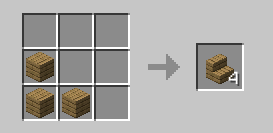
so you can craft it in you inventory
# Important
### All versions before 1.4 are unsupported and they may or may not work
if you have problems go to [The discord server](https://discord.gg/ZRTzwxD7WD)
**as you may have noticed this is pretty inactive it is mainly because nothing has really needed to be done xD**