Voicechat WorldGuard
[Modrinth](modrinth.com/project/voicechat-worldguard)
|
[Discord](https://discord.gg/yCdhVDgn4K)
|
[Wiki](https://docs.yleoft.me/voicechat-worldguard)
# Voicechat WorldGuard
Add custom WorldGuard flags for [Simple Voice Chat](https://modrinth.com/plugin/simple-voice-chat).
This small plugin provides WorldGuard region flags to control Simple Voice Chat behaviour per-region. It is intended for server software based on Bukkit APIs: Bukkit, Spigot, Paper and Folia. It does NOT support mod loaders (Fabric, Forge, etc.).
## Features
– Per-region control of voice chat behaviour for players inside WorldGuard regions.
– Simple, focused set of flags:
– voicechat-enabled — enable/disable voice in the region (boolean)
– voicechat-distance — set voice range in blocks (integer) (Voicechat 2.6.0+ required)
– voicechat-muted — mute voice in the region (boolean)
(Flags and names may be extended or changed in future versions — check the plugin’s documentation or changelog.)
## Requirements
– Java 17 or above
– WorldGuard (installed and working)
– Simple Voice Chat plugin 2.1.12 or above
– Server platforms supported: Bukkit, Spigot, Paper, Folia
## Usage
Set flags on a WorldGuard region with the standard WorldGuard commands. Examples:
– Disable voice chat in a region:
– /region flag voicechat-enabled deny
– or: /rg flag voicechat-enabled false
– Set a custom voice distance for a region:
– /region flag voicechat-distance 30
– Mute voice inside a region:
– /region flag voicechat-muted allow
– or: /rg flag voicechat-muted true
Note: WorldGuard accepts values in slightly different formats depending on version. If “allow/deny” does not work, try “true/false” for boolean flags.
## Permissions
– voicechatworldguard.bypass.* — Allows players to bypass all region voice chat restrictions.
– voicechatworldguard.bypass. — Allows players to bypass a specific flag restriction (e.g., voicechatworldguard.bypass.voicechat-enabled).
## Reporting Issues
If you find a bug or have a feature request, please open an issue on this repository: https://github.com/yL3oft/VoicechatWorlguard/issues
When reporting, include:
– Server platform & version (Spigot/Paper/Folia/etc.)
– Versions of WorldGuard and Simple Voice Chat
– Plugin version and server logs if available
Voice Chat – Global Spectator Chat
# Global Spectator Voice Chat
[](https://choosealicense.com/licenses/mit/)
A small addon for [Simple Voice Chat](https://modrinth.com/plugin/simple-voice-chat) that adds a global spectator chat.
This server-sided mod provides a dedicated communication channel for players in spectator mode. When you switch to spectator mode, you can freely communicate with all other spectators on the server, regardless of your distance, dimension, or location. The voice chat is non-positional, similar to the group functionality of Simple Voice Chat.
## Configuration
This mod provides commands to control its functionality. You need to be OP or have access to command blocks to be able to run these commands. If you are using any permission plugin, you require the `global_spectator_vc.permission.command` permission to be able to execute these commands.
### Commands
* `/spectatorchat enable`
* Enables the global spectator voice chat functionality. (Enabled by default)
* `/spectatorchat disable`
* Disables the global spectator voice chat functionality.
* `/spectatorchat groupmode `
* Changes how spectators interact with voice chat groups.
* Replace `` with one of the following options:
* `group_only`: Spectators can only hear and speak with other spectator members of their Simple Voice Chat group. Non-spectator group members will **not** hear the spectators in their own group. (Default)
* `group_plus_spectators`: Spectators can communicate with their group normally, but also hear and speak with all other spectators regardless of group.
* `spectator_only`: Spectators ignore all group functionality. They can only hear and speak with other spectators. Group functionality is effectively disabled while spectating.
## License
This project is licensed under the MIT License – see the [LICENSE](LICENSE) file for details.
Voice Bridge
# Voice Bridge
A server-side [Paper](https://papermc.io/) plugin that bridges proximity voice chat
between [Simple Voice Chat](https://modrinth.com/plugin/simple-voice-chat)
and [Plasmo Voice](https://modrinth.com/plugin/plasmo-voice), allowing players using different voice mods to hear each
other.
## How it works
Both Simple Voice Chat (SVC) and Plasmo Voice (PV) encode audio with Opus at 48 kHz, mono, 20 ms frames. Voice Bridge
intercepts audio packets from each mod’s API and relays them to the other — no transcoding required. The result is
low-latency, cross-mod proximity voice chat with minimal CPU overhead.
“`
SVC Player ──► SVC API ──► Voice Bridge ──► PV API ──► PV Player
PV Player ──► PV API ──► Voice Bridge ──► SVC API ──► SVC Player
“`
## Requirements
– Paper 1.21.4+ (or Folia)
– Java 21+
– [Simple Voice Chat](https://modrinth.com/plugin/simple-voice-chat) (server-side plugin)
– [Plasmo Voice](https://modrinth.com/plugin/plasmo-voice) (server-side plugin)
## Installation
1. Install both Simple Voice Chat and Plasmo Voice on your Paper server
2. Download `voice-bridge-.jar`
3. Place it in your server’s `plugins/` directory
4. Restart the server
## Building from source
“`shell
./gradlew build
“`
The plugin jar will be in `build/libs/`.
### Running a dev server
“`shell
# With Mojang mappings (for debugging)
./gradlew runDevBundleServer
# With obfuscation (production-like)
./gradlew runServer
“`
## Configuration
A `config.yml` is generated on first run in `plugins/voice-bridge/`:
“`yaml
bridge:
enabled: true # Enable/disable the bridge
debug: false # Enable debug logging
proximity:
default-distance: 48.0 # Default voice range in blocks
whisper-multiplier: 0.33 # Whisper range = distance * multiplier
max-distance: 128.0 # Maximum allowed voice distance
audio:
passthrough: true # Opus passthrough (recommended)
force-transcode: false # Force transcoding (not yet implemented)
“`
### Per-world distance overrides
You can override the default voice distance for specific worlds:
“`yaml
proximity:
world-overrides:
world_nether: 24.0
world_the_end: 64.0
“`
## Commands
| Command | Description |
|——————————–|—————————————–|
| `/voicebridge status` | Show bridge status, metrics, and config |
| `/voicebridge players` | List active bridged sessions |
| `/voicebridge reload` | Reload configuration |
| `/voicebridge debug [on|off]` | Toggle debug logging |
Alias: `/vb`
Permission: `voicebridge.admin` (default: op)
## Architecture
“`
┌────────────────────────────────────────────────┐
│ VoiceBridgePlugin │
├───────────┬───────────┬────────────┬───────────┤
│ SvcAdapter│ PvAdapter │ AudioRelay │ Session │
│ │ │ │ Manager │
├───────────┴───────────┴────────────┴───────────┤
│ SpatialMapper │ BridgeConfig │ BridgeMetrics │
└────────────────────────────────────────────────┘
“`
– **SvcAdapter** — integrates with Simple Voice Chat via `VoicechatPlugin`
– **PvAdapter** — integrates with Plasmo Voice via `@Addon` / `AddonInitializer`
– **AudioRelay** — central router that forwards audio frames between adapters
– **SessionManager** — tracks which mod each player is using
– **SpatialMapper** — converts between SVC float distances and PV short distances
## Known limitations
– Group/channel bridging is not supported (proximity chat only)
– Transcoding mode is not yet implemented (passthrough only)
– SVC-only players may not receive audio from PV players in some edge cases
Version Numbering Converter
# VNC (Version Numbering Converter)
Version Numbering Converter (VNC) is a Java library for working with Minecraft versions across both numbering families:
– Classic Java-style versions such as `1.20.6` and `1.21.11`
– Year-based drop versions such as `24.1`, `25.4`, and `26.1.1`
It covers two use cases:
– Pure version modeling and conversion through `MinecraftVersion`, `VersionScheme`, and `MappingTable`
– Bukkit/Paper runtime detection through `VNC`, including server constants, player version resolution, protocol lookup, and version comparisons
## Highlights
– Exact historic mappings from `1.0.0` through `1.21.11`
– Drop support for current lines such as `25.4`, `26.1`, and `26.1.1`
– Protocol lookup for exact releases and published snapshots
– A runtime bridge for Bukkit/Paper with legacy-compatible constants like `SERVER_VERSION`
– String-based comparisons that correctly handle patch-sensitive boundaries like `1.20.5`
## Core API
### 1. Parse and inspect versions
“`java
MinecraftVersion classic = MinecraftVersion.parse(“1.21.11”);
MinecraftVersion drop = MinecraftVersion.parse(“26.1”);
classic.isClassic(); // true
classic.getVersion(); // “1.21.11”
classic.getProtocol(); // 774
classic.supportsHex(); // true
drop.isClassic(); // false
drop.getVersion(); // “26.1”
drop.getProtocol(); // 775
“`
### 2. Convert between numbering schemes
“`java
String dropName = VersionScheme.MOJANG.toDrop(“1.20.3”); // “23.2”
String classicName = VersionScheme.MOJANG.toClassic(“25.2.2”); // “1.21.8”
String customClassic = VersionScheme.CROA_CUSTOM.toClassic(“25.4”); // “1.22”
String customDrop = VersionScheme.CROA_CUSTOM.toDrop(“1.22.1”); // “25.4.1”
“`
### 3. Create your own mapping scheme
“`java
MappingTable table = new MappingTable()
.registerLine(30, 1, “1.50”, “1.50.1”)
.registerMapping(“1.51”, “30.2”);
VersionScheme scheme = VersionScheme.mapped(table);
scheme.toDrop(“1.50.1”); // “30.1.1”
scheme.toClassic(“30.2”); // “1.51”
“`
### 4. Resolve protocols
“`java
Integer protocol = MinecraftVersion.protocolForIdentifier(“1.20.6”); // 766
Integer snapshot = MinecraftVersion.protocolForIdentifier(“26.2-snapshot-3”);
MinecraftVersion newest = MinecraftVersion.fromProtocol(754); // 1.16.5
List all = MinecraftVersion.versionsForProtocol(767); // 1.21, 1.21.1
“`
## Bukkit / Paper runtime API
`VNC` exposes a runtime snapshot of the current server:
“`java
MinecraftVersion server = VNC.SERVER_MINECRAFT_VERSION;
String classic = VNC.SERVER_CLASSIC_VERSION;
String drop = VNC.SERVER_DROP_VERSION;
int protocol = VNC.SERVER_PROTOCOL;
double legacy = VNC.SERVER_VERSION;
boolean modernRegistry = VNC.isAtLeast(“1.20.5”);
boolean legacyCommands = VNC.isBefore(“1.13”);
boolean inRange = VNC.isBetween(“1.19”, “1.21.11”);
“`
Player version resolution uses ViaVersion when present and falls back to the server version otherwise:
“`java
MinecraftVersion playerVersion = VNC.player(player);
if (playerVersion.supportsHex()) {
// Safe to send RGB formatting to this player
}
“`
## Why use the string helpers?
`SERVER_VERSION` is still available for compatibility with older plugins, but patch-sensitive checks should prefer:
“`java
VNC.isAtLeast(“1.20.5”);
VNC.isBefore(“1.21.9”);
VNC.compare(VNC.SERVER_MINECRAFT_VERSION, “26.1”);
“`
That avoids the common limitations of comparing versions only as `double`.
## Requirements
– Java 8+
– For the Bukkit runtime helpers: a Bukkit/Paper-compatible runtime on the classpath
– Optional: ViaVersion, if you want `VNC.player(…)` to resolve the effective client version instead of the server version
Vivecraft Spigot Extension
# Vivecraft Spigot Extensions
VSE is a companion plugin for [Vivecraft](https://modrinth.com/mod/vivecraft), the VR mod for Java Minecraft.
VSE is for [Spigot](https://www.spigotmc.org/), [Paper](https://papermc.io/software/paper) and [Folia](https://papermc.io/software/folia) servers and adds several enhancements for VR players.
# Features
– Vivecraft players will see other Vivecraft players head, arm and leg movements.
– Support for Vivecraft 2-handed archery.
– Assign permission groups for VR players.
– Fixes projectiles and dropped items from VR players.
– Shrinks Creeper explosion radius for VR players from 3 to 1.75m (Configurable)
– Reduces Mobs melee attack radius for VR players ny -0.4m (Configurable)
– Support for Vivecraft Roomscale Blocking (Toggleable)
– Support for Vivecraft Dual Wielding (Toggleable)
– Support for Vivecraft Climbey Tools (Toggleable)
– Support for Vivecraft Arrow Headshots (Configurable)
– Support for faster block breaking (Toggleable)
– Option to limit server to Vivecraft players only.
See the config.yml when you run the plugin, or the [Config](https://github.com/Vivecraft/Vivecraft-Spigot-Extension/wiki/Config) wiki entry for all available configuration options.
# Versioning
The plugins version number is split into two parts, the first part is the Vivecraft version that the plugin supports the features of, and the second part is the release version, this increments with fixes or when adding support for new Minecraft versions.
Example:
`1.3.3-0`: This version supports the features of Vivecraft `1.3.3` and is the first release for that version
# Using Proxies
When using proxy servers you might need to add a compatibility plugin to your proxy server so that our data is correctly forwarded to the spigot/paper/folia server.
A this moment we have extensions for
– BungeeCoord: [Vivecraft BungeeCord Extensions](https://github.com/Techjar/Vivecraft_BungeeCord_Extensions/releases)
– Velocity: [Vivecraft Velocity Extensions](https://github.com/Techjar/Vivecraft_Velocity_Extensions/releases)
# Metadata
VSE provides Spigot metadata on `Player` objects so other plugins can provide special support for handed interactions or somesuch. If you aren’t sure what metadata is, check the [Spigot documentation](https://hub.spigotmc.org/javadocs/spigot/org/bukkit/metadata/Metadatable.html). The API supports multiple plugins using the same metadata key, so make sure you filter to our specific plugin name (`Vivecraft-Spigot-Extension`).
For details on available data see the [wiki](https://github.com/Vivecraft/Vivecraft-Spigot-Extension/wiki/Metadata)
# API
We also have an API to access more data, like the history of all available body parts, for more details on that see the [wiki](https://github.com/Vivecraft/Vivecraft-Spigot-Extension/wiki/API).
Vivecraft Paper Extensions
# Vivecraft Paper Extensions
VPE is a companion plugin for [Vivecraft](http://www.vivecraft.org), the VR mod for Java Minecraft.
VPE is for [Paper](https://papermc.io/) servers and adds several enhancements for VR players.
## Attention
This plugin is the **fork** of the [Vivecraft_Spigot_Extensions](https://github.com/jrbudda/Vivecraft_Spigot_Extensions) project, any changes in it will be gradually transferred from it.
Information for the developers is presented in the original project.
## Differences from the original project
– Support only for Paper servers
– Using the Command API for commands instead of the old Bukkit implementation
– Removed Vault for permissions usage
and other changes in the future …
## Features
– Vivecraft players will see other Vivecraft players head and arm movements.
– Support for Vivecraft 2-handed archery.
– Assign permission groups for VR players.
– Fixes projectiles and dropped items from VR players.
– Shrinks Creeper explosion radius for VR players from 3 to 1.75m (Configurable)
– Option to limit server to Vivecraft players only.
See the config.yml for all available configuration options.
Visual Crafting
# Visual Crafting
Visualizes the crafting process
## Compatibility
Compatible with Spigot & Paper 1.16.5 – 1.21.9
## How it works
**1.16.5-1.19.3:**
The plugin downloads the Minecraft textures directly from Mojang and displays them on invisible maps. Please note that not all items and blocks can be displayed (for example stairs).
**1.19.4+:**
The plugin utilizes the new item display entities to display the items. All items and blocks are supported, even custom ones from resource packs.
## Visual Crafting compared to other similar plugins
Visual Crafting is a lightweight alternative to many other more performance intensive plugins.
* Visual Crafting does not store any items in any blocks
* Visual Crafting only supports crafting tables (for now)
* Visual Crafting utilizes invisible item frames, maps and display entities (completely client side)
* Visual Crafting does not utilize armor stands or any server side entities
* Visual Crafting is free
To sum it all up: Visual Crafting has less features than other similar plugins, but it doesn’t cause any lag and it’s completely free.
## Installation
1. Download the plugin
2. Drop the plugin into your plugins folder
3. Restart your server
4. (Optional) Configure the plugin (permission etc)
It’s that simple! On 1.16.5-1.19.3 the first start might take a little while depending on your server hardware since the plugin has to download all of the textures.
## Support
Please join my [Discord server](‘https://discord.gg/brb9eYp57E’) if you have any questions or if you encounter any bugs. That’s the only place where I will be able to help you.
## Images
Images

## Videos
Videos
(Updated version, 1.20.2, display entities)
(Old version, 1.16.5, maps)
## Donating
Want to support my work? Feel free to buy me a coffee 🙂
[GitHub Sponsors](https://github.com/sponsors/cerus)
## bStats
[](https://bstats.org/plugin/bukkit/Visual%20Crafting/14561)
This plugin is also available on [SpigotMC](https://www.spigotmc.org/resources/100552/).
VIPJoinPlus

**About VIPJoinPlus**
VIPJoinPlus is a modern, lightweight and fully customizable join & quit message plugin designed for servers that want more than just basic chat messages.
Give your VIPs and ranked players the attention they deserve with advanced formatting, gradients, HEX colors and interactive messages.
**Compatibility**
– Java 21 or higher
– Supports Spigot, Paper and Folia
**Features**
– Modern formatting with MiniMessage (gradients, HEX, hover & click events)
– Custom messages based on permissions (VIPs, ranks, etc.)
– PlaceholderAPI Support
– Async & performance-friendly
– Multiple formatting modes (MiniMessage, Legacy, Mixed)
– Configurable join & quit message delays
– Smart priority system for groups
– Fully compatible with Folia
**Commands**
– /vipjoinplus reload → Reload the configuration
**Permissions**
– vipjoinplus.reload → Allows reloading the plugin
**Why VIPJoinPlus?**
Most join/quit plugins are outdated or limited.
VIPJoinPlus focuses on modern formatting, clean configuration and real customization for VIPs and ranked players, while staying lightweight and fully compatible with modern server software.
VIP+ Chat – Advanced
### Description
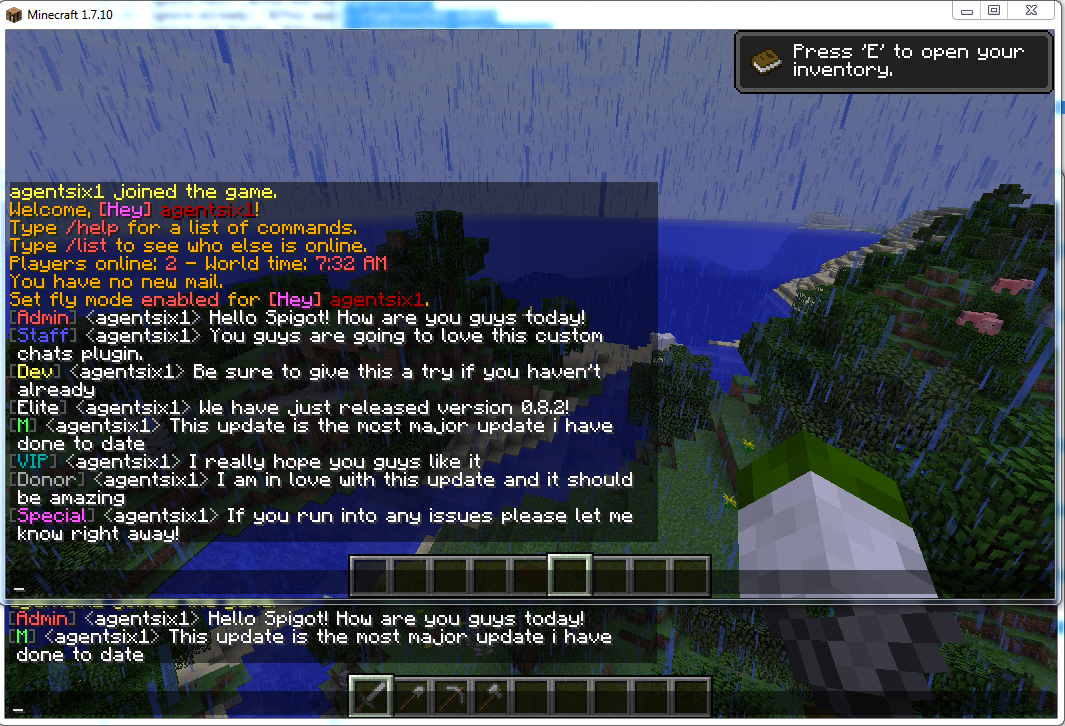
This is a very feature rich plugin that allows you to create an infinite number of private chats. The chats are configurable in a lot of ways allowing for customizations of how the chat looks and works. For additional info make sure to check out the features list down below or watch the videos about the features. The basics are worth a look just for general info!
### Screen Shots & Videos
**Basics**
**Anti Swear**
**Everything Else**
### **_Features:_**
– **Folia Support!**
– Custom Chat layout
– Ability to disable all color codes
– Permission-based chats
– Toggle Chat State
– Ignore Chat
– Blacklist ignoring chats
– Blacklist viewing chats
– Blacklist talking in chats
– Make your own custom chats
– Toggle the ability to use colors in-game
– Custom chats have multiple commands for each chat
– Check the version of the plugin
– Force players to unignore chats
– Set a custom permission node for your custom chats
– Customize most if not all the plugin messages
– Check the version of the plugin
– Allow/DIsable Ignore
– Focus on a single chat having all messages go to your chat
– chat with use of single symbol
– chat anti swear
– antiswear like words or exact words remove or replace the word
– antiswear a like word or exact words ban message
– ignore single players
– see the status of whether or not you are ignoring anything or are blacklisted
– ability to completely modify antiswear dictionaries in-game
– toggle antiswear in-game
– custom antiswear files
– list players you are currently ignoring
### Default Configs
Default config.yml – https://github.com/agentsix1/VIP-Plus-Chat/blob/main/src/main/resources/config.yml
Default chat.yml – https://github.com/agentsix1/VIP-Plus-Chat/blob/main/src/main/resources/chat.yml
### Documentation
Commands & Permissions: [Click Here](https://dev.bukkit.org/bukkit-plugins/vip-chat/pages/commands-permissions-v0-8-3/)
Config Variables: [Click Here](https://dev.bukkit.org/projects/vip-chat/pages/config-variables-v0-8-4)
### Source – https://github.com/agentsix1/VIP-Plus-Chat
Villiger Events
#  Villiger Events
 adds random events for players that stay inside village areas.
##  How It Works
– Every 5 minutes spent in a village area, one random event is triggered.
– Event chances are weighted and fully configurable in `config.yml`.
##  Included Events
–  **Emerald Gift** *(gives random emerald rewards)*
–  **Village Blessing** *(Hero of the Village + regeneration boost)*
–  **Fireworks** *(celebration fireworks around the player)*
–  **Trader Visit** *(spawns a wandering trader, optional llamas)*
–  **Patrol Skirmish** *(spawns a small pillager patrol attack)*
–  **Villager Dance Party** *(villagers spin + jump for ~15s with music)*
–  **Harvest Festival** *(boosts nearby crop growth + bread rewards)*
–  **Iron Guard Reinforcement** *(spawns iron golem defenders)*
–  **Village Feast** *(food rewards + temporary buffs)*
##  Commands
– `/villigerevents status`
– `/villigerevents status `
– `/villigerevents reload`
– `/villigerevents force `
##  Aliases
– `/villagepulse`
– `/vpulse`
– `/vevents`
##  Permissions
– `villagepulse.use`
– `villagepulse.admin`
– `villagepulse.bypass`
##  Requirements
– Java 17+
– Paper 1.20.4+ recommended
– No required dependencies