VoidSpawn+

—
# 📝 Overview
VoidSpawn is a high-performance Paper/Spigot plugin designed to automatically teleport players to safety when they fall into the void. The plugin monitors each player’s Y-coordinate and instantly teleports them to a designated spawn point when they fall below a configurable threshold.
### How It Works
1. Players fall below the configured Y-level threshold for their world
2. The plugin instantly detects the void fall
3. Players are teleported to a custom spawn point (set via `/vs setspawn`)
4. If no custom spawn exists, players are sent to the world’s default spawn
5. A smooth fade animation and sound effect enhance the experience
—
## ✨ Key Features
### 🎯 Core Functionality
– **Multi-World Support** – Configure unique Y-levels for each world
– **Custom Spawn Points** – Set specific teleport locations with exact orientation
– **Default Spawn Fallback** – Automatic fallback to world spawn if custom spawn not set
– **Optimized Detection** – Lag-free performance even with many players
### 🎨 Player Experience
– **Smooth Fade Effect** – 2-second fade-in/fade-out screen transition
– **Customizable Messages** – Full color code support with `&` formatting
– **Sound Effects** – Configurable teleport sounds
– **Cooldown System** – Prevents teleport spam and exploitation
### 🛡️ Administration
– **Permission-Based Access** – Granular control over commands and bypass
– **Hot Reload** – Update configuration without server restart
– **Per-World Configuration** – Enable/disable void protection per world
– **Minecraft 1.20+** – Full compatibility with latest versions
—
## 🚀 Installation
### Requirements
– Minecraft Server: Paper/Spigot/folia 1.20 or newer
– Java: 17 or higher
### Setup Steps
1. Download `VoidSpawn-1.0.0.jar`
2. Place the file in your server’s `plugins/` folder
3. Restart your server
4. Configure the plugin (files created automatically):
– `plugins/VoidSpawn/config.yml`
– `plugins/VoidSpawn/spawns.yml`
—
## 🎮 Commands
### Administrator Commands
| Command | Description | Permission Required |
|———|————-|———————|
| `/vs setspawn` | Sets the void spawn point for current world at your location and facing direction | `voidspawn.admin` |
| `/vs reload` | Reloads the configuration from disk | `voidspawn.admin` |
**Alias:** `/voidspawn` works identically to `/vs`
—
## 🔐 Permissions
| Permission Node | Description | Default |
|—————-|————-|———|
| `voidspawn.admin` | Access to all `/vs` commands | OP only |
| `voidspawn.bypass` | Exempts player from void detection (useful for testing) | OP only |
—
## ⚙️ Configuration
### config.yml Structure
“`yaml
# Fade Effect Settings
fade-effect-enabled: true # Enable/disable screen fade animation
# Sound Settings
teleport-sound: ENTITY_ENDERMAN_TELEPORT # Sound played on teleport (use ‘none’ to disable)
# Cooldown Settings
teleport-cooldown: 3 # Seconds before player can be teleported again
# Messages (supports & color codes)
teleport-message: “&aYou have been teleported to safety!”
spawn-not-set-message: “&eNo custom spawn set. Teleporting to world spawn…”
cooldown-message: “&cPlease wait before being teleported again.”
# World-Specific Settings
worlds:
world:
y-level: -64 # Players below this Y-level are teleported
enabled: true # Enable/disable void protection for this world
world_nether:
y-level: -64
enabled: true
world_the_end:
y-level: -64
enabled: true
“`
### Configuration Options
#### Visual Effects
– **fade-effect-enabled**: `true/false`
– Enables smooth screen fade during teleportation
– Duration: 2 seconds total (1s fade out, 1s fade in)
#### Audio Settings
– **teleport-sound**: Sound name or `none`
– Default: `ENTITY_ENDERMAN_TELEPORT`
– Must be valid Bukkit Sound enum name
– Set to `none` to disable sound
#### Anti-Spam Protection
– **teleport-cooldown**: Integer (seconds)
– Prevents repeated rapid teleportations
– Default: 3 seconds
– Helpful for preventing abuse
#### World Configuration
For each world, configure:
– **y-level**: Y-coordinate threshold (players below this are teleported)
– **enabled**: `true/false` to toggle void protection
—
## 🗺️ Setting Up Spawn Points
### Initial Setup (Required)
1. Ensure you have OP status or `voidspawn.admin` permission
2. Enter the world you want to configure
3. Stand at the exact location where players should spawn
4. Face the direction players should be facing
5. Execute: `/vs setspawn`
6. Confirmation message will appear
### What Gets Saved?
– World name
– X, Y, Z coordinates
– Yaw (horizontal rotation)
– Pitch (vertical rotation)
### Without Custom Spawn
If no custom spawn is set via `/vs setspawn`, players will:
1. Receive the `spawn-not-set-message`
2. Be teleported to the world’s default spawn point
3. Still benefit from void protection
—
## 🔧 Advanced Usage
### Multiple Worlds
Configure different Y-levels for each world type:
“`yaml
worlds:
survival_world:
y-level: -64
enabled: true
creative_world:
y-level: -128
enabled: false # Disable in creative
mining_world:
y-level: -64
enabled: true
“`
### Custom Messages
Use Minecraft color codes with `&`:
“`yaml
teleport-message: “&b&lVOID RESCUE &r&7» &aYou’ve been saved!”
spawn-not-set-message: “&e&l⚠ &7Using default spawn point…”
cooldown-message: “&c&l✖ &7Wait {cooldown}s before next teleport”
“`
### Performance Tuning
The plugin is optimized by default, but you can:
– Disable fade effects for minimal overhead
– Adjust cooldowns to reduce event frequency
– Disable in creative/spectator worlds
—
## 📊 Performance Information
VoidSpawn is built with performance as a priority:
– **Optimized Event Handling**: Only processes relevant player movement events
– **Memory Efficient**: Automatic cleanup on player disconnect
– **No Tick Lag**: Asynchronous processing where possible
– **Minimal Overhead**: Typically <1% CPU usage even with 100+ players
### Best Practices
- Set appropriate Y-levels (don't set too high)
- Use reasonable cooldowns (3-5 seconds recommended)
- Disable in worlds where void protection isn't needed
---
## ❓ Troubleshooting
### Players aren't being teleported
- Check if void protection is enabled for that world in config.yml
- Verify the Y-level is set correctly
- Ensure players don't have `voidspawn.bypass` permission
- Check server console for errors
### Spawn point not working
- Confirm spawn was set with `/vs setspawn`
- Check `spawns.yml` for the world entry
- Try setting the spawn again
- Verify world name matches exactly
### Performance issues
- Disable fade effects if experiencing lag
- Increase cooldown duration
- Check for conflicting plugins
- Review server TPS with `/tps` command
---
## 📞 Support
For bug reports, feature requests, or general support, please contact the development team.
Voidplate
## 📜 Overview
Voidplate is a lightweight Paper plugin that lets you wear armor without covering your Minecraft skin.
It permanently hides the visual appearance of armor while preserving all of its stats, enchantments, and functionality.
To others, it looks as if you’re not wearing any armor at all — but you’ll still have full protection.
## ✨ Features
– **Permanent Cosmetic Change**: Once applied, the armor’s appearance cannot be reverted.
– **Armor-Only**: Works only on armor pieces (helmets, chestplates, leggings, boots).
– **Crafting Process**: Use the smithing table with:
– A **Long Invisibility Potion** (8:00)
– Your **armor piece**
– An **Echo Shard**
to forge the hidden appearance.
– **No Resource Pack Required**: All effects are handled server-side using vanilla mechanics.
## 🛠 Installation
1. Download the latest Voidplate `.jar` from Modrinth.
2. Place it into your server’s `plugins/` folder.
3. Restart your server — no additional configuration required.
## ⚠️ Notes
– This plugin only hides the **visual model** of armor — it does not affect protection values or enchantments.
– The process is **irreversible**. Make sure you apply it to the correct item.
– Works with other cosmetic plugins unless they overwrite the same visual components.
—
VoidItemControl
# 📦 VoidItemControl | Advanced Item Management System
**VoidItemControl** is a professional, high-performance item interaction management system designed for modern Minecraft servers. It allows administrators to have full control over which items can be placed or dropped, supporting unique quest items, currencies, and special server artifacts.
### 🛠️ Key Features
* **Action Restriction System** – Precisely block **PLACEMENT** or **DROP** actions for specific items based on their material type.
* **Metadata Sensitivity** – The system recognizes items not just by material, but also by their **Display Name** and **Lore**, allowing for unique restricted items.
* **Universal Compatibility** – Designed to run smoothly on **Spigot**, **Paper**, **Bukkit**, and **Folia** engines from versions **1.8** to **1.21.x**.
* **Void Give System** – Integrated `/vic give` command allows administrators to instantly grant players items defined in the config with all metadata preserved.
* **Bypass Permissions** – A flexible permission system allowing staff or specific player groups to ignore item restrictions.
—–
### 💻 Installation & Setup
1. Download the `.jar` file.
2. Drop the file into your server’s `/plugins` folder.
3. Restart your server to generate the configuration files.
4. Customize your restricted items list and system messages in `config.yml`.
—–
### 📜〢 Configuration Example
“`yaml
############################################################
# #
# VOIDITEMCONTROL – CREATED BY KUBA_121 #
# A professional item interaction management system #
# #
############################################################
############################################################
# #
# PERMISSIONS: #
# – voiditemcontrol.admin: Access to /vic reload/give #
# – voiditemcontrol.bypass: Immune to item restrictions #
# #
############################################################
# Should the plugin notify you about new updates?
update-check: true
# Define your restricted items here
restricted-items:
# Unique identifier for the restriction (used in /vic give)
bedrock_rule:
# Material name (Bukkit name)
material: “BEDROCK”
# Optional: Block only if the item has this specific name
display-name: “&b&lVOID BEDROCK”
# Optional: Block only if the item has this lore
lore:
– “&7This item is controlled”
– “&bby the void system.”
# Actions to block
prevent-placement: true
prevent-drop: true
# Should the player be notified when an action is blocked?
notify-player: true
magic_block:
material: “COMMAND_BLOCK”
display-name: “&d&lMAGICAL COMMAND BLOCK”
lore:
– “&7This is a block”
prevent-placement: true
prevent-drop: false
notify-player: true
messages:
# The global prefix for all system messages
prefix: “&b&lVoidControl &r&8»&7”
# Sent when a player tries to place a restricted block
placement-blocked: “%prefix% &7The &bvoid &7prevents you from placing this object.”
# Sent when a player tries to drop a restricted item
drop-blocked: “%prefix% &7This item is &bbound to your soul &7and cannot be dropped.”
# Standard system notifications
no-permission: “%prefix% You lack the &bvoid power &7to do this.”
reload-success: “%prefix% Configuration reloaded &bsuccessfully&7.”
# Structure for the /voiditemcontrol help command
help-menu:
– “&8&m——–&r &b&lVoidControl Help &8&m——–”
– “&7/vic help &8- &fDisplays this menu”
– “&7/vic give [amount] &8- &fGive item”
– “&7/vic reload &8- &fReloads the configuration”
– “&8&m—————————————-”
usage-command: “%prefix% Usage: &b/vic &8<&7help&8|&7reload&8|&7give&8>”
“`
—–
### 🛡️ Support & Community
Join our **Code Hub** for technical support, bug reports, and updates.
* **Discord:** [[Join Support Server]](https://discord.gg/jdWeSJbcKx)
* **Source:** [[GitHub]](https://github.com/kuba-121/VoidItemControl)
VoidHeads
# 💀 VoidHeads | Advanced Death Trophies
**VoidHeads** is a professional, high-performance death trophy and memorial system designed for modern Minecraft servers. It enhances the survival and PvP experience by automatically dropping or placing player heads upon death, preserving the legacy of fallen warriors with precise location data and unique visual identity.
### 🛠️ Key Features
* **Smart Drop System** – Seamlessly toggle between dropping heads as a collectible **ITEM** or automatically placing them as a **BLOCK** at the exact death site.
* **Persistent Data Tracking** – Heads store the victim’s name and coordinates within Persistent Data Containers (PDC), ensuring they retain their unique data even after being broken and replaced.
* **Universal Skin Support** – Integrated profile-fetching system ensures trophies display high-fidelity player skins, compatible with both **Premium** and **Cracked** server environments.
* **Integrated Death Locator** – Lightweight JSON-based logging allows administrators to instantly trace any player’s last known death location via the `/vh locate` command.
* **Dynamic Placeholders** – Fully customizable item names and lore with support for `%player%`, `%world%`, `%x%`, `%y%`, and `%z%` placeholders.
—–
### 💻 Installation & Setup
1. Download the `.jar` file.
2. Drop the file into your server’s `/plugins` folder.
3. Restart your server to generate the configuration files.
4. Customize your head appearance and system messages in `config.yml`.
—–
### 📜〢 Configuration Example
“`yaml
############################################################
# #
# VOIDHEADS – CREATED BY KUBA_121 #
# Professional Death Head & Trophy System #
# #
############################################################
############################################################
# #
# PERMISSIONS: #
# – voidheads.locate: Access to /vh locate #
# – voidheads.admin: Access to /vh give and /vh reload #
# #
############################################################
# Action to take on death: ITEM or BLOCK
drop-mode: “BLOCK”
# Drop chance (0.0 – 100.0)
drop-chance: 100.0
# Should the head overwrite existing blocks (e.g., grass, flowers)?
overwrite-blocks: false
# Toggle all death broadcasts
broadcast-enabled: true
# — ITEM APPEARANCE —
# Placeholders: %player%, %world%, %x%, %y%, %z%
head-name: “&b&lVoid &8» &f%player%’s Head”
head-lore:
– “&8————————”
– “&7Fallen in the void of battle.”
– “&7Location: &b%world% &8| &f%x%, %y%, %z%”
– “&8————————”
messages:
prefix: “&b&lVoidHeads &r&8»&7 ”
# Command Responses
no-permission: “&cNo permission.”
reload-success: “&aConfiguration and Data reloaded!”
give-success: “&7Head granted for &f%player%”
locate-success: “&f%player% &7last died at: &b%world% %x%, %y%, %z%”
error-numbers: “&cCoordinates must be numbers!”
# Usage Messages
usage-give: “&cUsage: &7/vh give [x] [y] [z]”
usage-locate: “&cUsage: &7/vh locate ”
no-data: “&cNo death data found for player &f%player%”
# Action Messages
head-placed: “&f%player%’s &7head has been placed at &b%x%, %y%, %z%&7!”
head-dropped: “&f%player%’s &7head dropped at &b%x%, %y%, %z%&7!”
# Help menu structure
help-menu:
– “&8&m——–&r &b&lVoidHeads Help &8&m——–”
– “&7/vh help &8- &fDisplays this menu”
– “&7/vh reload &8- &fReloads the configuration”
– “&7/vh give [x y z] &8- &fGive a player head”
– “&7/vh locate &8- &fLocate the last death”
– “&bTip: &7Heads remember their data even after placing!”
– “&8&m——————————–”
“`
—–
### 🛡️ Support & Community
Join our **Code Hub** for technical support, bug reports, and updates.
* **Discord:** [[Join Support Server]](https://discord.gg/jdWeSJbcKx)
* **Source:** [[GitHub]](https://github.com/kuba-121/VoidHeads)
VoidGen










# VoidGen


VoidGen is a Minecraft plugin that enables server owners to create countless custom void worlds with a powerful and lightweight generator system. The plugin is made to handle all aspects of how you create void worlds. If you find any bug or have crashed because of the plugin, please report it at the [official Discord server](https://discord.gg/Q7yj32FMFh).
# Disclaimer
This is a fork of the original plugin, [VoidGen](https://www.spigotmc.org/resources/voidgen.25391/). This fork was created because the original developer has been inactive on GitHub, and SpigotMC. This new plugin supports the latest Minecraft versions.
# How To
Find out how to setup and use the plugin on the [Tutorial Page](https://github.com/NicoNekoDev/VoidGen/blob/master/docs/tutorial.md#tutorial-section).
# License
VoidGen is licensed under the [GNU General Public License v3.0](https://github.com/NicoNekoDev/VoidGen/blob/master/LICENSE.md).
## World Management
If you are using VoidGen for your default world and are not using any world management plugins like Multiverse, you are done here. Reload your server and the plugin should function as intended.
In case you are running a world management plugin like [Multiverse](https://modrinth.com/plugin/multiverse-core) this is important for you. If you are not using Multiverse use the corresponding commands from your plugin of choice.
You have three different choices, **Create** a world, **Import** a world and/or use the **Default world**.
### **Create**
**Use the following command, when creating a new World:**
“`html
/mv create -g VoidGen: -t FLAT
“`
– – This is the name of the world you want the plugin to work in.
– – represents the environment of the world, use “`/mv env“` to see a list of all possible environments. Most common ones are “`NORMAL“` and “`NETHER“`.
– – see [Tutorial Page](https://github.com/NicoNekoDev/VoidGen/blob/master/docs/tutorial.md#parameters) for an explanation.
– Void darkness start at around Y=64, if you want them to start at Y=0, set the “`level-type“` in the “`server.properties“` file to “`FLAT“`.
“`properties
level-type=FLAT
“`
### **Import**
**Use the following command, when creating a new World:**
“`html
/mv import -g VoidGen: -t FLAT
“`
– represents the name of the world you want to generate.
– represents the environment of the world, use “`/mv env“` to see a list of all possible environments. Most common ones are “`NORMAL“` and “`NETHER“`.
– – see [Tutorial Page](https://github.com/NicoNekoDev/VoidGen/blob/master/docs/tutorial.md#parameters) for an explanation.
### **Default world**
– We already specified the generator in the “`bukkit.yml“` file. But we also need to change the generator in our multiverse world file to:
“`yaml
generator: VoidGen:
“`
– – see [Tutorial Page](https://github.com/NicoNekoDev/VoidGen/blob/master/docs/tutorial.md#parameters) for an explanation.
Note: 🏳️🌈 This project stands firmly against any government, institution, or entity that seeks to suppress LGBTQ+ identities, deny basic human rights, or undermine the principles of freedom and dignity for all. Equality and self-expression are non-negotiable human rights, and any attempt to diminish them—whether through legislation, censorship, or social discrimination—must be recognized as a violation of justice and opposed without compromise. 🏳️🌈
VoidDeath
# 🌀 VoidDeath | Hardcore Dead-Ban System
**VoidDeath** is a professional, high-performance solution for Hardcore Minecraft servers. It provides a seamless way to manage player deaths by implementing a customizable “Dead-Ban” system, ensuring your server maintains its high-stakes environment without unnecessary overhead.
### 🛠️ Key Features
* **Customizable Ban Duration** – Set exactly how long a player should be banned after death (e.g., 24h, 7 days, or permanent).
* **Performance Optimized** – Built with a “Void-First” mindset. Minimal impact on TPS, even with high player counts.
* **Clean Death Messages** – Professional, customizable death announcements to inform the community.
* **Admin Bypass** – Operators can be exempted from the dead-ban system for testing and management.
—
### 💻 Installation & Setup
1. Download `.jar` file.
2. Drop the file into your server’s `/plugins` folder.
3. Restart your server to generate the configuration files.
4. Customize your settings in `config.yml`.
—
### 📜〢 Configuration Example
“`yaml
############################################################
# #
# VOIDDEATH – CREATED BY KUBA_121 #
# A professional death-ban event system #
# #
############################################################
############################################################
# #
# PERMISSIONS: #
# – voiddeath.admin: Access to /voiddeath reload, #
# /deadlist, /cleardeadlist #
# – voiddeath.revive: Access to /revive #
# – voiddeath.bypass: Immune to death-ban #
# #
############################################################
# Ban duration after death (e.g., 30s, 10m, 2h, 1d, perm)
ban-duration: “perm”
# Should administrators (voiddeath.bypass) be exempt from the ban?
admin-bypass: true
messages:
# The global prefix for all system messages
prefix: “&4&lVoidDeath &r&8»&7”
# Message sent to all players when someone dies
elimination-broadcast: “%prefix% &f%player% &7was consumed by the darkness.”
# The screen shown to players when they try to join while banned
# Placeholders: %time% (remaining duration), %prefix%
kick-message:
– “&4&l● ELIMINATED ●”
– “”
– “&8Your soul has left this world.”
– “&7Status: &4Death Ban”
– “”
– “&8Return will be possible in: &f%time%”
– “”
– “&8&oCheck our Discord for more information.”
# Structure for the /voiddeath help command
help-menu:
– “&8&m——–&r &4&lVoidDeath Help &8&m——–”
– “&7/voiddeath help &8- &fDisplays this menu”
– “&7/voiddeath reload &8- &fReloads the plugin”
– “&7/revive &8- &fRevive an eliminated player”
– “&7/deadlist &8- &fShow all eliminated players”
– “&7/cleardeadlist &8- &fClear the entire database”
– “&8&m——————————–”
# Correct command usage messages
usage-voiddeath: “%prefix% Usage: &4/voiddeath &8<&7help&8/&7reload&8>”
usage-revive: “%prefix% Usage: &4/revive &8<&7player&8>”
# Standard system notifications
no-permission: “%prefix% You lack the &4void power &7to do this.”
revive-success: “%prefix% &f%player% &7has been &4brought back &7to life.”
revive-not-found: “%prefix% &4%player% &7is not currently dead.”
list-empty: “%prefix% The void is currently empty.”
reload-success: “%prefix% Configuration and data &4reloaded &7successfully.”
# Styling for the /deadlist command
list-header: “&4&lELIMINATED PLAYERS LIST”
list-item: “&8• &f%player% &8(&4%time%&8)”
# Database and time formatting
clear-success: “%prefix% The elimination database has been &4purged&7.”
time-perm: “&4&lFOREVER”
“`
—
### 🛡️ Support & Community
Join our **Code Hub** for technical support, bug reports, and updates.
* **Discord:** [[Join Support Server]](https://discord.gg/jdWeSJbcKx)
* **Source:** [[GitHub]](https://github.com/kuba-121/VoidDeath)
—
VoidChat+
# 💬 VoidChat+ | Advanced Communication
**VoidChat+** is a professional, high-performance communication solution for modern Minecraft servers. It provides a complete chat management system by splitting communication into local and global channels, while maintaining top-tier security with integrated Anti-Swear and Anti-Bot mining requirements.
### 🛠️ Key Features
* **Dual-Channel System** – Seamless transition between local (proximity-based) and global communication (using the `!` prefix).
* **Infinite Local Mode** – Configure local chat range to `-1` to cover the entire world or dimension, perfect for specialized survival modes.
* **Anti-Bot Security** – Unique system requiring new players to mine a specific amount of blocks before they are granted the ability to chat.
* **HEX & PAPI Support** – Full support for modern HEX colors and PlaceholderAPI integration for dynamic, beautiful chat formats.
* **Admin Chat Spy** – Allows staff members to monitor local conversations to ensure community guidelines are followed.
—–
### 💻 Installation & Setup
1. Download the `.jar` file.
2. Drop the file into your server’s `/plugins` folder.
3. Restart your server to generate the configuration files.
4. Customize your settings and word filters in `config.yml`.
—–
### 📜〢 Configuration Example
“`yaml
############################################################
# #
# VOIDCHAT – CREATED BY KUBA_121 #
# Professional local & global chat system #
# #
############################################################
############################################################
# #
# PERMISSIONS: #
# – voidchat.use: Access to basic commands #
# – voidchat.reload: Access to /voidchat reload #
# – voidchat.admin: Access to Admin/Spy/Clear/Toggle #
# – voidchat.color: Ability to use & and HEX colors #
# – voidchat.bypass: Bypass block break requirement #
# – voidchat.globalbypass: Bypass global cooldown #
# #
############################################################
# — GENERAL SETTINGS —
# Time in seconds for global message (!) cooldown.
# Bypass this with voidchat.globalbypass permission.
global-message-cooldown: 30
# Distance in blocks for the local chat.
# Set to -1 for infinite range (everyone in the world hears you).
local-chat-range: 100.0
# Number of blocks a player must break before they can use the chat.
blocks-required: 10
# Should the block requirement be active?
chat-requirement-enabled: true
# — ANTI SWEAR —
anti-swear:
# List of words that will be replaced with ****
banned-words:
– “badword1”
– “badword2”
– “badword3”
# — CHAT FORMATTING —
# You can use Placeholders from PAPI (if installed) using %placeholder%
# {player} and {message} are internal placeholders.
# Format for global chat (triggered by ! at the start)
global-format: “&a&lGLOBAL &r&8»&7 {player}: {message}”
# Format for local chat (based on range)
local-format: “&e&lLOCAL &r&8»&7 {player}: {message}”
# — SYSTEM MESSAGES —
messages:
# The global prefix for all system messages
prefix: “&b&lVoidChat &r&8»&7”
# Error when player lacks required permissions
no-permission: “%prefix% You lack the &bvoid power &7to do this.”
# Notification for successful config reload
reload-success: “%prefix% Configuration &bpurged &7and &breloaded &7successfully.”
# Message when no one is in range for local chat
no-one-in-range: “%prefix% &7The void is silent. No one is close enough to hear you.”
# Requirement message. Use {blocks_required} for remaining count.
requirement-not-met: “%prefix% &7Your voice is weak. Break &b{blocks_required} &7more blocks to speak.”
# Global chat cooldown notification
global-cooldown: “%prefix% &7The void needs &b{time_remaining}s &7to resonate again.”
# Admin Spy mode toggles
admin-enabled: “%prefix% &bAdmin Spy &7is now &aactive&7. All whispers are yours.”
admin-disabled: “%prefix% &bAdmin Spy &7has been &cdisactivated&7.”
# Global mute notifications (self-toggle)
global-muted: “%prefix% &7You have &cclosed &7your ears to the global void.”
global-unmuted: “%prefix% &7You can now &ahear &7the global resonance again.”
global-muted-error: “%prefix% &cYou cannot speak while your global ears are closed.”
# Chat Management (Clear & Toggle)
chat-cleared: “%prefix% &7The chat has been &bpurified &7by &b{player}&7.”
chat-toggled-on: “%prefix% &aGlobal resonance has been restored. Chat is now enabled.”
chat-toggled-off: “%prefix% &cThe void has been silenced. Chat is now disabled.”
chat-disabled-error: “%prefix% &cThe chat is currently suppressed by an administrator.”
# Command usage and help
usage-voidchat: “%prefix% Usage: &b/voidchat &8<&7help/reload/admin/clear/toggle&8>”
only-players: “%prefix% &cOnly those with a physical form can use this command.”
# Help menu structure
help-menu:
– “&8&m——–&r &b&lVoidChat Help &8&m——–”
– “&7/voidchat help &8- &fDisplays this menu”
– “&7/voidchat reload &8- &fReloads the configuration”
– “&7/voidchat admin &8- &fToggle Admin Spy mode”
– “&7/voidchat clear &8- &fClear the chat history”
– “&7/voidchat toggle &8- &fEnable or disable the chat”
– “&7/global &8- &fSend a global message”
– “&bTip: &7Use &b!message &7or &b/g &7for global!”
– “&8&m——————————–”
“`
—–
### 🛡️ Support & Community
Join our **Code Hub** for technical support, bug reports, and updates.
* **Discord:** [[Join Support Server]](https://discord.gg/jdWeSJbcKx)
* **Source:** [[GitHub]](https://www.google.com/search?q=https://github.com/kuba-121/VoidChat)
Voidblock’s Better Hardcore
Voidblock’s Better hardcore is A minecraft paper plugin that adds:
Ban on death
Localized chat (Chat messages,Leave messages/join messages and death messages)
Only Players in a 180 block raidius can recive
This Plugin is inspired from unstable Smp
Note: When you download the plugin the plugin is called VoidSmp the reason for that is
that this plugin was originaly meant to be for my smp Renaming the plugin will break it
and i will have to rewrite it this will be fixed in future updates.
Please Report bugs in [Discord](https://discord.gg/wJ6U9NYGZZ)
VoiceServer
🎙️ VoiceServer – Powerful Group Management for Simple Voice Chat
VoiceServer is a lightweight yet advanced plugin that makes managing
Simple Voice Chat groups effortless.
With intuitive commands offering full tab completion, you can organize, secure,
and monitor voice chat groups in real time — perfect for servers hosting events,
teams, or dynamic player structures.
Fully compatible with Folia, Paper,
Spigot and Bukkit, supporting Minecraft versions from
1.8.8 up to 1.21.x.
Open Source:
https://github.com/Jakomi1/VoiceServer
🚀 Key Features
-
📋 List all voice chat groups
View all active Simple Voice Chat groups, including those with password protection.
Groups with passwords show [locked] instead of revealing the password.
-
🆕 Create new groups with optional persistence or password protection
Groups can be created as persistent or non-persistent.
Persistent groups may optionally be secured with a password.
-
🧑🤝🧑 Join players to existing groups
The join command supports selectors like
@a, @s, @r, and @p.
The internal playerGroupMap ensures group state consistency.
-
❌ Remove players from groups
Players can be removed from their current group using selectors.
The kick subcommand no longer requires an explicit group argument.
-
🗑️ Safely delete groups
Non-persistent groups are automatically deleted when empty.
Persistent groups remain until manually removed.
-
🛡️ Access control via permissions
All group management commands are protected by
voicechat.group.manage.
-
⚡ Full tab completion support
Commands, players, selectors, group names, and quoted arguments support
Folia-safe tab completion.
-
📌 Persistent groups
Persistent groups remain available even after all members leave,
making them ideal for staff, admin, or permanent team channels.
-
🔁 Persistent groups across restarts (optional)
A new configuration option
persistent-groups-should-survive-restart
allows persistent groups to survive restarts or reloads
(default: false).
-
➖ Create empty groups
Using @null with
/vcgroup create
allows creating a group without any players initially.
-
🐞 Debug logging and safe error handling
Clear messages and robust error handling ensure high stability.
-
ℹ️
/vcgroup info command
Displays the group type, persistence, lock status, and current members.
-
⚙️ Automatic handling of empty non-persistent groups
Non-persistent groups are removed automatically when the last player leaves.
-
🔧 Per-player VoiceChat permission system (
/vcpermission)
Fully custom per-player permission management for Simple Voice Chat:
listen — listen in voice chatspeak — speak in voice chatgroup — create or join voice groups
Permissions support give, remove,
default, and reset,
are stored in config.yml,
survive restarts, and are applied live.
-
✅ Fixed
/vcpermission command
The permission system is now fully functional and reliably enforced.
-
🔌 Broad platform compatibility
Fully compatible with Bukkit, Spigot, Paper, and Folia
from Minecraft 1.8.8 up to 1.21.x.
🧭 Commands
/vcgroup list
Lists all voice chat groups and marks password-protected groups with [locked].
/vcgroup create <player|@a|@s|@r|@p|@null> <type> "<group_name>" [persistent|not-persistent] ["password"]
Creates a new group. Using @null creates an empty group.
/vcgroup join <player|@a|@s|@r|@p> "<group_name>"
Moves players into an existing group.
/vcgroup kick <player|@a|@s|@r|@p>
Removes players from their current group.
/vcgroup remove "<group_name>"
Deletes a voice group and removes all members.
/vcgroup info "<group_name>"
Shows detailed information about a group.
🔐 /vcpermission — Voice permission management
/vcpermission give <player> <listen|speak|group>
Grants a voice permission and applies it live.
/vcpermission remove <player> <listen|speak|group>
Revokes a voice permission and updates the player instantly.
/vcpermission default <listen|speak|group> <true|false>
Sets global default values (defaults are true).
/vcpermission reset
Resets the entire permission system to factory defaults.
⚙️ Configuration
No setup required. Install VoiceServer alongside
Simple Voice Chat and start using it immediately.
All permission data and persistent group settings are stored in config.yml.
The plugin automatically migrates old keys and ensures a stable config structure.
⚠ Requirements
- Minecraft: 1.8.8 – 1.21.x
- Server: Folia, Paper, Spigot, Bukkit
- Dependency: Simple Voice Chat (Mod + API)
- The plugin must load after Simple Voice Chat.
💡 Example Use Cases
- Create dynamic voice groups for events, PvP, or minigames.
- Maintain permanent staff or admin voice channels.
- Use password-protected private groups without exposing passwords.
- Control who may listen, speak, or join groups on a per-player basis.
🧑💻 Developer Notes
- Developed by Jakomi1.
- Fully open source and community-friendly.
- Direct integration with
VoicechatServerApi.
- Single PermissionAttachment per player (no duplication or leaks).
- Live permission updates without reloads.
- Folia-safe scheduling, selectors, and tab completion.
- Automatic creation of a minimal
config.yml if missing.
Voice Messages
# Voice messages
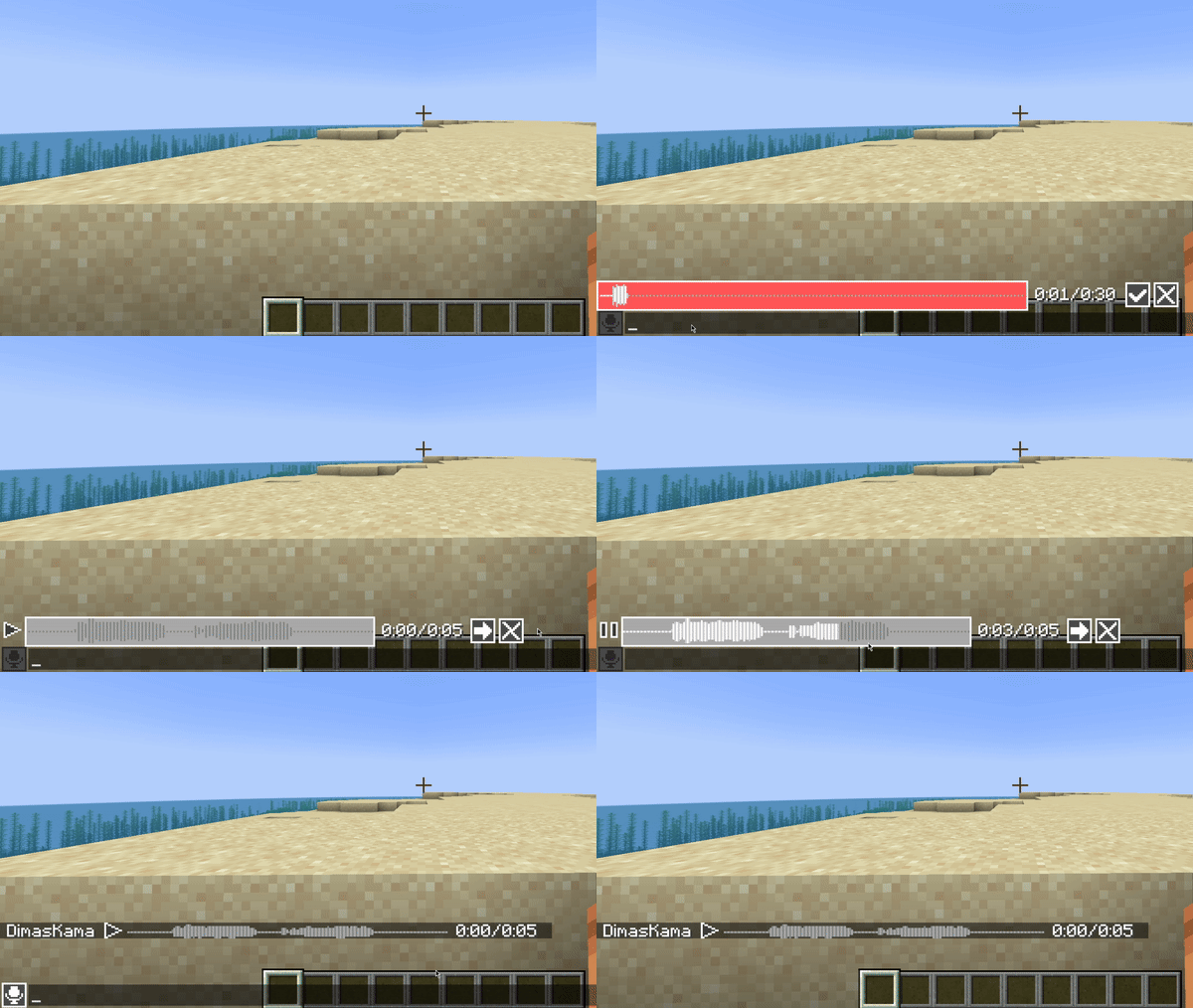
Mod and plugin that adds voice messages to the Minecraft.
Requires [Simple Voice Chat](https://modrinth.com/plugin/simple-voice-chat) installed.
## Good to know
This mod must be installed both on server and client to work. If a player does not have this mod installed, he will not see voice messages.
This mod uses the microphone configured in Simple Voice Chat with all its settings. So make sure that `Voice Amplification` in Simple Voice Chat settings is not set to `-100%`.
Also, if voicechat sounds are disabled, you will not hear voice messages.
## Private voice messages
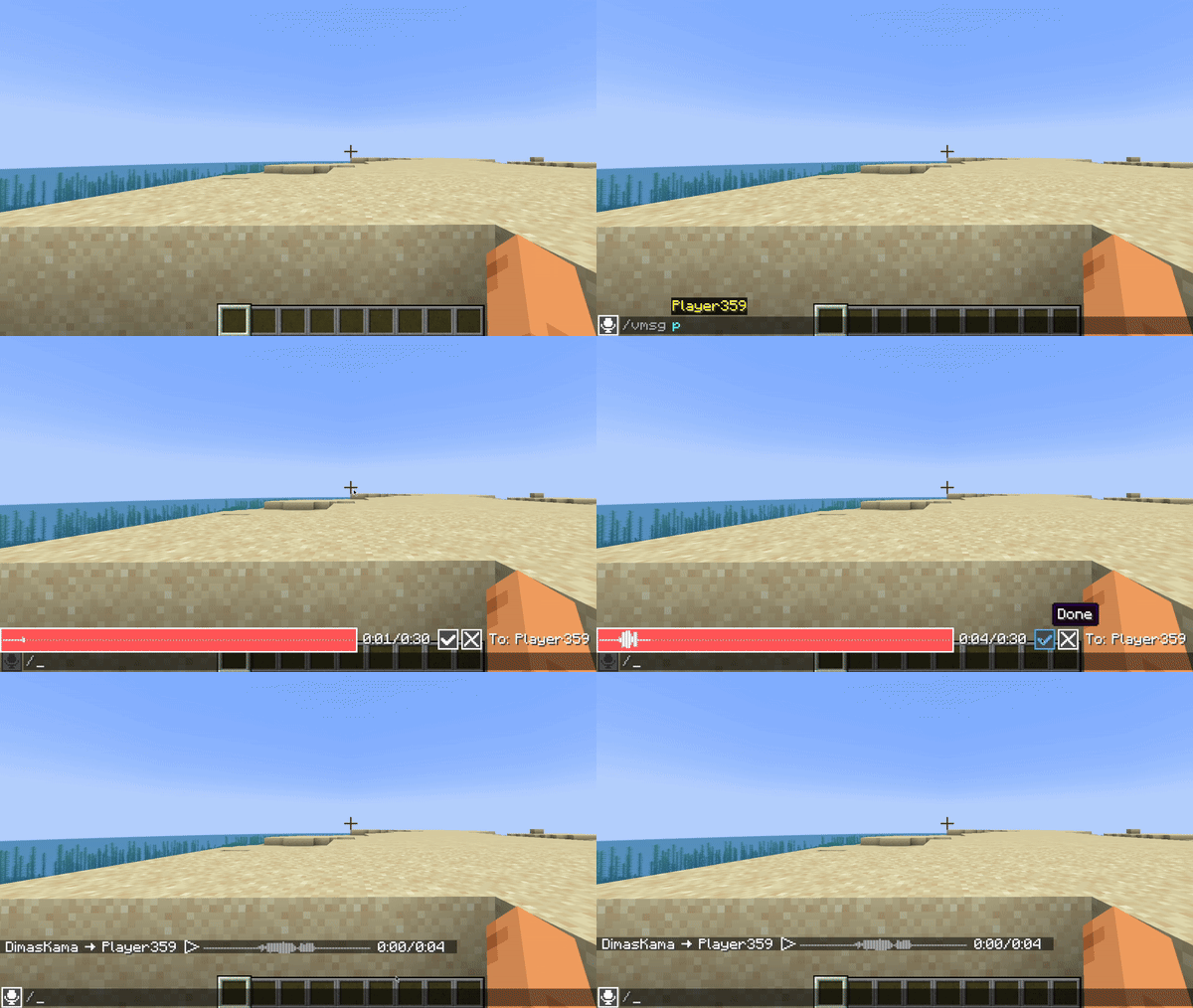
You can send private voice messages to players or to your team with `/voicemsg ` or `/vmsg ` commands.
Note that server can restrict you from sending them by permissions
## Setup on server
### Config
Server config is located in `config/voicemessages_server.json`
Here are the default values with their descriptions:
“`
{
“max_voice_message_duration_ms”: 90000, // The maximum voice message length in milliseconds in range [3_000;300_000]
“voice_message_spam_punishment”: “none”, // The punishment for sending a voice message longer than the time elapsed since the sending previous one. Possible values: “none”, “prevent”, “kick”
“voice_message_invalid_punishment”: “prevent”, // The punishment for sending an invalid voice message (longer than maximum configured) or sending a voice message without permission for it. Possible values: “none”, “prevent”, “kick”
“mod_required”: false, // If true, joining players will be kicked if they don’t have this mod installed
“mod_not_installed_text”: “VoiceMessages is not installed or is of an old version” // The kick message for players that don’t have this mod installed
}
“`
### Permissions
– `voicemessages.send` – permission to send voice messages. Default: `true`
– `voicemessages.send.all` – permission to send voice messages to global chat. Default: `true`
– `voicemessages.send.team` – permission to send private voice messages to player’s team. Default: `true`
– `voicemessages.send.players` – permission to send private voice messages to players. Default: `true`
## API
This mod has its own API.
Setup in `build.gradle`:
“`
repositories {
// Other repositories
maven {
name “dimaskama”
url “https://maven.dimaskama.net/releases”
}
}
dependencies {
// Other dependencies
// Voice Messages API
compileOnly “ru.dimaskama.voicemessages:voicemessages-api:${voicemessages_api_version}”
}
“`