Zoom-o-Matic

A simple, but customizable multi-button zoom tool for Minecraft.
It allows for up to 3 keybinds with customizable zoom and on / off smooth camera.
_This mod is for learning most of all, feel free to use it, but its biggest purpose is learning and teaching to mod fabric._
# Documentation for Learning Fabric
While we are certaintly not experts on fabric, we would like to share our journey and in a hope that it can help others get started with learning fabric modding and Java.
As such, we are currently working (in progress) on a detailed commentary of the code. In the future we may work towards a tutorial either written or video based on feedback.
[Find the code commentary here.](https://github.com/NicoIsLost/Zoom-o-Matic/blob/main/docs/COMMENTARY.md)
# Usage
## To install
After fabric mod loader has been installed for the correct version place the latest Zoom-o-matic release with compatible dependencies in the .minecraft/mods folder.
## Dependencies
Fabric Mod Loader (Install to use)
https://fabricmc.net/use/installer/
Fabric API (Place in mod folder)
https://github.com/FabricMC/fabric
owo-lib (Place in mod folder)
https://github.com/wisp-forest/owo-lib
## Using the Mod
**The default Zoom 1 Keybind is “c” which is already bound, so you need to unbind “Save Hotbar Activator” or bind zoom1 to another key to make the mod work.**
### Mod Menu
The mod is registered in mod menu, so you can adjust settings through that GUI if you desire, otherwise you can use commands.
### Keybinds
Are found in the Zoom-o-Matic section of the normal minecraft keybind menu.
Options -> Controls -> Keybinds
### Scroll Zoom
When zooming you can scroll in or out with your mousewheel to zoom more or less.
### Zoom Amount
Adjusts the amount of zooming, with
`/ZoomO ZoomAmount Zoom_X YY`
– **X** = Zoom Keybind #, (1, 2, or 3.)
– **YY** is the % zoom, (1 – 99)
### Smooth Camera Toggle
Toggles whether smooth_camera should be active when zooming, which slows down movement.
`/ZoomO SmoothCamera Zoom_X YY`
– **X** = Zoom Keybind #, (1, 2, or 3.)
– **YY** true/false
### Scroll Zoom Text Toggle
Toggles whether you have the % zoom displayed in text when using the scroll wheel.
`/ZoomO ActionBarWriting XX`
– **XX** = true/false
# About This Mod & Plans
This mod is meant to be a place to learn how to mod fabric mods for minecraft. This our first mod, so we know it’s not 100% perfect, but that’s not the point.
The goal is to optimize it, make it better, and improve the features in order to help learn more about modding.
## Here is a list of improvements we would like to make, in order of want:
– Remove owo dependency – i.e. Create a world-independent data saving system.
– ~~Add scrolling zoom~~ (done)
– Add a custom, customizable smoother,
– Add a custom GUI
– Add more keybinds (including more keybinds, via GUI)
– Add animations
– Presets like easing.
– Add customizable animations
# Credit
**@Fej1Dev** has been hand and hand in this entire process, coding large portions himself, and helping me when I get stuck with my portions!
**@LogcialGeekBoy** & [Logical Zoom](https://github.com/LogicalGeekBoy/logical_zoom) – Some of the code used in this mod (mainly the mixin) was from Logical Zoom, but more importantly was that his mod inspired us to make our own.
Zoom Katanas

May not be fully balanced! However, many values are configuable.
Adds 10+ weapons all with special abilities, special consumables, enchants, effects, and a miniboss.
If you’re looking for more weapons and variety, this mods adds may unique weapons each with unique abilities to spice up gameplay. See weapon abilities spoiler or gallery. More to come in the future!
Some of the weapons were inspired by Hypixel Skyblock
No known incompatabilties yet.
Please do comment any issues or suggestions on my [Curse Forge](https://www.curseforge.com/minecraft/mc-mods/zoom-katanas) Page.
Thanks to [Shade](https://opengameart.org/users/shade-1), [Kyrise](https://opengameart.org/users/kyrise), [Josehzz](https://opengameart.org/users/josehzz), and [ARoachIFoundOnMyPillow](https://opengameart.org/users/aroachifoundonmypillow) for the item icons!
Sorry for slow updates, I am currently busy in college :).
Weapons (Tier 1):
Spoiler
Flash: Upon use, the player dashes forward. If there is a mob in the way, the mob takes damage and turns the player around.
Aura: Attacks all mobs around the player in a range.
Ghost Fury: Teleports to nearest mob and applies glowing other nearby mobs.
Necron: Applies wither to nearby mobs. Upon use, doubles the amplifier.
Ephemeral: Attacks mobs through walls
Weapons (Tier 2):
Spoiler
Blights Embrace: Curses the user with Wither (toggleable). Does the most damage (12) of all other weapons. Causes mobs around the player to be inflicted with Wither II. Shoots a wither projectile that applies Wither IV for 10 seconds and Slowness II and Weakness II for 6 seconds.
Eclipse: Attacks all mobs in a given range. It will create 2 circles, where the mobs in the outer circle take the regular amount of damage, and mobs inside the inner circle take double damage.
Implosion: Dashes forward and creates an explosion at the player (player does not take damage from explosion, nor destroy blocks).
Seraphim: Heals and applies regeneration all non-hostile mobs and players nearby. Applies resistance and absorbtion II for 5 seconds and invulnerbility for 1 second only to player wielding the weapon.
Shadow Rage: Teleports to and applies damage to 3 mobs and glowing to other nearby mobs.
Specter Fang: Attacks mobs through walls. At the end of the range, it creates a small explosion, dealing high knockback.
Weapons (Tier 3)
Spoiler
These tier 3 require a rare ore called Luminite. Luminite can be crated into Shadow Orbs and Luminite Cores. Combined with a Katana Upgrade Template, tier 2’s can be upgraded into tier 3’s via smithing table.
Elysium: Heals the player to full health and applies regeneration all non-hostile mobs and players nearby. Applies resistance and absorption II for 5 seconds and invulnerbility for 2 seconds only to player wielding the weapon.
Lucifer: Does the most damage of all tier 3 weapons (20 damage), but reflects half of the attack damage back upon the wielder. Grants strength 1 for 3 seconds upon right click.
Shatter: Dashes forward, creating multiple, smaller explosions around the player within 8 blocks.
Hyperion: Dashes forward, creating a large, powerful explosion.
The Giant Sword: Summons a giant sword from the sky to slam down. Deals 10 magic, armor-piercing damage.
Kraken: Attacks all mobs surrounding the player, binding them and slowing them down.
Swift Death: Teleports to one mob with a high damage multiplier. Grants the player speed, haste, and invisibility.
Necromancer Lord: Teleports to three mobs dealing damage. On mob death, summons a friendly ghost to assist the player.
Vortex: Pulls mobs from around the player, granting the player resistance and weakness to the mobs.
Twin Fang: Shoots a wall-piercing beam infront of the player and behind the player. Summons an explosion at the end of the beams.
More to come!
Effects & Pills:
Spoiler
Pills:
All pills require the Refined Pill Base. Craft the regular Pill Base and then smelt it to get the Refined Pill Base.
Antidote Pill: Grants Immunity effect for 1 minute
Enhancement Pill: Grants absorbtion, strength, speed, jump boost, and regeneration I for ten seconds.
Major Enhancement Pill: Grants absorbtion, strength, speed, jump boost, and regeneration II for a minute.
Lumious Pill: Grants sensing for 5 minutes.
Steel Pill: Grants, resistance, strength, and robust II for 2 minutes.
Effects:
Invulnerbility: Player cannot take damage.
Sensing: Mobs within 15 blocks are affected with glowing.
Immunity: Player cannot be afflicted with poison or wither.
Crippled: Mobs lose one attack damage.
Broken Armor: Mobs lose two armor and armor toughness.
Blood Lust: Player gains one attack damage.
Robust: Grants 0.2 knockback resistance.
Shielding: Only obtained from the Shatter Weapon. Grants 4 armor.
Bound: Binds the mob, making it unable to move. Then applies slowness when the effect ends.
Enchants:
Spoiler
These custom enchants can only be obtained from gems found thoughout the world. Equip the gem in the offhand and have a sword in the main hand. Then, right click. Has a chance to grant an enchantment or fails and crumbles. NOTE: Currently only Common Gems exist. More will come as I develop the mod.
Blood Lust: Upon kill, grant the player Bloost Lust effect for 10 seconds.
Blunting: Afflicts Broken Armor Effect for 10 seconds.
Crushing: Upon crit, has a 6% chance to afflict Crippled effect.
Experience: Upon a hit, has a 50% chance to spawn XP.
Tangle Vines: Upon a hit, afflicts Slowness I for 10 seconds. Has a 10% chance to double the amplifier and duration.
Venomous: Afflicts Poison I for five seconds.
Future Plans:
Forge Port
Magic scrolls
A Discord server (if I get popular enough)!
Zoom
# Zoom
This datapack allows players in a server or singleplayer-world to zoom in by sneaking after activating the “Zoom Mode” with a “`/trigger zoom“` command.
## Datapack Video:
With a lot of Settings you can customize how the players from your server can zoom in:
_____________________________________________________
Use: “`/function zoom:config“` to open this menu:
### –Config–
###
### Scroll Zoom: [True] [False]
### Zoom Strength: [25%] [50%] [75%] [100%]
### Appearance Mode: [Header] [Middle] [Bottom] [Off]
### Notification: [True] [False]
______________________________________________________
## Copy Rules:
_You are allowed to download and modify this datapack,
You are NOT allowed to upload it anywhere except for the link to this page!_
Zones
# Zones
This plugin allows server administrators and players to create and manage protected regions within their Minecraft
world. It provides a flexible system for defining areas, setting permissions, and controlling interactions within those
areas.
## Features
* **Region Creation:** Create regions using in-game selection or manual coordinates.
* **Sub-Regions:** Create sub-regions within existing regions for more granular control.
* **Permission Management:** Set detailed permissions for players within regions, controlling actions like breaking,
placing, interacting, and more.
* **Member Management:** Add and remove members from regions with specific permissions.
* **Region Overlap Control:** Configure whether regions can overlap.
* **Bypass Permissions:** Allow specific players to bypass region restrictions.
* **Configuration:** Customize messages and region settings through configuration files.
* **Beacon Visualization:** Visualize selected regions using temporary beacons.
## Commands
The plugin provides the following commands:
* `/zone create`: Creates a new region using the currently selected locations.
* Usage: `/zone create`
* Requires two locations to be selected using left and right click, starts selection if not present.
* Prevents creation if the new region would overlap an existing region, unless the `zones.create.overlap`
permission is set.
* `/zone subcreate`: Creates a new sub-region within an existing region using the currently selected
locations.
* Usage: `/zone subcreate [regionKey]`
* `regionKey` is optional, if not provided, the region at the player’s location will be used.
* Requires two locations to be selected using left and right click, starts selection if not present.
* Player needs to be considered an admin in the region, or have the `zones.subcreate.other` permission
* `/zone delete`: Deletes an existing region.
* Usage: `/zone delete `
* Requires the `regionKey` of the region to be deleted.
* Player needs to be the owner of the region, or have the `zones.delete.other` permission
* `/zone expand`: Expands an existing region by a specified amount.
* Usage: `/zone expand [overlap]`
* Player needs to be an admin of the region, or have the `zones.expand.other` permission
* If `overlap` is set to `true` and the player has the `zones.expand.overlap` permission,
* the region will be expanded even if it overlaps with other regions.
* `/zone info`: Displays information about a region.
* Usage: `/zone info [regionKey]`
* If `regionKey` is not provided, the region at the player’s location will be used.
* To show region members, the player needs to be an admin of the region, or have the `zones.info.other` permission
* `/zone list`: Lists all regions the player is a member of.
* Usage: `/zone list`
* Only shows regions the player is a member of, unless the player has the `zones.list.other` permission
* `/zone cancel`: Cancels the current region selection.
* Usage: `/zone cancel`
* `/zone set`: Sets a permission for a member of a region.
* Usage: `/zone set `
* `` is the key of the region.
* `` who to set the permission for.
* e.g., `Player1` – to create or modify a group, use `+group-GROUPNAME`, where GROUPNAME can be any name.
* `` is the permission to set (e.g., `role`, `break`, `place`, `interact`).
* `` is the value to set for the permission (
* e.g., `owner`, `true`, `false`, `*`, `!*`, `GRASS_BLOCK`, `!GRASS_BLOCK`).
* `/zone rename`: Renames a region.
* Usage: `/zone rename `
* `` is the key of the region, `` is the new name of the region.
* Player needs to be an admin of the region, or have the `zones.rename.other` permission
* `/zone select`: Selects a region.
* Usage: `/zone select [regionKey]`
* If `regionKey` is not provided, the region at the player’s location will be used.
* Visually highlights the region in the world using particles.
* Player needs to be a member of the region, or have the `zones.select.other` permission
* `/zone mode`: Changes the selection mode.
* Usage: `/zone mode `
* `` is the new mode to set the player to.
* e.g., `3d` for 3D selection mode, `2d` for 2D selection mode.
* `/zone save`: Manually saves all regions to file.
* Usage: `/zone save`
* Admin only, requires the `zones.save` permission (not given by default)
* `/zone load`: Manually loads all regions from file.
* Usage: `/zone load`
* Admin only, requires the `zones.load` permission (not given by default)
* `/zone import`: Imports regions from another plugin.
* Usage: `/zone import `
* Currently only supports WorldGuard.
* Admin only, requires the `zones.import` permission (not given by default)
## Usage
### Creating a Region
1. Use the `/zone create` command to start the creation process.
2. Use left-click on a block to set the first corner of the region. A green beacon will appear.
3. Use right-click on a block to set the second corner of the region. A red beacon will appear.
4. Use the `/zone create` command to create the region.
### Creating a Sub-Region
1. Use the `/zone subcreate` command to start the creation process.
2. Select the two corners of the sub-region as described above.
3. Use the `/zone subcreate` command to create the sub-region within the region you are standing in or
use `/zone subcreate ` to create a sub-region within the specified region.
### Setting Permissions
1. Use the `/zone set ` command to set permissions for a member of a region.
* Example: `/zone set Player1 break true` allows “Player1” to break blocks in the specified region.
* Example: `/zone set Player2 break GRASS_BLOCK` allows “Player2” to break only `GRASS_BLOCK` blocks
in the specified region.
* Example: `/zone set Player3 interact !OAK_DOOR` denies “Player3” to interact with `OAK_DOOR`in
the specified region.
* Example: `/zone set Player4 place *` allows “Player4” to place all blocks in the specified region.
* Example: `/zone set Player5 break !*` denies “Player5” to break all blocks in the specified region.
* Groups:
* To assign a group, set the value of the permission `group` to the group name.
* e.g.: Create a group and assign permission: `/zone set +group-some-group-name break true`
* e.g. `/zone set ExamplePlayer group some-group-name`
* ExamplePlayer now inherits the permission `break` from the group `some-group-name`
### Viewing Region Information
1. Use the `/zone info` command to view information about the region you are standing in.
2. Use the `/zone info ` command to view information about a specific region.
## Integrations
### WorldGuard
Zones supports importing WorldGuard regions via the `/zone import WorldGuard` command. To use this feature,
you must have WorldGuard installed and enabled. Zones will automatically import all Cuboid regions, including
their members.
### WorldEdit
WorldEdit can only be used to modify blocks in a region if the executing player would be allowed to manually
modify the region.
### PlaceholderAPI
Zones provides multiple placeholders for use with the PlaceholderAPI plugin, displaying region information for the
region the player is standing in. It currently supports the following placeholders:
* `%zones_get_name%`
* `%zones_get_key%`
* `%zones_get_members%`
* `%zones_get_owner%`
* `%zones_get_min%`
* `%zones_get_min_x%`
* `%zones_get_min_y%`
* `%zones_get_min_z%`
* `%zones_get_max%`
* `%zones_get_max_x%`
* `%zones_get_max_y%`
* `%zones_get_max_z%`
* `%zones_is_member%`
* `%zones_can_place_hand%`
* `%zones_can_break_target%`
* `%zones_can__%`
## Design Choices
* **YAML Configuration:** The plugin uses YAML files for configuration and storage, making it easy to read and modify.
Additional storage options are planned for future releases.
* **Permission System:** The permission system is designed to be flexible and granular, allowing for fine-grained
control over player interactions.
* **Event-Driven:** The plugin uses Bukkit’s event system to handle player interactions, making it efficient and
responsive.
* **Caching:** The plugin uses a caching system to improve performance when checking permissions.
## Contributing
Contributions to the plugin are welcome! If you have any ideas for new features, bug fixes, or improvements, please feel
free to submit a pull request or open an issue.
## License
This plugin is distributed under the MIT License.
ZomBilliard Balls
Remember how creepers drop music discs when killed by skeletons? Have you ever thought “Wouldn’t it be cool if there was more collectibles you could get by making mobs kill each other?” No? Me neither. This datapack came to me in an incredibly strange dream, so I decided, why not make it a reality?
In this datapack, you can get all 15 billiard balls, along with a cue ball, by forcing a skeleton to kill a zombie. They come in slightly varying rarities, with 1-7 and 9-15 being of Rare rarity (Aqua color, higher chance of dropping), and the 8 and cue balls being of Epic rarity (Magenta/Light Purple color, lower chance of dropping).
Zombify
## Zombify
**Prevents villagers from dying when converting to zombie villagers on any difficulty**
Normally, on easy or normal difficulty, villagers may die when converting to zombie villagers, Zombify makes it so your villagers will never die during conversion!
### Chance of villager successfully converting to a zombie villager
| Difficulty | Chance (without the mod) | Chance (with the mod) |
|————|————————–|————————–|
| Easy | 0% | 100% |
| Normal | 50% | 100% |
| Hard | 100% | 100% |
Zombifiedcraft

Zombified Minecraft transforms the classic Minecraft world into a relentless, undead-infested survival challenge. The infection has taken over, and every corner of the world is crawling with new types of zombies, harsher survival mechanics, and an atmosphere built to keep you constantly on edge.
In this modpack, days feel shorter, nights feel longer, and nowhere is ever truly safe. Zombies evolve, adapt, and overwhelm in numbers. Some burn in sunlight—many do not. Structures are ruined, resources are scarce, and survival requires strategy, caution, and courage. Whether you’re fortifying a base, scavenging abandoned buildings, or pushing into the darkness in search of rare loot, danger is always one step behind you.
Features include:
Enhanced, smarter, and more varied zombies that can break blocks, detect players from farther away, or swarm in large groups.
Post-apocalyptic world generation, with ruined cities, abandoned shelters, and scattered remnants of civilization.
Improved survival mechanics such as hunger tweaks, scarce resources, and tougher nights.
Dark, immersive atmosphere, including foggy landscapes, eerie ambient sounds, and reduced visibility to amplify tension.
Expanded combat and gear progression to help you hold back the undead onslaught.
Balanced progression encouraging exploration, base-defense builds, and long-term survival planning.
If you’re looking for a Minecraft experience that’s darker, harder, and packed with undead chaosZombified Minecraft is your next nightmare.
Zombified Player – Kill Your Inner Zombie
[](https://www.curseforge.com/minecraft/mc-mods/zombified-player) [](https://modrinth.com/mod/zombified-player) [.svg)](https://www.curseforge.com/minecraft/mc-mods/zombified-player) [](https://discord.gg/rSVp3nCpPx) [](https://ko-fi.com/D1D71EVQVC)
# Zombified Player
This Mod **spawns a zombified version of the player after death**.
**Beta Version!** Please report any problems you find under: [issues](https://github.com/MC-Mods-Pete/ZombifiedPlayer/issues)
## Features
– spawns a zombified version of the player after death
– uses the players actuall skin (uses the steve skin as fallback)
– applies a zombified overlay to the skin
– the dead players inventory can be tranfered to his zombified version
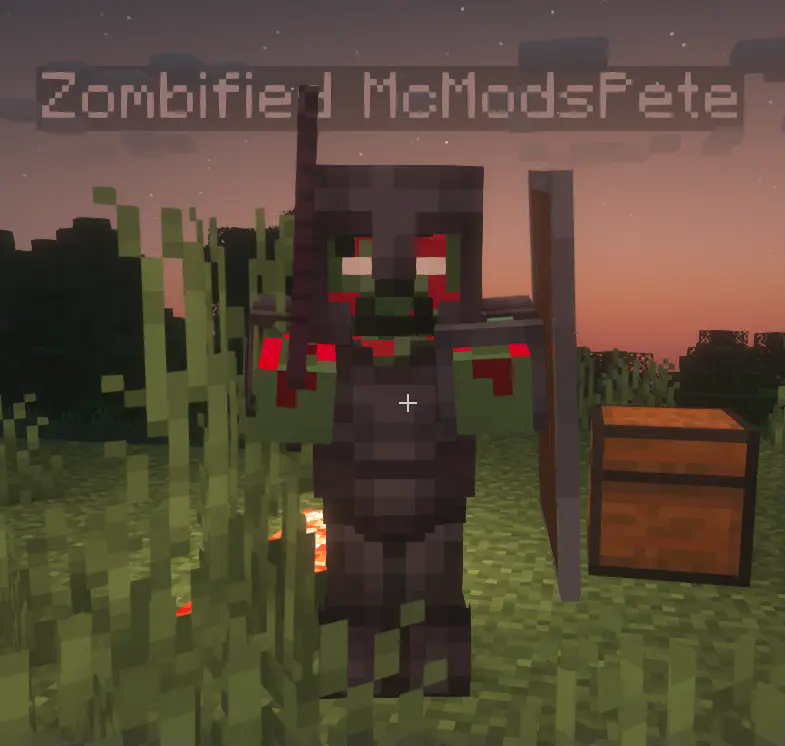
The zombified player mob will use the same skin as the player (with a zombify overlay). Besides that the mob behaves like a regular zombie, but it will not burn in sunlight and it will not despawn.
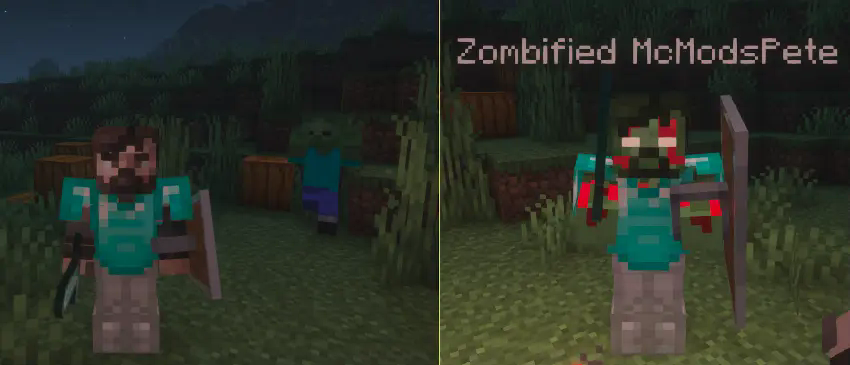
With a config option it is possible to **transfer the players inventory to the zombified player**. The player will have to fight and defeat the zombified version of himself to get back the items he lost after dying.
Needed Mods:
– Fabric API
– Cloth Config
Optional Mods:
– Mod Menu
Zombified Piglin restore anger loot
Restores the original Zombified Piglin loot mechanic like it was in 1.21
## Configuration
### Gamerule “spawn_zombified_piglin_always_with_sword_on_magma_block“
Forces Zombified Piglins to **always** spawn with a sword on magma blocks.
The default is “false“.
_This gamerule exists because_
* _starting with 1.21.11 Zombified Piglins can spawn with a spear:_
* _Piglins with spears can hit each other while attacking, which in turn causes retaliation/infighting and therefore lowering the overall effectiveness of farms_
* _The performed charge attack requires a lot more calculations when compared to a “normal” sword attack_
* _most gold farms use magma blocks anyway_
* _all other gameplay aspects are unaffected_
## Motivation/Why does this mod exist?
Gold farms got [significantly nerfed](https://bugs.mojang.com/browse/MC-56653) in [25w02a](https://minecraft.wiki/w/Java_Edition_25w02a).
See also: [More details, comparisons and arguments](https://github.com/litetex-oss/mcm-zombified-piglin-restore-anger-loot/blob/dev/MOTIVATION.md)
Zombification
This mod contains 1 new potion that changes mobs into their zombie counterparts. These are the conversions that are currently possible.
Villager -> Zombie Villager
Horse -> Zombie Horse
Piglin -> Zombified Piglin
Hoglin -> Zoglin
This potion can be brewed by using a rotten flesh and potion of Poison.