Zeph’s Vanilla+
# 📕About
My favorite optimization and QoL mods, all in one place. Designed to improve performance while maintaining a strict vanilla feel, with sparse new content along the way. Originally made for a small group of friends, this pack will also work on larger servers. The mods add a few new structures with very few new blocks, with a strict no-new-tools policy. There’s also some mods for technical players thrown in to help them monitor performance and farms.
# 📙Installation Instructions
This pack has been tested in a few of the most popular launchers, but I’ve decided to focus on the Prism launcher, which could be downloaded [here](https://prismlauncher.org). Once you download for your respective platform, follow the install instructions below. There is an auto-updating version of the pack for advanced users which can be found under the mod pack’s [repository](https://github.com/ZephWasTaken/Zephs-Vanilla-Plus).
> 1. Download the mod’s .mrpack file for the latest version
> 2. Open the .mrpack file with the Prism launcher
> 3. Click the browse button and change the file type from .zip to .mrpack
> 4. Select the .mrpack file from wherever you downloaded it to
* There is an auto-updating version of the pack which can be found above, but should be used only if you’re familiar with debugging the install
Armor HUD
Armor HUD is a clean, modern on‑screen display that shows your armor durability, protection level, and equipped gear status at all times. Instead of opening your inventory mid‑fight, the HUD gives you a real‑time breakdown of how close each armor piece is to breaking, helping you avoid losing gear during PvP, boss fights, or hardcore survival runs.
The mod reads your current armor values and displays them in a compact, unobtrusive overlay that fits naturally into any HUD layout. Durability values update every tick, and color‑coding makes it easy to see which pieces are healthy, damaged, or about to break. This makes Armor HUD especially useful for PvP players who need instant information, speedrunners who can’t afford to stop moving, and survival players who want better awareness without clutter.
Armor HUD is lightweight, fully client‑side, and compatible with virtually any modpack or server. Whether you’re fighting players, exploring dangerous structures, or grinding mobs, this mod ensures you always know the exact state of your armor at a glance.
Zephaire
**Zephaire’s Client Pack** is tailored to Minecraft’s version **1.21.8.** The mods which make up this pack aims to enhance the player’s experience in small ways without taking the experience away from the base game. Whereas there are many customizable features and the ease of adding onto the pack with shaders or texture packs of your own, there are also plenty of optimization features that should allow most, if not all machines to run this pack smoothly.
_It should be noted that this pack is made for the Minecraft Server – Zephaire, however anyone may use and alter this pack at their own discretion and is able to be used with any vanilla server._
**Express Yourself**: Addons for player customization for your models, such as Figura and Customizable Player Models to allow 3D modelers express their creativity and allow them reanimate and redefine how your model looks and feels. Other mods like Cosmetica and Essentials have built in cosmetics for you to choose and show off as you wish! For those that wish to keep a more vanilla feel for themselves, there exists 3D Skin Layers to spice up your style.
**Redefine Exploration**: With mods such as Sounds, Presence Footsteps, and Reactive Music, these three mods alone make Minecraft feel more alive. No need to turn off your music anymore! Other mods such as Xareo’s World Map will help you keep progress of your progression, where as small changes such as Falling Leaves and Dense Flowers, Cool Rain, and Drip Sounds makes exploring both the surface and caverns much more satisfying.
**Performance Boosts**: Many culling mods and optimizers that alter how Minecraft’s rendering engine such as Better Beds, Fast Items, Entity Culling, and Particle Core all help with ensuring a smooth experience while playing on any server.
**Gameplay Focused**: Other quality of life mods such as Armor Trim Item Fix, AppleSkin, BetterF3 Axolotl and Bucket Fix are just to name a few mods that assist your every day experience. Other mods like Resourcify and Controlling exists as well, Resourcify allows you to pull from a wide database of both shaders and texture packs where as Controlling allows you to search up any keybinds and to show conflicts with ease.
Whether you are a player of our server here on Zephaire or just another user looking to get a client pack that can be used anywhere, we hope that you enjoy using this pack!
ZenyFast
# ⚡ ZenyFast — Resourcepack Speed Optimizer
Tired of staring at a loading screen every time you join a server with a heavy resourcepack?
**ZenyFast** is a lightweight client-side mod designed to dramatically reduce resourcepack
loading times — so you spend less time waiting and more time playing.
—
## ✨ Features
⚡ **Faster Resourcepack Loading** — Significantly cuts down loading time for heavy resourcepacks
🎒 **Optimized for Large Packs** — The bigger the pack, the more you’ll notice the difference
🔧 **Zero Configuration** — Install and forget. No setup needed
🪶 **Lightweight** — Minimal performance impact on your game
🖥️ **Client-Side Only** — Works on any server, no server-side installation required
—
## 📦 Installation
1. Download the `.jar` file from the files tab
2. Drop it into your `.minecraft/mods/` folder
3. Launch the game — that’s it!
> 💡 **Tip:** Pair with **Remove Reloading Screen Mod** for the best experience!
—
## 🔗 Compatibility
– ✅ Fabric
– ✅ Minecraft 1.21+
—
## 💬 Support & Community
Have questions or feedback? Join our Discord community!
👉 [Zenyland Discord](https://discord.zenyland.com)
ZenXArch’s Zombie Apocalypse
## Data Driven zombies?
This mod adds data driven zombies since version 0.0.15.
What this means is that the variants of a zombie can be added using datapacks.
“Download the mod on modrinth”
Github link
https://github.com/offbeat-stuff/zombies
How the data driven system works
The mod adds a dynamic registry like for enchantments
Currently the mod adds the following configuration to variants
– lootTableInfo contains a field for spawn armor and loot drop
– events -> 7 event handlers (spawn,tick,death,kill etc.)
– Runs like an enchantment effect when event fires
– BiomePredicate -> what biomes the variant spawns in
– Requirements -> a loot condition for mob to spawn
– attribute (base and modifiers) to add on spawn
– weight (contains weight and quality) -> similiar to loot table entries (uses difficulty)
My plans for additional fields
– texture (would require client side changes) which isn’t plan so I will make a seperate to allow for that to be done in more portable way.
– spawn weight (How much the mob counts towards internal zombie cap) (unlikely)
– attachments to mob ai
What event handlers are there?
– apply status effect to target
– swap positions
– single target
– freeze
– ignite
– spawn effect cloud
– spawn particle effect
– apply status effect
Installation
Just install the main jar alongside smartbrainlib 1.16.7+ and fabric api 0.118+
## What about the apocalypse?
This mod continually spawns zombies around the players in overworld.
Also currently gives small leaping ability to zombies.
There is a seperate difficulty system that takes into account player weapons,armor,food.
And time spent in the world. But has a inverse effect based on time spent in a chunk.
Meaning that if you spent too much time in a chunk (8 hours on easy 35 hours on hard)
that place will no longer be apocalyptic. (I will be adding a gamerule to control this.
Certain things I want to implement over long period:
– Give various abilities to zombies: Like [Eldritch Mobs](https://modrinth.com/mod/eldritch-mobs) (not exactly the same but like)
– Give various intelligence to zombies: jump over gaps (Probably not, its hard to implement), and mob behaviour (grouping around the player) (also hard to implement but could be)
Certain things I want to implement right now:
– Different zombies for different places (drowned for water, zombie piglins for lava, husk for the sun)
– Make use of various creative mode tools (like /ride /tp) to give zombies a edge
– Add mechanics for zombies to escape mob farms
– Make zombies not group together in small spaces
## Didn’t you make a similiar mod ?
Yeah I did [Zombie Apocalypse](https://codeberg.org/ZenXArch/zombie-apocalypse), It was a good experience. This mod is still available as source, so you can use it if you compile the code. (Feel free to use the source code in your own mods.)
## So what went wrong with the old mod ?
Well It was a hassle to maintain. My mistake,I know. The worst thing was config. I had to spend way too much time to write the config code. Also the mod kinda felt not like what it name was.
It didn’t feel like the zombies were very good. So this time I wanna make the zombie low in density and high in damage and abilities. And also not limit myself to some config options.
One of the thing that was kinda wrong the last time. Everything was a config and that made it hard for me to try doing funky that were hard to write config for.
## So No config this time?
Yep, At least for a long time.
But I will be making simple stuff controllable via datapacks.
## So this is a all zombies mod.
Maybe, maybe not. I am open to ideas.
## Will you add client side content?
~~No. (Maybe textures using a seperate client side mod… maybe)~~
Zombie variants will use `{namespace}/textures/entity/zombie/{id}.png` as texture.I won’t be adding any other client side features.
Damage Vignette
This mod adds a vignette (similiar to world border) when on low health.
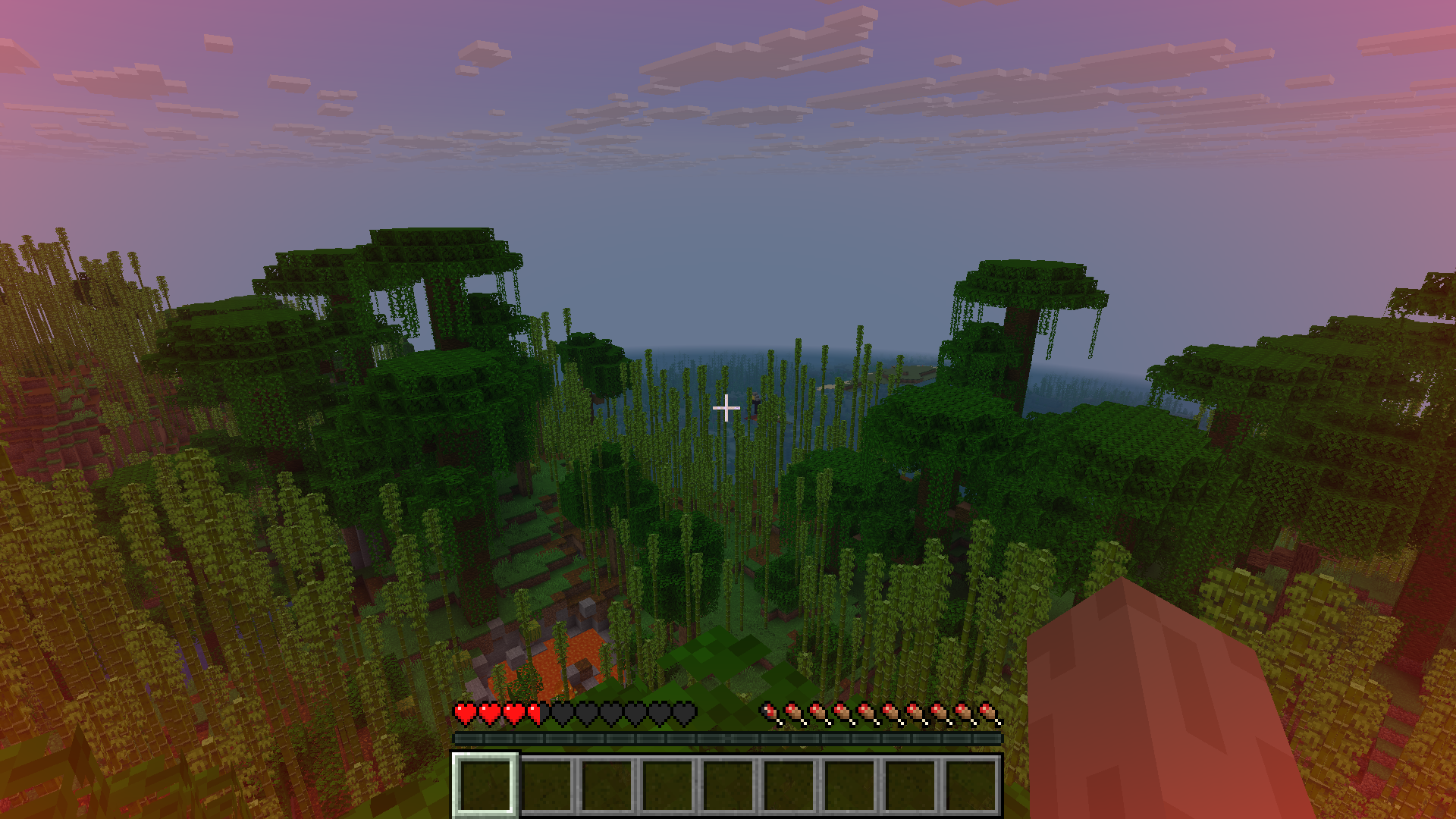
The vignette scales with health.
## Future plans
– add an api to control player vignette using server side
– smooth vignette (no instant change in vignette alpha)
– Add vignette based on danger (like air,health)
– Add pulsating effect on really low health
– Configurable texture
– Add directional pulse (like in zombie games)
Feel free to request / give ideas on discord or codeberg.
I am very likely to implement them (if I can).
## Credits
– The mod is based on [damage vignette](https://modrinth.com/mod/damagevignette) mod.
## Backports
– Similiar mods are available for previous versions, so you can go and use those.
– I have ported the above mentioned mod to 1.21.1 (for fabric), you can get it at https://github.com/offbeat-stuff/DamageVignette
Zent X Vulkan
This is a lightweight FPS boost modpack built for smooth Minecraft gameplay with Vulkan-powered rendering and smart performance tweaks. It focuses on higher FPS, less lag, faster chunk loading, and stable multiplayer performance while keeping visuals clean and simple.
Perfect for SMP and PvP players who want better performance without heavy visuals or bloat. Includes combat HUD improvements, clear fire visuals, zoom, replay support, and smart rendering optimizations for both low-end and mid-range PCs.
⚡ Built for speed
🎯 Made for PvP & SMP
🛠️ Clean, stable & optimized
All credit for this modpack goes to **Battlezent**.
Zen’s MC Trailer Pack
Modpack that enhances your Minecraft experience with stunning visuals and optimized performance. Inspired by the serene beauty of Minecraft trailers.
Zen’s Agricultural Automations
Agricultural Automation [1.20 – 1.21]
This is an updated version of the [Original Data Pack by Chewbarcus](https://www.planetminecraft.com/data-pack/datapack-agricultural-automation-1-14/)
Inspired by the [Bonsai Tree Mod](https://legacy.curseforge.com/minecraft/mc-mods/bonsai-trees), this Datapack aims to bring the mod to Vanilla in a similar fashion using commands to automate tree/flower/shrub/cactus/bamboo farming.
Simply place a hopper with an item frame on the side, a pot on the top of the hopper and then whatever you fancy farming into the pot.
Next up, either place a Diamond Axe, Hoe or Sword (See pictures for help) into the item frame to being the process.
Every 30 seconds you’ll be rewarded with one of the drops from custom loot tables, you can even hook the hoppers up to a redstone circuit to turn this off as the Automation will only work on hoppers that are unpowered.
[Tools & Drops]
Diamond Axe:
– Oak Sapling Logs, Sapling, Leaves, Apples
– Dark Oak Sapling Logs, Sapling, Leaves, Apples
– Pale Oak Sapling Logs, Sapling, Leaves, Pale Moss
– Acacia Sapling Logs, Sapling, Leaves
– Birch Sapling Logs, Sapling, Leaves
– Spruce Sapling Logs, Sapling, Leaves
– Cherry Sapling Logs, Sapling, Leaves
– Jungle Sapling Logs, Sapling, Leaves, Vines, Cocoa Beans
– Mangrove Propagule Logs, Propagule, Leaves, Roots
– Azalea Bush Oak Logs, Azalea Bush, Leaves, Moss
– Flowering Azalea Bush Oak Logs, Flowering Azalea Bush, Leaves, Flowering Leaves, Moss
– Crimson Fungus Logs, Fungus, Wart Blocks, Shroomlight, Vines
– Warped Fungus Logs, Fungus, Wart Blocks, Shroomlight, Vines
– Red Mushroom Red Mushroom
– Brown Mushroom Brown Mushroom
– Cactus Cactus, Green Dye
Diamond Hoe:
– Allium Flower
– Azure Bluet Flower
– Blue Orchid Flower
– Cornflower Flower
– Dandelion Flower
– Lily of the Valley Flower
– Orange Tulip Flower
– Oxeye Daisy Flower
– Pink Tulip Flower
– Poppy Flower
– Red Tulip Flower
– Torchflower Flower, Seeds
– White Tulip Flower
– Wither Rose Flower
– Open Eyeblossom Flower
– Closed Eyeblossom Flower
– Fern Fern, Wheat Seeds, Melon Seeds, Pumpkin Seeds, Beetroot Seeds
– Crimson Roots Crimson Roots
– Warped Roots Warped Roots
Diamond Sword:
– Bamboo Bamboo
– Dead Bush Dead Bush, Sticks
Simply pop this into your saves/[world]/datapacks folder and play!
Available On:
– Planet Minecraft https://www.planetminecraft.com/data-pack/zen-s-agricultural-automation/
– Modrinth https://modrinth.com/datapack/zens-agricultural-automations
– Github https://github.com/ZensiertG/Agricultural-Automation
ZenithUI
# Preview

Zenith is a client-side Fabric mod that completely replaces Minecraft’s default title screen with a custom-designed interface.
# Loading-screen replacement.

Features
– Custom background image with an animated starfield overlay and vignette effect
– Animated typing text on the title screen
– Custom-styled buttons with a translucent dark theme and light blue hover glow
– Icon bar with quick access to Accessibility, Language, Settings, and optionally Mods (via ModMenu) and Replays (via ReplayMod)
– Consistent custom background applied across all menu screens