zzz… rrr… Rawr?
Server-side mod that sends a (configurable) message to chat when it’s time to wake up.
The config file can be found at `config/zzz_rawr/config.toml`. This is what it looks like by default:
“`toml
# List of messages to send (one will be chosen at random)
messages = [
“Wakey, wakey, rise and shine… Good Morning everyone!”,
“zzz… rrr… Rawr?”
]
“`
You can add or remove messages here as you see fit, following the [TOML specification](https://toml.io/en/) for an array of strings.
Then, every time players awaken from sleep, one of the defined messages will be broadcast to chat globally.
Inspired by the same feature found in the classic mod [Morpheus](https://www.curseforge.com/minecraft/mc-mods/morpheus), with the title borrowed from that mod’s config in ReikaKalseki’s [DragonRealm](https://dragonrealm.overminddl1.com/).
ZYYN0X Survival Mods
## 🧭 Zyyn0x’s Survival Modpack – Fabric Edition
Survival gets a serious upgrade with this lightweight yet powerful modpack by **zyyn0x**, built on Fabric for smooth performance and modular flexibility. Designed for creators, explorers, and survivalists alike, it enhances the vanilla experience without overwhelming it.
### 🔧 Core Features:
**Performance Boosters**: Sodium, Iris, and Clumps ensure high FPS and smooth gameplay, even in modded worlds.
**UI & QoL Enhancements**: BetterF3, MouseTweaks, Controlling, and ModMenu streamline your interface and controls.
**Survival Tools**: AppleSkin, ClickMobs, Flashback, and ChatCalc add depth to food, combat, and exploration.
**Navigation & World Awareness**: Xaero’s Minimap + WorldMap keep you oriented, while ShulkerBoxTooltip and Searchables improve inventory management.
**Immersion Mods**: Sound Physics Remastered and VoiceChat bring your world to life with realistic audio and multiplayer interaction.
Customization Ready: Architectury, Cloth Config, and PlaceholderAPI make it easy to expand or tweak your setup.
### 🧱 Why It Works:
⚡ Fast & Modular – Built for creators who value speed, clarity, and control.
🎮 Survival-First – Every mod supports the core gameplay loop: gather, build, survive, thrive.
🛠️ Streamer-Friendly – Clean overlays, voice chat, and performance mods make it ideal for content creation.
zy optimised pack
zy optimised pack is modpack with a focus on optimisation and quality of life features. The performance of the game is improved with mods such as [Sodium](https://modrinth.com/mod/sodium) and [Lithum](https://modrinth.com/mod/lithium), with QoL mods such as [Bobby](https://modrinth.com/mod/bobby), [WI Zoom](https://modrinth.com/mod/wi-zoom), [Shulker Box Tooltip](https://modrinth.com/mod/shulkerboxtooltip) and [WI Zoom](https://modrinth.com/mod/wi-zoom) being included.
Various resource packs and shaders are included, making configuration easily accessible upon startup. This modpack aims to enable good performance across various devices and keep the experience as close to vanilla as possible, whilst improving the game in unobtrusive ways.
[PrismLauncher](https://prismlauncher.org/) is recommended to manage different Minecraft versions.
## How to Install
[PrismLauncher](https://prismlauncher.org/download/) is recommended to manage instances and download mods. With PrismLauncher open, click the `Add Instance` button, select the `Modrinth` tab and search for this modpack (either by name or by using the link).
Alternatively, you can use the `Import` tab to select the `.mrpack` that can be downloaded to import the pack into PrismLauncher.
You will need Java (version 21) installed on your device. PrismLauncher can download Java for you when you open it for the first time.
Additionally, you can also download Java here: [adoptium.net](https://adoptium.net/en-GB/temurin/releases/?version=21&os=any&arch=any).
> **Note: On Macs with Intel processors, you need to install the x64 version of Java, on Macs with Arm 64 (Apple silicon) processors, you need to install the Arm 64 (aarch64) version of Java.**
## When Updating
To keep your settings, make sure to copy over `options.txt` to the new instance’s folder, from your old folder. Also, if you want, copy over `servers.dat` (your server list), `hotbar.nbt` (your saved creative hotbars), `saves/` (your worlds) and `screenshots/`, along with `.bobby/` (only made if you have the bobby mod).
## Included Resource Packs and Shaders
**Resource Packs**
> – [Bare Bones](https://modrinth.com/resourcepack/bare-bones)
> – [C418 Songs Only](https://modrinth.com/resourcepack/c418-songs-only)
> – [Default Dark Mode](https://modrinth.com/resourcepack/default-dark-mode)
> – [Enchantment Glows](https://modrinth.com/resourcepack/enchantment-glows)
> – [Even Better Enchants](https://modrinth.com/resourcepack/even-better-enchants)
> – [No Mob Variants](https://modrinth.com/resourcepack/even-better-enchants)
> – [No Wolf Skin Variants](https://modrinth.com/resourcepack/no-wolf-skin-variants)
> – [Redstone Tweaks](https://modrinth.com/resourcepack/redstone-tweaks)
> – [Vanilla Tweaks](https://vanillatweaks.net/picker/resource-packs/)
**Shaders**
> – [BSL Shaders](https://modrinth.com/shader/bsl-shaders)
> – [Complementary Reimagined](https://modrinth.com/shader/complementary-reimagined)
> – [Complementary Reimagined](https://modrinth.com/shader/complementary-reimagined) [+ Euphoria Patches](https://modrinth.com/mod/euphoria-patches)
> – [Rethinking Voxels](https://modrinth.com/shader/rethinking-voxels/versions)
Zyno’s Visuals+
***(Built on Top of Zyno’s Client+, Check out Zyno’s Client+ to see its features)***
This Modpack Completely Overhauls Minecraft’s Visuals with new animations, Ambients sounds, New Footsteps sounds, includes a lightweight shader as well as a high performance shader
It includes the better third person mod and First Person Models so you can see yourself how steve does. The only way to see how many features are there is to install Modpack
It is Built on My Other Modpack Zyno’s Client+ Which has a ton of optimization mods and QOL features
**The Modpacks Comes with the Barebones resource pack and Fresh Animations So you can make the game look like the trailer too!**
Zyno’s Client+
Features:
– In game account switcher
– In game skin manager
– In game screenshot manager (has cropping and brush)
– Friends System!
– Better Chat (Copy Chat text, Search Chat messages and timestamps)
– Drag server and resource packs to arrange them
– Player head icons in chat
– Custom HUD (Click Right-Shift)
– Custom crosshair
– Gamma utils(fullbright)
– Dynamic Lights
– In game resource pack downloader
– In game server browser
– Wavy capes
– Custom capes for Free! (MinecraftCapes)
– Emotes for Free and Custom Emotes too! (Check Emotecraft Menu NOT Essential Emotes)
– Zoom
– Search keybinds
– Cape support from optifine, labymod, cosmetica, clocks+, MinecraftCapes and Wyntills
– And a bunch of performance mods!
Zynirium
**Zynirium** was built to give PvP players a **clean**, **fast**, and **reliable** client that just works. With MCPVP moving to Minecraft 1.21.11, we wanted a **ready-to-go pack that maximizes FPS**, reduces input latency, and includes **only useful PvP tools — no clutter**, no unnecessary features, and no confusing settings.
**Unlike many other PvP modpacks, Zynirium intentionally avoids unnecessary mods** such as minimaps, chest trackers, or similar utilities. These mods often add visual clutter, provide little value in combat, and are **frequently not allowed on competitive servers.**
Our goal was to keep the pack focused purely on **performance and PvP gameplay.**
✅ All mods included in this pack are **allowed according to the MCPVP Tier List**, so you can use the pack on competitive servers without worrying about disallowed features.
**Please still look up the rules of any Server you want to play on and check if there are any mods not allowed.**
⸻
## ✦ Why choose Zynirium?
⚡️ **Performance-first**
Carefully selected optimization mods such as Sodium, Lithium, FerriteCore, and Ixeris improve FPS, reduce stuttering, and make gameplay smoother even during intense fights.
🛡️ **PvP-tuned**
Includes useful combat tools like:
• Hit feedback improvements
• Totem counters
• Status effect timers
• Shield fixes
• Crosshair and zoom utilities
These features help provide clear combat feedback without changing gameplay mechanics.
🔁 **Stable & compatible**
Built on a tested Fabric mod stack with up-to-date libraries to reduce crashes and mod conflicts.
🧰 **Minimal & focused**
No filler mods. Everything included directly improves PvP gameplay or performance.
⚙️ **Easy setup**
Includes Mod Menu and configuration libraries so you can easily tweak settings to your preference.
Zxygo’s Crystal Util
**Business email: [email protected]** |
**Business discord: zxygomc.mod**
### Open to partnerships/sponsors ^
———————————————————————————————-
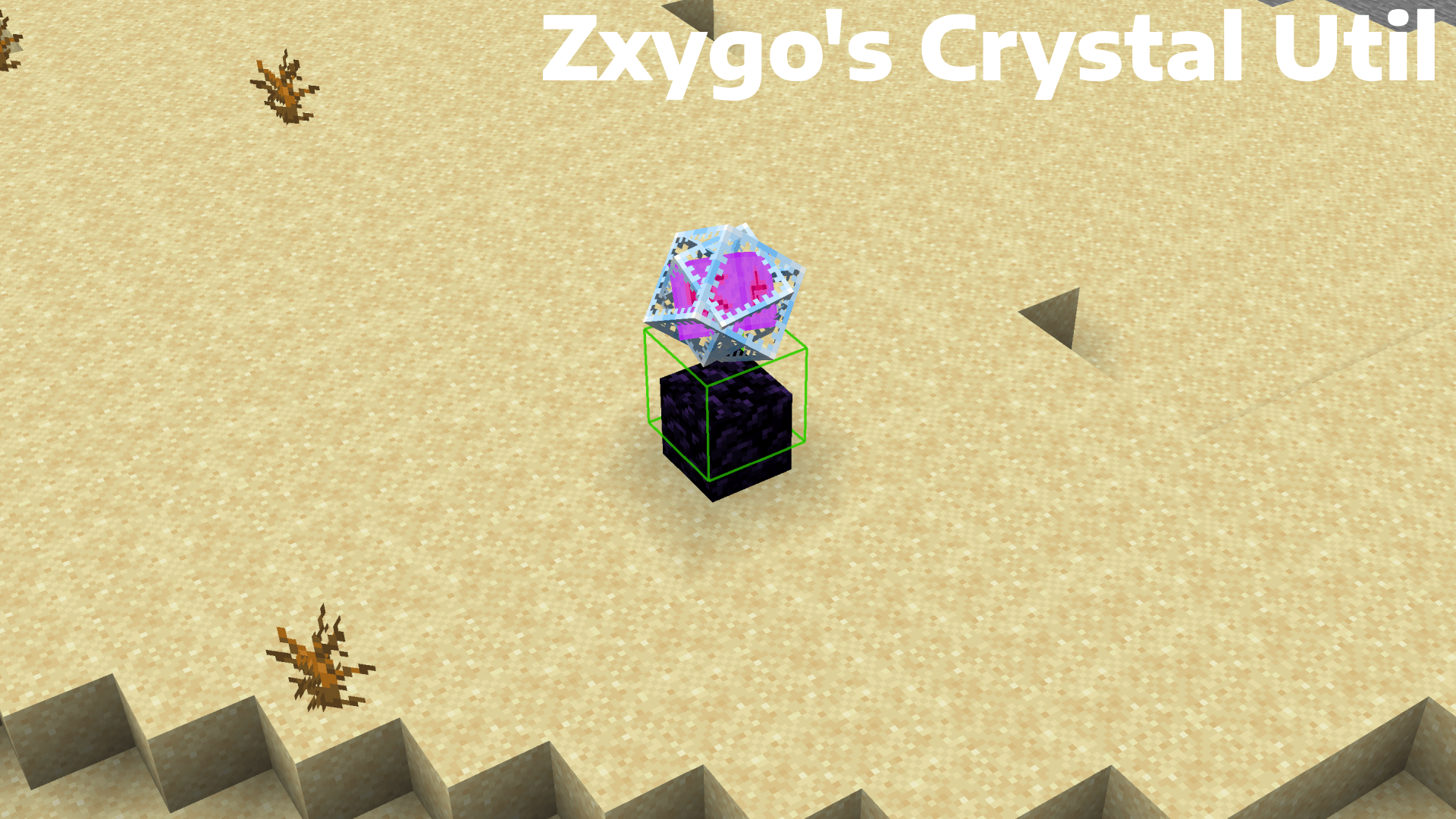
**Zxygo’s Crystal Util is a utility mod that shows people a relative damage indicator of a crystal comapred to the position and distance of a player compared to a crystal. It shows a simple box outline that changes color depending on your relative position and distance, and it allows for many uses.**
———————————————————————————————-
**NOTE: This mod may be seen as cheating on some servers and provides a unfair advantage. This mod is simply to be used as a learning tool for people getting into Crystal PVP. It exists as a tool that players can use, not a cheat. I don’t support hacking or cheating of any kind**
———————————————————————————————-
———————————————————————————————-
### Features
**Color-Coded Danger Levels**
– Red: can be dealt heavy damage and can be popped / killed
– Yellow: will deal some damage, a bit dangerous, take caution
– Green: safe
**Fully Customizable**
– Toggle the indicator on/off anytime
**Clean & Optimized**
– Minimal performance impact
– Works in multiplayer smoothly
**Mod Menu Integration**
– Simple Mod Menu Integration
———————————————————————————————-
### How It Works
Zxygo’s Crystal Util analyzes the vertical position of end crystals relative to your player, along with the distance from the player to the crystal. This allows for a calculation for the indicator and then a color depending on the calculation.
For example, if the crystal is above your head or you are far away from it, it renders green (least damage).
Intermediate positions blend between colors.
———————————————————————————————-
**This is my first ever mod, so apologies if there are some bugs. I hope this helps in someone’s journey in Crystal PVP, as at the very start of your journey, this mod can help you learn the mechanics and how you take damage from a crystal.**
Zxygo’s Anchor Util
**Business email: [email protected]** |
**Business discord: zxygomc.mod**
### Open to partnerships/sponsors ^
———————————————————————————————-
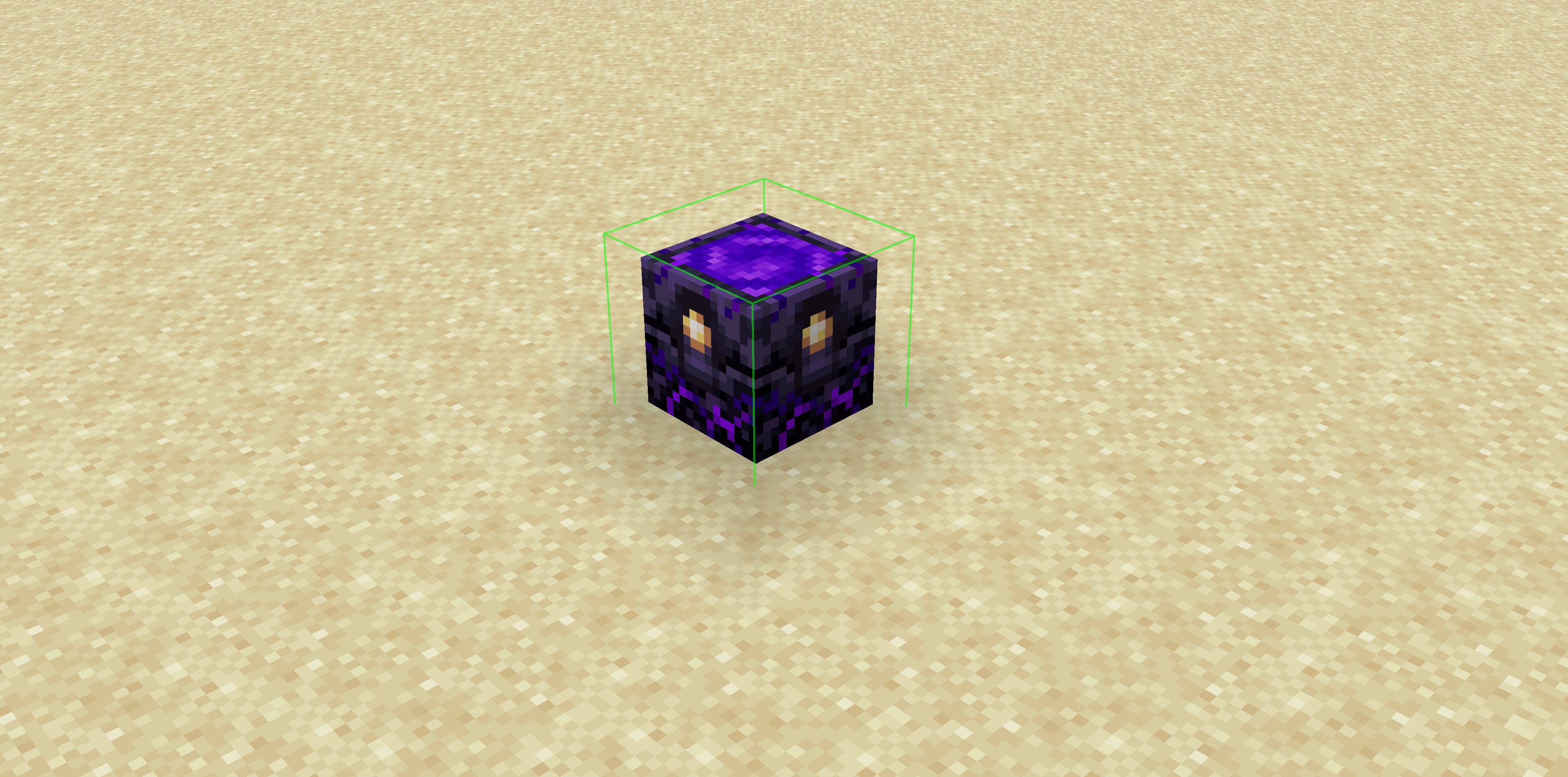
**Zxygo’s Anchor Util is a utility mod that shows people a relative damage indicator of a anchor comapred to the position and distance of a player compared to a anchor, along with taking in factors like the armor and enchantments a player is using. It shows a simple box outline that changes color depending on your relative position and distance, along with armor and enchantments, and it allows for many uses.**
**Check out my other mod: Zxygo’s Crystal Util**
————————————————————————————————
**NOTE: This mod may be seen as cheating on some servers and provides a unfair advantage. This mod is simply to be used as a learning tool for people getting into Crystal PVP. It exists as a tool that players can use, not a cheat. I don’t support hacking or cheating of any kind**
————————————————————————————————
————————————————————————————————
### Features
**Color-Coded Danger Levels**
– Red: (deadly)
– Yellow: (dangerous)
– Green: (safe)
**Fully Customizable**
– Toggle the indicator on/off anytime
**Clean & Optimized**
– Minimal performance impact
– Works seamlessly in multiplayer
**Mod Menu Integration**
– Simple Mod Menu Integration
————————————————————————————————
### How It Works
Zxygo’s Anchor Util analyzes the position and distance of anchors relative to your player, along with the other factors like blocks placed between you and the anchor, armor, and enchantments like protection on the armor. This allows for a calculation for the indicator and then a color depending on the calculation.
For example, if you have a obsidian block in front of the anchor between you, then it will be a green (least damage).
Zxro’s Vanilla+
# Zxro’s Vanilla Plus
A Simple Minecraft Modpack Focussing on Performance, Graphic enhancements and some Quality of life Changes while Keeping to the Vanilla Minecraft we all know.
## Performance
Zxro’s Vanilla+ is faster than most competing game clients, thanks to our modern performance mods. The bundled mods have been carefully selected to be safe and provide speed and performance unlike most others.
## Vanilla but better
although Zxro’s Vanilla+ has some changes to the classic Vanilla experience like adding the [Dungeons and Taverns Datapack](https://modrinth.com/datapack/dungeons-and-taverns) to spice up exploration and really emerse into a new minecraft vanilla experience, it still allows you to play Minecraft as you remembered it, no matter what version you played before.
## Up to date
Zxro’s Vanilla+ recieves fast updates and will update to new versions as soon as possible. updating the modpack is easy and will preserve mod settings where possible.
## Vanilla Tweaks
Massive Thanks to [Vanilla Tweaks](https://vanillatweaks.net/) for letting me use their service for this pack, check them out!
Zwad’s Simple Bingo
The pack includes several essential optimization mods, along with [Chunky](https://modrinth.com/plugin/chunky) for chunk pregeneration.
My primary use case for this modpack is when setting up a server for LAN events. [Chunky](https://modrinth.com/plugin/chunky) is particularly crucial; without pregenerating chunks, allowing all players to join at once could lead to server crashes due to Minecraft’s highly resource-intensive chunk generation process.
I host the modpack using the [itzg docker image](https://docker-minecraft-server.readthedocs.io/en/latest/) on a local server, but feel free to host it however suits you best.
Here’s an example using Docker Compose:
“`yaml
version: “3.8”
services:
mc:
image: itzg/minecraft-server
tty: true
stdin_open: true
ports:
– “25565:25565”
environment:
EULA: “TRUE”
MOD_PLATFORM: MODRINTH
MODRINTH_MODPACK: LINK_TO_YOUR_MODPACK
volumes:
# attach the relative directory ‘data’ to the container’s /data path
– ./data:/data
“`
Please feel free to use this pack, but note that I cannot guarantee any continued support beyond any updates I make in preparation for upcoming LAN events.