XTRA Gunpowder
When obtaining Gunpowder is such a chore go with XTRA Gunpowder Mod as your first choice!, with nothing but Sand and Charcoal, you make your gunpowder woes disappear!
Created this for my CO-OP world with a friend who complained about how annoying killing Creepers Were.
Totems of Warping
Download the optional resource pack [HERE](https://cdn.modrinth.com/data/kMFObSC3/versions/qRyZkizc/Warp%20Totem%20RP%20v1.1.1.zip)
The Totem of Warping allows players to teleport to various locations. The totem can either be used to teleport to the player’s spawn point or, if connected to a lodestone, it can be used to teleport back to it at any time. Use the totem for 5 seconds to warp.
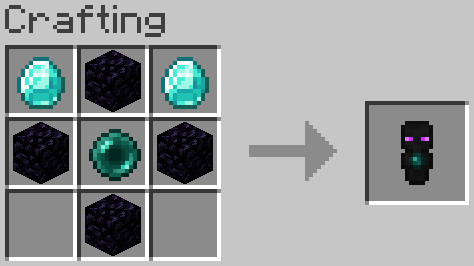
The Totem of Recovery allows players to teleport to their last death location.
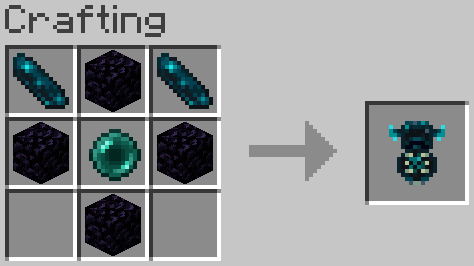
Two versions are available, the Single Use version and the Infinite Use version. Single use consumes the totems on use. Infinite Use can be used indefinitely but offers a toggle which will consume either Ender Pearls or Echo Shards. The toggle can be found in data/xtligh/function/warp_totem/config.json
Stylish Ghasts
Download the REQUIRED resource pack [HERE](https://cdn.modrinth.com/data/JhmYEwBq/versions/Km9kqtHo/Stylish%20Ghast%20RP%20v1.1.1.zip)
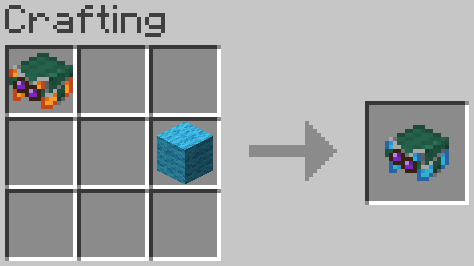
When crafting a ghast harness of any color the glass can be replaced by any stained glass to change the color of its goggles.
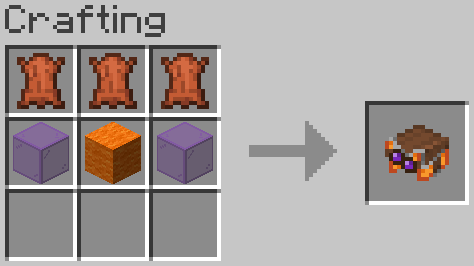
Harnesses can now be dyed similar to leather armor, this changes the the color of the harness’ upper half.
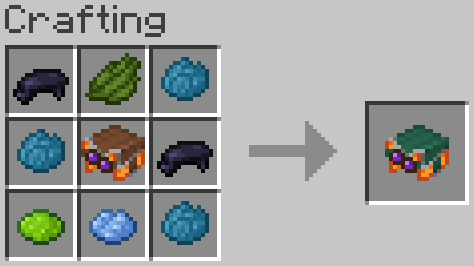
To prevent conflict with the vanilla crafting recipes, wool is used to change the base color of the harness instead of dye.
Xtabay’s Villager Creator
This datapack will help you create custom villagers very easily. Meant for server administrators or map creators. Trades are infinite and unblockable.
**Get the Villager Creator Kit**
/function vg.xtabay:give/villager_creator_kit
USE.
**Villager Creator Stick**
Put all the items you want your villager to trade in a chest in this order, from left to right: 1st buy item, 2nd buy item, sell item. This means every 3 slots are used for a single trade row, up to a maximum of 9 trades per chest. Every trade must have this structure: [Required Item] [Required Item](optional) [Offered Item], if they don’t have this structure, the items will be ignored and the trade won’t be added.
Once you’re done filling a chest with this structure, right click it with a Villager Creator Stick and the villager will be created.
All villagers created by Villager Creator have 40 heart containers, are leatherworkers and snow villagers by default. They’re also riding a block display so they can’t move or be moved.
**Add Trade Stick**
Put a chest next to a villager created with the Villager Creator datapack and repeat the same process as with the Villager Creator Stick but using the Add Trade Stick this time. Once done, all the trades in the chest will be added to the nearest villager and the chest will be deleted.
**Villager’s Properties Stick**
This stick allows you to fully customize your villagers.
These are the values you can modify:
– Profession
– Type
– Name (custom name, styling, color, visibility)
– Invulnerability
– Health
– Silent
**Villager Eraser Stick**
Kill any villager created by the Villager Creator datapack by right clicking it.
Better TnT Explosive Sulfur Cubes
(Let me know of any bugs & suggestions on discord: maxipetri05)
# TnT Sulfur Cubes!!!
– Give a TnT to Sulfur Cubes and Unleash Mayhem! if they’re going fast enough they will explode on Impact! (on xyz axis)
(dont watch on full screen, quality is bugged)
## Features :
– If they’re slowed back down they wont explode on impact.
– Leashed Sulfur Cubes with TnT wont explode if they Impact Vertically!!(Y axis) So you can bring them to your friendly ghasts safely!
– Light Them up on Fire and you’ll have 1 second to react before they Explode! So make sure you can punch them away fast enough!
– Customise The Explosion (if you have op) with: **_/trigger xsexplosivesulfurcubes.settings_**

**Explosion Power:** controls the explosion power of the basic impact speed (0-4).
**Explosion Power Override:** controls the explosion power of the basic impact speed (Any Number, -1 will mean that it will use **Explosion Power:** instead).
**Minimum Impact Speed:** controls the minimum speed required to trigger the basic explosion on impact.
**Safe Fall Distance:** controls how far it can fall vertically without exploding, even if its going fast enough.

**Ticks on Fire Before Exploding:** Number of ticks the cube will be on Fire Before it Explodes, Caused by the Fire.

**Strong Explosion Power:** controls the explosion power of the Strong impact speed (-1 means it will use the Basic >**Explosion Power**< Values for the Strong Explosion)
**Minimum Strong Impact Speed:** controls the minimum speed required to trigger the Strong explosion on Strong impact.
Craftable Gunpowder by XS (with Potent Sulfur)
Craft 4 Gunpowder with 1 Potent Sulfur, 1 Charcoal and 1 Bone Meal !!
Leave Result/Ingredient Feedback in DC channel: [Feedback Channel](https://discord.com/channels/1487840262372982985/1503702701664501890)
xray ore detector
# Feature
Add an enchantment to the pickaxe that add xray to nearby ore near the player.
The ore has different color to differentiate the different kind of ore

can xray :
– copper ore
– iron ore
– emerald ore
– gold ore
– diamond ore
– redstone
– coal
– ancient debris
# Installation
– Download the file
– open minecraft launcher
– create a new world
– in the **more** tab click the **datapack button**
– copy paste the downloaded file in the directory
XPTNT
A Minecraft challenge datapack where XP orbs are turned into lit TNT. How long can you go without being blown up?
XP SMP Datapack
# XP SMP Datapack
### About
A datapack used for the XP SMP that makes it so every level you get you gain a heart. But there’s a twist: every so often you lose a bit of xp.
### Tips
– Try to get high level quick because when your level is higher you lose xp slower.
### Installation
Installed just like any other datapack. A tutorial on how to do that can be found on the minecraft wiki here.
Experienced Powers
> This data pack is now discontinued.
> This means that it will no longer receive any more updates.
This data pack gives another use for experience, Magical powers!
You can use this experience points to trade for magical powers (well, effects in other words). For example, You can use 10 experience levels to get fire resistance for 30 seconds, or 7 experience levels to heal yourself.
Yeah I know, it can be a bit overpowered.
To use this data pack, simply use this Command: `/trigger `
Here is a full list of all “powers” and “power_id”:
| Name | Id | Description | XP level required | XP cost
|—————-|—————|—————————————|——|—–|
| Fire resistance | xpower.fire_resistance | Gives 30 seconds of fire resistance. | 25 | 12
| Fire resistance+ | xpower.fire_resistance+ | Gives 2 minutes of fire resistance. | 30 | 18
| Fire resistance++ | xpower.fire_resistance++ | Gives 10 minutes of fire resistance. | 40 | 25
| Slow falling | xpower.slow_falling | Gives 30 seconds of slow falling. | 15 | 5
| Water Breathing | xpower.water_breathing | Gives 1 minutes of water breathing. | 15 | 8
| Water Breathing+ | xpower.water_breathing+ | Gives 5 minutes of water breathing. | 20 | 15
| Water Breathing++ | xpower.water_breathing++ | Gives 20 minutes of water breathing. | 25 | 25
| Heal | xpower.heal | Gives 4 seconds of regeneration V, enough to fill your health bar. | 15 | 5
| Strength+ | xpower.strength+ | Gives 5 minutes of strength I. | 30 | 10
| Strength++ | xpower.strength++ | Gives 10 minutes of strength I. | 35 | 15
| Haste | xpower.haste | Gives 30 seconds of haste I. | 20 | 10
| Haste+ | xpower.haste+ | Gives 2 minutes of haste I. | 30 | 20
| Haste++ | xpower.haste++ | Gives 10 minutes of haste I. | 40 | 25
| Night vision | xpower.night_vision | Gives 2 minutes of night vision | 15 | 4