Server-Plugin
### **Server Plugin: Ultimate Minecraft Map Generator & Zombie Invasion**
**Version:** 0.8-SNAPSHOT
**Minecraft version:** 1.21+
**Author:** Kajakfrosch
#### **Are you ready to take your Minecraft server to the next level?
With this versatile plugin you don’t just get a tool, but a complete package that opens up new possibilities!
### **Features that will inspire you:**
**1. automatic map generation**
– Create an overview map of your entire world as **`map.png`**.
– Optionally generate a website with statistics and the map as **`index.html`** – perfect for sharing your map with friends.
– Supports active rendering on events: player join, server status or manually via commands!
**2. start epic zombie invasions**
– Want to fight hordes of zombies with your friends? No problem!
Start your own **Zombie Invasion** on your server and customise the distance and difficulty (1-20) to your liking.
– Rewards for victory! You get rare items such as diamonds, gold and more (all configurable).
– But beware: Failure costs you experience and prestige!
**3rd performance monitor for your world**
– Monitor your server in real time:
– **TPS (Ticks per Second):** Is your server running at optimal speed?
– **Memory utilisation:** Is there enough RAM available?
– Chunk situation:** Is your server loading too many chunks?
– The `/serverstatus` command gives you all the information at a glance!
**4. simple HTML integration for the server map**
– Automatically generated web pages make it easier to view your world map – ideal for private friends or public servers.
– Optional Apache support** to host the map publicly.
**5. customisable server status**
– Greet players with a personalised **MOTD** (message of the day)!
– Display important information such as the server node, instance data or a link to the live map.
– Designed for RPG and Survival fans who want their servers to be dynamic and informative.
### **Why this plugin?
– **For server admins:**
Stay in control – from performance checks to world documentation.
– **For Minecraft players:**
Dive into new adventures – from customised maps to thrilling zombie invasions.
– For creators & streamers:**
Easily share the beauty of your map or exciting game modes via the generated HTML data or interactive experiences like the invasion feature.
### **Available commands**
| **Command** | **Description** |
| — | — |
| `/dynmap` | Generates a map of the world. |
| `/invasion start X Y` | Starts a zombie invasion (_X_: distance, _Y_: difficulty). |
| `/invasion stop` | Stops all active invasions. |
| `/server status` | Shows the current status of the server. |
### **It’s that simple!
1. **Install the plugin**:
Load the `.jar` into your `plugins` folder and restart the server.
2 **Execute the command `/dynmap`**:
Admire the map of your world in the `plugins/server/work/` folder.
3 **Explore new challenges**:
Start a zombie invasion with `/invasion` or check your server status with `/serverstatus`.
### Deutsche Beschreibung
### **Server Plugin: Ultimativer Minecraft Karten-Generator & Zombie-Invasion**
**Version:** 0.8-SNAPSHOT
**Minecraft-Version:** 1.21+
**Autor:** Kajakfrosch
#### **Bist du bereit, deinen Minecraft-Server auf die nächste Stufe zu bringen?**
Mit diesem vielseitigen Plugin bekommst du nicht einfach nur ein Tool, sondern ein Komplettpaket, das dir neue Möglichkeiten eröffnet!
### **Features, die dich begeistern werden:**
**1. Automatische Karten-Generierung**
– Erstelle eine Übersichtskarte deiner gesamten Welt als **`map.png`**.
– Optional wird eine Website mit Statistiken und der Karte als **`index.html`** generiert – perfekt, um deine Karte mit Freunden zu teilen.
– Unterstützt das aktive Rendern bei Events: Spielerbeitritt, Serverstatus oder manuell über Befehle!
**2. Epische Zombie-Invasionen starten**
– Möchtest du mit deinen Freunden gegen Horden von Zombies kämpfen? Kein Problem!
Starte eine eigene **Zombie-Invasion** auf deinem Server und passe Abstände sowie den Schwierigkeitsgrad (1-20) nach deinen Vorstellungen an.
– Belohnungen für den Sieg! Du bekommst seltene Items wie Diamanten, Gold und mehr (alles konfigurierbar).
– Aber Achtung: Scheitern kostet dich Erfahrung und Prestige!
**3. Performance-Monitor für deine Welt**
– Überwache deinen Server in Echtzeit:
– **TPS (Ticks per Second):** Hält dein Server die optimale Geschwindigkeit?
– **Speicher-Auslastung:** Genügend RAM verfügbar?
– **Chunk-Situation:** Lädt dein Server zu viele Chunks?
– Mit dem `/serverstatus`-Befehl erhältst du alle Infos auf einen Blick!
**4. Einfache HTML-Integration für die Serverkarte**
– Automatisch generierte Webseiten erleichtern die Ansicht deiner Welt-Karte – ideal für private Freunde oder Public-Server.
– **Optionale Apache-Unterstützung**, um die Karte öffentlich zu hosten.
**5. Individualisierbarer Server-Status**
– Begrüße Spieler mit einer personalisierten **MOTD** (Nachricht des Tages)!
– Zeige wichtige Informationen an, z. B. den Serverknoten, Instanzdaten oder einen Link zur Live-Karte.
– Entwickelt für RPG- und Survival-Fans, die ihre Server dynamisch und informativ gestalten möchten.
### **Warum dieses Plugin?**
– **Für Server-Admins:**
Behalte die Kontrolle – von Performance-Checks bis hin zur Welt-Dokumentation.
– **Für Minecraft-Spieler:**
Tauche ein in neue Abenteuer – von benutzerdefinierten Karten bis zu packenden Zombie-Invasionen.
– **Für Kreative & Streamer:**
Teile die Schönheit deiner Karte oder spannende Spielmodi einfach über die generierten HTML-Daten oder interaktive Erlebnisse wie die Invasions-Feature.
### **Verfügbare Befehle**
| **Befehl** | **Beschreibung** |
| — | — |
| `/dynmap` | Generiert eine Karte der Welt. |
| `/invasion start X Y` | Startet eine Zombie-Invasion (_X_: Abstand, _Y_: Schwierigkeit). |
| `/invasion stop` | Stoppt alle aktiven Invasionen. |
| `/serverstatus` | Zeigt den aktuellen Zustand des Servers an. |
### **So einfach funktioniert’s!**
1. **Installiere das Plugin**:
Lade die `.jar` in deinen `plugins`-Ordner und starte den Server neu.
2. **Führe den Befehl `/dynmap` aus**:
Bewundere die Karte deiner Welt im Ordner `plugins/server/work/`.
3. **Erkunde neue Herausforderungen**:
Starte eine Zombie-Invasion mit `/invasion` oder überprüfe deinen Serverstatus mit `/serverstatus`.
Server Connection Plugin
# Server Connection Plugin
![Banner][banner]
[![Modrinth][badge-modrinth]][modrinth]
[![Discord][badge-discord]][social-discord]
[![Follow @simplecloudapp][badge-x]][social-x]
[![Follow @simplecloudapp][badge-bluesky]][social-bluesky]
[![Follow @simplecloudapp][badge-youtube]][social-youtube]
[Report a Bug][issue-bug-report]
·
[Request a Feature][issue-feature-request]
🌟 Give us a star — your support means the world to us!
> All information about this project can be found in our detailed [documentation][docs-thisproject].
The Server Connection Plugin provides comprehensive player connection management for your network, including network join handling, fallback servers, and navigation commands.
## Features
– [x] **Velocity**
– [x] **BungeeCord**
– [ ] **Gate**
– [x] **Connection targets**: Connection targets define server groups that players can connect to
– [x] **Matcher Operations**: Match Server names by Operations
## Contributing
Contributions to SimpleCloud are welcome and highly appreciated. However, before you jump right into it, we would like
you to read our [Contribution Guide][docs-contribute].
## License
This repository is licensed under [Apache 2.0][license].
[banner]: https://github.com/simplecloudapp/branding/blob/main/readme/banner/plugin/server-connection.png?raw=true
[issue-bug-report]: https://github.com/theSimpleCloud/server-connection-plugin/issues/new?labels=bug&projects=template=01_BUG-REPORT.yml&title=%5BBUG%5D+%3Ctitle%3E
[issue-feature-request]: https://github.com/theSimpleCloud/server-connection-plugin/discussions/new?category=ideas
[docs-thisproject]: https://docs.simplecloud.app/plugin/server-connection
[docs-contribute]: https://docs.simplecloud.app/contribute
[modrinth]: https://modrinth.com/plugin/server-connection-plugin
[license]: https://opensource.org/licenses/Apache-2.0
[snapshots]: https://repo.simplecloud.app/#/snapshots
[social-x]: https://x.com/simplecloudapp
[social-bluesky]: https://bsky.app/profile/simplecloud.app
[social-youtube]: https://www.youtube.com/@thesimplecloud9075
[social-discord]: https://discord.simplecloud.app
[badge-modrinth]: https://img.shields.io/badge/modrinth-18181b.svg?style=flat-square&logo=modrinth
[badge-license]: https://img.shields.io/badge/apache%202.0-blue.svg?style=flat-square&label=license&labelColor=18181b&style=flat-square&color=e11d48
[badge-discord]: https://img.shields.io/badge/Community_Discord-d95652.svg?style=flat-square&logo=discord&color=27272a
[badge-x]: https://img.shields.io/badge/[email protected]?style=flat-square&logo=x&color=27272a
[badge-bluesky]: https://img.shields.io/badge/[email protected]?style=flat-square&logo=bluesky&color=27272a
[badge-youtube]: https://img.shields.io/badge/youtube-d95652.svg?style=flat-square&logo=youtube&color=27272a
SendHub
SendHub: Central Lobby Management for Minecraft Servers
SendHub is a robust and efficient plugin designed to enhance the player experience on Minecraft servers by ensuring seamless transitions between game servers and the central lobby. When individual game servers shut down or restart, SendHub automatically redirects players to the designated main lobby, maintaining server continuity and minimizing disruption.
Key Features:
– Automatic Redirection: When a game server stops or restarts, players are immediately sent to the main lobby, ensuring they are never left in limbo.
– Configurable Lobby Settings: Easily configure which server acts as the central lobby and customize redirection messages to keep players informed.
– Lightweight and Efficient: Built to handle high player volumes with minimal performance overhead.
– Compatibility: Designed to work with various server types and configurations, making it versatile for different server setups.
– User-Friendly: Simple installation and configuration process, perfect for server administrators of all experience levels.
Why Use SendHub?
Running a network of Minecraft servers can be complex, especially when managing multiple game modes and ensuring players have a smooth experience. SendHub simplifies this by providing a reliable fallback solution, making sure that players are always redirected to a safe and stable environment in the lobby whenever a server goes offline.
Installation and Configuration:
– Download and Install: Add the SendHub plugin to your server’s plugins directory.
– Configuration: Edit the config.yml file to specify your main lobby server and customize messages.
– Deploy: Restart your server to apply the changes and start using SendHub.
Conclusion:
SendHub is the ideal solution for Minecraft server networks looking to maintain high uptime and seamless player experience. By automatically redirecting players to a central lobby, it helps keep your community engaged and happy, even during server maintenance or unexpected shutdowns.
SeleneChat
# SeleneChat
[](https://github.com/BlueSheep2804/SeleneChat/blob/main/LICENSE)
[](https://github.com/BlueSheep2804/SeleneChat/releases/latest)
([Click here for Japanese documentation. / 日本語ドキュメントはこちら](https://github.com/BlueSheep2804/SeleneChat/blob/v0.2.0/README_ja.md))
SeleneChat is a chat plugin for Minecraft inspired by LunaChat.
Available at Bukkit, BungeeCord, and Velocity.
Tested minecraft versions: 1.12.2-1.20.1
## Feature
– MiniMessage formatted chat
– Converts romaji sent in chat to Japanese
– Private message
## Customize
You can find detailed instructions on the [Wiki](https://github.com/BlueSheep2804/SeleneChat/wiki).
## Support
Bug reports and requests for new features are welcome on [Issues](https://github.com/BlueSheep2804/SeleneChat/issues).
[Pull requests](https://github.com/BlueSheep2804/SeleneChat/pulls) are also accepted.
## Links
– [Source code](https://github.com/BlueSheep2804/SeleneChat)
– [SpigotMC project page](https://www.spigotmc.org/resources/selenechat.111119/)
– [CurseForge project page](https://curseforge.com/minecraft/bukkit-plugins/selenechat)
– [Hangar project page](https://hangar.papermc.io/BlueSheep/SeleneChat)
– [Twitter](https://twitter.com/BlueSheep2804)
[](https://ko-fi.com/I3I2F9ODT)
SeedShield
# SeedShield
**Cryptographic structure seed protection for Paper/Spigot servers.**
SeedShield prevents seed cracking tools (chunkbase, SeedCrackerX, Structurecracker) from determining structure locations by replacing each structure type’s placement salt with an irreversible SHA-256 derived value.
**This is the first Paper/Spigot plugin to provide cryptographic structure seed protection.** Previously, this level of protection was only available through Fabric mods or custom server forks.
## How It Works
Minecraft determines structure positions using this formula:
“`
position = f(worldSeed, regionCoords, salt)
“`
The `salt` is a hardcoded integer per structure type. Tools like chunkbase know these default salts, so knowing the world seed = knowing all structure locations.
SeedShield replaces each salt with:
“`
salt = SHA-256(secretKey + “:” + worldSeed + “:” + structureType)[0..4]
“`
– **Per-structure isolation**: Each structure type gets a unique cryptographic salt. Cracking one type’s salt reveals nothing about others.
– **Secret key protection**: Without the 256-bit key (stored in `config.yml`), salts cannot be reversed.
– **Stronghold protection**: Also modifies `concentricRingsSeed` and recalculates ring positions.
## Installation
1. Download `SeedShield-1.0.0.jar`
2. Place it in your server’s `plugins/` folder
3. **Delete the region files** of worlds you want to protect (structures must regenerate)
4. Restart the server
5. Edit `plugins/SeedShield/config.yml` to configure which worlds to protect
> **Important**: SeedShield only affects newly generated chunks. Existing structures in already-generated chunks will not change positions.
## Configuration
“`yaml
# Auto-generated 256-bit secret key. DO NOT SHARE.
secret-key: “a1b2c3d4…”
# Worlds to protect
enabled-worlds:
– world
– survival
“`
SayanVanish

# Introduction
Welcome to the introduction for **SayanVanish**, a versatile vanish system that allows you to disappear and reappear on your server network at will, along with many other features.
### Supported Platforms
SayanVanish is compatible with the following platforms:
* **Minecraft**
* **Bukkit**
– Spigot
– Paper
– Folia
* **Proxy**
* **Velocity**
* **Bungeecord**
### Key Features
#### Modularity
SayanVanish is designed as a modular system. Each module serves a specific purpose, which simplifies the maintenance and extension of the plugin.
#### Extensive API
SayanVanish includes a comprehensive API, allowing other plugins to interact with it and utilize its features.
#### Integration with Other Plugins
The API provided by SayanVanish enables deep integration with other plugins, facilitating the development of additional server management tools.
Anti VPN

# Installation
You can install it by placing the plugin in your plugins folder, then visiting our website to get the server access token and start using it. 🙂 For more details, check out the installation guide: [Getting Started](https://docs.antivpn.io/getting-started/installation).
# Features
1. **Free tier** includes 5k Monthly requests.
2. **Cloud-based** checker optimized for the highest performance.
3. **Analytics** for your account, see where the users come from and more.
4. **Cloud Configuration** change your AntiVPN config through the panel and get instantly updated.
5. **Search** through the users tab and see who is blocked and who is allowed.
6. **Whitelist** ~ If you think any check is false, you can allow the player by searching it at the [panel](https://dash.antivpn.io).
7. **Sub Accounts (BETA)**
8. **Cloud Configurations** ~ Change settings for your server through the panel, configure the kick message, and more..
9. **Rest-API** ~ Implement our Rest-API in your Services, prevent VPN usage as desired. [Documentation](https://docs.antivpn.io/developers/rest-api)
# Support
We are providing support in our [Discord](https://discord.antivpn.io). If you feel more comfortable using email, you can contact us via [[email protected]](mailto:[email protected]).
ServerAlarmClock
# ServerAlarmClock
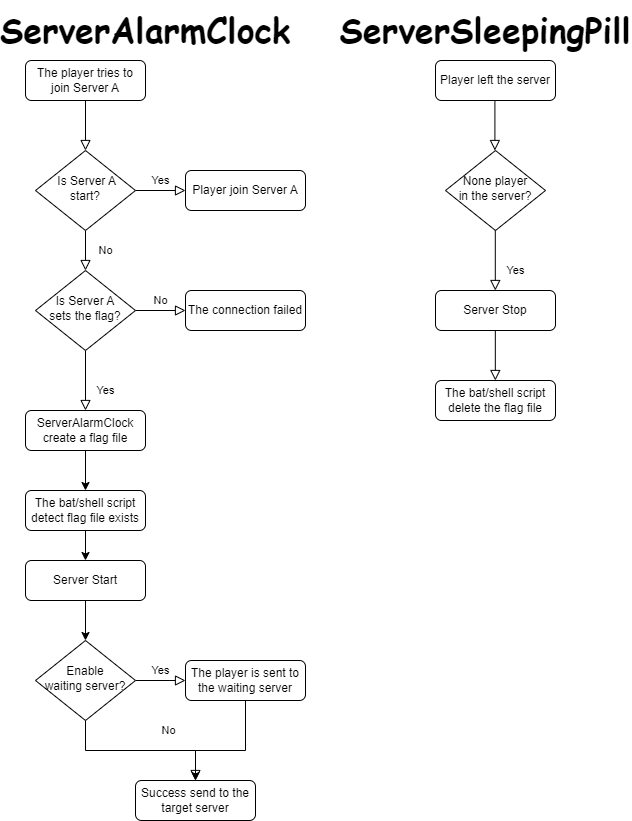
**ServerAlarmClock** is the perfect wake-up call for your Minecraft server! Ever tried to join a server that’s still fast asleep? With ServerAlarmClock, your server will automatically start up when someone attempts to join, ensuring no one has to wait too long for the fun to begin.
### Features
– 🚀 **Automatic Server Start:** Your server will automatically boot up when a player attempts to join a stopped or sleeping server.
– 💬 **Custom Messages:** Send players fun and customizable messages while they wait for the server to start.
– 🔧 **Easy Configuration:** Simple setup with a lightweight, no-hassle config.
Principle
### Command
“`
# reload your plugin config(serveralarmclock.reload)
/sac reload
“`
## How to Use
1. **Install the Plugin:**
– Download the `ServerAlarmClock.jar` file and place it in your BungeeCord plugins folder.
2. **Configure the Flags:**
– Open the `config.yml` file located in the `ServerAlarmClock` folder.
– Under the `flags` section, specify the paths to the flag files for each of your servers. These flags will be used to trigger the server startup.
3. **Setup the Server Startup Script:**
– You need to create or modify your server startup script to include the logic for checking the flag file. The example of a Linux shell script is provided at the end of this passage.
4. **Start the Server:**
– Once everything is configured, reload the plugin using /sac reload. The plugin will now monitor server connections and start the target server when a player attempts to join a server that is currently stopped.
5. **Enjoy!**
Example of a Linux shell script
“`
#!/bin/bash
# Server directory
SERVER_DIR=”your/server/path”
# Path to the flag file
FLAG_FILE=”your/flag/file/path/example.flag”
# Change to the server directory
cd “$SERVER_DIR” || { echo “Failed to change directory to $SERVER_DIR”; exit 1; }
while true
do
# Check if the flag file exists
if [ -f “$FLAG_FILE” ]; then
echo “Minecraft Server is Starting”
# Start the server
java -jar server.jar
# Remove the flag file
rm -f “$FLAG_FILE”
echo “Minecraft Server has Stopped”
else
sleep 1
fi
done
“`
Example of a Windows bat script(generate by gpt)
“`
@echo off
REM Server directory
set SERVER_DIR=yourserverpath
REM Path to the flag file
set FLAG_FILE=yourflagfilepathexample.flag
REM Change to the server directory
cd /d “%SERVER_DIR%”
if %errorlevel% neq 0 (
echo Failed to change directory to %SERVER_DIR%
exit /b 1
)
:loop
REM Check if the flag file exists
if exist “%FLAG_FILE%” (
echo Minecraft Server is Starting
REM Start the server
java -jar server.jar
REM Remove the flag file
del /f “%FLAG_FILE%”
echo Minecraft Server has Stopped
) else (
timeout /t 1 /nobreak >nul
)
goto loop
“`
Keep your players happy and your server ready with ServerAlarmClock—no more unexpected downtime!
RPlay
# RPlay Plugin
**Description:**
RPlay is a versatile and customizable Minecraft plugin designed to enhance roleplaying on your server. With features such as local and global chat commands, random rolls, and action attempts, RPlay adds depth and immersion to your gameplay. Easily configurable through the `config.yml` file, you can tailor message formats, colors, and language to suit your community’s needs.
**Features:**
– **Local and Global Chat:** Differentiate between local and global roleplay messages with `/me` and `/gme` commands.
– **Customizable Messages:** Configure message formats, colors, and language (Russian or English) via the `config.yml` file.
– **Random Rolls:** Use the `/roll` command to generate random numbers, perfect for in-game decisions.
– **Action Attempts:** Add a layer of chance to your actions with the `/try` command, which determines success or failure.
**Commands:**
– `/me [message]` – Send a local roleplay message (visible within 200 blocks).
– `/gme [message]` – Send a global roleplay message (visible to all players).
– `/do [message]` – Send a descriptive roleplay message.
– `/roll` – Roll a random number between 1 and 100.
– `/try [message]` – Attempt an action with a chance of success or failure.
– `/rplay reload` – Reload the plugin configuration.
RMotd
# 🎲 RMotd
A small Minecraft server plugin to serve rotating MOTDs (Message of the Day) and let server operators manage MOTDs at runtime.
# 🤑 Features
– Rotating MOTDs from `config.yml` (round-robin).
– `/randommotd` command: toggle random-rotation on/off.
– `/motd create ` command: add a new MOTD to `config.yml` at runtime.
– `/motd reload` command: reloads the `config.yml`.
# 🖌️ Configuration
“`yaml
random_motd_enabled: true
motds:
– “Welcome to our server!”
– “Explore the world of Minecraft with us!”
– “Join us and have fun!”
messages:
invalid_input: “Invalid input, Please use ‘true’ or ‘false’”
setting_updated: “Random MOTD feature updated to ”
“`
# 🕹️ Commands
– `/randommotd` — Toggle random MOTD rotation (reads/writes `random_motd_enabled` in `config.yml`).
– Permission: `rmod.randommotd` (declared in `plugin.yml`).
– `/motd create ` — Add a MOTD entry to `motds` in `config.yml` and save it. The `` is used only in the confirmation message currently. Provide the MOTD content as remaining args.
– Example: `/motd create welcome Welcome to our server!`
– Operator-only by default (only ops or console can run it). If you prefer permission-based control, see Permissions below.
– `/motd reload` — Reloads `config.yml` from disk. Operator-only.
# 🎭 Permissions
– `rmod.randommotd` — used for the `randommotd` command.
– `rmod.motd` — reserved for `/motd` (plugin.yml documents it). Currently the plugin enforces operator-only usage for `/motd`; if you prefer permissions, change the check to `sender.hasPermission(“rmod.motd”)` in `MotdCommand`.