EternalFriends Old
# ShadowFriends
### Sistema Global de Amigos para BungeeCord • Global Friends System for BungeeCord
—
## Descripción General / Overview
**ES:**
ShadowFriends es un sistema social funcional y optimizado para redes que utilizan BungeeCord. Permite a los jugadores agregar amigos, aceptar solicitudes, eliminar contactos y enviar mensajes privados, todo desde cualquier servidor conectado. No requiere interfaz gráfica: todo funciona por comandos.
**EN:**
ShadowFriends is a lightweight and functional social system designed for BungeeCord networks. It allows players to manage friendships, send/accept requests, and communicate privately across servers — all through simple commands. No GUI required.
—
## Características Principales / Key Features
| Español | English |
| ———————————————————————- | —————————————————————— |
| Envío y aceptación de solicitudes de amistad desde cualquier servidor. | Send and accept friend requests from any connected server. |
| Comandos simples para añadir, eliminar, listar y consultar amigos. | Simple commands to add, remove, list, and check friends. |
| Mensajes privados entre amigos conectados. | Private messages between connected friends across servers. |
| Visualización del estado (online/offline) de amigos en tiempo real. | Real-time online/offline friend status display. |
| Configuración editable de mensajes, prefijos y comportamientos. | Editable configuration for messages, prefixes, and core behaviors. |
| Funciona sin interfaces gráficas o menús. | Fully functional without menus or graphical interface. |
| Integración opcional con plugins externos. | Optional integration with external plugins. |
—
## Compatibilidad / Version Compatibility
| Versión BungeeCord / BungeeCord Version | Estado / Status |
| ————————————— | ———————– |
| 1.16 – 1.20 | ✅ Probado / Tested |
| Versiones anteriores o futuras | ⚠️ No garantizado |
> **Recomendación:** prueba el plugin en un entorno de pruebas si usas una versión no mencionada.
—
## Integraciones Opcionales / Optional Plugin Support
ShadowFriends no depende de otros plugins, pero puede trabajar con los siguientes si están instalados:
| Plugin | Requerido / Required? | Función / Functionality |
| ————– | ——————— | ————————————— |
| RedisBungee | No | Mejora la comunicación entre instancias |
| CobwebAPI | No | Proporciona APIs de apoyo |
| SQLiteDriver | No | Soporte para almacenamiento local |
| PlayerBalancer | No | Balanceo de carga y gestión de sesiones |
—
## Comandos Disponibles / Available Commands
| Comando / Command | Función / Function |
| ———————————- | ——————————————– |
| `/f add ` | Enviar solicitud / Send request |
| `/f acept ` | Aceptar solicitud / Accept request |
| `/f remove ` | Quitar de la lista / Remove from friend list |
| `/f msg ` | Enviar mensaje / Send private message |
> Todos los comandos pueden personalizarse o desactivarse desde el archivo de configuración del plugin.
—
## Instalación Rápida / Quick Setup
1. Coloca el archivo `.jar` en la carpeta `plugins/` de BungeeCord.
2. Reinicia el proxy.
3. Revisa el archivo de configuración y ajusta a tu gusto.
4. (Opcional) Añade RedisBungee, SQLiteDriver u otras dependencias.
5. Ejecuta comandos para probar la funcionalidad.
## Próximamente: Interfaz Gráfica / Coming Soon: GUI Interface
**ES:**
Si estás buscando menús interactivos o una experiencia más visual, pronto se lanzará **ShadowFriendsGUI**, un complemento adicional que añadirá soporte completo para interfaces gráficas dentro del juego.
Si no aparece un enlace, es porque aún no ha sido publicado.
Puedes dejar tus recomendaciones o ideas en nuestro servidor de Discord.
**EN:**
If you’re looking for interactive menus or a more visual experience, **ShadowFriendsGUI** is coming soon. It will provide full in-game graphical interface support as an optional add-on.
If there’s no link available yet, it means the GUI has not been released.
Feel free to leave suggestions or ideas in our Discord server.
—
**Desarrollado por / Developed by:** *こんにちは4885*
ServerVeil
# ServerVeil
Customize your Minecraft server to the bone
## Features
– Command blocker
– Tab Completion blocker
– /help customizer
– Multiplayer list MoTD
– ActionBar messenger
## Planned features
– Tab customizer
– Server brand changer
## Commands
– /sv reload – reloads the configuration
– /ab toggle – toggle the actionbar
– /ab send [player] [duration] [message] – sends a message in the specified player’s actionbar for the specified duration
## Requirements
– Spigot 1.7+ server
– SynkLibs
– ProtocolLib
– PlaceholderAPI (optional)
– Java 8+
ServerUtils
[spigot]: https://www.spigotmc.org/resources/79599/
[spigotRatingImg]: https://img.shields.io/badge/dynamic/json.svg?color=brightgreen&label=rating&query=%24.rating.average&suffix=%20%2F%205&url=https%3A%2F%2Fapi.spiget.org%2Fv2%2Fresources%2F79599
[spigotDownloadsImg]: https://img.shields.io/badge/dynamic/json.svg?color=brightgreen&label=downloads%20%28spigotmc.org%29&query=%24.downloads&url=https%3A%2F%2Fapi.spiget.org%2Fv2%2Fresources%2F79599
[issues]: https://github.com/FrankHeijden/ServerUtils/issues
[wiki]: https://github.com/FrankHeijden/ServerUtils/wiki
[release]: https://github.com/FrankHeijden/ServerUtils/releases/latest
[releaseImg]: https://img.shields.io/github/release/FrankHeijden/ServerUtils.svg?label=github%20release
[license]: https://github.com/FrankHeijden/ServerUtils/blob/master/LICENSE
[licenseImg]: https://img.shields.io/github/license/FrankHeijden/ServerUtils.svg
[bugReports]: https://github.com/FrankHeijden/ServerUtils/issues?q=is%3Aissue+is%3Aopen+label%3Abug
[bugReportsImg]: https://img.shields.io/github/issues/FrankHeijden/ServerUtils/bug.svg?label=bug%20reports
[reportBug]: https://github.com/FrankHeijden/ServerUtils/issues/new?labels=bug&template=bug.md
[featureRequests]: https://github.com/FrankHeijden/ServerUtils/issues?q=is%3Aissue+is%3Aopen+label%3Aenhancement
[featureRequestsImg]: https://img.shields.io/github/issues/FrankHeijden/ServerUtils/enhancement.svg?label=feature%20requests&color=informational
[requestFeature]: https://github.com/FrankHeijden/ServerUtils/issues/new?labels=enhancement&template=feature.md
[gradleInstall]: https://gradle.org/install/
[bStatsImg]: https://bstats.org/signatures/bukkit/ServerUtils.svg
[bStats]: https://bstats.org/plugin/bukkit/ServerUtils/7790
# ServerUtils
ServerUtils allows you to manage your plugins in-game.
Featuring reloading, unloading and loading of plugins from your plugins folder at runtime.
ServerUtils also has handy methods to lookup commands and plugins,
and provides you with handy information about them.
[![releaseImg]][release]
[](https://github.com/FrankHeijden/ServerUtils/actions)
[![licenseImg]][license]
[![featureRequestsImg]][featureRequests]
[![bugReportsImg]][bugReports]
[![spigotRatingImg]][spigot]
[![spigotDownloadsImg]][spigot]
[](https://discord.gg/WJGvzue)
## Features
– Spigot/Paper, BungeeCord/Waterfall and Velocity compatible!
– Replaces (you can disable this) the /pl and /plugins (bukkit) commands with a customisable message plugins version. Adding the -v tag will add all versions to the output! Please note: the commands [plain]/bukkit:pl[/plain] and [plain]/bukkit:plugins[/plain] are not replaced, so you can still use those!
– A neat configurable /bpl plugins command for bungeecord! Use the -v flag to output the versions of the plugin and -m flag to also include modules in the plugin list (e.g. cmd_send.jar, cmd_server.jar etc.)
– Reload plugins on the fly with /su (load/reload/unload)plugin ! (BungeeCord: the main command is /bsu) Supports tabcomplete to quickly load new plugins from a jar in your plugins folder 🙂
– Watch plugin files for changes and automatically reload them! /su watchplugin!
– Unloading unused commands (spigot/paper): You can define in the config commands which will be unloaded by ServerUtils at boot. These commands will not be accessible anymore to any in-game player, nor the console.
– Reloading plugins and cleaning things up, like their PluginClassLoader and their recipes, recipe cleanup only works 1.12+, as below those versions a plugin is not associated with a recipe, so there’s no way ServerUtils can know a recipe belongs to a plugin.
– ServerUtils can also restart / update itself, as a gimmick (:
– Reload commands.yml on the fly without performing a whole reload or restart on the server! Useful to quickly make aliases 🙂 Please note: currently, this only works on 1.8 – 1.16.
– Reload the bukkit configuration on the fly without performing a whole reload or restart on the server! Please note: some configuration options may not be reloaded, please contact me if you think this is an error. Spigot/Paper configs are not reloaded, you can reload those with /paper reload or /spigot reload. Please note: currently, this only works on 1.8 – 1.16.
– Automatic updater. The plugin can be configured to automatically download & install new updates of the plugin on server boot or when updates are checked. This feature is disabled by default, but can be precisely configured per config.
Plugins can listen for changes! ServerUtils offers an event API which can notify plugins precisely what component has been loaded, enabled, disabled or unloaded — all with a Pre and Post stage. Please take a look at the Bukkit and Bungee events!
## Load stages of a plugin (Spigot/Paper):
To understand the difference between loading / enabling / disabling / unloading of plugins, I will describe the load stages below:
### Fully loading a plugin (like at startup):
1. First, the plugin is loaded from a .jar file from the plugins directory. This is called loading of a plugin. The plugin is now “red” in the /plugin list, because it is not yet enabled.
2. At the second step, a plugin is enabled. This causes the plugin to spit all sorts of things in the console (which the developer found important to notify you about at startup), like database connections being setup etc.
### Fully disabling a plugin (like closing the server)
1. First the plugin is disabled. This causes the plugin to lose all of it’s features, like commands, event listeners, etc. After disabling, the plugin is still loaded in memory, but it is seen “red” in the /plugin list.
2. Then the plugin will be unloaded from the memory, so the plugin won’t appear at all anymore in the /plugin list.
## Disclaimer ‼️
Please note that reloading may not be compatible with each and every plugin! Plugins which depend on a reloaded plugin, are likely to be error-prone for reloading. Improper cleanup, or improper startup practises may break plugin (re/un)loading as well. Please be careful!
## Statistics
[![bStatsImg]][bStats]
## Compiling ServerUtils
There are two ways to compile ServerUtils:
### 1. Installing gradle (recommended)
1. Make sure you have [gradle][gradleInstall] installed.
2. Run the project with `gradle build` to compile it with dependencies.
### 2. Using the wrapper
**Windows**: `gradlew.bat build`
**Linux/macOS**: `./gradlew build`
## Developer API
### Repository / Dependency
If you wish to use snapshot versions of ServerUtils, you can use the following repo:
“`
https://repo.fvdh.dev/snapshots
“`
#### Gradle:
“`kotlin
repositories {
compileOnly(“net.frankheijden.serverutils:ServerUtils:VERSION”)
}
dependencies {
maven(“https://repo.fvdh.dev/releases”)
}
“`
#### Maven:
“`xml
fvdh
https://repo.fvdh.dev/releases
net.frankheijden.serverutils
ServerUtils
VERSION
provided
“`
## Commands and Permissions
Please refer to the [Wiki][wiki] page for an updated overview of the commands and permissions.
ServerSwitch
## **MySQL needed!**
### **[JSMySQLFix](https://modrinth.com/plugin/mysqlfix) is REQUIRED for the Velocity version**
ServerSwitch is a versatile plugin designed for both BungeeCord and Spigot servers, providing comprehensive server switch logging and serving as an alternative to OnlyProxyJoin. With ServerSwitch, you can effortlessly track player server switches and customize their join experience, enhancing your server network management capabilities.
**Features:**
1. Server Switch Logging: ServerSwitch logs player server switches to a MySQL database, providing valuable insights into player behavior and server traffic patterns across both BungeeCord and Spigot servers.
2. OnlyProxyJoin Alternative: Replace OnlyProxyJoin with ServerSwitch to control player joins and implement custom join messages and actions based on specific criteria, catering to the needs of your server network.
3. Automatic Cleanup: The plugin includes a feature to automatically delete old server switch records, ensuring optimal database performance and storage efficiency for both BungeeCord and Spigot servers.
4. Customizable Configuration: Easily configure the MySQL connection settings, join messages, and other plugin options through the included configuration file, offering flexibility and customization for your server network setup.
5. Lightweight and Efficient: ServerSwitch is lightweight and designed for efficiency, ensuring minimal impact on both BungeeCord and Spigot server performance while delivering robust functionality for server switch logging and player join management.
**Instructions:**
1. Place the serverswitch.jar file in the plugins folder of both your BungeeCord and Spigot servers.
2. Customize the plugin settings, including the MySQL connection details and join messages, in the config.yml file located in the plugin’s folder on both server types.
3. Restart your BungeeCord and Spigot servers to apply the changes.
4. ServerSwitch will now log player server switches and handle player joins according to your configured settings on both BungeeCord and Spigot servers.
Enhance your server network management and provide a seamless join experience for your players with ServerSwitch today!
config.yml
“`
# Connect to your Database! (IS REQUIRED!)
database:
url: “jdbc:mysql://127.0.0.1:3306/YourDB” # Set Infos here
username: “root”
password: “password”
# YOU HAVE TO SET A SERVERNAME! THE SERVER NAME HAVE TO BE THE SAME AS THE BUNGEECORD NAME TO THIS SERVER!!
server:
# YOU HAVE TO SET A SERVERNAME! THE SERVER NAME HAVE TO BE THE SAME AS THE BUNGEECORD NAME TO THIS SERVER!!
servername: “SETITHERE!” # Example: servername: “Lobby-01”
# Set your custom messages and permissions
messages:
kick: ‘§cYou need to join through the proxy!’
staff_notification: ‘§c{player} attempted to join without going through the proxy!’
joinMessage: ‘§e{player} joined’
leaveMessage: ‘§e{player} left the server’
permissions:
notify: ‘serverswitch.notify’ # Set Permission here
settings:
Custom-join-leaveMessages: false
Disable-join-leaveMessages: false
“`
bungeeconfig.yml
“`
# Connect to your Database! (IS REQUIRED!)
database:
url: “jdbc:mysql://127.0.0.1:3306/YourDB”
username: “root”
password: “password”
“`
ServerShout
# ServerShout 2
ServerShout is a Cross-Server Shout and Invite plugin for Bukkit/BungeeCord/Velocity. It features high performance and a high degree of customization, and it is compatible with PlaceholderAPI and LuckPerms.
## Screenshots
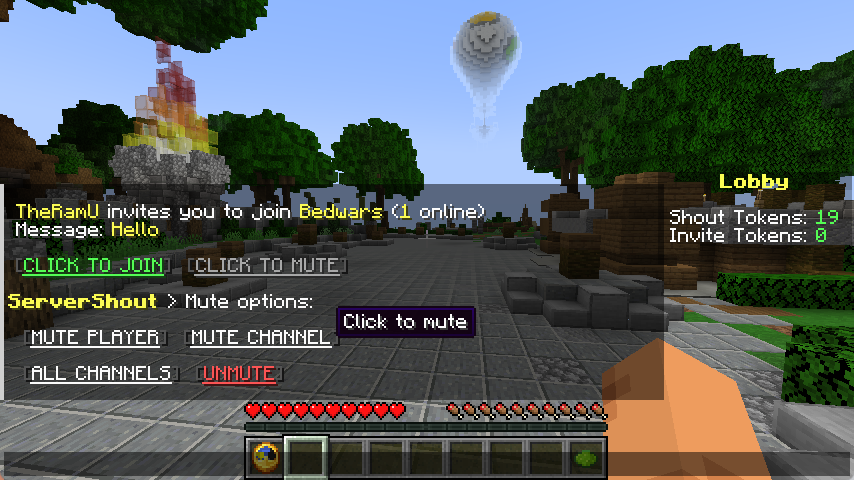
Cross-Server Shout

Cross-Server Invite

Message Mute
## Commands & Permissions
`/ss help` – Get help
`/ss reload` – Reload configuration
`/ss token list` – List all tokens
`/ss token create ` – Create new token
`/ss token delete ` – Delete token
`/ss balance get ` – Check player token balance
`/ss balance set ` – Set player token balance
`/ss balance give ` – Give tokens to player
`/ss balance take ` – Take tokens from player
`servershout.help` – Allows use of /ss help
`servershout.reload` – Allows use of /ss reload
`servershout.token.list` – Allows use of /ss token list
`servershout.token.create` – Allows use of /ss token create
`servershout.token.delete` – Allows use of /ss token delete
`servershout.balance.get` – Allows use of /ss balance get
`servershout.balance.set` – Allows use of /ss balance set
`servershout.balance.give` – Allows use of /ss balance give
`servershout.balance.take` – Allows use of /ss balance take
`servershout.update.notify` – Allows receiving update notifications
BungeeCord Command: `/ssb` | Velocity Command: `/ssv`
**⭐ Default Shout format:** `!`
**⭐ Default Invite format:** `/invite` or `/invite `
## PlaceholderAPI Placeholders
`%servershout_balance_%` the player’s token amount
## LuckPerms Meta Placeholders
In shout.yml, you can configure the show of a player’s LuckPerms Meta value in messages.
**For example:**
`{luckperms_meta_prefix}` displays the prefix Meta value, i.e., the player’s prefix.
Other Meta values can be managed via `/lp user meta`
## Usage
1. Download the jar file and place it in the plugins directory of the proxy (BungeeCord/Velocity) **(required)**
2. Place the jar file in the plugins directory of Bukkit as the management end of ServerShout (optional).
3. Restart the server.
4. Edit config.yml to configure the database and reload the plugin (optional). If the database is not configured, player tokens will not be deducted, and players can send messages without restrictions.
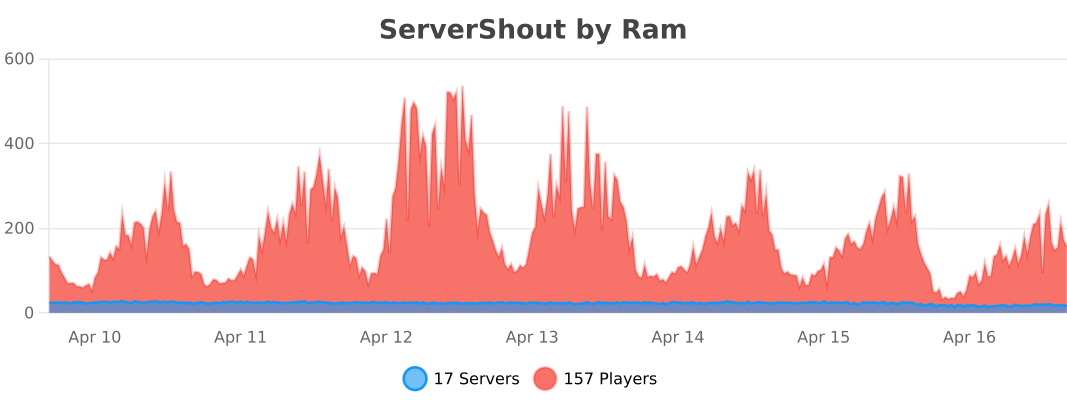
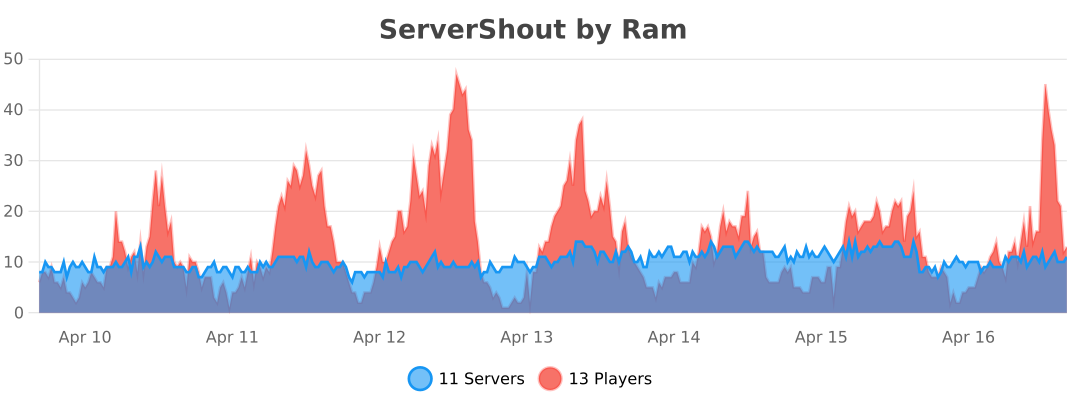
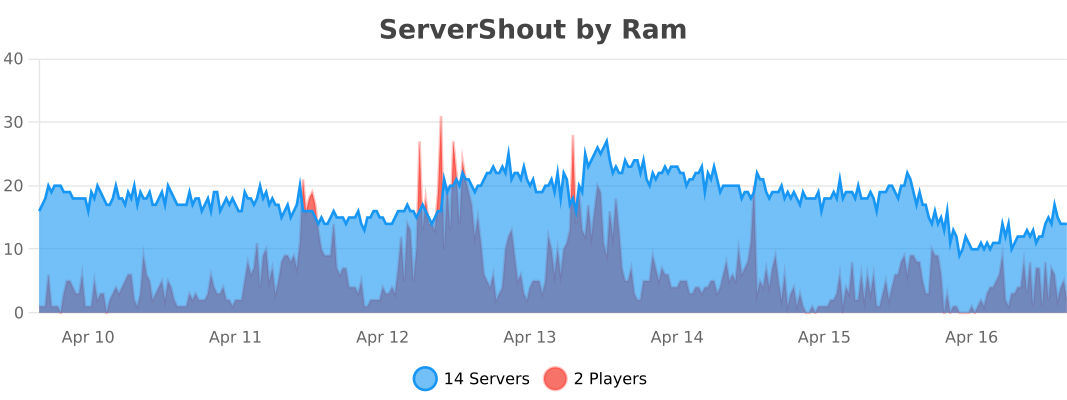
## Stats
BungeeCord
Velocity
Bukkit
ServerPulse

ServerPulse is your **all-in-one** server **monitoring** solution that combines **powerful** metrics collection, beautiful **visualizations**, real-time **alerting**, and **effortless** setup. Monitor **TPS, memory, entities, and more** through professional Grafana **dashboards** – all up and **running in minutes** with Docker!
Tired of guessing why your server is **lagging**? Frustrated with complex monitoring setups? **ServerPulse** is what you are looking for!
If you need support, or you have any question, join our [Discord server](https://discord.gg/jZUqcemc4G)
## Why ServerPulse?
– **Zero-Configuration Monitoring:** Get started in minutes with our Docker Compose setup – InfluxDB, Grafana, and pre-built dashboards, all ready to go!
– **Universal Platform Support:** Works with any **Bukkit-based, Velocity, BungeeCord** and **Fabric** server while taking advantage of Paper-specific optimizations when available
– **Complete Solution:** Not just a metrics exporter – includes the entire monitoring stack optimized for time-series data
– **Per-World Performance Tracking:** Uniquely monitor metrics separately for each world – find problem areas fast!
– **Advanced Tagging System:** Group and filter metrics by server, network, region, or any custom dimension
– **Production-Ready Infrastructure:** Built-in health checks, automatic reconnection, and proper error handling
## Real-Time Metrics Include:
– TPS (1m, 5m, 15m)
– MSPT (last, min, max, 1m, 5m, 15m)
– CPU Usage (System, JVM, Available Processors)
– Online Players
– Player Ping Statistics (min, max, avg)
– JVM Memory (Used, Committed, Max Heap)
– Disk Usage (Usable Bytes & Percent)
– Per-World Stats:
– Loaded Chunks
– Total Entities
## Alert Notification System:
– **Multi-Platform Support:** Choose between Discord or Telegram for notifications
– **Instant Notifications:** Get alerted when TPS drops, memory spikes, or other
critical events occur
– **Customizable Thresholds:** Set your own alert conditions for any metric
– **Intelligent Alert Grouping:** Prevents notification spam during ongoing issues
– **Easy Integration:** Simple webhook setup for Discord or bot configuration for
Telegram
## Technical Features:
– **Efficient & Safe**: Asynchronous tasks and batch writing minimize performance
impact
– **Platform Detection**: Automatically detects your server type and uses the optimal implementation
– **Flexible Configuration**: Customize metrics collection intervals, alerts, and
tagging
– **Professional Dashboards**: Start monitoring immediately with pre-designed Grafana
dashboards
– **Open Source**: Full transparency and community-driven development
## Requirements:
– **Server**: Any Bukkit-based, Velocity, BungeeCord or Fabric server (Bukkit, Spigot, Paper, or forks like Purpur, Pufferfish)
– **System**: Docker and Docker Compose for the monitoring stack
– Optional: Discord server or Telegram bot for alert notifications
## Quick Start:
Clone, compose up, and you’re monitoring! Full setup guide at [https://github.com/renvins/serverpulse](https://github.com/renvins/serverpulse)
Screenshots:
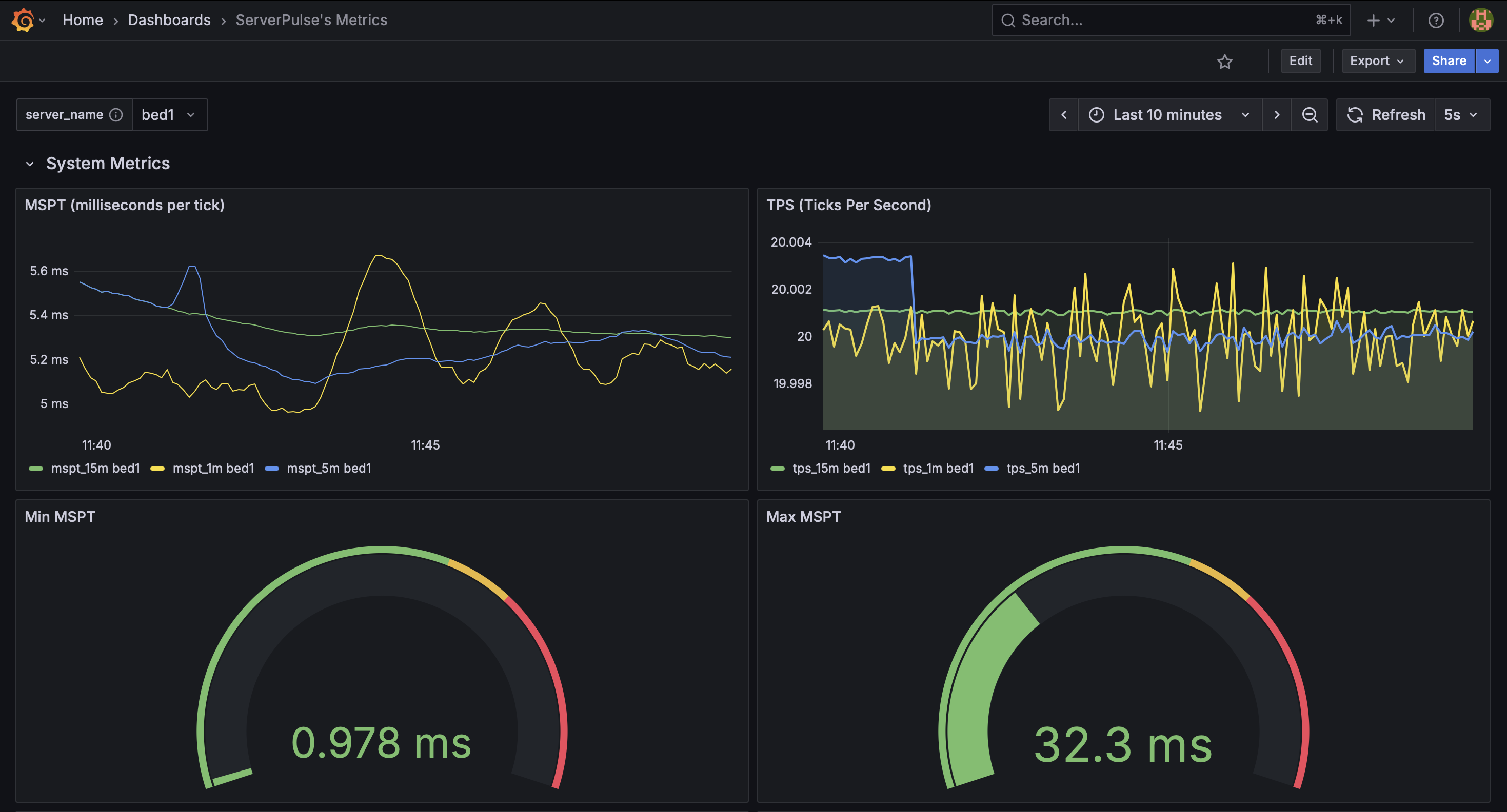
_Example dashboard view 1: System Metrics_
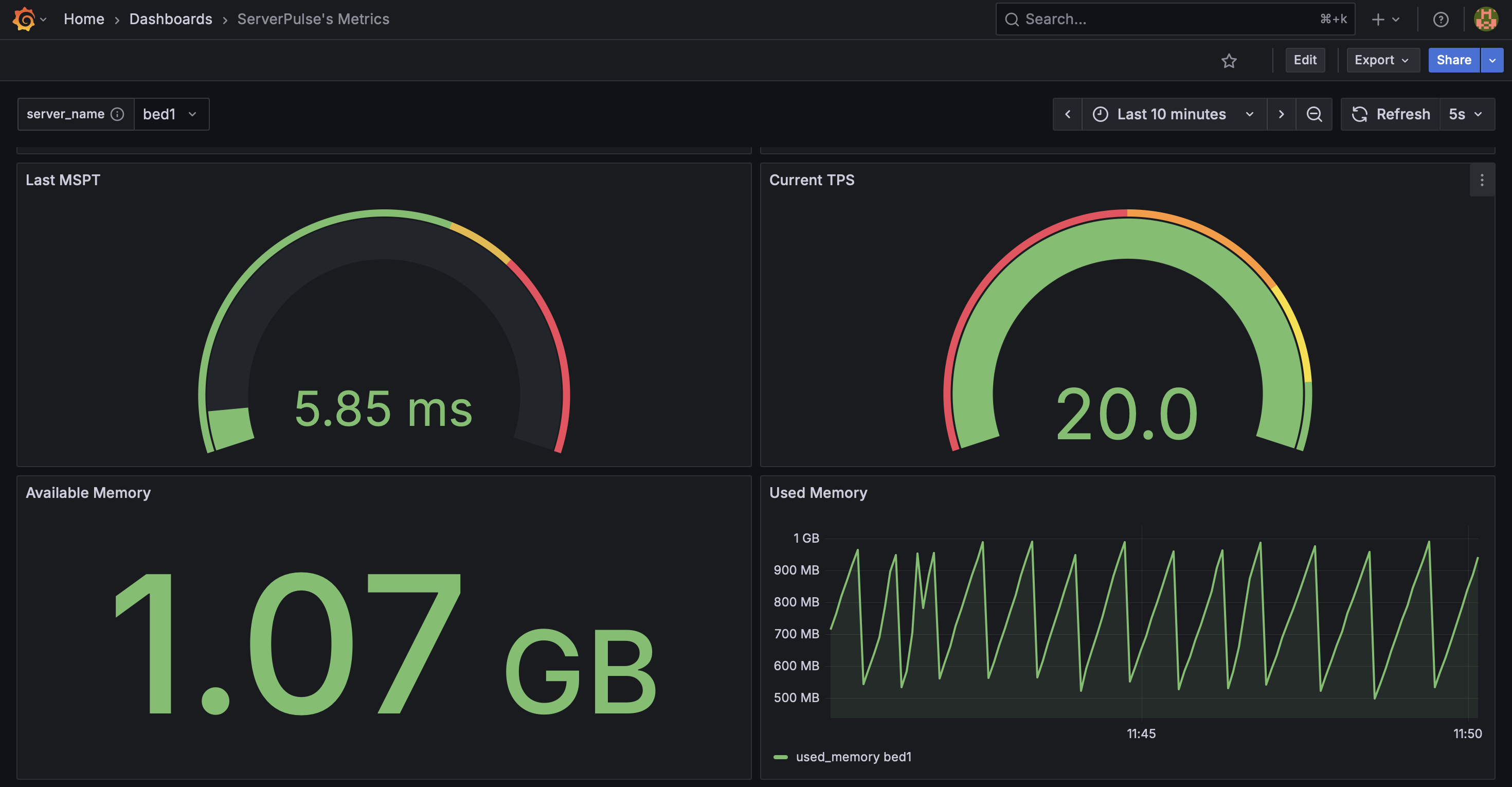
_Example dashboard view 2: System Metrics 2_
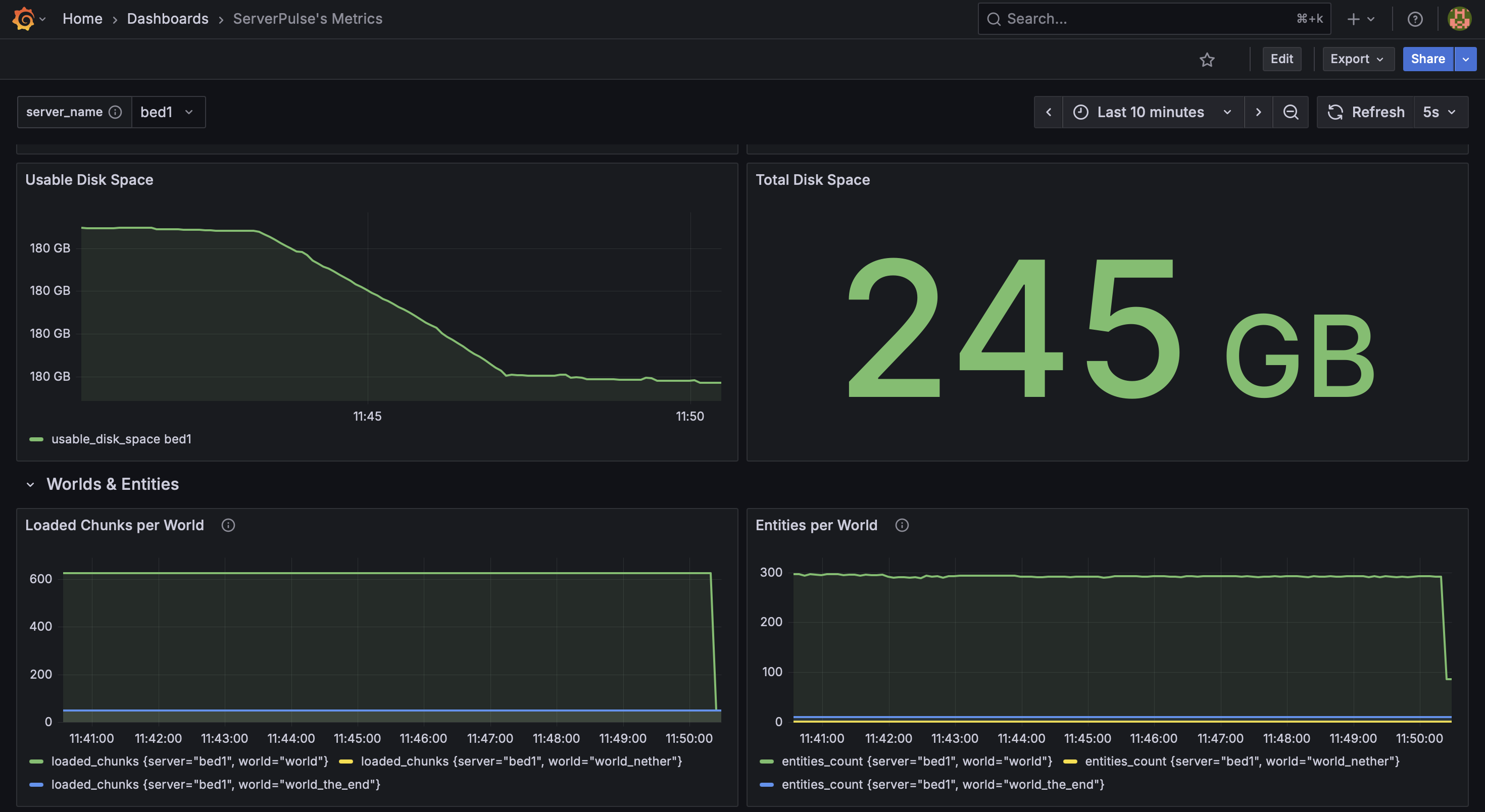
_Example dashboard view 3: System & World Metrics_
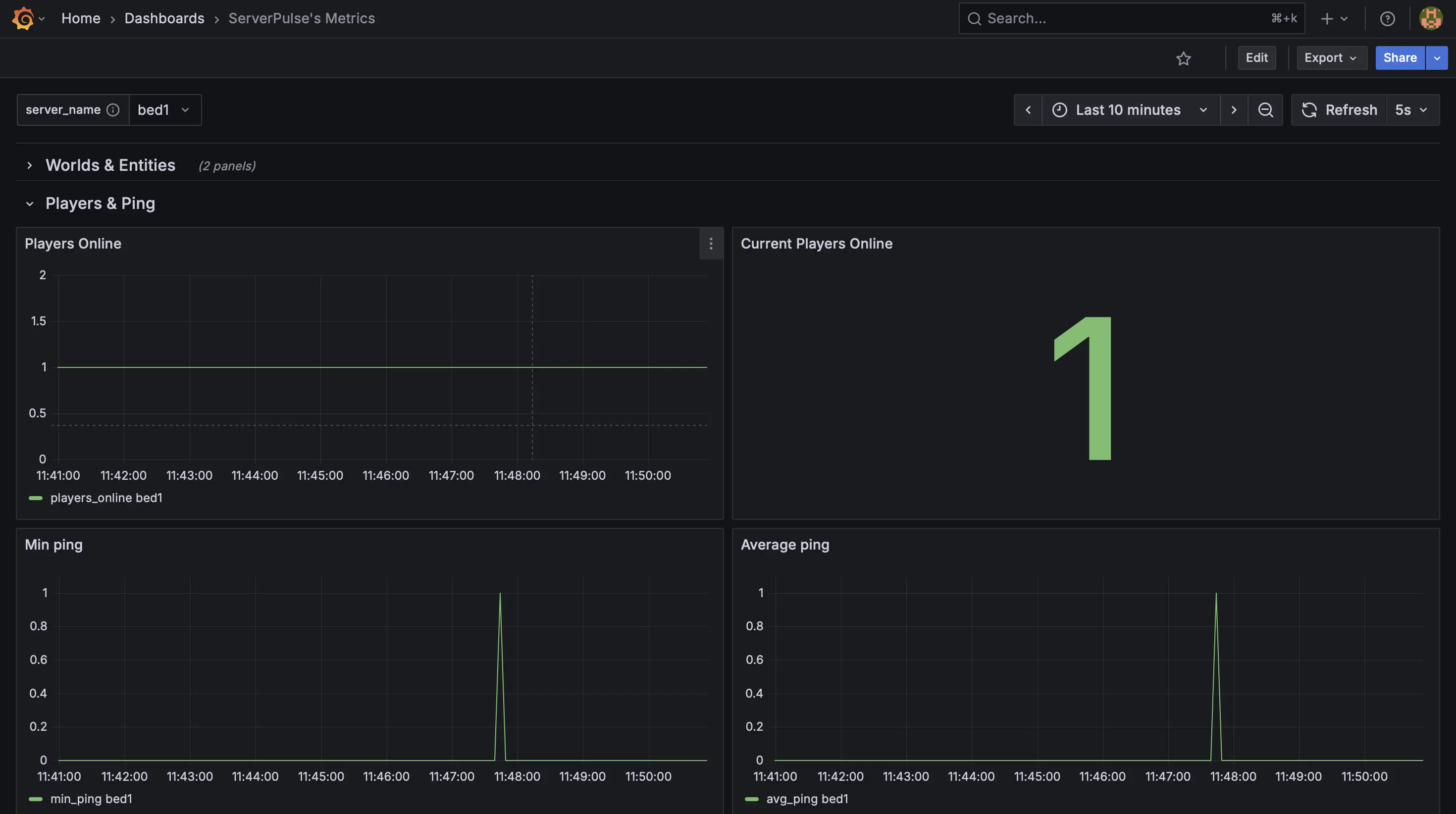
_Example dashboard view 4: Player Metrics_
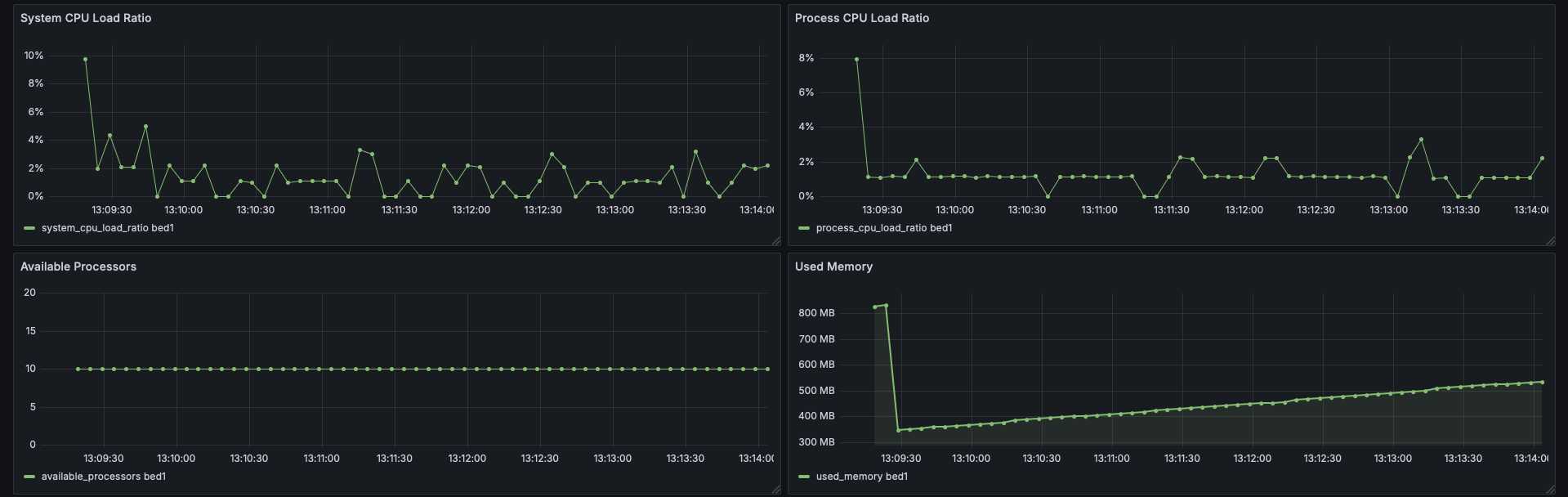
_Example dashboard view 5: CPU Stats_
## Support & Contributions:
– Issues & Features [https://github.com/renvins/serverpulse/issues](https://github.com/renvins/serverpulse/issues)
– Contributing [https://github.com/renvins/serverpulse/blob/master/CONTRIBUTING.md](https://github.com/renvins/serverpulse/blob/master/CONTRIBUTING.md)
– Discord [https://discord.gg/jZUqcemc4G](https://discord.gg/jZUqcemc4G)
**Ready to take control of your server’s performance with a professional monitoring solution? Download ServerPulse today!**
ServerJoinBlocker
# ServerJoinBlocker
Plugin that will allow or not allow players connect to BungeeCord
## Features
* Customizable messages
* List of players that can join during block
* Commands for easy enable/disable block
* Colored messages support
## Commands
* `/bon` – enable block (aliases: `/blockjoinenable`, `/benable`)
* `/boff` – disable block (aliases: `/blockjoindisable`, `/bdisable`)
* `/greload` – will reload BungeeCord, but plugin configuration will be reloaded too
## Permissions
* `serverjoinblocker.enable` – will allow to enable block
* `serverjoinblocker.disable` – will allow to disable block
## config.yml
“`yaml
enableMsg: ‘&cJoins blocked!’
enableMsgAlready: Joins already &cblocked
disableMsg: ‘&aJoins allowed!’
disableMsgAlready: Joins already &aallowed
kickMsg: ‘&cSorry, you can`t join now’
reloadMsg: ‘&aConfiguration reloaded!’
allowJoinTo:
– playername
blockEnabled: true
#dont touch blockEnabled option, commands changing it
“`
Server Stats Sender
# Steps on how to use
Make a bot on the disocord dev portal,
https://discordapi.com/permissions.html#8 use this <-- And put in the bots client id. Paste the link you get in the web to a discord channel. link should look like this ==>

Paste your plugin into your server
go to config yml put in the channel id, and bot token and restart vuala.
should look something like this:

If server doesn’t support measurements, mtps will not work, the rest of the servers stats will appear, Most servers support it!
Default time is set to 10 mins for repeat function.
REMASTER:
Now with more config then ever to enhance the user experience
– Embed ✔️
– Img ✔️
– discordCustomCmd ✔️
– time ✔️
– customChannel ✔️
– Repeat ✔️
and More!

# Permissions:
– “sss.access” this permission allows the user to have the onjoin notifier if the config of the plugin doesnt have channel id or a token in it. As well as the /sssreload command.
– “sss.token” This permission allows the user to do the command /sssactivate token chanid
ps does need spark plugin installed.
Server Registration Plugin
# Server Registration Plugin
![Banner][banner]
[![Modrinth][badge-modrinth]][modrinth]
[![Discord][badge-discord]][social-discord]
[![Follow @simplecloudapp][badge-x]][social-x]
[![Follow @simplecloudapp][badge-bluesky]][social-bluesky]
[![Follow @simplecloudapp][badge-youtube]][social-youtube]
[Report a Bug][issue-bug-report]
·
[Request a Feature][issue-feature-request]
🌟 Give us a star — your support means the world to us!
> All information about this project can be found in our detailed [documentation][docs-thisproject].
A proxy plugin that registers SimpleCloud v3 Minecraft servers on a proxy server.
## Features
– [x] **Velocity**
– [x] **BungeeCord**
– [x] **Server name**: Specify how the server name of servers is assigned
– [x] **Additional servers**: Add non network servers
– [ ] **Advanced filters**: Use advanced filters for filtering which servers can get registered
## Contributing
Contributions to SimpleCloud are welcome and highly appreciated. However, before you jump right into it, we would like you to read our [Contribution Guide][docs-contribute].
## License
This repository is licensed under [Apache 2.0][license].
[banner]: https://raw.githubusercontent.com/simplecloudapp/branding/refs/heads/main/readme/banner/plugin/server-registration.png
[issue-bug-report]: https://github.com/theSimpleCloud/server-registration-plugin/issues/new?labels=bug&projects=template=01_BUG-REPORT.yml&title=%5BBUG%5D+%3Ctitle%3E
[issue-feature-request]: https://github.com/theSimpleCloud/server-registration-plugin/discussions/new?category=ideas
[docs-thisproject]: https://docs.simplecloud.app/plugin/server-registration
[docs-contribute]: https://docs.simplecloud.app/contribute
[modrinth]: https://modrinth.com/plugin/server-registration-plugin
[license]: https://opensource.org/licenses/Apache-2.0
[snapshots]: https://repo.simplecloud.app/#/snapshots
[social-x]: https://x.com/simplecloudapp
[social-bluesky]: https://bsky.app/profile/simplecloud.app
[social-youtube]: https://www.youtube.com/@thesimplecloud9075
[social-discord]: https://discord.simplecloud.app
[badge-modrinth]: https://img.shields.io/badge/modrinth-18181b.svg?style=flat-square&logo=modrinth
[badge-license]: https://img.shields.io/badge/apache%202.0-blue.svg?style=flat-square&label=license&labelColor=18181b&style=flat-square&color=e11d48
[badge-discord]: https://img.shields.io/badge/Community_Discord-d95652.svg?style=flat-square&logo=discord&color=27272a
[badge-x]: https://img.shields.io/badge/[email protected]?style=flat-square&logo=x&color=27272a
[badge-bluesky]: https://img.shields.io/badge/[email protected]?style=flat-square&logo=bluesky&color=27272a
[badge-youtube]: https://img.shields.io/badge/youtube-d95652.svg?style=flat-square&logo=youtube&color=27272a
Server Redirect
## **Server Redirect**
This mod provides a lightweight way for servers to transfer players to another server address, without the use of a proxy server.
Server Redirect supports Forge, Fabric, Bukkit/Spigot, SpongeVanilla/SpongeForge, Bungeecord/Waterfall and Velocity.
With Server Redirect, server admins can avoid mod incompatibility issues caused by proxy servers (Bungeecord, Waterfall, and Velocity).
In particular, this mod can be used in combination with **Waterfall and Forge 1.13+** servers and clients to provide a way to transfer players between servers (currently, the 1.13+ Forge server needs to be “online” as they haven’t included IP forwarding yet…).
This mod is optional, so it can be added to modpacks and players can still join servers without this mod. Likewise, servers with this mod can be joined by clients without this mod.
## **Commands**
– **/redirect <Target> <Server Address>**: redirects the specified target player(s) to the specified address
– **/fallback <Target> <Server Address>**: sets the fallback server address for the specified target player(s)
– **/ifplayercanredirect <Target> <Command…>**: runs the specified command for each of the target player(s) that have Server Redirect
– **/ifplayercannotredirect <Target> <Command…>**: runs the specified command for each of the target player(s) that have not Server Redirect
The command source can be anything that can run a command, like a command block, a player, or console.
Replace **/redirect** with **/fallback** to have the specified target players connect to the specified server address when they get forcefully disconnected from the server.
##### **The <Target> argument can be one of the following:**
– **Player Name/UUID**: the specified player on the server
– **Target Selector**: a [target selector](https://minecraft.fandom.com/wiki/Target_selectors). Target selectors are not available on Bungeecord and Velocity.
– **r=N**: all players within N blocks from the command sender, or from the overworld spawn if run by console. Plugin version only.
– **s=<ServerName>**: all players in the specified ServerName. Bungeecord and Velocity only.
– *: all players on the server.
##### **The <Command…> argument can contain the following placeholders:**
– **%PlayerName**: this placeholder will be replaced with the player’s name
– **%PlayerId**: this placeholder will be replaced with the player’s UUID
**NOTICE**: **/ifplayercanredirect** and **/ifplayercannotredirect** will likely not work as expected if run when the target player just joined the server. These commands rely on the client sending a packet to the server telling them they have this mod installed. This packet requires some time to be sent by the client and processed by the server. It is recommended to delay this command execution by at least 20 ticks after the player has joined the server!
#### **Examples:**
– **/redirect KaiNoMood myawesomemcserver.net:25667**: the player named KaiNoMood will connect to myawesomemcserver.net:25667
– **/redirect a54a7884-9ea4-4d54-ac35-1623d70ffbe1 myawesomemcserver.net:25667**: the player with the specified UUID will connect to myawesomemcserver.net:25667
– **/redirect * myawesomemcserver.net:25667**: all players on the server will connect to myawesomemcserver.net:25667.
– **/redirect @a[m=creative] myawesomemcserver.net:25667**: all players in creative mode will connect to myawesomemcserver.net:25667.
– **/redirect r=10 myawesomemcserver.net:25667**: all players within 6 blocks from the command sender will connect to myawesomemcserver.net:25667. This works on Bukkit and Sponge based servers only.
– **/redirect s=lobby myawesomemcserver.net:25667**: all players in the “lobby” server will connect to myawesomemcserver.net:25667. This works on Bungeecord and Velocity proxy servers only.
– **/ifplayercanredirect * say %PlayerName is online and using Server Redirect! Yay!**: the specified command will run for each player on the server that has Server Redirect.
– **/ifplayercannotredirect @a[distance=..5] tell %PlayerName It does not seem you have Server Redirect installed! Make sure to install it!**: the specified command will run for all players without Server Redirect within 5 blocks of the command source.
Replace **/redirect** with **/fallback** for setting a fallback address for the target players. For more info about the fallback command, read below.
## **FAQ**
### **How this mod redirects players**
– By running the /redirect command, the server will send a “transfer” packet containing the specified server address to the specified players.
– All players receiving the packet that have the ServerRedirect mod installed will disconnect from the server, and automatically direct connect to the specified server address.
Any server address that is reachable by the players with the “Direct Connect” button can be used.
The “transfer” packet will not affect players without the mod installed: they will simply stay connected on the current server.
This behaves like the transfer packet present in “Minecraft: Bedrock Edition”, feature included by Mojang by default on that client. Regrettably, “Minecraft: Java Edition” is missing this feature entirely.
Both the redirect and fallback commands are not supposed to be run by players. They are intended for being run by the console, command blocks and other plugins. Command aliases and “server selector” GUIs are recommended (see BossShop or VirtualChest).
### **What the fallback command is for**
The fallback command tells the clients which server address they should connect to in case they get forcefully disconnected from the server (e.g. the server crashes).
Server admins want to use this by running the fallback command automatically by the server for every player that joins the server. If the server shuts down for any reason, the players will automatically direct connect to the fallback server address specified in the fallback command.
Another use of the fallback feature is when you want to redirect a player to a server, but they might get rejected for some reason (e.g. the server is offline). First, set the fallback address for the player to a server address you can be sure they can reach, then use the redirect command to redirect the player to the server address they might get rejected from. If the player cannot join the server they were redirected to, they’ll automatically join the fallback server.
### **Reasons for using this mod instead of a proxy like Bungeecord, Waterfall or Velocity**
Forge mods don’t always expect that the player is being moved from one server to another, and when a proxy transfers a player to a different server, it can cause glitches or crashes. Forge mods commonly expect to be disconnected from the server before connecting to another one. Additionally, Forge 1.13+ does not support proxies server switching. This mod solves the issue by properly disconnecting players from the server, and then connecting them to another server. This way, mods can properly handle players switching from a server to another.
Server admins can also use a combination of a proxy and Server Redirect if they want to use all the other features proxies can provide (except on Forge 1.13+ servers currently). Still, it is suggested to look into replacing the proxy with cross-server plugins and mods.
### **Players with this mod can join servers without this mod**
Any combination of presence/absence of this mod will let players connect to servers. Players with this mod can connect to Vanilla servers as well, and players with vanilla Minecraft can also connect to servers with this mod.
### **This mod can be added in modpacks**
Feel free to add this modpack in public and private modpacks. Asking for permission is not required. If you add Server Redirect to your public modpack, feel free to let everyone know in the comments below! Although this mod shouldn’t have any conflict with any other mod, feel free to [report conflicts here](https://github.com/KaiKikuchi/ServerRedirect/issues).
### **License and improvements to the project**
This project is MIT licensed. Feel free to fork this project and/or suggest new features on [the Issues page](https://github.com/KaiKikuchi/ServerRedirect/issues)! If you cannot find the right version of Server Redirect for your Minecraft version, feel free to ask there!
If you wish to buy me a pizza, [click here](https://paypal.me/kainomood “PayPal Me”)! I appreciate it very much! 🙂