FlectonePulse
### 🎥 FlectonePulse Video Review
[](https://youtu.be/UjIlfjXzdxE “Watch”)
## 🏆 What makes FlectonePulse special?
FlectonePulse is a plugin and mod for Minecraft servers that takes control of chat, messages, and notifications. Beginners will especially love it because the setup is simple, and the result is a beautiful chat, integrations, and useful commands without any hassle.
– All operations are performed asynchronously, the main server thread is not affected
– Uses Google Guice for dependency injection, which simplifies extending functionality
– Supports all popular platforms Bukkit, Spigot, Paper, Purpur, Folia, Fabric, BungeeCord, Waterfall, and Velocity on versions 1.8.8 to the latest
## 🎨 Flexible text formatting
Supports all color formats, from legacy (`&` or `§` for colors) to modern MiniMessage tags
| **Input code** | **Transformation** |
|——————————————————-|————————————————————-|
| `&0`-`&9`, `&a`-`&f` | ``, ``, …, `` |
| `&l`/`&m`/`&n`/`&o`/`&k`/`&r` | `` / `` / `` / `` / `` / `` |
| `&#rrggbb`, `#rrggbb`, `&x&r&r&g&g&b&b`, `<##rrggbb>` | `<#rrggbb>` |
| MiniMessage tags | ``, ``, ``, ``, etc. |
“`yaml
# EXAMPLE
join:
format: “&lHello !”
“`

## 🧱 Any textures in messages (WITHOUT RESOURCE PACK)
Add custom texture (image) using the `` placeholder
[](https://flectone.net/pulse/docs/message/format/object/)
[](https://flectone.net/pulse/docs/message/format/object/)
Use avatars in messages using the `` placeholder and Minecraft symbols using ``
[](https://flectone.net/pulse/docs/message/format/object/)
## 🌈 Chat customization with /chatsetting
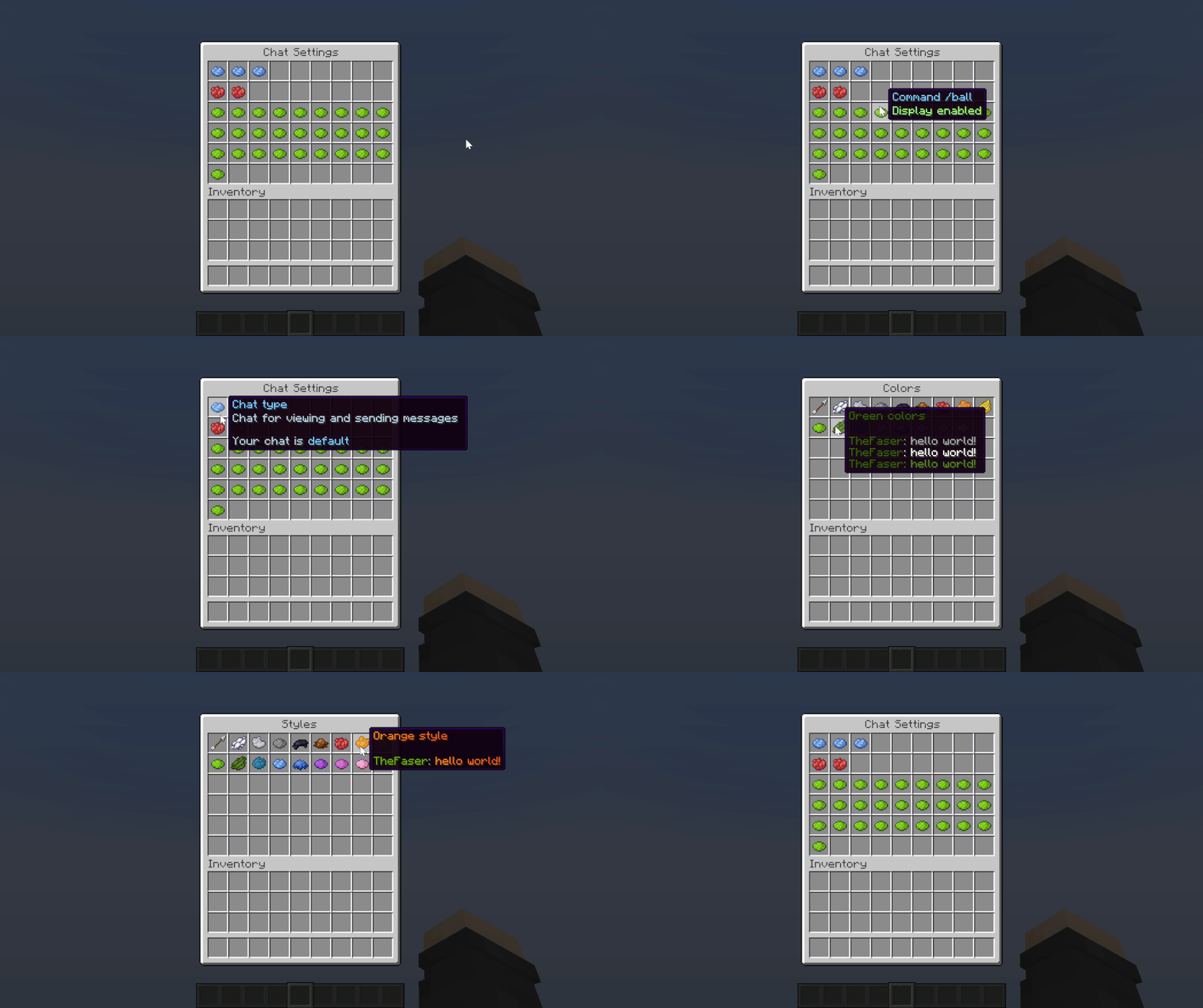
The /chatsetting command opens a menu for quick message customization for each player. Choose colors, styles, and disable unnecessary messages
## 🌍 Smart localization
### How it works
[](https://flectone.net/pulse/docs/config/language/)
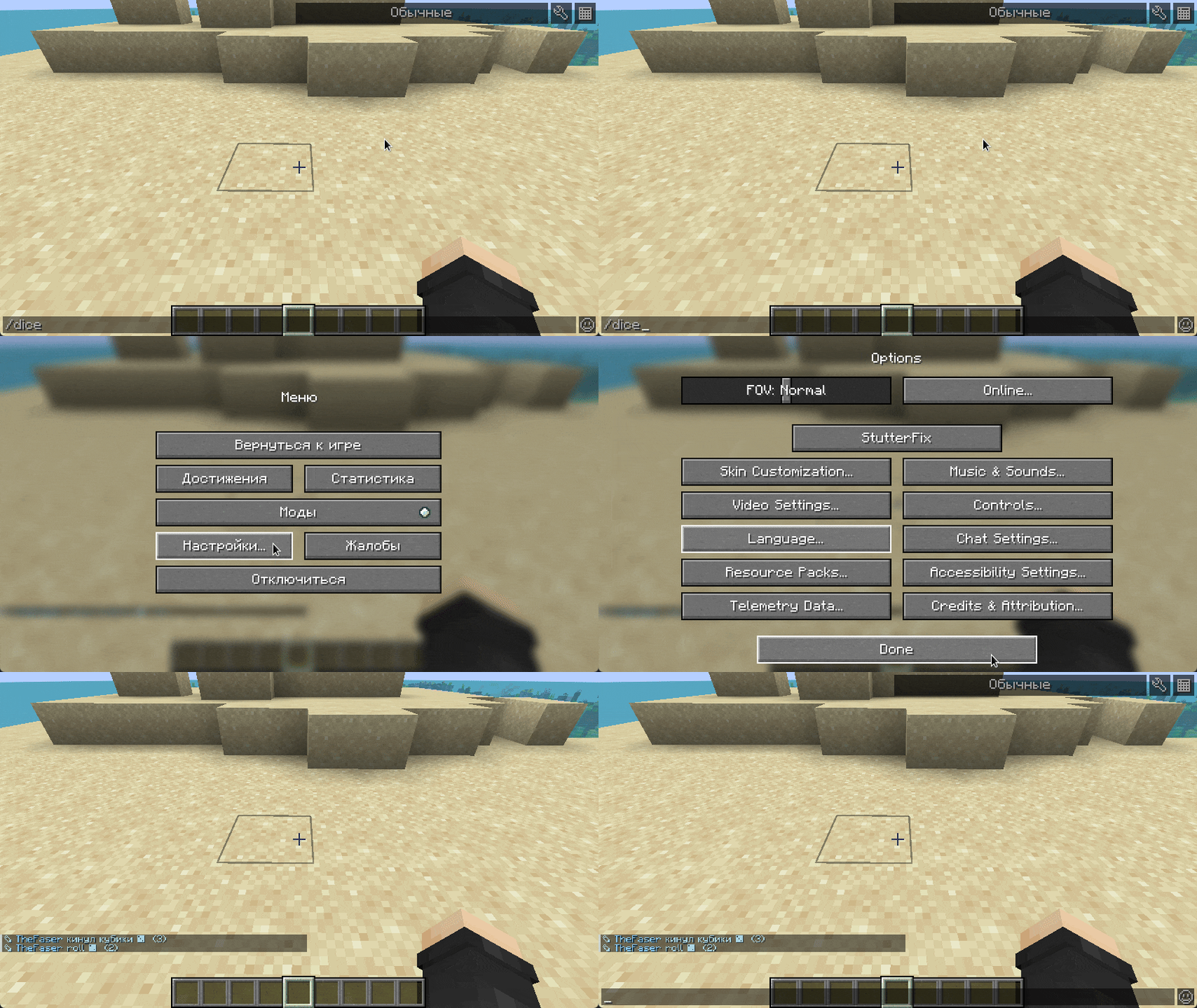
When `by_player: true` is enabled, FlectonePulse detects the client’s language and displays messages in it. If no translation exists, the default from the config is used. More in the [documentation](https://flectone.net/pulse/docs/config#language-player) 🔗
## ✨ Customizable elements
| **Visual** | **Description** |
|—————|—————–|
|  | **Server MOTD**
Add custom texts for greetings in the server list |
|  | **Join messages**
Greet players |
| 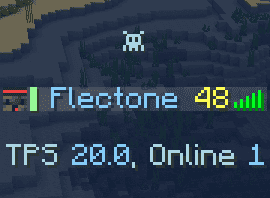 | **TAB menu**
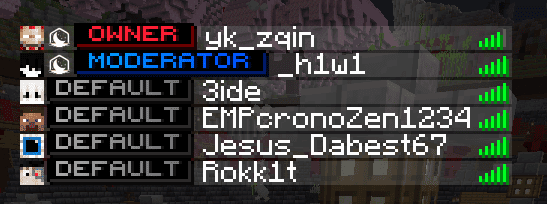
Show ping, online, ranks — all in one place |
|  | **Death messages**
Make them fun with text or sounds |
|  | **Branding**
Add server name to the F3 menu |
|  | **Advancements**
Custom advancement messages |
| Full list in [documentation](https://flectone.net/pulse/docs/message/) 🔗 | … |
## 🤝 Integrations
### External platforms
| **Visual** | **Description** |
|———|———-|
| [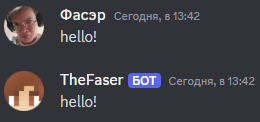](https://flectone.net/pulse/docs/integration/discord/) | **Discord**
Sync server chat with Discord channels |
| [](https://flectone.net/pulse/docs/integration/telegram/) | **Telegram**
Send messages via bot to Telegram and sync chats |
| [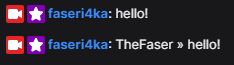](https://flectone.net/pulse/docs/integration/twitch/) | **Twitch**
Stream notifications in Minecraft chat and server chat sync |
### Plugins
| **Plugin** | **Description** |
|———————————————————————————————–|——————————————————————–|
| 💬 **[InteractiveChat](https://flectone.net/pulse/docs/integration/interactivechat/)** | Interactive elements in chat |
| 🛡️ **[LuckPerms](https://flectone.net/pulse/docs/integration/luckperms/)** | Permission and group management |
| 🧩 **[PlaceholderAPI](https://flectone.net/pulse/docs/integration/placeholderapi/)** | Placeholders from other plugins, e.g. %player_level% |
| 🎙️ **[PlasmoVoice & SimpleVoice](https://flectone.net/pulse/docs/integration/plasmovoice/)** | Ignore and mute sync in voice chat |
| 🖼️ **[SkinsRestorer](https://flectone.net/pulse/docs/integration/skinsrestorer/)** | Skin display in chat and TAB |
| 👻 **[SuperVanish](https://flectone.net/pulse/docs/integration/supervanish/)** | Hide vanished players |
| Full list in [documentation](https://flectone.net/pulse/docs/integration/) 🔗 | … |
## 🎮 Over 30 commands
| **Visual** | **Description** |
|————–|————————|
| [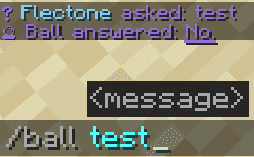](https://flectone.net/pulse/docs/command/) | **/ball**
Magic ball with many answers |
| [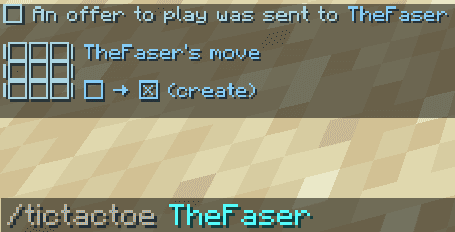](https://flectone.net/pulse/docs/command/) | **/tictactoe**
Tic-tac-toe |
| [](https://flectone.net/pulse/docs/command/) | **/stream**
Stream notifications in chat |
| [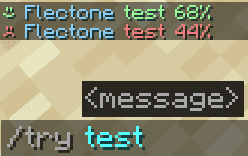](https://flectone.net/pulse/docs/command/) | **/try**
Test your luck from 0% to 100% |
| Full list in [documentation](https://flectone.net/pulse/docs/command/) 🔗 | … |
## ❓ FAQ
Questions about installation or setup? Check the [FAQ](https://flectone.net/pulse/docs/) in the documentation
## 🙏 Acknowledgments
FlectonePulse is built on these projects:
– 🏗️ **[Google Guice](https://github.com/google/guice)** — for modular code
– 📚 **[JDBI](https://jdbi.org/)** with **[HikariCP](https://github.com/brettwooldridge/HikariCP)** — efficient database work
– 📦 **[Jackson](https://github.com/FasterXML/jackson)** — data serialization
– 🧙 **[PacketEvents](https://github.com/retrooper/packetevents)** — packet handling
– 🎨 **[Adventure](https://github.com/KyoriPowered/adventure)** — text formatting
– ⌨️ **[Cloud](https://github.com/Incendo/cloud)** — commands with autocompletion
– ⏱️ **[Universal Scheduler](https://github.com/Anon8281/UniversalScheduler)** — task scheduling
– 🔣 **[Symbol Chat](https://github.com/replaceitem/symbol-chat)** — symbols in chat
– 🖥️ **[PacketUxUi](https://github.com/OceJlot/PacketUxUi)** — GUI elements
– 💬 **[LightChatBubbles](https://github.com/atesin/LightChatBubbles)** — messages above head
– 🌐 **[MiniTranslator](https://github.com/imDaniX/MiniTranslator)** — legacy color conversion
– 🌱 **[FlectoneChat](https://github.com/Flectone/FlectoneChat)** — predecessor of FlectonePulse
Thanks to the community! Every star on GitHub and review on platforms shows that FlectonePulse is truly needed ⭐
## 📊 Project statistics
## ❤️ Open source and free
FlectonePulse is completely free. Download, modify, put on your server. For priority support, early access to features, and help with server-specific setup, support on Boosty. It motivates further development!

FlectonePulse is waiting for you! Ready to install? 😎

FileCleaner
[](https://papermc.io/downloads/velocity)  [](https://papermc.io/downloads/paper)
# FileCleaner
### This plugin requires Java 21 or higher.
—
**Tired of filling your server up with log files? Look no further!**
FileCleaner automatically deletes specified files on server startup or whenever the “cleannow” command is run (which can be scheduled via your host or another plugin). Both folders and individual files can be scanned.
Files can be filtered by age, count, or size to keep things as tidy as possible!
—
### [Commands & Permissions](https://github.com/SilverstoneMC/FileCleaner/wiki/Commands-&-Permissions)
### [config.yml](https://github.com/SilverstoneMC/FileCleaner/blob/main/src/main/resources/config.yml)
—
[](https://discord.gg/5XFBx8uZVN) [](https://github.com/sponsors/JasonHorkles) [](https://www.paypal.com/donate/?business=2RN8VW6LS9XYS&no_recurring=0¤cy_code=USD)
FastPlayBungee
**FastPlayBungee** is a simple plugin designed to implement commands **/** and **/play ** for users across your network!
To join a server you require:
– permission to **join** the server (if **restricted access** is enabled);
– permission “*fastplaybungee.*”
– the server to be online!
Also, the command /play requires the permission “*fastplaybungee.play*”.
FarmingPlus
# FarmingPlus
What is **FarmingPlus**?
– FarmingPlus is a Minecraft farming plugin that adds new mechanics to farming.
– It’s a free plugin that is easy to use and configure.
– It’s compatible with the next plugins:
– Vault
– WorldGuard
– Towny
– CoreProtect
– MythicMobs
– PlaceholderAPI
– Compatible with MySQL.
# Overview
FarmingPlus is a plugin that allows players to experience new mechanics in farming. It includes new enchantments, with their own enchanting GUI, rewards for farming, and more.
# Features
– **Enchantments**:
– Farmer’s Grace: Prevent crops from being destroyed when trampled. **(Boots)**
– Replenish: Allows the player to replant crops automatically. **(Hoe/Axe)**
– Delicate: Prevents stems from being destroyed. **(Axe)**
– Irrigate: Allows the player to irrigate 64 blocks in a row (Configurable in config.yml). **(Water Bucket)**
– Grand Tilling: Allows the player to till an area. **(Hoe)**
– Level I: 3×3 area.
– Level II: 5×5 area.
– Level III: 64 blocks in a row (Configurable in config.yml).
– Farmer’s Step: Allow the player to plant crops automatically from their inventories in the area where they move. **(Boots)**
– Level I: 3×3 area.
– Level II: 5×5 area.
– Level III: 7×7 area.
– **Enchanting GUI**:
– Enchant your tools with the enchanting GUI. Configure the costs in config.yml. They can be money, experience and items.
– Enchant with /fp.
– **Rewards**:
Configure how much rewards you want in rewards.yml. By default, there are examples in the file.
The leaderboard saves the record of when and what rewards the player has received. It’s saved in Json file every few minutes(Configurable in config.yml).
– They work with the next parameters:
– crops:
– type:
– chance
– messages:
– sound:
– Depending on the type there are different extra parameters:
– Money:
– amount:
– Item:
– items:
– Command:
– commands:
– Summon:
Choose the mob that you want to summon. You can use MythicMobs.
– mob:
– amount:
– level:
# Permissions
– fp.gui.use: Let the player use the GUI for enchanting.
– fp.autopickup: Let the player autopickup the crops they break.
– fp.commands.reload: Reloading config.yml.
– fp.commands.help: Let the player use /fp help.
– fp.commands.reward.top: Let the player use /fp reward top.
– fp.commands.reward.list: Let the player use /fp reward list.
– fp.commands.reward.give: Let the player use /fp reward give. (ADMIN)
– fp.commands.reward.clear: Let the player use /fp reward clear. (ADMIN)
– fp.commands.enchants: Let the player use /fp enchants.
– fp.bypass.costs: Let the player enchant without costs.
– fp.bypass.farmerstep: Crops not needed in inventory when using Farmer’s Step.
– fp.bypass.farmerstep.protection: Let the player use Farmer’s step on WorldGuard regions.
– fp.bypass.replenish.protection: Let the player use Replenish on WorldGuard regions.
– fp.bypass.grandtilling.protection: Let the player use Grand Tilling on WorldGuard regions.
– fp.bypass.irrigate.protection: Let the player use Irrigate on WorldGuard regions.
– fp.bypass.durability-damage: Tools or boots don’t take durability damage when used by that player.
# Compatibilities
– **Vault**:
– Setup economic costs when enchanting items.
– Setup economic rewards.
– **WorldGuard**:
– Region control for Farmer’s Step, Grand Tilling, Replenish, Irrigate and rewards.
– **Towny**:
– Region control for Farmer’s Step, Grand Tilling, Replenish, Irrigate and rewards.
– Per-enchantment custom flags: mayors and assistants can toggle specific FarmingPlus enchantments in their town using `/fp towny `.
– Server admins can also manage flags via `/townyadmin town {name} meta add ` and `/townyadmin town {name} meta set true`.
| Enchantment | Command | Flag Key |
|————-|———|———-|
| Replenish | `/fp towny replenish on` | `farmingplus_replenish` |
| Farmer’s Step | `/fp towny farmerstep on` | `farmingplus_farmerstep` |
| Grand Tilling | `/fp towny grandtilling on` | `farmingplus_grandtilling` |
| Irrigate | `/fp towny irrigate on` | `farmingplus_irrigate` |
– **CoreProtect**:
– Block logging for Replenish, Farmer’s Step, Grand Tilling and Irrigate. All block changes are logged and can be rolled back.
– **MythicMobs**:
– You can summon MythicMobs as rewards.
– **PlaceholderAPI**:
– You can use placeholders in others plugins.
# PlaceholderAPI placeholders
– %farmingplus_prefix%: Prefix of the plugin, configurable in config.yml.
– %farmingplus_total_rewards_top_number%: Top **number** player in rewards leaderboard. Change **number** for the top that you want to access.
– %farmingplus_top_position%: Position of the player in the leaderboard.
– %farmingplus_total_rewards%: Total rewards of the player.
Only working in the plugin:
– %farmingplus_top_number%: Changes to the number top that is unfilled. Used for **not-top-reward** in config.yml.
# Discord
If you have any questions, found a bug or want to suggest something, you can join to the official [Discord Server](https://discord.gg/2KhE6xeEnf).
Fake Player Plugin (FPP)
# FakePlayerPlugin
[](https://modrinth.com/plugin/fake-player-plugin-(fpp))



[](https://github.com/Pepe-tf/fake-player-plugin/blob/main/LICENSE)
[](https://github.com/Pepe-tf/fake-player-plugin)
[](https://modrinth.com/plugin/fake-player-plugin-(fpp))
[](https://discord.gg/QSN7f67nkJ)
[](https://fpp.wtf)
[](https://github.com/sponsors/Pepe-tf)
[](https://www.patreon.com/c/F_PP?utm_medium=unknown&utm_source=join_link&utm_campaign=creatorshare_creator&utm_content=copyLink)
> **Advanced Fake Player Spoofer for Paper 1.21+**
> Create realistic fake players — full tab-list entries, physical in-world bodies, skins, combat, pathfinding, automation, and multi-server proxy support.
—
## ✨ Features
### Core (Ships with `fpp.jar`)
– 🎭 **Realistic Fake Players** — Full tab-list integration, join/leave messages, server count spoofing
– 🏃 **Physical Bodies** — NMS `ServerPlayer` entities with hitboxes, collision, damage, death & respawn
– 🎨 **Skins** — Auto-resolve from Mojang, per-bot skin commands, custom pool support
– 🧭 **Pathfinding & Automation** — A* navigation, follow, roam, find-and-mine, sleep, auto-eat, auto-place-bed
– ⛏️ **Area Mining & Block Placing** — Cuboid region mining (`/fpp mine`) and placement (`/fpp place`) with supply-container restocking
– ⚔️ **PvE Combat** — Per-bot attack settings, hunt mode, melee cooldowns
– ⚙️ **Per-Bot Settings GUI** — Shift+right-click any bot for inventories, pathfinding toggles, PvE settings, and automation overrides
– 💾 **Persistence** — Bot positions, tasks, and inventories survive restarts (YAML or database)
– 🗄️ **Database** — SQLite (local) or MySQL (network / multi-server)
– 🌐 **Proxy Support** — Velocity & BungeeCord companion plugins for cross-server bot visibility
– 🔄 **Config Sync** — Push/pull config across backend servers via shared MySQL
– 📦 **Extension API** — Drop `.jar` files into `plugins/FakePlayerPlugin/extensions/` to load third-party addons
– 🔤 **Random Name Generator** — `bot-name.mode: random` generates realistic Minecraft-style usernames on the fly
– 🚫 **Badword Filter** — Leet-speak normalization, auto-rename, remote word list
– 📊 **PlaceholderAPI** — 29+ placeholders for scoreboards, tab headers, and more
– 🧱 **WorldEdit & WorldGuard** — `–wesel` selection flag for mine/place; region-aware PvP protection
– 🍃 **Folia Support** — Compatible with Folia’s regionised threading model out of the box
– 📶 **Simulated Ping** — Tab-list latency display per bot
### Extension (`fpp-spoof.jar`)
Some advanced subsystems require the **`fpp-spoof.jar` extension**:
– 🤖 AI conversations (`/msg` replies with personalities)
– 💬 Fake chat / broadcast messaging
– 🔄 Swap system / peak-hours scheduler
– 👥 Bot groups
– 📶 Ping command (`/fpp ping`)
– 💻 Stored right-click commands (`/fpp cmd`)
—
## 📥 Installation
1. Download `fpp.jar` from [Modrinth](https://modrinth.com/plugin/fake-player-plugin-(fpp)) or build from source.
2. Drop the JAR into your server’s `plugins/` folder.
3. Restart the server. The plugin will create `plugins/FakePlayerPlugin/` with configs and data folders.
4. Configure permissions and `plugins/FakePlayerPlugin/config.yml` as needed.
5. Run `/fpp reload` to apply most config changes without restarting.
### Optional Dependencies
– **PlaceholderAPI** — enables placeholder expansion (`%fpp_count%`, `%fpp_total%`, etc.)
– **LuckPerms** — prefix/suffix support and bot group assignment
– **WorldGuard** — bot PvP region protection
– **WorldEdit** — `–wesel` flag for area mining/placing
—
## 🚀 Quick Start
“`
# Grant yourself admin access
/lp user permission set fpp.admin true
# Spawn your first bot
/fpp spawn
# Open its settings
shift+right-click the bot entity
# Teleport it to you
/fpp tph
# Make it follow you
/fpp follow
“`
—
## ⌨️ Commands
All commands are prefixed with `/fpp` (aliases: `fakeplayer`, `fp`).
| Command | Usage | Description | Permission |
|———|——-|————-|————|
| **spawn** | `[amount] [world [x y z]] [–name ] [–random-name] [–notp]` | Spawn fake player bots | `fpp.spawn` (admin) / `fpp.spawn.user` (user) |
| **despawn** | ` | all | –count | –random [–count ]` | Remove bot(s) | `fpp.despawn` |
| **list** | `[page]` | List active bots | `fpp.list` |
| **tph** | `[botname|all]` | Teleport bot(s) to you | `fpp.tph` |
| **tp** | `[botname]` | Teleport to a bot | `fpp.tp` |
| **xp** | `` | Collect XP from a bot | `fpp.xp` |
| **move** | ` –to | –coords | –roam [x,y,z] [radius] | –stop` | Navigate bot | `fpp.move` |
| **mine** | ` [–once|–stop|–pos1|–pos2|–start|–wesel] | –stop` | Mine blocks | `fpp.mine` |
| **place** | ` [–once|–stop|–wesel] | –stop` | Place blocks | `fpp.place` |
| **use** | ` [–once|–stop] | –stop` | Right-click automation | `fpp.use.cmd` |
| **attack** | ` [–mob [type]] [–range ] [–stop] | –hunt [–range ] [–stop]` | PvE attack / hunt | `fpp.attack` |
| **follow** | ` | –stop` | Follow a player | `fpp.follow` |
| **find** | ` [–radius ] [–count ] [–prefer-visible] | –stop | –stop` | Find and mine blocks | `fpp.find` |
| **sleep** | ` | –stop` | Auto-sleep at night | `fpp.sleep` |
| **stop** | `[|all]` | Cancel active tasks | `fpp.stop` |
| **freeze** | ` [on|off]` | Freeze/unfreeze | `fpp.freeze` |
| **inventory** | `` (alias: `inv`) | Open bot inventory | `fpp.inventory` |
| **storage** | ` [storage_name|–list|–remove |–clear]` | Manage supply containers | `fpp.storage` |
| **save** | — | Force-save all bots | `fpp.save` |
| **setowner** | ` ` | Transfer ownership | `fpp.setowner` |
| **rename** | ` ` | Rename a bot | `fpp.rename` |
| **info** | `[bot|spawner] ` | Bot info / session history | `fpp.info` |
| **stats** | — | Plugin statistics | `fpp.stats` |
| **badword** | `` | Manage badword filter | `fpp.badword` |
| **migrate** | `` | Backup / migrate data | `fpp.migrate` |
| **reload** | `[all|config|lang|extensions]` | Hot-reload config | `fpp.reload` |
| **settings** | `[bot]` | Open settings GUI | `fpp.settings` |
| **help** | `[page]` | Show help menu | `fpp.help` |
### Quick Examples
“`bash
/fpp spawn 5 # Spawn 5 bots
/fpp spawn –name Steve # Spawn a bot named “Steve”
/fpp spawn world_nether 100 64 -200 # Spawn in another world
/fpp despawn all # Remove all bots
/fpp despawn –random –count 3 # Remove 3 random bots
/fpp move bot1 –to Notch # Navigate to player
/fpp move bot1 –roam 500,64,200 25 # Roam in 25-block radius
/fpp mine bot1 diamond_ore –wesel # Mine using WorldEdit selection
/fpp place bot1 –once # Place one block
/fpp attack bot1 –hunt –range 16 # Hunt mobs
/fpp follow bot1 Notch # Follow a player
/fpp find bot1 diamond_ore –radius 64 –count 20
/fpp sleep bot1 100 64 200 50 # Set sleep origin
/fpp stop bot1 # Stop all tasks
/fpp freeze bot1 on # Freeze bot
/fpp inv bot1 # Open inventory
/fpp storage bot1 chest1 # Register container
/fpp rename bot1 builder_01 # Rename bot
/fpp info bot1 # Show session history
“`
—
## 🔐 Permissions
FPP uses a two-tier permission system.
### Wildcards
| Node | Default | Description |
|——|———|————-|
| `fpp.admin` | `op` | Full admin access (same as `fpp.op`) |
| `fpp.op` | `op` | Full access to all commands |
| `fpp.use` | `true` | User-tier: spawn (1 bot), tph, xp, info (own bots) |
### Key Nodes
– **Spawn:** `fpp.spawn`, `fpp.spawn.user`, `fpp.spawn.limit.1` through `fpp.spawn.limit.100`
– **Despawn:** `fpp.despawn`, `fpp.despawn.bulk`, `fpp.despawn.own`
– **Movement:** `fpp.move`, `fpp.move.to`, `fpp.move.stop`
– **Automation:** `fpp.mine`, `fpp.place`, `fpp.use.cmd`, `fpp.attack`, `fpp.attack.hunt`, `fpp.find`, `fpp.follow`, `fpp.sleep`, `fpp.stop`
– **Management:** `fpp.freeze`, `fpp.rename`, `fpp.rename.own`, `fpp.inventory`, `fpp.storage`, `fpp.setowner`, `fpp.save`, `fpp.settings`
– **System:** `fpp.reload`, `fpp.migrate`, `fpp.badword`
– **Bypass:** `fpp.bypass.max`, `fpp.bypass.cooldown`
– **Notify:** `fpp.notify` — update notifications on join
### Quick Setup
“`bash
# Admin
/lp group admin permission set fpp.admin true
# User
/lp group member permission set fpp.use true
# Custom bot limit (5)
/lp user Alice permission set fpp.spawn.limit.5 true
# Bypass cooldown for VIPs
/lp group vip permission set fpp.bypass.cooldown true
# Hide /fpp from guests
/lp group guest permission set fpp.command false
“`
—
## 📊 Placeholders
Requires **PlaceholderAPI**. All prefixed with `%fpp_`.
### Server-Wide
| Placeholder | Description |
|————-|————-|
| `%fpp_count%` | Total bots (local + remote) |
| `%fpp_local_count%` | Bots on this server |
| `%fpp_network_count%` | Bots on other proxy servers |
| `%fpp_max%` | Global bot cap (`∞` if unlimited) |
| `%fpp_real%` | Real players online |
| `%fpp_total%` / `%fpp_online%` | Total players (real + bots) |
| `%fpp_frozen%` | Frozen bot count |
| `%fpp_names%` | Comma-separated bot names |
| `%fpp_network_names%` | Remote bot names |
| `%fpp_version%` | Plugin version |
### State
| Placeholder | Description |
|————-|————-|
| `%fpp_chat%` | `on` / `off` |
| `%fpp_skin%` | Skin mode |
| `%fpp_body%` / `%fpp_pushable%` / `%fpp_damageable%` / `%fpp_tab%` / `%fpp_ping%` | `on` / `off` |
| `%fpp_max_health%` | Max HP |
| `%fpp_network%` | `on` / `off` (NETWORK mode) |
| `%fpp_server_id%` | Server ID |
| `%fpp_persistence%` | `on` / `off` |
| `%fpp_spawn_cooldown%` | Cooldown seconds |
### Per-World
| Placeholder | Description |
|————-|————-|
| `%fpp_count_%` | Bots in world |
| `%fpp_real_%` | Real players in world |
| `%fpp_total_%` | Total in world |
### Player-Relative
| Placeholder | Description |
|————-|————-|
| `%fpp_user_count%` | Player’s bot count |
| `%fpp_user_max%` | Player’s bot limit |
| `%fpp_user_names%` | Player’s bot names |
| `%fpp_user_ping%` | First bot’s ping |
| `%fpp_user_ping_avg%` | Average ping |
### Per-Bot
| Placeholder | Description |
|————-|————-|
| `%fpp_ping_%` | Specific bot’s ping |
| `%fpp_ping_all%` | Bot ping or player ping |
| `%fpp_avg_ping%` | Average across all bots |
| `%fpp_player_ping%` | Sender’s real ping |
—
## 🗂️ Configuration
Main file: `plugins/FakePlayerPlugin/config.yml`
Key sections:
– `limits` — max bots, user limits, spawn cooldowns
– `persistence` — save/restore bots on restart
– `bot-name` — name sources and formatting
– `badword-filter` — profanity filtering
– `body` — entity settings (pushable, damageable, item pickup)
– `combat` — health, fall damage, hurt sounds
– `death` — respawn behavior
– `chunk-loading` — keep chunks loaded around bots
– `automation` — auto-eat, auto-place-bed, auto-milk, bad-omen prevention
– `head-ai` — smooth head rotation
– `swim-ai` — automatic upward swimming
– `collision` — push radius, strength, separation
– `database` — SQLite / MySQL settings
– `config-sync` — cross-server config push/pull
– `performance` — position-sync distance tuning
– `logging.debug` — per-subsystem debug flags
The plugin includes an **automatic config migrator** (current version: **71**). Do not edit `config-version` manually.
—
## 📚 Documentation
– [Wiki](https://fpp.wtf) — Full documentation
– [Commands](https://fpp.wtf/wiki/Commands) — Command reference
– [Permissions](https://fpp.wtf/wiki/Permissions) — Permission setup
– [Configuration](https://fpp.wtf/wiki/Configuration) — Config tuning
– [Extensions](https://fpp.wtf/wiki/Extensions) — Extension API guide
– [Changelog](https://fpp.wtf/wiki/Changelog) — Version history
—
## 💬 Support
– **Discord:** [Join our server](https://discord.gg/QSN7f67nkJ)
– **Modrinth:** [Download updates](https://modrinth.com/plugin/fake-player-plugin-(fpp))
– **GitHub Issues:** [Report bugs & request features](https://github.com/Pepe-tf/fake-player-plugin/issues)
– **GitHub Sponsors:** [Sponsor development](https://github.com/sponsors/Pepe-tf)
– **Patreon:** [Support FPP](https://www.patreon.com/c/F_PP?utm_medium=unknown&utm_source=join_link&utm_campaign=creatorshare_creator&utm_content=copyLink)
—
## ⚖️ License
MIT License. See [`LICENSE`](https://github.com/Pepe-tf/fake-player-plugin/blob/main/LICENSE).
—
> Made with ❤️ by [Bill_Hub](https://github.com/Pepe-tf)
F3Name-Fixed
# F3Name – Edit server brand in debug screen
This is my fork of [original](https://www.spigotmc.org/resources/f3name-edit-your-server-brand-in-debug-screen.58997/) plugin that fixes joining issue on 1.20.3+.
Also thanks to [Marcelektro](https://github.com/Marcelektro), original fix author
—
### Info
With release of Minecraft 1.13, server owners got an additional place to show information to players. And this place is… debug screen!
With this plugin you can easily edit server brand from default (“Spigot”, or very long Bungee version) to whatever you want.
### Features
* Edit server brand in debug screen (F3)
* Colors and animation
* Easy configuration
* Both BungeeCord and Spigot
* Supports PlaceholderAPI
* Vault (basic) or LuckPerms (advanced) group support
* Built-in placeholders for BungeeCord
### BungeeCord placeholders
– `%player_name%` – player name
– `%player_displayname%` – player displayname
– `%player_uuid%` – player UUID
– `%player_ping%` – player ping
– `%server_name%` – server name
– `%server_motd%` – server motd
### Commands
– `/f3name` `/debugname` `/f3n` `/f3namebukkit` – aliases for Bukkit
– `/f3nameb` `/f3namebungee` – aliases for BungeeCord
– `/f3name reload` – reload configuration
### Permissions
– `f3name.reload` – permission for reload
EzHub

### Description
A simple plugin for sending player to the lobby.
### Commands
/lobby – Join Lobby
/hub – Join Lobby
### Config
“`
hub-server: “hub” #Hub Server Name
hub-teleport: “§aYou have been sent to the hub!” # Teleport Message
hub-not-available: “§cHub server is not available.” # Not Available Message
only-players: “§cOnly players can use this command.” # Console Execute Message
“`
ExecutableEvents
# It requires SCore to work : [SCore](https://modrinth.com/plugin/score)
# Premium version : [Click here](https://docs.ssomar.com/executableevents/information-ee#premium-version)


[](https://discord.com/invite/TRmSwJaYNv)[](https://docs.ssomar.com/executableevents/information-ee)
## What is ExecutableEvents ?
Our powerful plugin allows you to add a new dimension on your server by adding to them unique events / activators !
With ExecutableEvents, the possibilities are truly endless.
Dive into a realm where MMO/RPG ambiance meets boundless possibilities. With ExecutableEvents, you hold the reins – craft and control your custom events precisely the way you envision.
The creation process is extremely easy to understand. Particularly in our experienced in-game editor. (start to create with /ee editor)
## Customize your Activators / Triggers / Events
ExecutableEvents allows you to add more than 110 different types of activators and infinite triggers per block. These activators can have custom requirements such as mana, experience points, money, or specific items to be used. This feature makes it possible to create unique and interactive events that can be used for various purposes in the game.
List of Activators / Triggers
– BLOCK_DRY
– CROP_GROW
–
– ITEMSADDER_PLAYER_BLOCK_BREAK
–
– PLAYER_ACTIVE_FLY
– PLAYER_ACTIVE_SNEAK
– PLAYER_ACTIVE_SPRINT
– PLAYER_ALL_CLICK
– PLAYER_BED_ENTER
– PLAYER_BED_LEAVE
– PLAYER_BEFORE_DEATH
– PLAYER_BLOCK_BREAK
– PLAYER_BLOCK_PLACE
– PLAYER_BRUSH_BLOCK
– PLAYER_BUCKET_ENTITY
– PLAYER_CHANGE_WORLD,
– PLAYER_CLICK_ON_ENTITY
– PLAYER_CLICK_ON_PLAYER
– PLAYER_CONNECTION
– PLAYER_CONSUME
– PLAYER_CUSTOM_LAUNCH
– PLAYER_DEATH
– PLAYER_DISCONNECTION
– PLAYER_DISABLE_SNEAK
– PLAYER_DISABLE_SPRINT
– PLAYER_DISMOUNT
– PLAYER_FOOD_CHANGE
– PLAYER_MOUNT
– PLAYER_DROP_ITEM
– PLAYER_EDIT_BOOK
– PLAYER_ENTER_IN_HIS_LAND
– PLAYER_ENTER_IN_HIS_PLOT
– PLAYER_FERTILIZE_BLOCK
– PLAYER_FILL_BUCKET
– PLAYER_FIRST_CONNECTION
– PLAYER_FISH_BLOCK
– PLAYER_FISH_ENTITY
– PLAYER_FISH_FISH
– PLAYER_FISH_NOTHING
– PLAYER_FISH_PLAYER
– PLAYER_HARVEST_BLOCK
– PLAYER_HIT_ENTITY
– PLAYER_HIT_PLAYER
– PLAYER_ITEM_BREAK
– PLAYER_JUMP
– PLAYER_KICK,
– PLAYER_KILL_ENTITY
– PLAYER_KILL_PLAYER
– PLAYER_LAUNCH_PROJECTILE
– PLAYER_LEAVE_HIS_LAND
– PLAYER_LEAVE_HIS_PLOT
– PLAYER_LEFT_CLICK
– PLAYER_OPEN_INVENTORY
– PLAYER_PORTAL
– PLAYER_RECEIVE_EFFECT
– PLAYER_RECEIVE_HIT_BY_ENTITY
– PLAYER_RECEIVE_HIT_BY_PLAYER
– PLAYER_RECEIVE_HIT_GLOBAL
– PLAYER_REGAIN_HEALTH
– PLAYER_RESPAWN
– PLAYER_RIGHT_CLICK
– PLAYER_RIPTIDE
– PLAYER_SEND_MESSAGE
– PLAYER_SHEAR_ENTITY
– PLAYER_SPAWN_CHANGE
– PLAYER_TARGETED_BY_AN_ENTITY
– PLAYER_TELEPORT
– PLAYER_TRAMPLE_CROP
– PLAYER_WALK
– PLAYER_WRITE_COMMAND
– PLAYER_PARTICIPATE_KILL_ENTITY
– PLAYER_PARTICIPATE_KILL_PLAYER
– PLAYER_PICKUP_ITEM
– PLAYER_PROJECTILE_HIT_BLOCK
– PLAYER_PROJECTILE_HIT_ENTITY
– PLAYER_PROJECTILE_HIT_PLAYER
–
– ENTITY_PARTICIPATE_KILL_ENTITY
– ENTITY_PARTICIPATE_KILL_PLAYER
– ENTITY_PROJECTILE_HIT_BLOCK
– ENTITY_PROJECTILE_HIT_ENTITY
– ENTITY_PROJECTILE_HIT_PLAYER
– ENTITY_SPAWN
– ENTITY_BEFORE_DEATH
– ENTITY_BREAK_DOOR
– ENTITY_BREED
– ENTITY_CHANGE_BLOCK
– ENTITY_COMBUST_BY_BLOCK
– ENTITY_COMBUST_BY_ENTITY
– ENTITY_DAMAGE_BY_PLAYER
– ENTITY_DAMAGE_BY_ENTITY
– ENTITY_DAMAGE_BY_BLOCK
– ENTITY_DEATH
– ENTITY_DROP_ITEM
– ENTITY_ENTER_BLOCK
– ENTITY_ENTER_LOVE_MODE
– ENTITY_EXPLODE
– ENTITY_PICKUP_ITEM
– ENTITY_PORTAL_ENTER
– ENTITY_PORTAL_EXIT
– ENTITY_REGAIN_HEALTH
– ENTITY_RESURRECT
– ENTITY_TAME_BY_PLAYER
– ENTITY_TAME_BY_ENTITY
– ENTITY_TARGET_PLAYER
– ENTITY_TARGET_ENTITY
– ENTITY_TELEPORT
– ENTITY_TRANSFORM
– ENDERDRAGON_CHANGE_PHASE
## Based on SCore
In you activators you will have access to over 100 custom pre-made commands and 100 custom pre-made conditions that can be used to create complex and interactive gameplay mechanics. And you can even code your own because SCore is Open Source. Commands – Conditions
## Easy in-game editor / Easy installation
An in-game editor and easy installation process make it simple for users to create and install plugins without requiring technical knowledge.
## Compatibility with many versions and Optimized
The plugin’s compatibility with multiple versions of the game and optimized performance ensures seamless integration with the game.
exaroton
exaroton Proxy Plugin
A proxy plugin designed to use exaroton servers in your proxy network.
This plugin automatically updates exaroton servers in your proxy and allows you to manage them.
Installing this plugin on proxies that do not run on exaroton but use exaroton servers is also supported.
## About exaroton
exaroton provides high-end on demand game servers. This is very
useful for proxy networks as you can turn off servers which aren’t used right now to save money and start them
automatically when you need them.
## Commands
The Plugin provides the `/exaroton` command with the following subcommands:
| Command | Arguments | Description | Permission Node |
|———-|————————|———————————————————————————————————————————————————-|——————-|
| start | | Start a server and automatically add it to the network when it goes online | exaroton.start |
| stop | | Remove a server from the proxy and stop it | exaroton.stop |
| restart | | Restart a server | exaroton.restart |
| add | | Add a server that’s already online to your proxy | exaroton.add |
| remove | | Remove a server from your proxy | exaroton.remove |
| switch | [] | Start a server (if needed) and transfer the selected players to it. If no players are specified the player who executed the command will be transferred. | exaroton.switch |
### Permissions
Commands are not available to players by default. You can give players access to the commands by giving them the
required permission nodes. The `exaroton` permission node is required for all commands.
## Configuration
Since this plugin uses the exaroton API to manage servers, you need to provide an API token, which can be obtained
on https://exaroton.com/account/. You can also configure this plugin to start servers alongside your proxy (e.g. for
your main lobby) and stop servers when the proxy stops.
It’s also possible to disable the watch servers feature which automatically removes servers from the proxy when they
go offline.
### Default configuration
“`toml
# exaroton API token. You can generate this on https://exaroton.com/account/
apiToken = ‘example-token’
# Watch servers in the proxy config and automatically remove them when they go offline
# Note that this only works if you use .exaroton.me addresses in your velocity config.
watchServers = true
# Automatically start servers when the proxy starts
[autoStartServers]
enabled = false
servers = [“example.exaroton.me”]
# Automatically stop servers when the proxy stops
[autoStopServers]
enabled = false
servers = [“example.exaroton.me”]
“`
## Bukkit plugin
The bukkit plugin forwards commands from your backend servers to the proxy using plugin messages. This makes it possible to use these commands in command blocks or other plugins (e.g. for NPCs).
Since plugin messages are sent using a player connection, at least one player has to be connected to the backend server. If the plugin is missing from one of your proxies, the player could read the command that would have been executed.
Selectors like `@a`, `@p` and `@r` will automatically be replaced on the backend server. `@a` therefore refers to all players on the backend server, not all players on the proxy. These selectors are not supported on the proxy directly.
## Using multiple Proxies
Since this plugin does not synchronize the proxy servers with each other, there are some limitations when you try to
use it with multiple proxies. Starting a server using `/exaroton start ` only adds the server to the proxy you
are connected to right now. Stopping/Restarting works across proxies, assuming that all proxies have the plugin
installed as they will automatically remove the server when it is no longer online and will automatically add it back
once it comes back online.
If all servers you intend to use with the proxy are already in your proxy configuration, starting a server should also
work across proxies because the other proxies are already watching the status of this server.
Erase Map – X100
# ❌ Project Archived
👋 Hello everyone ! This project is **archived** !
👉 To **continue to use** *EraseMap*, use [the source code of the original project](https://github.com/Isax820/EraseMap) or [the last version](https://modrinth.com/plugin/erase-map-x100/version/1.0)
🥹 I’m sorry !
—
# 💻 Platfroms
[](https://papermc.io)
[](https://purpurmc.org)
[](https://dev.bukkit.org/)
[](https://www.spigotmc.org/)
[](https://www.spigotmc.org/wiki/bungeecord/)
—
# 🔨 EraseMap X100
EraseMap is a lightweight administration plugin designed for fast and simple map editing.
With the /erase command, you can instantly remove a horizontal layer of blocks in a circular radius of 100 blocks around the player.
This plugin is perfect for:
– 🗺️ Map preparation
– 🏃➡️ Quick terraforming
– 🫧 Cleaning or resetting flat areas
– 🤟 Simple, efficient, and easy to use — EraseMap does exactly what it’s meant to do.